Almost every founder who reaches out to us at Triple Minds asks the same question first: how much does it cost to build an AI agent for my business?
It is a fair question. But the honest answer is it depends on what you are actually trying to build. AI agents are no longer experimental tools used only by tech companies. Today, they are becoming the backbone of modern businesses. Companies are using them to handle customer conversations, qualify leads, support internal teams, automate repetitive tasks, and even power full digital products.
You might hear very different price estimates in the market. Some companies promise an AI agent for $1,000, while others quote $25,000, $50,000, or more. Both can be correct. The difference usually comes down to what is included, how complex the system is, and whether the agent is meant for simple automation or serious business operations.
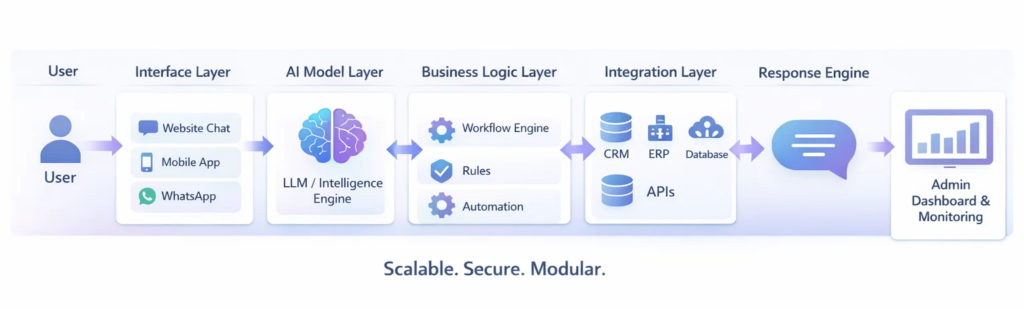
An AI agent is not just a chatbot. It is a complete software system made up of several parts working together, such as:
• AI intelligence (the model that understands and responds)
• Business logic (rules, workflows, and automation)
• Integrations (CRM, databases, tools, APIs)
• User interface (chat window, dashboard, controls)
Once businesses understand these layers, the AI agent development cost becomes much easier to understand. As an AI development company, we build everything from early-stage prototypes for startups to enterprise automation systems for large organizations. After working on multiple projects across industries, one thing is clear.
The cost to build an AI agent is mainly determined by three factors:
• How complex the agent needs to be
• How many systems it must connect with
• What role it will play inside your business
In this guide, we will break down the numbers in a simple, practical way. No vague estimates. No technical confusion. Just clear insights so you can plan your investment with confidence. At Triple Minds, we’ve helped businesses across industries understand AI agent development costs, from early-stage prototypes to enterprise-grade systems, so you can make informed decisions with clarity and confidence.
Build AI Infrastructure That Scales With You
From MVP to enterprise automation, Triple Minds designs AI agents that are modular, secure, and built for real business impact.
👉 Speak With Our AI Development Team
Key Takeaways
• The type of AI agent you build determines most of the total cost
• Enterprise systems require more time due to integrations and security
• Multi-channel support and custom training increase costs quickly
• Phased development helps control investment and reduce risk
• Operational costs should be planned alongside development budget
What Type of AI Agents Are You Building? (This Decides 60% of the Cost)
Before talking about timelines or pricing, the most important question is what kind of AI agent you actually need. This single decision determines most of the total investment. Not all AI agents are built the same. Some are simple automation tools. Others function like full digital employees connected to your systems.
When founders approach us, we spend more time defining the use case than discussing money. Because once the use case is clear, the development hours and AI development company pricing become predictable.
From a business perspective, most AI agents fall into three broad categories.
Basic AI Agent (Entry-Level Automation)
This is the starting point for most startups and small businesses entering AI. Think of it as a smart assistant that can handle repetitive conversations and routine tasks but does not deeply interact with your internal systems or databases.
These agents typically run on existing AI models and are designed to solve surface-level problems quickly. They can answer common questions, capture leads, book appointments, and guide users through simple steps. You will often see them used for website chat support, FAQ automation, or basic customer interaction.
Typical Capabilities Include:
• Answering frequently asked questions
• Capturing and qualifying leads
• Booking appointments or demos
• Providing basic product or service information
• Handling simple customer queries
If your goal is to launch quickly, validate an AI idea, or reduce the workload on your support team, this level works well. The AI chatbot development cost here stays relatively low because the system does not require deep integrations or complex backend logic.
Business AI Agent (Operational Intelligence)
This is where AI starts delivering real business value. At this level, the agent moves beyond simple conversations and begins acting more like a digital team member.
A business AI agent connects with your CRM, database, or internal tools. Instead of just answering questions, it can perform actions, retrieve real data, and support daily operations.
Common use cases include:
• Checking order or delivery status
• Updating customer records in the CRM
• Assisting sales teams with lead insights
• Pulling reports or business data
• Creating and managing support tickets
For example, an AI customer support agent that checks shipping details, opens support cases, and escalates complex issues to human staff falls into this category.
Most serious SaaS companies and scaling businesses choose this type first because it directly impacts efficiency, response time, and customer experience.
Advanced Autonomous AI Agent (High-Complexity Systems)
This is the most advanced and powerful category. These agents can handle multi-step tasks, run workflows automatically, use multiple tools, and operate with minimal human supervision.
They are typically built for AI-first startups, automation-focused companies, and large enterprises aiming to transform how work gets done.
Advanced capabilities often include:
• Multi-step reasoning and task execution
• Automatic workflow management
• Integration with multiple business systems
• Long-term memory and learning
• Custom-trained models for specific industries
These systems may require domain-specific training, complex integrations, and autonomous decision-making abilities. Naturally, enterprise AI agent cost increases significantly at this level because development becomes more demanding and time-intensive.
Why This Decision Matters
If you simply tell a developer you want an AI agent, the estimate will likely be vague because the scope is unclear.
But if you specify that you need an AI sales assistant connected to your CRM, with reporting features and an admin dashboard, the development team can calculate the effort accurately.
Defining the type of AI agent helps clarify:
• Development time required
• Team size needed
• Integration complexity
• Overall cost to build the AI agent
Clarity reduces surprises, delays, and budget overruns. This is why identifying the exact type of AI agent you need is the step that determines nearly 60 percent of the total development cost.
How AI Agent Development Actually Works
Understanding the pricing is important. But what truly builds confidence is understanding the process behind it.
An AI agent is not built in a single step. It is developed in structured phases to ensure clarity, performance, and long-term scalability.
1. Discovery & Use Case Validation
Every successful AI project starts with defining the exact problem.
At this stage, the focus is on identifying repetitive workflows, decision points, and system dependencies. The goal is to determine where automation creates measurable business impact and where human involvement is still necessary.
Without this clarity, projects either over-expand or fail to deliver value.
2. Architecture Planning
Once the use case is validated, the technical foundation is designed.
This includes defining how the AI model connects with internal systems, how data flows through the platform, and how security layers are implemented. A well-planned architecture ensures the system can scale without requiring a rebuild later.
This stage determines long-term stability.
3. Model Selection & Intelligence Design
Not every AI agent requires custom training.
In many cases, structured prompt engineering and well-organized knowledge integration are sufficient. For more advanced systems, this phase may involve domain-specific fine-tuning, workflow reasoning design, memory configuration, and confidence-based escalation logic.
This step determines how intelligently the agent behaves in real-world scenarios.
4. Backend Development & Integrations
This is where the AI moves from theory to operational capability.
The system is integrated with CRMs, databases, ticketing systems, APIs, or internal tools. These integrations allow the AI agent to retrieve real data, update records, trigger workflows, and perform actions instead of simply generating responses.
This is what separates an AI agent from a basic chatbot.
5. Interface & Control Layer
An AI agent must be usable and manageable.
This may include a website interface, application integration, and an internal dashboard for monitoring performance, reviewing conversations, and managing permissions. Adoption depends heavily on usability, not just intelligence.
6. Testing, Deployment & Continuous Monitoring
Before launch, the system is tested for response accuracy, workflow reliability, integration stability, and security compliance.
After deployment, performance monitoring becomes essential. AI agents improve over time through structured analysis, refinement, and system updates.
A properly built AI agent is not a one-time launch. It is an evolving operational system.
Enterprise AI Customer Support Agent Cost (4-Month Build)
Let’s walk through a realistic scenario so you can clearly understand the enterprise AI agent cost.
Imagine a company wants a production-ready AI customer support agent that can actually handle real customer traffic, not just demo conversations. This agent should be able to:
• Answer customer queries instantly
• Check order or ticket details from internal systems
• Create and update support cases automatically
• Escalate complex issues to human agents with full context
• Remember past conversations for continuity
• Provide an admin dashboard for monitoring and control
• Meet enterprise-level security and access requirements
At this level, you are not building a simple chatbot. You are building a core support infrastructure.
A typical enterprise build takes around four months because multiple specialists are involved, including AI developers, backend engineers, frontend developers, UI/UX designers, QA testers, DevOps engineers, and a project manager coordinating everything.
A properly engineered system in this category usually costs between $45,000 and $60,000 for development. If you add multi-channel support (WhatsApp, email, app integration), advanced analytics, or custom training, the cost can rise to $85,000 or more.
This is why AI development company pricing varies so much. Two projects may sound similar on the surface but require very different levels of engineering effort behind the scenes.
What Increases AI Agent Development Cost the Fastest
Many businesses begin with a simple requirement but expand the scope during planning. Each new feature adds development time, testing effort, and integration work.
The biggest cost drivers include:
• Multi-channel support (website, WhatsApp, email, mobile apps)
• Advanced knowledge base systems for large document sets
• Human escalation workflows and ticketing integration
• Security, compliance, and access control
• Analytics dashboards and reporting tools
• Custom AI model or domain training
For example, connecting the agent to multiple communication channels can increase development effort by 20 to 30 percent because each platform requires separate APIs, formatting rules, and testing.
Similarly, if your AI needs to accurately read thousands of documents such as policies, manuals, or product catalogs, the architecture becomes more complex. This requires additional engineering to ensure accurate responses.
This is why two companies building a “customer support AI agent” can receive very different quotes.
How Smart Businesses Reduce AI Development Cost
Controlling cost does not mean compromising quality. The smartest approach is phased development.
Instead of automating everything at once, successful companies start with one high-impact use case, such as FAQ handling or order tracking. Once the system proves its value, they expand features in later phases.
Another effective strategy is building an investor-ready prototype first. This creates a working system for demos, testing, and fundraising without committing to full enterprise investment immediately.
Avoid heavy customization early unless absolutely necessary. In many cases, structured prompts and knowledge integration perform well in the early stages.
Designing the system with modular architecture is also important. It allows new features, integrations, and upgrades to be added later without rebuilding the entire platform.
Ongoing Costs After Development
Development is a one-time investment, but running the AI agent involves recurring expenses.
Monthly operational costs typically include:
• AI model usage based on conversations
• Cloud hosting and infrastructure
• Database and knowledge storage
• Monitoring and logging systems
• Technical maintenance and updates
For an enterprise AI customer support agent handling moderate traffic, ongoing costs usually range from $2,000 to $5,000 per month.
However, if the system reduces support workload, improves response speed, and increases customer satisfaction, the long-term savings often outweigh the operational expense.
Understanding the ROI of an AI Agent
Cost alone does not determine whether an AI agent is worth building. Return on investment does.
Consider a simple operational example.
If a company spends $20,000 per month on customer support operations and an AI agent successfully handles 40 percent of repetitive queries, the workload reduces significantly. That reduction may translate into approximately $8,000 in monthly operational efficiency.
In that case, the development investment can be recovered within months.
But direct cost savings are only part of the equation.
An AI agent also creates value by:
- Reducing response time
- Offering 24/7 availability
- Improving consistency in communication
- Allowing teams to focus on high-value work
- Supporting scale without immediate hiring
The real return comes from operational leverage.
Instead of hiring proportionally as demand grows, the business scales with automation support already in place.
This is why experienced founders evaluate AI agents as infrastructure investments rather than short-term experiments. The long-term efficiency and scalability often outweigh the initial development cost.
Final Budget Guide for Founders
Here is a simplified cost overview to help you plan realistically.
| Project Type | Timeline | Estimated Development Cost |
| Basic AI Support Agent | 6–8 weeks | $12,000 – $18,000 |
| Investor-Ready Prototype | 8–10 weeks | $15,000 – $25,000 |
| Enterprise AI Customer Support Agent | ~4 months | $45,000 – $60,000 |
| Advanced Multi-Channel Enterprise System | 4–6 months | Up to $85,000+ |
Estimated Monthly Operating Cost
| Business Scale | Monthly Cost |
| Startup Usage | $800 – $1,500 |
| Growing Company | $2,000 – $4,500 |
| Large Enterprise | $5,000+ |
What This Means for Your Business
You are an early-stage startup, start with a focused MVP to validate demand before scaling.
Even you are a growing company, invest in a structured AI agent that integrates with your existing operations.
If you are an enterprise, plan a phased rollout with proper security, compliance, and monitoring from the beginning.
The biggest mistake businesses make is either building something too simple that fails under real usage or building an overly complex system before proving value.
Ready to Build the Right AI Agent for Your Business?
Every business needs a different approach. Let’s analyze your use case, systems, and growth stage before you invest. Talk to our AI experts at Triple Minds and get a clear roadmap — not just an estimate.
👉 Book Your Free AI Strategy ConsultationConclusion
An AI agent is not just another software tool. It is a long-term decision that can change how your business works, helping reduce support costs, respond faster to customers, and improve satisfaction while giving you an edge over competitors. The real question is not how cheaply you can build one, but which version to start with based on your current needs and growth stage.
That clarity, which we at Triple Minds focus on, determines your total AI agent development cost and ensures you get the most value. Building the right AI agent from the start sets your business up for smarter, faster, and more efficient growth.
FAQs
The timeline for building an AI agent depends on the level of complexity and integration required. A basic AI agent typically takes around 6 to 8 weeks to develop. A business-level AI agent with system integrations and workflow automation may require 8 to 12 weeks. Enterprise-grade AI agents, especially those involving multiple integrations, dashboards, security layers, and custom logic, usually take between 4 to 6 months. The exact timeline ultimately depends on features, integrations, and customization requirements.
Several elements significantly influence AI agent development cost. The number of system integrations, such as CRM platforms, APIs, and internal databases, plays a major role. Multi-channel support across web, mobile apps, and messaging platforms increases complexity. Custom AI model training, advanced workflow automation, and enterprise-level security or compliance requirements also raise development effort. The more intelligent and connected the system needs to be, the higher the engineering involvement.
Yes. Modern AI agents can integrate with:
CRM systems
ERP software
Payment gateways
Ticketing tools
Internal databases
Third-party APIs
Integration capability is one of the main reasons businesses move beyond basic chatbots.
The most common mistake is overbuilding before validating the actual business need. Many companies underestimate integration complexity or ignore security and compliance planning. Others fail to design for scalability from the beginning. Treating AI as a short-term experiment instead of long-term infrastructure often leads to underperformance or unnecessary rework. Clear scope definition and phased development significantly reduce these risks.
The best starting point is identifying your highest repetitive workload and the areas where delays directly impact revenue. Look at processes that rely heavily on structured data and follow predictable logic. The first AI agent should focus on solving one clear, high-impact business problem rather than attempting to automate everything at once. A focused initial deployment creates measurable results and builds a foundation for future expansion.
From MS Excel to Google Sheets, spreadsheets are the backbone of business data management worldwide. However, if you are still relying on traditional spreadsheet formulas to analyze critical business data, you may be slowing down decisions and increasing the risk of costly errors. Manual reporting, complex functions like VLOOKUP and pivot tables, and repetitive data cleaning consume valuable time. In fact, it’s been reported that data professionals spend nearly 60–80% of their time preparing data instead of analyzing it. This is where an AI Excel chatbot changes how modern businesses work with spreadsheets. Rather than making Excel itself “intelligent,” businesses can upload their Excel files into a secure AI-powered chatbot and analyze the data using plain English questions. The chatbot reads the spreadsheet, applies the correct calculations, and delivers structured insights instantly – turning static spreadsheets into dynamic analytical workspaces.
At Triple Minds, we implement secure AI Excel chatbot solutions that allow organizations to upload spreadsheet data and interact with it conversationally. An AI Excel chatbot is a tool that enables users to analyze Excel data using natural language instead of complex formulas. It helps clean messy datasets, generate visual reports, identify trends, and extract actionable insights faster and more accurately. For B2B teams managing sales reports, financial statements, operational dashboards, or inventory sheets, this shift from manual spreadsheet analysis to AI-driven conversational data analysis improves efficiency, reduces errors, and accelerates decision-making.
Ready to Transform Your Excel Analysis with AI?
Discover how AI-powered Excel chatbots help your team analyze spreadsheets in plain English—eliminating complex formulas, reducing reporting delays, and accelerating business decisions.
Explore Secure AI Excel Chatbot Solutions
Key Takeaways
- AI Excel chatbots let you analyze uploaded spreadsheet data using simple, natural language queries.
- They significantly reduce manual data cleaning and dependency on complex Excel formulas.
- Businesses can speed up decision-making with instant, structured insights generated by AI.
- Sales, finance, operations, and leadership teams gain faster access to accurate reports and performance analysis.
- AI-driven calculations minimize human errors and improve overall data reliability.
- Conversational analytics makes data accessible to both technical and non-technical teams across the organization.
What is AI in Excel?
AI in Excel refers to using intelligent AI-powered tools that can analyze your Excel data in a smarter and more efficient way. Instead of manually building complex formulas, calculations, and pivot tables, you can upload your spreadsheet into a secure AI chatbot and ask questions in plain language. The AI understands your request, applies the right logic behind the scenes, and delivers accurate, structured insights within seconds.
It can clean messy datasets, identify trends, summarize performance metrics, generate visual reports, and highlight unusual patterns automatically. At Triple Minds, we see AI in Excel as an evolution in how businesses interact with spreadsheet data — shifting from manual effort to AI-assisted analysis that makes insights faster, simpler, and accessible to every team, not just technical experts.
When we talk about cleaning messy datasets, we mean identifying and correcting common data issues that affect analysis accuracy. Business spreadsheets often contain duplicate entries, missing values, inconsistent date formats, numbers stored as text, or slight variations in naming conventions. These small inconsistencies may seem harmless, but they can significantly distort reports and performance metrics. An AI Excel chatbot automatically scans the uploaded file, detects such irregularities, and either corrects them or highlights them for review. This ensures that insights are generated from structured, reliable data, reducing errors and improving confidence in decision-making.
What Does It Mean to “Chat with Your Excel Files”?
“Chatting with your Excel files” means uploading your spreadsheet into a secure AI chatbot and asking questions about your data in plain English — without writing formulas or building complex reports.
Traditionally, extracting insights from Excel requires formulas like VLOOKUP, INDEX-MATCH, pivot tables, filters, or nested IF statements. Not everyone understands what these functions do or how to use them correctly. Even experienced users spend significant time building reports, and small formula errors can lead to inaccurate analysis. With an AI-powered Excel chatbot, that entire process becomes faster and more intuitive.
At Triple Minds, we implement secure AI chatbot systems that allow businesses to upload their spreadsheets and interact with them conversationally. Instead of struggling with formulas, your team can ask business questions and receive clear, structured answers instantly. Let’s look at how this works in practice.
Ask Questions in Plain Language
Instead of writing formulas, you simply type what you want to know. For example, if your uploaded file contains sales data with columns like Date, Product, Region, Customer, and Revenue, you can ask:
“What were last quarter’s highest-performing products?”
You receive a ranked list of top products based on revenue.
“Show monthly revenue trends for the past year.”
You get a clear month-by-month breakdown, often supported with a visual chart.
“Which customers reduced their purchase volume?”
The chatbot compares time periods and highlights customers with declining orders.
“Calculate churn rate from this dataset.”
The AI identifies inactive customers and calculates the percentage automatically.
How It Works
Behind the scenes, the AI chatbot reads your uploaded Excel file, understands column headers, analyzes the data structure, and performs the required calculations automatically. You do not need to define formulas or build reports – you simply ask the question, and the system generates the insight.
Why It Matters
Your spreadsheet remains the source of truth, but when connected to an AI chatbot, it becomes far more powerful. Instead of manually extracting insights, your team can interact with data conversationally and receive faster, more accurate answers. In simple terms, chatting with your Excel files means enabling AI to analyze your spreadsheet data on demand — making business analysis quicker, easier, and accessible across the organization.
Why Traditional Spreadsheet Analysis Slows Businesses Down
Spreadsheets have supported business operations for decades. They are reliable for storing and organizing structured data. However, as organizations scale and datasets grow larger, traditional spreadsheet workflows begin to create operational friction. What once worked for small teams can become inefficient when speed, accuracy, and cross-team collaboration become critical.
1. Analysis Becomes Time-Heavy
Generating meaningful insights from spreadsheets often requires multiple steps — filtering data, building calculations, validating numbers, and formatting reports. As data grows, this process takes longer, slowing down decision cycles.
2. Reporting Creates Dependency
Business leaders often rely on analysts or Excel experts to extract insights. This creates internal bottlenecks where decision-makers must wait for reports instead of exploring data independently.
3. Scalability Challenges
Spreadsheets are excellent storage tools, but as datasets expand across departments, managing versions, consolidating files, and maintaining consistency becomes increasingly complex.
4. Limited Real-Time Exploration
Most spreadsheet workflows are report-based. You generate a report, review it, and then request another version if you need deeper insights. This slows down dynamic decision-making.
5. Insight Gaps
Valuable business data often remains underutilized because extracting deeper patterns requires time and technical effort. Many organizations sit on strong datasets but struggle to convert them into continuous insight. For growing B2B businesses, these slowdowns directly impact agility and competitive advantage.
How AI Excel Chatbots Transform Business Analysis
AI Excel chatbots shift spreadsheet analysis from static reporting to interactive exploration. Instead of manually preparing reports, teams upload Excel files into a secure AI chatbot and engage with the data conversationally.
1. Instant Insight Generation
Rather than building step-by-step reports, teams receive structured answers immediately after asking a business question. This dramatically shortens decision cycles.
2. Self-Service Data Access
Non-technical users can interact with uploaded spreadsheet data without relying on specialists. This reduces bottlenecks and empowers cross-functional teams.
3. Interactive Follow-Up Questions
Instead of requesting a new report for every clarification, leaders can ask follow-up questions in real time. This enables deeper exploration without delays.
4. Structured Outputs & Visual Summaries
The chatbot doesn’t just provide numbers — it delivers organized summaries and visual breakdowns that are easier to interpret and present.
5. Strategic Focus Over Manual Work
By automating analytical tasks, teams can shift focus from spreadsheet management to strategic decision-making and performance improvement.
At Triple Minds, we see this transformation as moving from spreadsheet-driven reporting to AI-driven data conversations – where insight is continuous, not periodic.
Business Use Cases: Who Benefits the Most?
Sales Teams
Sales leaders can track pipeline health, deal velocity, win-loss trends, and account performance instantly after uploading their reports into the chatbot. Instead of waiting for analysts, representatives can analyze territory performance and identify stalled deals independently. This improves forecasting accuracy and strengthens revenue performance.
Finance Teams
CFOs and finance managers can review cash flow trends, cost centers, revenue variance, and profitability within seconds. Rather than rebuilding complex spreadsheets for each query, teams can drill into uploaded financial data conversationally. This improves financial clarity and speeds up reporting cycles.
Operations Teams
Operations managers can analyze inventory levels, supply chain delays, and vendor performance using simple queries. After uploading operational data, bottlenecks and inefficiencies become easier to identify. Instead of compiling reports manually, teams can focus on resolving issues faster.
Marketing Teams
Marketing leaders can evaluate campaign performance, conversion rates, ROI, and channel effectiveness instantly. Comparing campaign outcomes and identifying high-performing channels becomes straightforward. This enables smarter budget allocation and quicker optimization decisions based on real data.
Founders & Executives
Leaders can move beyond static dashboards and ask follow-up questions in real time. By interacting with uploaded business data through an AI chatbot, they can quickly explore revenue trends, growth drivers, and cost structures. This reduces dependency on multiple reports and meetings – making decisions faster, clearer, and data-backed.
Step-by-Step Guide: How to Chat with Your Excel Files
Below is a practical step-by-step guide to start analyzing your Excel data using a secure AI chatbot.
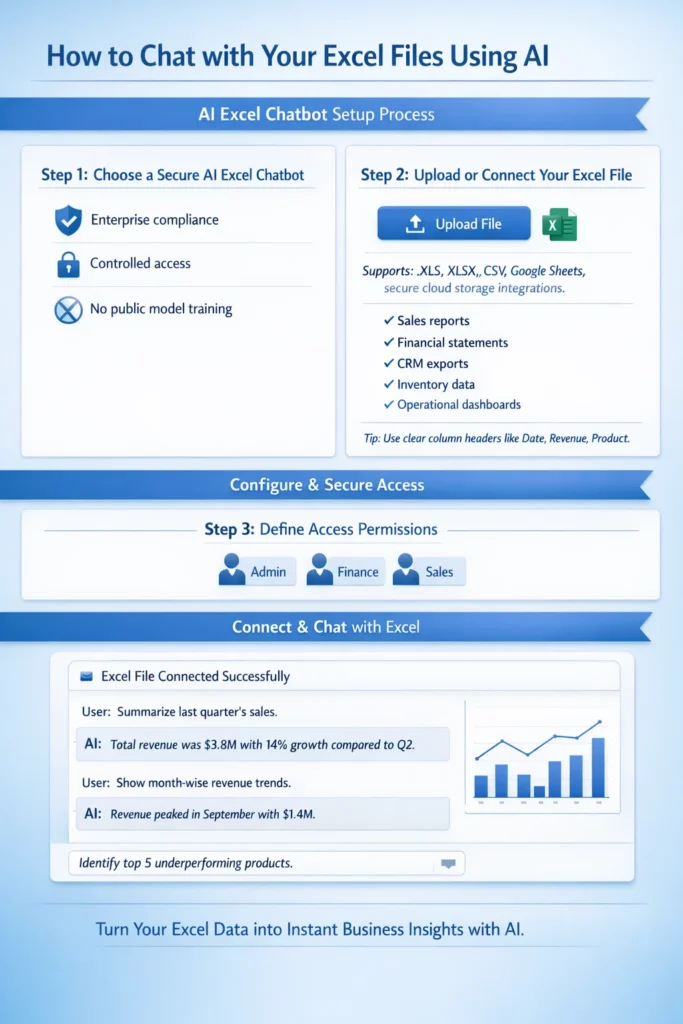
Step 1: Choose a Secure AI Excel Chatbot
Select a private AI chatbot solution that allows you to securely upload or connect Excel files. For business use, ensure the platform supports controlled access, enterprise compliance, and does not use your data for public model training.
Security should always be the first consideration when working with internal financial, sales, or operational data.
Step 2: Upload or Connect Your Excel File
Upload your Excel sheet directly into the chatbot or connect the secure folder where your spreadsheets are stored.
Typical business files include:
- Sales reports
- Financial statements
- CRM exports
- Inventory data
- Operational dashboards
For best results, ensure your spreadsheet has clear column headers such as Date, Revenue, Customer Name, or Product Category. Clean structure improves AI accuracy.
Step 3: Define Access Permissions
Decide which team members can access the chatbot and what data they are allowed to analyze. Role-based permissions protect sensitive information and ensure responsible usage across departments.
Step 4: Start Asking Business Questions
Once your file is connected, you can begin interacting with your data in plain English.
For example:
- “Summarize last quarter’s sales.”
- “Show month-wise revenue trends.”
- “Identify top 5 underperforming products.”
The AI chatbot reads your uploaded spreadsheet, performs the required calculations, and delivers structured answers instantly – without manual formula building or report preparation.
Public AI vs Private AI for Excel
Many AI tools are publicly available, but businesses handling sensitive operational or financial data must prioritize secure implementation.
Public tools may:
- Store conversation history externally
- Lack enterprise-grade compliance
- Offer limited integration with internal systems
At Triple Minds, we implement secure AI layers that allow businesses to connect Excel files or live databases privately. This ensures:
- Data privacy
- Controlled user access
- Enterprise compliance
- Scalable system integration
When working with internal business data, security is not optional – it is foundational.
The ROI of Using an AI Excel Chatbot
When we evaluate the return on investment of AI-powered Excel chatbots, we consistently see impact across three strategic areas:
1. Time Efficiency
Teams reduce hours spent preparing reports and restructuring spreadsheets. Instead of building analysis step-by-step, they ask questions and receive immediate answers. This shifts focus from operational tasks to strategic execution.
2. Improved Accuracy
Automated calculations reduce reliance on manual formulas, lowering the risk of reporting inconsistencies. More reliable insights lead to stronger business decisions.
3. Accelerated Decision Cycles
Executives gain clarity instantly instead of waiting for scheduled reports. Real-time follow-up questions allow deeper exploration, enabling faster course correction in competitive markets.
Common Mistakes to Avoid
Even with AI chatbots, best practices matter:
- Maintain clear and consistent column headers
- Avoid combining unrelated datasets in a single sheet
- Validate AI-generated outputs for business context
- Use secure platforms for confidential data
- Train teams to ask clear, goal-oriented questions
AI enhances analysis – but structured data and thoughtful usage maximize results.
The Future of Conversational Analytics
We believe spreadsheet analysis is evolving from static reporting toward interactive, AI-assisted decision support. In the coming years:
- AI systems will automatically detect key performance indicators
- Predictive insights will become embedded in analysis workflows
- Automated forecasting will become standard practice
- Businesses will rely more on conversational queries than static dashboards
This shift is not about replacing analysts. It is about empowering them to focus on strategic thinking rather than repetitive data preparation.
Why We Recommend Secure AI Implementation
Although subscription-based AI tools are easy to access, companies that prioritize stronger security and want their data to remain entirely within their own environment often benefit more from customized chatbots built exclusively for their business. As organizations grow, they typically require deeper integrations, such as:
- Connecting CRM systems
- Linking ERP platforms
- Integrating SQL databases
- Building centralized AI dashboards
At Triple Minds, we implement private AI systems that allow teams to securely chat with live business data. This removes silos, improves accessibility, and ensures leadership always works with updated insights.
Final Thoughts
Spreadsheets remain central to business operations. What is changing is how organizations extract value from them. Moving from manual formula-based analysis to AI-powered conversational data interaction is not just a productivity upgrade — it is a strategic advantage. When teams spend less time managing spreadsheets and more time interpreting insights, efficiency improves. When executives can explore data in real time, decision cycles shorten. When accuracy increases, confidence in data strengthens.
At Triple Minds, we see AI-powered spreadsheet analysis as the new standard for modern, data-driven organizations. Your Excel file remains structured data — but when connected to a secure AI chatbot, it becomes a powerful decision-support system. If your organization is ready to move beyond static reporting toward intelligent data conversations, the transition starts here.
FAQs
An AI Excel chatbot is a secure tool that allows users to upload spreadsheets and analyze data using natural language instead of formulas.
No. The chatbot removes dependency on complex formulas, making data analysis accessible to non-technical users.
Security depends on the solution. Private AI implementations provide enterprise-level protection and controlled access.
AI can automate most common analytical tasks, but maintaining clean and structured data remains important.
AI delivers highly accurate results when data is properly structured. Human validation is recommended for critical decisions.
Yes. These solutions are scalable and beneficial for startups as well as large enterprises.
Structured tabular data such as sales reports, financial sheets, CRM exports, inventory logs, and operational metrics.
Artificial Intelligence (AI) is a hot topic everywhere. You’ve probably heard discussions about AI-generated blogs or AI-created images, but understanding how AI actually works is a different story. In simple terms, artificial intelligence refers to machines using technology to perform tasks similar to humans. AI operates by utilizing algorithms that analyze data, learn from patterns, and improve over time.
An AI agent is a program designed to perform tasks such as problem-solving and interacting with humans using AI-driven techniques. These agents collect information from their environment and use Natural Language Processing (NLP) and Machine Learning (ML) to analyze data. Over time, AI agents enhance their performance by learning from past mistakes.
There are 5 different types of AI agents, including:
- Simple Reflex Agents
- Model-Based Reflex Agents
- Goal-Based Agents
- Utility-Based Agents
- Learning Agents
| AI Agent Type | Decision-Making | Complexity | Learning Capability | Real-World Example |
|---|---|---|---|---|
| Simple Reflex Agent | Condition-action rule | Low | No | Thermostat |
| Model-Based Reflex Agent | Uses internal model | Medium | Limited | Autonomous vacuum cleaner |
| Goal-Based Agent | Evaluates actions to achieve goals | High | No | Self-driving car navigation |
| Utility-Based Agent | Chooses best outcome | Higher | No | Stock trading AI |
| Learning Agent | Improves through experience | Very High | Yes | ChatGPT, AlphaGo |
In this blog, we’ll dive deeper into AI agents and their types, with a focus on goal-based agents in artificial intelligence.
5 Types of AI Agents and Their Complexity Levels

Let’s Learn More About 5 Types of Agents in Artificial Intelligence
AI agents are software programs that use Artificial Intelligence (AI) to assist humans in performing daily tasks efficiently. These agents collect information from their surroundings and provide recommendations based on their analysis. AI agents utilize Natural Language Processing (NLP) to understand data better and improve their performance over time.
In our daily lives, we interact with various AI-powered tools such as Alexa, Siri, navigation apps, customer service chatbots, and smart home devices. These virtual assistants and intelligent systems help automate tasks, making life easier.
1. Simple Reflex Agents
Simple Reflex Agents are a type of AI agent that functions based on condition-action rules, meaning they follow predefined instructions to make decisions. These agents respond to the current state of their environment without storing past data. They perform well in structured, detectable tasks.
Real-World Applications of Simple Reflex Agents
Automated Doors
Automatic doors detect human motion and signal the control system to open. These doors also incorporate safety features to prevent accidental closures if someone is too close.
Vending Machines
Vending machines operate based on customer input. When a button is pressed, the AI agent processes the selection and dispenses the chosen product. The entire process relies on real-time inputs from users.
Thermostat Devices
Thermostats regulate room temperature by adjusting heating or cooling settings. If the temperature drops, the system increases the heat. If it rises, it activates cooling to maintain a comfortable environment.
Traffic Lights
Traffic lights use sensors, cameras, and radars to monitor vehicle movement, speed, and direction at intersections. AI-based traffic lights dynamically adjust signals to optimize traffic flow and reduce congestion.
2. Model-Based Reflex Agents
Model-Based Reflex Agents are a type of AI agent that utilize internal memory and historical data to make informed decisions. Unlike Simple Reflex Agents, these agents can handle partially observable environments, meaning they can process and respond to complex situations by storing and analyzing past experiences. Their ability to retain and use memory allows them to function effectively in dynamic and unpredictable environments.
Real-World Applications of Model-Based Reflex Agents
Autonomous Cars
Self-driving cars rely on multiple sensors, including cameras, LiDAR, radars, and ultrasonic sensors, to gather environmental data. AI agents use this data to create real-time maps for safe navigation, detecting road conditions, traffic flow, and obstacles to ensure smooth driving.
Robotic Vacuum Cleaners
Smart vacuum cleaners use AI-powered sensors to map the room’s layout and identify obstacles such as furniture, beds, and walls. They efficiently detect dirt, avoid hurdles, and adjust their navigation paths accordingly. These devices continuously update their mapping system to improve cleaning performance
3. Goal-Based Agents
Goal-Based Agents are AI agents designed to achieve specific objectives. Unlike Model-Based Reflex Agents, these agents plan their actions and make informed decisions by using an internal model of the environment. They analyze data, execute tasks efficiently, and continuously improve based on input. Compared to Simple Reflex Agents and Model-Based Reflex Agents, Goal-Based Agents exhibit a higher level of intelligence and adaptability.
Real-World Applications of Goal-Based Agents
Driverless Cars
Self-driving cars rely on AI agents to navigate roads, avoid traffic, and reach destinations safely. They use sensors such as cameras, LiDAR (Light Detection and Ranging), radars, ultrasonic sensors, and GPS. By utilizing Convolutional Neural Networks (CNNs), a deep learning algorithm, AI processes real-time data to handle tasks like braking, accelerating, and steering with precision.
Warehouse Robots
Warehouse robots lift, sort, and transport goods with high efficiency. They perform real-time data analysis, learn from past experiences, and use computer vision to identify and pick the correct products, enhancing warehouse operations.
Autonomous Delivery Drones
Autonomous drones use cameras and LiDAR sensors to navigate flight paths and detect obstacles. They leverage SLAM (Simultaneous Localization and Mapping) technology to create real-time maps while tracking their position, ensuring smooth and accurate deliveries.
Personal Assistants
Voice assistants like Siri, Alexa, and Google Assistant use AI to process human commands. They assist with setting reminders, making calls, answering questions, chatting, and providing personalized suggestions based on user behavior.
Gaming AI
AI agents enhance gaming experiences by acting as virtual opponents or guides. Chess AI, such as Stockfish and AlphaZero, analyzes game moves and suggests the best strategies to win. Many online multiplayer games also use AI to adjust difficulty levels and optimize player engagement.
Why Goal-Based AI Stands Out?
The biggest advantage of Goal-Based AI is its flexibility and adaptability based on inputs. Whether in autonomous vehicles, robots, assistants, drones, or gaming AI, these intelligent agents continue to evolve, making human tasks more efficient and seamless.
4. Utility-Based Agents
Utility-Based Agents are intelligent AI agents similar to Goal-Based Agents, but with a key difference—they prioritize efficiency while considering risks and preferences. These agents aim to maximize output while minimizing time, cost, and potential errors, making them highly effective for complex decision-making.
Real-World Applications of Utility-Based Agents
Google Maps
Google Maps assists with navigation by analyzing real-time traffic data and suggesting the fastest routes. It provides accurate estimates for travel time based on different modes of transportation, whether by car, bike, or on foot.
Stock Trading Bots
AI-powered stock trading bots analyze market trends, historical data, and live stock prices to recommend buying and selling strategies that maximize profits. These bots execute trades automatically based on risk assessment and market predictions.
Recommendation Systems
AI-driven recommendation engines suggest content based on user behavior and past interactions. Platforms like Netflix, Amazon Prime, ZEE5, and Hotstar analyze watch history to recommend movies and shows, providing a personalized experience for users.
Flowchart of AI Agent Decision-Making
Here is a flowchart representing AI agent decision-making. It visually explains how different types of AI agents process information and make decisions.
Conclusion of Types of Agent in AI
AI agents are powerful software programs that help save human effort, time, and money. Different types of AI agents are designed for different tasks:
- Simple Reflex Agents and Model-Based Reflex Agents excel in detectable and immediate-response scenarios.
- Goal-Based Agents and Utility-Based Agents focus on achieving long-term objectives and ensuring optimal results while maintaining safety.
These AI agents are widely used in industries such as robotics, healthcare, finance, and entertainment. However, it is crucial to use AI responsibly and ethically to ensure fairness and security.
The 5 types of AI agents are Simple Reflex Agents, Model-Based Reflex Agents, Goal-Based Agents, Utility-Based Agents, and Learning Agents. Each type has different decision-making abilities.
A goal-based agent in AI selects actions based on achieving a specific objective. It evaluates multiple possibilities before making a decision, unlike reflex agents that respond immediately.
A self-driving car is an example of a goal-based agent in AI. It calculates the best route to reach a destination while avoiding traffic and obstacles, optimizing for safety and efficiency.
A goal-based agent considers future consequences and selects actions to achieve a goal, while a reflex agent reacts instantly to conditions without considering long-term outcomes.