Best Python Libraries for SEO Automation 2026
Python is transforming how SEO professionals automate complex workflows such as website crawling, data extraction, keyword analysis, and reporting. By leveraging powerful libraries like Requests, Selenium, Beautiful Soup, Scrapy, Pandas, and NumPy, marketers can efficiently process large datasets, detect technical issues, and gain actionable insights. This article explores the most effective Python libraries that enable scalable SEO automation, improve data accuracy, and streamline optimization strategies for modern search environments.

Published Date: March 5, 2026

In 2026, Python is becoming useful when it comes to SEO automation. From web scraping to data extraction, using Python for SEO automation is a game changer. Python helps speed up the automation process to such a large extent.
Search engine optimization is an ongoing process which demands undivided attention. Beyond driving traffic, the goal is to attract the right audience through keyword research, content refinement, technical improvements, and performance tracking. From content audits to data analysis and reporting, each stage forms part of a continuous optimization cycle. Today, these practices extend beyond traditional web results to include images, videos, news platforms, and even AI-assisted search experiences.
As digital competition increases and search platforms evolve, managing these responsibilities manually becomes inefficient. Automation tools, particularly those built with Python, now play a crucial role in streamlining and scaling these processes.
SEO plays an important role in digital marketing because it helps websites improve their technical setup, content quality, and authority so they rank higher in search engine results. The goal is to connect with users who are already searching for specific information, products, or services. However, many SEO tasks such as crawling websites, extracting page data, analyzing keywords, and processing large datasets are repetitive and time-consuming. This is where SEO automation becomes useful. Python libraries like BeautifulSoup are commonly used to extract meta tags and headings from webpages, Requests helps fetch page content for analysis, Scrapy is useful for large-scale website crawling and URL collection, Selenium automates browsers to collect data from JavaScript-heavy pages, and Pandas helps analyze large SEO datasets like keywords, backlinks, or crawl reports quickly and efficiently.
Upgrade Your SEO Strategy with Python Automation
Discover how Triple Minds helps businesses implement Python-powered SEO automation to crawl websites, analyze large datasets, detect technical issues, and generate insightful reports faster—eliminating repetitive manual work and improving optimization accuracy.
Explore Advanced SEO Automation Solutions
Key Takeaways
- Python enables large-scale SEO automation by simplifying tasks like crawling, data extraction, and performance monitoring.
- Libraries such as Requests, Selenium, and Beautiful Soup help collect and structure website data efficiently.
- Scrapy allows full-site crawling and large-scale SEO audits beyond single-page analysis.
- Pandas and NumPy support advanced data processing, enabling deeper insights into rankings, traffic trends, and performance metrics.
- spaCy and OpenAI SDK assist with semantic analysis, keyword clustering, and AI-driven content optimization.
- Visualization tools like Matplotlib help convert complex SEO data into clear performance reports.
- Combining multiple Python libraries creates a complete automation pipeline—from data collection to analysis and reporting.
What is SEO Automation?
In SEO automation we use specific software and AI driven tools to handle multiple tasks like keyword tracking, site audits, backlink monitoring and reporting. Through automation businesses can save time and free resources for high effect strategies like content creation and link building campaigns.
About 70% of professionals use automation tools including AI to manage core workflows like keyword research, ranking checks, and reporting.
In today’s time, using SEO automation alone isn’t going to cut it anymore. Doing automation only can be time-consuming and complex sometimes. That’s where Python becomes useful. With its rich libraries of tools and features, Python helps professionals to automate tasks, analyse broken links, and much more.
Role of Python in SEO Automation
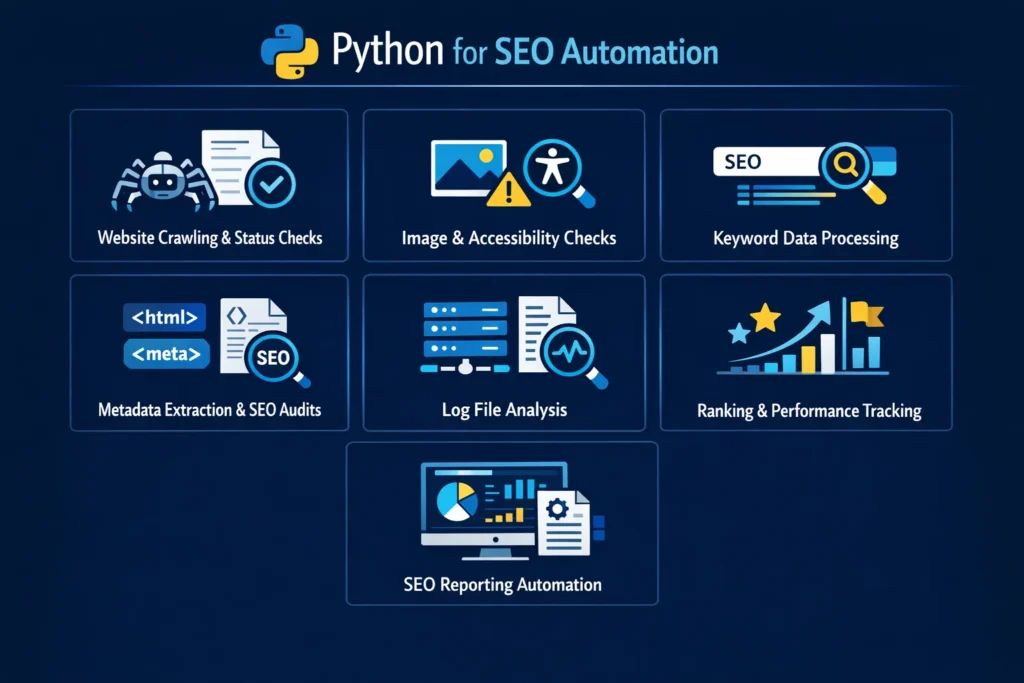
In SEO Automation, Python can be used for the following tasks such as:
1. Website Crawling and Status Checks
Python enables website crawling and status check by visiting the page and extracting internal links. After extracting internal links, it also analyses and checks their response codes such as 200 (successful), 404 (page not found) etc. Through this process, it can automatically identify broken links, server errors and other technical issues across a website.
2. Metadata Extraction and Audits
Python visits the HTML code of a web page and analyses its structure. After examining the code, it extracts important metadata such as titles, meta descriptions, and other relevant tags across multiple pages. By collecting this information, Python can identify common SEO issues, including missing titles, duplicate meta descriptions, absent tags, and inconsistent metadata patterns.
3. Image and Accessibility Checks
After visiting a webpage, Python analyzes the HTML code to look for specific tags such as <img>, <label>, <input>. It then checks for errors like missing alt text, large image file sizes, or incorrect image formats. The same process applies to accessibility. Subsequently, scanning the HTML, it looks for issues such as missing alt attributes in images, improper heading structure, and missing label tags for form inputs.
4. Keyword Data Processing
Finding keywords online, removing repeated words, and structuring the keywords manually might take hours to complete. That’s why giving Python a CSV or Excel file can help because it can automatically remove duplicate keywords, fix messy formatting, remove empty rows, and convert everything to lowercase. So, your messy list becomes clean and organised.
5. Log Files Analysis
Log files are huge in size. Reading them manually is nearly impossible. Taking the help of Python can make a big difference. Python can open files very quickly using Pandas and re (regular expressions). It can automatically calculate 404 errors, report, analyse, and monitor. Because Python can handle large datasets efficiently, it turns raw server logs into actionable SEO insights and enables automated crawl monitoring systems. Thus, making the work a lot easier.
6. Ranking and Performance Tracking
By connecting to platforms like Google Search Console and Google Analytics, it can easily complete tasks like:
- 1. Track daily ranking changes
- 2. Detect performance drops
- 3. Compare time periods
- 4. Identify underperforming pages
- 5. Generate automated reports
That’s how Python helps with fast and reliable SEO performance monitoring.
7. SEO Reporting Automation
Using libraries like matplotlib, seaborn, plotly, Python cleans and analyses the data, calculates performance metrics, generates charts and reports, and can even email the final report automatically. Where manual reporting takes hours to monitor and is often hard to scale, Python only takes some minutes and can easily scale clients.
Python’s rich network of libraries helps in simplifying complex tasks like web scraping, API integration, automation and monitoring.
As Python’s growing demand in SEO automation, knowing the right Python libraries can remarkably increase accuracy and effectiveness.
But before jumping into the best Python libraries, knowing the meaning behind Python libraries matters a lot.
Now, let’s have a look at the meaning behind Python libraries.
Meaning Behind Python Libraries
Python libraries are like handbooks of pre – written code which helps you in completing the tasks with more productivity and efficiency. It can easily handle tasks like data manipulation, math operations, web scraping.
How Do Python Libraries Work in SEO Automation?
Instead of doing everything manually, Python libraries do the work for you. Libraries like Beautiful Soup, Scrapy, requests help you access data from websites. Along with these libraries can manage many more tasks like data cleaning & analysis, technical SEO checks, automated reporting, etc.
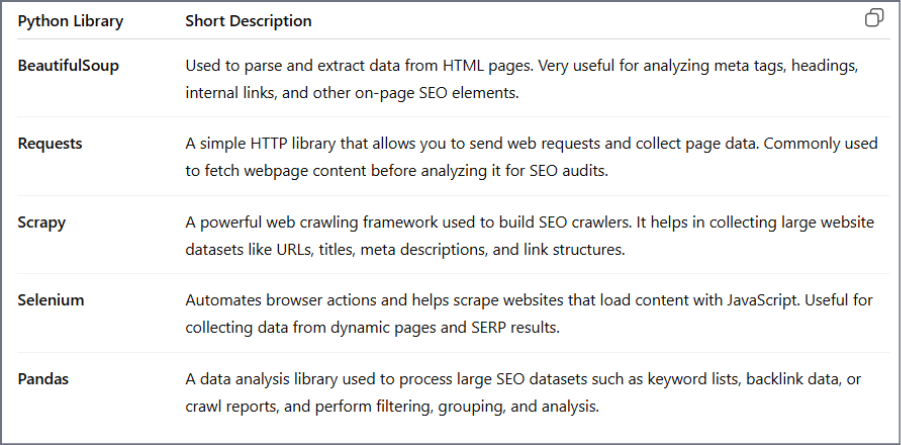
Best Python Libraries for SEO Automation in 2026
1. Requests
The requests module is a library for sending HTTP requests using python. With requests, sending methods like GET, POST, PUT, DELETE becomes easier. It’s the first step towards data extraction.
Step-by-step guide to using the Requests module in SEO automation:
First we need to install requests. Here’s how you do it:
<Bash>
   pip install requests
Import Requests:
</> python
import requests

url = "https://tripleminds.com"

response = requests.get(url)
It sends a GET request to the page and then the server responds with the HTML content, and Python stores it in the response object.
Check Website Status:
Python

Response =
requests.get(“https://example.com”)
print(response.status_code)
Through this you can detect broken pages, redirects, and server errors automatically.
Fetch Page Content:
Python

html = response. Text
print(html [:300])
This gives you raw HTML for monitoring or further processing.
Pull SEO Data from APIs :
Python

url = “API_ENDPOINT”
headers = headers)
data = response.json()

print(data)
Now you can automatically track keywords rankings, monitor impressions, clicks and fetch SEO performance data.
2. Selenium
Selenium helps you interact with JavaScript websites including which are heavy. If content loads dynamically, requests alone won’t make any difference.
Let’s see the guide below to use Selenium for SEO Automation.
Install Selenium:
<Bash>

pip install selenium
Import and Launch the Browser:
Python

from selenium import webdriver
from selenium.webdriver. Common.by import By

# Triple Minds SEO Automation Script
driver . get (“https://example.com" )

print(“Triple Minds SEO Audit Started”)
Extract SEO Elements:
Get Page Title:
Python

print(“Title” , driver . title)

Get Meta Description

Python

meta = driver.find_element(By.XPATH,” //meta[@name=‘description’]”)
print(“Meta Descriptions : ” ,meta.get_attribute(“content”))
Get H1 Tag:
Python

h1 = driver.find_elementry(By.TAG_NAME, “h1”)
print(“H1 :” , h1.text)
This helps in verifying on-page SEO elements on dynamic websites.
Extract Internal Links:
Python

links =
driver.find_elements(By.TAG_NAME, “a”)

print(“Triple Minds Internal Link Audit :”)
for link in links :
            print(link.get_atrribute(“herf”))
Important to check link structure and crawl paths
Run in Headless Mode (for Automation):
Python

from selenium . webdriver . chrome . options  import Options

options = Options()
options.add_argument(“--headless”)

driver =
webdriver . Chrome(options=options)
driver . get(“https://example . Com")

print(“Triple Minds Headless SEO Scan Running”)
This is a good to go option for scheduled audits.
Close the Browser:
Python

driver.quit()
print(“Triple Minds SEO Audit Completed")
3. Beautiful Soup
Beautiful Soup in SEO automation helps with the extraction of SEO elements from raw HTML.
After fetching a page (using requests or Selenium), Beautiful Soup helps you pull structured data like titles, meta tags, headings and links.
it turns unstructured and messy HTML into usable SEO insights.
Here’s how to use it:
Install the Module:
Bash

pip install beautifulsoup4
Import the Library:
Python

from bs4 import BeautifulSoup4
Now it becomes ready to parse HTML.
Load HTML for Audit:
Python

import requests from bs4 import Beautifulsoup

# Triple Minds SEO Page Check
url = “https : //example.com.”
response = requests. get(url)

soup = BeautifulSoup(response.text, “html.parser” )

print(“Triple Minds SEO Audit Started”)
Now the HTML is structured and searchable.
Extract Key SEO Elements:
Page Title:
Python

title= soup.title.string print(“Title:”,title)
Meta Description:
Python

meta_desc = soup.find(“meta”,attrs ={“name” : “description”,

If meta_desc:
     print(“Meta Description:”,meta_desc[“content”])
else:
    print(“Meta Description Missing”)
H1 Tag:
Python

h1= soup.find(“h1”)

If h1 : Useful
    print(“H1 :” , h1.text)
else :
    print(“H1 Missing”)
Now you will be able to quickly detect things like missing tags, duplicate headings, weak on-page structure.
Extract Internal Links:
Python


Links = soup.find_all(“a”)

print(“Triple Minds Internal Links:”)
for link in links :
       print(link.get(“href”))
Useful for internal linking audits and crawl structure checks.
Close The Audit:
Python

print(“Triple Minds SEO Audit Completed”)
4. Scrapy – Large-Scale Crawling
Scrapy helps with:
- Web page crawling
- Extracts key SEO elements
- Saves structured data
- Scales structured data
Scales audits beyond single URLs.
Unlike Beautiful Soup (single page focus), Scrapy handles full site audits efficiently.
Install Scrapy:
Bash id=“s9kl2x”

pip install scrapy
Create Project:
Bash id=“t3mn8p”

scrapy startproject triple_minds_audit cd triple_minds_audit
Create Spider:
Bash id =“q7vz4r”
Scrapy genspider seo_spider example.com
Add SEO Extraction Logic:
Python id= “m2xp9a”

import scrapy

class SeoSpider(scrapy.spider) :

   name = “seo_spider”
   start_urls =

[“https : //example.com”]

  def parse(self, response) :
     Yield {
         “url” : response.url,
         “title”:

response.css(“title : : text” ).get(), “meta”

response.css(‘meta [name = “description”] : :attr(content)’).get(),”h1” :

response.css(“h1 : : text”).get(),}
Run Spider:
Bash id=”w4pl8n”

Scary crawl seo_spider -o results.json
5. Pandas – Data Processing
Pandas helps you with:
- Clean scraped data
- Detect missing metadata
- Filter weak pages
- Generate SEO insights
So, you don’t have to hassle much.
Install Pandas:
Bash id =“pd7xk2”

pip install pandas
Import Pandas:
Python id= “p3kz9va”

import pandas as pd
Python id= “p3kz9va”
Python id= “p3kz9va”
Load Scrapy Results:
(Assuming Scrapy saved results.json)
Python id = “l8mvq1”

# Triple Minds SEO Data Analysis

df = pd.read_json(“results.json”)

print(df.head())
Now your scraped SEO data is structured in a table.
Find Pages Missing Meta Descriptions:
Python id= “z6wn2r”

missing_meta = df[df[“meta”].isna()]

print(“Pages Missing Meta Description : “)

print(missing_meta[“url”])
You can now instantly spot optimization gaps.
Find Pages Missing H1:
Python id= “u4rc8m”

Missing_h1 = df[df[“h1”].isna()
print(“Pages Missing H1 : ”)

print (missing_h1[“url”])
Count Total Issues:
Python id = “y9tb5e”

print(“Total Pages :”, len(df))

print(“Missing Meta:”,

df[“meta’].isna(),sum())

print(“Missing H1 : ‘,

df[“h1”].isna(),sum())
Now you have quick audit metrics.
After the Pandas module structures the SEO data, you may need deeper calculations – growth, CTR changes, performance trends.
That’s where Numpy comes in.
6. How You Can Use NumPy for SEO Automation
NumPy helps with:
- Percentage growth calculations
- CTR computation
- Traffic change analysis
- Forecast modeling basics
Install NumPy:
Bash id=”np3k8x”

Pip install numpy
Import NumPy:
Python id= “nm7v2p”

Import numpy as np
Calculate CTR (Click Through Rate):
Imagine that a company has impressions and clicks data.
Python id=”n5r8zt”

clicks = np.array([120, 85, 601]) impressions = np.array([1000, 950, 800])

ctr = (clicks / impressions) * 100

print (“CTR (%) : , ctr)
Now you have precise CTR values.
Calculate Traffic Growth:
Python id = “n9q2yl”

last month = np.array([5000])

this_month= np.array([6500])

growth = ((this_month - last_month) / last_month) * 100

print(“Traffic Growth (%) ;” , growth)
You can quickly measure SEO performance changes.
Detect Sudden Ranking Drops:
Python id= “n2tw6m”

rank_previous = np.array([3, 5, 2])

Rank_current = np.array([8, 4, 2])


drop = rank_current - rank_previous

print(“Ranking Change :” , drop)
Positive values = ranking drop
Negative values = Improvement
This is a game changer when it comes to calculating SEO metrics accurately, measuring growth trends , detecting performance issues early and supporting data driven decisions.
7. spaCy
After data collection and performance analysis, you can improve content quality and topical relevance using spaCy.
spaCy specifically helps with :
- Entity Extraction
- Keyword context analysis
- Topic Clustering
- Semantic optimization
SEO in 2026 focuses on meaning and relevance, not just keywords.
Install spaCy:
Bash id=”sp4k8x”

pip install spacy
python –m spacy download
en_core_web_sm
Import spaCy:
Python id”sp7m2p”


Import spacy

nlp = spacy.load(“en_core_web_sm”)
Analyze Page Content:
Python id= “sp9r5t”

# Triple Minds Content Analysis
text =” ” ”

Triple Minds provides SEO automation solutions using Python libraries like Scrapy, Pandas , and spaCy for advanced optimization.
” ” ”

doc = nlp(text)
Now the text is processed and structured.
Extract Named Entities:
Python id= “sp2x6m”

Print(“Entities Found :”)

for ent in doc.ents :
       print(ent.text, “-”,ent.label_)
Now you can check:
- Brand mentions
- Tool references
- Location signals
- Organization names
Extract Important Keywords:
keywords = [token.text for token in doc if token.pos_ == "NOUN"]

print("Key Terms:", keywords)
This helps identify:
- Core topics
- Content gaps
- Semantic coverage
What This Does for Your Brand:
- Improves topical authority
- Ensures content includes relevant entities
- Helps with semantic optimization
- Supports AI-driven SEO strategies
8.OpenAI Python SDK
This module helps with:
- Keyword clustering
- Content brief generation
- Meta description suggestions
- Search intent classification
- Competitor content analysis
Step 1: Install OpenAI SDK:
pip install openai Step 2: Import and Set API Key:
from openai import OpenAI

client = OpenAI(api_key="YOUR_API_KEY")
Step 3: Generate SEO-Optimized Meta Description:
# Triple Minds AI SEO Optimization
response = client.responses.create(
   model="gpt-4.1-mini",
   input="Write an SEO-optimized meta description for a blog about Python SEO automation."
)

print(response.output_text)
Triple Minds can now auto-generate optimized metadata.
Step 4: Cluster Keywords by Intent:
keywords = """
python seo automation
best python seo libraries
scrapy for seo
technical seo python
"""

response = client.responses.create(
   model="gpt-4.1-mini",
   input=f"Group these keywords by search intent:\n{keywords}"
)

print(response.output_text)
This helps identify:
- Informational intent
- Transactional intent
- Technical learning intent
Step 5: Generate Content Brief:
response = client.responses.create(
   model="gpt-4.1-mini",
   input="Create a structured blog outline for 'Best Python Libraries for SEO Automation in 2026'."
)
print(response.output_text)
Now your brand can scale content production intelligently.
What This Does for Your Brand
- Speeds up content strategy
- Improves semantic optimization
- Automates repetitive SEO writing tasks
- Enhances data-driven decisions
9. Matplotlib
Matplotlib helps with:
- Visualize traffic trends
- Show ranking improvements
- Track CTR changes
- Create client-ready SEO reports
Step 1: Install Matplotlib:
pip install matplotlib Step 2: Import the Library:
import matplotlib.pyplot as pltStep 3: Plot Traffic Growth:
# Triple Minds SEO Traffic Report

months = ["Jan", "Feb", "Mar", "Apr"]
traffic = [5000, 6200, 7100, 8300]

plt.plot(months, traffic, marker="o")
plt.title("Triple Minds Organic Traffic Growth")
plt.xlabel("Month")
plt.ylabel("Visitors")
plt.show()
This creates a simple traffic trend graph.
Step 4: Visualize Ranking Changes:
keywords = ["Keyword A", "Keyword B", "Keyword C"]
rankings = [8, 4, 2]

plt.bar(keywords, rankings)
plt.title("Triple Minds Keyword Rankings")
plt.ylabel("Position in SERP")
plt.gca().invert_yaxis()  # Lower ranking number is better
plt.show()
Now you can clearly show performance improvements.
What This Does for Your Brand
- Converts raw data into visual insights
- Makes reports client-friendly
- Helps spot trends instantly
- Supports decision-making
Conclusion
SEO automation in 2026 is no longer optional — it’s essential for scale, speed, and precision. From collecting data with Requests, rendering dynamic pages using Selenium, extracting insights through Beautiful Soup and Scrapy, analyzing performance with Pandas and NumPy, enhancing semantic relevance using spaCy, generating AI-powered optimization with OpenAI, and finally visualizing results through Matplotlib — each library plays a strategic role in a complete automation workflow.
For Triple Minds, this ecosystem creates a powerful, end-to-end SEO system: collect, analyse, optimize, and report — all automated.
The real advantage isn’t just using Python.
It’s combining the right libraries in the right order to turn raw data into actionable growth.
SEO in 2026 belongs to those who automate intelligently.
Quick Answers to Common Questions
SEO automation in Python uses scripts and libraries to automate tasks like crawling websites, analyzing keywords, extracting metadata, and generating SEO reports.
Python is widely used because it offers powerful libraries that simplify web scraping, data analysis, automation, and API integration for SEO workflows.
Popular libraries include Requests, Selenium, Beautiful Soup, Scrapy, Pandas, NumPy, spaCy, and Matplotlib.
Yes, Python can crawl websites, detect broken links, analyze response codes, and identify metadata issues automatically.
Python processes large datasets quickly and generates automated reports and visualizations for better SEO insights.
Yes, beginners can start with basic libraries and gradually build more advanced SEO automation workflows.