Chat with Your Excel Files: Guide to Use AI Excel Chatbot
Chat with your Excel files using AI and turn static spreadsheets into interactive data conversations. Instead of relying on complex formulas and manual reporting, you can upload your spreadsheet and ask questions in plain English to get clear, structured insights. AI Excel chatbots help teams analyze data faster, reduce errors, and make smarter business decisions without technical dependency.

Published Date: February 13, 2026
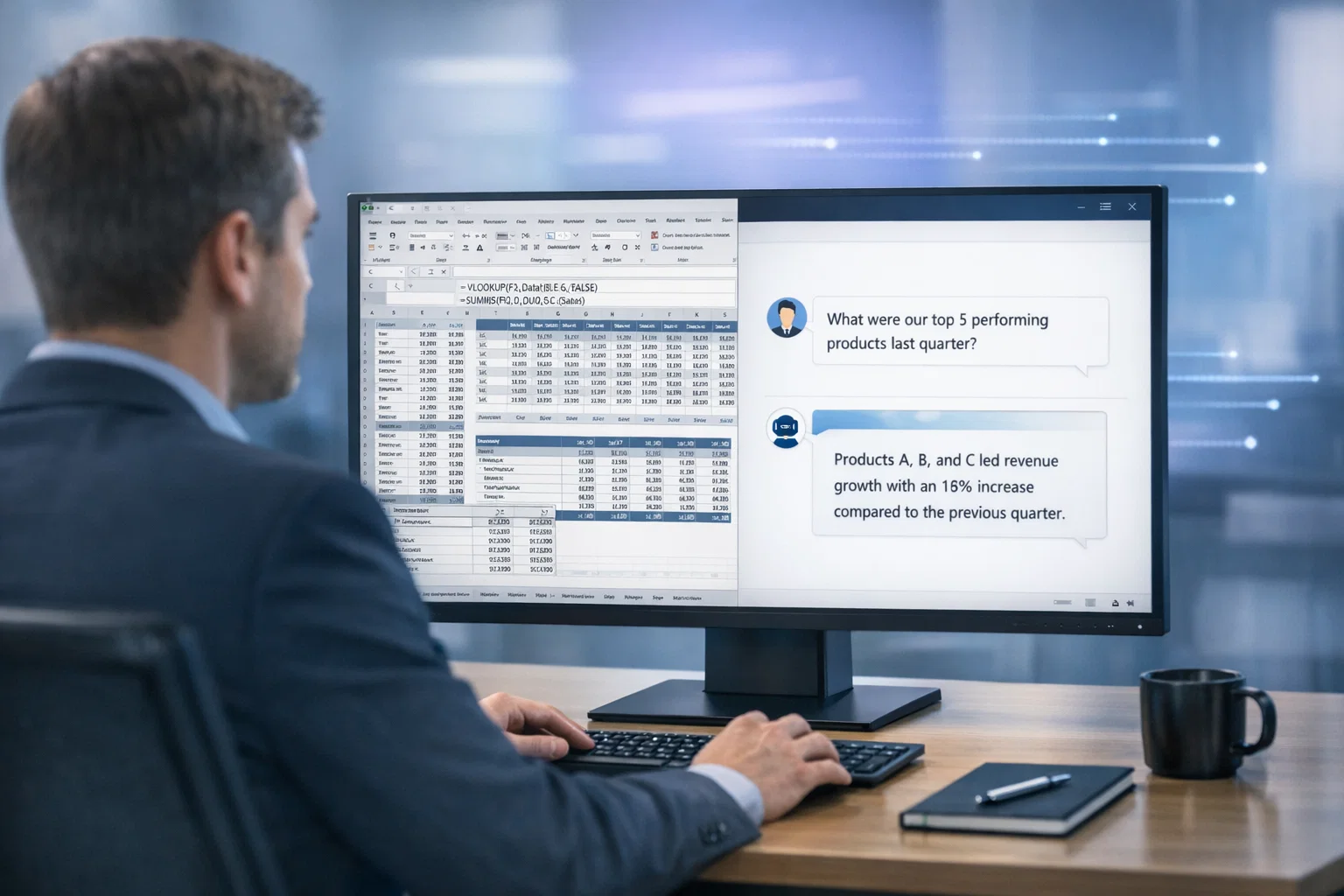
From MS Excel to Google Sheets, spreadsheets are the backbone of business data management worldwide. However, if you are still relying on traditional spreadsheet formulas to analyze critical business data, you may be slowing down decisions and increasing the risk of costly errors. Manual reporting, complex functions like VLOOKUP and pivot tables, and repetitive data cleaning consume valuable time. In fact, it’s been reported that data professionals spend nearly 60–80% of their time preparing data instead of analyzing it. This is where an AI Excel chatbot changes how modern businesses work with spreadsheets. Rather than making Excel itself “intelligent,” businesses can upload their Excel files into a secure AI-powered chatbot and analyze the data using plain English questions. The chatbot reads the spreadsheet, applies the correct calculations, and delivers structured insights instantly – turning static spreadsheets into dynamic analytical workspaces.
At Triple Minds, we implement secure AI Excel chatbot solutions that allow organizations to upload spreadsheet data and interact with it conversationally. An AI Excel chatbot is a tool that enables users to analyze Excel data using natural language instead of complex formulas. It helps clean messy datasets, generate visual reports, identify trends, and extract actionable insights faster and more accurately. For B2B teams managing sales reports, financial statements, operational dashboards, or inventory sheets, this shift from manual spreadsheet analysis to AI-driven conversational data analysis improves efficiency, reduces errors, and accelerates decision-making.
Ready to Transform Your Excel Analysis with AI?
Discover how AI-powered Excel chatbots help your team analyze spreadsheets in plain English—eliminating complex formulas, reducing reporting delays, and accelerating business decisions.
Explore Secure AI Excel Chatbot Solutions
Key Takeaways
- AI Excel chatbots let you analyze uploaded spreadsheet data using simple, natural language queries.
- They significantly reduce manual data cleaning and dependency on complex Excel formulas.
- Businesses can speed up decision-making with instant, structured insights generated by AI.
- Sales, finance, operations, and leadership teams gain faster access to accurate reports and performance analysis.
- AI-driven calculations minimize human errors and improve overall data reliability.
- Conversational analytics makes data accessible to both technical and non-technical teams across the organization.
What is AI in Excel?
AI in Excel refers to using intelligent AI-powered tools that can analyze your Excel data in a smarter and more efficient way. Instead of manually building complex formulas, calculations, and pivot tables, you can upload your spreadsheet into a secure AI chatbot and ask questions in plain language. The AI understands your request, applies the right logic behind the scenes, and delivers accurate, structured insights within seconds.
It can clean messy datasets, identify trends, summarize performance metrics, generate visual reports, and highlight unusual patterns automatically. At Triple Minds, we see AI in Excel as an evolution in how businesses interact with spreadsheet data — shifting from manual effort to AI-assisted analysis that makes insights faster, simpler, and accessible to every team, not just technical experts.
When we talk about cleaning messy datasets, we mean identifying and correcting common data issues that affect analysis accuracy. Business spreadsheets often contain duplicate entries, missing values, inconsistent date formats, numbers stored as text, or slight variations in naming conventions. These small inconsistencies may seem harmless, but they can significantly distort reports and performance metrics. An AI Excel chatbot automatically scans the uploaded file, detects such irregularities, and either corrects them or highlights them for review. This ensures that insights are generated from structured, reliable data, reducing errors and improving confidence in decision-making.
What Does It Mean to “Chat with Your Excel Files”?
“Chatting with your Excel files” means uploading your spreadsheet into a secure AI chatbot and asking questions about your data in plain English — without writing formulas or building complex reports.
Traditionally, extracting insights from Excel requires formulas like VLOOKUP, INDEX-MATCH, pivot tables, filters, or nested IF statements. Not everyone understands what these functions do or how to use them correctly. Even experienced users spend significant time building reports, and small formula errors can lead to inaccurate analysis. With an AI-powered Excel chatbot, that entire process becomes faster and more intuitive.
At Triple Minds, we implement secure AI chatbot systems that allow businesses to upload their spreadsheets and interact with them conversationally. Instead of struggling with formulas, your team can ask business questions and receive clear, structured answers instantly. Let’s look at how this works in practice.
Ask Questions in Plain Language
Instead of writing formulas, you simply type what you want to know. For example, if your uploaded file contains sales data with columns like Date, Product, Region, Customer, and Revenue, you can ask:
“What were last quarter’s highest-performing products?”
You receive a ranked list of top products based on revenue.
“Show monthly revenue trends for the past year.”
You get a clear month-by-month breakdown, often supported with a visual chart.
“Which customers reduced their purchase volume?”
The chatbot compares time periods and highlights customers with declining orders.
“Calculate churn rate from this dataset.”
The AI identifies inactive customers and calculates the percentage automatically.
How It Works
Behind the scenes, the AI chatbot reads your uploaded Excel file, understands column headers, analyzes the data structure, and performs the required calculations automatically. You do not need to define formulas or build reports – you simply ask the question, and the system generates the insight.
Why It Matters
Your spreadsheet remains the source of truth, but when connected to an AI chatbot, it becomes far more powerful. Instead of manually extracting insights, your team can interact with data conversationally and receive faster, more accurate answers. In simple terms, chatting with your Excel files means enabling AI to analyze your spreadsheet data on demand — making business analysis quicker, easier, and accessible across the organization.
Why Traditional Spreadsheet Analysis Slows Businesses Down
Spreadsheets have supported business operations for decades. They are reliable for storing and organizing structured data. However, as organizations scale and datasets grow larger, traditional spreadsheet workflows begin to create operational friction. What once worked for small teams can become inefficient when speed, accuracy, and cross-team collaboration become critical.
1. Analysis Becomes Time-Heavy
Generating meaningful insights from spreadsheets often requires multiple steps — filtering data, building calculations, validating numbers, and formatting reports. As data grows, this process takes longer, slowing down decision cycles.
2. Reporting Creates Dependency
Business leaders often rely on analysts or Excel experts to extract insights. This creates internal bottlenecks where decision-makers must wait for reports instead of exploring data independently.
3. Scalability Challenges
Spreadsheets are excellent storage tools, but as datasets expand across departments, managing versions, consolidating files, and maintaining consistency becomes increasingly complex.
4. Limited Real-Time Exploration
Most spreadsheet workflows are report-based. You generate a report, review it, and then request another version if you need deeper insights. This slows down dynamic decision-making.
5. Insight Gaps
Valuable business data often remains underutilized because extracting deeper patterns requires time and technical effort. Many organizations sit on strong datasets but struggle to convert them into continuous insight. For growing B2B businesses, these slowdowns directly impact agility and competitive advantage.
How AI Excel Chatbots Transform Business Analysis
AI Excel chatbots shift spreadsheet analysis from static reporting to interactive exploration. Instead of manually preparing reports, teams upload Excel files into a secure AI chatbot and engage with the data conversationally.
1. Instant Insight Generation
Rather than building step-by-step reports, teams receive structured answers immediately after asking a business question. This dramatically shortens decision cycles.
2. Self-Service Data Access
Non-technical users can interact with uploaded spreadsheet data without relying on specialists. This reduces bottlenecks and empowers cross-functional teams.
3. Interactive Follow-Up Questions
Instead of requesting a new report for every clarification, leaders can ask follow-up questions in real time. This enables deeper exploration without delays.
4. Structured Outputs & Visual Summaries
The chatbot doesn’t just provide numbers — it delivers organized summaries and visual breakdowns that are easier to interpret and present.
5. Strategic Focus Over Manual Work
By automating analytical tasks, teams can shift focus from spreadsheet management to strategic decision-making and performance improvement.
At Triple Minds, we see this transformation as moving from spreadsheet-driven reporting to AI-driven data conversations – where insight is continuous, not periodic.
Business Use Cases: Who Benefits the Most?
Sales Teams
Sales leaders can track pipeline health, deal velocity, win-loss trends, and account performance instantly after uploading their reports into the chatbot. Instead of waiting for analysts, representatives can analyze territory performance and identify stalled deals independently. This improves forecasting accuracy and strengthens revenue performance.
Finance Teams
CFOs and finance managers can review cash flow trends, cost centers, revenue variance, and profitability within seconds. Rather than rebuilding complex spreadsheets for each query, teams can drill into uploaded financial data conversationally. This improves financial clarity and speeds up reporting cycles.
Operations Teams
Operations managers can analyze inventory levels, supply chain delays, and vendor performance using simple queries. After uploading operational data, bottlenecks and inefficiencies become easier to identify. Instead of compiling reports manually, teams can focus on resolving issues faster.
Marketing Teams
Marketing leaders can evaluate campaign performance, conversion rates, ROI, and channel effectiveness instantly. Comparing campaign outcomes and identifying high-performing channels becomes straightforward. This enables smarter budget allocation and quicker optimization decisions based on real data.
Founders & Executives
Leaders can move beyond static dashboards and ask follow-up questions in real time. By interacting with uploaded business data through an AI chatbot, they can quickly explore revenue trends, growth drivers, and cost structures. This reduces dependency on multiple reports and meetings – making decisions faster, clearer, and data-backed.
Step-by-Step Guide: How to Chat with Your Excel Files
Below is a practical step-by-step guide to start analyzing your Excel data using a secure AI chatbot.
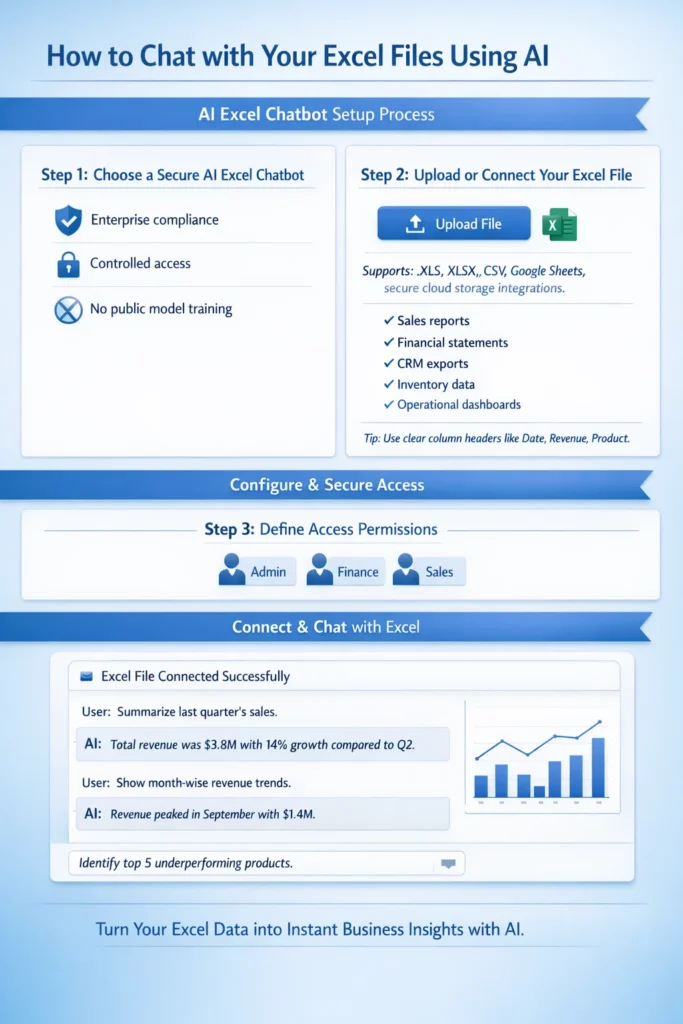
Step 1: Choose a Secure AI Excel Chatbot
Select a private AI chatbot solution that allows you to securely upload or connect Excel files. For business use, ensure the platform supports controlled access, enterprise compliance, and does not use your data for public model training.
Security should always be the first consideration when working with internal financial, sales, or operational data.
Step 2: Upload or Connect Your Excel File
Upload your Excel sheet directly into the chatbot or connect the secure folder where your spreadsheets are stored.
Typical business files include:
- Sales reports
- Financial statements
- CRM exports
- Inventory data
- Operational dashboards
For best results, ensure your spreadsheet has clear column headers such as Date, Revenue, Customer Name, or Product Category. Clean structure improves AI accuracy.
Step 3: Define Access Permissions
Decide which team members can access the chatbot and what data they are allowed to analyze. Role-based permissions protect sensitive information and ensure responsible usage across departments.
Step 4: Start Asking Business Questions
Once your file is connected, you can begin interacting with your data in plain English.
For example:
- “Summarize last quarter’s sales.”
- “Show month-wise revenue trends.”
- “Identify top 5 underperforming products.”
The AI chatbot reads your uploaded spreadsheet, performs the required calculations, and delivers structured answers instantly – without manual formula building or report preparation.
Public AI vs Private AI for Excel
Many AI tools are publicly available, but businesses handling sensitive operational or financial data must prioritize secure implementation.
Public tools may:
- Store conversation history externally
- Lack enterprise-grade compliance
- Offer limited integration with internal systems
At Triple Minds, we implement secure AI layers that allow businesses to connect Excel files or live databases privately. This ensures:
- Data privacy
- Controlled user access
- Enterprise compliance
- Scalable system integration
When working with internal business data, security is not optional – it is foundational.
The ROI of Using an AI Excel Chatbot
When we evaluate the return on investment of AI-powered Excel chatbots, we consistently see impact across three strategic areas:
1. Time Efficiency
Teams reduce hours spent preparing reports and restructuring spreadsheets. Instead of building analysis step-by-step, they ask questions and receive immediate answers. This shifts focus from operational tasks to strategic execution.
2. Improved Accuracy
Automated calculations reduce reliance on manual formulas, lowering the risk of reporting inconsistencies. More reliable insights lead to stronger business decisions.
3. Accelerated Decision Cycles
Executives gain clarity instantly instead of waiting for scheduled reports. Real-time follow-up questions allow deeper exploration, enabling faster course correction in competitive markets.
Common Mistakes to Avoid
Even with AI chatbots, best practices matter:
- Maintain clear and consistent column headers
- Avoid combining unrelated datasets in a single sheet
- Validate AI-generated outputs for business context
- Use secure platforms for confidential data
- Train teams to ask clear, goal-oriented questions
AI enhances analysis – but structured data and thoughtful usage maximize results.
The Future of Conversational Analytics
We believe spreadsheet analysis is evolving from static reporting toward interactive, AI-assisted decision support. In the coming years:
- AI systems will automatically detect key performance indicators
- Predictive insights will become embedded in analysis workflows
- Automated forecasting will become standard practice
- Businesses will rely more on conversational queries than static dashboards
This shift is not about replacing analysts. It is about empowering them to focus on strategic thinking rather than repetitive data preparation.
Why We Recommend Secure AI Implementation
Although subscription-based AI tools are easy to access, companies that prioritize stronger security and want their data to remain entirely within their own environment often benefit more from customized chatbots built exclusively for their business. As organizations grow, they typically require deeper integrations, such as:
- Connecting CRM systems
- Linking ERP platforms
- Integrating SQL databases
- Building centralized AI dashboards
At Triple Minds, we implement private AI systems that allow teams to securely chat with live business data. This removes silos, improves accessibility, and ensures leadership always works with updated insights.
Final Thoughts
Spreadsheets remain central to business operations. What is changing is how organizations extract value from them. Moving from manual formula-based analysis to AI-powered conversational data interaction is not just a productivity upgrade — it is a strategic advantage. When teams spend less time managing spreadsheets and more time interpreting insights, efficiency improves. When executives can explore data in real time, decision cycles shorten. When accuracy increases, confidence in data strengthens.
At Triple Minds, we see AI-powered spreadsheet analysis as the new standard for modern, data-driven organizations. Your Excel file remains structured data — but when connected to a secure AI chatbot, it becomes a powerful decision-support system. If your organization is ready to move beyond static reporting toward intelligent data conversations, the transition starts here.
FAQs
An AI Excel chatbot is a secure tool that allows users to upload spreadsheets and analyze data using natural language instead of formulas.
No. The chatbot removes dependency on complex formulas, making data analysis accessible to non-technical users.
Security depends on the solution. Private AI implementations provide enterprise-level protection and controlled access.
AI can automate most common analytical tasks, but maintaining clean and structured data remains important.
AI delivers highly accurate results when data is properly structured. Human validation is recommended for critical decisions.
Yes. These solutions are scalable and beneficial for startups as well as large enterprises.
Structured tabular data such as sales reports, financial sheets, CRM exports, inventory logs, and operational metrics.
Table of Content
- Key Takeaways
- What is AI in Excel?
- What Does It Mean to “Chat with Your Excel…
- Why Traditional Spreadsheet Analysis Slows Businesses Down
- How AI Excel Chatbots Transform Business Analysis
- Business Use Cases: Who Benefits the Most?
- Step-by-Step Guide: How to Chat with Your Excel…
- Public AI vs Private AI for Excel
- The ROI of Using an AI Excel Chatbot
- Common Mistakes to Avoid
- The Future of Conversational Analytics
- Why We Recommend Secure AI Implementation
- Final Thoughts
- FAQs