Do you want to build an Uber-like tow truck booking app but don’t know how much budget you need?
You have landed on the right page.
This blog is exactly what you were looking for.
Businesses and entrepreneurs are investing in an on-demand digital platform that connects stranded motorists with nearby tow truck operators. An estimated cost to build an Uber-like tow truck booking app can range from $8,000 to $120,000+.
However, this cost can vary depending on the app complexity, integrated features, and development team. At Triple Minds, we provide white-label app development solutions, allowing you to own a pre-built and ready-to-launch Uber-like application.
Quick Answer: How Much Does an Uber-Like Tow Truck App Cost?
| Development Level | Estimated Cost | Approx. Timeline | Best For |
| Basic MVP | $25,000–$50,000 | 3–5 months | Local towing startup |
| Mid-Level Platform | $50,000–$100,000 | 5–8 months | Regional towing marketplace |
| Advanced Platform | $100,000–$180,000+ | 8–12+ months | Multi-city roadside assistance |
| Enterprise Platform | $180,000–$300,000+ | 12–18+ months | Large-scale towing/fleet network |
These are planning ranges rather than fixed quotes. Current Uber-like app benchmarks vary substantially depending on platforms, real-time tracking, dispatch logic, payment infrastructure, design, integrations, and scalability requirements. However, for an exact cost, you can use a mobile app cost calculator.
Ready to estimate your tow truck app development cost? Talk to our experts and get a customized quote based on the features, platforms, and business model you want to launch.
What Features Will You Be Paying For?
Before discussing costs, it is important to understand what an Uber-like tow truck app consists of and what features you are actually paying for. An Uber-like tow trucking application is not simply a mobile application. It is an on-demand towing marketplace and dispatch ecosystem.
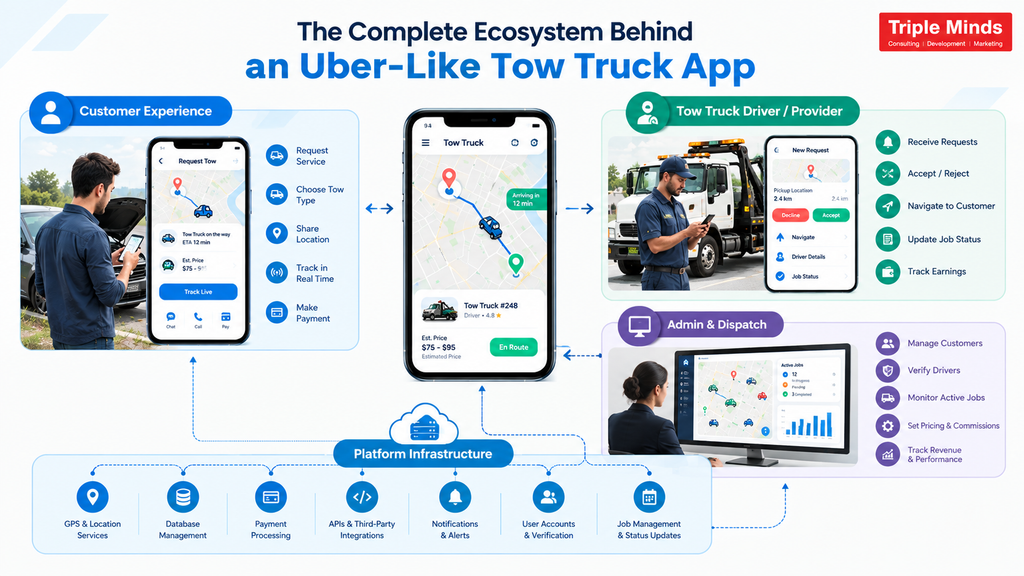
1. Customer App
Customers can use the application to request towing, select towing type, share pickup location, choose destination, view estimated pricing, track the tow truck, communicate with the driver, make payments, and perform similar operations.
2. Tow Truck Driver App
Drivers or towing providers will have a separate interface that allows them to register, upload verified documents, set their available hours, accept or reject customer requests, offer custom prices, navigate to the customer location, and upload service evidence, etc.
3. Admin & Dispatch Dashboard
The business owner needs a centralized control system to manage their customers, verify drivers, manage two trucks, monitor active jobs, configure pricing, manage commissions, track revenues, and analyze business performance.
4. Backend Infrastructure
The backend infrastructure is important because it connects everything and manages major tasks like booking requests, driver verification, GPS coordination, payments, user accounts, job status, API’s and much more.
Read More: How To Create Uber Like Safety App?
Breaking Down the Cost of an Uber-Like Tow Truck Application
UI/UX Design
Estimated cost: $4,000–$12,000
Design can include different interfaces for customer screens, driver screens, admin dashboard, booking flows, maps, payment screens, notifications, service selection, tracking interfaces, and responsive web dashboards.
For applications like Uber Tow Truck, design plays an important role. A customer whose vehicle has broken down does not want to navigate through 10 complicated screens.
Customer App Development
Estimated cost: $12,000–$30,000
The customer app is where your platform actually makes money. Therefore, you must invest well in this module. You should include easy signups, location tracking, saved vehicle info, upfront pricing, and flexible payment.
Real-Time GPS & Dispatch
Estimated cost: $8,000–$20,000+
This is one of the most important components of an Uber-like towing application. When a customer requests help, your system needs to identify suitable drivers.
The basic matching logic could be considered: ETA, distance, availability, vehicle type, service capability, etc. For example, if a customer needs a heavy-duty tow, the system should not simply select the nearest motorcycle recovery vehicle. It should identify the nearest qualified vehicle.
Tow Truck Driver App Development
Estimated cost: $10,000–$25,000
The driver app is another contributor to the overall tow truck white label app development budget. The development cost of this side can vary depending on how much functionality you want to give your towing partners.
A basic driver application may include registration, profile management, document submission, availability status, booking requests, accept/reject functionality, navigation, job status updates, and earnings. However, if you want to go to an advanced level, you can add document verification features, custom offers, job scheduling, and much more.
Admin Panel & Dispatch Management
Estimated cost: $8,000–$20,000
If you want to efficiently manage your Uber-like tow truck marketplace, you require an admin panel. It gives business owners a centralized place to control customers, drivers, bookings, pricing, payments, service areas, and platform operations.
An admin panel can include various modules such as customer management, driver management, booking management, tow truck management, service management, etc. If you are planning a larger towing marketplace, you may require more advanced administrative functionality. The cost increases when the dashboard moves from basic CRUD-based management to real-time operational control.
Backend Development
Estimated cost: $10,000–$25,000+
One cannot see the backend, but it is still the most important part of your Uber-like tow truck application. Customers cannot see the backend, but every action that is performed is processed by the complex logic implemented by app developers in the backend. From user authentication, driver matching, pricing calculations, and payment processing to API integrations, the backend holds everything. Therefore, it needs a less budget-specific approach.
Payment Gateway Integration
Estimated cost: $2,000–$6,000
Imagine a user finding it difficult to make a seamless payment due to a poor interface or slow processing; what do you think would happen? They will not make a booking, and that is what makes payment functionality another important cost component while calculating the total Uber-like tow truck application’s development budget.
However, the development cost can increase if you require more efficient payment workflows.
Push Notifications, SMS & Communication
Estimated cost: $2,000–$5,000
Communication and notifications features may appear small in comparison to customer and driver applications, but they are still important for an on-demand towing platform.
The application can send notifications about bookings, confirmations, arrival status, and payment completion. You can also opt to add in-app chat or calling functionality, so customers and drivers can communicate without exposing their personal contact details.
How Much Do Advanced Features Add to the Development Cost?
Once the core application is ready, you may want to add advanced functionality. These features can significantly affect the final quotation.
| Advanced Feature | Estimated Additional Cost |
| Scheduled Towing | $2,000–$5,000 |
| Dynamic Pricing | $3,000–$8,000 |
| Multiple Service Categories | $2,000–$5,000 |
| Fleet Management | $5,000–$12,000 |
| Corporate Accounts | $4,000–$10,000 |
| Subscription/Membership | $4,000–$9,000 |
| Advanced Analytics | $3,000–$8,000 |
| Multi-Currency | $2,000–$5,000 |
| Multi-Language | $2,000–$6,000 |
| AI-Based Dispatch | $8,000–$20,000+ |
| Insurance/Enterprise Integrations | $5,000–$15,000+ |
*Note*
The information we have explained in the table above is an incremental planning range, not prices that should automatically be added together. Some features share backend infrastructure, so the actual increase in project cost depends on the overall architecture.
How Much Does the Development Team’s Location Affect Cost?
The same two truck application can receive significantly different development quotations depending on the country from which you are hiring your development team. Typical hourly development ranges may look approximately like this:
| Development Region | Approx. Hourly Rate |
| India | $20–$50/hour |
| Eastern Europe | $35–$70/hour |
| Western Europe | $60–$120/hour |
| North America | $80–$150+/hour |
White-Label vs Custom Tow Truck App: Which Costs Less?
A white-label tow trucking app has less upfront cost compared to a custom-built platform.
White-Label Tow Truck App:
The upfront cost can range from $10,000 to $25,000 (can vary from company to company). In this cost, you will receive a pre-built and rebranded product with standard dispatch, tracking, and payment features. However, there can be ongoing costs for monthly licensing fees, server costs, or extra charges if you want custom features.
Custom Tow Truck App:
The upfront cost of a custom tow truck app ranges from $25,000 to $95,000+ for a basic MVP (Minimum Viable Product), and can exceed $100,000 for complex, feature-rich enterprise platforms. You will get software built entirely from scratch to meet your unique requirements, business logic, and workflow. In-house or contracted maintenance, security updates, and infrastructure management can be the ongoing cost for a custom Uber-like tow truck application.
At Triple Minds, our white-label mobile app development approach allows businesses to start with a pre-built, ready-to-launch tow truck application that can be customized around your brand and operational requirements.
Cost of Building an Uber-Like Tow Truck App from Scratch vs White Label
Building an Uber-like tow truck booking app from scratch gives you complete control over the product, but that flexibility comes with a higher initial investment. Whereas a white-label solution uses an existing application foundation with standard functionality, allowing you to reduce development time and control upfront costs.
| Cost Factor | From Scratch | White Label |
| Initial development | Higher | Lower |
| UI/UX customization | Fully custom | Customizable |
| Standard features | Built from scratch | Already available |
| Time to market | Longer | Faster |
| Custom functionality | High flexibility | Depends on the solution |
| Maintenance | Usually higher | Lower or managed, depending on provider |
| Initial investment | Higher | More controlled |
| Feature development cost | Paid individually | Many standard features included |
| Testing & deployment | More extensive | Reduced development effort |
| Scalability | Designed specifically for your requirements | Depends on the underlying solution |
Where Does White Label Actually Save Money?
The cost advantage is not simply that a white-label application has a lower price tag. The larger savings can come from reducing the amount of development work required before launching the final product.
For example, a scratch-built application may require separate development efforts for developing various modules. But with a white-label solution, much of the standard functionality can already exist. Your development budget can instead be allocated toward customization and business-specific requirements. That means you are potentially paying for modification rather than recreation.
How Can You Reduce the Cost of Making an Uber-Like Tow Truck App?
Reducing the cost does not mean removing the features that make your business viable.
Instead, you can focus on spending your initial budget on the functionality required to generate and manage bookings.
- Start with an MVP consisting of a core customer, driver, and admin workflow.
- No need to implement multi-city functionality; launch in one market.
- Prioritize revenue-generating features like booking, dispatch, payments, and tracking.
- Choose your platform by analyzing your target audience through a cross-platform application, reducing development efforts.
- Opt for white-label solutions as they can reduce the cost and timeline associated with developing standard functionality from scratch.
- Introduce advanced features like subscriptions, corporate accounts, analytics, and advanced feature management after validating the core platform.
How Much Should You Budget for Your Tow Truck App?
Your budget should ultimately depend on your business objectives. If you are an entrepreneur, a $25,000–$50,000 MVP may provide enough functionality to launch and validate your idea.
If you want to establish a regional towing marketplace, you may need approximately $50,000–$100,000 for a more comprehensive platform.
If your goal is to create a multi-city roadside assistance ecosystem with advanced dispatch, fleet management, corporate accounts, automation, and integrations, your investment can move toward $100,000–$180,000+.
On the other hand, for an enterprise-grade platform, the budget can exceed $200,000 due to extensive customization and integration.
Tow Truck App Development Cost: In-House vs Development Agency
| Factor | In-House Team | Development Agency |
| Initial hiring cost | Higher | Lower |
| Development expertise | Depends on team | Available immediately |
| Project management | Internal | Agency-managed |
| Scalability | Requires hiring | Easier to scale |
| Maintenance | Internal team | Can be outsourced |
| Initial investment | Higher | Usually more predictable |
Cost of Adding AI to a Tow Truck Booking App
AI can make an Uber-like tow truck booking app more intelligent, but it also adds another layer to your development cost. The cost depends on what you want AI to do.
For a basic AI implementation, you may only need an AI-powered customer support assistant. More advanced systems can use historical bookings, driver availability, location data, traffic conditions, service types, cancellations and other operational data to make predictions and automate dispatch decisions.
| AI Feature | What It Does | Potential Development Cost* |
| AI-powered driver matching | Selects suitable drivers based on location, availability, vehicle capability and historical performance | $5,000–$15,000+ |
| Demand prediction | Forecasts where and when towing requests are likely to increase | $5,000–$15,000+ |
| ETA prediction | Estimates more accurate driver arrival times using historical and real-time data | $4,000–$12,000+ |
| Intelligent dispatch | Automates or assists dispatch decisions using multiple operational signals | $8,000–$20,000+ |
| Customer support chatbot | Handles common booking, pricing, status and support questions | $3,000–$10,000+ |
| Fraud detection | Identifies suspicious bookings, payments, accounts or location patterns | $5,000–$15,000+ |
| Pricing recommendations | Suggests prices based on demand, service type, distance and other factors | $5,000–$15,000+ |
| Driver performance analytics | Identifies patterns in acceptance, cancellations, response times and service performance | $3,000–$10,000+ |
How Much More Does AI Add Your Tow Truck App Development Cost?
You should not simply add the cost of every AI feature to your development budget. Some AI capabilities can share the same data infrastructure, APIs, dashboards, and machine-learning components. A practical AI investment could therefore look like this:
| AI Development Level | Approximate Additional Investment |
| Basic AI integration | $3,000–$10,000 |
| AI chatbot + analytics | $8,000–$20,000 |
| Predictive ETA + matching | $10,000–$25,000+ |
| AI dispatch + demand prediction | $15,000–$35,000+ |
| Advanced AI-powered platform | $30,000–$80,000+ |
These ranges are intended for budgeting rather than quoting. The actual cost depends on whether the AI is API-based, rule-assisted, machine-learning-based or fully custom.
Launch Your Uber-Like Tow Truck Booking App Faster
Build a modern roadside assistance platform with Triple Minds. From customer booking, real-time GPS tracking, AI-powered dispatch, and driver management to payments, fleet operations, and admin dashboards, we develop custom and white-label tow truck booking applications designed for faster launch and long-term scalability.
Launch Your Tow Truck App with Triple Minds
Final Cost to Make an Uber-Like Tow Truck Booking App
So, how much does it cost to make an Uber-like tow truck booking app?
The development cost can start at around $25,000–$50,000 and can exceed $50,000–$100,000. Advanced platforms can require $100,000–$180,000+, while large-scale enterprise solutions can move beyond $200,000. Therefore, the best approach is to define your business model first and then select the technology investment that supports it.
If you’re planning to launch an Uber-like tow truck business but don’t want to spend months building standard functionality from the ground up, Triple Minds can help you launch with a white-label tow truck booking solution customized to your business requirements.
Quick Answers to Common Questions
With a budget under $20,000 you can invest in a white label uber like tow truck app solution. For a fully customized platform with separate customer and driver applications, you need a higher budget.
App maintenance can take up to 15–25% of the initial development cost per year, although your actual maintenance expenses will depend on the technology stack, infrastructure, integrations, traffic, support requirements, and frequency of updates.
A development company will typically need information about your target market, platforms, user roles, required features, towing services, pricing model, payment methods, integrations, number of locations, customization requirements, and expected scale before providing an accurate quotation.
Advanced real-time functionality such as GPS tracking, automated dispatch, complex pricing, fleet management, AI-based matching, and third-party integrations can increase the development costs of uber-like tow truck applications.
Health-conscious consumers have turned calorie counting, macro tracking, meal planning, food logging, and fitness monitoring into everyday habits. As more people use smartphones and wearable devices to manage their health, nutrition tracking apps have become an increasingly attractive opportunity for startups, fitness businesses, dietitians, gyms, and health-tech companies.
According to Grand View Research, the global diet and nutrition app market is projected to grow to USD 4.6 billion by 2030, at a CAGR of 13.4% from 2025 to 2030. Making it a lucrative business opportunity for budding entrepreneurs worldwide.
For someone planning to enter this market, the biggest question is often how much it will cost to build a nutrition tracking application in 2026.
And the answer is: there is no fixed development price.
A nutrition planning app can cost anywhere from $10,000 to more than $300,000, depending on its features, platforms, design complexity, integrations, AI capabilities, security requirements, and development team.
For instance, a simple calorie tracker with manual food logging may sit toward the lower end of the range. On the other hand, a sophisticated platform with AI-generated meal plans, wearable integrations, computer vision, personalized recommendations, nutritionist dashboards, analytics, and multiple applications can move well beyond $200,000.
At Triple Minds, we can help you turn your nutrition app concept into a fully functional, scalable product. From developing core features such as food and calorie tracking, personalized meal planning, and progress monitoring to integrating AI, wearables, panels, and third-party health platforms, our team can build a solution tailored to your business goals. Contact our subject matter expert to discuss your idea and explore the right technology, features, and development approach for your product.
This guide explains why the development cost can range from $10,000 to $200,000 or more. If you’re planning to build your own diet tracking app, you’ll get a clear breakdown of the key cost factors, helping you estimate your development budget before approaching an app development company.
Nutrition Tracking Application & Different Panels
A nutrition planning application helps users monitor and improve their dietary habits through digital tools. Depending on the product concept, users may be able to record meals, count calories, track macronutrients, create meal plans, discover recipes, monitor weight, set nutrition goals, and receive personalized recommendations.
More advanced applications can connect nutrition data with activity, sleep, heart rate, and other health information collected through smartphones and wearable devices. A modern nutrition platform may include three primary components:
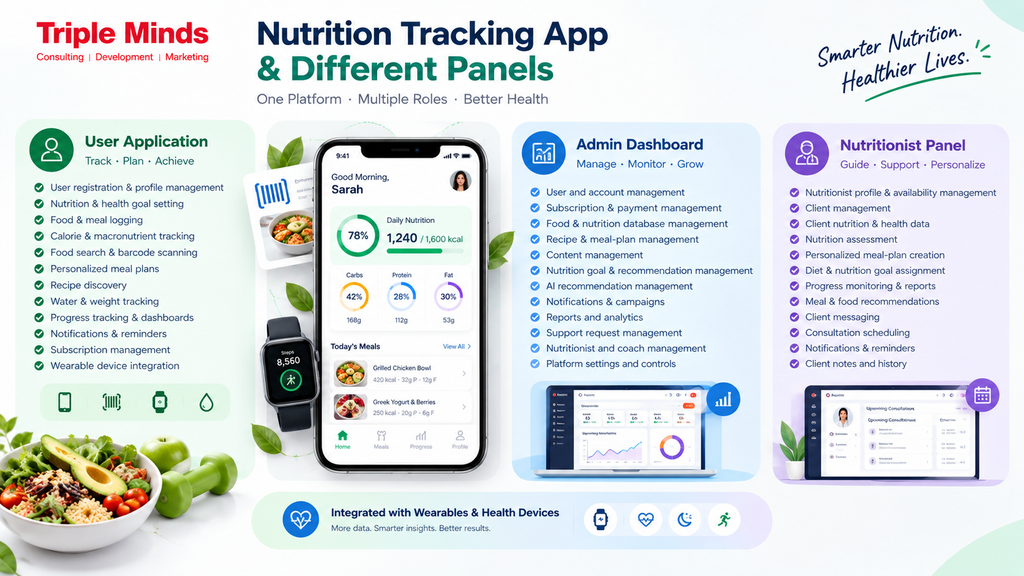
User Application
- User registration and profile management
- Nutrition and health goal setting
- Food and meal logging
- Calorie and macronutrient tracking
- Food search and barcode scanning
- Personalized meal plans
- Recipe discovery
- Water and weight tracking
- Progress tracking and dashboards
- Notifications and reminders
- Subscription management
- Wearable device integration
Admin Dashboard
- User and account management
- Subscription and payment management
- Food and nutrition database management
- Recipe and meal-plan management
- Content management
- Nutrition goal and recommendation management
- AI recommendation management
- Notifications and campaigns
- Reports and analytics
- Support request management
- Nutritionist and coach management
- Platform settings and controls
Nutritionist Panel
- Nutritionist profile and availability management
- Client management
- Client nutrition and health data
- Nutrition assessment
- Personalized meal-plan creation
- Diet and nutrition goal assignment
- Progress monitoring and reports
- Meal and food recommendations
- Client messaging
- Consultation scheduling
- Notifications and reminders
- Client notes and history
Based on how many features you’re planning to add, the overall nutrition app development cost varies.
Cost of Popular Diet and Nutrition Tracking Applications
Looking at established nutrition and fitness applications provides a useful benchmark for understanding the potential cost ceiling of this category.
| App | Estimated Rebuild Cost |
| MyFitnessPal | $17,000–$90,000 |
| Noom | $20,000–$60,000 |
| MyPlate Calorie Counter | $25,000–$120,000 |
| Lifesum | $19,000–$100,000 |
| 8fit | $80,000–$180,000 |
| Peloton | $120,000–$250,000+ |
These are estimated rebuild costs rather than the cost of reproducing every aspect of an established company’s business. The final price depends heavily on how closely the new product attempts to replicate the original.
Nutrition Planning App Development Cost by Complexity
Most nutrition applications can be grouped into three broad complexity levels. Evaluate your business idea and your app complexity to get an estimated app development budget in mind before talking to a freelance developer or development company.
| App Complexity | Estimated Development Cost |
| Simple | $10,000–$91,000 |
| Medium | $55,000–$131,000 |
| Complex | $91,000–$211,000+ |
| Advanced AI-native platform | $250,000–$350,000+ |
Simple Nutrition App
A simple nutrition app generally focuses on core tracking functionality. It may include registration, user profiles, manual food logging, calorie calculations, basic progress tracking, notifications, and an admin panel.
Estimated cost: $10,000–$91,000
The large range reflects differences in design quality, platform count, backend complexity, development location, and customization.
Medium-Complexity Nutrition App
A medium-complexity application may introduce barcode scanning, wearable integrations, subscriptions, social sharing, richer dashboards, secure payments, recipes, and multimedia content.
Estimated cost: $55,000–$131,000
This is often the most practical category for businesses that want a commercially viable product without attempting to replicate every feature of a market leader.
Complex Nutrition App
A complex application can combine AI recommendations, advanced analytics, wearable data, personalized meal plans, coaching, computer vision, real-time data processing, and multiple platforms.
Estimated cost: $91,000–$211,000+
Fully AI-native, multi-platform applications can move toward $250,000–$350,000 or more, particularly when they include sophisticated machine-learning systems and enterprise-level infrastructure.
Key Features of a Nutrition Planning App
The feature set is one of the biggest factors affecting the cost of development.
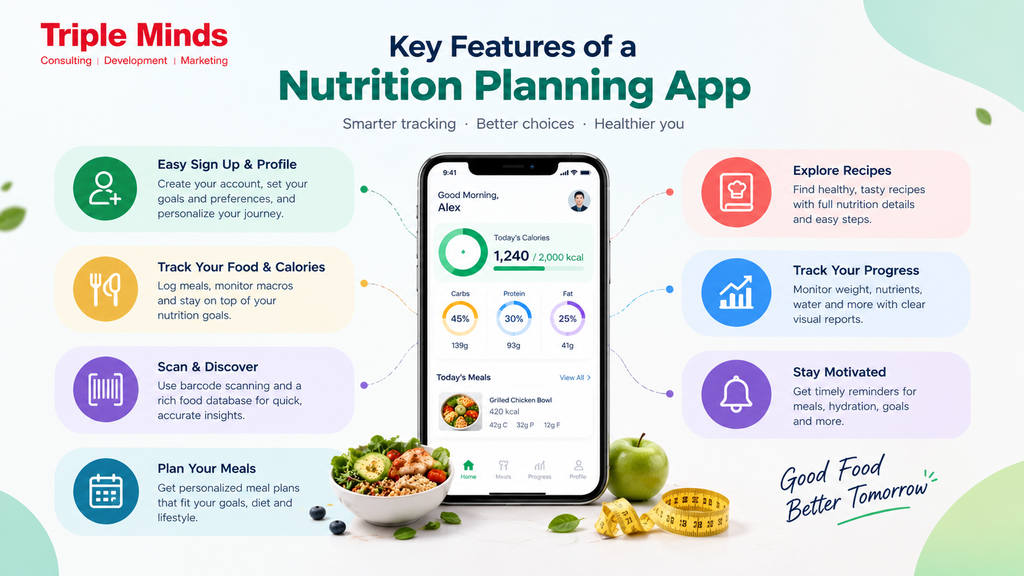
User Registration and Profile
Users should be able to create an account and provide relevant information such as age, weight, activity level, dietary preferences, goals, and other inputs required by the application. Social login, email verification, two-factor authentication, and profile management can be added depending on security and product requirements.
Nutrition and Calorie Tracking
The core functionality of many nutrition applications is food and calorie tracking. Users can search for foods, record portions, and monitor calories and macronutrients throughout the day. More advanced applications can calculate nutritional targets based on the user’s goals and display daily, weekly, or monthly progress.
Food Database
A comprehensive food database is essential for applications centered around nutrition tracking. The database can contain calories, proteins, carbohydrates, fats, serving sizes, ingredients, and other nutritional information. Businesses can integrate third-party databases rather than creating everything from scratch.
Barcode Scanner
Barcode scanning allows users to quickly identify packaged foods rather than manually searching for them. The feature requires camera functionality, barcode recognition, database matching, and appropriate error handling when products cannot be identified.
Meal Planning
Meal planning allows users to organize breakfast, lunch, dinner, and snacks according to their nutritional goals. A basic implementation may allow users to select meals manually. A more advanced version can automatically generate plans based on calorie targets, dietary preferences, allergies, available ingredients, and nutritional requirements.
Recipe Management
Recipe functionality can make a nutrition application more engaging by allowing users to discover meals based on their goals. Recipes can include ingredients, nutritional information, preparation instructions, serving sizes, and calorie breakdowns.
Progress Tracking
Users can monitor weight, calorie intake, macros, water consumption, exercise, and other relevant metrics through dashboards and visual reports. Advanced analytics can identify trends and provide users with actionable insights.
Push Notifications
Notifications can remind users to log meals, drink water, follow their meal plans, complete goals, or check their progress. Personalized notifications can be particularly useful for improving engagement and retention.
Key Factors That Directly Impact The Overall Nutrition App Development Cost
1. Feature List
The feature list is the single biggest cost lever. A basic application with registration, manual food logging, a calendar, and an admin panel may cost approximately $4,000–$50,000.
Standard-plus features such as barcode scanning, push notifications, social sharing, and wearable synchronization can bring the budget to around $50,000–$120,000. Advanced features including AI diet suggestions, live coaching, predictive analytics, and AR/VR can push development toward $120,000–$300,000+.
2. UI/UX Design
Nutrition applications are used frequently, so the interface needs to make logging and tracking as simple as possible.
A template-based design can cost around $5,000–$10,000, while a fully custom interface with bespoke illustrations, animations, and motion design can reach $10,000–$30,000 or more.
UX decisions also affect retention. If users have to navigate through several screens just to log a meal, they may stop using the application.
3. Backend Development
The backend manages authentication, user profiles, nutrition records, meal plans, subscriptions, analytics, notifications, and integrations. Basic backend development involving databases, authentication, APIs, and a limited number of integrations may cost $10,000–$30,000.
Advanced backend systems involving multiple integrations, scalable cloud infrastructure, extensive health-data handling, and stronger security requirements can cost $30,000–$70,000+.
4. Third-Party APIs and Data
Nutrition applications often depend on external services rather than building every capability internally.
Typical costs can include:
- Nutritionix: approximately $50–$500/month depending on usage
- USDA FoodData Central and Open Food Facts: free to integrate, with data-seeding and implementation work required
- Wearable data aggregators such as Terra: around $299/month at a startup tier
- Other API and third-party subscriptions: approximately $1,000–$5,000+/year
The exact costs depend on usage, commercial licensing, API limits, and the provider selected.
5. Development Team Location
Development rates differ substantially by region.
| Region | Typical Hourly Rate |
| USA & Canada | $80–$150/hr |
| Western Europe | $60–$130/hr |
| Eastern Europe | $40–$80/hr |
| India & South Asia | $25–$50/hr |
Outsourcing to lower-cost regions can reduce the overall development budget considerably, although project management, communication, technical quality, and delivery experience should also be evaluated when selecting a development partner.
iOS, Android, or Cross-Platform: Which Costs More?
Platform strategy directly affects the initial budget.
| Platform Strategy | Estimated Cost |
| Single platform | $20,000–$50,000 |
| Native iOS + Android | $40,000–$120,000 |
| Cross-platform | $30,000–$100,000 |
Launching separately on iOS and Android generally requires additional development and testing resources. Cross-platform frameworks such as React Native and Flutter can reduce development effort because much of the application logic and interface can be shared.
For an MVP, launching on a single platform or using cross-platform development can help control costs. Businesses can then expand after validating demand. An exception may be applications that rely heavily on computer vision or platform-specific machine-learning capabilities. In such cases, a native approach can provide advantages depending on the technical requirements.
How Much Does AI Nutrition App Development Cost?
AI is becoming one of the biggest differentiators in nutrition applications. Instead of simply recording what users eat, AI can analyze user information and provide personalized recommendations. Potential AI functionality includes:
- Personalized meal recommendations
- AI-generated meal plans
- Nutrition coaching
- Food recognition from images
- Personalized calorie targets
- Adaptive recommendations
- Voice-based coaching
- Predictive analytics
- Lifestyle recommendations
Estimated costs for individual AI features include:
| AI Feature | Development Cost | Monthly Cost |
| AI nutrition recommendations | $12,000–$30,000 | $300–$800 |
| Personalization engine | $15,000–$40,000 | $200–$1,200 |
| Computer-vision recognition | $20,000–$50,000 | Minimal if on-device |
| Voice coaching | $10,000–$20,000 | $500–$2,000 |
| Full AI stack | $67,000–$165,000 | $1,000–$5,000/month |
An AI-enabled nutrition application with personalization, adaptive meal planning, and analytics can typically fall within the $60,000–$150,000 range, compared with approximately $30,000–$60,000 for a basic non-AI calorie tracker covering the same core use case.
Cloud AI costs also need to be considered. Applications with frequent AI interactions can generate significant inference expenses. One practical strategy is to use on-device models for frequent, lower-risk tasks while reserving cloud-based AI for more complex recommendations.
Nutritionist and Coach Features
Businesses targeting professional nutrition services can add a dedicated coach or nutritionist panel.
The panel can allow professionals to:
- View assigned clients
- Review nutrition history
- Create meal plans
- Set nutrition goals
- Monitor progress
- Send messages
- Share recommendations
- Schedule consultations
- Review reports
Live chat and telehealth-style functionality can further expand the platform. A coach dashboard and associated functionality may form part of a $10,000–$35,000 feature set depending on scope.
This model can also support B2B use cases for gyms, clinics, wellness providers, and independent dietitians.
Security and Compliance Considerations
Nutrition applications can handle sensitive personal and health-related information. Security should therefore be considered from the beginning rather than added after development. Depending on the target market and functionality, requirements may include:
- Secure authentication
- Data encryption
- Role-based access
- Secure API communication
- Audit logs
- Data retention controls
- Privacy management
- GDPR-related requirements
- HIPAA-related requirements where applicable
Compliance-related development can add approximately $5,000–$15,000, while ongoing audits and related expenses may range from $2,000–$10,000 per year.
The exact compliance obligations depend on the application, business model, geographic market, data being processed, and relationships with healthcare providers.
Nutrition App Development Cost by Development Stage
A practical budget can be divided across the development lifecycle.
| Development Stage | Approximate Share |
| Research & MVP validation | 10–15% |
| UI/UX design | 15–20% |
| Frontend & backend development | 35–45% |
| Integrations & QA testing | 15–20% |
| Deployment & launch | 5–10% |
| Ongoing maintenance | 15–25% annually |
Research helps define the target audience, core problem, competitors, business model, and MVP scope before development begins.
Design then establishes the user journey and interface. Development represents the largest portion because it includes the frontend, backend, database, APIs, business logic, and core functionality.
Testing is particularly important for nutrition applications because incorrect calculations, broken integrations, inaccurate data mapping, or synchronization issues can directly affect the user experience.
Custom vs. White-Label Nutrition Planning App Development Cost
Businesses planning to enter the nutrition app market generally have two development options: custom nutrition app development or a white-label nutrition app. The right approach depends on your budget, launch timeline, desired level of customization, and long-term product strategy.
Custom Nutrition Planning App
A custom nutrition planning app is built from the ground up according to your business requirements. You have complete control over the application’s design, features, technology stack, integrations, and user experience.
Custom development is ideal if you want to offer unique functionality such as AI-generated meal plans, personalized nutrition recommendations, food recognition, wearable synchronization, advanced analytics, nutritionist dashboards, or proprietary algorithms.
The cost can typically range from $50,000 to $300,000+, depending on the complexity and number of features.
White-Label Nutrition Planning App
A white-label nutrition app is based on an existing, pre-built platform that can be customized with your brand identity and selected functionality. Instead of developing the entire application from scratch, businesses can launch using an established technical foundation.
White-label solutions are generally more affordable and faster to launch, making them suitable for startups, gyms, fitness businesses, nutrition coaches, and wellness brands that want to test the market.
Depending on the platform and customization requirements, costs can typically start around $9,000 and go up to $30,000+.
Key advantages include:
- Lower initial development cost
- Faster time to market
- Pre-built nutrition and tracking features
- Reduced development effort
- Easier MVP validation
- Branding and feature customization
Hidden Costs of Developing a Nutrition App
The initial development quotation does not necessarily represent the total first-year investment. Several additional expenses should be included in the budget.
App Store and Platform Fees
Businesses selling subscriptions or digital services through mobile stores may incur platform fees. Developer accounts also carry registration costs.
Cloud Infrastructure
A small application may operate on approximately $50–$200/month in infrastructure costs at lower usage levels, while applications serving tens or hundreds of thousands of users can require significantly larger infrastructure budgets.
Video and CDN Costs
Applications that provide workout or nutrition videos need to account for video storage, processing, and content delivery. Video delivery can cost approximately $0.01–$0.05 per minute, depending on the infrastructure and provider.
API Usage
Third-party APIs may initially appear inexpensive but can become a major operational cost as user activity increases.
Scope Creep
Changing requirements during development can significantly increase costs. Scope changes can commonly add 20–40% to an original budget. The best way to reduce this risk is to finalize the MVP scope, feature priorities, technical requirements, and acceptance criteria before development begins.
How Can You Reduce Nutrition App Development Costs?
Building every possible feature from the beginning is rarely necessary. A more practical approach is to develop an MVP containing the features that directly support the core business proposition. For example, a first release might include:
- Registration
- User profile
- Nutrition goals
- Food database
- Manual food logging
- Calorie and macro tracking
- Meal planning
- Progress dashboard
- Notifications
- Basic admin panel
Once users begin interacting with the product, additional features can be introduced based on actual usage. AI coaching, computer vision, wearable integrations, social functionality, nutritionist dashboards, and advanced analytics can then be added in later phases. This approach helps businesses validate product-market fit before committing to a large technology investment.
Ready to Launch a Nutrition Planning App That Users Actually Stick With?
Whether you’re building a calorie tracker, AI meal planner, wellness platform, or dietitian marketplace, Triple Minds helps startups and healthcare businesses launch scalable nutrition applications faster. From AI-powered recommendations and wearable integrations to subscription models and nutritionist dashboards, we build solutions designed for engagement, personalization, and long-term growth.
Contact with Expert Right Now
Bottom Line: Cost to Develop a Nutrition Tracking App
The cost of developing a nutrition tracking app depends on its features, platforms, integrations, AI capabilities, design, and scalability. A simple tracking app can cost significantly less than an AI-powered platform with personalized meal plans, wearable integration, and advanced analytics.
For startups, launching with a focused MVP is often the most practical approach. Core features such as food logging, meal planning, calorie tracking, and progress monitoring can be introduced first, with AI, wearables, coaching, and advanced analytics added as the product grows.
At Triple Minds, we help businesses build nutrition and fitness applications tailored to their goals, from MVPs and white-label solutions to fully customized, AI-powered platforms. Our team can help you select the right features and technology stack while keeping development costs aligned with your business objectives.
Ready to build your nutrition tracking app? Get in touch with Triple Minds to discuss your idea and development requirements.
Quick Answers to Common Questions
A nutrition tracking app can cost anywhere from $10,000 to $300,000+, depending on features, AI capabilities, wearable integrations, platforms, security, and overall product complexity.
AI meal planning, barcode scanning, wearable integrations, nutritionist dashboards, computer vision food recognition, personalized recommendations, and advanced analytics are among the biggest cost drivers.
A basic calorie tracker typically costs $30,000–$60,000, while an AI-powered nutrition app with personalization, meal planning, and analytics can range from $60,000–$150,000+.
Yes. A white-label nutrition app generally starts around $9,000–$30,000+ and provides a faster, lower-cost alternative to building a custom nutrition platform from scratch.
Hidden costs include cloud infrastructure, third-party API usage, app store fees, video hosting, ongoing maintenance, security compliance, and future feature enhancements.
A roadside assistance application can look simple from the customer’s side: choose a service, share a location, request help, track the service provider, and make a payment. But behind that straightforward experience is a much more complex technology stack that includes real-time location, dispatch, service-provider management, payments, notifications, mapping, customer support, administration, and data security.
So, how much does it cost to build a roadside assistance application?
A realistic budget can range from approximately $15,000 to $100,000+, depending on whether you are launching a basic MVP, a multi-provider roadside assistance marketplace, or an enterprise-grade application with AI. But at Triple Minds, you can expect lower cost as we offer white label roadside assistance application that you can customize to your brand identity. In this guide, we break down the cost of roadside assistance app development, the features that influence pricing, technology expenses, AI capabilities, ongoing costs, development timelines, and when a white-label solution can make more financial sense.
Roadside Assistance App Development Cost at a Glance
Before getting into individual components, here is a practical 2026 cost framework:
| Roadside Assistance App Type | Approximate Cost | Typical Scope |
| Basic MVP | $15,000–$30,000 | Registration, service requests, GPS, basic provider management, notifications, admin |
| Mid-Level Platform | $30,000–$80,000 | Real-time tracking, payments, provider network, dispatch, multiple services, analytics |
| Advanced Platform | $80,000–$150,000+ | Advanced dispatch, multiple roles, sophisticated pricing, integrations, scalable infrastructure |
| Enterprise / AI-Powered Platform | $150,000–$250,000+ | AI, intelligent dispatch, fleet/insurance integrations, multi-region support, advanced analytics |
| White-Label Solution | Depends on configuration | Existing platform foundation, branding, selected features, integrations, deployment and support |
These are planning ranges rather than fixed quotations. The actual cost can move significantly depending on the scope and the technology partner you choose.
In 2026, roadside assistance app development can cost anywhere from $15,000 to $250,000 or more, depending on the platform’s complexity, features, technology stack, integrations, development approach, and geographic scope.
But the price tag alone does not tell you much. The more important question is: What are you actually getting for that investment?
Want to Launch a Roadside Assistance App Faster?
Build a feature-rich roadside assistance platform with Triple Minds’ Honk Clone, designed to replicate the core features and functionality of the Honk application. Get a faster route to market with a ready-made solution that can be customized to match your brand, business model, and service requirements.
Launch Your Roadside Assistance App Today
Why Does Roadside Assistance App Development Cost So Much?
A roadside assistance platform is not simply a booking application. It operates on different features such as- location tracking, service descriptions, real-time data monitoring, request altering, and much more. The moment a customer presses “Request Assistance,” several processes may happen simultaneously:
- The platform identifies the customer’s location.
- It determines the type of roadside service required.
- It identifies suitable providers.
- It considers provider availability and service coverage.
- A provider receives the request.
- The job may be assigned to a specific driver or technician.
- The customer tracks the assigned service personnel.
- The provider navigates to the customer’s location.
- The service status changes throughout the job.
- Payment is processed.
- The job is recorded in the system.
- The customer can submit a rating or complaint.
- The administrator can review the entire transaction.
This means the platform requires several interconnected systems rather than a single mobile interface. Therefore, a well-equipped system becomes costlier as it scales.
The more sophisticated these systems become, the higher the development investment.
Four Main Components of a Roadside Assistance Platform
A single interface is not enough for the seamless operation of roadside assistance platforms. It requires different modules for different roles and operations. It delivers a four-role structure and is one of the biggest reasons why a roadside assistance platform costs more than a basic booking application.

1. Customer Application
This module allows the end users to register, add their vehicle information, request assistance, share location, choose service, track assistance, communicate, make payments and review services.
2. Service Provider Panel
The provider interface is designed for towing companies, roadside assistance companies, mechanics, technicians, and other businesses fulfilling service requests. It allows the providers to manage their profile, service areas, availability, jobs, earnings, etc.
3. Technician Panel
This is the operational interface for the person who performs the roadside service.
A provider may accept a job and then assign it to a particular towing driver or technician. Those individuals use this panel to access customer location, vehicle information, navigation, task details, and other relevant updates.
4. Admin Dashboard
The admin panel acts as the central command center. From the admin panel, you can manage users, providers, drivers, service categories, pricing, requests, payments, commissions, service areas, reviews, disputes, analytics, and platform settings.
Feature-Based Cost Breakdown of Roadside Assistance Application
User Registration and Profiles
Basic registration can be inexpensive. However, the cost can increase when you introduce additional features like phone verification, social login, identity verification, multiple vehicle profiles, saved addresses, preferences, membership plans, and account security.
A roadside assistance profile may also need vehicle-specific information such as:
- Vehicle make and model
- Registration details
- Vehicle type
- Fuel or power type
- Insurance information
- Service history
The more data and workflows you want to associate, the more you will have to pay to build a robust backend.
GPS and Real-Time Location Tracking
Location updates are one of the most important features in any roadside assistance app. Customers need to share their location so that providers can locate them and admins can monitor the active jobs. The system may also require to calculate the following:
- Distance
- Estimated arrival time
- Route
- Service area
- Provider proximity
- Travel time
- Location updates
Therefore, we can say that real-time tracking can become one of the major cost-driven elements.
Smart Dispatch
The dispatch feature determines which provider should handle a request. A basic version might simply identify the nearest available provider. But, when you switch to an advanced road assistance application like our HONK clone, you will see that we consider all essential elements like:
- Distance & Traffic
- Provider availability
- Service capabilities
- Vehicle type
- Current workload
- Service area
- Estimated arrival time
- Provider ratings
- Job priority
Ratings and Reviews
Ratings provide feedback about service quality and help administrators monitor the performance of their service provider. Incorporating an advanced review system that categorizes the types of complaints, moderation, dispute handling, provider responses, and automated sentiment analysis.
Analytics and Reporting
You may also need a dashboard that shows the number of requests, completed jobs, cancellation rates, average response time, arrival time, revenue generated, popular services, high-demand locations, customer retention, and much more. Advanced analytics increase development and infrastructure requirements but can provide much greater operational visibility.
Impact of AI Integration on your Roadside Assistance Application Cost
Artificial Intelligence is becoming popular is increasingly becoming relevant to applications like roadside assistance. It can be used beyond a general customer chatbot. For better understanding- An intelligent dispatch engine can provide appropriate service provide by analyzing the location, traffic, service requirements, and historical patterns. The addition of AI can therefore increase development and infrastructure costs, particularly when businesses require custom models, real-time inference, extensive data pipelines, or sophisticated analytics.
| AI Capability | Relative Cost Impact |
| AI chatbot | Low to moderate |
| AI request classification | Moderate |
| AI-powered provider recommendations | Moderate to high |
| Demand forecasting | High |
| Predictive vehicle assistance | High |
| Custom AI/ML models | High to very high |
| AI-powered enterprise decision system | Very high |
AI-Powered Customer Support
An AI assistant can answer questions, explain service options, provide request updates, and guide customers through common roadside issues.
Intelligent Request Classification
Customers do not always know the technical name for the problem your vehicle is facing. For example, someone may say- “My car is not starting, and I hear a clicking noise” An AI-integrated roadside assistance platform can interpret the natural language and help the user classify the likely service requirements.
Predictive Demand Forecasting
AI can analyze historical requests to identify patterns based on the location, time, day, service category, vehicle type, etc. This can help businesses plan provider coverage before demand increases.
Intelligent Provider Matching
Rather than solely depending on the distance to choose a provider, AI can support provider selection based on multiple variables such as skills, requirements, previously resolved issues etc.
Anomaly and Fraud Detection
Machine learning and advanced AI practices prevent you from doing suspicious activities. It can help you identify unusual booking patterns, repeated transactions, suspicious activity, or operational anomalies.
However, AI does not always require building a proprietary model from scratch. With Triple Minds’ roadside assistance clone app, businesses can integrate existing AI APIs and managed AI services to add capabilities such as intelligent assistance, automated support, smart provider matching, and AI-powered dispatch without the high initial investment of developing an AI model from the ground up.
Cost of Third-Party Integrations
Third-party services can significantly influence both development and recurring costs. You can expect a typical cost between $4,500 and $12,000 initially and this cost can rise or even fall depending on your requirements. A roadside assistance platform may require:
Maps and Navigation: Google Maps, Mapbox, TomTom, or another mapping provider.
Payments: Stripe, PayPal, Razorpay, Adyen, or local payment gateways.
Communication: SMS, email, push notification, and voice providers.
CRM: Salesforce, HubSpot, Zoho, or other business systems.
Insurance Systems: APIs for policy, claim, or assistance workflows.
Fleet Management: Integrations for vehicle and fleet information.
Analytics: Product analytics, monitoring, and reporting tools.
*Note*
The development team must build and test these integrations, while the third-party providers may charge based on usage.
How Platform Choice Affects Roadside Assistance App Cost
The cost of roadside assistance app development also depends on the platform for which you want it for.
Android Only
This can be appropriate when your initial target market is heavily Android-oriented.
iOS Only
This may make sense for a specific customer demographic or geographic market.
Android + iOS
Supporting both native applications increases the amount of platform-specific work.
Cross-Platform
Frameworks such as Flutter or React Native can allow businesses to share significant portions of the application code across platforms.
Web Platform
A responsive web interface can provide another customer or provider access channel and may also be useful for booking, account management, and business operations.
Full Ecosystem
A well-built and optimized roadside assistance business may ultimately require:
- Customer mobile app
- Provider mobile app
- Assigned driver/technician app
- Customer web interface
- Provider web dashboard
- Admin web dashboard
This is considerably more complex than developing a single application.
How Much Does a Roadside Assistance App Cost in Different Regions?
| Region | Typical Development Rate | Relative Project Cost |
| North America | $100–$200+/hour | Highest |
| Western Europe | $80–$160+/hour | High |
| Eastern Europe | $45–$90+/hour | Moderate-high |
| Middle East | $50–$100+/hour | Moderate-high |
| India / South Asia | $25–$65+/hour | Moderate |
The final cost still depends on the actual team that you are hiring. Choosing a lower hourly rate does not automatically produce a lower total cost. An inexperienced team may require more hours, create technical debt, or introduce expensive problems during scaling.
Hidden Costs You Should Consider Before Launching a Roadside Assistance App
| Hidden Cost | What It Covers | Estimated Impact |
| App Maintenance & Updates | Bug fixes, security patches, OS compatibility, performance optimization, technical support, and ongoing feature improvements | Around 15–20% of initial development cost annually |
| Server & Cloud Hosting | Cloud servers, databases, storage, bandwidth, backups, scalability, monitoring, and uptime management | $100–$1,000+/month, depending on traffic and platform scale |
| Third-Party API Charges | Usage fees for maps, GPS, geolocation, payment gateways, SMS, email, push notifications, and other external services | Variable; typically usage-based |
| App Store & Publishing Fees | Developer account and publishing costs for platforms such as Apple App Store and Google Play | Platform-specific; recurring or one-time fees may apply |
| Marketing & Customer Acquisition | SEO, paid advertising, social media marketing, content, referral campaigns, promotions, and customer acquisition activities | $500–$10,000+/month, depending on growth strategy |
| Security & Compliance | Security monitoring, vulnerability fixes, data protection measures, compliance updates, and audits where required | Variable based on market and regulatory requirements |
| Technical Support | Post-launch troubleshooting, monitoring, issue resolution, and assistance for administrators, providers, and users | Variable; usually based on a monthly support plan |
| Feature Enhancements | Adding new services, AI capabilities, integrations, payment methods, languages, currencies, or business workflows after launch | Variable based on feature complexity |
Cloud Infrastructure
Your platform requires servers, databases, storage, bandwidth, monitoring, backups, and other cloud resources. As the user base grows, infrastructure requirements grow with it.
Maps and Location APIs
Maps are often usage-based. More customers and more tracking events can mean higher API expenses.
SMS and Communication
Incorporating special security such as OTP messages and transactional SMS creates recurring usage costs.
Payment Processing
Payment providers generally charge transaction fees to securely process a payment. They can even charge commissions.
App Store Fees
Publishing mobile applications can involve platform-specific accounts and service fees.
Maintenance
The annual maintenance can take up to 15-20% of initial development costs. It includes systems change, APIs evolution, bugs, etc.
Security
Security testing, monitoring, backups, access management, vulnerability fixes, and compliance requirements can create additional costs.
Customer Acquisition
An excellent application will not automatically create demand. You may also need to invest in SEO, paid advertisement, social media, partnerships, referral programs, etc.
Roadside Assistance App Development Timeline
A basic roadside assistance MVP may take around 2–4 months, while an advanced version can take 6–12 months or longer, depending on scope, team size, integrations, testing, and deployment requirements.
| Development Stage | Approximate Timeline |
| Discovery & Planning | 1–3 weeks |
| UI/UX Design | 2–5 weeks |
| Core Application | 6–12 weeks |
| Backend & APIs | 6–14 weeks |
| GPS & Dispatch | 3–8 weeks |
| Payments & Integrations | 2–6 weeks |
| QA & Security Testing | 3–6 weeks |
| Deployment | 1–2 weeks |
Custom Development vs White-Label Roadside Assistance Platform
This is one of the most important decisions for an entrepreneur considering investing in a roadside assistance platform: Should you develop the application from scratch or choose a white-label roadside assistance solution? Both approaches have their advantages, but they differ significantly in terms of upfront investment and development time.
Custom Development
With custom development, the product is created specifically around your requirements.
You can choose and monitor its architecture, features, backend, integrations, technology stack, and long-term roadmap.
However, in custom roadside assistance application development, you also take responsibility for the complete product-building process. That eventually results in higher upfront investment, longer time to market, and greater responsibility for ongoing maintenance.
White-Label Solution
A white-label roadside assistance platform starts with an existing technology foundation.
Instead of building every core component from scratch, you can configure the platform around your brand and operating model.
For businesses focused on speed to market and controlled upfront investment, a white-label solution can therefore be a practical alternative to full custom development.
As a white-label HONK-like roadside assistance platform provider, Triple Minds helps businesses launch their own branded roadside assistance platform without going through the entire process of developing every core component from scratch. Want to know more? You can talk to our expert consulting team.
Need a Custom Roadside Assistance Platform?
Build a tailored roadside assistance platform with Triple Minds’ custom development services, designed around your specific business model, workflows, and customer needs. From service booking and driver dispatch to real-time tracking, payments, notifications, and admin management, the platform can be customized with the features your business requires.
Contact Our Experts to Discuss Your Idea
Conclusion
If you are planning to build a roadside assistance application, start with the business model, define the users, map the operational workflow, prioritize the services, select the necessary integrations, and then determine the technology investment.
Want to know what our white label roadside assistance platform could cost?
Get in touch with us now!
Quick Answers to Common Questions
It is not necessary. You can develop separate customer and service provider applications or create role-based experiences within a single application.
Cross-platform development can reduce development time and costs because a shared codebase can be used across iOS and Android.
Yes. A white-label roadside assistance solution can be a faster and more cost-effective as compared to custom development from scratch. Businesses can launch with existing core functionality and customize elements such as branding, workflows, interfaces, features, and integrations depending on the solution.
Yes. Roadside assistance platforms can generate revenue through service commissions, subscription plans, membership packages, emergency service fees, provider registration fees, premium assistance plans, etc.
Quick Answer: An AI chatbot can cost you from none to millions. SMBs pay $0 to $499 per month on flat-rate SaaS, while mid-market teams pay more than $500. Talking about enterprises, their AI chatbot costs much higher than SMB up to $100,000 or more.
When you search the internet to compare the AI chatbot cost for SMB vs enterprise, most of the results will only show the initial numbers. No one will tell you what you’re actually paying for. But, as a reliable AI chatbot development agency, Triple Minds will thoroughly explain each aspect that contributes to the cost of your AI chatbot.
How Much Does an AI Chatbot Cost?
The cost of an AI chatbot is made up of many elements such as base subscription, resolution fees, and add-ons that increase with volume. Two pricing models differentiate between the AI chatbot cost of SMB and enterprise: flat rate and per resolution.
Once you add custom knowledge bases, CRM integration, multilingual capabilities, voice, security controls, analytics, human handoff, RAG, or autonomous AI agents, the investment can increase significantly.
For SMBs, the priority is often affordability, speed, and measurable ROI. Enterprises usually have a different set of requirements: security, scalability, integration, governance, compliance, customization, and reliability. In this blog, we will map the pricing structure against real volume scenarios.
| AI Chatbot Type | Estimated Development Cost | Typical Timeline |
| Basic FAQ chatbot | $3,000–$10,000 | 2–4 weeks |
| AI-powered SMB chatbot | $8,000–$25,000 | 4–8 weeks |
| RAG-based chatbot | $15,000–$50,000 | 6–12 weeks |
| Advanced business chatbot | $30,000–$75,000+ | 8–16 weeks |
| Enterprise conversational AI | $50,000–$150,000+ | 3–6 months |
| Enterprise AI platform/agent system | $150,000–$500,000+ | 6–12+ months |
This is not a fixed market price, but just an estimated planning range. The final cost depends heavily on your business requirements and the technology architecture that your potential chatbot development company will execute.
For example, an API-based chatbot using an existing foundation model can be relatively inexpensive to build. A system requiring proprietary model training, complex RAG pipelines, multiple enterprise integrations, private deployment, advanced security, and continuous optimization is a very different project.
Build an AI Chatbot That Actually Delivers ROI
A chatbot should do more than answer FAQs. Triple Minds builds AI chatbots that automate support, qualify leads, retrieve business knowledge with RAG, integrate with CRM and ERP systems, and scale securely across your business. From SMB automation to enterprise conversational AI, we design chatbots built for production—not just demos.
Explore AI Chatbot Development Services
SMB vs. Enterprise AI Chatbot Cost at a Glance
| Cost Factor | SMB AI Chatbot | Enterprise Chatbot |
| Primary objective | Support, leads, automation | Enterprise-wide automation and intelligence |
| Typical budget | $8K–$50K | $50K–$500K+ |
| Deployment | Cloud/SaaS/API | Cloud, private cloud, hybrid or on-premise |
| Integrations | 1–3 systems | Multiple enterprise systems |
| AI model | Existing API/foundation model | Multiple models, fine-tuned or customized models |
| Knowledge base | Basic RAG | Enterprise-grade RAG and data pipelines |
| Security | Standard security | Advanced security and governance |
| Users | Hundreds/thousands | Thousands to millions |
| Channels | Website/mobile | Omnichannel |
| Analytics | Standard dashboards | Advanced monitoring and business intelligence |
| Compliance | Basic requirements | Industry-specific requirements |
| Maintenance | Basic support Continuous | MLOps/AI optimization |
The key point is that enterprise chatbot costs do not increase simply because the company is larger. Instead, they increase because enterprise requirements introduce additional technical and operational complexity.
Now let’s see individual cost plan of both chatbots.
The Cost of AI Chatbot for SMBs
Small and medium-sized businesses generally do not need to build a massive AI platform from day one. Their chatbot may be designed to solve one or two clearly defined problems, such as answering customer questions, qualifying leads, recommending products, booking appointments, or reducing repetitive support requests. Typical SMB AI Chatbot costs can range from $8,000 to $50,000. It may include the following:
- Conversational AI
- Website integration
- Basic customer support
- FAQ automation
- Product or service information
- Lead capture
- Human-agent escalation
- Basic analytics
- CRM integration
- Knowledge base
- RAG
- Multilingual responses
Example: SMB Customer Support Chatbot
Suppose an eCommerce business receives 5,000 customer questions per month.
Instead of hiring additional support personnel to handle repetitive questions, it develops an ecommerce chatbot capable of answering questions about order status, shipping, returns, and refunds. The AI chatbot can retrieve relevant information from the company’s knowledge base and escalate complicated cases to human agents.
| Component | Approximate Cost |
| Discovery & architecture | $1,000–$4,000 |
| Conversational UI | $1,500–$5,000 |
| AI integration | $2,000–$7,000 |
| RAG/knowledge base | $3,000–$10,000 |
| CRM/eCommerce integration | $2,000–$8,000 |
| Testing & deployment | $1,500–$5,000 |
| Estimated total | $11,000–$39,000 |
The Cost of AI Chatbot for Enterprise
Enterprise chatbot development is fundamentally different because rather than remaining isolated customer-support widget, it becomes part of the organization’s technology ecosystem. To resolve issues or answer user queries, it may need to communicate with the following:
- CRM systems
- ERP platforms & HR systems
- Data warehouses
- Customer databases
- Knowledge repositories
- Ticketing systems
- Internal applications
- Identity-management platforms
Talking in general, the enterprise AI Chatbot Cost between $50,000–$500,000+. A relatively focused enterprise chatbot may start around $50,000. If your deployment is more complex, it can reach $150,000, $250,000, $500,000 or more depending on integrations, data requirements, security, AI architecture, user volume, and deployment model.
For businesses building a broader AI ecosystem rather than a standalone chatbot, you can consider working with an enterprise AI development company.
AI Chatbot Pricing Models: Flat Rate vs. Per-Resolution
When you’re trying to estimate what an AI chatbot will actually cost you, development complexity is only half the story. Another aspect is knowing how you’ll be billed for using it, since that decision can swing your budget significantly. Most providers price their chatbots one of two ways: flat-rate or per-resolution.
The right model depends on factors such as your business size, expected conversation volume, level of customization, and whether you need a simple customer-support bot or a completely integrated enterprise AI system.
1. Flat-rate Pricing
With a flat-rate model, you pay a fixed amount for the chatbot, usually either as:
- A one-time development fee
- A monthly subscription
- An annual license
For small and mid-sized businesses, this model tends to make budgeting a lot easier due to predictable costs. A typical setup might look like a custom chatbot development followed by a recurring monthly fee that covers hosting, maintenance, support, and AI infrastructure.
On other side, enterprises can also work with the fixed project fee. The only difference is that the numbers climb fast, because their chatbots usually need custom integrations, strong security, private deployment, robust analytics, and connection to CRM, ERP, HT portals, or internal database etc.
For example: If an SMB spends $15,000 on chatbot development and pays $1,000 per month for hosting, maintenance, and ongoing AI services, its first-year base investment would be approximately $27,000.
2. Per-resolution Pricing
Per-resolution pricing works differently. Instead of a flat fee, you pay based on how many customer conversations or support issues the chatbot successfully resolves.
Say a provider charges $1 per resolution, and your chatbot closes to 3,000 conversations in a month. That’s: 3,000 resolutions × $1 = $3,000
This model can be appealing because the expense is linked directly to chatbot usage. An SMB with a relatively small support volume may therefore avoid paying for excessive capacity that it does not need.
However, for enterprises the economics can change. A company processing hundreds of thousands of customer interactions every month could face substantial recurring costs if every resolution is billed individually.
Flat Rate vs. Per Resolution
| Factor | Flat Rate | Per Resolution |
| Pricing basis | Fixed project/subscription fee | Number of resolved interactions |
| Budget predictability | High | Medium |
| Best suited for | Custom implementations | High-volume support |
| Upfront investment | Usually higher for custom builds | Usually lower |
| Cost as usage increases | May remain relatively stable | Increases with resolutions |
| Customization | Usually higher | Depends on provider |
| Enterprise suitability | Strong for complex systems | Useful for high-volume support |
Which Model is Better for SMBs vs. Enterprises?
If your chatbot usage is fairly steady month to month, flat-rate pricing is usually the easier path as it gives you a clearer view of your tech spending and simplifies planning. Per-resolution pricing can also be a solid option if your support volume runs low, since you’re paying in line with actual usage rather than covering capacity you don’t need
For enterprises, the decision requires more careful analysis. A per-resolution model may become expensive at scale, while a flat-rate/custom development model can provide greater control over integrations, data, security, and functionality.
One thing worth keeping in mind: flat-rate and per-resolution pricing only describe how you’re billed, not what the chatbot actually costs to build and run. You’ll likely still face separate costs for AI model usage, RAG infrastructure, integrations, cloud hosting, security, maintenance, and ongoing optimization.
So rather than judging a chatbot solution by its advertised pricing model alone, it’s worth calculating the total cost of ownership (TCO) to get the real picture.
Which Factors Determine the Cost of AI Chatbot Development?
Before comparing the cost of SMB and enterprise AI chatbots, you need to understand the layers of this cost.
Total AI chatbot cost = Discovery + Design + Development + AI/model costs + Integrations + Infrastructure + Testing + Deployment + Maintenance
Let’s explore different factors that make a big change to the final cost of an AI Chatbot.
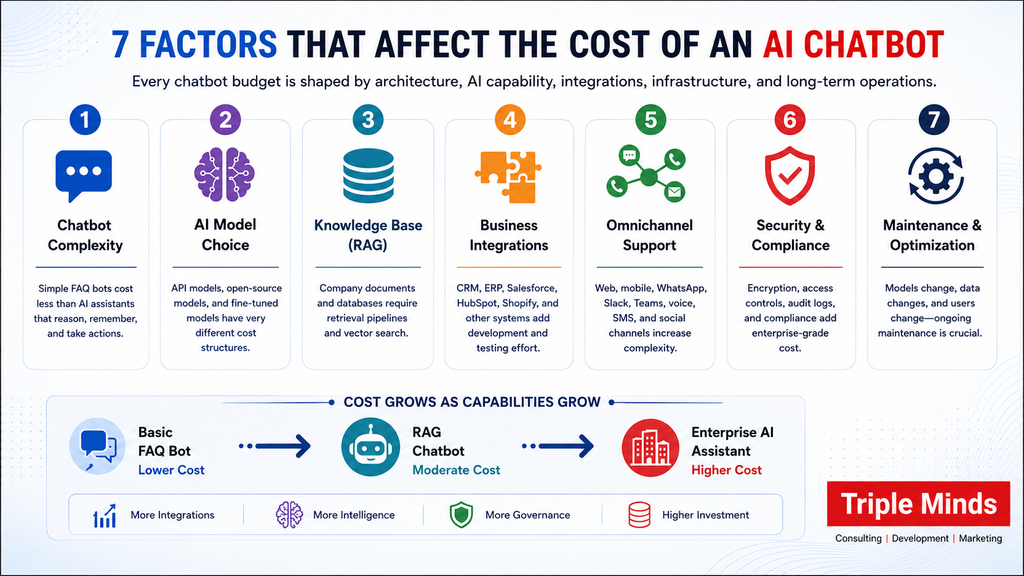
1. Chatbot complexity
A chatbot that answers predefined questions is relatively simple.
A chatbot that understands context, remembers previous conversations, retrieves information from internal documents, accesses customer data, calls APIs, and performs actions requires significantly more engineering.
2. AI model
Businesses can use third-party foundation models through APIs, open-source models, or custom-trained/fine-tuned models. The model choice affects both development effort and recurring inference costs.
3. Knowledge base
If the chatbot needs to answer questions using company documents, product catalogs, policies, manuals, contracts, or internal knowledge, you may need a RAG architecture.
A RAG architecture becomes much more powerful when your chatbot can retrieve answers directly from your company’s databases and internal documents. Learn how a Database Chatbot works and how businesses use natural language to securely query knowledge bases, product catalogs, CRM records, PDFs, and other internal data sources in real time.
4. Integrations
Connecting a chatbot with systems such as Salesforce, HubSpot, SAP, Oracle, Shopify, databases, help desks, ERP systems, or internal applications adds development and testing effort.
Integrating an AI chatbot with CRM, ERP, databases, and internal business tools is often the most complex part of development. Learn how to securely connect AI with your existing technology stack in our guide on How to Integrate AI into an Existing Business Platform and understand the role of APIs, webhooks, authentication, permissions, and enterprise integration layers.
5. Channels
A web chatbot is simpler than an omnichannel conversational AI platform supporting:
- Website
- Mobile applications
- Slack
- Microsoft Teams
- SMS
- Voice
- Social messaging channels
6. Security and compliance
Enterprise applications may require encryption, role-based access control, audit trails, private cloud deployment, data isolation, monitoring, and compliance controls.
7. Maintenance
AI applications are not necessarily “build once and forget.”
Models change. APIs change. Business information has changed. User behavior changes. Your chatbot therefore needs monitoring, evaluation, optimization, and maintenance.
What Makes Enterprise Chatbots More Expensive?
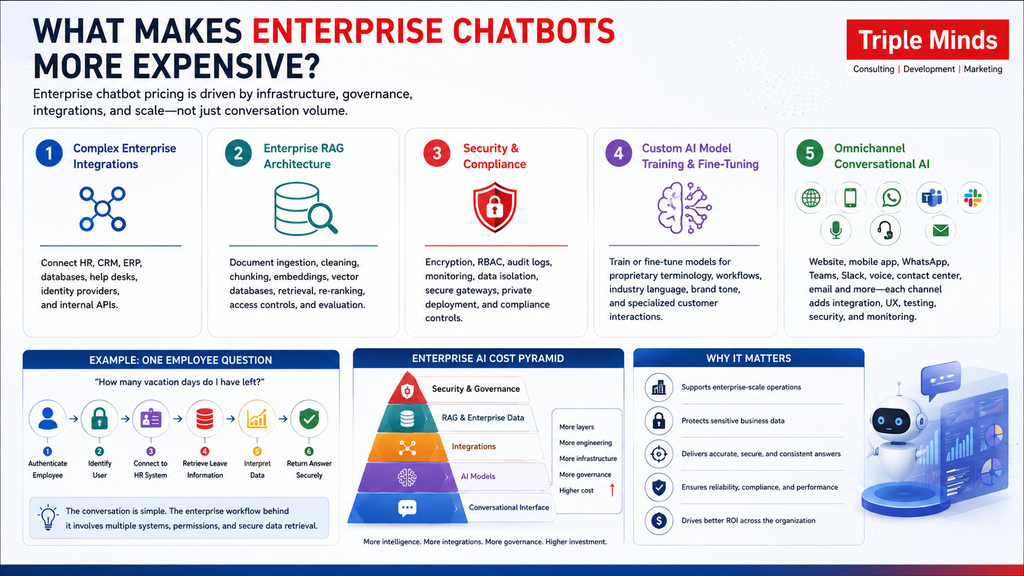
1. Complex Enterprise Integrations
Consider an employee asking: “How many vacation days do I have remaining? “A basic chatbot can only provide a generic answer. But, an enterprise AI assistant needs to:
- Authenticate the employee.
- Identify the user.
- Connect to the HR system.
- Retrieve the employee’s leave information.
- Interpret the data.
- Return the answer securely.
However, the AI conversation itself may be relatively simple. But the integration behind the conversation is not.
2. Enterprise RAG architecture
Enterprise chatbots often need access to large collections of proprietary information such as PDFs, manuals, contracts, product documents, HR policies, knowledge bases, technical documentation, etc. A production-grade RAG system may require:
- Document ingestion
- Data cleaning
- Chunking
- Embedding generation
- Vector databases
- Metadata management
- Retrieval
- Re-ranking
- Access controls
- Evaluation
3. Security and Compliance
Security is often one of the largest differences between an SMB chatbot and an enterprise AI system. An enterprise chatbot may process confidential information such as customer records, financial data, employee information, contracts, intellectual property, etc. Therefore, the system may need the following:
- Encryption
- Identity and access management
- Role-based permissions
- Audit logs
- Data isolation
- Secure API gateways
- Monitoring
- Threat detection
- Private deployment
- Compliance controls
All these requirements can increase both development and infrastructure costs.
4. Custom AI model Training and Fine-tuning
Not every chatbot needs a custom model. Some models have a strong foundation model that combines good prompting, RAG, and application logic to deliver excellent results. However, businesses with highly specialized requirements may benefit from model fine-tuning or custom training. For example, a company may want an AI system trained to understand:
- Highly specialized terminology
- Proprietary workflows
- Industry-specific language
- Brand communication
- Internal classification systems
- Specialized customer interactions
This is where AI model training and fine-tuning services can become part of the overall project architecture.
5. Omnichannel Conversational AI
Enterprise customers increasingly expect consistent experiences across multiple channels. An enterprise conversational AI system may need to operate across:
- Website
- Mobile app
- Microsoft Teams
- Slack
- Voice
- Contact center
Each additional channel introduces integration, UX, testing, security, and monitoring requirements. The objective should not simply be to deploy the chatbot everywhere but to maintain appropriate context and permissions across the channels.
Analyzing the Cost of AI Chatbot by its Features
| Feature | Cost Impact |
| Basic conversational UI | Low |
| FAQ automation | Low |
| Lead capture | Low–Medium |
| CRM integration | Medium |
| RAG knowledge base | Medium–High |
| Multilingual AI | Medium |
| Voice chatbot | Medium–High |
| Payment integration | Medium–High |
| Personalization | High |
| Complex workflow automation | High |
| Multi-agent architecture | High |
| Custom model training | High |
| Private deployment | High |
| Enterprise security | High |
| Advanced analytics | Medium–High |
Note: Features should be evaluated according to business value, not simply added to make the chatbot appear more advanced.
Make Your AI Chatbot Smarter With Custom AI Models
Generic AI models don’t always understand your business, products, or workflows. Triple Minds helps businesses fine-tune and train AI models using proprietary knowledge, industry terminology, internal documents, and brand-specific conversations to improve accuracy, reduce hallucinations, and deliver more relevant responses.
Explore AI Model Training Services
Final Takeaway: How Much Should You Budget for an AI Chatbot?
For Small-Medium businesses, a customized AI chatbot’s approximate cost is $8,000-$50,000. This cost can vary depending on features, integrations and other requirements.
Similarly, enterprises’ chatbots start around $50,000 and can go beyond $150,000, $250,000, $500,000 or more due to the proprietary data, advanced security, custom workflows, multi-agent capabilities, etc.
On the top of all this, the most important question is not: “How much does an AI chatbot cost?” Instead, it is “What should the AI accomplish, and what architecture is required to accomplish it reliably?”
Need Help with Your AI Chatbot?
The smartest approach is to start with your business objective, define the required capabilities, estimate usage, and integration complexity. After that you can select the architecture that delivers the best balance between cost, performance, scalability, and ROI.
If you are planning to build a production-grade chatbot or a broader AI system? Count on Triple Minds. We can help you evaluate the use case, pick the right AI architecture, integrate models into your existing tech stack, and build something that is meant for the real-world deployment. Want to know more? Get in touch with us now.
Quick Answers to Common Questions
Buying a chatbot platform is initially less expensive and can be suitable for businesses with simple requirements. Custom development typically costs more upfront but provides greater control over functionality, integrations, data, security, and scalability.
Yes. Businesses may incur recurring expenses for AI model/API usage, cloud hosting, storage, monitoring, maintenance, security, integrations, model optimization, and knowledge-base updates.
It depends on the use case. A chatbot is primarily designed for conversational interactions, while an AI agent can use tools, access business systems, make decisions, and execute multi-step workflows.
A basic chatbot may take a few weeks to develop, while a customized RAG-based chatbot can take several weeks to a few months. Enterprise-grade systems involving complex integrations, security, custom models, and workflow automation can take several months or longer.
The AI girlfriend app market is expected to reach USD 11.06 billion by 2032, growing at a CAGR of 20% over the forecast period (2025-2032). And that’s why budding entrepreneurs from around the world are planning to develop their own AI girlfriend app.
And what’s the first thing someone will search if they are thinking about building their own AI girlfriend platform?
Yes, you have guessed it right – how much does it actually cost ot build an AI girlfriend app?
AI girlfriend apps let users create and customize a virtual partner, then interact through text, voice, images, and even video calls. Behind this seemingly simple experience is a complex technology stack involving AI models, real-time communication, personalization, media generation, and a polished UI/UX designed to keep users engaged.
Building all of this requires serious development resources, especially if you want to support thousands of active users without compromising performance. And all of this comes at a cost … but how much?
The honest, unpadded answer:
- A production-ready AI girlfriend app starts around $15,000–$20,000 for a core build with chat, image generation, and subscriptions.
- A differentiated platform with voice calling, avatars, and gamification runs $25,000–$45,000.
- A full first-year budget — development, hosting, compliance, and marketing — typically lands between $35,000 and $55,000+.
But this is just the tip of the iceberg. In this post, we break down AI girlfriend app development cost and exactly where that money goes:
- The feature set that defines the category,
- A stage-by-stage cost table,
- Tech stack decisions that make or break scalability,
- Compliance work most cost estimates conveniently skip,
- Monetization models that determine whether the investment pays back in months or never.
We at Triple Minds have successfully shipped AI girlfriend platforms like Candy AI clone, DreamGF Clone, and many other similar platforms. We have published a Candy AI case study showing exactly how we cut development time in half, and we now ship white-label clones in a guaranteed 21 days. Launch your own white label AI girlfriend app in just $15,000 – get in touch to know more!
Why AI Girlfriend Apps Are Expensive to Get Right
On the surface, an AI girlfriend app looks like “a chatbot with a face.” But in reality it’s way more than just a virtual character. AI girlfriend platform is a multi-model AI product stitched together from several expensive, independently scaling systems:
- A conversational engine that maintains personality and memory across thousands of messages
- Image (and increasingly video) generation for a customized character
- Voice synthesis and, for premium tiers, real-time voice calling
- A subscription and micro-transaction payment system
- Content moderation and age-verification infrastructure that most consumer apps never need
Each of the above-mentioned features of an AI girlfriend app has its own engineering discipline. And that’s what drives the cost of an AI girlfriend app. The cost is the sum of five or six specialized systems working together in real time, which is exactly why estimates that only price out “an AI girlfriend chatbot” tend to be wildly optimistic.
Launch Your AI Girlfriend App with Triple Minds
Launch your AI companion platform with a team that understands development, compliance, monetization, and growth. Triple Minds offers white-label and custom AI girlfriend app solutions, backed by experience across the AI companion ecosystem—including working with Candy AI as a marketing partner—so you get consulting, development, and marketing under one roof.
Schedule a Session With Our Experts
AI Girlfriend App Development Cost at a Glance
As demand for AI girlfriend platforms continues to grow, entrepreneurs have several development options to choose from based on their budget, goals, and desired level of customization. The table below outlines the estimated cost ranges for white-label, standard, premium, and enterprise AI girlfriend platforms, helping you understand the investment required for each approach.
| Build Tier | What’s Included | Timeline | Cost (USD) |
| White-Label | Pre-built core, custom branding, ready to deploy | 2–3 weeks | $9,000 – $12,000 |
| Standard Build | Text chat, image generation, voice notes, subscriptions, real-time voice calls, gamification, custom avatars | 10–12 weeks | $25,000 – $35,000 |
| Premium Build | + 3D/animated avatars, video calling, fine-tuned models | 14–18 weeks | $40,000 – $60,000 |
| Enterprise Platform | Multi-tenant, custom LLM, full global compliance | 5–7 months | $75,000 – $130,000+ |
These ranges hold up across most of the market data and agency pricing currently public for the category. Further, the spread mainly comes down to how much of the stack is custom-built versus assembled from existing AI APIs, and how much compliance work a given target market requires.
Detailed AI Girlfriend Platform Cost Breakdown by Development Stage
Zooming into a standard $25,000–$35,000 build, here’s roughly how the budget is typically allocated stage by stage:
| Development Stage | Cost Range (USD) | What It Covers |
| Discovery & Product Strategy | $1,500 – $2,500 | Competitor teardown, use-case validation, scope lock |
| UI/UX Design | $2,500 – $4,500 | Character builder flow, chat UI, onboarding, mobile + web |
| Conversational AI Engine | $5,500 – $8,000 | LLM integration, personality prompting, memory system |
| Image/Video Generation Module | $4,500 – $6,000 | Generation pipeline, character consistency, gallery |
| Voice Integration | $2,500 – $4,000 | Text-to-speech, voice notes, optional real-time calling |
| Subscription & Payments | $2,000 – $2,500 | Tier logic, token/credits wallet, payment processor wiring |
| Gamification & Retention Features | $2,500 – $4,000 | Streaks, milestones, relationship progression system |
| Compliance & Moderation | $2,500 – $3,500 | Age verification, content filters, audit logging |
| QA & Testing | $1,000 – $2,500 | Functional, load, edge-case, and payment testing |
| Deployment & Launch Support | $1,000 – $1,800 | Infrastructure setup, monitoring, post-launch fixes |
| Total | $25,500 – $39,300 | Production-ready platform, fully branded |
Two line items consistently surprise first-time founders: the image/video generation module and compliance. Text chat is now a commoditized capability thanks to modern LLMs, but generating consistent, on-brand character images at scale- that too, without blowing the GPU budget takes real engineering. Compliance, meanwhile, isn’t optional polish; it’s what keeps the app bankable and off the front page of a regulatory takedown notice.
Where the Money Actually Goes?
Now let’s break down AI girlfriend app cost based on a typical $25,000 build by percentage of total spend:
- Conversational AI & memory engine — ~25%. This is the product. Personality consistency, long-term memory, and natural conversational flow are what determine whether users come back on day 30.
- Image/video generation — ~18%. Character customization and visual content are the single biggest engagement and upsell driver in the category.
- UI/UX & frontend — ~15%. The character-builder experience alone often gets more design iteration than the rest of the app combined.
- Voice & gamification — ~12%. Increasingly table stakes rather than a differentiator.
- Compliance & moderation — ~12%. Non-negotiable, and consistently underestimated in DIY cost estimates.
- Payments & subscriptions — ~10%. Standard subscription logic plus non-standard payment processor integration.
- QA & deployment — ~8%. Higher than typical consumer apps because of the payment and moderation edge cases involved.
Core AI Girlfriend Platform Features That Define the Cost Floor
Regardless of budget tier, a competitive AI girlfriend app in 2026 needs to ship with a baseline feature set. Anything less and the product will struggle against the established players users are already comparing it to.
- Character customization: Appearance, personality traits, voice, and backstory, set during onboarding and editable later. This is the first-impression feature and directly affects activation rate.
- Persistent memory: The AI should remember names, preferences, and prior conversations across sessions. This is consistently cited as the single biggest driver of retention in the category — users churn fast when the AI “forgets” who they are.
- Multi-modal conversation: Text as the baseline, with voice notes and image generation as expected premium features rather than nice-to-haves.
- Tiered subscriptions plus microtransactions: A free tier to drive acquisition, a mid-tier subscription for expanded features, and a credits or token system for one-off purchases like extra images or voice minutes. Stacking these monetization layers is what gives the category its unusually high ARPU compared to typical consumer subscription apps.
- Mood and tone adaptation: The AI should adjust its responses based on conversational context and user sentiment — this is what separates a “companion” from a static chatbot.
- Cross-platform access: Web and mobile, ideally from a single codebase, so users aren’t locked into one device.
AI Girlfriend App Features That Push the Budget Higher
Once the baseline is covered, these are the features that meaningfully differentiate an AI girlfriend platform and meaningfully raise the price:
- Real-time voice calling. Requires sub-second round-trip latency across speech-to-text, the language model, and text-to-speech, which means streaming architecture rather than simple request/response calls.
- Animated or 3D avatars with lip-sync. Genuinely expensive — real-time rendering and lip-sync pipelines are GPU-intensive and require specialized engineering separate from the core chat stack.
- Fine-tuned or custom-trained personality models. Off-the-shelf models with strong prompting get most platforms 80% of the way there; custom fine-tuning is a real cost multiplier best reserved for platforms with enough usage data to justify it.
- Gamification and relationship progression systems. Streaks, milestones, and unlockable content meaningfully improve retention but require their own reward-economy design and balancing work.
- Multilingual support. Each additional language typically needs its own voice model and translation QA pass, not just a translated UI.
Tech Stack: The Decisions That Determine Whether It Scales
Two platforms with an identical feature list can have wildly different costs and reliability depending on stack choices. Here’s what a production-grade build typically looks like:
| Layer | Common Choices | Why It Matters |
| Language model | Frontier APIs (Claude, GPT) for safe-mode conversation; self-hosted open models for less restricted flows | Balances output quality against cost and content flexibility |
| Image generation | Diffusion-based models (SDXL, Flux) via managed or self-hosted GPU pipelines | Self-hosting lowers per-image cost at scale but requires GPU ops expertise |
| Voice (TTS/STT) | ElevenLabs, Cartesia, Whisper, Deepgram | Latency and voice quality directly affect how “real” the companion feels |
| Memory / vector database | Pinecone, Qdrant, Weaviate, or pgvector | Enables persistent, per-user memory without ballooning the context window |
| Frontend | Next.js, React Native, or Flutter | A shared codebase across web and mobile cuts long-term maintenance cost significantly |
| Backend | Node.js or Python (FastAPI), PostgreSQL, Redis | Proven for high-concurrency chat workloads |
| GPU hosting | RunPod, Lambda Labs, or major cloud GPU instances | Spot/on-demand pricing keeps inference costs predictable |
| Payments | Standard processors for safe-mode content; specialized adult-friendly processors if content skews explicit | Mismatched processor choice is one of the most common reasons launches get shut down mid-flight |
The single biggest scaling mistake founders make is architecting the chat and image-generation pipelines as synchronous, unthrottled calls. Without caching, request queueing, and per-tier rate limits, a handful of heavy users can quietly consume a disproportionate share of the GPU budget — turning a profitable subscriber into a money-losing one.
The Compliance Work Most Estimates Leave Out
This is where AI girlfriend app development diverges sharply from typical consumer app development, and it’s the reason a “just wire up an LLM” estimate is almost always too low.
- Age verification. A growing list of jurisdictions such as UK, EU, and several US states now require robust age-verification flows for platforms with mature or sensitive content, not just a checkbox.
- Content moderation. Every generated message and image needs to pass through a moderation layer, both to enforce platform policy and to prevent the generation of any content involving minors. A zero-tolerance requirement with legal as well as reputational consequences.
- Payment processor approval. Mainstream processors have strict content policies; platforms that skew toward explicit content typically need specialized payment processors built for adult-adjacent businesses, along with a healthy chargeback rate to keep that relationship intact.
- Data privacy. Conversations with an AI companion are often deeply personal. GDPR- and CCPA-aligned data handling, clear retention policies, and user data export/delete tools aren’t optional extras in this category, but they’re baseline trust infrastructure.
- Prompt injection and jailbreak defense. Companion apps are a frequent target for users attempting to bypass content guardrails. Layered safety checks are not a single system-prompt instruction; they are required to hold up under sustained adversarial use.
Budgeting 10–15% of total development cost toward compliance and moderation isn’t a nice-to-have; it’s what keeps the platform operating past its first few months.
Ongoing Costs After Launch
Development cost is only the first bill. Running the platform carries its own recurring costs that scale with usage:
- AI inference (LLM + image + voice APIs): Typically the largest recurring line item, scaling directly with active users and how heavily they use image/voice features.
- Hosting and infrastructure: Servers, CDN, and database hosting, generally modest until the platform reaches meaningful scale.
- Vector database / memory storage: Grows with the number of active users and the depth of memory retained per user.
- Payment processing fees: Often higher than standard e-commerce rates, particularly with specialized processors.
- Content moderation tooling: Either a licensed moderation API or the ongoing engineering cost of maintaining a custom classifier.
- Customer support and community management: Companion apps generate a disproportionate volume of support tickets tied to billing and content preferences, which is easy to underbudget.
Early-stage platforms typically see monthly operating costs in the $1,000–$3,000 range, scaling to $5,000–$10,000+ per month once the user base reaches meaningful five-figure territory.
Factors That Move the Price Up or Down
| Cost Driver | Impact on Budget |
| Real-time voice or video calling | +15% to +30% |
| Custom-trained or fine-tuned models | +20% to +35% |
| 3D or animated avatars | +25% to +40% |
| Native iOS/Android apps vs. single web app | +15% to +25% |
| Multi-language support | +10% to +20% |
| Advanced gamification and progression systems | +8% to +15% |
| Multi-jurisdiction compliance | +10% to +18% |
| White-label, multi-tenant architecture | +25% to +50% |
Regional development costs also shift the total significantly — the same feature set built in North America or Western Europe can run two to four times what it costs through an offshore development partner with proven experience in the category, without a meaningful difference in the finished product’s quality when the team has the right specialization.
Monetization: What Determines Whether the Budget Pays Back
Development cost only matters relative to what the platform earns back, and this category has unusually strong unit economics when the monetization stack is built correctly from day one:
- Tiered subscriptions — the baseline recurring revenue engine, typically structured across free, standard, and premium tiers.
- Credit or token-based microtransactions — users purchase credits for extra messages, images, or voice minutes, layering flexible spend on top of the subscription base.
- Premium content unlocks — one-off purchases for special scenarios, outfits, or interactions.
- Voice/video call minutes — a high-margin add-on once the real-time infrastructure exists, since the underlying cost per minute is a fraction of what it can be charged at retail.
- Referral programs — particularly valuable in this category since mainstream ad networks heavily restrict advertising for companion apps, making organic and referral-driven growth disproportionately important.
Platforms that stack multiple revenue streams rather than relying on subscriptions alone consistently report blended ARPU well above typical consumer subscription products — which is exactly why, despite the higher upfront development cost, well-executed AI girlfriend platforms tend to reach payback faster than most comparable app categories.
Build vs. White-Label: Choosing the Right Starting Point
Founders generally have two paths in:
White-label / pre-built platforms get to market in two to three weeks at the lowest cost, trading some customization flexibility for speed. This is the right call for founders validating demand in a specific niche or market before committing to a fully custom build. At Triple Minds, we have already shipped fully working Candy AI clone, DreamGF clone, and similar AI girlfriend platforms.
Custom development costs more and takes longer but produces a defensible, fully owned product — the right call once there’s confidence in the business model and a clear differentiation strategy beyond “another companion app.”
A common and effective middle path: launch on a white-label foundation to validate the market and start generating revenue, then reinvest that revenue into custom differentiation such as voice calling, avatars, or a fine-tuned personality model, once the core product-market fit is proven.
Want to Launch Your AI Girlfriend App Faster?
Skip months of development and launch with Candy AI Clone — Triple Minds’ most popular white-label AI companion solution. It comes with pre-built AI chat, image generation, subscriptions, monetization flows, and compliance-ready architecture, so you can focus on launching and growing your business instead of building everything from scratch.
Explore Candy AI Clone
The Bottom Line
A competitive AI girlfriend app costs $15,000–$20,000 for a standard build, $25,000–$45,000 for a differentiated platform, and a realistic first-year all-in budget — development, compliance, hosting, and initial marketing — of $35,000–$55,000+. The categories that most often blow past these estimates are image/video generation infrastructure and compliance, both of which are frequently underscoped in early planning.
At Triple Minds, we’ve built and scaled AI companion platforms end-to-end — development, hosting, and the specialized marketing this category requires. We know exactly where founders overspend and where they dangerously underspend. If you’re evaluating what it would cost to build your own AI girlfriend app, talk to our team for a roadmap and quote tailored to your specific feature set and target market.
Quick Answers to Common Questions
A production-ready AI girlfriend app typically costs $15,000–$20,000 for a core build, while premium platforms with voice, avatars, and advanced AI features can cost $25,000–$45,000 or more.
Real-time voice calling, AI image and video generation, persistent memory, 3D avatars, custom AI models, multilingual support, and gamification are among the biggest cost drivers.
Yes. White-label AI girlfriend apps can launch in 2–3 weeks at around $9,000–$12,000, while fully custom platforms require significantly larger budgets and longer development timelines.
Founders should budget for AI inference APIs, cloud hosting, GPU infrastructure, vector databases, payment processing, moderation tools, and customer support after launch.
AI companion apps require age verification, content moderation, privacy compliance, payment processor approval, and jailbreak protection, making compliance a core development expense rather than an optional feature.
Vibe coding developers have gained immense popularity among software development companies. You know why? Because it shifts software creation from writing complex syntax to conversing in simple language and allowing artificial intelligence to manage the rest of the implementation. The estimated cost of a vibe-coding engineer lies between $16 and $35 per hour. However, the cost of hiring a vibe-coding developer depends on various factors that we will be discussing further in this blog.
Being the top vibe coding development company, Triple Minds accelerates delivery while reducing costs and minimizing defects by implementing AI-supported digital products. Our vibe coding developers are experienced and provide error-free software within the assigned budget. While other blogs demonstrate the importance of vibe coding in general terms, we have crafted this piece of information to help you understand “How much does it cost to hire vibe coding engineers?”
Why Vibe Coding is Becoming a Popular Concept in Software Development?
Vibe coding has changed how startups, founders, and businesses approach software development. Instead of manually writing every line of code, developers can now use AI coding tools to turn natural-language instructions into working software, iterate rapidly, and automate the repetitive development work. But if you’re considering hiring a vibe coding developer, one question usually comes first: How much does it actually cost?
The answer isn’t as simple as quoting an hourly rate. The cost of hiring a vibe coding developer depends on the developer’s experience, location, project complexity, AI tools being used, engagement model, security requirements, and—most importantly—how much human engineering is involved.
Hire Experienced Vibe Coding Developers Who Build Beyond Prompts
Vibe coding delivers the best results when AI speed is backed by experienced engineering. Triple Minds helps startups and businesses build MVPs, SaaS platforms, AI applications, and production-ready software through Vibe Coding Development, Vibe Code Audits, Vibe Code Cleanup, and AI-assisted engineering services—so you can launch faster without compromising quality or scalability.
Explore Vibe Coding Development Services
The Potential Global Hiring Cost of Vibe Coding Developers
There is no standardized global rate card for vibe coding developers because the role itself is relatively new. However, if you’re a CTO, head of development, or technical expert seeking to develop fast POCs, MVPs, or prototypes, hiring vibe coding engineers can be the best choice. But for that, you have to pre-plan your budget, which will go beyond comparing salaries. Without this, you risk overspending and missing your potential ROI targets.
| Hiring Model | Approximate Cost |
| Lower-cost freelance developers | $20–$50/hour |
| Experienced freelance vibe coders | $60–$100+/hour |
| Senior AI-assisted developers | $75–$150+/hour |
| Specialist / certified developers | $150+/hour |
| Full-time senior developer | $150K–$250K+/year |
| Small vibe development team | Project-dependent |
Rather than treating the figures mentioned in the table as fixed market prices, consider them indicative ranges because factors like the developer’s region, specialization, experience, and your project requirements can alter the cost of vibe-coding software developers.
Important Consideration
If you are looking to hire a vibe-coding engineer, remember- total project cost is more crucial than hourly rate.
For example, a developer charging $100/hour may still be cheaper overall than someone charging $50/hour if the more experienced developer finishes the project in half the time and requires less rework.
Here is classification of vibe coding developer’s cost from region to region:
| Region | Cost |
| India/SEA | $32 – $42 |
| North America | $80 – $120 |
| Western Europe | $70 – $100 |
| Eastern Europe | $50 – $65 |
| LATAM | $50 – $65 |
What is the Cost of a Vibe-Coding Engineer?
Freelance Vibe-Coding Developer
For smaller projects with less complexity, hiring freelance developers can be the simplest and most convenient option. You will either need to pay an hourly rate or agree on a fixed project fee. Typically, the cost of a freelance vibe coding engineer ranges from $20–$150+/hour.
If the developer is a beginner, the cost can be somewhere between $20- $80 and can be suitable for simpler prototypes or tasks, while experienced developers handling complex production applications can command significantly higher rates. Hiring a freelancer-style coding developer is best for MVPs and prototypes. Landing pages, internal tools, small SaaS products, feature development, etc.
Advantages:
- Lower overhead
- Flexible engagement
- Direct communication
- Easy to scale hours up or down
Potential drawbacks:
- Single-person dependency
- Limited QA capacity
- Security expertise may vary
- Project management becomes your responsibility
Experienced Vibe Coding Developer
When hiring a dedicated vibe coding developer, remember you are not simply paying for coding hours; instead, you’re paying for someone who learns your product, understands your architecture, maintains the codebase, and continuously ships improvements. Hiring a Dedicated Vibe coding developer is best for the following cases:
- Funded startups
- SaaS companies
- Growing products
- Long-term development
- Continuous feature releases
A full-time senior developer can cost well into six figures annually in markets such as the United States. An experienced Vibe-coding developer can cost you $140,000 to $196,000.
Vibe Coding Development Agency
For businesses that need a complete product, rather than a single developer, you should hire an agency that can provide you with an experienced team. A typical AI-assisted development team may include:
- Product strategist
- UI/UX designer
- Senior developer
- AI-assisted developers
- QA engineer
- DevOps engineer
- Project manager
The advantage is that you’re not relying on one person to handle architecture, testing, security, deployment, and product decisions.
The downside is that agency pricing generally includes team coordination and project management overhead. Want to know how much Triple Minds‘ vibe-coding development services cost? Request a quote from us now!
What Factors Affect the Cost of Hiring a Vibe Coding Developer?
From the project scope and complexity, to quality assurance and hiring model, there are many factors that impact the cost of Vibe Coding developer. Some of these factors are mentioned below:
1. Project Complexity
This is the biggest factor: how complex your project is. A landing page and a multi-tenant SaaS platform cannot be priced using the same assumptions. As you incorporate more features, it will impact the following:
- Development
- Testing
- Integration
- Debugging
- Security
- Deployment
- Maintenance
2. Developer Experience
AI tools don’t eliminate the value of experience. In fact, experienced developers may become even more valuable because they know how to identify AI-generated mistakes quickly. A senior developer can recognize:
- Poor architecture
- Security vulnerabilities
- Inefficient database queries
- Incorrect API usage
- Dependency problems
- Unnecessary code
- Performance bottlenecks
3. Technology Stack
The stack you choose also affects cost. A developer who already has deep experience with your preferred stack can usually move faster than someone learning it during the project. For example, a modern web application may use:
- Next.js
- React
- Node.js
- PostgreSQL
- Supabase
- Vercel
- AWS
4. Number of Integrations
Every external integration adds complexity. You need to account for authentication, API limits, error handling, webhooks, retries, and testing. Examples include:
- Stripe
- PayPal
- HubSpot
- Salesforce
- Slack
- Google APIs
- OpenAI
- Anthropic
- Twilio
5. Security Requirements
A prototype can tolerate more shortcuts than a production application.
If your application handles:
- Payments
- Personal information
- Healthcare data
- Financial information
- Enterprise data
*Note* You’ll need stronger security controls, testing, access management, logging, and monitoring. This can substantially increase the cost.
6. Design Requirements
AI can rapidly generate interfaces, but a polished product still requires thoughtful UX.
Costs rise when you need:
- Custom UI
- Design systems
- Animations
- Complex workflows
- Accessibility
- Responsive behavior
- Extensive usability testing
Don’t Forget the Hidden Costs: Costs You May Overlook When Hiring Vibe Coding Developers
A developer’s salary or hourly rate is just the starting point. The real total cost of hiring vibe coding engineers often shows up later — when they need to navigate complex enterprise tech stacks, work closely with cross-functional teams, or fit their AI-assisted workflows into your existing processes.
One cost that’s easy to miss: AI-powered development tools themselves. Depending on which tools you use and how intensively your team relies on them, these platforms can quietly add up to $40 per engineer per day. The good news is that smart hiring decisions and thoughtful tool selection can keep this in check — and working with business IT consultants can help you build a hiring and tech strategy that doesn’t blow your budget.
Beyond that, here are a few other indirect costs worth planning for:
Training and Upskilling: Even skilled vibe-coding developers need ramp-up time — learning your product, codebase, business needs, security requirements, and how your team likes to work. Budget somewhere in the range of $1,500–$4,000 per developer each year for this, especially if you’re getting them aligned with your product vision and your approach to AI integration in software development.
Tooling and Integration: Many vibe-coding developers lean on tools like Vercel or Netlify to ship fast. That’s great for speed, but folding their output into an enterprise setup takes real work — matching it to your design systems, version control, CI/CD pipelines, monorepos, testing frameworks, and staging environments.
Code Review and Rework: Speed doesn’t automatically mean production is ready. As a scrappy MVP grows into a full application, your engineering team will likely need to review, refactor, and sometimes rewrite chunks of the code to hit the bar for scalability, security, and long-term maintainability. Those extra hours add up fast.
Technical Oversight: AI-assisted coding still needs a human keeping watch. Senior developers or architects typically need to review what’s been generated, sanity-check architectural choices, spot technical debt early, and make sure everything holds up to your engineering standards.
Maintenance and Technical Debt: Apps built fast can rack up technical debt just as fast — especially if architecture, documentation, and testing get skipped in the rush. Left unaddressed, the cost of cleaning that up later can end up outweighing whatever time you saved upfront.
When Should You Invest in a Vibe-Coding Developer?
If you want to build software primarily by just commanding and guiding AI tools while eliminating the need of writing the line-by-line syntax, vibe coding engineer can be the right choice for you. You can use Vibe Coding when-
- Building MVPs and Prototype
- CRUD Applications
- Internal Tools
- Landing Pages & Marketing Sites
- Exploring Unfamiliar Technologies
- Solo Founders and Small Teams
How Triple Minds Makes Vibe Coding More Cost-Effective
At Triple Minds, we don’t treat vibe coding as “let AI write the entire application.” We use AI to accelerate the repetitive and time-consuming parts of development while experienced engineers remain responsible for architecture, implementation decisions, testing, security, and delivery. Our approach combines:
AI-Assisted Development
We use modern AI coding tools to accelerate scaffolding, boilerplate, component creation, debugging, refactoring, and repetitive implementation.
Senior Engineering Oversight
AI-generated code is reviewed by developers who understand architecture, databases, scalability, production engineering, and perform a thorough Vibe Code security audit before deployment.
Rapid Prototyping
Instead of spending months building before validating an idea, we can rapidly create functional prototypes that help founders test workflows and gather feedback.
Production-Ready Engineering
When the product needs to move beyond a demo, we focus on testing, code quality, security, deployment, monitoring, and maintainability.
Fixed-Price Sprints
Where the scope allows, we structure work into defined sprints and deliverables, so you have better visibility into what you’re paying for.
Scalable Development
The goal isn’t just to launch quickly. We build the foundation so your product can continue evolving as users, features, and revenue grow.
Triple Minds currently offers fixed-price vibe development options ranging from prototypes to MVPs and larger-scale builds, with published MVP estimates of $3K–$16K depending on scope.
Vibe Coding Developer vs Traditional Developer: Cost Comparison
Building software via AI prompts initially costs 5x to 10x lowers than traditional software development. But, as the complexity increases, you need to influence more resources to ensure error-free workflow and therefore high chances of cost increase.
| Factor | Traditional Developer | Vibe Coding Developer |
| Coding process | Mostly manual + tools | AI-assisted |
| Development speed | Standard | Often faster |
| Boilerplate work | Developer-written | AI-generated/assisted |
| Prototyping | Moderate | Very fast |
| Architecture | Human-led | Human-led + AI assistance |
| Testing | Human + automation | Human + AI-assisted |
| Code review | Required | Required |
| Security review | Required | Required |
| Cost potential | Higher | Potentially lower |
| Best advantage | Predictability and expertise | Speed + productivity |
Is Hiring a Vibe-Coding Developer Worth Every Cost?
Yes. Hiring a vibe-coding developer is worth every penny. A Vibe-coding engineer is a professional who uses AI-first workflows and prompt-driven development to build software. Therefore, hiring a vibe-coding developer is worth the cost for rapid prototyping and MVPs. However, it can cause hidden costs. Want to know more about vibe coding development? Get in touch with us now!
Get a Personalized Vibe Coding Project Estimate
Every AI project has a different budget. The cost of hiring a vibe coding developer depends on your product scope, features, AI integrations, security requirements, timeline, and long-term scalability goals. Talk to the team at Triple Minds to receive a personalized estimate based on your specific project requirements—not generic pricing ranges.
Contact Us for a Personalized Vibe Coding Quote
Quick Answers to Common Questions
Rates vary by experience, geography, and project complexity. Broad recent year estimates range from around $20+/hour for some lower-cost developers to $60–$100+/hour or more for experienced freelancers, with senior specialists potentially charging $150+/hour.
It can be because AI can reduce the time required for certain development tasks. However, production applications still require architecture, testing, security, code review, and maintenance, so the total savings depend on the project.
A professional vibe-coding developer should still have strong software engineering skills. The difference is that they use AI as a development partner rather than relying exclusively on manual coding.
Yes. Developers can conduct an audit of your existing AI-generated code, identify architectural, security, performance, and maintainability problems, and then refactor or rebuild parts of the application.
A freelancer may be suitable for a small, clearly defined project. A development company can be a better fit when you need multiple capabilities such as product strategy, UI/UX, engineering, QA, DevOps, security, and long-term support.
If you want to receive an accurate quote for your project, start by defining your product type, target users, core features, integrations, preferred platforms, quality requirements, and timeline. A developer or development company can then turn that scope into a realistic estimate.
A simple MVP can cost a few thousand dollars, while more sophisticated SaaS or AI-powered MVPs can reach $10,000–$20,000 or more. Triple Minds currently publishes a $3K–$16K range for many vibe-built MVPs depending on scope.
Build Faster Without Compromising Engineering Quality
Vibe coding makes it possible to move from an idea to a working product faster than ever. But speed alone doesn’t create a successful software product. For effective outcomes, you need the right combination of AI-assisted development, experienced engineers, clear product scope, testing, security, and scalable architecture.
If you’re exploring an MVP, SaaS product, AI application, marketplace, internal tool, or other software idea, Triple Minds can help you determine whether vibe coding is the right development approach—and what it should realistically cost.
Building a minimum viable product (MVP) has never been faster. With AI-powered development tools like Claude Code, Cursor, Windsurf, Bolt, and v0, anyone can transform an idea into a working application in days instead of months.
For early-stage startups, this speed is a game changer.
Using AI-powered development tools, they can validate an idea, gather customer feedback, and even secure investor interest before committing to a large engineering team.
But once the MVP starts attracting real users, another question quickly follows: How much does it cost to make an AI-built MVP production-ready?
The answer varies widely.
We at Triple Minds work with founders daily and over the years have successfully built over 200+ AI built products. While some founders spend less than $10,000 strengthening an existing application, others invest $50,000 or more rebuilding critical parts of their product before launch.
This difference in price is because every AI-built MVP starts from a different place. Some have clean architecture and only need security, testing, and deployment improvements. Others were built entirely for speed and require substantial engineering before they can safely support customers.
In this guide, we’ll break down:
- The typical cost ranges for different scenarios
- The factors that have the biggest impact on your budget
- Whether you should harden your existing MVP or rebuild it
- The hidden costs many founders overlook
By the end, you’ll have a realistic framework for budgeting your AI-built MVP’s journey from prototype to production.
Cost Breakdown of Making an AI-Built MVP Production Ready
As already mentioned, there is no fixed price for turning an AI-built MVP into a production-ready application. There are multiple factors that directly impact the cost, such as AI-generated code quality, the number of users expected to use it, security level, and the compliance your business requires.
For example, a basic AI chatbot built for internal use may require only minor improvements before launch. In contrast, a customer-facing SaaS platform that handles payments, stores sensitive data, or integrates multiple AI models will require significantly more engineering effort.
The good news is that not every AI-generated MVP needs to be rebuilt from scratch. If the underlying architecture is solid, then the existing code can often be improved through refactoring and optimization, reducing both development time and cost.
The following breakdown highlights the major cost areas involved in productionizing an AI-built MVP.
Ready to Take Your AI-Built MVP to Production?
Building an MVP with AI is only the first step. Triple Minds helps startups and businesses transform AI-generated applications into secure, scalable, and production-ready products through code audits, architecture optimization, security hardening, DevOps, automated testing, and performance engineering.
👉 Schedule a Vibe Code Audit
Estimated Production Readiness Costs
| Engineering Activity | Estimated Cost |
| Code audit and technical assessment | $2,000 to $8,000 |
| Architecture review and planning | $3,000 to $10,000 |
| Code refactoring and optimization | $5,000 to $30,000 |
| Security improvements | $5,000 to $20,000 |
| Authentication and authorization enhancements | $2,000 to $8,000 |
| Database optimization | $3,000 to $12,000 |
| Automated testing implementation | $4,000 to $15,000 |
| CI/CD pipeline setup | $3,000 to $10,000 |
| Cloud infrastructure configuration | $5,000 to $20,000 |
| Monitoring and logging setup | $2,000 to $8,000 |
| AI model optimization | $3,000 to $20,000 |
| Documentation | $1,000 to $5,000 |
Insight:
Most businesses we have worked with spend anywhere from $10,000 to $100,000+ to transform an AI-built MVP into a stable production application. Larger enterprise products or regulated platforms can exceed this range depending on complexity.
1. Code Audit and Technical Assessment
Before implementing any improvements, experienced engineers conduct a comprehensive audit of the AI-generated codebase to evaluate its overall quality, stability, and long-term maintainability.
This assessment involves reviewing the application’s code structure, identifying security vulnerabilities, analyzing performance bottlenecks, evaluating database design and API architecture, assessing the quality of AI integrations, reviewing third-party dependencies, and identifying areas of technical debt.
By thoroughly understanding the existing implementation, the team can determine the most effective path forward. It might involve targeted refactoring, rebuilding specific components, or redesigning the application architecture to ensure scalability, security, and maintainability.
Typical Cost: $2,000 to $8,000
Wondering why AI-generated applications require comprehensive code audits before deployment? Learn the common security, scalability, and maintainability challenges of AI-generated code in our detailed guide on Is Vibe-Coded Code Production-Ready?
2. Architecture Review and Refactoring
AI-generated applications often work well initially but become harder to maintain as new features are added. Refactoring focuses on improving the internal structure without changing how the application behaves.
Common improvements include:
- Modularizing the codebase
- Removing duplicated logic
- Simplifying business workflows
- Improving API structure
- Standardizing coding practices
- Organizing reusable components
A well-structured architecture reduces future development costs and improves long-term scalability.
Typical Cost: $5,000 to $30,000
3. Security Hardening
Security should be one of the highest priorities before launching any customer-facing application. This phase focuses on strengthening the application’s defenses by implementing secure authentication and authorization, protecting APIs, validating user input, encrypting sensitive data, securely managing secrets and credentials, scanning third-party dependencies for known vulnerabilities, and preparing the application for penetration testing.
These measures help reduce security risks, improve compliance, and protect both the business and its users. For applications that store customer information, financial records, or healthcare data, security requirements become significantly more rigorous, often requiring additional controls, ongoing monitoring, and adherence to industry-specific compliance standards.
Typical Cost: $5,000 to $20,000
4. Database Optimization
Databases built during the MVP stage are often designed for speed of development rather than production performance. As the application grows, engineering teams optimize the database to improve efficiency, reliability, and scalability.
This process includes optimizing query performance, creating effective indexes, eliminating unnecessary database calls, implementing reliable backup and recovery strategies, improving data consistency, and preparing the database to handle increasing volumes of users and data.
A well-optimized database enhances application responsiveness, supports future growth, and helps reduce cloud infrastructure and operational costs.
Typical Cost: $3,000 to $12,000
Want to understand how AI can securely retrieve and interact with business data stored in production databases? Explore our guide on What Is a Database Chatbot and How Does It Work?
5. Automated Testing
Testing is often overlooked during MVP development because speed is the priority. Once real customers begin using the application, automated testing becomes essential.
Testing commonly includes:
- Unit tests
- Integration tests
- API testing
- End-to-end testing
- Regression testing
Automated testing reduces production bugs and allows development teams to release updates with greater confidence.
Typical Cost: $4,000 to $15,000
6. Cloud Infrastructure and DevOps
Launching an application involves far more than simply deploying code to a server. A reliable production environment requires a well-designed infrastructure that supports performance, availability, and long-term growth.
This phase typically includes configuring cloud hosting, implementing containerization, establishing CI/CD pipelines for automated deployments, enabling auto scaling, setting up load balancing, creating backup and disaster recovery systems, and deploying infrastructure monitoring tools.
A robust production infrastructure improves application uptime, simplifies deployment and maintenance, and ensures the system can reliably handle increasing traffic and business growth.
Typical Cost: $8,000 to $30,000
7. Monitoring and Observability
Once an application is live, engineers need continuous visibility into its health and performance.
Monitoring solutions typically track:
- Server health
- Application performance
- API latency
- AI response times
- Error rates
- User activity
- Infrastructure utilization
Without monitoring, identifying production issues often takes much longer, leading to extended downtime and frustrated users.
Typical Cost: $2,000 to $8,000
8. AI Optimization
For AI-powered applications, production readiness extends beyond traditional software engineering to include optimizing model performance, reliability, and operational costs.
This phase focuses on refining prompt engineering, selecting the most appropriate AI models for different use cases, implementing response caching, optimizing token usage, enforcing rate limiting, configuring fallback models, and improving overall AI workflows.
These optimizations help deliver faster and more consistent responses while reducing unnecessary API usage. Even incremental improvements can significantly lower monthly AI infrastructure costs without compromising the quality of the user experience.
Typical Cost: $3,000 to $20,000
9. Documentation and Knowledge Transfer
Documentation is often treated as an afterthought during MVP development, but it becomes essential as products grow and teams expand.
Documentation usually includes:
- System architecture
- API references
- Deployment guides
- Database documentation
- Development workflows
- Troubleshooting procedures
Well-documented systems reduce onboarding time and simplify future maintenance.
Typical Cost: $1,000 to $5,000
Before investing in production readiness, make sure you’re building a product that investors actually want to fund. Learn the key principles of creating an investor-ready startup product and avoid costly mistakes early in your journey. Read our guide on Investor-Ready Startup Product Development.
Production Readiness Costs for AI-Built MVPs by Product Type
Not every AI application requires the same level of engineering investment. The complexity of your product has a direct impact on the cost of making it production-ready.
| Product Type | Estimated Production Cost |
| Internal AI tool | $20,000 to $50,000 |
| AI chatbot | $30,000 to $70,000 |
| AI SaaS platform | $50,000 to $120,000 |
| Marketplace with AI features | $70,000 to $150,000 |
| Healthcare AI application | $100,000 to $300,000+ |
| FinTech AI platform | $120,000 to $350,000+ |
| Enterprise AI platform | $200,000+ |
These estimates assume the MVP has already been built and the remaining investment is focused on improving quality, scalability, security, and operational readiness.
Why Do Production Readiness Costs Vary So Much?
Two founders can build similar MVPs using the same AI coding tool and still face significantly different production readiness costs. While AI accelerates development, the tool itself is rarely the primary factor that determines the effort required to prepare an application for production.
As discussed earlier, there are multiple factors that have a much greater impact on the overall cost. Each of these factors influences the amount of refactoring, testing, optimization, and infrastructure work needed before the application can be deployed with confidence.
Further, the timing of production readiness also plays a critical role.
A security vulnerability identified early in development may take only a few hours to resolve. The same issue discovered after thousands of users have created accounts can require weeks of engineering effort, emergency patches, customer communication, compliance reviews, and additional testing to ensure the problem has been fully addressed.
As a result, delaying production readiness often increases both the complexity and the overall cost of bringing an AI-built MVP to a production-ready state.
How to Reduce the Cost of Making an AI-Built MVP Production-Ready
Production readiness doesn’t have to become an expensive rescue project. In many cases, founders overspend because they either rebuild unnecessarily or delay addressing technical debt until it becomes a much larger problem.
The following practices can significantly reduce both upfront costs and long-term maintenance expenses.
1. Start with a Technical Audit
Before committing to a major engineering investment, it is essential to understand the current state of your application. A comprehensive technical audit identifies which components are already production-ready, which areas require improvement, which issues pose the greatest business risk, and whether the application is better suited for targeted hardening or a more extensive rebuild. This assessment provides a clear roadmap for engineering efforts and helps teams avoid spending time and resources addressing lower-priority issues while critical risks remain unresolved.
2. Prioritize High-Risk Areas First
Not every issue needs to be resolved before launch. The highest priority should be given to areas that directly impact users, business operations, and data security. This includes strengthening authentication and authorization, addressing security vulnerabilities, ensuring reliable payment processing, maintaining data integrity, implementing backup and recovery procedures, and improving error handling. By focusing on the most critical systems first, organizations can reduce operational risk while postponing cosmetic improvements and code refinements until the application’s foundation is stable.
3. Build Automated Testing Early
One of the primary reasons production costs increase over time is the absence of automated testing. Without a reliable test suite, every new feature or code change requires extensive manual verification, slowing development and increasing the likelihood of introducing regressions. Establishing automated tests early, particularly for essential user journeys such as registration, authentication, payments, and checkout, enables engineering teams to release updates with greater confidence while significantly reducing future maintenance effort and development costs.
4. Improve Incrementally Instead of Rebuilding Everything
Many founders assume that AI-generated code must be discarded and rebuilt before it can support production workloads. In practice, most applications can be successfully productionized through incremental improvements. By replacing or refactoring only the components that require attention, engineering teams can improve reliability, security, and performance while preserving business logic that has already been validated by real users. This approach is typically faster, more cost-effective, and less disruptive than rebuilding the entire application from scratch.
5. Optimize AI Usage Before Scaling
For AI-powered applications, optimizing model usage before scaling can substantially reduce long-term operating costs. This process includes selecting the most appropriate model for each task, minimizing unnecessary token consumption, implementing response caching, using smaller models where appropriate, and refining prompts to improve efficiency. These optimizations help control AI inference costs while maintaining response quality, enabling applications to scale more sustainably without compromising the user experience.
Is It Worth Building a Production-Ready MVP from the Start?
If you’re starting a brand-new project, it’s worth asking whether you should invest in production readiness from the beginning instead of building a quick MVP first.
The answer depends on your product.
For internal tools or early validation, a lightweight MVP is usually the right approach. However, for applications handling payments, healthcare data, financial information, or enterprise customers, investing in production-ready engineering from the start often reduces long-term costs and avoids major rework later.
The goal isn’t to over-engineer an MVP. It’s to avoid creating technical debt that becomes expensive to remove once your product gains traction.
Choose an AI Development Partner That Grows with Your Product
Your AI journey doesn’t end when the MVP is complete. From refining early prototypes to building enterprise-scale AI applications, Triple Minds delivers the strategy, engineering expertise, and ongoing support needed to help your product evolve with confidence.
Explore Our AI Development Services
Final Thoughts
AI has fundamentally changed how startups build software. Founders can now launch products in weeks instead of months, validate ideas faster, and reach customers with significantly less upfront investment.
But an AI-built MVP is only the beginning.
Moving from a functional prototype to production-ready software requires deliberate engineering investment in security, testing, infrastructure, scalability, and operational reliability.
For some startups, that investment may be as little as $5,000–$10,000 and for others particularly products with complex workflows, regulated data, or significant technical debt it may exceed $100,000.
The important takeaway is that production readiness isn’t determined by the AI tool you used. It’s determined by the quality of the engineering that follows.
A structured audit, a clear roadmap, and targeted improvements are often enough to transform a promising MVP into software that can reliably support real users and long-term business growth.
Whether you’ve already built an AI-generated MVP or are planning one from scratch, our team helps bridge the gap between rapid development and production-ready software. We conduct detailed technical audits, identify security and scalability risks, implement testing and CI/CD pipelines, optimize infrastructure, and strengthen application architecture without sacrificing development speed.
If you’re unsure whether your AI-built MVP is ready for production or want an accurate estimate of what it will take to get there, get in touch with our subject matter experts today!
Quick Answers to Common Questions
Yes, but it should go through the same engineering review as any other code. AI-generated applications often require improvements in security, testing, scalability, observability, and infrastructure before they’re ready for production.
In most cases, productionizing an existing MVP is more cost-effective than rebuilding it. A full rebuild is usually only recommended when the application’s architecture, data model, or security posture is fundamentally flawed.
It depends on the complexity of the application. Simple production hardening projects can take 2–4 weeks, while larger rescue engineering efforts typically take 6–12 weeks. Enterprise applications or regulated products may require several months.
The highest cost is usually engineering effort rather than AI itself. Security hardening, architecture improvements, automated testing, DevOps, infrastructure, and integrations typically account for most of the investment.
While not mandatory, a technical audit is strongly recommended. It helps identify architectural issues, security gaps, and technical debt before significant engineering work begins, often saving both time and money.
Beyond the initial production-readiness investment, founders should budget for cloud infrastructure, AI API usage, monitoring, maintenance, security updates, backups, and continuous product improvements.
One of the most common questions businesses ask is: How much does it cost to develop an AI hospital management system?
The answer isn’t straightforward. The cost of developing an AI-powered hospital management system depends on several factors, including the number of hospital modules, AI capabilities, EHR and third-party integrations, regulatory compliance requirements, cloud infrastructure, security standards, and the overall complexity of the solution.
Generally, AI hospital management software can be categorized into three types, each with a different investment range:
Basic AI Hospital Management System: A solution with essential administrative features and basic AI capabilities typically costs between $30,000 and $60,000.
Custom AI Hospital Management System: A tailored solution with advanced workflows, automation, and AI-driven features generally ranges from $50,000 to $100,000+, depending on the project’s scope and customization requirements.
Enterprise AI Hospital Management Platform: A large-scale platform featuring advanced AI capabilities, predictive analytics, real-time decision support, intelligent automation, multi-hospital management, and seamless integrations can cost $300,000 or more.
It’s important to understand that AI introduces additional development and operational costs beyond traditional hospital management software.
Building intelligent healthcare solutions requires investments in machine learning models, large language models (LLMs), data engineering pipelines, AI infrastructure, model training, continuous monitoring, and ongoing optimization. These components significantly impact both the initial development budget and long-term maintenance costs.
If you’re wondering why the cost of an AI hospital management system can range from $30,000 to over $300,000, the breakdown becomes much clearer once you understand the technologies, integrations, and compliance requirements involved.
Key Takeaways
- The cost of developing an AI Hospital Management System typically ranges from $30,000 for a basic solution, starting from $50,000 for a custom solution, and up to over $300,000 for an enterprise-grade platform. All costs depend on its features, AI capabilities, integrations, and compliance requirements.
- Advanced AI features such as clinical decision support, AI medical scribes, predictive analytics, intelligent scheduling, and medical image analysis significantly increase both development complexity and overall project cost.
- Factors including EHR/EMR integration, HIPAA compliance, cloud infrastructure, AI model selection, data migration, and third-party APIs have a major impact on the total development budget.
- Choosing the right development approach, prioritizing high-impact AI features, and building an MVP before scaling can help reduce development costs without compromising functionality.
- Partnering with an experienced healthcare AI development company ensures your hospital management system is secure, scalable, compliant, and capable of delivering long-term business value.
Build a Smarter AI Hospital Management System with Triple Minds
Modern healthcare platforms require more than digital records—they need intelligent automation, secure patient data management, AI-driven workflows, and seamless integrations. Triple Minds develops custom AI hospital management systems that help healthcare providers improve operational efficiency, enhance patient care, and build scalable, future-ready healthcare platforms.
Explore Our AI Hospital Management System Development Services
AI Hospital Management System Market Statistics
The growing adoption of artificial intelligence across the healthcare sector reflects a broader shift toward intelligent automation, data-driven decision-making, and personalized patient care. Hospitals worldwide are investing in AI-powered technologies to improve operational efficiency, reduce costs, and deliver better clinical outcomes.
Interesting Facts & Statistics
- The global AI in healthcare market is projected to grow from approximately $26.6 billion in 2024 to more than $187 billion by 2030, at a CAGR of over 38%. (Grand View Research)
- According to McKinsey, AI technologies could generate between $200 billion and $360 billion in annual value for the healthcare industry through improved clinical productivity and operational efficiency. (McKinsey & Company)
- The World Health Organization (WHO) recognizes artificial intelligence as a transformative technology capable of improving diagnosis, clinical decision-making, healthcare accessibility, and administrative efficiency when implemented responsibly. (WHO)
- The global Hospital Information System (HIS) market continues to grow as healthcare providers accelerate digital transformation and invest in integrated, AI-enabled hospital management platforms. (Fortune Business Insights)
These trends highlight why hospitals are moving beyond traditional management software and investing in AI-powered systems that automate repetitive tasks, support clinical staff, optimize resource utilization, and improve the overall patient experience.
Read Also: AI Medical Scribe Development Cost & Features List
Factors Affecting AI Hospital Management Software Development Cost
The cost of developing an AI hospital management system depends on far more than the number of features you include. Factors such as AI capabilities, system integrations, regulatory compliance, deployment architecture, and scalability all play a major role in determining the overall investment. Below are the key factors that influence the development cost.
Scope and Complexity of Features
A basic AI HMS may include patient registration, appointment scheduling, billing, and electronic medical records. A more advanced platform can incorporate AI-powered diagnostics, clinical decision support, predictive analytics, medical image analysis, automated documentation, virtual assistants, and remote patient monitoring.
The more intelligent workflows you automate, the higher the development effort, testing requirements, and infrastructure costs.
Basic Features
- Patient registration
- Appointment scheduling
- Billing and invoicing
- Electronic Medical Records (EMR)
- Doctor and staff management
Advanced AI Features
- AI symptom checker
- Medical image analysis
- AI medical transcription
- Predictive analytics
- Smart scheduling
- AI-powered chatbot
- Automated claims processing
- Personalized treatment recommendations
Artificial Intelligence Capabilities
The type of AI capabilities you implement significantly impacts the overall development cost. Simple machine learning models for appointment prediction or resource optimization are relatively inexpensive compared to advanced AI solutions, such as large language models (LLMs) for generating discharge summaries or computer vision systems for analyzing radiology scans. The complexity of AI directly affects development time, model training, infrastructure requirements, and ongoing operational costs.
Electronic Health Record (EHR) and EMR Integration
Hospitals rarely operate on a single software platform. An AI hospital management system often needs to integrate with existing Electronic Health Record (EHR) and Electronic Medical Record (EMR) systems to access patient history, prescriptions, lab reports, diagnoses, and treatment plans.
These integrations require standardized healthcare protocols such as HL7 and FHIR, secure APIs, extensive testing, and compliance validation, all of which add to development costs.
Third-Party Integrations
Modern hospitals rely on multiple third-party systems to streamline clinical, administrative, and financial operations. As a result, your AI hospital management system may need to integrate with:
- Laboratory Information Systems (LIS)
- Radiology Information Systems (RIS)
- Pharmacy management software
- Insurance verification systems
- Payment gateways
- Telemedicine platforms
- IoT-enabled medical devices
- Wearable health monitoring devices
- Government healthcare portals
Every additional integration increases development complexity, API implementation, data synchronization, security requirements, and testing efforts, ultimately increasing overall project costs.
Healthcare, AI Compliance, and Security
Developing an AI hospital management system requires compliance with both healthcare regulations and emerging AI governance frameworks. Since these systems process sensitive patient data and use AI to support clinical or administrative decisions, meeting regulatory and security requirements is critical.
Depending on your target market, compliance may include:
Healthcare Compliance
- HIPAA (United States)
- GDPR (European Union)
- HITECH Act
- HL7 & FHIR interoperability standards
- FDA guidance for AI-enabled Software as a Medical Device (SaMD), where applicable
- Local healthcare regulations
AI Governance & Security
- ISO/IEC 42001 (AI Management System)
- NIST AI Risk Management Framework (AI RMF)
- ISO/IEC 23894 (AI Risk Management)
- SOC 2
- ISO 27001
- OWASP Top 10 for Large Language Model (LLM) Applications (if using generative AI)
- EU AI Act (for organizations operating in or serving the European Union)
Implementing these compliance and security controls increases the overall development cost but is essential for protecting patient data, ensuring trustworthy AI outputs, meeting regulatory requirements, and reducing legal and operational risks.
AI Model Development and Training
Organizations can either use pre-trained AI models or build custom healthcare AI models. Using APIs from providers like OpenAI, Anthropic, or Google can significantly reduce development time.
However, hospitals with specialized requirements often invest in custom AI models trained on proprietary healthcare datasets for improved accuracy and domain-specific performance. Custom model development involves – data collection, data labeling, model training, validation, fine-tuning, and continuous retraining. Using this approach offers greater control but ends up increasing the overall AI software development budget.
Read Also: How AI Therapy Chatbots Are Making Mental Healthcare?
Cloud Infrastructure and Deployment
AI-powered hospital systems require reliable infrastructure capable of handling sensitive healthcare data and computationally intensive AI workloads.
Deployment options include:
- Public cloud
- Private cloud
- Hybrid cloud
- On-premise infrastructure
Infrastructure costs depend on:
- GPU resources
- Storage requirements
- Backup systems
- Disaster recovery
- High availability
- AI inference workloads
- Database performance
Hospitals handling thousands of daily patients typically require significantly more infrastructure than smaller clinics.
User Roles and Access Management
Hospital management software serves multiple stakeholders, each requiring customized dashboards and permissions. For AI healthcare management software the common panels include: Doctors, Patients, Healthcare Providers, Admin, Insurance coordinators, and more.
Designing secure role-based access with customized workflows increases development complexity but is essential for operational efficiency and compliance.
Mobile Applications
Many hospitals require mobile applications alongside the web platform. Separate applications may be developed for:
- Patients
- Doctors
- Nurses
- Hospital administrators
Features like appointment booking, teleconsultation, prescription access, notifications, and AI-powered virtual assistants improve patient engagement but also increase development costs. Cross-platform development frameworks can reduce costs compared to building separate native Android and iOS applications.
Reporting and Analytics
Hospitals generate enormous amounts of operational and clinical data. Advanced reporting dashboards help management monitor:
- Bed occupancy
- Patient flow
- Revenue
- Operational efficiency
- Resource utilization
- Treatment outcomes
- Readmission rates
- Staff productivity
Adding AI-powered predictive analytics and interactive dashboards requires additional backend engineering and visualization capabilities.
UI/UX Design
Healthcare software should be intuitive and easy to use because medical professionals work in time-sensitive environments.
An effective UI should:
- Reduce clicks
- Simplify workflows
- Minimize data entry
- Support accessibility
- Improve response times
Investing in user-centered design improves adoption and productivity but requires additional design and usability testing effort.
Maintenance and Continuous Improvement
Developing an AI hospital management system is only the first step, as ongoing maintenance is essential to ensure the system remains secure, reliable, compliant, and efficient over time.
Regular maintenance activities include implementing security updates to protect sensitive healthcare data, fixing bugs to improve system stability, optimizing AI models for greater accuracy and performance, and monitoring the underlying infrastructure to maintain high availability. Organizations must also keep the system aligned with evolving healthcare regulations through compliance updates while introducing new features to meet changing user needs.
In addition, maintaining third-party API integrations and continuously optimizing system performance help ensure a seamless user experience. To support these ongoing improvements, most organizations typically allocate approximately 15% to 25% of the initial development cost each year for maintenance and continuous enhancements.
Development Team Location
The location and expertise of your development partner can significantly impact the total investment.
| Region | Average Hourly Rate |
| North America | $120–$250 |
| Western Europe | $90–$200 |
| Eastern Europe | $50–$120 |
| India | $25–$80 |
While offshore development can reduce costs, choosing an experienced healthcare AI development company is often more important than selecting the lowest hourly rate. Expertise in AI, healthcare regulations, interoperability standards, and enterprise software development can help reduce long-term risks and implementation challenges.
Hidden Costs of AI Hospital Management System Development
The initial development cost is only one part of the total investment. Many healthcare organizations focus on building the platform but underestimate the ongoing expenses required to keep an AI hospital management system secure, compliant, accurate, and scalable.
Planning for these hidden costs helps avoid budget overruns and ensures the system continues to perform reliably after deployment.
AI API Usage
If your hospital management system uses third-party AI models like OpenAI, Anthropic, Google Gemini, or Azure AI, you’ll pay based on API usage.
Costs increase as the number of users, AI requests, document processing tasks, and chatbot interactions grow. Features such as medical report summarization, AI assistants, and clinical decision support can generate substantial monthly API expenses.
For high-volume hospitals, these recurring costs should be included in long-term budgeting.
Cloud Infrastructure
AI-powered healthcare applications require significantly more computing resources than traditional hospital management systems.
Ongoing cloud expenses may include:
- Application hosting
- GPU servers for AI inference
- Database hosting
- File storage
- Backup systems
- Load balancing
- Disaster recovery
- Monitoring services
As patient records and AI workloads increase, infrastructure costs typically grow alongside system usage.
Regulatory Compliance
Healthcare regulations are constantly evolving, making it essential for organizations to regularly update their AI hospital management systems to remain compliant with applicable legal and industry standards.
Maintaining compliance involves conducting routine security audits, performing penetration testing to identify vulnerabilities, carrying out comprehensive risk assessments, obtaining and renewing compliance certifications, updating privacy policies in line with regulatory changes, and reviewing system documentation to ensure accuracy and completeness.
Failing to meet regulatory requirements can lead to significant legal penalties, financial losses, and reputational damage, making regulatory compliance an ongoing operational investment rather than a one-time effort.
AI Model Monitoring and Optimization
AI models gradually become less accurate as medical knowledge, clinical guidelines, and patient data evolve. To maintain performance, organizations need continuous:
- Model evaluation
- Prompt optimization
- Dataset updates
- Accuracy testing
- Bias detection
- Performance monitoring
Without regular optimization, AI recommendations may become outdated, increasing the risk of inaccurate outputs and reduced user trust.
System Maintenance and Support
Like any enterprise software, an AI hospital management system requires ongoing maintenance after launch. Typical maintenance activities include:
- Bug fixes
- Feature enhancements
- Security patches
- Performance optimization
- Operating system updates
- Third-party API maintenance
- Database optimization
Many organizations allocate around 15–20% of the initial development cost annually for software maintenance and support.
Staff Training and Change Management
Successfully implementing an AI hospital management system involves more than deploying the technology; it also requires preparing healthcare professionals to use it effectively in their daily workflows.
Organizations often need to invest in comprehensive user onboarding sessions, administrator training, detailed technical documentation, workflow and process redesign, and dedicated internal support teams to facilitate a smooth transition.
These initiatives help employees understand the system’s capabilities, minimize resistance to change, and encourage consistent adoption across departments. Even the most advanced AI platform is unlikely to deliver its full value if doctors, nurses, administrators, and other healthcare staff are not confident and comfortable using it.
Read Also: How to Make Mental Health App Like Elomia Clone?
How to Reduce AI Hospital Management System Development Cost
Developing an AI hospital management system can be expensive, but the right approach helps control costs while maintaining quality and scalability.
Start with an MVP: Build only the essential features, such as patient registration, appointment scheduling, EHR, billing, and an AI chatbot. Expand the platform based on user feedback and business needs.
Use Pre-trained AI Models: Integrate pre-trained AI models through APIs instead of building custom models from scratch to reduce development time and costs.
Prioritize High-Value AI Features: Focus on AI capabilities that deliver the greatest business impact, such as appointment scheduling, medical documentation, patient support, and predictive analytics.
Choose a Modular Architecture: Develop a modular system that allows new features, departments, and integrations to be added without rebuilding the entire platform.
Build for Cloud Scalability: Use cloud infrastructure to scale resources as needed, reducing upfront hardware costs and improving flexibility.
Partner with an Experienced Development Company: Working with a healthcare AI development expert helps accelerate development, ensure regulatory compliance, and avoid costly implementation mistakes.
Ready to Modernize Your Hospital with AI?
From patient registration and appointment scheduling to AI-powered analytics, EHR integrations, and workflow automation, Triple Minds builds secure, scalable AI hospital management systems tailored to the needs of hospitals, clinics, and healthcare enterprises.
Talk to Our Healthcare AI Experts
Conclusion
The cost of developing an AI hospital management system depends on several factors, including the platform’s features, AI capabilities, integrations, compliance requirements, infrastructure, and overall complexity.
Basic AI hospital management systems typically start at around $30,000, custom solutions generally begin at $50,000 and can exceed $100,000 depending on the level of customization, while enterprise-grade platforms with advanced AI capabilities and multi-hospital support can cost $300,000 or more.
Beyond the initial development investment, organizations should also budget for ongoing expenses such as cloud infrastructure, AI model optimization, regulatory compliance, maintenance, and staff training to ensure long-term performance and scalability.
By starting with an MVP, leveraging pre-trained AI models, prioritizing high-impact features, and partnering with an experienced healthcare AI development company, hospitals can optimize costs while building a secure, scalable, and future-ready solution.
With the right strategy, an AI-powered hospital management system can streamline operations, improve patient care, enhance clinical decision-making, and deliver long-term value for healthcare organizations.
If you’re planning to develop an AI-powered hospital management system, Triple Minds can help. Our team specializes in building secure, scalable, and AI-driven healthcare software tailored to your operational goals. From strategy and UI/UX design to AI integration, cloud deployment, and long-term support, we help healthcare organizations transform their digital infrastructure with future-ready solutions.
Quick Answers to Common Questions
The cost of developing an AI hospital management system typically ranges from $30,000 to over $300,000, depending on the platform’s features, AI capabilities, integrations, compliance requirements, and overall complexity.
Development timelines vary by project scope. A basic solution usually takes 4–6 months, a custom platform 6–10 months, and an enterprise-grade AI hospital management system 10–18 months.
An AI hospital management system can include features such as AI-powered appointment scheduling, medical chatbots, clinical decision support, medical transcription, predictive analytics, patient risk assessment, and medical image analysis.
Yes. AI hospital management systems can integrate with EHR/EMR platforms, laboratory and pharmacy systems, billing software, insurance providers, telemedicine platforms, and other healthcare applications using standards like HL7 and FHIR.
After deployment, organizations should budget for cloud hosting, AI API usage, system maintenance, security updates, compliance, and AI model optimization. Annual maintenance typically costs around 15%–25% of the initial development cost.
The answer depends on one key factor: the development approach you choose.
If you’re launching with a white-label AI social media solution, the investment is significantly lower than building a fully custom platform from scratch. That’s why there isn’t a single fixed price for AI social media app development.
If you’re looking for a faster and more cost-effective way to enter the market, a white-label AI social media platform can start from around $10,000, with pricing increasing based on customization and additional AI features.
On the other hand, a fully custom AI social media app typically starts at around $50,000 and can exceed $100,000, depending on the platform’s complexity, AI capabilities, supported platforms, and infrastructure requirements.
In this guide, we’ll break down the major cost drivers, development stages, infrastructure expenses, and practical ways to optimize your budget while building a scalable AI social media platform.
Before diving into the details, it’s important to understand what an AI social media app is and why it’s becoming one of the most promising opportunities in today’s digital landscape.
What Are AI Social Media Apps?
AI social media platforms are built for AI characters, virtual companions, and autonomous AI agents to create profiles, publish content, build audiences, and interact with users. Instead of following human influencers alone, users can engage with intelligent AI personalities that post, chat, entertain, educate, and collaborate, creating an entirely new social networking experience.
Popular AI social media apps such as Moltbook and Rosely.ai are gaining significant attention by redefining how people interact with AI, enabling AI personalities to build communities, grow followers, and foster meaningful engagement on dedicated social platforms.
As AI adoption continues to accelerate across industries, businesses investing in AI-powered social media platforms are well-positioned to capture a rapidly growing market, unlock new monetization models, and build the next generation of intelligent social experiences.
AI Social Media Facts and Statistics
- The global AI in social media market was valued at USD 2.96 billion in 2024
- The market is projected to reach USD 48.18 billion by 2033, growing at a CAGR of 36.4% from 2025 to 2033.
- The global virtual influencer market was valued between $6 billion and $11.8 billion, and is projected to skyrocket to over $45 billion by 2030.
- Popular AI social media app – Moltbook reached 1.5m+ agents in its first week.
- Meta bought the Moltbook platform for an undisclosed amount.
The statistics above make one thing clear: AI social media platforms represent one of the biggest opportunities in the next wave of AI innovation. With rapid market growth, increasing adoption of AI characters and virtual influencers, and only a handful of dedicated platforms currently available, there is still significant whitespace in the market. Now is the ideal time to turn your vision into reality by partnering with an experienced AI social media app development company.
Whether you’re building the next Moltbook, an AI creator platform, or a social network for autonomous agents, we can help transform your idea into a scalable, feature-rich application ready for the future. Book a free consultation call with our experts today!
Ready to Launch an AI-Native Social Platform?
Bring your AI social media vision to life with Triple Minds’ Moltbook Clone Solution. Built around the key capabilities of AI-native social platforms, it offers a fast, customizable foundation for launching AI agent communities, intelligent social experiences, and scalable ecosystems.
Explore Our Moltbook Clone Solution
Cost to Build an AI Social Media App: White Label & Custom
The cost of developing an AI social media app primarily depends on the development approach you choose. Businesses generally have two options: a white-label AI social media solution or custom AI app development. Each option offers different advantages in terms of cost, development time, and flexibility.
White-Label AI Social Media Development Cost
If you’re looking to launch quickly with a proven foundation, a white-label AI social media platform is the most cost-effective option. It comes with core features such as user profiles, AI character management, content feeds, messaging, notifications, and an admin panel. It allows you to customize the branding, UI, and selected functionalities.
A white label AI social media app typically starts from $10,000, with the final cost depending on the level of customization, AI integrations, supported platforms, and additional features you require. This approach is ideal for startups and businesses that want to validate their idea and enter the market faster.
Custom AI Social Media App Development Cost
If you’re planning to build a unique AI social network with custom AI capabilities, proprietary features, and a highly scalable infrastructure, custom development is the right choice. This approach gives you complete control over the user experience, AI workflows, integrations, security, and platform architecture.
The cost of custom AI social media app development generally falls into the following ranges:
| Platform Type | Estimated Cost |
| AI Social Media MVP | $30,000 – $60,000 |
| Mid-Scale AI Social Platform | $60,000 – $120,000 |
| Enterprise AI Social Media Platform | $120,000 – $300,000+ |
These estimates typically include product discovery, UI/UX design, frontend and backend development, AI integration, testing, deployment, and project management.
Keep in mind that, regardless of the development approach, you’ll also need to budget for ongoing expenses such as AI model APIs, cloud hosting, vector databases, content moderation, maintenance, security updates, and infrastructure scaling as your platform grows.
For a more personalized estimate, you can also use our Mobile App Development Cost Calculator to calculate an approximate budget based on your project’s features and requirements.
Custom AI Social Media App Development Cost Breakdown
The overall cost of building an AI social media app is distributed across multiple development stages. Each phase plays a critical role in transforming your idea into a secure, scalable, and feature-rich platform. Understanding where your investment goes helps you plan your budget more effectively and prioritize features based on your business goals.
Below is a typical cost breakdown for a custom AI social media app development project.
Discovery & Planning ($2,000–$8,000)
Every successful AI social media platform starts with a solid strategy. During this phase, the development team defines your product vision, identifies the target audience, prioritizes features, creates technical documentation, and plans the project roadmap. Investing in proper planning helps reduce development risks and prevents costly changes later.
UI/UX Design ($5,000–$20,000)
An engaging user experience is essential for increasing user retention and engagement. This phase includes user research, wireframing, interactive prototypes, visual design, design systems, and responsive layouts for web and mobile applications. More customized and animation-rich interfaces generally require a higher investment.
Frontend Development ($10,000–$40,000)
Frontend development focuses on building the user-facing interface of your AI social media platform. It includes developing user profiles, news feeds, messaging, AI interactions, notifications, media uploads, search functionality, and responsive experiences across different devices.
Backend Development ($15,000–$60,000)
The backend powers the entire platform by managing users, authentication, databases, APIs, AI workflows, content storage, messaging services, notifications, and admin dashboards. A scalable backend architecture becomes increasingly important if you’re expecting rapid user growth.
AI Integration ($10,000–$80,000)
AI is the core component that differentiates these platforms from traditional social networks. This phase includes integrating large language models (LLMs), AI chat, autonomous AI agents, image and video generation, recommendation engines, AI memory, voice capabilities, and prompt orchestration. The more advanced the AI functionality, the higher the development cost.
QA & Testing ($5,000–$15,000)
Before launch, the platform undergoes extensive quality assurance to identify bugs, optimize performance, verify security, and ensure compatibility across devices and operating systems. This phase includes functional testing, AI output validation, load testing, usability testing, and security testing.
Deployment & Launch ($2,000–$5,000)
The final stage involves deploying the application to production servers, configuring cloud infrastructure, publishing mobile apps, setting up monitoring tools, analytics, backups, and ensuring everything is ready for a successful public launch.
| Development Stage | Estimated Cost |
| Discovery & Planning | $2,000 – $8,000 |
| UI/UX Design | $5,000 – $20,000 |
| Frontend Development | $10,000 – $40,000 |
| Backend Development | $15,000 – $60,000 |
| AI Integration | $10,000 – $80,000 |
| QA & Testing | $5,000 – $15,000 |
| Deployment & Launch | $2,000 – $5,000 |
Factors Affecting AI Social Media App Development Cost
The cost of building an AI social media app isn’t determined by a single factor. Instead, it depends on the platform’s complexity, AI capabilities, infrastructure requirements, and the overall user experience you want to deliver. Below are the key factors that have the biggest impact on development costs.
1. Number of Platforms
The more platforms you support, the higher the development cost. A web-only platform is typically the most affordable option, while building for iOS, Android, and the web simultaneously requires additional development, testing, and maintenance.
- Web Application
- iOS App
- Android App
- Cross-Platform App
- Web + Mobile Ecosystem
2. AI Capabilities
AI functionality is one of the largest cost drivers. Basic AI chat features are relatively inexpensive, while advanced capabilities such as autonomous AI agents, image generation, voice conversations, and multi-agent collaboration require more sophisticated models, infrastructure, and ongoing AI API costs.
Examples include:
- LLM-powered AI conversations
- AI-generated posts and comments
- AI image and video generation
- Voice AI interactions
- AI memory and personalization
- Autonomous AI agent collaboration
3. Feature Complexity
The number and sophistication of features directly affect development time and budget. A simple MVP with core social networking features costs significantly less than an enterprise platform with advanced AI experiences.
Common features include:
- AI profiles
- News feed
- Follow and discover
- Direct messaging
- Live streaming
- Creator marketplace
- Virtual gifting
- Subscription management
- AI agent marketplace
4. UI/UX Design
A visually appealing and intuitive interface improves user engagement but also increases design and development costs. Custom animations, interactive AI experiences, personalized feeds, and premium user interfaces require more design effort than standard templates.
5. Real-Time Infrastructure
AI social platforms rely heavily on real-time communication and content delivery. Supporting millions of concurrent users requires a scalable backend capable of handling live feeds, instant messaging, notifications, AI interactions, and media streaming with minimal latency.
Infrastructure may include:
- Real-time messaging
- Live notifications
- Feed synchronization
- Media storage
- CDN integration
- Cloud-based scaling
6. Third-Party Integrations
Most AI social media apps integrate with external services to enhance functionality. The number and complexity of these integrations can significantly impact development costs.
Common integrations include:
- OpenAI, Claude, Gemini, or other LLM providers
- Image and video generation APIs
- Authentication services
- Payment gateways
- Social login
- Analytics platforms
- Push notification services
- Cloud storage providers
7. Security & Content Moderation
Since users and AI agents continuously generate content, robust security and moderation systems are essential. Implementing AI-powered moderation, user verification, data encryption, fraud detection, and compliance with privacy regulations increases development effort but is critical for building a trusted platform.
Read Also: AI Chat Moderation System – Compliance & Safety Guidelines
8. Scalability
If your goal is to build the next Moltbook or a platform serving millions of users, scalability should be considered from day one. A scalable architecture requires distributed databases, load balancing, caching, cloud infrastructure, monitoring systems, and high availability, all of which increase the initial investment but ensure long-term growth without performance issues.
AI Features That Increase AI Social Media App Development Cost
AI is the defining feature of modern AI social media platforms, but it’s also the biggest contributor to development costs. While basic AI capabilities can be integrated relatively quickly, advanced features require powerful AI models, complex workflows, additional infrastructure, and ongoing API usage. The more intelligent and autonomous your platform becomes, the higher the overall investment.
Below are the AI features that have the greatest impact on development costs.
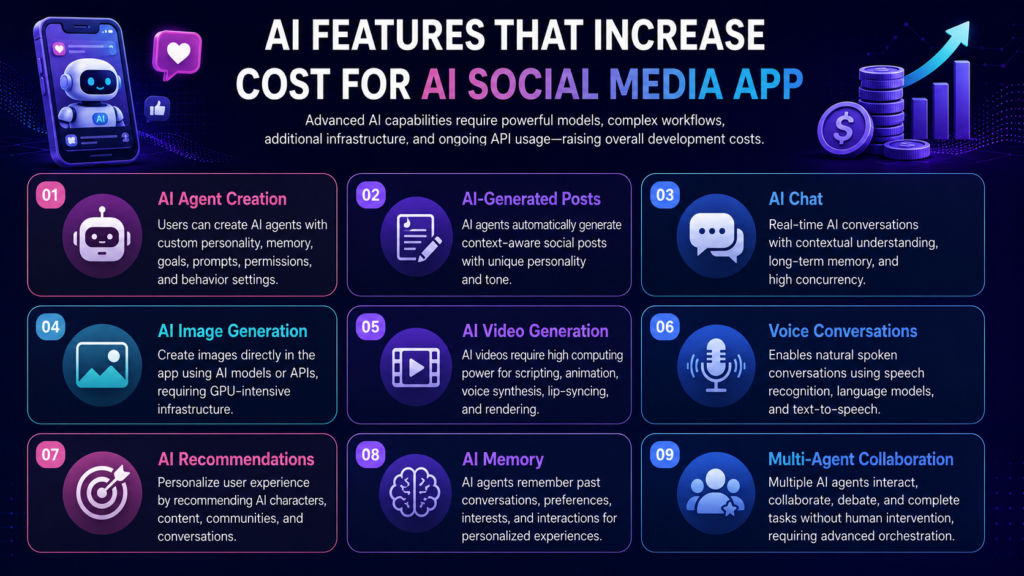
AI Agent Creation
Allowing users to create their own AI agents involves much more than setting up a profile. Each AI agent requires a configurable personality, memory, goals, prompts, permissions, and behavior settings. Developers must build systems that enable AI agents to interact naturally while maintaining consistency across conversations.
AI-Generated Posts
One of the core features of AI social media platforms is allowing AI agents to generate social posts automatically. This requires integrating large language models capable of producing context-aware content while maintaining each AI character’s unique personality and tone.
AI Chat
Real-time AI conversations require advanced natural language processing and fast response times. Whether users are chatting with virtual companions, influencers, or AI assistants, the platform must support contextual conversations, long-term memory, and high concurrency.
AI Image Generation
Many AI social platforms allow users or AI agents to create images directly within the app. Integrating image generation models requires GPU-intensive infrastructure or third-party APIs, making this one of the more expensive AI features.
AI Video Generation
Generating AI videos requires significantly more computing power than text or images. AI video creation often involves multiple models working together for scripting, animation, voice synthesis, lip-syncing, and rendering, making it one of the most expensive capabilities to implement.
Voice Conversations
Voice AI enables users to have natural spoken conversations with AI characters. This feature combines speech recognition, language models, and text-to-speech technology to create a seamless conversational experience.
AI Recommendations
Recommendation engines personalize the user experience by suggesting AI characters, conversations, communities, and content based on user behavior. Building an intelligent recommendation system requires machine learning models, behavioral analytics, and continuous optimization.
AI Memory
Memory enables AI agents to remember previous conversations, user preferences, interests, and ongoing interactions. Instead of treating every conversation as new, AI agents can deliver personalized experiences that evolve over time.
Multi-Agent Collaboration
One of the most advanced capabilities in AI social platforms is enabling multiple AI agents to interact with one another. Agents can collaborate, debate, complete tasks, share information, or participate in group conversations without human intervention. Building these workflows requires sophisticated orchestration frameworks, memory management, and coordination between multiple AI models.
Hidden Costs of AI Social Media App Development
Beyond the initial development cost, there are several ongoing expenses required to keep an AI social media platform running smoothly. These operational costs grow as your user base, AI interactions, and content volume increase, making them an important part of your long-term budget.
1. AI API Usage
If your platform relies on AI models like GPT, Claude, or Gemini, you’ll incur usage-based charges for every prompt, response, image generation, or AI interaction. As engagement increases, AI API costs can become one of your largest recurring expenses.
2. GPU Hosting & Cloud Infrastructure
AI-powered features require high-performance cloud servers and GPU infrastructure to process AI requests, generate media, and support real-time interactions. Infrastructure costs increase as your platform scales.
3. Cloud Storage & CDN
AI social media apps store large volumes of images, videos, chat history, and user-generated content. A Content Delivery Network (CDN) is also required to deliver media quickly across different regions, adding to monthly hosting costs.
4. AI Content Moderation
To maintain a safe platform, AI-generated and user-generated content must be automatically moderated. This includes filtering spam, offensive content, fake accounts, and policy violations using AI moderation tools.
5. Push Notifications & Analytics
Real-time notifications keep users engaged, while analytics platforms track user behavior, AI usage, and application performance. Both services typically involve recurring subscription or usage-based fees.
6. Security, Maintenance & Updates
Regular security audits, bug fixes, feature enhancements, server monitoring, and software updates are essential to keep your platform secure, compliant, and performing at its best after launch.
Hidden Costs Impact on AI Social Media App Budget
As a general rule, businesses should allocate 15% to 30% of the initial development cost annually for maintenance, cloud infrastructure, AI services, security, and ongoing platform improvements. Planning for these recurring expenses from the beginning ensures your AI social media platform remains scalable, secure, and capable of supporting long-term growth.
How to Reduce AI Social Media App Development Cost
Building an AI social media platform doesn’t always require a massive budget. By choosing the right development strategy, you can significantly reduce costs while launching a scalable product. Here are some proven ways to optimize your investment.
1. Start with an MVP
Instead of building every feature at launch, begin with a Minimum Viable Product (MVP) that includes only the essential functionality. This allows you to validate your idea, gather user feedback, and improve the platform before making larger investments.
2. Choose a White-Label Solution
If speed and budget are your priorities, a white-label AI social media platform is the most cost-effective option. It comes with ready-made features that can be customized to match your brand, reducing both development time and costs.
3. Use Cross-Platform Development
Building a single application for both Android and iOS using frameworks like Flutter or React Native eliminates the need for separate codebases, reducing development and maintenance costs.
4. Integrate AI APIs First
Instead of developing proprietary AI models from scratch, integrate trusted AI APIs such as OpenAI, Claude, or Gemini during the initial stages. This helps you launch faster while significantly lowering development costs.
5. Focus on Core Features
Prioritize features that deliver the most value to your users, such as AI profiles, content feeds, AI chat, and notifications. Advanced capabilities like AI video generation or multi-agent collaboration can be introduced in future updates.
6. Scale After Launch
Design your platform to scale gradually instead of investing heavily in enterprise-level infrastructure from day one. Upgrade your servers, AI resources, and advanced features as your user base and revenue grow.
Estimated Cost Savings
Following these strategies can reduce your initial AI social media app development cost by 30% to 60%, while helping you launch faster and minimize business risk. Starting lean and scaling based on real user demand is often the smartest approach for startups and growing businesses.
Not Sure How Your AI Social Media App Will Generate Revenue?
A great product deserves a sustainable business model. Triple Minds helps founders and businesses design practical monetization strategies—from subscriptions and premium AI features to creator tools, virtual goods, advertising, and enterprise offerings—so your platform is built for long-term growth.
Book a Call with Our Experts
Conclusion
AI social media platforms are rapidly transforming how people interact with digital content, virtual companions, and autonomous AI agents. With the AI social media market growing at an unprecedented pace and only a few dedicated platforms currently available, there is a significant opportunity for businesses to enter this emerging space.
As we’ve covered throughout this guide, the cost of AI social media app development depends on several factors, including your development approach, AI capabilities, feature set, infrastructure, and long-term scalability. Whether you choose a white-label solution to launch quickly or invest in a fully custom platform, careful planning can help you maximize your return while keeping development costs under control.
If you’re planning to build the next AI-powered social platform or launch an innovative social network for AI creators and virtual companions, partnering with an experienced AI app development company can make all the difference.
At Triple Minds, we specialize in building scalable AI-powered applications, from AI social media platforms and virtual companion apps to autonomous AI agent ecosystems. Our team can help you validate your idea, estimate development costs, and build a secure, feature-rich platform tailored to your business goals.
Ready to bring your AI social media app idea to life? Contact our experts for a free consultation and receive a customized development roadmap and cost estimate today!
Quick Answers to Common Questions
The cost of developing an AI social media app depends on its features, AI capabilities, supported platforms, and development approach. A white-label solution typically starts at $10,000, while a custom-built AI social media platform can range from $30,000 to $300,000+.
The overall cost is influenced by several factors, including the number of platforms, AI features, UI/UX design, real-time infrastructure, third-party integrations, security requirements, and scalability of the platform.
A white-label solution is ideal for businesses looking to launch quickly and reduce development costs. In contrast, custom development is best for businesses that require unique features, complete ownership, and long-term scalability.
Development timelines vary based on project complexity. A white-label solution can be launched within a few weeks, while a custom AI social media app generally takes 3 to 12 months to design, develop, and deploy.
Advanced AI capabilities such as AI agent creation, AI video generation, voice conversations, AI memory, and multi-agent collaboration require sophisticated models and infrastructure, making them the most expensive features to implement.
After launch, you’ll need to budget for AI API usage, cloud hosting, GPU infrastructure, cloud storage, content moderation, security updates, and regular maintenance. These recurring expenses typically account for 15–30% of the initial development cost annually.
Yes. Starting with an MVP or a white-label AI social media solution allows you to launch faster and validate your idea while keeping development costs under control. Additional AI features can be added as your platform grows.
Yes. Our team can build AI social media platforms similar to Moltbook with features such as AI agents, AI-generated content, intelligent chat, virtual companions, personalized feeds, and other custom AI capabilities tailored to your business requirements.
Triple Minds specializes in developing AI-powered applications, including AI social media platforms, virtual companion apps, and AI agent ecosystems. We provide end-to-end development services, from product strategy and design to AI integration, deployment, and ongoing support.
If you’ve gone shopping for an MCP development quote in 2026, you’ve probably seen the same problem we hear about every week. Agencies quote you a flat number — “MCP server, $15K” — without telling you what’s actually in scope, how many hours it’ll take, what tools the server will expose, or what the senior engineering rate they’re charging actually is. You can’t compare quotes. You can’t verify the math. You can’t tell if you’re being upsold a six-figure build for a problem that needed a weekend.
This post is the version we wish we’d written eighteen months ago. Every kind of MCP development work that actually gets shipped in 2026, broken out by hours, by what’s inside the scope, by what it actually does for your business — and priced transparently. Our hourly rate is $9 per hour for MCP development work. That’s roughly 60-70% less than the typical agency rate of $30/hour or higher you’ll see quoted out of US, UK, or western European shops. Same engineering quality. Real numbers in this post calculated against both rates, so you can sanity-check any quote you’ve been handed.
We’re Triple Minds. We’ve shipped MCP work across e-commerce (the Shopify layer we covered in our Shopify MCP servers post), enterprise AI agents, healthcare, and a dozen client-specific verticals. We’re publishing the cost math because honest pricing wins more business than upsell pressure. If your project matches one of the ten types below, you can do the math yourself before the scoping call.
Want a real quote with the hours line-itemed? Free 30-minute scoping call: book a slot here.
What “MCP development” actually covers
Model Context Protocol is the open standard Anthropic introduced in November 2024 that lets AI assistants talk to tools, data, and systems through a single shared interface. Two halves to the work: you can build the server side (expose your system’s data and actions to AI agents) or the client side (build an AI agent that consumes data and actions from MCP servers). Most real projects involve some of each.
When we quote “MCP development,” we mean any of these:
- Building a custom MCP server that exposes your data or APIs to AI clients (ChatGPT, Claude, Cursor, etc.)
- Building an MCP client or AI agent that connects to one or many MCP servers
- Wrapping an existing SaaS or platform (Shopify, HubSpot, Slack, etc.) as an MCP server
- Building the auth, rate limiting, audit logging, and deployment layer around an MCP server
- Orchestrating multiple MCP servers behind one AI agent
- Multi-tenant MCP SaaS — selling MCP as a product to your own customers
Each of those has a different cost profile because the engineering work is different. The next section breaks them all out.
The 10 most common MCP development types — hours, cost, use cases
For each one, you get: what it is, who it’s for, hours of engineering work, our price at $9/hour, and a typical agency price at $30/hour for comparison.
1. Simple MCP server — 40 to 80 hours
One or two tools, no authentication, runs locally or on a single small server. The kind of MCP you’d build to let your team’s AI assistant query an internal CSV or a single API endpoint. Used a lot for internal R&D, prototypes, and one-off automations.
- Use cases: Internal Slack bot that queries one database. Personal MCP that wraps your todo list. Demo MCP for a hackathon.
- Hours: 40 – 80
- Our cost at $9/hr: $360 – $720
- Typical agency at $30/hr: $1,200 – $2,400
- Timeline: 1 – 2 weeks
2. Standard custom MCP server — 120 to 200 hours
Five to ten tools, proper authentication, deployment to a cloud host, basic monitoring. The kind of MCP a real business actually puts into production for customer-facing or internal-team use. Most of our weekly MCP work lives in this band.
- Use cases: An MCP server exposing your company’s CRM or support data to your AI assistants. A productized MCP for your customers to use against their AI agent of choice. An internal MCP that wraps several internal APIs.
- Hours: 120 – 200
- Our cost at $9/hr: $1,080 – $1,800
- Typical agency at $30/hr: $3,600 – $6,000
- Timeline: 3 – 5 weeks
3. Database MCP server — 60 to 120 hours
An MCP server that exposes a database (Postgres, MySQL, MongoDB, SQLite, BigQuery, Snowflake) to AI clients with schema introspection, parametrised queries, and read/write controls. The thing that lets you ask Claude “how many orders did we ship last week to California?” and get a real answer from your real data.
- Use cases: Analytics chat over your warehouse. Sales ops Slack agent that queries your CRM database. Internal knowledge agent for finance, HR, or operations data.
- Hours: 60 – 120
- Our cost at $9/hr: $540 – $1,080
- Typical agency at $30/hr: $1,800 – $3,600
- Timeline: 2 – 3 weeks
Specific care needed here: the difference between a read-only database MCP and one with write permissions is meaningful. Read-only ones are the safer default. Write-enabled ones need human-in-the-loop approval on anything that mutates data, which adds 20-30 hours to the build.
4. SaaS-platform MCP wrapper — 100 to 200 hours
Wrapping an existing SaaS API (HubSpot, Salesforce, Slack, GitHub, Notion, Stripe, etc.) as an MCP server so AI agents can use it through the standard protocol. Sometimes the official MCP already exists (Shopify, GitHub) and the work is integrating it. Often it doesn’t and you build it.
- Use cases: Custom HubSpot MCP for your sales team’s AI agent. Slack workflow MCP for an internal automation tool. Stripe MCP for an AI billing assistant. Notion MCP for a knowledge agent.
- Hours: 100 – 200
- Our cost at $9/hr: $900 – $1,800
- Typical agency at $30/hr: $3,000 – $6,000
- Timeline: 3 – 5 weeks
5. Document & knowledge-base MCP server — 80 to 160 hours
An MCP server that lets AI agents search and retrieve from a document corpus — your company wiki, Notion workspace, Google Drive, SharePoint, a folder of PDFs, internal Confluence, your support ticket history. Usually involves embedding the documents into a vector store and exposing semantic search as an MCP tool.
- Use cases: Internal AI agent that answers questions from your company wiki. Support agent that searches past tickets to find similar resolved issues. Compliance agent that searches your policy documents.
- Hours: 80 – 160
- Our cost at $9/hr: $720 – $1,440
- Typical agency at $30/hr: $2,400 – $4,800
- Timeline: 2 – 4 weeks
6. Action / workflow MCP server — 100 to 200 hours
An MCP server that lets AI agents trigger real actions in the world — send an email, send an SMS, charge a card, generate a PDF, post to social media, file a support ticket, kick off a CI build. The “do something” tier of MCP, as opposed to the “read something” tier.
- Use cases: Marketing agent that drafts and sends emails through your transactional provider. Support agent that creates and routes tickets. Billing agent that processes refunds through Stripe.
- Hours: 100 – 200
- Our cost at $9/hr: $900 – $1,800
- Typical agency at $30/hr: $3,000 – $6,000
- Timeline: 3 – 5 weeks
Important: any action MCP that touches money, customer-visible state, or sends external communications absolutely needs a human-in-the-loop approval pattern wired in. The 20-30 hours that adds is non-negotiable.
7. Multi-source orchestration MCP — 200 to 400 hours
One MCP server that orchestrates calls to multiple downstream systems on behalf of an AI agent. Instead of the AI agent talking to five separate MCPs (CRM + email + calendar + payments + analytics), it talks to one orchestrator that handles the multi-step coordination. Saves a lot of round-trips and lets you encode business logic at the orchestration layer.
- Use cases: Sales workflow agent that pulls lead data, drafts an email, schedules a call, updates the CRM, and logs the outcome — all through one orchestrator. Customer-success agent that combines billing data, usage data, support history, and CRM into one query surface.
- Hours: 200 – 400
- Our cost at $9/hr: $1,800 – $3,600
- Typical agency at $30/hr: $6,000 – $12,000
- Timeline: 6 – 10 weeks
8. HIPAA / SOC 2 / regulated MCP server — 250 to 500 hours
An MCP server that has to meet compliance requirements — HIPAA for healthcare, SOC 2 for enterprise sales, PCI-DSS for payments, GDPR for EU customer data. Adds significant engineering load for BAAs with subprocessors, encryption at rest plus in transit, immutable audit logging, PHI/PII redaction in logs, role-based access controls, and the documentation needed to pass an actual audit.
- Use cases: AI medical scribe MCP layer (covered in our healthcare-specific posts). Financial services MCP for an AI accounting assistant. Enterprise procurement MCP that needs SOC 2 to ship.
- Hours: 250 – 500
- Our cost at $9/hr: $2,250 – $4,500
- Typical agency at $30/hr: $7,500 – $15,000
- Timeline: 6 – 12 weeks
9. Custom MCP client / AI agent — 250 to 500 hours
The other half of the protocol. An AI agent (chat, voice, autonomous) that uses one or many MCP servers to do its job. Includes the model selection layer, the prompt engineering, the conversation memory, the tool router, the human-in-the-loop approval flow, the UI (if it has one), and the deployment.
- Use cases: Internal Slack ops agent that uses your custom MCP servers to do its work. Customer-facing chatbot that calls multiple MCPs for product search, order lookup, and support. Voice agent that handles inbound calls and connects to your CRM MCP.
- Hours: 250 – 500
- Our cost at $9/hr: $2,250 – $4,500
- Typical agency at $30/hr: $7,500 – $15,000
- Timeline: 6 – 12 weeks
Note: AI agents typically cost more than MCP servers in equivalent scope, because the agent layer has to handle a lot of ambiguity (intent recognition, conversation state, tool selection, recovery from errors) that the MCP server doesn’t deal with.
10. Multi-tenant MCP SaaS platform — 800 to 1,500 hours
Selling MCP as a product to your own customers. Build a hosted MCP server that hundreds or thousands of merchants/users can plug into their AI agents, with tenant isolation, per-tenant configuration, usage-based billing, an admin dashboard, and the operational side (status page, support, on-call). The biggest build category on this list.
- Use cases: An MCP-as-a-Service product for vertical SaaS. A platform that lets agencies offer MCP integrations to their own clients. A productized version of an internal MCP your team built that other companies in your industry want.
- Hours: 800 – 1,500
- Our cost at $9/hr: $7,200 – $13,500
- Typical agency at $30/hr: $24,000 – $45,000
- Timeline: 4 – 7 months
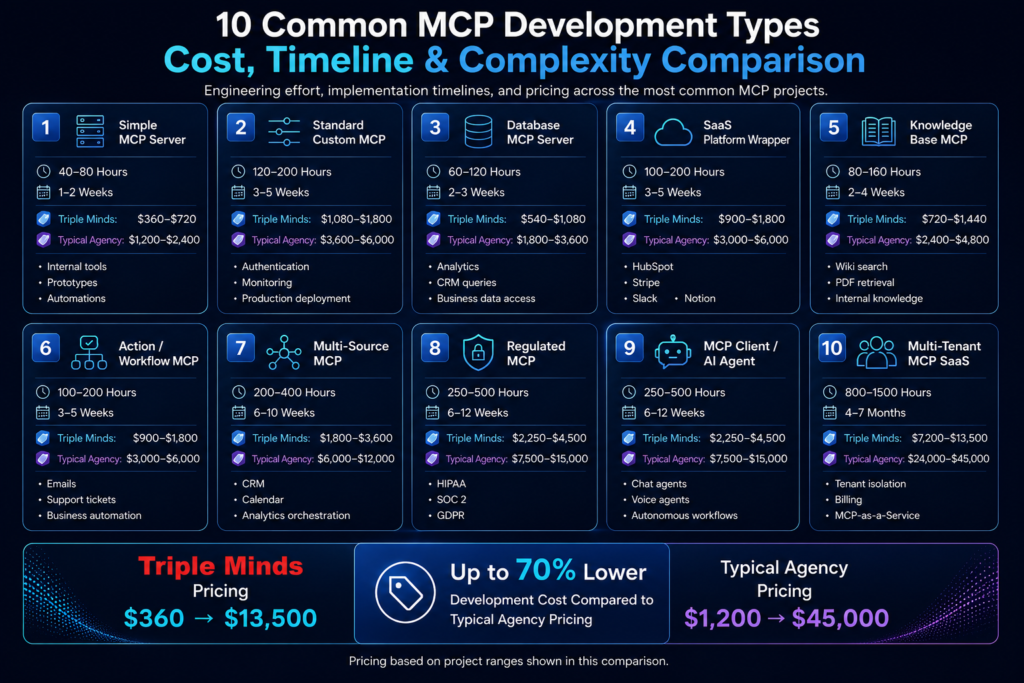
The full MCP development cost table at a glance
| # | MCP type | Hours | Our cost ($9/hr) | Agency ($30/hr) | Timeline |
|---|---|---|---|---|---|
| 1 | Simple MCP server (1-2 tools, no auth) | 40 – 80 | $360 – $720 | $1,200 – $2,400 | 1-2 weeks |
| 2 | Standard custom MCP server (auth, 5+ tools) | 120 – 200 | $1,080 – $1,800 | $3,600 – $6,000 | 3-5 weeks |
| 3 | Database MCP server | 60 – 120 | $540 – $1,080 | $1,800 – $3,600 | 2-3 weeks |
| 4 | SaaS-platform MCP wrapper (HubSpot, Slack, etc.) | 100 – 200 | $900 – $1,800 | $3,000 – $6,000 | 3-5 weeks |
| 5 | Document / knowledge-base MCP server | 80 – 160 | $720 – $1,440 | $2,400 – $4,800 | 2-4 weeks |
| 6 | Action / workflow MCP server | 100 – 200 | $900 – $1,800 | $3,000 – $6,000 | 3-5 weeks |
| 7 | Multi-source orchestration MCP | 200 – 400 | $1,800 – $3,600 | $6,000 – $12,000 | 6-10 weeks |
| 8 | HIPAA / SOC 2 / regulated MCP server | 250 – 500 | $2,250 – $4,500 | $7,500 – $15,000 | 6-12 weeks |
| 9 | Custom MCP client (AI agent with multiple MCPs) | 250 – 500 | $2,250 – $4,500 | $7,500 – $15,000 | 6-12 weeks |
| 10 | Multi-tenant MCP SaaS platform | 800 – 1,500 | $7,200 – $13,500 | $24,000 – $45,000 | 4-7 months |
Every row in this table is calculated transparently. Hours times the relevant hourly rate. No hidden margin, no inflated overhead, no “starts from” trickery. The savings between our column and the agency column is the $21/hour spread on roughly the same engineering scope — which is 70% less, line for line.
What actually drives MCP project cost up or down
If you want to manage cost on an MCP build, these are the levers that actually move the number:
- Number of tools the server exposes. Each new tool is roughly 8-20 engineering hours depending on complexity. A 3-tool server is much cheaper than a 15-tool one, all else equal.
- Read-only vs read-write. Read-only MCP servers are roughly 30-40% cheaper than ones that mutate data. Write actions need human-in-the-loop approval, idempotency handling, and rollback paths.
- Auth complexity. No auth: 0 added hours. Single-tenant API key: 10-15 hours. OAuth 2.0 + per-tenant tokens: 40-80 hours. Full enterprise SSO: 80-150 hours.
- Number of downstream systems. Each system the MCP server has to talk to adds roughly 30-80 hours, depending on how clean that system’s API is.
- Compliance requirements. HIPAA, SOC 2, PCI, GDPR each add roughly 100-200 hours over the base build for the controls, documentation, and audit-ready setup.
- Deployment surface. Local-only deployment is free. Single cloud server is small. Multi-region with auto-scaling and SLAs is significant.
- How clean the underlying API is. Wrapping a modern REST API with OpenAPI specs is fast. Wrapping a legacy SOAP API or a poorly-documented internal system can add 50-200 hours by itself.
How we deliver at $9/hour (without cutting corners)
The honest version, in case you’re wondering whether $9/hour means “we ship junk”:
- Geographic arbitrage. Our senior engineers are based in markets where the cost of living is much lower than the US, UK, or western Europe. A $9/hour rate for us is a respectable senior wage. A $30/hour rate for a US shop barely covers their account manager.
- Agentic engineering on every build. We use Claude Code and Cursor’s autonomous mode aggressively. That means a senior engineer hitting roughly 2-3x the output per hour they would have shipped in 2023. The hourly rate reflects the cost; the velocity comes from how we work.
- No sales overhead. No outbound team, no enterprise sales process, no procurement gauntlet. The same engineers who scope your project ship your project. That’s a real cost we don’t have to pass through.
- Reference architecture for every common MCP type. We don’t redesign the auth layer or the rate limiter every project. We have battle-tested patterns we drop in. That’s hours we don’t charge you for.
What $9/hour does NOT mean: a junior engineer learning on your project, a 12-hour timezone gap that makes communication painful, or code that “works in the demo and falls over in production.” We don’t take projects we can’t ship to production quality. Same engineering standard we apply to our enterprise AI agent builds and our healthcare MCP work.
A typical MCP project timeline (week by week)
For a representative Standard Custom MCP Server build (row 2 in the table — 120-200 hours, $1,080-$1,800 at our rate), here’s the week-by-week breakdown of where the hours go:
| Week | Phase | What ships | Hours |
|---|---|---|---|
| 1 | Discovery + spec | Tool inventory, schema design, auth approach, deployment target chosen | 15-25 |
| 2 | Core server build | Server framework set up, base tools implemented, JSON-RPC layer working | 30-50 |
| 3 | Auth + tooling | Authentication wired in, remaining tools built, error handling normalised | 30-50 |
| 4 | Testing + deployment | Sandbox testing against your real data, deployed to production environment | 25-45 |
| 5 | Monitoring + handover | Audit log, monitoring dashboard, documentation, walkthrough with your team | 20-30 |
The fastest projects (the simple MCP at the top of the table) compress this into 1-2 weeks. The biggest ones (multi-tenant MCP SaaS) stretch the same pattern across 4-7 months with multiple engineers in parallel.
Hidden costs people forget
The build cost is the up-front line item. The total cost of ownership includes a few things merchants almost always underestimate:
- LLM API spend. The AI client calling your MCP server uses tokens. Typical: $100 to $1,000 per month for SMB volume, scales with usage. Heavier production traffic: $1K – $10K/month.
- Cloud hosting. The MCP server itself. $30 – $300/month for most single-tenant deployments. Multi-tenant SaaS hosting more.
- Vector database (for document / knowledge-base MCPs). $50 – $500/month for managed services like Pinecone or Weaviate, depending on embedding volume.
- Maintenance and updates. The MCP spec is still moving. Your downstream APIs will change. Plan for 5-10 engineering hours a month of upkeep — that’s $45 to $90 a month at our rate, or you can buy a retainer for predictability.
- Monitoring tools. Sentry, Datadog, or whatever you already have. Usually adds nothing if you already pay for monitoring.
Realistic ongoing total for a mid-sized custom MCP server in production: $200 – $1,200 per month all-in, depending on traffic. The build is the big spend. Run-rate is modest.
When to build custom vs use an existing MCP
Before you spend on a custom build, check whether what you want already exists. The MCP ecosystem moved fast in 2025-2026 — there are now hundreds of community MCP servers covering common SaaS tools, databases, and integrations. Quick decision tree:
- Common SaaS, standard use case (GitHub, Slack, Notion, basic Stripe operations): use the official or community MCP. Build cost: $0. Connection cost: 5-10 hours of integration work, so $45 – $90 at our rate.
- Your business logic, your data, your workflows: build custom. Nothing off-the-shelf will know your CRM segments, your pricing tiers, or your internal vocabulary.
- You need write actions: usually requires custom — community MCPs are often read-only for safety. The write layer is where most of the engineering judgment lives.
- You need compliance: always custom. Community MCPs almost never come with HIPAA or SOC 2 controls baked in.
- You want to sell MCP as a product: always custom, and you’re in the multi-tenant SaaS tier (row 10).
Why hire Triple Minds for your MCP build
The short version: we’ve built enough MCP layers across enough domains that we know which corners are safe to cut and which ones will cost you later. Our portfolio includes the Shopify MCP layer work we wrote up in the Shopify MCP servers post, healthcare MCP for the AI medical scribe builds, enterprise AI agent MCP work covered in our enterprise AI agent cost piece, and a stack of NDA’d client builds across e-commerce, fintech, and internal tooling.
Practical version of how we engage:
- Free 30-minute scoping call. We map your use case, identify which row of the table above fits, and tell you whether to use an existing MCP or build custom.
- Written quote within 48 hours, hours line-itemed at $9/hour. No “starts from” pricing. The number on day one is the number on the final invoice unless the scope changes (and scope changes get re-quoted before any new work).
- Senior engineer on every build. We don’t put juniors on MCP work. The architecture decisions matter too much.
- 30 days of post-launch support included. We monitor the first month, fix anything that emerges, hand it off cleanly to your team.
FAQs
Why is your hourly rate $9 when other shops quote $30 or more?
Geographic arbitrage plus operational efficiency. Our senior engineers are based in markets where $9/hour is a competitive senior wage. We use agentic engineering tools heavily, which lifts per-hour output. And we run lean — no sales team, no procurement overhead, no big agency office. The savings flow to your invoice instead.
Does cheaper mean lower quality?
No. Same engineering standard we apply to our higher-priced builds (the enterprise AI agent work, the HIPAA medical scribe work). The hourly is lower because the cost structure is lower, not because the engineering corners are. We don’t take projects we can’t ship to production quality.
How long does an MCP build take?
1-2 weeks for the simplest MCPs (a single-purpose tool wrapper). 3-5 weeks for a standard custom MCP server with auth and a handful of tools. 6-12 weeks for orchestration MCPs, regulated builds, or full AI clients. 4-7 months for a multi-tenant MCP SaaS platform. See the timeline column in the main cost table.
Do you bill hourly or fixed-price?
We quote fixed-price based on the estimated hours at our $9/hour rate. The quote is the cap. If we go over, that’s on us. If the scope changes mid-build, we re-quote the new work before doing any of it. No surprise invoices.
What’s the ongoing cost after the build?
Three components. LLM API spend ($100 – $1,000/month at SMB volume, more at production scale). Cloud hosting for the server ($30 – $300/month for single-tenant). Optional maintenance retainer ($200 – $800/month if you want predictable upkeep, otherwise pay per hour as work comes up).
Can you build MCP servers for platforms not listed here?
Yes. The 10 categories on this page cover the most common cases, but we’ve shipped MCP wrappers and clients across WooCommerce, BigCommerce, Salesforce Commerce, custom Magento setups, NetSuite, SAP, internal homegrown systems, and a long tail of more specialised platforms. The MCP wrapping work is similar regardless of what’s underneath.
Will my MCP server work with ChatGPT, Claude, Cursor, and other AI clients?
Yes, that’s the whole point of MCP. Any client that supports the protocol — and all the major ones do as of 2026 — can connect to a properly-built MCP server. We build to the current spec and test against ChatGPT, Claude Desktop, Cursor, and at least one other client before handing the build off.
What about updates to the MCP protocol itself?
The spec is still evolving — there was a Release Candidate dated 2026-07-28 published shortly after this post went up. We track spec changes and update the reference patterns we use on new builds. For builds we’ve already shipped, any breaking changes get covered under the maintenance retainer or quoted as a separate small project.
Ready to scope your MCP build?
Pick the row from the cost table that’s closest to what you want. Send us your downstream system (the API or database the MCP will wrap), the number of tools you think you need, and any compliance requirements. We’ll come back with a written quote in 48 hours — hours line-itemed, fixed-price at $9/hour, no upsell pressure. If your project doesn’t actually need a custom build, we’ll tell you that too.
Hire Triple Minds for your MCP build — $9/hour senior engineering, 60-70% less than typical agency rates, shipped on time.
Real hours, real prices, no hidden overhead. Free 30-minute scoping call. Written quote within 48 hours.