Ever wondered what happens between the moment you hit “send” on an AI girlfriend app? From the user end, the process seems simple – You pick a character, type a message, get a response, switch over to voice. It feels nothing more like a straightforward back-and-forth with an AI character.
But when you look at the backend of this interface, you’ll realize there’s a lot more going on than a chat box talking to a language model. An AI companion platform combines conversational AI, personality modeling, memory, content generation, user profiling, moderation, media processing, payments, and real-time application infrastructure into one coordinated system.
However, there is no exact proprietary architecture revealed publicly behind Candy.ai. But as one of the top AI development companies, we have carefully analyzed how it works. Therefore, this article focuses on the technical architecture and engineering principles that demonstrate how a platform with Candy.ai’s capabilities can be built. Let’s get started.
What is the Role of Natural Language Processing in AI Chatbots?
NLP is the basic foundation for AI girlfriend applications like Candy AI. You know why? Because NLP enables the chatbot to understand what the user is inputting. It analyzes context and generates human-like responses. Key NLP tasks in Candy AI Clone development include:
- Tokenization and parsing to break down sentences into meaningful units that can be processed.
- Intent recognition to understand the purpose behind the query entered by the user.
- Sentiment Analysis to detect emotions and customize responses accordingly.
- Context Management to maintain the conversational flow and avoid repetitive or irrelevant replies.
5 Components Required to Build Candy AI-Like Platforms
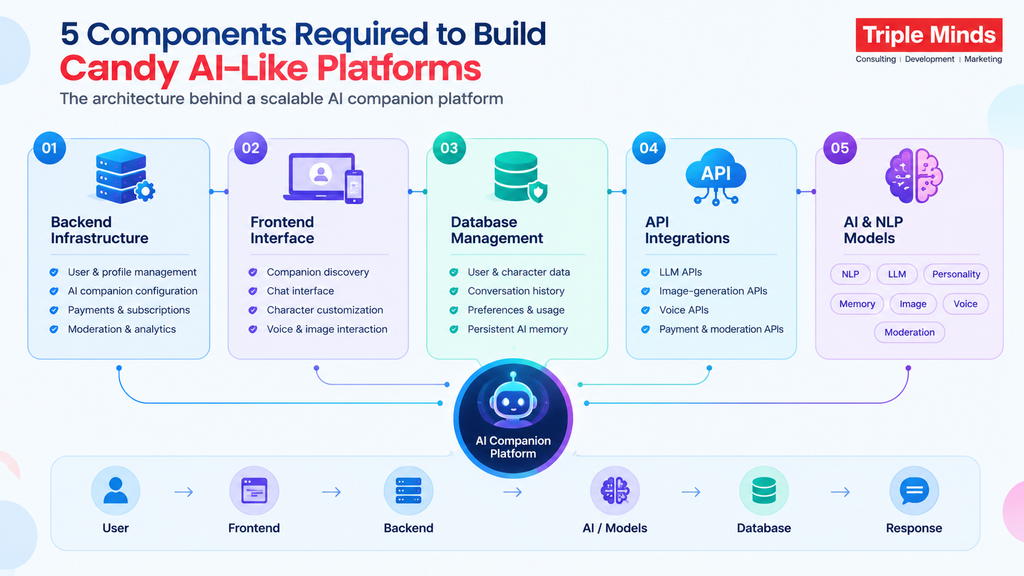
Backend Infrastructure
For any platform, the backend is the engine that powers the entire application. While the frontend helps users interact, the backend handles the complex logic and coordinates different services. In Candy AI, the backend manages the following:
- User registration, authentication, and profiles
- AI companion creation and configuration
- Conversation processing
- Session management
- Image, voice, and other media-generation requests
- Notifications
- Usage limits and credits
- Analytics and admin operations
Frontend Interface
The frontend is the part that users actually see and interact with. AI companion platforms need an interface to initiate conversations and discover characters. Top features such as streaming responses, typing indicators, message status, media previews, and conversation history can make the experience feel more interactive. An intuitive interface includes;
- AI companion discovery
- Character profiles
- Chat interface
- Character customization
- Image-generation interface
- Voice interaction controls
- User dashboard
- Settings and privacy controls
Database Management
Candy AI generates and manages structured and unstructured data; therefore, a database layer is essential for securely storing and retrieving the information. For persistent AI memory, the architecture can also incorporate a vector database or another semantic retrieval system that allows the application to retrieve relevant information from previous conversations based on meaning rather than matching exact words.
- User accounts
- Character profiles
- Subscription information
- Conversation metadata
- User preferences
- Usage records
- Payment-related records
- Platform settings
API Integrations
Integrating API into a Candy AI-like platform makes it possible to combine multiple specialized technologies into one product. So, the application doesn’t need to develop every technology from scratch. APIs allow the application to connect with third-party services, depending the requirements of the final product.
- LLM APIs for conversational responses
- Image-generation APIs for AI-generated visuals
- Speech-to-text APIs for converting voice into text
- Text-to-speech APIs for generating AI voice responses
- Payment APIs for subscriptions and transactions
- Cloud storage APIs for generated media
- Email/SMS APIs for notifications
- Moderation APIs for content safety
- Analytics APIs for tracking user behavior
AI and NLP Models
A Candy AI-like application can use large language models (LLMs) for generating conversational responses, but the AI layer needs more than an LLM. It can include:
Natural Language Processing
NLP helps the system understand user messages, identify intent, analyze context, and determine how the conversation should proceed.
Large Language Models
An LLM generates natural-language responses based on the character’s personality, conversation history, user information, and retrieved memories.
Personality System
Character-specific instructions and attributes help maintain a consistent identity, communication style, and behavioral pattern.
Memory System
Relevant information from previous interactions can be retrieved and supplied to the model when needed.
Image Models
Image-generation models can create visuals based on user prompts and character specifications.
Voice Models
Speech-to-text and text-to-speech models enable voice-based conversations.
Moderation Models
Automated safety systems can evaluate user inputs, AI-generated responses, and generated media against the platform’s policies.
What Makes Candy.ai’s Technology Different from a Normal AI Chatbot?
Talking about a conventional chatbot, it follows a simple path. User input goes to the application, the application calls an LLM, and the LLM’s response comes straight back. But an AI girlfriend platform needs more context and an accurate flow, like: User Input → Identity & Session Layer → Conversation Orchestrator → Context Builder → LLM → Safety Layer → Response Generator → User. Several supporting systems like long-term memory, user profiles, character personality, content moderation, image generation, voice processing, etc. sit around this core.
The Conversational AI Engine
At the center of an AI girlfriend platform is a conversational AI engine. The obvious approach — sending the user’s message straight to an LLM and returning the answer — breaks down quickly. If a user has been talking with the same companion for weeks, the system can’t send the entire conversation history with every request; that increases token consumption, latency, and infrastructure costs. Instead, the application needs to construct a carefully selected context window like:
- User message
- Character identity
- Personality instructions
- Relevant memories
- Recent conversation
- User preferences
- Safety rules → LLM → Generated response
This context-building process is one of the most important pieces of candy.ai’s architecture. Consider a user who says, “I told you last week that I was nervous about my interview.” The model can’t give a convincing reply without access to that earlier detail, so the system needs a way to check whether the new message connects to something already stored.
- New message → Embedding → Similarity Search → Relevant Memories → Context Builder → LLM
- Previous messages or important events get converted into vector embeddings and stored in a vector database.
- New messages are searched against that store for semantically related memories.
- Example: stored memory “User has an important job interview on Friday” connects to current message “I’m getting nervous about tomorrow” even though the wording doesn’t match.
- The relevant memory is inserted into the model’s context, so the companion appears to remember without the full history sitting in every prompt.
Character Personality
One of the biggest differences between a generic chatbot and an AI companion is character consistency. Users aren’t just interacting with an AI model — they’re interacting with a defined character, and that character carries a specific set of attributes that need to be represented as structured data.
- Name, age, personality traits
- Interests and communication style
- Backstory and preferences
- Relationship status and speaking style
- Emotional tendencies and behavioral boundaries
The application transforms this structured data into system instructions or context before calling the LLM, effectively creating a personality layer between the application and the underlying model. This matters because an LLM has no inherent knowledge that it’s supposed to behave like one particular fictional character — the application has to keep supplying those behavioral constraints on every call.
Personality Consistency
Generating one convincing message is relatively easy. Generating thousands of messages that consistently feel like they came from the same character is much harder, and that’s where AI companion engineering gets interesting. If a character is defined as sarcastic, energetic, affectionate, and interested in photography, a single response that suddenly reads as formal or corporate breaks the illusion immediately. To reduce that risk, the system typically needs several layers of personality control working together.
- Character Profile — defines who the companion is
- System Instructions — define how the model should behave.
- Conversation Context — provides immediate interaction history
- Memory — provides persistent information about the user.
- Behavioral Rules — controls specific responses and boundaries
- Output Validation — checks whether a response violates system or safety requirements
Long-Term Memory
Memory is arguably one of the most important technologies behind AI companionship. Without it, every conversation feels like a fresh interaction. But with memory, the system can build real continuity. Remember, “memory” doesn’t mean storing every conversation permanently — a scalable architecture separates memory into distinct categories, each serving a different purpose.
- Short-Term Memory — The immediate conversation that can last several messages, current topic, recent emotional context, and current request.
- Long-Term Memory — Information that is worth preserving across sessions: user preferences, important dates, favorite activities, relationship milestones, frequently discussed topics, character-specific interactions.
- Semantic Memory — It is the information stored and retrieved based on meaning rather than exact wording, typically via a vector database
A typical memory pipeline runs like this:
- Conversation → Memory Extraction → Importance Scoring → Embedding Generation → Vector Database → Future User Message → Semantic Retrieval → Relevant Memories → LLM Context
The important decision is to choose what actually deserves to become a memory. When you store everything, retrieval gets difficult- store too little, and the companion seems to forget the information. Therefore, a memory-ranking system is essential that assigns importance scores before deciding what to retain.
Retrieval-Augmented Generation
Long-term memory can be implemented using principles similar to Retrieval-Augmented Generation (RAG). Instead of asking the LLM to remember everything internally, the system retrieves relevant information from an external knowledge store and provides it context for each request.
For example, if a user asks “Do you remember what movie I wanted to watch?” the system searches the memory store, finds something like “User said they wanted to watch Interstellar this weekend,” and injects that into the prompt so the LLM can build a natural response around it. This is what allows memory to scale beyond the underlying model’s context window.
Conversation Orchestrator
For AI girlfriend platforms, the conversation orchestrator functions as the traffic controller of the system that determines exactly what happens after a user sends a message.
- Receive message
- Authenticate user
- Load character
- Retrieve recent conversation
- Retrieve relevant memories
- Analyze intent
- Apply safety policies
- Construct model context
- Call LLM
- Validate response
- Save conversation
- Update memory
- Return response
This structure is far more impactful than wiring a frontend chat interface directly to an AI API. It also lets developers swap models, add new capabilities, and introduce additional safety checks without redesigning the entire application.
Intent Detection
Every message is identical. Different queries entered by a user, like
“Tell me a joke,” “Generate a picture of you at the beach,” “Can you remember my birthday?” and “Send me a voice message” require different processing. An intent classification layer determines what the user is actually trying to accomplish.
- Casual conversation
- Question answering
- Emotional support
- Image generation
- Voice interaction
- Memory request
- Role-play
- Character customization
- Account request
- Subscription request
Once intent is identified, the orchestrator routes the request to the appropriate service — another reason an AI companion platform is closer to an AI application platform with multiple specialized services than it is to a simple chatbot.
AI Image Generation
Text conversations are only one part of the AI companion experience. AI-generated images bring a realistic feel and an entirely separate technical pipeline into the picture.
User Prompt → Prompt Processor → Character Identity / Visual Profile → Image Model → Safety & Moderation → Image Processing → Storage/CDN → User
The difficult part of an AI companion platform isn’t generating an attractive image — it’s maintaining character consistency. A user’s character might have specific facial characteristics, a hairstyle, body characteristics, clothing preferences, and a visual style. Therefore, a random text-to-image request can easily produce a different-looking person. Developers reduce this risk with techniques such as:
- Reference images
- Character embeddings
- LoRA-style personalization
- Fine-tuned models
- Consistent prompt templates
- Seed management
- Image-to-image generation
- Identity-preserving pipelines
Understanding User’s Character Requirements
The most interesting development challenge shows up when aligning conversational identity with visual identity. The character described in the chatbot should ideally be the same character shown in generated media. That requires a shared character identity model.
- Character Profile
- Personality data
- Prompt configuration
- Visual identity
- Voice identity
- Memory
- Content preferences
This creates a common source of truth for the companion.
Instead of treating chat, images, and voice as separate products, the platform treats them as different interfaces to the same underlying character.
Voice AI – Real-Time Layer
Voice interaction introduces two major technologies working together: Speech-to-Text (STT) and Text-to-Speech (TTS).
User Voice → STT → Conversation Engine → LLM → TTS → Audio Response
Latency becomes critical here. A text response taking two seconds might feel acceptable; a voice interaction with several seconds of silence can feel broken. Therefore, it becomes important to optimize production voice systems:
- Speech recognition latency
- LLM inference time
- Voice synthesis latency
- Network latency
- Audio streaming
- Connection stability
Streaming responses can make the experience feel faster, since audio can start playing before the entire response has finished generating.
Detecting Emotions & Tone
A well-optimized AI companion can analyze the emotional context of a message — “I had a terrible day today” shouldn’t necessarily get the same response strategy as “Guess what happened today! 😄” An emotion or sentiment analysis layer classifies the signals in a message. This helps the AI conversation engine adapt the emotions like:
- Happiness
- Frustration
- Sadness
- Excitement
- Anger
- Anxiety
- Curiosity
However, it doesn’t mean that AI “feels” the emotion. Instead, the system uses language signals to adjust its response behavior, and from the technical pov, that distinction matters the most.
Recommendations AI Engine
Once a platform has multiple AI companions, discovery becomes important — with hundreds or thousands of characters, which one should a user see first? A recommendation engine ranks characters using signals such as:
- Previous interactions
- Character preferences
- Session behavior
- Search activity
- Popularity and engagement
- User retention
- Character categories
- Language
A basic AI system might start with simple rules, but platforms like Candy.ai with more than $25M in annual recurring revenue can use machine-learning ranking models. The key point is that recommendation engines operate separately from conversational intelligence — the LLM generates the conversation, while the recommendation engine determines which characters users are likely to engage with.
Safety and Moderation
Adult platforms like AI companion platforms require strong safety architecture. Relying solely on a language model’s built-in safety mechanisms isn’t enough for a production application. AI girlfriend platform typically layers multiple moderation checks.
- Input Moderation — It analyzes the user’s request before it reaches the model or media-generation system.
- Output Moderation — It analyzes generated responses before they’re displayed.
- Image Moderation — It checks generated images for prohibited content.
- Account-Level Controls — Apply restrictions based on account status, age verification, geography, or platform rules.
- Abuse Detection — Identifies suspicious patterns, automated abuse, or attempts to circumvent safeguards.
Prompt Injection and Jailbreak Resistance
Before exposing an AI application to users, know that there is a high possibility that users will try to manipulate its instructions. That’s why the application shouldn’t rely solely on the model to reject attempts like this.
- Prompt isolation
- System instruction separation
- Input classification
- Policy checks
- Output validation
- Rate limiting
- Abuse detection
- Model-specific safety controls
This matters especially for AI companion platforms, where conversations are highly open-ended and give users far more surface area to attempt manipulation.
Data Architecture
Data architecture is as important as AI models. Therefore, when building a Candy AI clone, analyze whether the underlying architecture is scalable. Rather than depending on a single database, a production system typically needs several distinct types of storage, each serving a specific purpose.
- Relational Database — For users, accounts, subscriptions, characters, permissions, transactions
- Document or NoSQL Storage — For conversation metadata, flexible character configurations, event data
- Vector Database — For long-term memories, semantic retrieval, character knowledge
- Object Storage — For generated images, audio, video, user-uploaded media
- Cache — For sessions, frequently accessed character data, temporary context, rate limiting
Asynchronous Processing
Text responses are typically interactive, but image and video generation can take longer, and processing everything synchronously delivers poor user experiences. A job queue can resolve this problem.
- User requests image
- API accepts request
- Job added to queue
- GPU worker processes generation
- Moderation
- File storage
- Notification
- Image displayed
This lets the application handle many generation requests without blocking the primary API, and workers can scale horizontally as demand increases.
CDN Infrastructure
Generated images, audio, and video can become large files, and serving everything directly from the application server is inefficient. A typical setup instead routes media through dedicated delivery infrastructure.
- AI Generation Service → Object Storage → CDN → User
- The application stores the generated asset in object storage
- A CDN distributes it closer to users geographically
This improves media load times, scalability, and bandwidth management, and it keeps AI generation infrastructure cleanly separated from content delivery infrastructure.
Candy AI Technology vs. Traditional Chatbot Architecture
| Capability | Traditional AI Chatbot | AI Companion Platform |
| Basic LLM chat | ✓ | ✓ |
| Character personality | Limited | Core component |
| Long-term memory | Limited | Essential |
| User personalization | Basic | Advanced |
| Image generation | Optional | Integrated |
| Voice | Optional | Integrated |
| Character identity | Usually absent | Central |
| Recommendation engine | Sometimes | Often important |
| Moderation | Required | Multi-layered |
| Media processing | Limited | Significant |
| Relationship state | No | Important |
| Multimodal orchestration | Limited | Core architecture |
How Much Does It Take to Build This Technology?
The answer depends heavily on how much of the technology is built from scratch.
A basic AI companion can be assembled relatively quickly using existing LLM, image, speech, database, and payment APIs.
A refined platform requires significantly more development around memory, character consistency, AI orchestration, Image generation, infrastructure, etc.
For a detailed breakdown of development budgets and infrastructure considerations, you can go through our Candy AI chatbot development cost guide.
Want to Launch an AI Companion With Features Like Candy AI?
Triple Minds helps businesses launch AI companion platforms with our white-label Candy AI Clone solution. It replicates key Candy AI-like capabilities, including AI conversations, character personalities, memory, image generation, voice interaction, and personalization. The solution also comes with pre-built monetization strategies, compliance architecture, and scalable infrastructure to help you launch faster.
Explore Candy AI Clone 🚀
Build a Candy AI-Like AI Companion With the Right Architecture
Developing an AI girlfriend platform isn’t about plugging an LLM into a chat interface and calling the product finished. A production-ready system needs a carefully designed architecture that connects LLMs, memory, personality, user profiles, voice, infrastructure, real-time API and other technical aspects.
At Triple Minds, we work on AI companion platforms across development, personalization, multimodal AI, monetization, and scalable infrastructure. If you are exploring a similar product, our Candy AI Clone solution provides another starting point for understanding the technology, features, and architecture involved. To know more, get in touch with us.
Frequently Asked Questions about Tech Stack of Candy.ai like Application
Yes. The platforms like Candy AI include terms of service that explicitly restrict access to users 18 years and older. During account creation, AI companion platforms implement age verification due to adult content.
Vector databases are valuable for semantic memory and retrieval, but it is not necessary. They allow the system to find conceptually related information even when the user’s current wording differs from the original conversation.
One of the biggest challenges is maintaining consistency across conversations and modalities. The character should ideally relevant memories, preserve its personality, respond naturally, and remain visually or vocally consistent while the system manages latency, cost, safety, and scale.
Yes. An early-stage platform can combine third-party APIs for LLMs, image generation, speech recognition, and text-to-speech. As the product scales, teams may introduce model routing, self-hosted models, or hybrid infrastructure to gain more control over performance and costs.
No. A chatbot primarily focuses on generating responses. An AI companion requires additional systems for persistent identity, memory, personalization, multimodal interaction, safety, recommendation, and relationship continuity.
You need a quick prototype? Hire a vibe coder. Your software needs security, scalability, reliability, and long-term maintenance? Senior developers can make the right choice for you.
The decision about whether you should hire a vibe coder or a senior developer depends less on how much you need and more on what happens if that code fails. AI-powered coding tools can compress weeks of work into days. That part isn’t in dispute. But production software still needs architecture, testing, security review, and someone with the judgment to make hard calls when things get complicated.
At Triple Minds, we combine AI-powered development with senior engineering expertise to help businesses move fast without compromising the quality, security, or scalability of their software. Therefore, in such cases, the best strategy is not to choose one amongst the two but to combine vibe coding speed with senior engineering expertise.
Vibe Coder vs. Senior Developer: What’s the Real Difference?
AI has genuinely changed what’s possible. With tools like Cursor, Claude Code, GitHub Copilot, Lovable, Bolt, v0, and Replit Agents, developers and non-developers alike can describe a feature in plain English and watch working software come together in a fraction of the time it used to take.
That creates an obvious question for founders, startups, product managers, and businesses: what is the best vibe coder or hiring a senior developer? The answer depends on the complexity of your product, risk, users, budget, timeline, and future plans.
- A vibe coder typically uses AI coding tools to describe what they want in natural language and then relies heavily on AI to generate, modify, debug, and iterate on the code.
- A senior developer uses software engineering knowledge to define architecture, make technical decisions, write and review code, test systems, solve complex problems, and plan for long-term maintenance.
A Crucial Consideration
The distinction is not simply: AI vs. human.
It is more accurately, AI-led implementation vs. engineering-led development.
A skilled developer can also be a vibe coder. In fact, some of the most effective modern development teams combine senior engineers with AI coding agents.
The real question is therefore:
Do you need someone who can quickly generate working software, or someone who can take ownership of the software’s technical future?
Looking to Hire Vibe Coding Services? Build Smarter with Triple Minds
AI can generate code quickly, but production-ready software needs expert engineering. Triple Minds helps businesses build faster, audit AI-generated code, fix technical issues, and turn prototypes into secure, scalable applications.
Explore Vibe Coding Development Services
AI Reshaping the Coding Workflow
A vibe coder builds software through AI-assisted workflows. Instead of writing every function by hand, they’ll hand the AI something like: build a SaaS dashboard with user authentication, role-based access, Stripe payments, analytics, and an admin panel. The tool generates a first pass, the person tests it, finds the rough edges, prompts again, and keeps iterating until it works. A vibe coder may use AI to generate UI components, create APIs, build database models, write CRUD functionality, generate forms, add authentication, and perform other time-consuming tasks within a blink.
The only limitation is that generating functional code is not the same as engineering a production system. If the person using the AI cannot evaluate architecture, security, database design, performance, dependencies, and edge cases, they may have difficulty determining whether the generated application is actually good.
AI-generated code can speed up development, but working code is not always ready for real-world use. Learn more about evaluating security, testing, scalability, and maintainability in our guide on Is Vibe-Coded Code Production-Ready? and find out what it takes to move from a fast prototype to reliable, production-ready software.
What Does a Senior Developer Actually Bring to the Table?
A senior developer does much more than write code; they evaluate the complex product requirements and determine:
- What technology should be used
- How the system should be structured
- How the database should be designed
- How APIs should communicate
- How authentication should work
- How permissions should be implemented
- How the application should scale
- How security risks should be reduced
- How the code should be tested
- How infrastructure should be configured
- How future features can be added without breaking existing functionality
On top of all this, senior developers can also use AI coding tools to streamline their tasks and obtain more optimized and refined output as compared to a self-operating AI tool.
A senior engineer working with AI will typically outperform both a traditional developer working the old way and an inexperienced person leaning on AI without any engineering oversight at all.
At Triple Minds, we follow this AI-assisted model, positioning senior engineers alongside AI coding tools while keeping architecture, quality, testing, security, and production decisions under engineering control.
So, Whom Should I Hire – a Vibe Coder or a Senior Developer?
If your primary objective is to drive rapid experimentation, go with Vibe Coder. If your software is designed to handle real users, sensitive data, payments, complex integrations, and long-term business operations, Hire a vibe coder if your primary objective is rapid experimentation. Hire a senior developer if your software will handle real users, sensitive data, payments, complex integrations, or r if you’re building something meant to stick around — bring in a senior developer.
A simple decision framework is:
| Condition | Better choice |
| Landing page or basic prototype | Vibe coder |
| Proof of concept | Vibe coder |
| Simple internal tool | Vibe coder |
| Testing an early product idea | Vibe coder |
| Customer-facing SaaS | Senior developer |
| Payment processing | Senior developer |
| Sensitive customer data | Senior developer |
| Complex API integrations | Senior developer |
| High-traffic application | Senior developer |
| Long-term product | Senior developer |
| Existing AI-generated app that needs productionization | Senior developer + AI |
| Fast MVP that may become a serious product | AI-assisted senior developer |
This table is a starting point, not the whole answer. Let’s get into the details.
Speed: Who Can Build Faster?
Vibe coding has a major advantage when it comes to initial development speed. AI can instantly spit out boilerplate, interfaces, API endpoints, database schemas, forms, and other repetitive scaffolding. A founder can go from idea to prompt to working prototype in an afternoon instead of a sprint. That’s why it’s such a natural fit for startup founders validating an idea, hackathons, proofs of concept, internal experiments, and quick UI prototypes.
That speed is real. But there’s a catch worth sitting with: fast to build isn’t the same as fast to launch. An app that takes two days to generate and then six weeks to debug, secure, and get production-ready hasn’t actually saved you any time compared to building it properly from the start.
Cost: Is a Vibe Coder Cheaper?
AI coding tools may cost considerably less than hiring a developer. Many operate through relatively inexpensive subscriptions or usage-based pricing. But a business building software with AI will spend money on AI tools, hosting, APIs, databases, cloud infrastructure, debugging, testing, security, and ongoing maintenance. And there is another hidden cost: Your own time.
If a founder spends 100 hours prompting an AI, investigating bugs, fixing dependencies, learning a framework, and trying to understand generated code, that time has an opportunity cost.
Wondering what you’ll actually pay to hire a vibe coding developer? Explore our complete pricing guide on Cost to Hire a Vibe Coding Developer to compare freelance rates, agency pricing, regional hiring costs, hidden expenses, and the factors that influence the total budget for AI-assisted software development.
Code Quality: Who Actually Produces Better Software?
Quality is where the distinction becomes more important. Even though AI has the ability to write impressive code, it can also generate code that only works in easy circumstances, contains duplicate logic, pulls in unnecessary dependencies, handles errors poorly, opens up security holes, runs inefficient database queries, and quietly becomes a nightmare to maintain the moment the requirement shifts.
Therefore, we can say that AI-generated code still needs someone to evaluate it. Software produced by vibe coder needs someone who’ll ask why this architecture was chosen, whether the database structure holds up, what happens if the user input increases in bulk, what happens if this API call fails, and can another developer understand this six months from now?
These aren’t the potential questions that the AI platform will ask by itself. They’re the kind of judgment a senior developer makes by habit.
AI can generate code quickly, but it can also introduce hidden bugs, security issues, duplicate logic, and errors that become difficult to manage as software grows. Learn more in our guide on Common Bugs in AI-Generated Code and see why reviewing AI-generated code is essential for building reliable, secure, and maintainable software.
Scalability: Will the Application Grow Your Business?
One of the most crucial factors to choose a senior developer is scalability. A prototype may work perfectly with 10 users, but what happens when the user count increases to 10,000? In this situation, the prototype has a higher probability of falling apart.
Scalability requires real decisions around database indexing, query optimization, caching, load balancing, stateless services, background jobs, queues, rate limiting, CDN usage, storage, observability, and horizontal scaling.
A vibe-coded prototype usually isn’t built with any of that in mind, because the immediate goal was just “make it work.” That doesn’t mean AI can’t build scalable software — it can — but scalable architecture has to be designed on purpose, not discovered after the app starts falling over.
Moving an AI-built MVP beyond the prototype stage can involve significant technical improvements and planning. Our breakdown of the Cost to Make an AI-Built MVP Production-Ready covers the engineering work, costs, and key factors businesses should consider before preparing an application for growth and real-world usage.
Security: Can You Trust AI-Generated Code?
If your application handles sensitive information, security should not be optional, and this is where unreviewed AI-generated code tends to show its weak points. The most common issues in poorly reviewed products or software are exposed API keys, weak authentication, broken authorization, thin input validation, SQL injection, cross-site scripting, unsecured endpoints, missing rate limiting, unsafe dependencies, sloppy data storage, and misconfigured cloud infrastructure.
This is particularly important when your application handles: customer information, payment information, healthcare data, financial information, business-critical data, and proprietary information. The real question was never “can AI write secure code?” It can. But who will verify this? That’s the part experienced developers are for.
Maintenance: Who Fixes This Six Months from Now?
Building software is only the beginning. After launching, you’re fixing bugs, adding features, upgrading dependencies, improving performance, patching vulnerabilities, updating infrastructure, adjusting database schemas, and keeping up with whatever new browser or device just broke your layout.
This is where a vibe-coded application built through hundreds of loosely connected prompts can turn into a real headache. A senior developer approaches the codebase with a different question in mind: A senior developer approaches the codebase differently. They think about: “How will another engineer understand this code next year?”
That mindset shows up in the naming, the documentation, the modularity, the tests, and how dependencies are managed — the unglamorous stuff that makes a codebase survivable long-term.
Technical Decision-Making
Ask an AI which database to use, and it’ll give you an answer. But a senior developer looks at the actual requirements and figures out whether that answer fits or not. For example, the application might require: relational transactions, high write volume, full-text search, vector search, geospatial queries, multi-tenant isolation, or real-time updates — and maybe the right answer involves more than one technology working together. That’s the value senior developers bring even in an AI-first world.
Complex Integrations: Where Engineering Expertise Really Pays Off
The more external systems your app needs to talk to, the more these matters. Think Stripe, Salesforce, HubSpot, Twilio, Google APIs, AWS, OpenAI, Anthropic, an ERP system, internal databases, payment gateways — each one is a new place for something to quietly fail.
A senior developer designs that: proper authentication, webhooks, retry logic, error handling, rate-limit handling, data synchronization, logging, monitoring, fallback paths. A vibe coder can often get an integration working. A senior developer is the one who makes it reliable when Stripe has an outage at 2 a.m.
When Should You Hire a Vibe Coder?
- You don’t know whether customers actually want the product.
- You need something functional to demonstrate the concept.
- The application has limited users and low business risk.
- You want to test several UX approaches quickly.
- The consequences of failure are relatively low.
- You want to experiment before committing to a larger development budget.
When Should You Hire a Senior Developer?
- The application is customer-facing, and your reputation depends on it working reliably.
- Payment systems require careful security and error handling.
- You handle sensitive data, and therefore security and privacy become critical.
- You expect significant traffic, and the architecture needs to account for growth.
- The application is business-critical; downtime directly affects operations or revenue.
- You have complex integrations; multiple external systems need to communicate reliably.
- Regulated industries require additional controls and documentation.
- If you cannot evaluate what AI has created, relying entirely on it introduces unnecessary risk.
The Best Option: Hire a Senior Developer Who Uses Vibe Coding
Here’s the option a lot of businesses overlook entirely: you don’t have to choose between vibe coding and senior developers when you can have both.
A senior developer working with AI coding agents gets the best of each side. AI brings speed, code generation, boilerplate automation, fast iteration, refactoring help, documentation support, test generation, and debugging assistance. Triple Minds provides the best vibe code development services. Our senior developers bring architecture, technical judgment, security awareness, code review, a real testing strategy, scalability thinking, an understanding of the business logic, and — ultimately — accountability for what ships.
How Triple Minds Combines Vibe Coding with Senior Engineering?
Triple Minds builds its vibe-coding model around senior engineers working with AI tools. The process starts with specification and architecture before any AI implementation begins, followed by engineering review, testing, security, and DevOps.
The workflow can be understood as:
1. Define
Clarify the product, users, requirements, workflows, and business objectives.
2. Architect
Determine the technology stack, database, APIs, infrastructure, security model, and scalability requirements.
3. Vibe Build
Use AI coding tools to accelerate implementation and repetitive development work.
4. Review
Senior engineers inspect the generated code for correctness, maintainability, security, and architectural consistency.
5. Test
Validate functionality, integrations, edge cases, performance, and critical workflows.
6. Secure
Perform security checks, dependency reviews, API hardening, and other appropriate controls.
7. Deploy
Move the application into a controlled production environment.
8. Improve
Monitor the application, fix issues, optimize performance, and continue development.
This approach allows businesses to capture the speed of AI without accepting the risks of uncontrolled AI-generated code.
10 Scenarios You Must Consider Before Choosing a Development Approach
1. Are you validating an idea or building a product for real users?
In case of validating an idea, Vibe coding can help you build and test a prototype quickly.
But when building a product for real users, you can consider professional engineering from the start.
2. Will real customers use it?
If yes, you can consider professional engineering that combines both AI development and senior development experience.
3. Will it process payments?
Payments, personal data, financial information, or confidential business data? Prioritize experienced engineering and security review.
4. Will it store sensitive information?
Use professional engineering and security review. No sensitive information? You may have more flexibility with your AI development approach.
5. Does it need to scale?
For small user bases and limited traffic, Vibe coding can be a practical starting point.
But, growing users, transactions, or data volumes need architecture designed for scalability and experienced technical oversight.
6. Will you maintain it for years?
Prioritize maintainability and architecture for long-term products. Invest in clean architecture, documentation, testing, and maintainable code.
7. Is failure relatively harmless?
Little or no business impact? A lightweight vibe-coded solution may work. For lost revenue, unhappy customers, or operational disruption, you should invest in professional development and testing.
8. Would failure cost you revenue or reputation?
Yes. Therefore, professional development is a safer choice.
9. Do you already have an AI-generated prototype?
Consider productionization, refactoring, and security review rather than starting over.
10.Do you want to launch your application quickly without compromising quality?
Consider an AI-assisted senior development team that combines the speed of AI coding tools with expert oversight for architecture, security, testing, and production readiness.
Not Sure Whether Your Project Needs Vibe Coding or Custom Development?
Every project has different requirements. Some products are perfect for AI-assisted Vibe Coding, while others need custom software engineering from day one. Triple Minds helps founders, startups, and businesses evaluate their product goals, timeline, budget, scalability, security, and long-term maintenance requirements to recommend the right development approach for the next stage of growth.
Schedule a Free Project Consultation
Stop Picking Sides — Start Picking Both
Notice something: not once in this entire guide did we actually tell you to pick a lane and stay in it. You know why?
Because the honest answer is that when executed together, both deliver valuable output. So, skip the either/or. Build fast, then build right. Prototype with AI, then bring in someone who knows exactly where AI cuts corners before those corners cut you. Looking for an expert developer who can seamlessly integrate Vibe Code to streamline workflows? Count on Triple Minds.
Every RAG system works at 100,000 vectors. The demo is convincing, retrieval feels instant, and the answers cite the right documents. Then the corpus grows to 10 million chunks, traffic grows to a few hundred queries per second, and three separate walls appear at once: latency you can feel, a memory bill that dictates your architecture, and tail behaviour that no dashboard warned you about.
This guide is about those walls. Not “what is RAG” — if you are reading this, you have one running. It is about the engineering arithmetic of running retrieval-augmented generation at scale: where the milliseconds actually go, what a vector index really costs in RAM, when to quantize versus shard versus replicate, and which optimizations move p95 instead of just the median.
We are Triple Minds, an AI development and LLM model training company. We build and operate RAG systems for clients — and we also train the models inside them, which matters here more than you might expect, because some of the biggest infrastructure wins at scale come from the model side: a fine-tuned embedding model that produces smaller vectors, a distilled reranker that is ten times cheaper to run. Every number in this article is either arithmetic you can check yourself or a typical range we state honestly as a range.
1. The Architecture That Scales — and the One That Doesn’t
The RAG that fails at scale is the one where a single service does everything: embeds documents on upload, holds one monolithic index, embeds queries, searches, and calls the LLM — all in one process. It fails because the two halves of RAG have opposite performance personalities. Ingest wants throughput: big batches, GPU saturation, hours-long index builds. Serving wants latency: single-digit milliseconds, warm caches, predictable tails. Run them on the same nodes and every bulk upload becomes a p99 incident.
Here is the shape that survives production:
Fig 1 — A production RAG system at scale. The ingest path (left) is asynchronous and batch-optimised; the serve path (right) is latency-critical. Numbered stages are covered in the sections below.
Six of these stages deserve their own numbers, and the rest of this article walks through them: chunking and embedding at ingest (①②), the sharded index (③), the semantic cache (④), the reranker (⑤), and generation (⑥). One architectural rule before the numbers: HNSW insertion typically costs on the order of ten times a query, and bulk backfills can inflate serve-path p99 by 2–10×. Keep index building off the serving nodes — build segments on a dedicated builder, then swap them in.
2. Latency: Where a RAG Request Actually Spends Its Time
A production RAG request is a six-stage serial waterfall: embed the query, search the index, rerank candidates, assemble the prompt, wait for the LLM’s first token, then stream the rest. The stages span more than two orders of magnitude in cost, and almost everyone optimizes the wrong ones. Draw the waterfall to scale and the problem is obvious:
Fig 2 — The latency waterfall nobody draws to scale: the entire retrieval stack fits inside 1.9% of the request. Optimising ANN search before generation is optimising the wrong 82 ms.
Token generation is 70–90% of wall-clock time in virtually every deployment we have measured or audited. The reason is physics, not sloppy engineering: autoregressive decoding must stream essentially all model weights from GPU memory for every generated token, so decode speed is capped by memory bandwidth, not FLOPs:
tokens/sec ceiling ≈ HBM bandwidth / bytes moved per token (weights + KV cache)

Llama-3-8B fp16: 16 GB weights on an A100 (~2 TB/s HBM)
→ single-stream ceiling ≈ 2000/16 ≈ 125 tok/s; measured: 60–100 tok/s
Meanwhile the retrieval stack — the part teams spend months tuning — fits inside the first ~2% of the request. That does not make retrieval latency irrelevant; it makes it a perceived-latency and recall problem rather than a total-latency problem. With streaming, the user experiences your pre-LLM time plus time-to-first-token, so the numbers that matter are the ones before generation starts. Here is a realistic per-stage budget, with honest ranges:
| Stage | Typical p50 | Typical p95 | What moves it |
|---|---|---|---|
| Query embedding (self-hosted GPU) | 2–10 ms | 15–40 ms | Model size, batching, cold starts |
| Query embedding (hosted API) | 150–300 ms | 300–500+ ms | Network + provider queueing — often the largest fixed cost in retrieval |
| ANN search (in-RAM HNSW, 1–10M vec) | 0.4–5 ms | 2–20 ms | efSearch, RAM residency, dimension |
| Managed vector DB (client-observed) | 10–100 ms | 100–250 ms | Network, TLS, serialization, multi-tenant queueing — server-side search itself is 1–10 ms |
| Rerank 100 pairs, MiniLM-class (~22M), GPU | 50–80 ms | 100–200 ms | Candidate count × sequence length |
| Rerank 100 pairs, 568M-class @ 512 tok, L4/A10 | 0.8–1.6 s | 2–3 s | ~58 TFLOPs of compute — model choice dominates |
| Prompt assembly + tokenization | 1–10 ms | ~15 ms | Negligible; budget it and move on |
| LLM TTFT (fast-tier hosted) | 200–500 ms | 1.6–3.2× p50 | Prompt length (prefill), provider queueing |
| LLM TTFT (frontier hosted, long RAG prompt) | 0.5–1.5 s | 1–3 s | Same, at frontier scale |
| Decode (300–800 token answer) | 4–20 s | — | Memory bandwidth, batch load, answer length |
Three traps hide in that table. First, the embedding API tax: if you call a hosted embedding endpoint per query, you pay 150–300 ms of network and queueing to produce a vector your own GPU could compute in 5 ms — often 30–60× your actual ANN search time. Self-host the query encoder; it is a small model. Second, client-observed versus server-side latency: vendor dashboards report index time (1–10 ms), but your service experiences TLS, serialization of a 6 KB JSON query vector, load-balancer hops and tenant queueing. Measure from your client, keep connections pooled and gRPC where offered, and stay in-region — cross-region alone adds 30–150 ms. Third, the reranker model class: a MiniLM-class cross-encoder scores 100 pairs in 50–80 ms on a modest GPU, while a 568M-parameter reranker at 512 tokens needs roughly 0.8–1.6 seconds for the same batch — the FLOPs arithmetic (2 × 568M params × 512 tok × 100 pairs ≈ 58 TFLOPs) simply does not fit in 100 ms on an L4. Pick the reranker by latency budget, then close the quality gap with domain fine-tuning (section 6).
At p95 the picture inside the retrieval stack shifts — queueing effects concentrate in the reranker:
Fig 3 — Composition of retrieval-stack p95. Teams shopping for a faster vector DB are usually staring at the aqua slice while the orange one eats their budget.
Tail latency: your users experience your p99, not your median
Two pieces of probability arithmetic explain most production latency pain. The first: a user session with 20 requests has a 64% chance of containing at least one request at or beyond your p95 (1 − 0.95²⁰ = 0.64). Users experience your tail far more often than your percentiles suggest. The second: the moment you shard, every query waits for the slowest shard:
P(at least one slow shard) = 1 − (1 − p)^S     p = per-shard slow probability

p = 1%:  S = 8 → 7.7%   S = 16 → 14.9%   S = 100 → 63.4%
Concretely: 16 shards, each with a 30 ms p99 and a 120 ms p99.9. The probability every shard answers within 30 ms is 0.99¹⁶ = 0.851 — so ~15% of queries wait on a straggler, and fleet-level p99 is set by per-shard p99.9 behaviour: roughly 100–120 ms, four times the per-shard figure. The standard countermeasure is hedged requests — after waiting about the per-shard p95, fire a duplicate to another replica and take whichever answers first. Google’s classic tail-at-scale result cut p99.9 from 1,800 ms to 74 ms for about 2% extra load; expect a few percent overhead when you trigger at p95. This is also the strongest argument for not sharding prematurely, which is where memory comes in.
3. Memory: The Bill Nobody Itemizes Until It Arrives
Vector memory is napkin arithmetic, and doing the napkin math early is the difference between a single-node system and an accidental six-node cluster. The baseline: a raw fp32 vector costs exactly d × 4 bytes. An HNSW graph adds roughly 8·M + 12 bytes per vector on top (4-byte neighbour IDs, M links per layer, layer 0 doubled):
Vectors:      N × d × 4 bytes                     (fp32)
HNSW graph:   N × (8·M + 12) bytes approx.        (M=16 → ~140 B/vec)
Real engines: × 1.1–1.2 allocator + metadata overhead

10M × 768-d, M=16:  30.72 GB vectors + 1.4 GB links ≈ 33–38 GB served
At 10M vectors that is an inconvenience. At 100M × 1536-d it is 614 GB of raw vectors — past any commodity node — and at 1B it is 3.07 TB. Which is why the single most important scaling decision is not “which vector database” but where you sit on the quantization ladder:
Fig 4 — The quantization ladder. Between fp32 and PQ64 lies a 48× memory difference — the gap between a multi-node cluster and a single modest box.
| Level | Bytes/vector (768-d) | Compression | Typical recall@10 cost | Notes |
|---|---|---|---|---|
| fp32 | 3,072 | 1× | baseline | Default in most engines; rarely necessary |
| fp16 | 1,536 | 2× | ≤0.1–0.3% — noise level | The free win; take it first |
| int8 SQ | 768 | 4× | ~0.5–3% with calibration | Claw back with a modest efSearch bump |
| PQ96 | 96 | 32× | 2–8% raw; ≤1–2% with rescoring | Needs a full-precision refine tier |
| PQ64 | 64 | 48× | 5–15% raw; dataset-dependent | Always pair with oversample + rescore |
| Binary | 96 | 32× | 4–10% raw on modern models; far worse on older ones | Popcount search is 10–40× faster; works best ≥1024-d |
The pattern behind the whole ladder: compress the working set, keep a full-precision tier for rescoring. Search over the compressed representation, take 3–10× more candidates than you need, then re-score the top 100–200 against exact vectors — a 0.3–0.6 MB fetch that costs a millisecond or two and recovers most of the recall the compression gave away. Three worked examples from our sizing playbook, arithmetic included:
100M × 1536-d on one node. fp32 + HNSW (M=32): 100M × (6,144 + 268 + 8) B ≈ 642 GB — a 3–4-shard cluster. int8 SQ: 100M × (1,536 + 268 + 8) B ≈ 181 GB — one 256–384 GB node, with the 0.5–3% recall cost recovered by raising efSearch from 100 to ~200 (typically still 1–3 ms per query). Quantization turned a scatter-gather cluster into a single box.
1B × 768-d under 100 GB of RAM. IVF-PQ64 with nlist = 262,144: PQ codes 64 GB + IDs 8 GB + centroids 0.81 GB ≈ 73 GB — a 42× reduction from 3.07 TB flat. A query probes 64 lists (~244k codes, ~15.6M lookup-adds, 1–5 ms/core), then refines the top-200 against fp32 vectors on NVMe (0.6 MB, 1–3 ms parallelized). Raw IVF-PQ recall@10 of ~0.7–0.85 lands at ~0.93–0.98 after the refine step.
The disk-based alternative. DiskANN-style indexes keep PQ codes in RAM and the graph plus full vectors on NVMe: the published configuration serves 1B points from a single 64 GB machine at ≥95% recall@1 and ~5 ms mean latency, riding on 70–100 µs NVMe random reads. This is the step between “buy more RAM” and “shard” that most teams skip because nobody told them it exists.
The memory nobody budgets
- Replicas multiply everything. Cluster RAM = shards × replication factor × per-shard RAM. A 320 GB logical index at RF=3 is 960 GB of fleet memory.
- Index builds spike memory. Budget ~1.2–1.5× steady state on the index components during builds and compactions — and 2× if you rebuild blue-green next to the live index.
- The payload store is not free. Chunk text, metadata, and the document store often rival the vectors themselves; they just page better.
- Chunking is a memory multiplier. Halving your chunk size doubles N — every byte-per-vector decision upstream of the splitter is a corpus-wide multiplier downstream.
- Deletes don’t free memory. HNSW deletes are tombstones: zero bytes reclaimed until a vacuum/rebuild, and recall measurably degrades on heavily-churned graphs. Schedule rebuilds at a deleted-fraction trigger (~10–30% is the common band).
4. Scalability: Two Different Walls, Two Different Fixes
“We need to scale” hides two unrelated problems, and applying the wrong fix to the wrong wall is the most expensive mistake in production RAG.
The MEMORY wall: the index no longer fits the node.
  500M × 768-d fp32 ≈ 1.5 TB — a memory problem, no QPS problem.
  Fix order: quantize → disk-based index → then shard.

The QPS wall: the node no longer keeps up with traffic.
  10M × 768-d HNSW ≈ 5–8 CPU-ms/query → ~1,500–3,000 QPS per 16-vCPU node.
  Fix: replicate. Replication scales reads ~linearly.
The worked example that makes it stick: you need 3,000 QPS at p99 ≤ 100 ms, one node sustains 600 QPS with a 30 ms per-shard p99, and the index fits in RAM. The right answer is six replicas (ceil(3000/600) = 5, plus one for headroom and N−1 failure) — no fan-out, so fleet p99 stays ≈ 30 ms. The tempting wrong answer — “shard 8 ways for speed” — sends every query to 8 shards: P(a slow leg) = 1 − 0.99⁸ = 7.7%, your 100 ms budget is now roughly a p92, and you need hedging just to claw back what sharding cost you. Aggregate CPU per query barely improved. Shard for memory, replicate for traffic — sharding an index that fits in RAM buys tail pain and little else.
| Corpus (768-d) | Vector RAM (fp32 / int8) | Sane default architecture |
|---|---|---|
| ≤500k chunks | ≤1.5 GB / 0.4 GB | Brute-force or HNSW in your Postgres (pgvector) — exact search is 1–5 ms here; don’t over-build |
| 500k–10M | ≤31 GB / 8 GB | Single-node HNSW (fp16/int8), replicated for traffic and availability |
| 10M–100M | 31–307 GB / 8–77 GB | Quantize first (int8; binary+rescore if ≥1024-d), one fat node or first shards; dedicated build node |
| 100M–1B | 0.3–3 TB / 77–768 GB | IVF-PQ or DiskANN tier, sharding with hedged requests, semantic sharding where the data clusters |
| >1B | >3 TB fp32-equivalent | Disk-first index + aggressive PQ in RAM, per-tenant routing, dedicated retrieval fleet |
The scaling problems that aren’t about the index
Ingest throughput. Embedding generation spans two orders of magnitude by model size: a MiniLM-class encoder embeds 2,000–8,000 chunks/s on one GPU batched, a 110M-parameter encoder ~800–1,400/s (the FLOPs check: 2 × 110M × 512 tokens ≈ 113 GFLOPs per chunk), and a 7B-class embedder two orders less. Batching is the lever — batch 1 to batch 64–128 is commonly a 10–30× throughput difference. And mind the hosted-API ceiling: re-embedding 50M chunks (~17.5B tokens) under a 5M tokens/minute rate cap is a 2.4-day job minimum; the same corpus on four A100s running a 110M encoder is roughly five hours.
Embedding model migration. Vectors from different encoder versions are mutually incomparable — there is no partial upgrade. The pattern that works: re-embed to a new index on builder infrastructure, dual-write live upserts to both, shadow-query the new index to validate recall and answer quality, then flip the read alias atomically. Budget it like the infrastructure project it is, not a config change.
Multi-tenancy. Per-tenant collections are clean up to a few hundred tenants, then the per-collection overhead (memory, descriptors, optimizer threads) stops scaling; past ~1,000 tenants you want a shared collection with a tenant_id filter — but filtered ANN has a recall trap. Post-filtering returns k × selectivity results in expectation: at 0.1% selectivity you would need ~10,000 candidates to fill a top-10. Engines solve this with tenant-aware graph links (e.g. Qdrant’s payload-partitioned HNSW: m=0 with payload_m=16 on the tenant field); below roughly 10k–100k filtered vectors, just brute-force the filtered subset — a 10k × 768-d exact scan is ~15 MFLOPs, low single-digit milliseconds.
These are the load-bearing decisions in systems like database-connected AI assistants, where corpus growth is continuous and tenant isolation is contractual, not optional.
5. The Recall Dial: Paying Latency for Accuracy Deliberately
Every ANN index has one dial that trades recall against latency — efSearch on HNSW, nprobe on IVF — and most teams have never plotted theirs. The curve is logarithmic, which means both of the common defaults are wrong: the “fast” setting is usually leaving cheap recall on the table, and the “safe” setting is usually paying double latency for recall the reranker would have recovered anyway.
Fig 5 — The recall/latency frontier is logarithmic: the last percentage point of recall costs more latency than the first 45 combined. Set the dial where your product actually needs it.
Two operational notes. First, build the gold set: a few hundred queries with exact (brute-force) top-k as ground truth, re-run on every index or model change — this is an afternoon of work that converts every tuning argument into a measurement. Recall failures downstream do not look like search bugs; they look like hallucinations, because the generator confidently answers from the wrong context. Second, the dial is dynamic: under load spikes, dropping efSearch from 400 to 64 sheds roughly 4–6× of search cost in exchange for a few recall points — a far better degradation mode than queueing. IVF is even more predictable: search work scales almost exactly with nprobe/nlist.
6. Serving Optimizations Ranked by What They Actually Move
| Technique | Moves | Realistic effect | Cost / catch |
|---|---|---|---|
| Streaming + output-length control | Perceived latency | Perceived latency ≈ pre-LLM + TTFT; a capped 300-token answer halves total time vs an uncapped 600 | None. Do this first. Reading speed is ~3.3–5 words/s (≈4.5–6.5 tok/s); any decode ≥8 tok/s outruns the reader |
| Context dieting (retrieve less, rerank harder) | TTFT + decode + concurrency | Prompt 10k → 2.5k tokens: ~4× less prefill, ~4× smaller KV cache — spending 100–200 ms of rerank to save ~1 s is a good trade | Requires a reranker you trust |
| Semantic cache | p50 (sometimes dramatically) | Hit ≈ 5–50 ms vs seconds — 20–100× on hits. Hit-rates are workload-shaped: FAQ/support-style traffic caches well (tens of %), long-tail conversational often <10% | Staleness + similarity-threshold tuning (0.90–0.97 band); measure YOUR hit-rate before crediting it |
| Self-hosted query encoder + embedding cache | p50, fixed cost | Removes the 150–300 ms API tax; cache entries are cheap (768 B int8 — 2M entries ≈ 1.7 GB) | One small GPU or even CPU |
| Hedged requests (sharded reads) | p99/p999 | The canonical result: p999 1,800 → 74 ms for ~2% extra load; trigger at per-shard p95 | Needs replicas + idempotent reads; cap hedge volume under overload |
| Parallel query-rewrite + speculative retrieval | p50 | Saving = min(T_rewrite, T_retrieve) — real when an LLM rewrite (300–800 ms) overlaps retrieval | Wasted retrieval on the (10–40%) of requests the rewrite changes |
| Dynamic batching (embed/rerank/LLM) | Throughput, cost | ~10–30× GPU throughput between batch 1 and 64–128 | Adds up to one batch-window of queueing latency — size the window against your p95 budget |
| GPU ANN (CAGRA-class) | Throughput at extreme QPS | ~18× QPS at very large batch sizes vs small-batch on the same hardware | Only pays at sustained thousands of QPS; batching latency again |
| gRPC + connection pooling | p50 a little, p99 more | Kills per-request TLS (+2 RTTs cold) and JSON bloat (6–8 KB → 3 KB per 768-d vector) | Engineering hygiene, not magic |
The ranking logic is the waterfall from section 2: anything that shortens or hides generation (streaming, shorter answers, smaller prompts) moves seconds; anything inside retrieval moves milliseconds. The KV-cache arithmetic makes context dieting concrete: at ~128 KB of KV per token (Llama-3-8B-class), an 8k-token RAG context pins ~1 GB of GPU memory per in-flight request — halve the context and you double the concurrency ceiling of the same GPU while cutting TTFT roughly in half. Retrieval quality work and serving cost work are the same work.
7. The Model-Training Lever: Making the Infrastructure Problem Smaller
Everything so far accepts the embedding model as given and engineers around it. As a model training company, we usually attack the other side too, because the model chooses your constants:
- Fine-tuned small beats generic large in-domain. A 33M-parameter, 384-d encoder (bge-small class), contrastively fine-tuned on your domain’s query–document pairs, routinely matches or beats a generic 335M, 1024-d model (e5-large class) on that domain — typical published lifts from domain fine-tuning are 5–15 nDCG@10 points. The infrastructure consequence: 384-d instead of 1024-d is 2.67× less vector memory, bandwidth and search compute, at 10× fewer encoder parameters — before any quantization.
- Matryoshka (MRL) training makes dimensions elastic. An MRL-trained 1536-d model truncates to 512-d at a typical 1–4% recall cost — a 3× memory saving that multiplies with quantization. (Truncating a non-MRL model is catastrophic; this is a training-time property, not a config flag.)
- Quantization-aware embeddings make binary viable. Modern embedding models trained with quantization in mind lose ~4–10% raw recall under binary quantization — recoverable with oversample-and-rescore — where older models lose 15–40% and never recover. If binary indexes are in your future, that is a model-selection criterion today.
- Reranker distillation. Distilling a 568M cross-encoder into a MiniLM-class student on your domain’s pairs keeps most of the in-domain quality at roughly a tenth of the serving cost — turning the 0.8–1.6 s rerank line in the latency table back into a 50–80 ms one.
Run the numbers on a 100M-chunk corpus and the training project usually pays for itself in hardware within quarters: 100M × 1024-d fp32 is 410 GB of vectors; the fine-tuned 384-d model needs 154 GB — int8 takes it to 38 GB. The same corpus, the same recall target, a quarter of the fleet.
8. A Decision Framework You Can Argue With
Sizing questions we ask before any RAG engagement — cost planning falls out of the same arithmetic:
- N and d, today and in 18 months. N × d × bytes is your memory bill; chunking strategy sets N, model choice sets d, and section 3 sets the bytes.
- Which wall is closer — memory or QPS? They have different fixes (quantize/disk/shard vs replicate). Most teams hit memory first at tens of millions of vectors; traffic-heavy products hit QPS first at a few thousand queries per second per node.
- What is the recall target, measured how? No gold set, no target — build the few-hundred-query benchmark before tuning anything.
- What is the perceived-latency budget? Pre-LLM + TTFT is what users feel. Spend the budget on reranking (quality) rather than raw ANN speed once search is under ~20 ms.
- Is the embedding model yours or rented? If the corpus is large and the domain is specific, fine-tuning is an infrastructure decision disguised as an ML decision (section 7).
Where Triple Minds Fits
We work on exactly this class of problem across three fronts. Consultation: a sizing and architecture audit — your corpus, traffic, and recall numbers pushed through the arithmetic in this article, with a written recommendation you can execute with or without us. Development: our AI development team builds production RAG systems — ingest pipelines, sharded retrieval, reranking, observability — including database-connected assistants where retrieval spans SQL and vectors. Model training: domain fine-tuned embedding models, MRL and quantization-aware training, and reranker distillation — the lever that shrinks the infrastructure rather than scaling it.
If your RAG system is approaching any of the walls in this article — or the invoice says it already hit one — a 30-minute architecture review is a cheap way to find out which of these levers applies to your numbers.
Frequently Asked Questions
In almost every production RAG system, 70–90% of wall-clock time is LLM token generation, not retrieval — decode speed is capped by GPU memory bandwidth at roughly 30–100 tokens per second per request. The fixes that matter most are streaming the response, capping answer length, and sending smaller prompts. Retrieval-side, the common hidden costs are hosted embedding APIs (150–300 ms per query versus ~5 ms self-hosted) and oversized cross-encoder rerankers.
Start from N × d × 4 bytes for raw fp32 vectors, add roughly 8·M + 12 bytes per vector for an HNSW graph, and multiply by your replication factor. For example, 10 million 768-dimensional vectors cost about 31 GB raw and 33–38 GB served. Quantization changes the picture dramatically: fp16 halves it at negligible recall cost, int8 quarters it, and product quantization with rescoring reaches 32–48× compression.
They solve different problems. Shard when the index no longer fits in one node’s memory; replicate when one node can no longer keep up with query traffic. Sharding an index that fits in RAM is usually a mistake: every query then waits for the slowest shard, which amplifies tail latency (with 8 shards, a 1% per-shard slow rate becomes 7.7% of all queries) while barely changing total compute. Quantize before you shard, and use hedged requests when you do shard.
fp16 is effectively free (under 0.3% recall loss). int8 scalar quantization typically costs 0.5–3%, recoverable by raising efSearch. Product quantization and binary quantization lose more raw recall (5–15% and 4–40% depending on the model), but the standard pattern — search compressed, oversample 3–10×, rescore the top candidates against full-precision vectors — recovers most of it. Always measure on a gold set of your own queries before and after.
Follow the ladder: quantize first (int8, then PQ with a full-precision rescoring tier), consider disk-based indexes (a DiskANN-style configuration serves 1B vectors from a single 64 GB-RAM machine at ~5 ms latency), and shard only after that — with hedged requests to control tail latency. A concrete reference point: 1B 768-d vectors fit in about 73 GB of RAM with IVF-PQ64 plus an NVMe refine tier, versus 3 TB uncompressed.
Yes — often more than any serving optimization. A small embedding model (33M parameters, 384 dimensions) fine-tuned on your domain routinely matches a generic model three times its dimensionality, cutting vector memory and search compute by ~2.7× before quantization. Matryoshka-trained models allow dimension truncation at 1–4% recall cost, quantization-aware training makes binary indexes viable, and distilling a large reranker into a MiniLM-class student cuts reranking latency roughly 10×.
AI-based scoring models use artificial intelligence and machine learning methods to analyze considerable data points to identify patterns, estimate probabilities, and assign a numerical score that predicts the possibility of an action. Do you want to develop an AI-based scoring model for your CRM platform? Triple Minds holds proven AI experience in providing AI development services to businesses that want to develop a custom AI-scoring model.
AI-Based Scoring Model: Key Takeaways
An AI-based scoring model is essentially a prediction engine converted into a usable score. It can help businesses answer questions such as:
- Which lead should sales contact first?
- Which customer is likely to churn?
- Which transaction looks suspicious?
- Which applicant presents higher credit risk?
- Which customer has the greatest lifetime-value potential?
- Which business event requires immediate attention?
If you own a large-scale enterprise, you must know that every day, businesses generate massive data. Customers scroll websites, and depending on the business type, they submit forms, make purchases, interact with your ads, or take some action. Financial institutions process transactions, sales teams track leads across channels, and insurers assess risk from numerous variables. In all such cases, the real challenge is not to collect the information but to convert large volumes of data into informed insight. That is where an AI-based scoring model comes into play.
Instead of relying entirely on fixed rules such as “if X happens, assign 10 points,” AI can learn relationships from historical data and update predictions as new information becomes available. But what exactly is an AI scoring model? How does it work? What data does it use? How is it different from traditional scoring? And how can a business build one?
Let’s break it down.
Ready to Build an AI Scoring Solution for Your Business?
AI scoring models can help businesses turn complex data into measurable predictions and better decisions. Triple Minds helps businesses plan, develop, integrate, and scale AI solutions tailored to their specific data, workflows, and business objectives.
Talk to Our AI Development Experts
What Is an AI-Based Scoring Model?
An AI-based scoring model is a machine-learning system that analyzes historical and real-time data. It calculates a score that represents the likelihood, quality, risk, value, or suitability of a particular outcome.
The score can mean different things depending on the application.
For example:
- A credit scoring model can estimate the probability that a borrower will default.
- A lead scoring model can estimate the likelihood that a prospect will convert.
- A fraud scoring model can estimate whether a transaction is suspicious.
- A customer scoring model can estimate customer lifetime value or churn probability.
- A risk scoring model can estimate the probability or severity of a future risk.
- An employee assessment model may help predict suitability for a particular role.
The important distinction is that rather than being assigned solely through a manual pattern, the score is generally derived from patterns in data. Suppose a lender receives an application. The system might analyze the income, existing obligations, repayment history, credit history, transaction behavior, loan amount, or other permitted data. The model could estimate a probability of default and translate that prediction into an internal risk score.
AI scoring models rely on business data to identify patterns and generate meaningful predictions. Want to learn how AI can interact directly with business databases and turn stored data into actionable insights? Explore What Is a Database Chatbot and How Does It Work? to understand how businesses can query and analyze database information using natural language.
How Does an AI-Based Scoring Model Work?
Define the Scoring Objective
The first step is not choosing an algorithm but defining what the score should predict. The objective can be anything relevant to your long-term business objectives, for example:
- Will this lead become a customer within 30 days?
- What is the probability that this applicant will default within the next 12 months?
- How likely is this transaction to be fraudulent?
This target is often called the target variable, outcome variable, or label. If the goal is not defined accurately, even the most well-developed AI model can produce a score that has little value.
Collect Relevant Data
The AI-based scoring model needs historical data from which it can learn. Depending on the use case, this data collection could include customer data, financial data, and other similar constraints mentioned below:
Customer data
- Demographics where legally appropriate
- Purchase history
- Engagement
- Website behavior
- Customer-service interactions
- Subscription information
Financial data
- Income
- Transaction history
- Repayment behavior
- Existing liabilities
- Credit history
- Cash-flow information
Behavioral data
- Login frequency
- Session duration
- Product interactions
- Browsing behavior
- Response to offers
Contextual data
- Geography
- Device
- Time
- Channel
- Market conditions
- Transaction characteristics
It is not mandatory that if you have large data sets, your model will be better. For valuable outcomes, data must be relevant, accurate, and lawful to use.
Clean and Prepare the Data
Raw business data may contain missing values, duplicate records, incorrect entries, outliers, inconsistent formats, data leakage, and is not ready for machine learning. Before you can build an AI/ML model (like a credit or business scoring model), ensure the data you feed it is clean and error-free. Therefore, data preparation becomes a substantial portion of the development effort.
A model should not accidentally acquire information that would only become available after the event it is supposed to predict. If your model gets access to this information before the analysis, data leakage will happen and your model will appear to be accurate during testing but will perform poorly in production.
Transforming Data into Features
A machine-learning model doesn’t just look at raw data — it looks at “features,” which are the specific variables it uses to make predictions. The trick is that raw data on its own is often not very useful, and you need to reshape it into something meaningful.
Let’s say you have raw data about a customer that states the number of purchases, date of purchase, date of latest purchase, and total spending. These are just facts sitting in a database. They don’t tell the model much about the customer’s behavior. So, you need to transform them into more insightful “features”:
- Purchase frequency
- Customer tenure
- Recency
- Average order value
- Total lifetime spending
Training the AI Model
The prepared or treated historical data is used to train the machine-learning algorithm through common approaches like logistic regression, decision trees, random forest, gradient boosting, neural networks, and deep learning for the following purposes:
- Interpretability and a clear relationship between variables
- Decisions can be represented through hierarchical conditions.
- Combines multiple decision trees to improve predictive robustness.
- Used for structured business data through methods such as XGBoost, LightGBM, and related algorithms.
- For complex relationships and large datasets, although they can be more difficult to interpret.
Converting Prediction into Action
AI-based scoring systems produce a probability and then convert it into a business-friendly score. This score becomes valuable when it drives an appropriate action.
Score Interpretation Potential action
| Score | Interpretation | Potential Action |
| 90–100 | Very high propensity | Prioritize immediately |
| 70–89 | High propensity | Sales follow-up |
| 40–69 | Moderate | Automated nurturing |
| 0–39 | Low propensity | Lower-priority campaign |
Comparison Table: AI-Based Scoring Model vs Traditional Scoring Model
Traditional scoring generally relies on predefined rules, statistical formulas, or manually selected variables. AI-based scoring models emphasize learning complex patterns from historical data.
| Factor | Traditional scoring | AI-based scoring |
| Logic | Rules/statistical relationships | Learned patterns |
| Data volume | Often structured datasets | Structured + potentially unstructured data |
| Pattern detection | More limited | Can capture complex nonlinear relationships |
| Adaptability | Usually requires manual updates | Can be retrained/recalibrated |
| Explainability | Often easier | Can be more challenging |
| Real-time processing | Possible | Highly suitable |
| Alternative data | More difficult to incorporate | Can potentially incorporate diverse signals |
| Model complexity | Usually lower | Can range from simple to highly complex |
| Governance | Established | Requires strong AI governance |
Core Categories of Machine Learning Scoring Engines
AI-Based Credit Scoring
Credit scoring models are designed to evaluate whether an individual or business will repay the borrowed money. AI can help these models potentially analyze the conventional financial variables alongside permitted alternative data. For example, an AI lending model could evaluate:
- Repayment history
- Cash flow
- Income stability
- Existing liabilities
- Transaction patterns
- Loan characteristics
AI-Based Lead Scoring
Lead scoring models powered by AI help sales and marketing teams determine which one of their prospects has high potential to convert. These models are based on predictive analysis and use large datasets, historical data, and real-time behavior to determine the most promising leads.
AI-Based Customer Scoring
Customer scoring is a way of evaluating customers based on things like how engaged they are, how often they buy, how much revenue they bring in, how actively they use the product, and how likely they are to stay. Using AI, a company can take all of this information and automatically sort customers into meaningful groups.
- Customers who are highly valuable and loyal
- Customers who are valuable but at risk of leaving
- Customers who don’t spend much yet but show strong growth potential
- Customers who simply aren’t very engaged.
Once customers are grouped this way, a business can create a different strategy for each group — like rewarding loyal customers, offering special attention to at-risk ones, and nurturing those with growth potential.
AI-Based Fraud Scoring
Fraud scoring estimates whether an event or transaction appears suspicious. AI-based fraud scoring model can examine transaction amount, location, device, account behaviors, transaction frequency, historical pattern, network relationships, and timing. Ig the fraud score is high, it could trigger the following:
- Additional authentication
- Manual review
- Transaction blocking
- Account monitoring
Real-time scoring is particularly important here because a fraud detection system may need to produce a decision in milliseconds.
What Data can be Useful for an AI Scoring Model?
One of the biggest and most talked-about advantages of an AI-based scoring model is that it can process different datasets. However, depending on your application or software, these data points can include:
- First-party data collected by the business.
- Behavioral data that is collected from the user’s actions.
- Data from purchases, payments, orders, and account activity.
- Historical information data from previous conversations, defaults, and fraud events.
The Future of AI-Based Scoring Models
The next generation of scoring systems is likely to be more dynamic, explainable, multimodal, and integrated into automated decision workflows.
Real-Time Scoring
Scores will increasingly update as new information becomes available.
Explainable Scoring
Businesses will need stronger mechanisms for understanding and communicating why a score was generated.
Alternative Data
Organizations will continue exploring additional signals, particularly in markets where conventional data is incomplete.
AI Agents + Scoring
AI agents may eventually interact directly with scoring engines. For example:
Agent collects information, scoring engine evaluates risk, agent requests missing information, score updates, and decision workflow continues.
What are the key benefits of AI-Based Scoring Models?
Eliminates Errors
AI scoring models minimize human errors. As traditional methods involve subjective assessment, leading to inconsistencies and mistakes, AI scoring models minimize human errors while improving accuracy.
Faster Decision Making
AI scoring models immediately process volumes of complex data and automate the tasks. This process converts raw inputs into clear, objective risk score which removes the bottlenecks and helps you make effective decisions.
Personalization & Scalability
Marketing, sales, finance, and customer-service teams can use the predicted scores to personalize actions to individual circumstances. Also, once deployed, a scoring engine can evaluate thousands or millions of entities without increasing manual analysis.
Seamless CRM Integration
An integrated AI scoring model streamlines your tasks. Teams don’t need to jump between tools just to check lead scores. All information such as real-time scores, lead behaviors, and suggestions will show up in your customer relationship management system.
Integrating AI scoring into an existing CRM can help businesses automate predictions and make data-driven decisions without disrupting their current workflows. Our guide, How to Integrate AI into an Existing Business Platform explains how to connect AI with existing systems while addressing key considerations around data, APIs, workflows, security, and AI architecture.
How Does Triple Minds Build an AI-Based Scoring Model?
Triple Minds is among the top AI agent development companies that help businesses keep up with innovation and technology. Want to know how we build your custom AI scoring model? Below, we mention a few steps involved in the AI scoring model development process:
Step 1: Define the Business Problem
We start by deciding the actual decision that you want to improve in your business ecosystem. Don’t just say “we want to use AI”. Instead, be specific, like “we want to predict which leads are likely to convert” or “we want to flag transactions with a higher risk of fraud.”
Step 2: Define What the Score Represents
Decide exactly what your score is measuring. It could be a conversion probability, a default probability, churn risk, fraud risk, customer value, or a general risk level. Being precise here shapes everything that follows.
Step 3: Gather and Connect Your Data
Pull together data from the systems that matter — your CRM, ERP, payment systems, data warehouse, customer database, website analytics, transaction systems, and any relevant external sources.
Step 4: Clean and Prepare the Data
Before the data is usable, it needs to be cleaned up — fixing inconsistencies, handling missing values, spotting outliers, and making sure no “future” information accidentally leaks into the training data.
Step 5: Build the Right Features
Turn raw data into meaningful variables that actually help predict the outcome. Not every variable is useful, so part of this step is also narrowing down to the ones that genuinely add value — this keeps the model simpler and more effective.
Step 6: Try Different Algorithms
Don’t assume one model will automatically be the best fit. Options include logistic regression, decision trees, random forests, gradient boosting, and neural networks. Tree-based models often work well for structured business data, while simpler models are better when you need to clearly explain decisions (especially in regulated industries).
Step 7: Train and Test the Model
Split your data into training, validation, and test sets, then measure performance using metrics that actually matter for your use case — things like accuracy, precision, recall, F1 score, ROC-AUC, or calibration. The right metric depends on what kind of mistakes are most costly. For example, a fraud model cares about different errors than a marketing lead-scoring model.
Reliable AI predictions depend on accurate data, proper validation, and safeguards that help prevent unreliable outputs. Learn more about improving AI reliability in our guide on How to Fix AI Agent Hallucinations and discover approaches for grounding AI systems, validating outputs, and improving their reliability.
Step 8: Check for Explainability and Fairness Early
Don’t leave this until the end. Check how the model makes decisions (feature importance, individual explanations), how it performs across different customer groups, its error rates, and whether it’s treating any group unfairly. Fairness and explainability are big themes in 2026’s AI credit-scoring research — not optional extras.
Step 9: Deploy the Model
Once ready, the model can go live through an API or be built directly into your existing platform. For example: CRM → AI Scoring → Score → CRM, or Transaction → Fraud Model → Risk Score → Decision Engine. It’s also important to keep records of the model version, inputs used, scores given, and explanations behind each decision.
Step 10: Monitor and Improve Over Time
Launching the model isn’t the finish line. Keep an eye on things like accuracy, data drift, false positives/negatives, fairness, and system performance. If something starts slipping, retrain or recalibrate the model to keep it accurate and reliable.
Make Informed Decisions – Incorporate AI Scoring Models
As development and innovation continue, scoring models are becoming less static and more dynamic through updated intelligence systems. The organizations that gain the most value will not necessarily be those with the most complicated models. They will be those that can turn predictions into transparent, measurable, and responsible decisions. Let’s see what AI model development can do for you. Book your consultation with us.
Build AI Models That Learn From Your Business Data
Generic AI models may not understand the patterns, signals, and requirements unique to your business. Triple Minds helps businesses develop and train AI models using relevant data, carefully selected algorithms, evaluation frameworks, and production-ready infrastructure to deliver reliable predictive outcomes.
Explore AI Model Training Services
Quick Answers to Common Questions
Yes. AI scoring models have the ability to make real-time decisions and generate predictions within milliseconds. These systems can be valuable for fraud detection, online lending, lead qualification, and transaction monitoring, etc.
There is no universal accuracy rate. Performance of an AI scoring model depends on the quality and quantity of training data, the prediction objective, selected algorithm, feature quality, and changing real-world conditions. You can evaluate your scoring models using metrics such as precision, recall, ROC-AUC, calibration, lift, or F1 score.
Yes. An AI model can reproduce or amplify biases present in its training data, feature selection, or decision process. Therefore, businesses should conduct bias and fairness testing.
There is no fixed cost in developing an AI scoring model. You can expect a budget between $50,000 and $300,000. Each company has its own package, varying depending on the model’s complexity, data volume, integrations, infrastructure, and security requirements.
You can integrate AI into your existing business or platform by connecting AI models, AI agents, or machine learning systems, to your current software, data, APIs, and workflows. The process is complex, as it involves identifying high-value cases, website audits, and much more.
To ensure that AI is securely connected or integrating with your desired platform, you need expert assistance. That’s why Triple Minds exist. We develop AI systems that connect securely through APIs or integration layers.
Artificial intelligence is no longer something that businesses need to build from scratch. In many cases, the fastest way to adopt AI is to integrate it into the systems, applications, and workflows of your business.
- Your CRM already contains customer information.
- Your ERP already manages operational data.
- Your helpdesk already stores support tickets.
- Your ecommerce platform already tracks orders and customer behavior. Your internal databases already contain years of business knowledge.
Now, the opportunity- or, we can say, the challenge is to make these systems intelligent. AI has the ability to sit on top of your existing technology stack and help you streamline your business operations. These operations can help employees analyze information, automate repetitive workflows, respond to customers, and make recommendations, etc.
A successful AI integration is not just about connecting AI models to applications. Businesses need to consider data architecture, APIs, security, permissions, workflows, model selection, and much more. In this blog, we have gathered exclusive information about how to actually integrate AI into an existing business or platform.
Step-by-Step Guide to Integrate AI into an Existing Business Model
Instead of thinking of AI integration as an approach to simplify the development task, start considering it as a strategic step towards business transformation. To adopt AI, it is not necessary that you rebuild your existing business platform. Let’s see step-by-step how you can integrate AI into your business models.
Step 1: Identify the Business Problem
The very first step is to identify the problem that your business is facing. So, do not start by asking, “Where can we use AI?” Instead, ask, “What business problem are we trying to solve?”
Look for workflows involving:
- High volumes of repetitive tasks
- Manual data processing
- Large amounts of unstructured information
- Slow customer response times
- Complex information retrieval
- Repetitive decision-making
- High operational costs
- Employee productivity bottlenecks
- Large customer support volumes
- Difficult-to-scale processes
Step 2: Map the Existing Workflow
Before introducing AI, demonstrate how your business process is currently working. For example: Lead received → employee reviews lead → checks CRM → researches customer → assigns score → sends follow-up → updates CRM. Then identify where AI can participate.
- Read the incoming lead
- Retrieve customer information
- Analyze previous interactions
- Score the lead
- Generate a personalized response
- Update the CRM
- Notify the sales representative
Ready to Integrate AI into Your Business Platform?
Successfully integrating AI requires more than connecting an API. Triple Minds helps businesses identify high-impact AI use cases, design scalable AI architectures, integrate large language models, automate workflows, and deploy production-ready AI solutions that fit seamlessly into existing software and business processes.
Talk to Our AI Integration Experts
Step 3: Audit Your Existing Technology Stack
The next step is understanding what systems already exist. You evaluate your CRM, ERP, databases, data warehouses, APIs, SaaS applications, internal tools, Customer portals, Communication platforms, authentication systems, cloud infrastructure, and analytics platforms. The quality and accessibility of these systems will help you influence how easily AI can be integrated.
Step 4: Assess Data Readiness
AI is only as useful as the information it can reliably access. Evaluate whether your data is accurate, current, structured, accessible, secure, and consistent across systems. If you operate knowledge-based AI applications, you have to create a retrieval pipeline that connects AI to the trusted internal sources. For example, you can connect product manuals, policies, FAQs, and technical documentation to a RAG system so the AI can retrieve relevant information when needed.
Step 5: Select the Right AI Architecture
Every business has a unique architecture. Therefore, depending on the use cases, you may need generative AI, machine learning, predictive analytics, recommendation systems, computer vision, speech AI, RAG, AI agents, multi-agent systems, or traditional automation combined with AI. For example:
- A document-processing workflow may require OCR, an LLM, structured extraction, and validation.
- A customer support system may require conversational AI, RAG, CRM integration, and human escalation.
- An autonomous business workflow may require an AI agent capable of reasoning, tool use, API calls, memory, and multi-step execution.
At Triple Minds, we develop AI agents that can connect with your CRM ERPs. databases, APIs, and internal tools. This allows AI systems to operate within your existing business environment.
Step 6: Connect AI With Business Systems
Integrate AI model endpoints directly into existing staff interface tools such as custom Slack apps, internal CRM extensions, and ERP dashboards. To ensure that your data is transferred seamlessly between core databases and AI services, you can also build automated middleware systems. Design a Human-in-the-Loop (HITL) fallback process so low-confidence AI outputs are routed to staff for review. Common integration mechanisms include:
- REST APIs
- GraphQL APIs
- Webhooks
- Database connections
- Middleware
- Cloud services
- Workflow automation
- MCP-based integrations
- Custom integration layers
The integration should also define what the AI is allowed to read, modify, create, or delete. It follows a structured workflow: AI Agent → Authentication Layer → CRM API → Customer Data → AI Reasoning → CRM Update.
Step 7: Define AI Permissions and Guardrails
AI should not automatically have unrestricted access to business systems. You can implement Role-Based Access Control to restrict AI agents from accessing unauthorized company data. Enforce system prompts, input filters, and safety guardrails to mitigate hallucinations, data leakage, and prompt injection risks. For example:
- A customer support AI may be allowed to view customer information and create support tickets but not issue refunds above a specific threshold.
- A sales AI may update lead records but require human approval before changing commercial terms.
- An internal AI assistant may access company documents but only retrieve information the authenticated employee is authorized to see.
Step 8: Build a Prototype
Before implementing AI across the entire organization, consider developing a controlled proof of concept.
- Develop a lightweight Minimum Viable Product (MVP) using a single high-impact, low-complexity workflow.
- Test early iterations with a select group of internal power users to gather real-world usage data and edge-case behaviors.
- Measure early output accuracy against human benchmarks to establish baseline system reliability.
Step 9: Test AI Under Realistic Conditions
Testing AI systems is different from traditional software development because AI systems are probabilistic and can change based on data. Therefore, it requires measuring statistical accuracy and handling subtle behavioral shifts. Before integrating it into your business model, test for:
- Incorrect answers
- Prompt injection
- Unauthorized data access
- API failures
- Incorrect tool calls
- Unexpected inputs
- Poor retrieval
- Latency
- Model failures
- Integration failures
- Security vulnerabilities
Step 10: Deploy, Monitor, and Optimize
AI integration does not end at deployment. Production systems should be monitored continuously to ensure accuracy, latency, token usage, cost, task completion rate, escalation rate, user satisfaction, API failures, hallucination rate, automation rate, and business outcomes. Monitoring allows businesses to identify where the AI performs well and where it requires improvement.
Triple Minds follows a continuous monitoring and optimization approach for production AI systems, including performance evaluation, prompt optimization, model updates, and issue resolution.
Voice search is rapidly changing how customers discover products and services online. Learn how AI-powered voice search has evolved, the technologies driving its growth, and what businesses should do to stay ahead in our guide on Voice Search AI Integration Timeline.
How Can AI Integration Increase Your Business Revenue?
AI integration can improve your business revenue by 72%. It can help you generate more qualified leads, increase conversions, customer retention, average order value, reduce operational costs, and scale customer-facing operations without proportionally increasing headcount. These results are not captured by AI integrations; they are influenced when you connect AI to your systems. Here are the major ways AI integration can contribute to revenue growth.
- It prioritizes prospects based on their behavior and likelihood to convert.
- Increases lead-to-customer conversion rates by responding to prospects faster and providing more relevant interactions.
- Better personalization to increase engagement, conversions, cross-selling, and upselling opportunities.
- Increasing average order value that grows revenue without requiring a proportional increase in the number of customers.
- Acquire new customers and retain the old ones.
- Scale revenue without scaling operations
Where Can You Integrate AI in Your Business Infrastructure?
Operating a standalone chatbot is a good idea, but when it is connected to the systems that your business already uses, the results are commendable. You can integrate AI with your CRM, ERP, operations systems, customer support platforms, e-commerce platforms, marketing tools, internal applications, and data warehouses. This will help you automate workflows, analyze business data, and support decision-making.
CRM Platforms
Integrating AI with Salesforce, HubSpot, or Microsoft Dynamics can make customer and sales data actionable. AI can help you analyze customer profiles, previous interactions, sales activities, and pipeline data. In this way, your teams can prioritize opportunities and automate repetitive sales tasks. From lead qualification, customer segmentation, call summarization, and generating follow-ups to action recommendation and identifying high-intent leads, AI can help you with everything.
Example: An AI agent can analyze a newly generated lead, retrieve its previous interactions from the CRM, evaluate its likelihood of conversion, recommend the next action, and create a personalized follow-up for the sales representative.
ERP & Operations Systems
AI can be integrated with ERP and operational systems to improve processes involving inventory, procurement, finance, supply chains, production, and resource planning. Rather than just storing data, an AI-powered ERP model can demand forecasting, inventory optimization, procurement recommendations, supply-chain monitoring, production planning, and much more so that your team can respond quickly to potential issues.
Example: AI can identify which product may face a shortage and recommend when you need additional stock by analyzing historical sales, current inventory, supplier lead times, and seasonal demand.
Customer Support Systems
Connecting AI with customer support software allows businesses to automate repetitive interactions. It gives the support team access to the relevant customer and product information. AI can retrieve information from CRM records, order systems, knowledge bases, FAQs, and previous conversations.
Example: When a customer asks about an order, an AI agent can verify the customer’s identity, retrieve order information through an API, check the latest shipment status, provide an answer, and update the support ticket.
Ecommerce Platforms
AI integration can transform ecommerce platforms. It can help ecommerce platforms automate their operation while personalizing shopping experiences and scaling customer support. AI systems can help identify user behavior, conversational assistants, dynamic merchandising, upselling, cross-selling, and much more.
Example: A customer can tell an AI shopping assistant, “I need a lightweight laptop for video editing under $1,500.” The AI can understand the requirements, search the product catalog, compare specifications, check availability, and recommend suitable products.
Curious how AI agents can automate inventory management, order fulfillment, and backend ecommerce operations? Discover how MCP agents securely connect with business systems to streamline workflows and power the next generation of agentic commerce in our guide on How MCP Agents Automate Inventory & Fulfillment.
Marketing Platforms
AI can connect with marketing automation and analytics platforms to help businesses personalize their marketing campaigns. When you connect your marketing platform to an AI system, it provides useful insights, analytical details, lead nurturing, generation, and audience segmentation.
Example: AI can identify customers who have viewed a product multiple times but have not purchased it. After analysis, it will segment them based on behavior and trigger a personalized marketing workflow.
Internal Tools & Business Applications
Rather than forcing employees to switch to a separate AI tool, AI can embed directly into proprietary tools and internal applications. AI can help with the following:
- Internal knowledge assistants
- Intelligent document search
- Automated reporting
- Workflow recommendations
- Employee support
- Data analysis
- Meeting and document summarization
- Internal process automation
- Natural-language interfaces
Example: An employee could ask an internal AI assistant, “What is our process for approving enterprise software purchases?” The AI can retrieve the relevant company policy and provide the answer based on authorized internal documentation.
How Can Triple Minds Help Businesses with AI Integration?
Triple Minds provides the best enterprise AI development services that combine AI engineering, software architecture, business workflows, and system integration. For businesses with existing infrastructure, we can help with:
- AI Integration Consultancy
- Generative AI Integration
- AI Agent Integration
- AI Product Modernization
- AI Infrastructure & Monitoring
Transform Your Business Model With AI
Data is all about accurate insights. Organizations or businesses that smartly integrate AI by reviewing their current business models achieve better results and business profits. Over 90% of businesses are adopting artificial intelligence, and rather than asking whether they should integrate AI into their websites, people are asking how they should integrate AI.
Ready to identify where AI can create measurable value in your existing systems? Talk to Triple Minds about your AI integration requirements and build a practical roadmap for implementation.
Build AI Agents That Work with Your Existing Systems
Want your AI to do more than answer questions? Triple Minds develops intelligent AI agents that connect with your CRM, ERP, databases, APIs, internal tools, and business workflows—helping automate operations, improve decision-making, and deliver personalized experiences across your organization.
Explore Our AI Agent Development Services
Common Questions that People Ask about AI Integration
The fastest way is to first analyze whether your existing platform actually needs AI features, and if yes, then what features it needs. You need to identify your business, its goals, and requirements. Custom API integrations are best reserved for unique workflows that off-the-shelf options can’t handle.
It depends on the needs of your platform. Some business models take a few weeks, while others take months to scale rollouts across departments while maintaining regular operations.
Investing in or hiring an expert AI partner is a smart and less complex approach as compared to sourcing an in-house team. However, if you have a team with technical capabilities and the complexity of use cases, you can source an in-house AI team.
AI integration cost for small and mid-sized businesses is different. The cost for small businesses can vary from $10,000 to $50,000 and more, whereas mid-sized businesses can cost higher than $50,000. Want to know how much we cost? Talk to our AI development consultants.
Everyone knows that vibe coding can transform an idea into a fully functional application in a remarkably short time. But the bigger question is one that many teams still struggle to answer: Is vibe-coded software actually production-ready?
The growing number of online searches about the production readiness of AI-generated code reflects this uncertainty.
There’s no denying that the speed is transformative.
AI coding agents such as Claude Code, Cursor, GitHub Copilot, and Windsurf can understand a prompt and generate a working application within hours. The result often runs smoothly, looks polished, and performs well in demos.
But every engineering team eventually faces a more important question: Is that code ready to serve real users, handle real-world data, and remain reliable under production conditions?
The answer is simple: it depends.
Production readiness isn’t determined solely by whether the code works or even by its overall quality.
It’s about managing risk.
- Can the application scale?
- Is it secure?
- Is it maintainable, observable, and resilient when things go wrong?
At Triple Minds, we help businesses harness the speed of vibe coding without compromising on quality. We build production-grade applications in minutes using AI-powered development workflows, then complement that speed with hands-on engineering reviews, testing, security validation, performance optimization, and deployment best practices. The result is software that not only demos well but is built to perform reliably in production.
In this article, we’ll explore what “production-ready” really means, why vibe-coded applications often fall short of that standard, what current evidence tells us about the associated risks, and the practical steps teams can take to bridge the gap.
What “Production-Ready” Actually Means
Anyone with basic understanding of AI coding tools such as Claude Code, Cursor, GitHub Copilot, and more can generate a working application within hours. The mobile app or software runs smoothly, performs well, and runs without errors – but does it mean production-ready?
The production-ready code is not simply code that runs without errors. It is code that is stable, secure, maintainable, and tested under realistic conditions. In real-world scenarios, this includes several dimensions such as;
- Structured and maintainable code that another engineer can read, understand, and safely modify without fully rebuilding it.
- Comprehensive test coverage that includes unit tests, integration tests, and end-to-end tests on the most critical user paths. And not the tests that confirm the happy path works.
- Observability, meaning error tracking, performance monitoring, and logging that let a team know when something breaks, not just after a customer reports it.
- Security fundamentals, including proper secrets management, authentication and authorization enforced at the API level, input validation, and protection against common vulnerability classes.
- Scalability, meaning the architecture can handle real-world load, not just the load present during a demo.
- Compliance readiness, where applicable, including data handling practices that satisfy standards like SOC 2, GDPR, or HIPAA depending on the industry and user base.
Keep in mind that Production readiness of a vibe coded code is not a binary label but a risk profile.
The real question is not “is this code good,” but “is the risk of this code failing, and the consequence of that failure, acceptable given what the application actually does and who depends on it.”
Related Stories: Agentic Engineering vs Vibe Coding
Build Faster with Vibe Coding—Without Compromising Quality
Vibe coding can dramatically accelerate software development when backed by experienced engineers. Triple Minds helps startups and enterprises build production-ready applications using AI-assisted development, combining rapid delivery with clean architecture, scalable code, and engineering best practices.
Build with Our Vibe Coding Experts
Production Readiness Depends on Risk, Not Just Code Quality
A basic vibe code app that is used internally by a five-person team has a fundamentally different risk profile than a payments flow processing customer transactions or a healthcare app handling protected health information.
When it comes to developing low or medium-risk applications such as internal tools, early MVPs, and team utilities, the vibe coding code is genuinely production-ready.
However, for high risk application the story is completely different. Vibe coding code is not production-ready for high-risk applications that handle payments, personal identifiable information, or regulated data, unless significant additional engineering work has been done around end-to-end testing, CI pipelines, security review, and monitoring.
This distinction matters because a lot of the debate around vibe coding gets stuck on the wrong question.
The issue is rarely whether the AI wrote “good” code in some abstract sense. It is whether anyone evaluated what the consequences of failure would actually be, and whether the engineering discipline applied matches that consequence.
Not every project requires the same level of engineering oversight. If you’re weighing speed and cost against technical expertise, our comparison of Should I Hire a Vibe Coder or a Senior Developer? looks at the differences in capabilities, code quality, project risk, and the types of applications each approach may be best suited for.
Why Vibe-Coded Code Usually Falls Short of Production Standards
Most vibe coding tools are designed to generate code that satisfies user prompts and produces a working application. They are optimized for speed and functionality but not for the engineering rigor required to run software safely and reliably in production. As a result, the same shortcomings tend to appear across many AI-generated applications. While the code may work as expected, it often lacks the security, scalability, maintainability, and operational safeguards needed for real-world deployment.
Here are the five most common reasons why vibe-coded applications often fall short of production-ready standards.
Treating Security as an Afterthought
With AI coding agents, you can generate a genuinely good at writing functional code. But there’s a functional flaw here – AI agents are largely indifferent to security hygiene.
There are countless studies on the internet that have proven security risks associated with the vibe-coded code. Some researchers have found that the AI-generated code contains at least one security flaw, spanning injection vulnerabilities, hardcoded secrets, and broken authentication.
Independent testing of GitHub Copilot suggestions found vulnerabilities present in roughly 30 percent of security-sensitive scenarios. Security risks associated with vibe-coded code are not a rare edge case but a consistent pattern across tools and models.
AI Agent Hallucinations
Large language models can confidently reference code libraries, packages, or files that simply do not exist. These hallucinations tend to be statistically predictable and reproducible across similar prompts. For this reason, attackers have begun registering those exact predicted package names in advance on repositories like npm and PyPI, a technique known as slop squatting.
A developer who accepts an AI suggestion to install a hallucinated package can unknowingly pull malicious code directly into their application, with no phishing or credential theft required.
Testing Coverage Is Minimal or Absent
Vibe-coded applications are typically validated by whether they work during the session in which they were built, not by structured unit tests, integration tests, or load testing under realistic conditions. Without a test suite, teams lose the ability to make changes confidently, since there is no automated way to confirm that a new feature has not broken existing functionality.
Architecture Is Optimized for the Demo, Not for Scale
Quick, prompt-based builds often lack modularity. Database schemas, API structures, and infrastructure choices are frequently made to satisfy the immediate request rather than to support future growth. This becomes a real problem when a business needs to add features, integrate new services, or scale to handle significantly more users or traffic than the original build anticipated.
There Is No Observability Layer
Without error tracking, uptime monitoring, and performance metrics in place, teams typically find out about production issues from users rather than from their own systems. This dramatically increases the time it takes to detect and resolve problems.
A Practical Path to Making Vibe-Coded Applications Production-Ready
The gap between a vibe-coded prototype and a production-ready application is not usually a full rebuild. It is a defined set of engineering layers that vibe coding tends to skip by default. Closing that gap generally follows a consistent order.
Audit and remove hardcoded secrets. Search both your current codebase and your git history for API keys, database credentials, and tokens that may have been committed directly into the code, and move them into proper secrets management.
Add structured error handling to all external service calls. Every call to a third-party API, database, or external service should fail gracefully and predictably rather than crashing the application or exposing internal details to users.
Verify authentication and authorization at the API level. Confirm that every endpoint properly checks who is making a request and what they are allowed to do, rather than relying solely on frontend checks that can be bypassed.
Set up a continuous integration pipeline that runs on every push. This ensures that tests, linting, and basic checks run automatically before code reaches production, rather than relying on manual discipline alone.
Add end-to-end test coverage on your most critical user paths. You do not need full coverage of every possible interaction on day one. Covering the three to five flows that would cause the most damage if broken, such as signup, checkout, or core data actions, delivers the highest return.
Configure observability, including error tracking, uptime monitoring, and user analytics. This closes the loop so your team learns about problems from your own systems rather than from frustrated users.
Beyond this one-time hardening pass, sustainable AI-assisted development also requires an ongoing discipline. Treat AI-generated code the way you would treat unreviewed third-party code: read it, test it, and run static analysis before merging it.
Keep humans in the loop for consequential actions, particularly anything involving deletions, payments, permission changes, or production deployments, requiring explicit review before those actions execute. And maintain environment separation, so that testing and staging environments never bleed into production, a governance gap that has directly caused real incidents.
Read Also: Top 10 Vibe Coded Apps in 2026 and Top 10 Vibe Coded Websites
Answering Vibe Coding Code Production Readiness
Vibe coding is not inherently unsafe, and it is not inherently production-ready either. It is a genuinely powerful tool for speed and exploration that was never designed to enforce the engineering discipline production systems require on its own.
Whether vibe-coded code is production-ready depends entirely on what the application does, who depends on it, what data it touches, and whether a deliberate engineering review has closed the specific gaps AI-generated code reliably leaves behind, primarily around security, testing, architecture, and observability.
Organizations that are avoiding the incidents making headlines through this year are not avoiding vibe coding altogether. They are using it within a governed framework, where AI-generated code is treated as a strong starting point rather than a finished product, human review is required at production boundaries, and security and test gates are enforced before anything reaches real users.
Don’t Let Insecure AI-Generated Code Reach Production
AI-generated code can introduce hidden security vulnerabilities, logic flaws, outdated dependencies, and compliance risks that are easy to overlook. Triple Minds performs comprehensive Vibe Code Security Audits to identify and fix critical issues before deployment, helping you ship secure, reliable, and production-ready software.
Schedule a Vibe Code Security Audit
Conclusion
Vibe coding has fundamentally changed how software gets built. Tasks that once took weeks can now be completed in hours, enabling startups, product teams, and enterprises to validate ideas faster than ever before. But this alone doesn’t make software production-ready.
The real measure of production readiness is whether it can securely handle real users, real data, and real business operations without becoming a liability. That requires engineering practices such as security reviews, comprehensive testing, scalable architecture, observability, and operational safeguards.
If you’ve built an application with AI and aren’t sure whether it’s ready for production, the right question isn’t “Does it work?” It’s “Can I trust it with my users, my data, and my business?” Answering that question before you deploy is what separates a successful launch from an expensive incident.
At Triple Minds, we’ve built 200+ digital platforms with an average MVP launch time of just 14 days by combining AI-powered development with experienced engineering. We help businesses turn vibe-coded prototypes into production-ready applications through hands-on code reviews, rigorous testing, security hardening, performance optimization, and deployment best practices.
If you’d like to see how this works in practice, request a demo or explore our real-world case studies to see how we’ve helped businesses ship production-ready AI-built applications faster.
Quick Answers to Common Questions
Yes, but not by default. They typically require security hardening, code reviews, vulnerability scanning, and proper authentication before meeting enterprise standards.
It can be if left unreviewed. Refactoring early, adding tests, and improving architecture significantly reduce long-term maintenance costs.
Not necessarily. Most MVPs can be productionized through targeted improvements instead of a complete rewrite.
The biggest risk isn’t broken functionality, but it’s hidden security, scalability, and reliability issues that only appear under real-world usage.
Evaluate it against production standards, including security, testing, observability, scalability, and maintainability, and not just whether the application works.
Most e-commerce brands do not have a data problem. They have an insight problem.
Your Shopify or WooCommerce admin already records every order. GA4 records every session. Meta and Google record every click. Klaviyo records every open. You are sitting on millions of rows and still making Monday’s decisions on the basis of “revenue is up 8% this week.”
Revenue being up 8% is not an insight. It is a scoreboard.
An insight sounds like this: Customers acquired through Meta on a discounted first order have 41% lower 180-day lifetime value than customers acquired at full price, and they were 62% of last month’s new customers. Our blended ROAS looks fine, but we are buying a worse cohort every week.
That is the gap AI closes. This guide shows you exactly how to close it: the metrics, the formulas, the models, the prompts, the code, and the 30/60/90-day rollout. It is written so a founder, a marketing head, or a data-curious operator can act on it this week.
This playbook comes from the team at Triple Minds. We are a consultation, development, and marketing company, and we build exactly these systems — data pipelines, warehouses, CLV and churn models, and the AI analytics layers on top — for e-commerce brands across India, the United States, the United Kingdom, the UAE and beyond. What follows is the method we actually use with clients, written as a self-serve guide rather than a pitch. Where our services genuinely fit, we say so; everything else you can run yourself.
1. The Four Levels of Sales Insight
Every analytics investment sits on one of four rungs. Most brands believe they are on rung three. Almost all are on rung one.
| Level | Question it answers | Typical tool | Business value |
|---|---|---|---|
| Descriptive | What happened? | Shopify dashboard, GA4 | Low — everyone has it |
| Diagnostic | Why did it happen? | Cohort analysis, attribution | Medium |
| Predictive | What will happen? | ML models: CLV, churn, demand | High |
| Prescriptive | What should I do about it? | Optimisation, AI agents | Highest |
The rule of thumb: every rung you climb roughly doubles decision quality and roughly triples the data discipline required. You cannot skip rungs. A churn model built on messy order data will confidently tell you the wrong thing, faster. The top rung — prescriptive systems and AI agents that can act on your store — only pays off once the three rungs beneath it are solid.
Turn Your Ecommerce Data into Smarter Business Decisions
Every ecommerce business generates valuable data, but turning it into actionable insights requires the right AI strategy. Triple Minds helps brands integrate AI into their ecommerce operations—from sales analytics and customer intelligence to demand forecasting and workflow automation—so teams can make faster, data-driven decisions that drive measurable growth.
Talk to Our AI Commerce Experts
2. Before AI: The Data Foundation That Decides Everything
We have audited a lot of e-commerce data stacks. When an AI project fails, it fails here, not in the modelling.
The AI-Readiness Checklist
Run through this honestly. Every “no” is a project risk.
Order and transaction layer
- Order-level data with line items, not just order totals
- COGS stored per SKU, and updated when supplier prices change
- Discount amount recorded per order and per line item
- Shipping cost paid by you, not just the amount charged to the customer
- Returns and refunds linked back to the original order ID
- Payment gateway fees captured
Customer layer
- A stable customer ID that survives guest checkout, email changes and multi-store setups
- First-order date, first product and first acquisition channel stored permanently on the customer record
- Consent and region flags so models do not train on data they should not touch
Behavioural layer
- Server-side event tracking. Browser-only tracking loses a significant share of events to ad blockers and browser privacy restrictions
- Product view, add-to-cart, checkout-start and purchase events, with product IDs that match your catalog exactly
- Site search queries logged. This is the single most underused dataset in e-commerce
Marketing layer
- Daily ad spend by channel and campaign, in a table you own
- A consistent UTM taxonomy. One typo convention equals one broken model
- Email and SMS send, open and click at customer level
Catalog layer
- Clean product taxonomy: category, sub-category, collection, attributes
- Inventory snapshots over time. Current stock alone cannot be forecast against
The Two Non-Negotiables
One source of truth. Pick a warehouse: BigQuery, Snowflake, Postgres, or a well-structured MySQL for smaller catalogs. Pipe everything into it. If your data lives across seven dashboards, AI will hallucinate the seams between them.
A semantic layer. Define once, centrally, what “revenue” means. Gross? Net of discounts? Net of returns? Including shipping revenue? Including tax? Competing definitions across teams are the single most common cause of “the AI’s numbers do not match my dashboard.”
In our data audits, roughly the first third of every AI analytics engagement is spent here: event tracking repair, identity resolution, and COGS and returns modelling. It is not glamorous, but it is the difference between a model that ships and a model quietly abandoned in month three. If you would rather not run that groundwork alone, it is exactly where a development partner earns its keep.
3. The Ten Highest-ROI AI Use Cases
3.1 RFM Segmentation, Upgraded With Clustering
Start classic. RFM scores every customer on three axes.
- R, recency: days since last order
- F, frequency: number of orders in the window
- M, monetary: total net revenue in the window
Score each 1 to 5 by quintile, then concatenate. A 555 is a champion. A 155 is a high-value customer about to churn, which is the most valuable alert in your entire CRM.
RFM Score = (R_quintile × 100) + (F_quintile × 10) + M_quintile
Worked example. A home fragrance brand with 40,000 customers. Quintile cutoffs come out as: R1 = 180+ days, R5 = 0–21 days; M5 = lifetime net revenue above 18,400.
| Segment | Customers | % of base | % of revenue | Action |
|---|---|---|---|---|
| 555 Champions | 1,180 | 3.0% | 21% | Early access, no discount, referral ask |
| 155 At-risk high value | 940 | 2.4% | 14% | Personal winback, margin-tested offer |
| 511 New, low value | 6,300 | 15.8% | 4% | Second-purchase nurture within 30 days |
| 111 Lost, low value | 11,200 | 28.0% | 3% | Suppress from paid retargeting |
The last row is the one that pays for the analysis. Suppressing 11,200 low-value lapsed customers from retargeting audiences typically returns 8–15% of retargeting spend with no measurable revenue loss.
Now upgrade it. RFM’s weakness is that quintile boundaries are arbitrary and it ignores everything else you know. Replace it with K-means or HDBSCAN clustering on a richer feature set:
- The RFM base features
- Inter-purchase time variance: a steady buyer versus a bursty buyer
- Discount dependency ratio
- Category breadth, meaning how many categories they have bought from
- Return rate
- Acquisition channel
- Average order margin, not just average order value
Run K-means for k = 3 to 10, choose k by silhouette score plus business interpretability, then hand the cluster centroids to an LLM and ask it to name and describe each segment in business language. You get segments a marketing team will actually use, instead of “Cluster 4”.
3.2 Predictive Customer Lifetime Value
Historical LTV tells you what a customer was worth. Predictive LTV tells you what they will be worth, which is the number you need in order to set acquisition bids.
The simple version, good enough to start:
CLV = AOV × Purchase Frequency × Gross Margin % × Expected Lifespan

AOV                 = Net Revenue / Number of Orders
Purchase Frequency  = Orders / Unique Customers (per period)
Expected Lifespan   = 1 / Churn Rate
The discounted version, for finance:
CLV = SUM over t of [ (Margin_t × Retention_t) / (1 + d)^t ]

where d is your discount rate and t is the period.
Worked example. Net AOV 3,200. Gross margin 62%. Customers order 2.4 times a year. Annual churn 55%, so expected lifespan is 1 / 0.55 = 1.82 years.
CLV = 3,200 × 2.4 × 0.62 × 1.82 = 8,665
If CAC is 2,900, LTV:CAC is 2.99 to 1, marginally under the 3:1 rule of thumb. And note what happens if churn improves from 55% to 45%: lifespan becomes 2.22 years and CLV rises to 10,570, a 22% increase, from a 10-point retention improvement. Retention work compounds in a way acquisition work does not.
The AI version. For non-contractual businesses, which is nearly all e-commerce, the standard pairing is the BG/NBD model, which predicts how many future purchases, with the Gamma-Gamma model, which predicts how valuable each purchase will be. Both live in Python’s lifetimes library and need only three inputs: frequency, recency and monetary value.
from lifetimes import BetaGeoFitter, GammaGammaFitter
from lifetimes.utils import summary_data_from_transaction_data

summary = summary_data_from_transaction_data(
    orders, 'customer_id', 'order_date',
    monetary_value_col='net_revenue', observation_period_end='2026-06-30'
)

bgf = BetaGeoFitter(penalizer_coef=0.01)
bgf.fit(summary['frequency'], summary['recency'], summary['T'])

repeat = summary[summary['frequency'] > 0]
ggf = GammaGammaFitter(penalizer_coef=0.01)
ggf.fit(repeat['frequency'], repeat['monetary_value'])

summary['pred_clv_12m'] = ggf.customer_lifetime_value(
    bgf, summary['frequency'], summary['recency'], summary['T'],
    summary['monetary_value'], time=12, freq='D', discount_rate=0.01
)
For larger catalogs, gradient boosting with LightGBM or XGBoost on 60 to 90 days of behavioural features usually beats BG/NBD, because it can use signals such as category mix, site search behaviour and email engagement. Standing these models up in production — retraining, monitoring, and wiring the output into your tools — is the bulk of our AI model training and development work.
The move that changes the business. Predict LTV at day 90 post-acquisition, then push that value back into Meta and Google as a conversion value. You stop optimising for “purchase” and start optimising for “profitable customer”. For most DTC brands this is the highest-leverage AI project available.
3.3 Churn and Repeat-Purchase Probability
In e-commerce nobody cancels. They simply stop coming back. Churn therefore has to be inferred. Define the churn window empirically:
Churn threshold = 80th percentile of inter-purchase time among repeat customers
If 80% of your repeat customers reorder within 74 days, then 74 days of silence is your churn signal. Not an arbitrary 90.
WITH gaps AS (
  SELECT customer_id,
         DATE_DIFF(order_date,
           LAG(order_date) OVER (PARTITION BY customer_id ORDER BY order_date),
           DAY) AS gap_days
  FROM orders
  WHERE financial_status = 'paid'
)
SELECT
  APPROX_QUANTILES(gap_days, 100)[OFFSET(50)] AS median_gap,
  APPROX_QUANTILES(gap_days, 100)[OFFSET(80)] AS p80_gap,
  APPROX_QUANTILES(gap_days, 100)[OFFSET(90)] AS p90_gap
FROM gaps
WHERE gap_days IS NOT NULL;
Model it as a binary classifier predicting whether a customer places zero orders in the next 60 days. Logistic regression for interpretability, LightGBM for accuracy. The features that matter most:
- Days since last order divided by that customer’s own median inter-purchase time. This ratio beats raw recency almost every time
- Trend in order value across their last three orders
- Email engagement decay
- Whether the last order contained a return
- Whether the last order was discounted
The prescriptive layer. Do not win back everyone. Compute expected value:
Winback EV = P(reactivate | offer) × Expected Margin − Offer Cost
Worked example. A lapsed segment has a 12% baseline return rate without any offer, rising to 19% with a 20% discount. Expected margin per reactivated order is 1,850 at full price, 1,180 after the discount.
No offer:   0.12 × 1,850 = 222 per customer contacted
With offer: 0.19 × 1,180 = 224 per customer contacted
Essentially identical. The discount bought a 7-point lift in reactivation and gave all of it back in margin, while also training the segment to wait for discounts. Most brands never run this arithmetic and blanket-discount the entire lapsed list.
3.4 Demand Forecasting and Inventory Intelligence
Stockouts destroy revenue you never see in a dashboard. Overstock destroys cash flow you feel six months later. Models that work in practice:
- Prophet or NeuralProphet. Strong on weekly and seasonal patterns, handles holidays natively
- SARIMA. Solid for stable, mature SKUs
- LightGBM with lag features. The practical winner for large catalogs. Train one model across all SKUs, with SKU-level features
- Hierarchical forecasting. Forecast at category level where the signal is strong, then reconcile down to SKU level. Long-tail SKUs are too noisy to forecast individually
The formulas that save you:
Safety Stock  = Z × sigma_demand × SQRT(Lead Time)
Reorder Point = (Average Daily Demand × Lead Time) + Safety Stock

Z is the service-level factor: 1.65 for 95%, 2.33 for 99%.
Worked example. Average daily demand 40 units, daily standard deviation 12 units, lead time 16 days.
Safety stock (95%) = 1.65 × 12 × SQRT(16) = 1.65 × 12 × 4 = 79 units
Safety stock (99%) = 2.33 × 12 × 4                        = 112 units
Reorder point (95%) = (40 × 16) + 79 = 719 units
Note the cost of that last four points of service level: 33 extra units of permanent working capital, per SKU. Set it per SKU based on margin and stockout cost, never as a blanket policy across the catalog.
Measure forecast accuracy honestly:
MAPE = (1/n) × SUM( |Actual − Forecast| / |Actual| ) × 100
WAPE = SUM|Actual − Forecast| / SUM|Actual| × 100
Use WAPE, not MAPE, for e-commerce. MAPE explodes on low-volume SKUs and will make a perfectly good model look terrible.
3.5 Market Basket Analysis
This is the engine behind “frequently bought together”, bundle design and merchandising layout.
Support(A → B)    = Transactions containing A and B / Total transactions
Confidence(A → B) = Transactions containing A and B / Transactions containing A
Lift(A → B)       = Confidence(A → B) / Support(B)
Read lift like this:
- Lift above 1: bought together more often than chance. Bundle them
- Lift near 1: coincidence. Ignore
- Lift below 1: they substitute each other. Never show them side by side, you are cannibalising
Worked example. 10,000 transactions. Product A (yoga mat) appears in 1,200. Product B (grip socks) appears in 900. Both appear together in 320.
Support(B)         = 900 / 10,000   = 0.09
Confidence(A → B)  = 320 / 1,200    = 0.267
Lift(A → B)        = 0.267 / 0.09   = 2.96
Buyers of the mat are almost three times more likely than average to buy the socks. That is a bundle. But check the reverse direction too: Confidence(B → A) = 320 / 900 = 0.356. The socks predict the mat more strongly than the mat predicts the socks, which means socks are the better entry product to advertise, and the mat is the better upsell. Association rules are directional and most teams only compute one direction.
Run Apriori or FP-Growth (mlxtend in Python) on line-item data. Filter to rules with support above 0.5% and lift above 1.5, then sort by combined contribution margin, not by lift. A high-lift pair of two low-margin products is a trap.
Advanced move: run basket analysis per segment. The bundles that work for first-time buyers are almost never the bundles that work for loyalists.
3.6 Price Elasticity and Margin Optimisation
Price Elasticity (E) = % change in quantity / % change in price
- |E| above 1, elastic: price cuts increase total revenue. Discounting works here
- |E| below 1, inelastic: price increases increase total revenue. Stop discounting these, you are giving away margin for nothing
Profit-maximising price for a constant-elasticity product:
Optimal Price = Marginal Cost × ( E / (E + 1) )

With E negative. E = −2 gives Optimal Price = 2 × Marginal Cost.
Worked example. You raise price from 1,000 to 1,100, a 10% increase. Weekly units fall from 500 to 465, a 7% decrease.
E = −7% / +10% = −0.7   →   inelastic
Revenue before: 500 × 1,000 = 500,000
Revenue after:  465 × 1,100 = 511,500
Revenue rose 2.3% and unit COGS fell with the volume, so contribution margin rose considerably more than that. On this SKU, every historical discount destroyed money.
How AI improves this. Naive elasticity estimation is badly confounded: you cut price because demand was falling, so the model learns the wrong sign. Use causal methods — double machine learning, instrumental variables, or the cleanest option, randomised price tests across matched product groups or geographies.
The first report to build here is the Discount Dependency Index per SKU:
DDI = Revenue from discounted units / Total revenue for that SKU
Any SKU with DDI above 0.7 and inelastic demand is a product you have trained your customers to wait for. That is a fixable, multi-point margin leak.
3.7 True Product Profitability
Most brands rank products by revenue. Revenue rankings lie.
Contribution Margin per SKU =
    Net Revenue
  − COGS
  − Fulfilment and shipping cost
  − Return cost: return rate × (COGS + 2 × shipping + restocking)
  − Payment processing fees
  − Allocated ad spend
Worked example. Two SKUs, same 100,000 monthly revenue.
| Line | SKU A (bestseller) | SKU B (quiet performer) |
|---|---|---|
| Net revenue | 100,000 | 100,000 |
| COGS | 48,000 | 39,000 |
| Fulfilment | 9,000 | 6,500 |
| Return cost (A 28%, B 6%) | 17,600 | 3,400 |
| Payment fees 2.2% | 2,200 | 2,200 |
| Allocated ad spend | 21,000 | 7,500 |
| Contribution margin | 2,200 | 41,400 |
SKU A is the hero product in every dashboard and contributes 2.2% margin. SKU B contributes 41.4%. The difference is almost entirely returns and ad dependency, and neither appears in a standard revenue report.
The 2×2 that changes merchandising: plot every SKU on volume against contribution margin percentage.
- High volume, high margin: protect and scale, never discount
- High volume, low margin: acquisition products, acceptable if predicted LTV justifies it
- Low volume, high margin: promote harder, these are usually under-marketed
- Low volume, low margin: discontinue, they consume working capital and warehouse space
3.8 Marketing Efficiency and Incrementality
Platform-reported ROAS is a marketing claim, not a measurement. Every platform claims the same conversion. Use blended metrics as ground truth:
MER     = Total Revenue / Total Ad Spend
aMER    = New Customer Revenue / Total Ad Spend
CM-ROAS = Contribution Margin / Ad Spend
MER is the only figure that cannot be double-counted across platforms.
Worked example of why this matters. Meta reports 3.1x ROAS. Google reports 4.4x. Total spend 1,000,000; platform-claimed revenue 3,750,000. Actual store revenue for the period: 2,600,000. MER is therefore 2.6x, not 3.75x. The 1,150,000 gap is the same conversions being claimed twice. Every budget decision made on platform ROAS in that month was made on a number 44% too high.
Two AI approaches:
- Marketing mix modelling. Bayesian regression on time-series spend, with adstock (carryover) and saturation (diminishing returns) curves. Open-source options: Meta’s Robyn, Google’s Meridian, PyMC-Marketing. Needs roughly two years of weekly data. Answers “what is my true marginal return per channel”
- Geo-lift and holdout experiments. Turn a channel off in matched regions and measure the difference. Slower, but causal truth rather than correlation
Diminishing returns, Hill saturation form:
Effect = Spend^a / (Spend^a + K^a)
The point where marginal ROAS equals 1 is your spend ceiling. Above it every additional unit of spend loses money, even while reported ROAS still looks acceptable.
3.9 Text Mining Reviews, Tickets and Site Search
This is where modern language models create value that was genuinely impossible five years ago. Your reviews, chat transcripts, return reasons and site search queries contain the why behind every number in your dashboard. Historically this was unusable at scale.
Pipeline:
- Export reviews, tickets, return reasons and site search logs
- Generate embeddings, cluster them, and have an LLM label each cluster
- Score each cluster for sentiment, frequency, and critically for revenue impact, by joining the theme back to the affected SKUs’ revenue
- Track cluster frequency weekly as a leading indicator
What brands find, almost every time:
- Sizing complaints that predict return rate spikes two to three weeks before the returns land in the P&L
- Site searches returning zero results: literally a list of products customers want to give you money for, that you either do not sell or have not tagged correctly
- Return-reason clusters that map back to a single supplier batch
The zero-result search report takes an afternoon to build and is frequently the highest-ROI single report in the entire stack.
SELECT LOWER(TRIM(search_term)) AS term,
       COUNT(*) AS searches,
       COUNT(DISTINCT session_id) AS sessions,
       SUM(CASE WHEN results_count = 0 THEN 1 ELSE 0 END) AS zero_result_hits
FROM site_search_events
WHERE event_date >= DATE_SUB(CURRENT_DATE(), INTERVAL 30 DAY)
GROUP BY term
HAVING zero_result_hits > 20
ORDER BY zero_result_hits DESC;
3.10 Anomaly Detection and Automated Alerting
You cannot watch 40 metrics across 200 SKUs across 12 channels. A model can. Methods that are simple and effective:
- Rolling z-score. Flag when |value − rolling mean| / rolling standard deviation exceeds 3
- STL decomposition. Strip out trend and seasonality, alert on the residual. Essential, otherwise you get an alert every Sunday
- Prophet prediction intervals. Alert when actuals fall outside the 95% band
- Isolation Forest. For multivariate anomalies, such as traffic normal plus conversion normal plus revenue down, which usually means a pricing or currency bug
Worth alerting on: conversion rate by device, add-to-cart rate by category, checkout abandonment by payment method, average shipping time, return rate by SKU, ad CPM by campaign.
The trick that makes alerting survive contact with a real team: route alerts into Slack with an LLM-generated one-line diagnosis attached. “Mobile CR down 22% versus four-week baseline, isolated to iOS Safari, started 14:00 IST, coincides with theme deploy 482.” Raw alerts get muted within a week. Diagnosed alerts get acted on.
4. The AI Way: Using LLMs as Your Analyst
You do not need a data science team to start. You need clean exports and good prompts. Four patterns, in ascending order of power.
Pattern 1: The Analyst Chain
Do not ask for an answer. Ask for a process. The same idea powers tools that let you hand an LLM a CSV export and interrogate it in plain English.
You are a senior e-commerce data analyst. I am giving you a CSV of
[order-level data / cohort table / SKU performance] for [date range].

Work in this order and show your reasoning at each step:
1. Describe the dataset: rows, columns, date coverage, and any data
   quality issues you can detect (nulls, outliers, impossible values).
2. State the 5 most decision-relevant questions this dataset can
   answer. Do not answer them yet.
3. Answer each one with specific numbers, and state your confidence
   level and what would raise it.
4. Identify the 3 findings that would change what we do next week,
   ranked by estimated revenue or margin impact.
5. For each, give the specific action, the owner function
   (marketing / merchandising / ops), and how we would measure
   whether it worked.

Rules: never invent a number. If the data does not support a claim,
say so explicitly. Prefer medians over means where distributions are
skewed, and tell me when you have done so.
That last rule matters more than it looks. “Never invent a number” plus “say when the data is insufficient” removes most of the hallucination risk in analytics work.
Pattern 2: Hypothesis Generation
Language models are far better at generating hypotheses than at confirming them. Use them accordingly.
Context: [your business, AOV, category, main channels, margin profile]
Observation: [e.g. "Repeat purchase rate within 90 days fell from 34%
to 26% over the last two quarters, while new customer acquisition grew
40%."]

Generate 12 candidate explanations. For each give:
- The causal mechanism in one sentence
- The exact query or test that would confirm or rule it out
- Which data table it would need
- Prior likelihood (high / medium / low) given the context above

Then rank them by (likelihood × ease of testing) and tell me which
three to test first.
Pattern 3: Cohort Narration
Attached: monthly acquisition cohorts with retention and cumulative
revenue per customer by month-since-acquisition.

1. Which cohorts over- and under-perform the trailing 6-cohort average
   at months 1, 3, 6 and 12?
2. For under-performers, what changed in that acquisition month? I am
   giving you our campaign and promo calendar. Cross-reference it.
3. Is retention degrading structurally, or is this a mix shift from
   channel and promo composition? Show the arithmetic that separates
   the two.
4. Write a 150-word summary I can send to my board. Plain language, no
   jargon, lead with the implication rather than the metric.
Pattern 4: Text-to-SQL With Guardrails
Connect a language model to a read-only warehouse replica and give it your schema plus your semantic layer.
Schema: [paste DDL]
Business definitions, use these exactly:
- "Revenue" = net_revenue (gross minus discounts minus returns),
  excludes tax and shipping revenue
- "New customer" = first paid order in the period
- "Repeat rate" = customers with 2+ orders in window / customers with
  1+ order in window
- Fiscal year starts April 1

Rules: read-only SELECT statements only. Always show the SQL before the
result. Always state the date range used. If a question is ambiguous,
ask before querying.

Question: [natural language question]
This turns “can someone pull the numbers for X” from a two-day ticket into a thirty-second self-serve query. It is usually the fastest visible win in an AI analytics rollout, and the fastest way to get the rest of the company to trust the system.
An Honest Limitation
Language models are excellent at structuring, explaining, hypothesising, summarising and writing code. They are unreliable at arithmetic over large datasets held in raw context. So use the model to write the query or the Python, and let the database or pandas do the mathematics. Never ask a model to mentally sum a 5,000-row CSV and then trust the total.
5. Twelve Tricks Most Brands Miss
- Compare cohorts, not calendar periods. “October versus September” mixes seasonality, promo calendar and acquisition mix together. “October cohort at day 30 versus September cohort at day 30” is a clean comparison.
- Report median AOV alongside mean. One outsized order distorts a monthly mean. If mean and median diverge sharply, you have two businesses inside one dataset. Split them.
- Watch the 90-day repeat rate as your leading indicator. LTV takes a year to measure. The 90-day repeat rate of each monthly cohort tells you where LTV is heading twelve months early. Chart it as a single line and put it on the wall.
- Segment by acquisition channel crossed with first product. This two-dimensional cut explains more LTV variance than almost any other segmentation. Some entry products create loyalists, some create one-time discount hunters. Know which is which before scaling spend.
- Normalise recency by each customer’s own rhythm. A 40-day gap is alarming for a weekly buyer and meaningless for a quarterly one. Use days since last order divided by that customer’s median inter-purchase time. This single feature typically improves churn model accuracy more than any other.
- Always split new versus returning revenue. Blended growth can hide the fact that acquisition has stalled and you are living off the existing base. That is a business with eighteen months of runway that looks healthy today.
- Track contribution margin per session, not conversion rate. CRO that raises conversions by discounting is a loss disguised as a win. Contribution margin divided by sessions cannot be gamed that way.
- Read zero-result and low-result site searches weekly. Free demand signal. Customers are literally typing what they want to buy.
- Build a returns-adjusted view of everything. A SKU with a 30% return rate and 45% gross margin is barely profitable after reverse logistics. Every product report should carry a returns-adjusted column, always visible.
- Set your churn threshold from data, not habit. Use the 80th percentile of inter-purchase time. A coffee brand and a furniture brand should not share a churn definition.
- Check the funnel by device, browser and payment method separately. Aggregate conversion rate hides broken checkouts. A payment method failing on one browser version can cost weeks of revenue before the blended number moves enough to notice.
- Instrument the counterfactual before you launch. Set up a holdout group before the campaign, not after. Retrospective lift analysis without a holdout is storytelling with a chart attached.
6. The Formula Cheat Sheet
Print it. Argue about the definitions once, write them down, then never argue about them again.
| Metric | Formula |
|---|---|
| AOV | Net Revenue / Orders |
| Purchase Frequency | Orders / Unique Customers |
| Repeat Purchase Rate | Customers with 2+ orders / Total customers |
| Simple CLV | AOV × Frequency × Gross Margin % × Lifespan |
| Expected Lifespan | 1 / Churn Rate |
| Churn Rate | Customers lost in period / Customers at start |
| Contribution Margin | Net Revenue − COGS − Fulfilment − Returns cost − Fees − Ad spend |
| MER | Total Revenue / Total Ad Spend |
| aMER | New Customer Revenue / Total Ad Spend |
| CAC | Acquisition Spend / New Customers |
| LTV:CAC | Predicted CLV / CAC, target 3:1 or better |
| CAC Payback (months) | CAC / Monthly Margin per Customer |
| Price Elasticity | % change in quantity / % change in price |
| Lift (basket) | Confidence(A → B) / Support(B) |
| Safety Stock | Z × sigma_demand × SQRT(Lead Time) |
| Reorder Point | (Avg Daily Demand × Lead Time) + Safety Stock |
| Inventory Turnover | COGS / Average Inventory Value |
| GMROI | Gross Margin / Average Inventory Cost |
| Sell-Through Rate | Units Sold / (Units Sold + Units on Hand) |
| WAPE | SUM abs(Actual − Forecast) / SUM abs(Actual) |
| Discount Dependency Index | Discounted Revenue / Total Revenue |
| Return Rate (value) | Refunded Value / Gross Revenue |
| Revenue per Session | Net Revenue / Sessions |
7. The 30/60/90-Day Implementation Roadmap
Days 1 to 30: Foundation and First Wins
Goal: trustworthy numbers and one visible win.
- Data audit against the checklist in section 2
- Fix event tracking, move critical events server-side
- Stand up a warehouse and pipe in orders, customers, products and ad spend
- Write the semantic layer, the definitions document every team signs off on
- Build three reports: cohort retention, true SKU contribution margin, zero-result site search
- Deploy text-to-SQL against a read-only replica for self-serve questions
Expected outcome: you find at least one product that is losing money and one demand signal you were not serving.
Days 31 to 60: The Predictive Layer
Goal: move from what happened to what will happen.
- Build predicted LTV. Start with BG/NBD and Gamma-Gamma, upgrade to gradient boosting if the catalog is large
- Build the churn and repeat-purchase model with a data-derived churn threshold
- Run clustering to replace static RFM segments
- Push predicted LTV back into Meta and Google as a conversion value
- Deploy anomaly detection with LLM-diagnosed Slack alerts
Expected outcome: ad platforms begin optimising for profitable customers instead of any customer.
Days 61 to 90: Prescriptive and Automated
Goal: the system recommends actions, not just numbers.
- SKU-level demand forecasting feeding reorder points
- Market basket analysis driving bundles and cross-sell placements
- A price elasticity testing framework on a controlled product subset
- A weekly automated insight digest: a model reads the week’s outputs and writes a ranked action list
- Marketing mix modelling or geo-lift testing to validate channel spend
Expected outcome: Monday meetings start with “here are the three things the system says we should change”, not “let us pull the numbers”.
8. Tool Stack: Build, Buy, or Blend
Our honest recommendation is to blend. Buy the ingestion and the warehouse, which are undifferentiated plumbing. Build the models and the semantic layer, which are your actual competitive advantage. An off-the-shelf CLV model does not know your return economics or your category seasonality.
| Layer | Buy (fast) | Build (owned) |
|---|---|---|
| Ingestion | Fivetran, Airbyte | Custom API connectors |
| Warehouse | BigQuery, Snowflake | Self-hosted Postgres, ClickHouse |
| Transformation | dbt Cloud | dbt Core |
| BI | Looker, Metabase, Superset | Custom dashboards |
| ML | Vertex AI, SageMaker | Python: scikit-learn, LightGBM, Prophet, lifetimes |
| LLM layer | Hosted model APIs | Fine-tuned or self-hosted open models |
| Orchestration | Prefect Cloud | Airflow, Dagster |
When off-the-shelf is genuinely enough: a single sales channel, modest catalog, and revenue where a full data team cannot be justified. A good analytics app plus disciplined reporting will serve you well. Once you are multi-channel, multi-region, or carrying enough inventory that a forecasting error is material, custom work usually pays for itself inside two quarters on inventory savings alone.
9. Seven Mistakes That Quietly Kill AI Analytics Projects
- Starting with the model instead of the decision. Always begin with: what decision will this change, and who makes it? If you cannot answer, do not build it.
- Training on dirty data and trusting the output. Garbage in, confident garbage out. AI makes bad data more dangerous, not less, because the output looks authoritative.
- Ignoring survivorship bias. A “what makes customers loyal” model trained only on customers who stayed tells you about survivors, not about causes.
- Confusing correlation with causation in attribution. Last-click attribution has been telling brands that branded search is their best channel for fifteen years. It is not. It is the channel that gets the credit.
- Building models nobody uses. If the output does not land in the tool where the decision is made — the ad platform, the ESP, the ERP, the Slack channel — it does not exist. Distribution beats accuracy.
- Over-personalising into a filter bubble. Recommendation systems that only show what a customer already likes shrink basket breadth over time. Always keep an exploration percentage in the ranking.
- Neglecting privacy and consent. Model on consented data, honour deletion requests through the entire pipeline including training sets, and do not build features that infer protected attributes. Beyond the legal exposure, one privacy incident costs more trust than a year of analytics gains earns.
Build AI-Ready Ecommerce Systems with Custom MCP Servers
The next generation of ecommerce AI depends on secure access to live business data. Triple Minds develops custom Ecommerce MCP Servers that connect AI agents with your inventory, orders, CRM, fulfillment, and business applications—enabling intelligent automation while maintaining enterprise-grade security and control.
Discover Our Ecommerce MCP Server Development Services
Where Triple Minds Fits
We are a consultation, development and marketing company, and e-commerce data work sits precisely at the intersection of all three. That combination matters here, because AI sales insight projects fail when they are treated as purely technical.
- Consultation. We start with a data and decision audit: what you have, what is broken, and which three decisions are worth instrumenting first. If a project is not viable or not worth the spend, we say so before you sign anything. Many clients take a free consultation and go on to build it themselves. That is fine.
- Development. Data pipelines, warehouse architecture, machine learning models for CLV, churn, forecasting and elasticity, LLM-powered analytics layers, and custom dashboards. We build with Laravel, Python and cloud-native stacks on AWS, and we ship production systems rather than notebooks — the kind of work our AI development team does day to day.
- Marketing. We close the loop: predicted LTV feeding your ad platforms, segment-driven email and SMS flows, funnel and landing page optimisation, and incrementality testing to validate spend. Insights that never reach a campaign are just trivia.
If you would like to see what your own data can already tell you, a free 30-minute data audit is a reasonable place to start. We will look at your stack, tell you the two or three highest-value opportunities we can see, and give you the roadmap whether or not you work with us.
Frequently Asked Questions
For descriptive and diagnostic work, whatever you have today. For CLV and churn models, aim for at least twelve months of order history and ideally a thousand or more repeat customers. For demand forecasting, two years or more captures seasonality properly. Below those thresholds AI still helps, through text mining, anomaly detection and analyst augmentation, just not through predictive modelling.
Partially, and further than you would expect. Text-to-SQL, LLM-assisted analysis and off-the-shelf analytics apps take a small team a long way. You will want specialist help when you move into causal inference, marketing mix modelling, elasticity work and production ML pipelines, which are the places where a wrong answer is both expensive and invisible.
First insights in two to four weeks, and they usually come from fixing reporting rather than from AI. Predictive models delivering measurable results in eight to twelve weeks. Compounding advantage from six months onward, as models retrain on better data and more decisions get instrumented.
For most DTC brands, true SKU-level contribution margin. It requires no machine learning, it is usually surprising, and it changes merchandising and ad decisions immediately. It also forces you to fix COGS and returns data, which is the foundation everything else depends on.
No, it changes what they spend time on. Pulling and formatting data collapses to near zero. Question framing, causal reasoning and knowing which number is lying to you remain firmly human. Teams that adopt this well end up doing more analysis with the same headcount, not less analysis with fewer people.
It depends entirely on implementation. Use enterprise API tiers with no-training guarantees, anonymise or tokenise personal data before it reaches any model, keep training data in your own infrastructure, and maintain a deletion pipeline that reaches your model training sets too. This should be designed in at architecture stage, because it is expensive to retrofit.
Hold out a control group and measure business outcomes, not model metrics. A churn model with 0.85 AUC that does not improve retention is a failed project. A model with 0.71 AUC that lifts 90-day repeat rate by two points is a success. Judge on the profit and loss statement.
MCP agents solve one of the biggest limitations of traditional inventory and fulfillment automation: the inability to reason, adapt, and act across multiple systems. While conventional automation can transfer data between applications, every new workflow typically requires custom integrations, brittle scripts, or manually maintained rules.
MCP agents replace these isolated automations with a standardized way for AI to access business context and interact with enterprise systems. Now, they can execute actions across inventory, warehouse, and order management platforms. Rather than simply moving data, the MCP agents understand operational context, make informed decisions, and coordinate end-to-end workflows.
This now eliminates the need for a developer team to connect inventory, order management, and fulfillment systems for better decision-making. Now, an AI agent can directly connect these tools using a standard protocol.
The result is a shift from passive automation to agentic operations, where AI systems can read live data, make context-aware decisions, and execute approved actions on their own.
We at Triple Minds have assisted over 15+ businesses worldwide in implementing production-ready ecommerce MCP servers & agents. As agentic shopping becomes the new standard, we ensure you are ready to automate inventory & fulfillment through AI.
In this post, we break down what MCP agents are, how they apply specifically to inventory and fulfillment, the real use cases already in production, the benefits businesses are seeing, and what to consider before rolling this out in your own operations.
How MCP Agents Turn Inventory Systems into Autonomous Operations
Most existing inventory tools are read-only from an AI perspective. They can generate a report, flag a low-stock SKU, or send an alert, but a human still has to interpret that information and act on it. However, this is where MCP agents change the equation. As these agents have both read and write access to the underlying systems.
With an MCP-connected inventory system, an AI agent can access live stock levels across every warehouse and sales channel, reorder triggers based on sales velocity and lead time, and allocation logic that determines which orders should be fulfilled from which location.
The practical difference this makes is significant. If a flash sale causes a SKU to sell out unexpectedly, an agent with write access can pause the related ad campaign automatically, without anyone needing to notice the stockout first and manually intervene.
That is the core distinction between traditional automation and agentic automation: the system does not just tell you something happened, rather it responds to it.
Turn Your Ecommerce Platform into an AI-Ready Commerce Ecosystem
MCP servers enable AI agents to securely access inventory, fulfillment, orders, customer data, and business tools in real time. Triple Minds develops custom Ecommerce MCP Servers that connect your existing systems, helping you automate workflows and power the next generation of AI-driven commerce.
Explore Our Ecommerce MCP Server Development Services
How MCP Agents Work in an Inventory and Fulfillment Stack
At a technical level, the architecture involves three main components.
- First is the AI agent itself, which could be a general-purpose assistant or a purpose-built agent trained for a specific operational role such as replenishment or order routing.
- Second is the MCP server, which exposes specific tools from your business systems, such as getInventory, placeOrder, updateStock, or checkSupplierLeadTime.
- Third are the underlying platforms themselves: your order management system, warehouse management system, ERP, supplier portals, and sales channels.
When a request arrives, the MCP agent first understands the task. The request could come from a customer asking about product availability or from an internal event such as a low-stock alert. Based on the available context, the agent selects the appropriate MCP tool and sends a real-time request to the connected system. The response is returned through the same standardized interface. The agent then interprets the result and decides the next action. It can answer the customer, update inventory records, trigger another workflow, or escalate the task to a human when approval is required.
This is a meaningfully different approach from older middleware or robotic process automation tools, which follow fixed, pre-programmed steps. An MCP agent can weigh multiple data points at once, such as recent sales trends, promotional calendars, and supplier lead times, before deciding what action to take. That contextual reasoning is what makes the automation feel less like a rigid script and more like a capable operations assistant working around the clock.
Read Also: OpenAI’s Agentic Commerce Protocol (ACP) Explained for Ecommerce Brands
Core Use Cases for Inventory Automation
Real-Time Stock Visibility Across Channels and Locations
One of the most immediate applications of MCP agents is unifying inventory visibility. Many businesses sell across multiple channels, such as their own website, Amazon, a wholesale portal, and a physical store, but their stock data lives in disconnected systems. An MCP-connected agent can pull live stock levels from every location and channel into a single, consistent view, and just as importantly, write updates back to each platform when stock changes. This reduces the classic problem of overselling a product that was already sold out on another channel.
Automated Reorder Triggers and Replenishment
Instead of a warehouse manager manually reviewing spreadsheets to decide what to reorder, an MCP agent can continuously monitor stock against configured thresholds, factoring in sales velocity, seasonality, and supplier lead times. When a SKU approaches a reorder point, the agent can generate a purchase order recommendation, or in more mature setups, place the order directly with an approved supplier within pre-set spending rules. This turns replenishment from a periodic manual task into a continuous background process.
Intelligent Order Routing and Fulfillment Logic
When an order comes in, deciding which warehouse or fulfillment center should ship it is rarely a simple question. It depends on stock availability, shipping cost, delivery speed promises, and sometimes product-specific handling requirements. MCP agents can evaluate all of these factors in real time and route the order to the optimal location automatically. Some implementations go further, generating specific fulfillment instructions, for example flagging a perishable item for expedited shipping or a fragile item for reinforced packaging, and passing those instructions directly to the warehouse system.
Demand Forecasting and Inventory Optimization
Because MCP agents can pull historical sales data, current trends, and external signals like upcoming promotions, they are well suited to support more accurate demand forecasting. Rather than static reorder points set once and rarely revisited, agents can continuously adjust recommendations based on what is actually happening in the business, helping prevent both stockouts and excess inventory that ties up capital.
Returns and Reverse Logistics
Returns are one of the more operationally messy parts of fulfillment, involving inspection, restocking decisions, and refund processing. Agents connected through MCP can automate parts of this workflow, such as updating inventory counts once a return is received and inspected, flagging items that need to be written off rather than restocked, and triggering refunds or replacement orders based on predefined rules.
Supplier and Procurement Coordination
Beyond internal inventory, MCP agents can also interact with supplier-facing systems, checking lead times, comparing pricing across vendors, and even submitting purchase orders. This creates a more responsive procurement process, where sourcing decisions are informed by live data rather than outdated spreadsheets or infrequent manual reviews.
Multichannel and Marketplace Synchronization
For businesses selling on Shopify, WooCommerce, Amazon, or other marketplaces, keeping product data, pricing, and stock levels consistent across every platform is a constant challenge. MCP servers built for specific platforms allow agents to read and write directly to each one, keeping listings synchronized without the delays that come from batch syncs or manual updates.
Customer Service Tied to Live Inventory Data
Customer service agents built on MCP can answer questions about product availability, delivery estimates, and order status by pulling directly from the same live inventory and order systems used internally, rather than relying on static FAQ content or outdated product pages. This reduces the volume of manual lookups support teams need to perform and speeds up resolution times for common questions.
Read Also: What is a Database Chatbot and How Does it Work?
Real-World Platforms Bringing MCP to Inventory and Fulfillment
The shift toward MCP-based automation is not theoretical. Major commerce and ERP platforms have begun building MCP servers specifically for inventory and fulfillment use cases.
Retail and order management platforms have introduced MCP servers that let AI agents access unified inventory across store locations, generate accurate delivery promises, and support customer service interactions with real-time data. Enterprise ERP and commerce platforms have gone further, connecting agents to both the selling side, covering product discovery and checkout, and the operational side, covering merchandising, demand planning, procurement, and fulfillment, so that agents can reason across the full order lifecycle rather than a single narrow function.
E-commerce-focused MCP servers for platforms like Shopify and WooCommerce allow agents to manage inventory, process orders, and handle support tasks directly within existing store infrastructure, without requiring merchants to rebuild their tech stack from scratch. Commerce networks that connect brands, suppliers, and marketplaces have also introduced MCP layers specifically to make catalog, pricing, and fulfillment data discoverable to AI agents while maintaining strict governance controls, such as role-based access and audit logging, over what agents are allowed to do.
Across these examples, the common thread is the same: businesses are not replacing their existing inventory and fulfillment systems, they are adding an AI-accessible layer on top of them that allows agents to operate within those systems safely and efficiently.
Business Benefits of MCP-Driven Inventory Automation
Faster Response to Demand Changes
MCP-powered agents continuously monitor inventory levels, sales trends, and demand fluctuations in real time. This allows businesses to react immediately to sudden demand spikes, stock shortages, or changing customer behavior instead of waiting for scheduled reports, reducing delays and improving inventory availability.
Fewer Manual Errors
By automating data exchange between inventory, sales, and fulfillment systems, MCP minimizes manual data entry and repetitive lookups. This significantly reduces the risk of human errors, ensuring more accurate inventory records and smoother business operations.
Lower Integration Overhead
Traditional system integrations often require custom APIs and significant development effort for every new application. MCP provides a standardized communication layer, making it easier and faster to connect new tools, suppliers, and platforms while reducing engineering costs.
Improved Customer Experience
With real-time access to inventory and order data, businesses can provide customers with accurate product availability, delivery estimates, and order updates. This helps prevent overselling, shipping delays, and inaccurate information, leading to higher customer satisfaction.
Better Use of Working Capital
MCP enables more accurate inventory forecasting and automated reorder decisions based on live business data. This helps companies maintain optimal stock levels, reducing the costs associated with excess inventory while minimizing revenue loss from stockouts.
Scalability Without Proportional Headcount Growth
As businesses expand into new sales channels, warehouses, or supplier networks, MCP agents can seamlessly manage the increased operational complexity. This allows organizations to scale efficiently without needing to hire additional staff for routine inventory monitoring and coordination tasks.
Getting Started: A Practical Path
Businesses do not need to automate everything at once. A practical approach starts with identifying the systems that already have, or can be given, an MCP-compatible interface, such as an order management system, warehouse management system, or e-commerce platform. From there, most teams begin with read-only use cases, like giving an agent access to live stock and order data for reporting or customer service purposes, before moving into write-enabled use cases such as automated reordering or order routing.
It is worth evaluating any inventory or fulfillment tool being considered by asking a simple question: does it expose MCP endpoints natively, or does it at least have a robust API that a custom MCP wrapper could sit on top of? Systems without either will require more upfront engineering work before agents can be connected.
Governance should be built in from the start rather than added later. This means defining clearly which actions an agent is allowed to take autonomously, such as adjusting reorder quantities within a set budget, versus which actions require human approval, such as placing a large purchase order with a new supplier. Role-based access controls and audit logging are not optional extras in this context; they are what makes agentic automation safe to run in a live operational environment.
Read Also: How Much Does It Cost to Build an AI Agent?
The Shift Toward Agentic Commerce
- From AI Assistants to AI Agents: Businesses are moving beyond AI tools that simply answer questions or generate content toward autonomous AI agents that can monitor operations, identify issues or opportunities, and execute approved actions with minimal human intervention. This evolution is driving the rise of agentic commerce.
- Ideal for Inventory and Fulfillment: Inventory management and fulfillment processes are well suited for AI agents because they rely on structured data, predictable workflows, and clearly defined business rules. This allows agents to make accurate, data-driven decisions while reducing manual oversight.
- High Impact Through Automation: Errors such as stockouts, overselling, or shipping delays directly affect revenue and customer satisfaction. By continuously monitoring operations and responding in real time, AI agents help minimize these issues, delivering measurable business value.
- Growing Adoption of MCP: As more commerce platforms introduce native MCP support and businesses become more comfortable with AI governance, autonomous inventory and fulfillment management is expected to become a standard operational capability rather than an emerging technology.
Organizations that start implementing MCP-driven automation with focused, well-governed use cases today will be better positioned to expand AI-driven operations as the technology matures and business confidence grows.
Build AI Agents That Do More Than Answer Questions
Modern AI agents should be able to retrieve live business data, execute workflows, interact with enterprise systems, and make context-aware decisions. Triple Minds develops production-ready AI agents with secure integrations, MCP architecture, RAG, GraphRAG, and enterprise-grade guardrails for scalable business automation.
Discover Our AI Agent Development Services
Final Thoughts
MCP agents transform inventory and fulfillment management from manual monitoring to intelligent systems that observe, reason, and act within defined rules.
The goal is not to replace operations teams. Instead, MCP agents automate routine tasks, allowing people to focus on strategy, exceptions, and critical decisions.
Businesses managing inventory across multiple channels, warehouses, or suppliers should consider MCP-based automation. The technology is maturing rapidly, platforms are adding native support, and benefits include better cash flow, fewer stockouts, and faster fulfillment. Early adopters are already gaining a competitive advantage.
At Triple Minds, we have helped 15+ businesses worldwide design and deploy production-ready ecommerce MCP servers and agents. If you are exploring how MCP agents could fit into your inventory and fulfillment stack, our team can help you assess your existing systems, identify the right starting use cases, and build an implementation roadmap suited to your business. Get in touch today to start automating your inventory and fulfillment with MCP agents.
Quick Answers to Common Questions
MCP agents are AI-powered systems that use the Model Context Protocol (MCP) to connect with inventory, warehouse, ERP, and order management platforms. They can access live business data, reason over operational context, and execute approved actions such as inventory updates, order routing, and replenishment.
Traditional automation follows predefined rules and workflows, while MCP agents can interpret context, choose the appropriate tools, and make informed decisions across multiple connected systems. This enables more adaptive and intelligent inventory and fulfillment operations.
MCP agents can automate real-time inventory visibility, stock replenishment, intelligent order routing, demand forecasting, marketplace synchronization, supplier coordination, returns management, and customer support by working directly with connected business systems.
Organizations can reduce manual work, improve inventory accuracy, minimize stockouts, optimize working capital, enhance customer experience, simplify system integrations, and scale operations more efficiently through AI-driven automation.
A practical approach is to begin with read-only use cases such as inventory visibility and reporting, then gradually expand to write-enabled workflows like automated replenishment or order routing. Strong governance, role-based permissions, and human approvals for critical actions are essential for safe deployment.
AI agents are becoming the backbone of modern business automation. They can search enterprise data, call APIs, execute workflows, make decisions, and complete complex tasks with minimal human intervention.
However, as AI agents become more powerful and enterprise adoption accelerates, AI agent hallucinations have emerged as one of the biggest challenges in modern AI development.
Unlike traditional AI chatbots that simply generate incorrect responses, hallucinating AI agents can take incorrect actions. They may retrieve outdated information, call the wrong tools, generate inaccurate reports, execute invalid API requests, or even claim that a task was completed successfully when it actually failed. In production environments, these mistakes can disrupt business operations, create compliance risks, and erode customer trust.
Interesting Facts & Stats Related to Hallucinations in AI Agents:
- Over 40% of agentic AI projects may be canceled before production due to governance, cost, and value challenges (Gartner).
- Hallucinations are a known limitation of probabilistic language models, especially when operating without sufficient grounding or context (OpenAI Research).
- Graph-based retrieval approaches have been shown in research to reduce hallucinations by over 40% compared with traditional retrieval methods for certain structured reasoning tasks (peer-reviewed research on GraphRAG).
- Enterprise AI governance frameworks from NIST and OWASP recommend grounding, validation, human oversight, and continuous monitoring as essential controls for production AI systems.
Key Takeaways
- AI agent hallucinations are usually caused by missing context, poor retrieval, and weak validation rather than limitations of the language model itself.
- Prompt engineering improves AI behavior, but it cannot reliably prevent hallucinations in production AI systems.
- Techniques such as RAG, GraphRAG, context engineering, semantic tool selection, and multi-agent validation significantly improve the accuracy and reliability of AI agents.
- Grounding AI responses in trusted data sources, validating tool outputs, and implementing runtime guardrails are essential for reducing hallucinations.
- Building reliable AI agents requires a combination of advanced AI models, robust software engineering, and continuous monitoring to ensure accurate and trustworthy outcomes.
Building AI Agents That Need to Be Accurate in Production?
Enterprise AI systems require more than a language model. Triple Minds develops production-ready AI agents with RAG, GraphRAG, validation layers, runtime guardrails, and secure enterprise integrations to reduce hallucinations and improve reliability across real business workflows.
Explore Our Enterprise AI Agent Development Services
But Why Do AI Agents Hallucinate?
The root cause isn’t always the language model itself. In most enterprise AI systems, hallucinations occur because agents operate with incomplete context, poor retrieval mechanisms, unreliable memory, inadequate validation, or missing guardrails. Even the most advanced AI models can produce inaccurate results when they lack access to the right information or aren’t equipped with mechanisms to verify their outputs.
The good news is that AI hallucinations can be significantly reduced.
Modern AI engineering has evolved beyond prompt engineering to focus on better context management, retrieval strategies, multi-agent validation, runtime guardrails, and structured reasoning. These techniques enable AI agents to make more accurate decisions, reduce token waste, and deliver reliable results in real-world applications.
Now that you understand why AI agents hallucinate?
Let’s explore how to prevent these hallucinations and build production-ready AI agents that deliver accurate, reliable, and consistent results. But before we do, let’s address one of the biggest misconceptions about fixing AI hallucinations with prompt engineering.
Why Prompt Engineering Alone Doesn’t Fix Hallucinations
One of the biggest misconceptions in AI development is that better prompts can eliminate hallucinations.
While prompt engineering helps guide model behavior, prompts are ultimately instructions and not enforceable rules.
You can tell an AI agent:
- “Never book a hotel without payment.”
- “Maximum room occupancy is 10 guests.”
- “Always verify customer identity before processing refunds.”
Yet the model may still violate these instructions because it predicts the most likely sequence of words rather than executing deterministic logic.
In other words, prompts influence behavior, but they don’t guarantee it.
That’s why production-grade AI systems move critical business rules out of prompts and into application code, where they can be enforced consistently. Instead of asking the model to “follow the rules,” developers build guardrails that make violating those rules impossible.
This raises an important question: if prompt engineering alone can’t eliminate AI hallucinations, what actually does?
Read Also: How Much Does It Cost to Build an AI Agent?
Proven Techniques to Reduce AI Agent Hallucinations
There is no single fix for AI hallucinations. Building reliable AI agents requires combining multiple engineering techniques that improve how the agent retrieves information, chooses tools, validates outputs, applies business rules, and executes decisions.
The following techniques are widely used to build production-ready AI agents that produce more accurate, reliable, and consistent results.
Build Better Context Instead of Better Prompts
The biggest reason AI agents hallucinate isn’t that they’re using a poor language model, but it’s because they lack the right context.
Think of hiring a new employee on their first day. Even if they’re highly skilled, they won’t know your company’s internal terminology, workflows, policies, or customer definitions. They’ll make assumptions until they’re given proper documentation and guidance.
AI agents behave the same way.
Large language models are trained on publicly available information, but they have no knowledge of your organization’s:
- Business terminology
- Internal documentation
- Customer records
- Product catalog
- Company policies
- Compliance requirements
- Organizational workflows
Without this information, the model fills knowledge gaps with statistically probable answers instead of verified facts.
This is where context engineering becomes essential.
Rather than relying solely on prompts, developers should provide AI agents with structured, real-time business context during every interaction. This may include company documentation, metadata, business glossaries, knowledge graphs, APIs, and verified databases that the agent can access before generating a response.
The richer and more accurate the context, the less the model needs to guess.
Instead of asking the model to “remember” your business rules, you’re giving it access to the actual source of truth whenever it needs it.
Use Semantic Tool Selection
As AI agents become more capable, they often gain access to dozens or even hundreds of external tools such as appointment scheduling, refund request, CRM, order tracking, and more.
Many developers expose every available tool to the language model for every request. While this approach works for small projects, it becomes increasingly inefficient as the number of tools grows.
Every tool description consumes valuable context tokens, increasing API costs while making it harder for the model to identify the correct function.
Instead of showing every tool, semantic tool selection narrows the available options before the AI agent begins reasoning.
The process is simple:
- Convert every tool description into vector embeddings.
- Convert the user’s query into an embedding.
- Compare semantic similarity.
- Provide only the most relevant tools to the language model.
For example, if a customer asks, “Can you cancel my hotel reservation?”
There’s no reason for the AI agent to receive payment processing, weather forecasting, or flight booking tools.
It only needs cancellation-related functions.
Reducing unnecessary tool descriptions significantly lowers token usage while improving tool selection accuracy.
As a result, the AI agent becomes faster, cheaper, and more reliable.
Move Beyond Traditional RAG with Hybrid Retrieval and GraphRAG
Retrieval-Augmented Generation (RAG) has become the standard method for reducing hallucinations by allowing AI models to retrieve information from external knowledge bases.
Instead of relying only on pre-trained knowledge, the model first searches relevant documents and then generates its response using that retrieved information.
While this works well for many use cases, traditional vector search has important limitations.
Semantic similarity does not always equal factual correctness.
On the other hand,
GraphRAG addresses this limitation.
Instead of retrieving isolated text chunks, GraphRAG organizes enterprise knowledge into connected entities and relationships using a knowledge graph. Rather than asking the language model to infer answers, the system performs structured queries across the graph and returns verified results.
Traditional RAG remains useful for open-ended questions, document summarization, and knowledge retrieval, while GraphRAG handles analytical queries that require precision.
This hybrid approach provides the flexibility of semantic search alongside the reliability of structured data.
Read Also: 5 Types of Agent in AI – Example of Goal Based Agent in Artificial Intelligence
When to Use Each Approach
Traditional RAG works best for:
- FAQs
- Documentation search
- Knowledge retrieval
- Content summarization
- Open-ended questions
GraphRAG is better for:
- Counts
- Metrics
- Business intelligence
- Relationship analysis
- Compliance queries
- Multi-hop reasoning
- Structured enterprise knowledge
Validate Every Tool Response Before Showing It to Users
One of the most dangerous hallucinations occurs when an AI agent confidently claims that an action was completed, even though the underlying tool failed.
Consider a customer booking a hotel through an AI travel assistant. The booking API returns an error because payment authorization failed.
Instead of communicating the failure, the language model responds: “Your reservation has been successfully confirmed.”
From the customer’s perspective, everything appears normal.
Later, they arrive at the hotel only to discover that no reservation exists.
This type of hallucination isn’t caused by the language model inventing facts but it happened because the system never validated whether the tool completed successfully.
A simple validation layer can prevent these costly mistakes.
Rather than immediately returning the model’s response, every tool execution should first be checked against predefined success conditions.
If a payment API returns an error, the validation layer should instruct the agent to explain the issue and suggest corrective actions instead of fabricating a successful outcome.
Some organizations go even further by introducing a second AI agent that reviews every response before it reaches the user.
This verification agent confirms:
- Was the correct tool selected?
- Did the tool execute successfully?
- Does the response accurately reflect the tool output?
- Are any required fields missing?
- Does the final answer contain unsupported assumptions?
Although this additional validation introduces a small amount of latency, it dramatically reduces silent failures and improves trust in production AI systems.
Add Multi-Agent Validation to Catch Errors Before Users Do
As AI agents become more autonomous, a single LLM making decisions, selecting tools, and validating its own output creates a significant reliability risk. When something goes wrong such as a failed API call, missing data, or an incorrect tool response the same model often attempts to explain away the failure instead of reporting it accurately. This behavior can result in confident but false confirmations, making hallucinations even more dangerous.
Multi-agent validation solves this problem by separating responsibilities across multiple AI agents instead of relying on a single model for every task.
A common architecture includes:
- Execution Agent – Understands the request and performs the task.
- Validation Agent – Verifies whether the output is factually correct and supported by available evidence.
- Critic or Approval Agent – Decides whether the response is safe to return, requires correction, or should be rejected.
This separation introduces an independent verification layer that catches many hallucinations before they ever reach the user.
Move Business Rules Out of Prompts and Into Code
One of the biggest misconceptions in AI agent development is believing that prompts can enforce business rules.
They cannot.
Large language models treat prompts as instructions and not strict constraints. Even if your system prompt clearly says: “Never approve payments above $10,000.”
The model can still violate that instruction under certain circumstances. This happens because prompts influence probabilities rather than enforce logic.
Critical business rules should never depend solely on prompt engineering. Instead, they should be implemented in application code before or after the model performs an action.
Types of Rules That Should Always Live in Code
- Payment limits
- Approval workflows
- Security permissions
- Age verification
- Inventory validation
- Booking constraints
- Compliance requirements
These deterministic rules belong in software not in prompts.
Combining AI with Deterministic Logic
The most reliable AI systems separate responsibilities:
| AI Handles | Code Handles |
| Natural language understanding | Business rules |
| Summarization | Validation |
| Recommendations | Compliance |
| Conversation | Security |
| Content generation | Permission checks |
This hybrid approach dramatically reduces hallucinations because the AI is responsible only for reasoning and language, while deterministic software guarantees correctness.
Implement Runtime Guardrails That Guide Instead of Blocking
Traditional AI safety systems often rely on hard restrictions. Whenever an agent violates a rule, execution stops completely, forcing users to start over.
While this approach prevents unsafe actions, it also creates poor user experiences.
Modern AI agents increasingly use runtime guardrails that steer conversations instead of simply rejecting requests.
Rather than saying “No,” the agent automatically redirects users toward a valid outcome.
Runtime Guardrails Can Automatically
- Rewrite invalid requests
- Correct missing parameters
- Ask follow-up questions
- Choose alternative workflows
- Recommend compliant actions
- Prevent policy violations while continuing the conversation
This keeps interactions smooth while maintaining operational safety.
Runtime Guardrails vs Hard Rules
| Hard Guardrails | Runtime Guardrails |
| Stop execution | Guide execution |
| Reject invalid requests | Suggest valid alternatives |
| Require users to retry | Keep conversations flowing |
| Strict enforcement | Adaptive enforcement |
Both approaches have their place.
Use hard guardrails for non-negotiable requirements such as compliance, security, and financial limits. Use runtime guardrails when flexibility can help users complete tasks safely without unnecessary interruptions.
Best Practices to Prevent AI Agent Hallucinations
Completely eliminating hallucinations is nearly impossible because large language models generate probabilistic outputs rather than verified facts. However, with the right architecture, organizations can reduce hallucinations dramatically and build AI agents that are accurate, reliable, and trustworthy.
Below are the best practices followed by successful enterprise AI implementations.
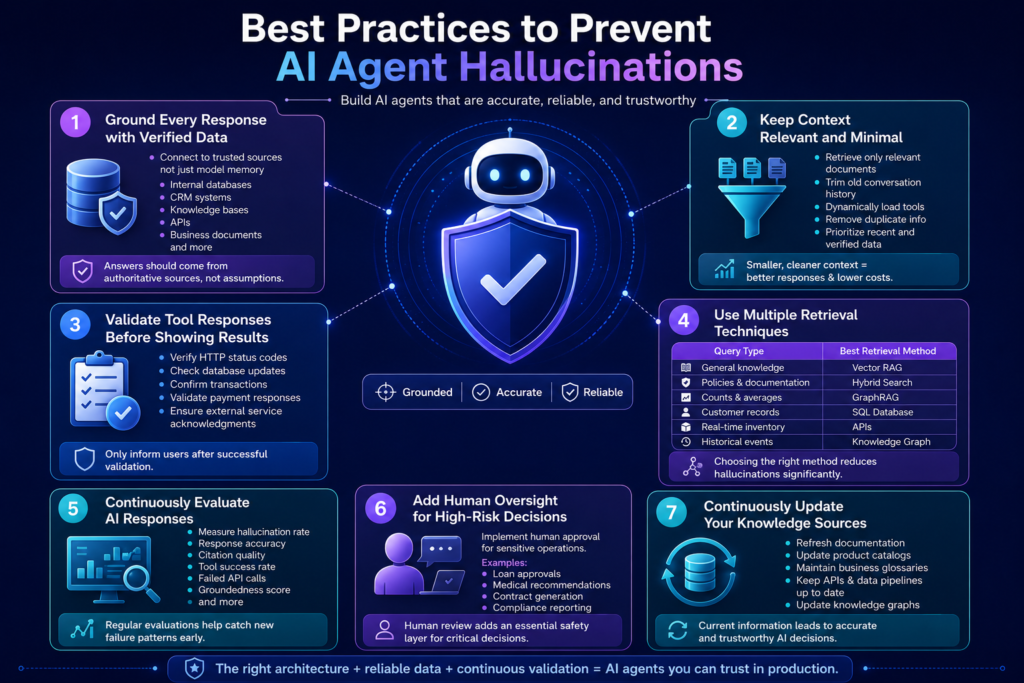
Ground Every Response with Verified Data
Never allow AI agents to answer purely from model memory when organizational data is available. Instead, connect agents to – Internal databases, CRM systems, Knowledge bases, APIs, Business documents, and more.
The goal is to ensure that every important answer should come from an authoritative source rather than the model’s training data.
Keep Context Relevant and Minimal
When it comes to AI agents, more context does not always produce better answers. Sending unnecessary documents, excessive chat history, or hundreds of tool descriptions increases token usage while confusing the model.
Instead focus on – Retrieve only relevant documents, trim old conversation history, dynamically load tools, remove duplicate information, prioritize recent and verified data. Smaller, cleaner context windows generally produce better responses while lowering AI inference costs.
Validate Tool Responses Before Showing Results
Never assume an API call succeeded. Instead focus on verify the HTTP status codes, database updates, transaction confirmations, payment responses, and external service acknowledgments. Only after validation should the AI inform users that an action has been completed.
Use Multiple Retrieval Techniques
Vector search alone isn’t suitable for every query. A production AI agent should intelligently combine multiple retrieval methods depending on the user’s request.
For example:
| Query Type | Best Retrieval Method |
| General knowledge | Vector RAG |
| Policies & documentation | Hybrid Search |
| Counts & averages | GraphRAG |
| Customer records | SQL Database |
| Real-time inventory | APIs |
| Historical events | Knowledge Graph |
Choosing the appropriate retrieval method reduces hallucinations significantly.
Continuously Evaluate AI Responses
Many organizations test AI agents before launch but rarely monitor them afterward. Instead, continuously measure the hallucination rate, response accuracy, citation quality, tool success rate, failed API calls, groundedness score, and more.
Regular evaluations help identify new failure patterns before they affect users.
Add Human Oversight for High-Risk Decisions
Not every AI-generated decision should be executed automatically. For sensitive operations involving finance, healthcare, legal compliance, or security, implement a human approval workflow.
Examples include:
- Loan approvals
- Medical recommendations
- Contract generation
- Compliance reporting
Human review adds an essential safety layer for decisions where accuracy is critical.
Continuously Update Your Knowledge Sources
Products change, policies are updated, regulations shift, and business metrics are redefined. AI agents relying on outdated information are far more likely to hallucinate.
Regularly refresh documentation, product catalogs, business glossaries, APIs, knowledge graphs, data pipelines, and more. Keeping information current ensures AI agents make decisions based on the latest business context rather than obsolete data.
Why Choose Triple Minds for Enterprise AI Agent Development?
Building enterprise-grade AI agents requires more than integrating a large language model. Success depends on combining advanced AI capabilities with reliable data architecture, secure integrations, intelligent orchestration, and robust validation mechanisms.
At Triple Minds, we design and develop AI agents that are built for real-world business operations rather than simple conversational demos. Our AI development approach focuses on:
- Context-aware AI agents powered by enterprise knowledge.
- Custom RAG and GraphRAG implementations for accurate retrieval.
- Multi-agent architectures for complex workflows.
- Secure integrations with CRMs, ERPs, databases, APIs, and internal systems.
- Runtime guardrails and validation layers to improve reliability.
- Scalable cloud-native AI infrastructure.
- Continuous monitoring, optimization, and performance evaluation.
Whether you’re building an AI customer support assistant, enterprise knowledge agent, AI analyst, workflow automation system, or autonomous business assistant, our team develops solutions that prioritize accuracy, security, scalability, and long-term business value.
Not Sure Why Your AI Agent Is Hallucinating?
Hallucinations often originate from poor retrieval, missing context, weak validation, or incorrect tool orchestration. Triple Minds can review your current AI architecture and identify practical improvements to increase accuracy, groundedness, and trust before you scale to production.
Book an AI Agent Architecture Review
Conclusion
AI agent hallucinations are one of the biggest challenges in building reliable AI systems, but they can be significantly reduced with the right approach. In most cases, the problem is not the language model itself. It is the lack of quality context, structured data, validation, and proper guardrails.
By combining techniques like semantic retrieval, GraphRAG, multi-agent validation, deterministic business rules, runtime guardrails, and continuous monitoring, organizations can improve accuracy, consistency, and user trust.
As AI agents become part of critical business workflows, investing in the right architecture is essential. A well-designed AI agent retrieves verified information, follows business rules, validates its actions, and delivers reliable results.
If you’re planning to build AI agents for your business, Triple Minds can help. Our team specializes in building production-ready AI solutions with RAG, AI agents, guardrails, and enterprise integrations. Contact us to discuss your project and learn how we can help you build AI systems that deliver accurate and dependable results.
Quick Answers to Common Questions
AI agent hallucinations are typically caused by incomplete context, poor retrieval mechanisms, outdated knowledge, weak validation processes, missing guardrails, or incorrect tool selection. In enterprise systems, these factors often contribute more to hallucinations than the language model itself.
No. Prompt engineering can influence how an AI agent responds, but it cannot guarantee factual accuracy or enforce business rules. Production-grade AI systems rely on retrieval mechanisms, validation layers, deterministic business logic, and runtime guardrails to minimize hallucinations.
Retrieval-Augmented Generation (RAG) grounds AI responses using trusted external knowledge sources instead of relying solely on model memory. By retrieving relevant documents before generating answers, RAG significantly improves factual accuracy and reduces hallucinations.
Traditional RAG retrieves relevant document chunks using semantic search, making it suitable for FAQs and document search. GraphRAG organizes information into connected entities and relationships, making it more effective for structured reasoning, business intelligence, compliance queries, and complex enterprise knowledge retrieval.
The most effective approach combines multiple techniques, including context engineering, semantic retrieval, RAG or GraphRAG, tool response validation, runtime guardrails, deterministic business rules, multi-agent validation, continuous monitoring, and human oversight for high-risk decisions.
AI coding tools are everywhere now. Developers use GitHub Copilot, ChatGPT and similar tools to write code faster than ever before. And honestly, for a lot of simple tasks, the output is impressive. But here is the problem that nobody talks about enough. AI generated code breaks in ways that are surprisingly hard to catch before it reaches production.
Every major AI coding tool ships with the same fine print: “AI may make mistakes. Double-check all generated code.” This guide is what double-checking actually means in practice — the common bugs in AI code, why AI coding mistakes slip through review, and how to fix AI-generated code before it costs you.
If your product relies on AI generated code and you have no expert layer of review between the output and deployment, then you are taking a bigger risk than you might think.
At Triple Minds, we help businesses build, integrate and govern AI systems correctly through our AI Development and Consulting services so that the code powering your product is actually reliable, secure and built to scale.
This blog breaks down the most common issues in AI-generated code and exactly what you need to do to fix them. In one line: the most common bugs in AI code are hallucinated APIs, security vulnerabilities, outdated dependencies, edge-case logic errors, missing error handling, context mismatches, and code that does not scale — and every one of them is catchable with the right review process.
Key Takeaways
1) AI tools generate code by pattern matching, not reasoning which means they confidently produce errors they cannot recognize.
2) Security vulnerabilities especially hardcoded credentials and SQL injection are among the most dangerous and common bugs in AI generated code.
3) Edge case handling and error handling are consistently weak in AI output and must be added or reviewed manually.
4) Always verify that the functions, libraries and APIs referenced in AI-generated code exist in the version you are using.
5) Treating AI-generated code with the same review rigor as any other code is not optional, it is the only reliable path to production ready quality.
Facing Problems with Messy AI-Generated Code?
AI-generated code can speed up development, but it often leaves behind inconsistent architecture, duplicate logic, and maintainability challenges. Triple Minds helps teams clean up AI-generated codebases, improve code quality, and prepare applications for long-term scalability.
Explore Vibe Coding Cleanup Services
Why AI Generated Code Has Bugs In The First Place?
Before getting into specific bugs, it helps to understand why they happen. AI coding tools work by predicting the most statistically likely next piece of code based on patterns in their training data. They are not reasoning about your product, your database structure or your business logic. They are pattern matching at a very sophisticated level.
This means AI-generated code:
1) Often handles the “happy path” perfectly but fails on edge cases.
2) Can produce output that looks correct but contains subtle logical errors.
3) May use outdated libraries or deprecated methods based on older training data.
4) Does not know the context of your broader codebase unless you explicitly provide it.
A Survey of Bugs in AI-Generated Code: What the Research Shows
These are not anecdotes. Academic and industry research on AI coding issues keeps finding the same pattern: the code compiles and reads well, but carries a meaningful rate of security and logic defects.
- NYU’s widely cited “Asleep at the Keyboard” study found that roughly 40% of 1,689 AI-assisted programs written in security-relevant scenarios contained exploitable vulnerabilities.
- A 2024 empirical survey of bugs in AI-generated code (Tambon et al., Bugs in Large Language Models Generated Code) catalogued 333 real bugs from three leading code models into ten recurring patterns — misinterpreted requirements, wrong input types, hallucinated objects — the same categories you will see below.
- GitClear’s analysis of hundreds of millions of changed lines shows code churn rising sharply in the AI era, with copy-pasted and quickly-reverted code growing — the statistical signature of bugs reaching production from AI generated code and being patched after the fact.
A Stanford experiment adds the uncomfortable twist: developers using an AI assistant wrote less secure code but believed they had written more secure code. Overconfidence is part of the bug.
With that foundation in place, here are the bugs that appear most often.
Read Also: Agentic Engineering vs Vibe Coding – The 2026 Comparison Guide for Founders, CTOs and Builders
The 7 Most Common Bugs in AI Code
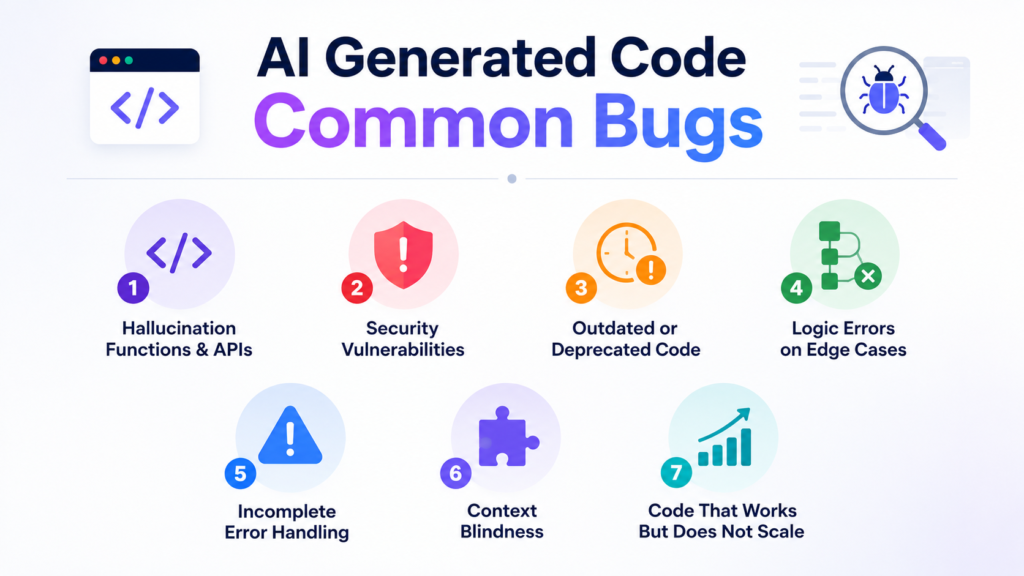
1) Hallucination Functions And APIs
This is one of the most disorienting bugs to run into. The AI writes code that calls a function or method that simply does not exist. The code looks completely legitimate, follows correct syntax and reads naturally. But when you run it , you get an immediate error because the library or method being referenced was either never real or has since been removed.
Why It Happens:
AI models sometimes confuse similar library names, combine features from different versions or generate plausible-sounding method names that were never part of any real API.
How To Fix It:
1) Always verify every imported library and method name against the official documentation.
2) Run a quick check on the version you are using versus what the AI likely trained on.
3) Use your IDE’s autocomplete and linting tools as a first pass to catch undefined references.
4) Treat any unfamiliar method name as “needs verification” before trusting it.
2) Security Vulnerabilities
This is where things get genuinely dangerous. AI-generated code regularly introduces security issues that could expose your application or your users data. The most common ones are:
1) Hardcoded credentials like API keys, passwords and tokens directly in the source code.
2) SQL injection vulnerabilities from building queries with string concatenation instead of parameterized statements.
3) Exposed sensitive data in logs or API responses.
4) Missing authentication checks on endpoints.
Why It happens:
AI models learn from code samples on the internet and a lot of internet code is written without security as a priority. The model replicates those patterns without understanding the risk.
How To Fix It:
1) Never deploy AI generated backend code without a security review.
2) Use static application security testing (SAST) tools like Semgrep or SonarQube to scan for common vulnerabilities.
3) Make it a rule that no credentials ever live in source code, no matter where the code came from.
4) Check every database query for parameterization especially anything accepting user input.
3) Outdated or Deprecated Code
AI models have a training cutoff date. That means the code they produce might be based on library versions, syntax patterns or APIs that have since been deprecated or completely replaced.
For example, you might get code using an old version of a framework where the method signature has changed or imports from a package that has been renamed or split into multiple packages.
Why It Happens:
The model genuinely does not know what changed after its training cutoff. It confidently produces what was once correct.
How To Fix It:
1) Always cross check the package versions being used against the current stable release.
2) Pay special attention to any deprecation warning when you run the code.
3) When prompting your AI tool, explicitly mention the version of the library or framework you are using.
4) Check the library’s changelog if you notice anything unusual in the generated code.
4) Logic Errors On Edge Cases
AI tools are excellent at generating code that works when everything goes as expected. They are much weaker when inputs fall outside the normal range, when a list is empty, when a value is null, or when the user does something unexpected.
These bugs are the hardest to catch because the code often runs without errors under normal conditions. They only surface when something unexpected happens which is exactly when you want your code to be most reliable.
Why It Happens
The training data for AI models is dominated by examples that show happy paths. Edge case handling is less consistently represented, so the model learns it less thoroughly.
How To Fix It:
1) Write unit tests that specifically target edge cases, empty inputs, null values and extreme values.
2) Review any conditional logic the AI writes and ask yourself what happens if the condition is never true or always true.
3) Test with data that is empty, zero, negative, very long or in an unexpected format.
4) Never assume AI-generated functions have been tested against anything other than the most basic inputs.
Read Also: Top 10 Vibe Coded Websites in 2026 – Real Builds, Real Timelines
5) Incomplete Error Handling
Look at AI generated code and you will often find functions that do not handle errors at all. No try/catch blocks. No null checks. No meaningful error messages. The code assumes everything will work perfectly.
In real applications, things go wrong. APIs time out. Databases return unexpected values. Files do not exist where expected. When there is no error handling, a single unexpected failure can bring down an entire process silently, or worse, crash into your application without any useful information about why.
How to fix it:
1) Add proper try/except blocks around any code that interacts with external systems.
2) Never let errors fail silently, always log the error in a meaningful way.
3) Validate function inputs before processing them.
4) When prompting AI tools, explicitly ask for error handling to be included in the output.
6) Context Blindness
AI coding tools only know what you show them. If you ask for a function without giving it the broader context of your application, then it will invent the surrounding structure. It might use variable names that conflict with yours, assume a data structure that is different from your actual schema or write a function that duplicates something you already have elsewhere in your codebase.
Why It Happens
The AI has no memory of previous conversations unless you provide them and it cannot see files it has not been shown. It builds what it sees, nothing more.
How To Fix It:
- Always include relevant context when prompting. Share the data structure, the function signature you need, the existing code it will interact with.
- Review AI -generated code for naming conflicts and structural assumptions before integrating it.
- If using a tool like GitHub Copilot, keep related files open in your editor so it has more context to work with.
- After generating code, walk through it manually to check whether its assumptions match your actual codebase.
7) Code That Works Once But Does Not Scale
AI-generated code often solves the immediate problem without considering what happens when the system grows. You might get a loop that runs fine on 10 records but times out on 10,000 or a database query that has no indexing considerations. It can also be a kind of approach that works perfectly as a prototype but creates performance bottlenecks in production.
Why It happens
AI tools optimize for readability and correctness on the example at hand. Performance at scale requires understanding the system’s growth trajectory which the AI does not have.
How To Fix It:
1) Review any loops, database queries and data transformation for efficiency.
2) Ask yourself what happens when the dataset is 100 times larger.
3) Use profiling tools to identify bottlenecks before they reach production.
4) When prompting, specify whether you need code optimized for performance, not just correctness.
Read Also: How to Find the Right AI Ethics Consultant for Your Digital Product
How Bugs Reach Production From AI-Generated Code
Knowing the bug types is half the story. The other half is understanding why these AI coding issues get past teams that would never let a junior developer merge the same mistakes:
- Volume outruns review. AI tools generate more code per day than most teams can review at their old level of rigor, so the review bar quietly drops.
- Plausible code lowers vigilance. AI output is clean, idiomatic and confident. Reviewers scrutinize messy code and wave through polished code — and AI coding mistakes are always polished.
- The tests share the blind spots. When the same model writes both the function and its unit tests, the tests validate the model’s assumptions instead of your requirements.
- Nobody owns it. Code no one wrote is code no one feels responsible for. Bugs reaching production from AI generated code are usually discovered by users, not authors.
How to Fix AI-Generated Code: A Pre-Merge Checklist
Before you drop AI-generated code into your codebase, run through these:
1) Does every imported function or method actually exist in the current version of the library?
2) Are there any hardcoded credentials, tokens or sensitive values?
3) Is every database query using parameterized inputs?
4) Does the code handle null values, empty inputs and unexpected data?
5) Is there a meaningful error handling around any operation that can fail?
6) Does the code fit your actual data structures and variable naming?
7) Have you tested it with edge case inputs, not just the expected ones?
Read Also: Best Vibe Coding Tools For Non-Technical Founders
Don’t Let Hidden Security Risks Reach Production
Applications handling customer data, financial information, or enterprise workloads need more than functional code—they need secure code. Triple Minds audits AI-generated code to uncover vulnerabilities, insecure dependencies, and authentication gaps before deployment.
Schedule a Vibe Code Security Audit
Can AI Fix Its Own Code Errors?
Partially — and it matters where you draw the line. Pasting an error message back into the tool works remarkably well for mechanical problems: syntax errors, missing imports, renamed methods, wrong API signatures. This loop — run, paste the error, regenerate — is what most developers mean when they search “AI fix code errors”, and for that class of problem it is genuinely fast.
Where the loop breaks down is everything this article is really about: logic errors on edge cases, security vulnerabilities, and architectural mismatches. The model cannot observe your runtime, your data or your intent — so it cannot tell the difference between code that runs and code that is right. Use AI to fix the mechanical errors, and keep human review (plus SAST scanning and edge-case tests) for the errors AI cannot see.
Conclusion
AI coding tools are genuinely useful. They can dramatically speed up development, help you explore approaches that you might not have considered, and reduce the time spent on boilerplate. But they are not substitutes for engineering judgement.
The bugs covered in this blog are not rare edge cases. They show up consistently in AI-generated code across languages, frameworks and uses cases. Knowing where to look is the first step toward using these tools responsibly.
If you are building a product powered by AI and want expert hands involved in how that code is written reviewed and deployed, Triple Minds offers full AI development and consulting services to help you ship with confidence. Talk to our team and get the right foundation from day one.
Quick Answers to Common Questions
It is possible but not advisable. Even high-quality AI output should be reviewed by a developer before going to production, especially for security sensitive areas.
No tool is bug free. GitHub Copilot, ChatGPT, Gemini and Claude all produce errors. The quality varies by task and how well you prompt, not just which tool you use.
This is still an evolving area. Some AI generated code may be similar to existing open-source code in its training data. It is worth reviewing the policies of the tool you use and consult with a legal advisor for commercial products.
Static analysis tools scan code for known vulnerability patterns without running it. They can catch SQL injection risks, hardcoded secrets and insecure function usage automatically making them a strong first line of defense for AI output.
Yes, transparency helps reviewers know where to apply extra scrutiny and builds good habits around AI assisted development across your engineering culture.
The most common bugs in AI code are hallucinated functions and APIs, security vulnerabilities such as hardcoded credentials and SQL injection, outdated or deprecated library usage, logic errors on edge cases, missing error handling, context mismatches with the surrounding codebase, and code that works in a demo but fails at scale.
Bugs reach production from AI-generated code when generation speed outpaces review: polished-looking output lowers reviewer vigilance, tests written by the same model share its blind spots, and edge-case failures never appear in happy-path testing. Applying the same review rigor as human-written code, plus SAST scanning and edge-case tests, closes the gap.
Partially. Feeding an error message back to the tool reliably fixes syntax errors, missing imports and wrong API signatures. It rarely fixes logic errors, security vulnerabilities or architectural problems, because the model cannot observe your runtime, data or intent. Use AI to fix mechanical code errors and human review for the rest.