Everyone knows that vibe coding can transform an idea into a fully functional application in a remarkably short time. But the bigger question is one that many teams still struggle to answer: Is vibe-coded software actually production-ready?
The growing number of online searches about the production readiness of AI-generated code reflects this uncertainty.
There’s no denying that the speed is transformative.
AI coding agents such as Claude Code, Cursor, GitHub Copilot, and Windsurf can understand a prompt and generate a working application within hours. The result often runs smoothly, looks polished, and performs well in demos.
But every engineering team eventually faces a more important question: Is that code ready to serve real users, handle real-world data, and remain reliable under production conditions?
The answer is simple: it depends.
Production readiness isn’t determined solely by whether the code works or even by its overall quality.
It’s about managing risk.
- Can the application scale?
- Is it secure?
- Is it maintainable, observable, and resilient when things go wrong?
At Triple Minds, we help businesses harness the speed of vibe coding without compromising on quality. We build production-grade applications in minutes using AI-powered development workflows, then complement that speed with hands-on engineering reviews, testing, security validation, performance optimization, and deployment best practices. The result is software that not only demos well but is built to perform reliably in production.
In this article, we’ll explore what “production-ready” really means, why vibe-coded applications often fall short of that standard, what current evidence tells us about the associated risks, and the practical steps teams can take to bridge the gap.
What “Production-Ready” Actually Means
Anyone with basic understanding of AI coding tools such as Claude Code, Cursor, GitHub Copilot, and more can generate a working application within hours. The mobile app or software runs smoothly, performs well, and runs without errors – but does it mean production-ready?
The production-ready code is not simply code that runs without errors. It is code that is stable, secure, maintainable, and tested under realistic conditions. In real-world scenarios, this includes several dimensions such as;
- Structured and maintainable code that another engineer can read, understand, and safely modify without fully rebuilding it.
- Comprehensive test coverage that includes unit tests, integration tests, and end-to-end tests on the most critical user paths. And not the tests that confirm the happy path works.
- Observability, meaning error tracking, performance monitoring, and logging that let a team know when something breaks, not just after a customer reports it.
- Security fundamentals, including proper secrets management, authentication and authorization enforced at the API level, input validation, and protection against common vulnerability classes.
- Scalability, meaning the architecture can handle real-world load, not just the load present during a demo.
- Compliance readiness, where applicable, including data handling practices that satisfy standards like SOC 2, GDPR, or HIPAA depending on the industry and user base.
Keep in mind that Production readiness of a vibe coded code is not a binary label but a risk profile.
The real question is not “is this code good,” but “is the risk of this code failing, and the consequence of that failure, acceptable given what the application actually does and who depends on it.”
Related Stories: Agentic Engineering vs Vibe Coding
Build Faster with Vibe Coding—Without Compromising Quality
Vibe coding can dramatically accelerate software development when backed by experienced engineers. Triple Minds helps startups and enterprises build production-ready applications using AI-assisted development, combining rapid delivery with clean architecture, scalable code, and engineering best practices.
Build with Our Vibe Coding Experts
Production Readiness Depends on Risk, Not Just Code Quality
A basic vibe code app that is used internally by a five-person team has a fundamentally different risk profile than a payments flow processing customer transactions or a healthcare app handling protected health information.
When it comes to developing low or medium-risk applications such as internal tools, early MVPs, and team utilities, the vibe coding code is genuinely production-ready.
However, for high risk application the story is completely different. Vibe coding code is not production-ready for high-risk applications that handle payments, personal identifiable information, or regulated data, unless significant additional engineering work has been done around end-to-end testing, CI pipelines, security review, and monitoring.
This distinction matters because a lot of the debate around vibe coding gets stuck on the wrong question.
The issue is rarely whether the AI wrote “good” code in some abstract sense. It is whether anyone evaluated what the consequences of failure would actually be, and whether the engineering discipline applied matches that consequence.
Not every project requires the same level of engineering oversight. If you’re weighing speed and cost against technical expertise, our comparison of Should I Hire a Vibe Coder or a Senior Developer? looks at the differences in capabilities, code quality, project risk, and the types of applications each approach may be best suited for.
Why Vibe-Coded Code Usually Falls Short of Production Standards
Most vibe coding tools are designed to generate code that satisfies user prompts and produces a working application. They are optimized for speed and functionality but not for the engineering rigor required to run software safely and reliably in production. As a result, the same shortcomings tend to appear across many AI-generated applications. While the code may work as expected, it often lacks the security, scalability, maintainability, and operational safeguards needed for real-world deployment.
Here are the five most common reasons why vibe-coded applications often fall short of production-ready standards.
Treating Security as an Afterthought
With AI coding agents, you can generate a genuinely good at writing functional code. But there’s a functional flaw here – AI agents are largely indifferent to security hygiene.
There are countless studies on the internet that have proven security risks associated with the vibe-coded code. Some researchers have found that the AI-generated code contains at least one security flaw, spanning injection vulnerabilities, hardcoded secrets, and broken authentication.
Independent testing of GitHub Copilot suggestions found vulnerabilities present in roughly 30 percent of security-sensitive scenarios. Security risks associated with vibe-coded code are not a rare edge case but a consistent pattern across tools and models.
AI Agent Hallucinations
Large language models can confidently reference code libraries, packages, or files that simply do not exist. These hallucinations tend to be statistically predictable and reproducible across similar prompts. For this reason, attackers have begun registering those exact predicted package names in advance on repositories like npm and PyPI, a technique known as slop squatting.
A developer who accepts an AI suggestion to install a hallucinated package can unknowingly pull malicious code directly into their application, with no phishing or credential theft required.
Testing Coverage Is Minimal or Absent
Vibe-coded applications are typically validated by whether they work during the session in which they were built, not by structured unit tests, integration tests, or load testing under realistic conditions. Without a test suite, teams lose the ability to make changes confidently, since there is no automated way to confirm that a new feature has not broken existing functionality.
Architecture Is Optimized for the Demo, Not for Scale
Quick, prompt-based builds often lack modularity. Database schemas, API structures, and infrastructure choices are frequently made to satisfy the immediate request rather than to support future growth. This becomes a real problem when a business needs to add features, integrate new services, or scale to handle significantly more users or traffic than the original build anticipated.
There Is No Observability Layer
Without error tracking, uptime monitoring, and performance metrics in place, teams typically find out about production issues from users rather than from their own systems. This dramatically increases the time it takes to detect and resolve problems.
A Practical Path to Making Vibe-Coded Applications Production-Ready
The gap between a vibe-coded prototype and a production-ready application is not usually a full rebuild. It is a defined set of engineering layers that vibe coding tends to skip by default. Closing that gap generally follows a consistent order.
Audit and remove hardcoded secrets. Search both your current codebase and your git history for API keys, database credentials, and tokens that may have been committed directly into the code, and move them into proper secrets management.
Add structured error handling to all external service calls. Every call to a third-party API, database, or external service should fail gracefully and predictably rather than crashing the application or exposing internal details to users.
Verify authentication and authorization at the API level. Confirm that every endpoint properly checks who is making a request and what they are allowed to do, rather than relying solely on frontend checks that can be bypassed.
Set up a continuous integration pipeline that runs on every push. This ensures that tests, linting, and basic checks run automatically before code reaches production, rather than relying on manual discipline alone.
Add end-to-end test coverage on your most critical user paths. You do not need full coverage of every possible interaction on day one. Covering the three to five flows that would cause the most damage if broken, such as signup, checkout, or core data actions, delivers the highest return.
Configure observability, including error tracking, uptime monitoring, and user analytics. This closes the loop so your team learns about problems from your own systems rather than from frustrated users.
Beyond this one-time hardening pass, sustainable AI-assisted development also requires an ongoing discipline. Treat AI-generated code the way you would treat unreviewed third-party code: read it, test it, and run static analysis before merging it.
Keep humans in the loop for consequential actions, particularly anything involving deletions, payments, permission changes, or production deployments, requiring explicit review before those actions execute. And maintain environment separation, so that testing and staging environments never bleed into production, a governance gap that has directly caused real incidents.
Read Also: Top 10 Vibe Coded Apps in 2026 and Top 10 Vibe Coded Websites
Answering Vibe Coding Code Production Readiness
Vibe coding is not inherently unsafe, and it is not inherently production-ready either. It is a genuinely powerful tool for speed and exploration that was never designed to enforce the engineering discipline production systems require on its own.
Whether vibe-coded code is production-ready depends entirely on what the application does, who depends on it, what data it touches, and whether a deliberate engineering review has closed the specific gaps AI-generated code reliably leaves behind, primarily around security, testing, architecture, and observability.
Organizations that are avoiding the incidents making headlines through this year are not avoiding vibe coding altogether. They are using it within a governed framework, where AI-generated code is treated as a strong starting point rather than a finished product, human review is required at production boundaries, and security and test gates are enforced before anything reaches real users.
Don’t Let Insecure AI-Generated Code Reach Production
AI-generated code can introduce hidden security vulnerabilities, logic flaws, outdated dependencies, and compliance risks that are easy to overlook. Triple Minds performs comprehensive Vibe Code Security Audits to identify and fix critical issues before deployment, helping you ship secure, reliable, and production-ready software.
Schedule a Vibe Code Security Audit
Conclusion
Vibe coding has fundamentally changed how software gets built. Tasks that once took weeks can now be completed in hours, enabling startups, product teams, and enterprises to validate ideas faster than ever before. But this alone doesn’t make software production-ready.
The real measure of production readiness is whether it can securely handle real users, real data, and real business operations without becoming a liability. That requires engineering practices such as security reviews, comprehensive testing, scalable architecture, observability, and operational safeguards.
If you’ve built an application with AI and aren’t sure whether it’s ready for production, the right question isn’t “Does it work?” It’s “Can I trust it with my users, my data, and my business?” Answering that question before you deploy is what separates a successful launch from an expensive incident.
At Triple Minds, we’ve built 200+ digital platforms with an average MVP launch time of just 14 days by combining AI-powered development with experienced engineering. We help businesses turn vibe-coded prototypes into production-ready applications through hands-on code reviews, rigorous testing, security hardening, performance optimization, and deployment best practices.
If you’d like to see how this works in practice, request a demo or explore our real-world case studies to see how we’ve helped businesses ship production-ready AI-built applications faster.
Quick Answers to Common Questions
Yes, but not by default. They typically require security hardening, code reviews, vulnerability scanning, and proper authentication before meeting enterprise standards.
It can be if left unreviewed. Refactoring early, adding tests, and improving architecture significantly reduce long-term maintenance costs.
Not necessarily. Most MVPs can be productionized through targeted improvements instead of a complete rewrite.
The biggest risk isn’t broken functionality, but it’s hidden security, scalability, and reliability issues that only appear under real-world usage.
Evaluate it against production standards, including security, testing, observability, scalability, and maintainability, and not just whether the application works.
MCP agents solve one of the biggest limitations of traditional inventory and fulfillment automation: the inability to reason, adapt, and act across multiple systems. While conventional automation can transfer data between applications, every new workflow typically requires custom integrations, brittle scripts, or manually maintained rules.
MCP agents replace these isolated automations with a standardized way for AI to access business context and interact with enterprise systems. Now, they can execute actions across inventory, warehouse, and order management platforms. Rather than simply moving data, the MCP agents understand operational context, make informed decisions, and coordinate end-to-end workflows.
This now eliminates the need for a developer team to connect inventory, order management, and fulfillment systems for better decision-making. Now, an AI agent can directly connect these tools using a standard protocol.
The result is a shift from passive automation to agentic operations, where AI systems can read live data, make context-aware decisions, and execute approved actions on their own.
We at Triple Minds have assisted over 15+ businesses worldwide in implementing production-ready ecommerce MCP servers & agents. As agentic shopping becomes the new standard, we ensure you are ready to automate inventory & fulfillment through AI.
In this post, we break down what MCP agents are, how they apply specifically to inventory and fulfillment, the real use cases already in production, the benefits businesses are seeing, and what to consider before rolling this out in your own operations.
How MCP Agents Turn Inventory Systems into Autonomous Operations
Most existing inventory tools are read-only from an AI perspective. They can generate a report, flag a low-stock SKU, or send an alert, but a human still has to interpret that information and act on it. However, this is where MCP agents change the equation. As these agents have both read and write access to the underlying systems.
With an MCP-connected inventory system, an AI agent can access live stock levels across every warehouse and sales channel, reorder triggers based on sales velocity and lead time, and allocation logic that determines which orders should be fulfilled from which location.
The practical difference this makes is significant. If a flash sale causes a SKU to sell out unexpectedly, an agent with write access can pause the related ad campaign automatically, without anyone needing to notice the stockout first and manually intervene.
That is the core distinction between traditional automation and agentic automation: the system does not just tell you something happened, rather it responds to it.
Turn Your Ecommerce Platform into an AI-Ready Commerce Ecosystem
MCP servers enable AI agents to securely access inventory, fulfillment, orders, customer data, and business tools in real time. Triple Minds develops custom Ecommerce MCP Servers that connect your existing systems, helping you automate workflows and power the next generation of AI-driven commerce.
Explore Our Ecommerce MCP Server Development Services
How MCP Agents Work in an Inventory and Fulfillment Stack
At a technical level, the architecture involves three main components.
- First is the AI agent itself, which could be a general-purpose assistant or a purpose-built agent trained for a specific operational role such as replenishment or order routing.
- Second is the MCP server, which exposes specific tools from your business systems, such as getInventory, placeOrder, updateStock, or checkSupplierLeadTime.
- Third are the underlying platforms themselves: your order management system, warehouse management system, ERP, supplier portals, and sales channels.
When a request arrives, the MCP agent first understands the task. The request could come from a customer asking about product availability or from an internal event such as a low-stock alert. Based on the available context, the agent selects the appropriate MCP tool and sends a real-time request to the connected system. The response is returned through the same standardized interface. The agent then interprets the result and decides the next action. It can answer the customer, update inventory records, trigger another workflow, or escalate the task to a human when approval is required.
This is a meaningfully different approach from older middleware or robotic process automation tools, which follow fixed, pre-programmed steps. An MCP agent can weigh multiple data points at once, such as recent sales trends, promotional calendars, and supplier lead times, before deciding what action to take. That contextual reasoning is what makes the automation feel less like a rigid script and more like a capable operations assistant working around the clock.
Read Also: OpenAI’s Agentic Commerce Protocol (ACP) Explained for Ecommerce Brands
Core Use Cases for Inventory Automation
Real-Time Stock Visibility Across Channels and Locations
One of the most immediate applications of MCP agents is unifying inventory visibility. Many businesses sell across multiple channels, such as their own website, Amazon, a wholesale portal, and a physical store, but their stock data lives in disconnected systems. An MCP-connected agent can pull live stock levels from every location and channel into a single, consistent view, and just as importantly, write updates back to each platform when stock changes. This reduces the classic problem of overselling a product that was already sold out on another channel.
Automated Reorder Triggers and Replenishment
Instead of a warehouse manager manually reviewing spreadsheets to decide what to reorder, an MCP agent can continuously monitor stock against configured thresholds, factoring in sales velocity, seasonality, and supplier lead times. When a SKU approaches a reorder point, the agent can generate a purchase order recommendation, or in more mature setups, place the order directly with an approved supplier within pre-set spending rules. This turns replenishment from a periodic manual task into a continuous background process.
Intelligent Order Routing and Fulfillment Logic
When an order comes in, deciding which warehouse or fulfillment center should ship it is rarely a simple question. It depends on stock availability, shipping cost, delivery speed promises, and sometimes product-specific handling requirements. MCP agents can evaluate all of these factors in real time and route the order to the optimal location automatically. Some implementations go further, generating specific fulfillment instructions, for example flagging a perishable item for expedited shipping or a fragile item for reinforced packaging, and passing those instructions directly to the warehouse system.
Demand Forecasting and Inventory Optimization
Because MCP agents can pull historical sales data, current trends, and external signals like upcoming promotions, they are well suited to support more accurate demand forecasting. Rather than static reorder points set once and rarely revisited, agents can continuously adjust recommendations based on what is actually happening in the business, helping prevent both stockouts and excess inventory that ties up capital.
Returns and Reverse Logistics
Returns are one of the more operationally messy parts of fulfillment, involving inspection, restocking decisions, and refund processing. Agents connected through MCP can automate parts of this workflow, such as updating inventory counts once a return is received and inspected, flagging items that need to be written off rather than restocked, and triggering refunds or replacement orders based on predefined rules.
Supplier and Procurement Coordination
Beyond internal inventory, MCP agents can also interact with supplier-facing systems, checking lead times, comparing pricing across vendors, and even submitting purchase orders. This creates a more responsive procurement process, where sourcing decisions are informed by live data rather than outdated spreadsheets or infrequent manual reviews.
Multichannel and Marketplace Synchronization
For businesses selling on Shopify, WooCommerce, Amazon, or other marketplaces, keeping product data, pricing, and stock levels consistent across every platform is a constant challenge. MCP servers built for specific platforms allow agents to read and write directly to each one, keeping listings synchronized without the delays that come from batch syncs or manual updates.
Customer Service Tied to Live Inventory Data
Customer service agents built on MCP can answer questions about product availability, delivery estimates, and order status by pulling directly from the same live inventory and order systems used internally, rather than relying on static FAQ content or outdated product pages. This reduces the volume of manual lookups support teams need to perform and speeds up resolution times for common questions.
Read Also: What is a Database Chatbot and How Does it Work?
Real-World Platforms Bringing MCP to Inventory and Fulfillment
The shift toward MCP-based automation is not theoretical. Major commerce and ERP platforms have begun building MCP servers specifically for inventory and fulfillment use cases.
Retail and order management platforms have introduced MCP servers that let AI agents access unified inventory across store locations, generate accurate delivery promises, and support customer service interactions with real-time data. Enterprise ERP and commerce platforms have gone further, connecting agents to both the selling side, covering product discovery and checkout, and the operational side, covering merchandising, demand planning, procurement, and fulfillment, so that agents can reason across the full order lifecycle rather than a single narrow function.
E-commerce-focused MCP servers for platforms like Shopify and WooCommerce allow agents to manage inventory, process orders, and handle support tasks directly within existing store infrastructure, without requiring merchants to rebuild their tech stack from scratch. Commerce networks that connect brands, suppliers, and marketplaces have also introduced MCP layers specifically to make catalog, pricing, and fulfillment data discoverable to AI agents while maintaining strict governance controls, such as role-based access and audit logging, over what agents are allowed to do.
Across these examples, the common thread is the same: businesses are not replacing their existing inventory and fulfillment systems, they are adding an AI-accessible layer on top of them that allows agents to operate within those systems safely and efficiently.
Business Benefits of MCP-Driven Inventory Automation
Faster Response to Demand Changes
MCP-powered agents continuously monitor inventory levels, sales trends, and demand fluctuations in real time. This allows businesses to react immediately to sudden demand spikes, stock shortages, or changing customer behavior instead of waiting for scheduled reports, reducing delays and improving inventory availability.
Fewer Manual Errors
By automating data exchange between inventory, sales, and fulfillment systems, MCP minimizes manual data entry and repetitive lookups. This significantly reduces the risk of human errors, ensuring more accurate inventory records and smoother business operations.
Lower Integration Overhead
Traditional system integrations often require custom APIs and significant development effort for every new application. MCP provides a standardized communication layer, making it easier and faster to connect new tools, suppliers, and platforms while reducing engineering costs.
Improved Customer Experience
With real-time access to inventory and order data, businesses can provide customers with accurate product availability, delivery estimates, and order updates. This helps prevent overselling, shipping delays, and inaccurate information, leading to higher customer satisfaction.
Better Use of Working Capital
MCP enables more accurate inventory forecasting and automated reorder decisions based on live business data. This helps companies maintain optimal stock levels, reducing the costs associated with excess inventory while minimizing revenue loss from stockouts.
Scalability Without Proportional Headcount Growth
As businesses expand into new sales channels, warehouses, or supplier networks, MCP agents can seamlessly manage the increased operational complexity. This allows organizations to scale efficiently without needing to hire additional staff for routine inventory monitoring and coordination tasks.
Getting Started: A Practical Path
Businesses do not need to automate everything at once. A practical approach starts with identifying the systems that already have, or can be given, an MCP-compatible interface, such as an order management system, warehouse management system, or e-commerce platform. From there, most teams begin with read-only use cases, like giving an agent access to live stock and order data for reporting or customer service purposes, before moving into write-enabled use cases such as automated reordering or order routing.
It is worth evaluating any inventory or fulfillment tool being considered by asking a simple question: does it expose MCP endpoints natively, or does it at least have a robust API that a custom MCP wrapper could sit on top of? Systems without either will require more upfront engineering work before agents can be connected.
Governance should be built in from the start rather than added later. This means defining clearly which actions an agent is allowed to take autonomously, such as adjusting reorder quantities within a set budget, versus which actions require human approval, such as placing a large purchase order with a new supplier. Role-based access controls and audit logging are not optional extras in this context; they are what makes agentic automation safe to run in a live operational environment.
Read Also: How Much Does It Cost to Build an AI Agent?
The Shift Toward Agentic Commerce
- From AI Assistants to AI Agents: Businesses are moving beyond AI tools that simply answer questions or generate content toward autonomous AI agents that can monitor operations, identify issues or opportunities, and execute approved actions with minimal human intervention. This evolution is driving the rise of agentic commerce.
- Ideal for Inventory and Fulfillment: Inventory management and fulfillment processes are well suited for AI agents because they rely on structured data, predictable workflows, and clearly defined business rules. This allows agents to make accurate, data-driven decisions while reducing manual oversight.
- High Impact Through Automation: Errors such as stockouts, overselling, or shipping delays directly affect revenue and customer satisfaction. By continuously monitoring operations and responding in real time, AI agents help minimize these issues, delivering measurable business value.
- Growing Adoption of MCP: As more commerce platforms introduce native MCP support and businesses become more comfortable with AI governance, autonomous inventory and fulfillment management is expected to become a standard operational capability rather than an emerging technology.
Organizations that start implementing MCP-driven automation with focused, well-governed use cases today will be better positioned to expand AI-driven operations as the technology matures and business confidence grows.
Build AI Agents That Do More Than Answer Questions
Modern AI agents should be able to retrieve live business data, execute workflows, interact with enterprise systems, and make context-aware decisions. Triple Minds develops production-ready AI agents with secure integrations, MCP architecture, RAG, GraphRAG, and enterprise-grade guardrails for scalable business automation.
Discover Our AI Agent Development Services
Final Thoughts
MCP agents transform inventory and fulfillment management from manual monitoring to intelligent systems that observe, reason, and act within defined rules.
The goal is not to replace operations teams. Instead, MCP agents automate routine tasks, allowing people to focus on strategy, exceptions, and critical decisions.
Businesses managing inventory across multiple channels, warehouses, or suppliers should consider MCP-based automation. The technology is maturing rapidly, platforms are adding native support, and benefits include better cash flow, fewer stockouts, and faster fulfillment. Early adopters are already gaining a competitive advantage.
At Triple Minds, we have helped 15+ businesses worldwide design and deploy production-ready ecommerce MCP servers and agents. If you are exploring how MCP agents could fit into your inventory and fulfillment stack, our team can help you assess your existing systems, identify the right starting use cases, and build an implementation roadmap suited to your business. Get in touch today to start automating your inventory and fulfillment with MCP agents.
Quick Answers to Common Questions
MCP agents are AI-powered systems that use the Model Context Protocol (MCP) to connect with inventory, warehouse, ERP, and order management platforms. They can access live business data, reason over operational context, and execute approved actions such as inventory updates, order routing, and replenishment.
Traditional automation follows predefined rules and workflows, while MCP agents can interpret context, choose the appropriate tools, and make informed decisions across multiple connected systems. This enables more adaptive and intelligent inventory and fulfillment operations.
MCP agents can automate real-time inventory visibility, stock replenishment, intelligent order routing, demand forecasting, marketplace synchronization, supplier coordination, returns management, and customer support by working directly with connected business systems.
Organizations can reduce manual work, improve inventory accuracy, minimize stockouts, optimize working capital, enhance customer experience, simplify system integrations, and scale operations more efficiently through AI-driven automation.
A practical approach is to begin with read-only use cases such as inventory visibility and reporting, then gradually expand to write-enabled workflows like automated replenishment or order routing. Strong governance, role-based permissions, and human approvals for critical actions are essential for safe deployment.
Since you’ve landed on this post, it’s safe to assume that you have already built a digital product and now you need an AI ethics consultant.
But now the question you are actually trying to answer is how to find the right AI ethics consultant. And we can understand your dilemma.
The right AI ethics consultant will genuinely make your product safer, fairer, and more defensible. On the other hand, the wrong AI consultant will produce a framework document, invoice you, and leave your engineering team exactly where they started.
The gap between the two is enormous — and it is rarely obvious from a proposal document or an introductory call.
According to EY, AI compliance failures cost organisations approximately $4.4 billion in 2025. Non-compliance limits market access for 68% of global AI firms. Strong compliance frameworks cut penalties by 80%.
You are not hiring a consultant for philosophical reasons. You are hiring one because the cost of getting this wrong is real and measurable. This post will guide you with the specific criteria, questions, and red flags you need to make the right hiring decision for your product and your situation.
Key Criteria to Choose the Right AI Ethics Consultant
Finding the right AI ethics consultant can have a significant impact on the success of your digital product. To help you choose the right partner, we’ve outlined the key criteria to guide your decision and make the selection process easier. Today, many consultants claim expertise in responsible AI. The difference lies in their ability to turn AI ethics, regulatory compliance, bias testing, and audit readiness into practical product controls that work in real-world deployments.
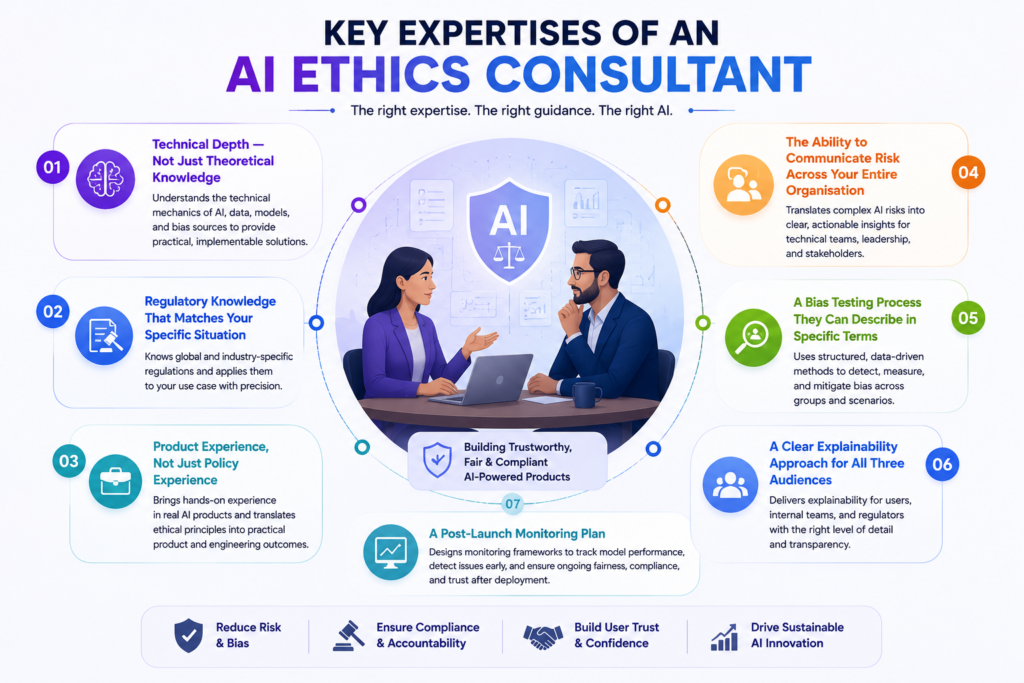
1. Technical Depth — Not Just Theoretical Knowledge
This is the most important filter, and the one that eliminates the largest proportion of candidates who present well on paper.
Be careful with consultants who cannot explain the technical mechanics of bias in machine learning models. Real AI ethics consulting means you can point to where bias actually enters the pipeline: in the training data, in feature selection, in the optimisation objectives, in threshold calibration, or in the deployment context.
Ask them:
“If our model’s approval rate for one demographic group was ten percentage points lower than another — where would you start looking for the cause?”
A consultant with genuine technical depth will walk you through a structured diagnostic: training data representation, feature engineering choices, label quality, threshold calibration, proxy variable encoding. A consultant without it will say something like “we would run a bias audit” without being able to explain what that involves in practice.
They do not need to write your model training code. But they need to understand the mechanics well enough to give your data science team specific, implementable guidance and not general observations that engineers then have to translate on their own.
2. Regulatory Knowledge That Matches Your Specific Situation
AI regulation is proliferating, sector-specific, and moves faster than most people working outside of it realise. General familiarity with the EU AI Act is not the same as knowing which risk tier your specific product falls into and what compliance looks like at the feature level.
The regulatory landscape you need your consultant to understand depends on where your product operates and what it does:
EU AI Act — if your product operates in the EU or serves EU users, the Act’s risk tier classifications determine what obligations apply. High-risk AI systems face significant transparency, explainability, and human oversight requirements. Your consultant should be able to tell you exactly which category your product falls into and what compliance requires from your engineering team and not your legal team.
GDPR Article 22 — applies when automated decision-making produces legal or similarly significant effects on users. The requirement to inform users and provide human review mechanisms must be built into your product interface, not buried in a terms and conditions document.
NIST AI Risk Management Framework — the practical governance standard in many US enterprise and government-adjacent contexts. Your consultant should be able to map your product against it, not just cite it.
ISO/IEC 42001 — the international AI management system standard. Increasingly appearing in enterprise procurement requirements and certification expectations.
Sector-specific frameworks — an ethics consultant supporting a healthcare organisation should understand FDA Software as a Medical Device guidance. Someone focused on financial services should be comfortable with SR 11-7 model risk management guidance from the Federal Reserve. Do not hire a generalist for a regulated sector engagement without verifying they understand the sector-specific layer on top of general AI ethics principles.
Ask them:
“What regulatory obligations apply to our specific use case and what would compliance with each one actually look like in our product?”
The answer should be precise and feature-specific. If it is general, they do not know your situation well enough yet or at all.
3. Product Experience, Not Just Policy Experience
There is a meaningful difference between consultants who have worked directly with engineering and product teams on live AI systems, and those whose experience is primarily in policy development, academic research, or corporate ethics programme design.
If your immediate need is to make your existing product more ethically sound, you need someone who has done this before in a product context — someone who knows how to translate an ethical principle into a data science sprint, a bias testing protocol, a logging specification, or a user-facing disclosure that your development team can implement.
For industry-specific engagements, hands-on experience with real AI projects usually says more than academic degrees. Look for people who can show their skills through open-source contributions, participation in AI competitions, or prior production deployments. Ask for references from clients in your exact sector.
Ask them:
“What did this consultant produce for your engineering team? What got built or changed as a direct result of their engagement?”
The answer should involve specific controls, tests, or architectural decisions, not a governance document that was produced and then filed away.
4. The Ability to Communicate Risk Across Your Entire Organisation
One thing most AI ethics consultants don’t have, but enterprises really notice, is organisational influence. The ability to translate technical risk findings into board-level language, then actually drive policy adoption across legal, compliance, product, and data science teams.
A consultant who can explain model fairness to your data scientists but cannot explain the same risks to your CFO, your legal team, or your board in language that produces decisions is only half as valuable as one who can do both. Test this in the conversation itself.
Ask them:
To explain a complex trade-off like the difference between demographic parity and equalised odds as fairness criteria. First, as they would to a machine learning engineer, then as they would to a Chief Risk Officer.
The quality and clarity of both explanations tells you whether they can drive change across your organisation or only within one function.
5. A Bias Testing Process They Can Describe in Specific Terms
Bias testing is the most commonly claimed and most inconsistently delivered capability in AI ethics consulting. Almost every candidate says they do it. Very few can describe a rigorous, specific approach when asked.
A credible bias testing process for your product should include, at minimum:
Training data review — examining demographic composition, identifying representation gaps, and assessing whether historical decisions encoded in the data carry discriminatory patterns.
Protected group testing — measuring model outcomes across legally protected characteristics and statistically significant proxy variables.
Proxy variable analysis — identifying features in your data that correlate with protected characteristics without directly encoding them. Postcode, device type, browsing behaviour, transaction timing — these can all serve as proxies for demographic characteristics in ways that produce discriminatory outcomes even when demographic data is excluded from the model.
Intersectional testing — understanding that bias compounds at the intersection of characteristics. A model may perform fairly on gender and fairly on age independently, while producing significantly unfair outcomes for a specific combination of both.
Threshold calibration review — assessing whether the decision threshold applied to model outputs is producing systematically different false positive and false negative rates across groups — one of the most common and least diagnosed sources of outcome disparity.
Ask them:
To walk you through exactly what they would do for your specific product and your specific data. A consultant who gives a generic answer without specifying which fairness metrics they would use, why those metrics are appropriate for your use case, and what the output would look like is not the right person.
6. A Clear Explainability Approach for All Three Audiences
Explainability means different things to different stakeholders, and a strong consultant addresses all three rather than treating it as a single deliverable:
User-facing explainability — the plain-language explanation a person affected by an AI decision receives. This is both an ethical obligation and a legal requirement in many jurisdictions.
Internal operational explainability — the ability for your engineering and product teams to understand why the model made a specific decision in a specific case, enabling debugging, auditing, and improvement.
Regulatory explainability — the documented, auditable evidence that your AI system makes decisions in a way that can be scrutinised and defended by an auditor, a regulator, or in litigation.
Ask them:
“How do they approach each of the three?”
A consultant who focuses only on user-facing explanations will leave your internal and regulatory needs unmet. A consultant who focuses only on model interpretability tools will miss the user communication and regulatory documentation requirements.
7. A Post-Launch Monitoring Plan
AI ethics is not a pre-launch exercise. Models drift. Data distributions shift. The user population your product serves in year two may differ significantly from the population your model was trained on. A model that passes every fairness test at launch can degrade into unfair outcomes as real-world data diverges from training data.
Ethics consulting engagements that start after deployment end up costing about three to five times more than work built into the development cycle. But equally, consultants whose engagement ends at pre-launch validation are not accounting for what happens next.
Ask them:
- What metrics would you recommend we track post-launch to detect fairness degradation?
- At what thresholds should those metrics trigger a model review or retraining?
- How should our team document and escalate AI incidents?
- What does responsible AI monitoring look like for our specific use case in practice?
The answers should be specific and implementable by your team without continuous consultant involvement. If they cannot describe a monitoring programme in concrete terms, they are not thinking about the full lifecycle of your product.
Read Also: Common Bugs in AI-generated Code (and How to Fix Them)
Key Questions to Ask Before Hiring an AI Ethics Consultant
These separate candidates who understand the domain from those who have learned to sound like they do.
“Walk me through what you would do in the first two weeks of engaging with our product.”
This reveals whether they start with discovery or with their own framework and methodology. Starting with their framework before understanding your context is backwards.
“Describe a bias testing protocol you have run for a real product. What did you find, and what specifically changed as a result?”
A practitioner with genuine product experience will have concrete examples. Someone without it will describe methodology in the abstract.
“How would you explain demographic parity versus equalised odds to our lead data scientist — and then to our Chief Risk Officer?”
Tests both technical depth and the communication range that drives organisational adoption.
“What regulatory obligations apply to our specific use case — and what would meeting each one actually require from our engineering team?”
Tests the precision of their regulatory knowledge for your situation, not their general awareness of AI regulation.
“What would post-launch AI ethics monitoring look like for a product like ours?”
Tests whether they think in full product lifecycle terms or only in pre-launch terms.
“What is outside your expertise — what would you not be able to do for us?”
A confident, honest consultant has a clear and specific answer. Candidates who claim to cover everything should be treated with scepticism. Nobody is strong across the entire domain.
“Can you share an example of a deliverable your team produced for an engineering team on a comparable project?”
An anonymised example of a bias testing report, a technical risk brief, or a model card from a past engagement is far more informative than a list of client names.
These questions provide a solid starting point, but they shouldn’t be treated as a fixed checklist.
Every AI product has unique technical, regulatory, and business requirements, so it’s important to prepare additional questions that reflect your specific use case. The more tailored your discussion is to your product, the better you’ll be able to assess whether a consultant is the right fit.
Read Also: Best Vibe Coding Tools For Non-Technical Founders
One Final Distinction Worth Making
The consultants who produce the most durable, practical outcomes are the ones who treat your product’s ethical quality as a product quality issue and not a compliance issue, not a values exercise, and not a risk management checkbox.
Users who do not trust an AI decision do not act on it. Users who feel an AI system treated them unfairly do not return. Users who cannot understand why an AI made a decision about them disengage from the feature. The commercial and ethical arguments for responsible AI in your product point in the same direction.
The right consultant understands this. They will not produce a framework that imposes friction on your product in exchange for compliance comfort. They will find the places where getting the ethics right makes the product better and help your team build those improvements into the product itself.
If you’re looking for that kind of partner, Triple Minds can help. We’ve worked with 50+ AI-powered digital products to build practical AI governance, reduce bias, strengthen compliance, and embed responsible AI into real-world products—not just documentation.
Our focus is on creating AI systems that are trusted, compliant, and ready to scale. Get in touch with us to discuss your AI product and learn how our AI ethics consulting services can help you build responsible AI with confidence.
Why Choose Triple Minds as Your AI Ethics Consulting Partner?
Building responsible AI requires more than compliance checklists. Triple Minds helps businesses design practical AI governance, reduce bias, strengthen regulatory readiness, and embed responsible AI practices directly into real-world products from development through deployment.
Talk to Our AI Ethics Experts
Frequently Asked Questions
Ask for a real example of product improvements they delivered, such as bias mitigation, audit logging, or AI governance changes, not just policies or frameworks.
If you operate in regulated industries like healthcare or finance, industry expertise is essential. For other sectors, proven product-level AI ethics experience is usually sufficient.
Start with a short paid assessment or pilot project. The quality of their recommendations and deliverables will indicate what to expect from a larger engagement.
You still need AI ethics oversight. A consultant can help assess risks, implement safeguards, and ensure your use of third-party AI is compliant and responsible.
You should receive actionable outputs such as bias testing protocols, audit requirements, implementation recommendations, and a monitoring plan—not just a report.
Define clear objectives and success criteria at the start. The engagement should end once agreed deliverables, testing, and documentation have been completed.
In 2026, three tools are ruling the AI coding space. They are Cursor, GitHub Copilot, and Claude Code. These tools are getting used almost everywhere, whether you need to code regarding specific tasks or ship software.
Cursor turns your written instructions into code changes, refactors and even complete app features inside an IDE (Integrated Development Environment).
On the other hand, GitHub Copilot suggests code as you type and helps explain, debug and generate functions directly in your editor.
While Claude Code works like an autonomous coding agent that can read your project, run commands, fix bugs, and build features from the terminal.
They are all pretty good at what they do. But often businesses get confused when they are not able to understand which one they should choose according to their business needs and type?
In this blog, we will dive deep into what is the differences between each AI coding tool and which is best to have based on the needs of your startup or business.
Building a product and not sure which AI Coding tool is best for your business?
Triple Minds offers hands-on AI consulting and custom AI agent development to help teams move faster without the guesswork. Talk to our team and help figure out which AI coding works best for you.
What Are We Comparing?
Before the comparison, it is important to understand that each tool solves a different problem in coding. They have their own ways to work which differ from each other.
Cursor
It is a full AI-native code editor. It is built on top of VS code but rebuilt from scratch to put AI at the center of every action you take. You are not adding AI to your editor. The editor itself is the AI experience.
GitHub Copilot
GitHub Copilot is an AI powered coding assistant developed by GitHub and OpenAI. It acts as an “AI pair programmer” that integrates directly into your text editor, suggesting code completions, generating functions, explaining complex code and debugging in real time as you type.
Claude Code
It is an agentic coding assistant developed by Anthropic that lives directly inside your local terminal or IDE (Integrated Development Environment) instead of a web browser. It simply allows you to build, debug and refactor software using natural language by giving the AI direct access to read, create and modify files in your project directory.
Note: One is an editor. One is a plugin. One is an autonomous agent. That distinction matters more than any feature comparison.
Ready to Build Faster With AI-Assisted Development?
Modern development teams are increasingly combining AI coding tools, agent workflows, and human expertise to accelerate product delivery. Triple Minds helps startups and enterprises implement practical AI-driven development processes through specialized Vibe Coding services that speed up development without compromising quality.
Explore Our Vibe Coding Development Services
Cursor
Where Cursor Works the best?
Cursor is at its best when you are building something new, and you want the AI to co-build it with you in real time.
Its standout feature is called Composer. You describe a feature in plain English and Cursor builds it across multiple files at once. Also, if you need a login flow that involves your routes, controllers, database schema and frontend components, then you just describe it simply. After your command, Cursor writes all of it together by understanding how each piece connects rather than leaving you to stitch everything manually.
It also indexes your entire project, so it understands how your files relate to each other. When you give it a task, it reasons your actual code base not just the file on your screen.
Cursor also works well for:
1) Scaffolding new features from a plain-language description, saving the initial hours of setup.
2) Refactoring code with awareness of how a change in one place affects the rest of the project.
3) Asking architectural questions and getting answers that reference specific files.
4) Multi-line autocomplete that predicts entire logical blocks based on the pattern of what you are writing.
Where Cursor Lacks?
1) It handles new projects well but loses context in large, legacy codebases with hundreds of files and inconsistent patterns.
2) The learning curve is steep and many developers install it, feel overwhelmed and go back to their old setup without ever using it properly.
3) Its most powerful features run on premium AI models that consume plan credits fast, so heavy users on the Pro plan hit limits quickly.
4) Switching to Cursor means leaving your current editor behind entirely which is a bigger ask than it sounds for developers deep in JetBrains or Neovim.
Pricing
Individual plan: $20/month
Teams plan: $40/user/monthly
Choose Cursor If:
1) You are building a new product from scratch and want AI that co-builds it with you.
2) You are a solo developer or small team willing to fully commit to an AI first workflow.
3) You want AI across every layer of your editing experience not just a separate assistant.
4) You are comfortable investing time to learn the tool properly in exchange for a long-term productivity gain.
GitHub Copilot
Where GitHub Copilot Works Best?
Copilot was launched around 2021 and has gone through more real-world iteration than either of the other two tools. That history shows how reliably it performs across different environments.
Its inline autocomplete is the best of the three in pure accuracy and speed. For the kind of work that fills out a large portion of every developer’s day, writing boilerplate, implementing familiar patterns and converting logic between formats. Copilot saves real time without requiring any change to how you work.
Copilot also excels in team and enterprise environments because it has the most mature security controls, the most robust privacy settings for proprietary code and the deepest integration with GitHub’s existing ecosystem.
Copilot also works well for:
1) Accurate inline autocomplete across all major languages without any configuration.
2) Teams already on GitHub, VS Code or JetBrains who want AI capability with zero workflow disruption.
3) Enterprise environments with compliance requirements around data privacy and audit controls.
4) Developers who want AI that makes their current workflow faster rather than replacing it.
Where GitHub Copilot Lacks?
1) It accelerates what you are already doing but will not challenge a poor architectural decision or reason through a complex problem with you.
2) It tends to reason at the file level rather than the project level, so tasks involving multiple interconnected files often result in suggestions that are correct in isolation but break something elsewhere.
3) It does not do agentic work, every output requires a developer to review, accept and direct the next step manually.
4) Quality drops significantly in less common languages where suggestions become unreliable enough to be more of a distraction than a help.
Pricing
1) Team plan: $4 USD per user/month
2) Enterprise: Enterprise starting at $21 per user/month
Note: Copilot is the most predictability affordable of the three at team scale, costing less per month than most productivity tools that teams pay for without much thought.
Choose Copilot If:
1) Your team is already on GitHub and wants AI capability without changing tools or workflow.
2) You need enterprise-grade privacy controls and compliance features for proprietary code.
3) You want the most reliable and proven inline autocomplete available today.
4) Predictable, scalable pricing matters more than having the most experimental capabilities.
Claude Code
Where Claude Code Works the best?
Claude Code operates at a different level from the other two tools. It is an autonomous agent that takes a goal, reasons through it across your entire codebase and executes the solution with a level of independence that Cursor and Copilot do not offer.
You give it a task in your terminal and it reads the relevant files, maps out what needs to change and why, writes the change across every affected part of the codebase, runs the necessary commands, reads any errors that come back and iterates on its own until the task is resolved. It works through a complex engineering problem the same way a capable engineer would work through a ticket.
Because it runs in your terminal, it also has access to your file system, package manager, build tools and logs, letting it take broad environment-level actions that editor-based tools simply cannot.
Claude Code also works well for:
1) Debugging complex problems that span multiple files, services or layers of a stack.
2) Refactoring large sections of legacy code while understanding how every change affects the broader system.
3) Writing and fixing test suites including tests for parts of the codebase that were never tested before.
4) Getting oriented inside and unfamiliar codebase by having it map the architecture and explain where key logic lives.
5) Multi-step engineering work that would take a human developer several hours to work through it carefully.
Where Claude Code Lacks?
1) It lives entirely in the terminal with no syntax highlighting, no inline difference view and no GUI (Graphical User Interface) which feels unfamiliar and raw for developers used to visuals editor feedback.
2) It can make sweeping changes across many files at once and approving actions without carefully reviewing the plan first can leave you with a codebase that takes real time to untangle.
3) It is billed on API token consumption rather than a flat monthly fee, so a long agentic session on a large codebase can cost significantly more than expected if usage is not tracked.
4) It is best supported on MacOS, Linux and windows users need WSL to run it which adds friction that some teams find prohibitive.
Pricing
1) No flat monthly subscription for individual use.
2) Billed based on Anthropic API token consumption per session.
3) A simple task on Claude Sonnet costs very little while a long session on Claude Opus across a large codebase can cost meaningfully more.
4) Enterprise pricing is available directly through Anthropic for teams that need predictable billing and usage controls.
Setting usage Budgets and monitoring consumption from the first week is strongly recommended before it becomes a line item that surprises you.
Choose Claude Code If:
1) You are working on a large or legacy codebase where tasks routinely modify many files at once.
2) You want an AI that can own a task from start to finish rather than assist you through every step manually.
3) You are comfortable in the terminal and can build the review habits that make agentic AI safe on real codebases.
4) You are Tackling high value, high complexity problems where the hours saved justify the usage cost.
Read Also: Cursor vs Claude vs Bolt – AI Coding Tool Comparison for Production Code
How To Choose One?
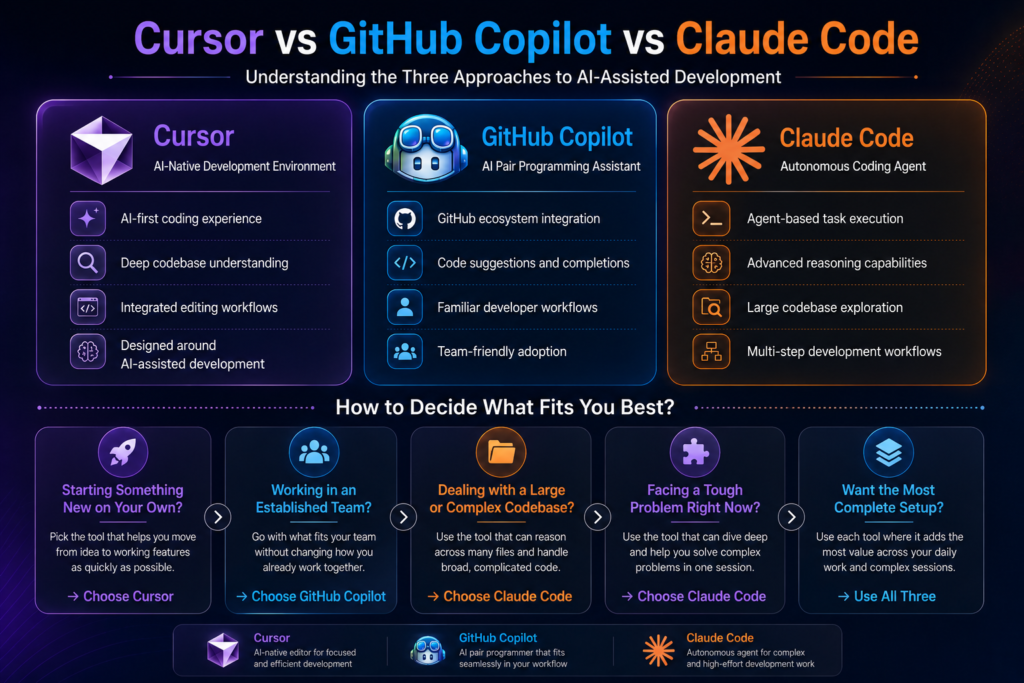
Here is a clear framework based on where you actually are right now:
1) Solo Developer Building Something New
Start with Cursor. The AI-native editor changes how fast you can go from idea to working feature and the gain on greenfield work is hard to match with any other tool.
2) Established Engineering Team:
Github Copilot is the path of least resistance. It requires nothing from your team in terms of workflow change, scales predictability in cost and delivers reliable daily value.
3) Large Or Complex Codebase
Claude Code is worth the terminal-based workflow. For tasks that require sustained reasoning across hundreds of files, it is the most capable tool available right now.
4) Specific hard Problem In Front Of You
Reach for Claude Code for that session even it is not your daily driver. It handles the kind of problem that would take a skilled developer most of the day to work through carefully.
5) Maximum Overall Setup:
Many senior developers run all three. Copilot for inline suggestions throughout the day, Cursor for building features across files, Claude Code for deep debugging or refactoring session.
Read Also: Best Uncensored LLMs For AI companion Apps in 2026
When Tools Are Not Enough?
Here is what all three tools share: they make a skilled developer faster, but none of them replace architectural thinking, strong product judgment or the experience to recognize when a codebase is quietly heading in the wrong direction.
A solo developer with three excellent AI tools is still one person with one perspective, and there is a ceiling on what one person can build well. That ceiling tends to appear at exactly the moment when momentum matters most.
Think about what actually goes into shipping something serious:
1) A senior AI engineer approaches a system design problem differently than a backend developer, and that difference prevents entire categories of technical debt.
2) A product strategist catches misalignments between what is being built and what users actually need, something no tool can flag because the tool has never spoken to your users.
3) A growth team ensures that what gets built actually reaches the people it is built for, because a product nobody finds is just an expensive side project.
AI tools speed up execution within the boundaries of what one person can see and decide. A team expands those boundaries entirely. If you are at the stage where the ceiling is starting to feel real, that is worth paying attention to.
Building With Claude AI?
From AI-powered assistants to intelligent business workflows, Claude AI can unlock powerful capabilities when implemented correctly. Triple Minds helps organizations integrate Claude AI into modern products and applications.
Learn More About Claude AI Integration Services
Conclusion
Cursor, Copilot and Claude each represent a genuinely different philosophy about AI-assisted development and all three are serious enough to deserve real consideration.
Copilot is the most reliable and universally applicable choice. Cursor gives the most immersive experience that changes how build rather than just making it slightly faster. Claude Code is the most powerful tool for complex autonomous work, behaving less like an assistant and more like a capable engineer you can hand over a hard problem to.
The right choice fits where you are right now. And the honest follow up is that if where you are is a point where you need to build something serious, at pace, with real quality, the tools alone might not help that much.
Quick Answers to Common Questions
Yes, but they conflict on inline autocomplete since both tools compete to fill the same suggestions. Most developers who switch to Cursor disable Copilot’s autocomplete and rely on Cursor’s Tab feature instead, which tends to be stronger in that environment.
Anthropic does not use API inputs to train its models by default. For sensitive codebases, review Anthropic’s current data usage policy and consider an enterprise agreement with formal contractual protections before running Claude Code on proprietary repositories at scale.
Copilot supports most major languages but quality varies significantly. It performs best in JavaScript, TypeScript, Python, and Go. In less common languages, suggestions become noticeably less accurate and can be more of a distraction than a help.
Claude Code works on Windows through WSL (Windows Subsystem for Linux) but is best supported on macOS and Linux, where setup is straightforward. The WSL requirement adds enough friction that some teams find it a practical barrier.
GitHub Copilot’s free tier is the most generous starting point, offering 2,000 completions and 50 chat messages per month with no time limit. Cursor’s free tier works for light use but premium model requests run out faster than most active developers expect. Claude Code is technically free to start but it accumulates costs quickly even in moderate sessions.
The global carbon credit trading platform market was valued at $199 million in 2025 and is projected to reach $1.27 billion by 2034. For entrepreneurs, climate-tech companies, and enterprises looking to enter this space, the first question is always the same:
“How much does it cost to build a carbon credit marketplace?”
A carbon credit marketplace ranges between $25,000 to $40,000 and can increase based on features, integrations, compliance needs, and development scope. But most businesses fall somewhere in between, and understanding what drives those costs is the key to making a smart investment decision.
In this blog, we break down everything you need to know — the types of carbon credit marketplaces, the features that shape your budget, the factors that influence the final number, and the revenue models available to you once you launch.
What Is a Carbon Credit Marketplace?
A carbon credit marketplace is a digital platform where buyers and sellers trade carbon credits. A carbon credit represents the reduction or removal of one metric ton of carbon dioxide or its equivalent from the atmosphere. Sellers list credits generated from verified projects such as reforestation, renewable energy, methane capture, or direct air capture. Buyers, including corporations, governments, and investors, purchase these credits to offset emissions and meet sustainability goals.
Modern carbon credit marketplaces do far more than simple buying and selling. They manage project verification, credit issuance, transaction processing, compliance documentation, ESG reporting, and registry integrations within a single platform. The more advanced features and integrations included, the higher the development complexity and cost.
Ready to Build Your Own Carbon Trading Marketplace?
Triple Minds helps businesses design and develop compliant, scalable carbon credit trading platforms — from verified listings and buyer-seller matching to real-time reporting and payment infrastructure. Let us turn your vision into a market-ready product.
Start Building With Triple Minds
Types of Carbon Credit Marketplaces
Before estimating cost, it is important to understand the type of platform you want to build. Each marketplace has different users, features, and development complexity.
Compliance Carbon Marketplaces
These platforms operate within government-regulated carbon systems where businesses must offset emissions above legal limits. They require registry integration, compliance reporting, audit trails, and support for regulated carbon credits. Due to strict compliance requirements, they are the most complex and expensive to build.
Voluntary Carbon Marketplaces
These platforms help businesses and individuals purchase carbon offsets for ESG and sustainability goals. They are more flexible, faster to build, and currently the most common type of carbon marketplace in the market.
Corporate ESG and Sustainability Platforms
Built for enterprises that need carbon tracking, ESG reporting, and offset purchasing in one system. These platforms often include emissions dashboards, sustainability reporting, and ERP integrations.
API-First Carbon Offset Platforms
These platforms provide carbon offset functionality through APIs instead of a traditional marketplace interface. They are commonly used by e-commerce, travel, logistics, and fintech businesses that want to embed carbon offsetting into their own products.
Project Developer Platforms
Designed for organizations generating carbon credits through projects such as reforestation, renewable energy, or waste management. These platforms manage project registration, verification, credit issuance, inventory management, and buyer transactions.
You Might Find This Useful: How to Make Money Producing and Selling Carbon Offsets
Key Features of a Carbon Credit Marketplace and Their Cost Impact
The features you include will directly affect development cost. Below are the core and advanced features most carbon credit marketplaces require.
User Registration and Identity Verification
Every buyer, seller, project developer, and admin needs a secure account system. Most platforms also require KYC and AML verification for compliance and fraud prevention. Basic account management is simple, while advanced verification integrations increase development cost.
Project Listing and Verification Workflow
Project developers need tools to submit project details, certifications, and supporting documents. The platform also requires approval workflows and verification processes to ensure only certified credits are listed. More automation and registry integrations increase complexity and cost.
Credit Issuance and Inventory Management
The platform must issue credits, track inventory, manage available quantities, and prevent double counting. Strong inventory management is critical for marketplace reliability and scalability.
Trading Engine and Order Matching
This is the core transaction system of the marketplace. Buyers can browse listings, place orders, and purchase credits. A fixed-price marketplace is simpler to build, while live trading engines with automated order matching and price discovery require significantly higher investment.
Payment Gateway Integration
Secure payment processing is essential for carbon credit transactions. Most platforms include payment gateways, invoice generation, refunds, and multi-currency support. International payment support increases development scope.
Carbon Credit Retirement and Certificate Issuance
When credits are used, they must be retired permanently to avoid reuse. The platform should update records and generate retirement certificates for ESG reporting and compliance purposes.
Registry Integration
Most platforms integrate with registries such as Verra or Gold Standard to verify credit authenticity and update issuance or retirement records. Multi-registry integrations add significant development complexity.
MRV Tools (Monitoring, Reporting, and Verification)
MRV tools help collect and validate emissions data through reports, sensors, satellite imagery, or IoT devices. Manual workflows are simpler, while automated MRV systems are among the most advanced and expensive features to build.
Analytics and ESG Reporting Dashboard
Buyers and enterprises need dashboards to track offset purchases, ESG progress, and carbon reporting data. Sellers also require insights into pricing, sales, and inventory performance.
Admin Panel and Platform Management
The admin panel allows operators to manage users, transactions, approvals, commissions, disputes, and compliance reporting. Advanced automation and detailed controls increase development cost but improve operational efficiency.
Notification and Communication System
The platform should support email and in-app notifications for transactions, approvals, price alerts, and compliance updates. Basic alerts are simple, while real-time notification systems with custom triggers require more development effort.
Read Also: Climate Tech Startup Ideas That Actually Make Money
Factors That Affect Carbon Credit Marketplace Development Cost
Understanding the cost ranges is only half the picture. These are the specific variables that will push your project toward the lower or higher end of any given range.
Platform Complexity and Feature Scope
Platform complexity is the biggest cost factor. More features mean more development time and higher costs. A simple fixed-price marketplace costs far less than a live trading platform with dynamic pricing and order matching. Starting with an MVP and adding features later is usually the most cost-effective approach.
Number of Credit Types and Verification Standards
Different carbon credit types such as renewable energy, biochar, methane capture, and forestry projects require different workflows and documentation. Supporting multiple standards like Verra, Gold Standard, and national registries also increases integration work. Platforms with limited credit types and one verification standard are cheaper to build.
Registry Integration Depth
Carbon registry integration can be simple or highly complex depending on the registry API. Some registries offer easy API access, while others require custom integrations and manual approval workflows. More registry integrations increase both development and maintenance costs.
MRV System Complexity
MRV systems collect and verify emissions data. Manual reporting workflows are the most affordable option. Advanced systems using satellite data, IoT sensors, or drone monitoring cost much more but offer stronger verification and automation.
Compliance and Regulatory Requirements
Compliance platforms must follow legal requirements such as KYC, audit trails, reporting standards, and data retention rules. Supporting multiple countries or regulatory systems increases both development and legal costs.
UI/UX Design Quality
A basic template design is more affordable than a custom UI/UX built around complex buyer and seller workflows. Consumer platforms often invest more in design and user experience, while B2B platforms focus more on usability and clarity.
Third-Party Integrations
Most carbon credit marketplaces require integrations with payment gateways, KYC providers, analytics tools, email systems, and ESG reporting platforms. Each additional integration increases development time, licensing fees, and ongoing maintenance costs.
Development Team Location and Engagement Model
Development rates vary widely by region, and team location can significantly impact your total project cost. A carbon credit marketplace built by a US-based team may cost three to four times more than a similar platform developed by an experienced team in India or Southeast Asia.
| Region | Average Hourly Rate |
| India & Southeast Asia | $20–$50/hour |
| Eastern Europe | $40–$80/hour |
| US, UK & Australia | $80–$150+/hour |
For startups and MVPs, offshore or hybrid development teams are often the most cost-effective option. Enterprise platforms with strict compliance or institutional requirements may prefer local teams despite the higher cost.
Post-Launch Maintenance and Support
Development is only the initial investment. Ongoing maintenance is required to keep the platform secure, stable, and compliant as carbon market regulations and registry APIs evolve.
Most carbon credit marketplaces spend around 15% to 20% of the initial development cost annually on maintenance and support. This typically includes:
- Bug fixes and technical support
- Security patches and monitoring
- Registry API updates
- Compliance and regulatory updates
- Performance optimization
- Server and infrastructure maintenance
Platforms with live trading systems, automated MRV tools, or multiple registry integrations generally require higher ongoing maintenance than simpler listing-based marketplaces.
Revenue Models for Carbon Credit Marketplaces
A carbon credit marketplace is not just a sustainability initiative — it is a business. Here are the primary revenue models available to platform operators.
Transaction Fees
The most common revenue model. The platform charges a commission on every carbon credit transaction, usually between 1% and 5%. As trading volume grows, revenue increases without major operating cost increases.
Subscription Plans
Platforms can offer monthly or yearly subscription plans with premium features such as advanced analytics, API access, better reporting tools, priority listings, and dedicated support. Subscription plans create stable recurring revenue.
Listing Fees for Project Developers
Project developers can be charged a fee to list carbon credit projects on the marketplace. This may be a flat listing fee or based on credit volume. This model is commonly used in voluntary carbon markets.
Premium Data and Analytics
Institutional buyers and sustainability teams often need pricing insights, market trends, ESG reporting data, and project quality analysis. Selling premium analytics and market intelligence creates an additional high-margin revenue stream.
Not Sure Where to Start? Prototype Your Carbon Marketplace First
Before committing to a full build, validate your carbon trading concept with a working prototype. Triple Minds helps you test your platform idea — credit flows, user journeys, and marketplace mechanics — before a single line of production code is written.
Explore Prototyping Services
Conclusion
Building a carbon credit marketplace is a major opportunity as demand for carbon trading and ESG solutions continues to grow. Development costs for a carbon credit marketplace range between $25,000 to $40,000 and increase based on features, registry integrations, compliance requirements, and platform complexity.
The key to controlling cost is starting with a focused MVP and scaling features over time. Along with development, businesses should also budget for maintenance, security, compliance updates, and third-party integrations.
The market is growing quickly, and businesses that enter early with the right platform and strategy are better positioned for long-term growth.
Quick Answers to Common Questions
A carbon credit marketplace ranges between $25,000 to $40,000 and can go upto $200,000 based on features, integrations, compliance needs, and development scope.
Compliance marketplaces operate under government-regulated carbon systems and require strict reporting and audit capabilities. Voluntary marketplaces support businesses and individuals purchasing offsets for ESG and sustainability goals. Voluntary platforms are generally faster and less expensive to build.
Not for an MVP. Early-stage platforms can use manual verification and documentation workflows. However, registry integrations become important as the platform grows and institutional buyers require verified, traceable credits.
A basic MVP should include user login, project listings, search and filters, payment integration, credit purchasing, retirement certificates, and an admin panel. These features are enough to validate the market and onboard early users.
Most new platforms start with transaction fees and listing fees. As the platform scales, subscription plans, premium analytics, and enterprise tools create additional recurring revenue streams.
The climate tech space has come a long way and so have the people building in it.
Startups and businesses today are not just passionate about the planet, they understand that a startup without revenue cannot help anyone. The real question serious builders are asking in 2026 is not “is this good for the planet?” It is “how do we build something sustainable enough to create a lasting impact?”
The answer is yes, but only if you pick the right model. The ideas below are not concept pitches. They are business models with real revenue mechanics, growing demand, and measurable market size.
If you are building in this space and need help shaping your product strategy or developing the AI infrastructure behind it, Triple Minds offers consulting and AI development services built for exactly this kind of technical and commercial startup challenge.
Have an Eco Business Idea and want to Make it Real?
Triple Minds helps businesses like yours prototype and validate climate tech ideas — from EV fleet software and carbon tracking platforms to smart energy SaaS and sustainable supply chain tools. Whether you are at the idea stage or ready to build, we can help you shape the right product, fast.
Visit Prototyping Services
Key Takeaways
1) The most profitable climate tech startups solve problems with existing budgets behind them, not problems waiting for future regulation to create demand.
2) Software-first business models in climate tech reach profitability faster than hardware-heavy approaches because margins are higher and scaling costs are lower.
3) AI integration is becoming a core competitive differentiator in climate tech, not a nice-to-have feature.
4) Regulatory compliance, particularly around carbon reporting and supply chain emissions, is creating a fast-growing market of enterprise buyers who have no choice but to purchase solutions.
5) The most defensible climate tech businesses build proprietary data assets over time that make their platform harder to replace the longer a customer stays.
Climate Tech Startup Ideas With Real Revenue Potential
1. Energy Management SaaS For Commercial Buildings
Commercial buildings account for roughly 40% of global energy consumption. Building owners and facility managers are under pressure from regulators, tenants, and their own operating budgets to cut energy costs. This is not a future problem. It is a present pain with money attached.
An energy management platform connects to a building’s existing systems such as HVAC, lighting, and electrical meters. It monitors consumption in real time, spots inefficiencies, and either alerts the facility manager or adjusts settings automatically through AI-driven controls.
Key revenue details to know:
- Revenue model: monthly SaaS subscription tied to building size or number of sensors
- Buyers already have energy budgets and pay utility bills, so ROI is immediately calculable
- Payback period of 12 to 18 months makes it easy for finance teams to approve
- Upsell path through carbon reporting modules as ESG compliance requirements increase
2. Carbon Credit Platforms And Marketplaces
The voluntary carbon market crossed $2 billion in 2023 and is projected to reach $50 billion by 2030. Corporations are committing to net zero targets and need to offset what they cannot eliminate. The problem is the market is fragmented, opaque, and riddled with quality issues that make buyers nervous.
A platform that brings transparency, verification, and liquidity to carbon credit transactions solves a problem that large corporate buyers genuinely care about.
What makes this model work commercially:
- Transaction fee model on every credit bought and sold, similar to how a financial exchange earns revenue
- Subscription tier for corporate buyers who need portfolio management and reporting tools
- Developer-side revenue from helping project developers list, verify, and manage their credit inventory
- High-margin business once the marketplace reaches liquidity
This Might Be Useful: How to Make Money Producing and Selling Carbon Offsets
3. EV Fleet Management Software
Fleets are electrifying faster than anyone expected. Logistics companies, delivery services, municipalities, and ride-share operators are all adding electric vehicles. But managing an EV fleet is not the same as managing a diesel fleet. Charging schedules, range planning, battery health monitoring, and energy cost optimization are entirely new problems.
This is a pure software play with zero hardware dependency if done right.
Revenue and market details:
- Per-vehicle monthly subscription scales automatically with fleet size
- Buyers are existing fleet operators with clear software budgets already allocated
- Displacement of older fleet management tools means a clear sales conversation
- Integration with energy procurement opens a secondary revenue stream through demand response programs
Read Also: How to Create Used Car Marketplace & App?
4. Sustainable Supply Chain Analytics
Regulators in the EU, UK, and increasingly the US are requiring companies to report on the carbon footprint of their supply chain, not just their direct operations. This is called Scope 3 emissions reporting, and most companies have no idea how to do it.
A B2B analytics platform that helps procurement and sustainability teams map, measure, and reduce supply chain emissions is solving a compliance problem with a hard regulatory deadline behind it.
Why this makes money:
- Enterprise SaaS with annual contracts, typically $50,000 to $500,000 per year
- Compliance-driven demand means the buyer has no choice but to purchase a solution
- Sticky product because switching requires re-integrating supplier data
- Professional services revenue from implementation and ongoing consulting
5. Climate Risk Intelligence Platforms
Insurance companies, banks, infrastructure funds, and real estate firms need to understand how physical climate risks such as flooding, wildfires, and extreme heat will affect their assets over the next 10 to 30 years. Standard financial models do not include this data. Regulatory guidance from bodies like the SEC and Bank of England is pushing financial institutions to integrate it.
A climate risk data and analytics platform license its models and datasets to institutional buyers.
Business model highlights:
- Data licensing revenue from financial institutions and insurers
- API access for fintech companies building climate risk into their own products
- High switching costs once the platform is embedded into an institution’s risk models
- Extremely defensible business because proprietary datasets and model accuracy compound over time
6. Water Tech And Smart Irrigation SaaS
Agriculture accounts for 70% of global freshwater use. In regions facing drought, farmers are under pressure from both cost and regulation to reduce water consumption. Smart irrigation platforms use soil sensors, weather data, and AI to tell farmers exactly when and how much water, cutting consumption by 20 to 40% without reducing yield.
This model works because it saves the buyer money directly and immediately.
Key points:
- Hardware plus software subscription creates two revenue streams and high lock-in
- Government subsidies in many regions reduce the effective price for farmers
- Water utility partnerships create a second buyer channel alongside direct farm sales
- Expanding from agriculture into golf courses, municipalities, and commercial landscaping is a natural upsell path
This May Be Useful To You: Forest Management Software Cost Guide
7. Recycling And Waste Tech Platforms
The recycling industry is broken. Contamination rates are high, logistics are inefficient, and economics only work in certain commodity cycles. Startups building technology to fix the operational layer of recycling, whether through AI sorting, reverse logistics software, or materials traceability platforms, are finding paying customers in both the public and private sector. Digital product passport software is one example of a materials traceability platform, and EU rules make it mandatory for batteries from February 2027.
Revenue mechanics:
- SaaS licensing to waste management companies and municipalities
- Per-ton processing fee for AI-driven sorting platforms installed at materials recovery facilities
- Brand partnerships with consumer goods companies that need certified recycled material supply chains
- Carbon credit generation from verified diversion of materials from landfill
Read Also: A Complete Guide To Build A Battery Recycling Management Software
Why Most Climate Tech Startups Struggle To Make Money ?
Before jumping into ideas, it is worth understanding why so many climate startups fail in the first place.
Many climate startups fail because they confuse a problem worth solving with a product thinking someone will pay for it.
They build grant-dependent solutions, rely on government contracts that take years to close or price their product at a premium that only enterprise buyers can afford while targeting small businesses.
The startups that survive do three things differently:
1) They find a buyer who already has a budget.
2) They solve a problem the buyer already knows they have.
3) They make switching from the old ways and solution feel easy, not complex.
What Makes A Climate Tech Idea Actually Investable?
Investors in this space are no longer impressed by the project alone. They want to see the same fundamentals they look for in any software or technology business.
Four things that separate fundable climate tech startups from the rest:
1) A buyer who has the budget today, not in three years when regulations tighten.
2) A revenue model that grows without your costs growing at the same rate. In simple terms, adding 100 new customers should not require hiring 100 new people.
3) A data or network effect that makes the business harder to copy over time.
4) Measurable environmental impact that can be reported, verified and used in the buyer’s own ESG disclosures.
How AI Is Accelerating climate tech profitability?
Every idea on this list becomes more valuable and more defensible when AI is at the core of the product rather than bolted on as a feature. Energy management platforms that predict consumption before it happens are worth more than ones that report it after. Carbon credit platforms that use AI to verify project quality reduce the biggest trust barrier in the market. Supply chain analytics tools that surface actionable insights rather than raw data are the ones that get renewed.
The gap between climate tech companies that use AI well and those that do not is widening fast.
If you are building in this space and want to explore how AI development or product strategy consulting can sharpen your competitive position then you should know that Triple Minds works with startups at exactly this stage. See our AI development services here.
Ready to Launch your own Carbon Trading Marketplace?
The voluntary carbon market is growing fast — and the window to build a trusted platform is now. Triple Minds helps founders and enterprises build end-to-end carbon trading marketplaces with verified credit listings, buyer-seller matching, compliance reporting, and AI-driven quality checks. From architecture to launch, we handle the full build.
Explore Our Services
Conclusion
Climate tech is not a charity sector anymore. The ideas with the strongest commercial potential in 2026 are the ones solving problems that businesses, institutions, and governments already know they have and already have budgets to fix. Energy management, fleet software, supply chain compliance, climate risk data, and waste tech are not speculative bets. They are markets with proven buyers and growing regulatory tailwinds. Pick the model that matches your technical strengths, find the buyer who already has a reason to pay, and build the product around their existing workflow rather than asking them to change it.
Quick Answers to Common Questions
Yes, but investors are now prioritizing revenue-generating models over pure impact plays, meaning startups with clear SaaS or marketplace revenue are getting funded faster than hardware-heavy projects.
Deep tech climate companies build physical technology like new battery chemistries or carbon capture machines, while software-first climate startups build platforms and analytics tools on top of existing infrastructure, typically with faster paths to revenue.
Many do, particularly in the US through the Inflation Reduction Act, in the EU through the Green Deal Industrial Plan, and in various national subsidy programs, but grants should complement revenue, not replace it.
Scope 3 covers indirect emissions across a company’s supply chain and is increasingly mandated by regulators in Europe and proposed in the US, creating a large and urgent market for analytics tools that help companies measure and manage these emissions.
Estimates vary, but leading analysts project the voluntary carbon market will reach between $50 billion and $250 billion by 2050, depending on how aggressively corporations pursue net zero commitments.
If you have ever opened your monthly OpenAI or Anthropic invoice and felt a small flash of “wait, how much?” — you are in the right place. The Claude API and ChatGPT API are both production-ready. Both are powerful. Both can run a real business. But the differences in pricing, context handling, latency, ecosystem and operational gotchas are wide enough that picking the wrong one costs real teams $10K–$100K of avoidable spend per year — sometimes more, when you factor in re-prompting, re-platforming, and the engineer-months lost mid-migration. This guide is the deep, current, no-marketing comparison that founders and CTOs ask us for at Triple Minds every week.
We’re going to cover the entire decision surface — every model in the 2026 lineup of both providers, the real per-million-token cost (with caching, batch and tier discounts factored in), the multimodal and agent capabilities that the headline pricing pages skip, the context-window-vs-actual-recall reality, the compliance and data-retention picture, real cost calculations for four common product shapes (chatbot, document analyser, agent, voice product), and the migration patterns that let you keep optionality. By the end, you will know exactly which API to start on, when to switch, and how to architect so a switch doesn’t cost you a quarter.
👉 Building or scaling an AI product? Triple Minds runs Claude AI Integration Development and broader AI development services for startups and enterprises — picking the right model, building the agent, optimising the cost. Book a free 30-minute consultation → No signup, no obligation.
Key Takeaways
- Claude leads on context window and reasoning depth. 200K-token context (1M for select tiers), strong long-document recall, and Constitutional-AI-aligned outputs make it the default for legal, healthcare, finance and long-form codebases.
- OpenAI leads on ecosystem breadth. Multimodal (vision + audio + image-gen + voice), embeddings, fine-tuning, Assistants/Responses API, code interpreter, Realtime voice — all under one API contract.
- Output tokens cost 4–5× input tokens on both platforms. Most teams under-estimate output costs and over-estimate input costs. Optimise output length first if your bill is climbing.
- Prompt caching cuts costs 50–90%. If your prompts share a system prefix or RAG context — and most production prompts do — caching is the biggest single cost lever you have.
- Batch API gives 50% off. If your workload tolerates 24-hour latency (analysis, summarisation, ETL, evaluation), batch is mandatory, not optional.
- The 200K context isn’t always 200K of usable context. Both providers’ models suffer “lost in the middle” on long contexts. Real-world recall above 100K is meaningfully worse than the marketing implies.
- Multi-provider architecture is the only sane default. Both APIs go down. Both raise prices. Both deprecate models. Build a thin router layer (LiteLLM, OpenRouter, or your own) on day one.
- The right API is the one that fits your product, not the leaderboard. Benchmarks rarely match real workloads. Test both on your actual prompts before committing.
What Are These APIs, Really?
Claude API (Anthropic)
Anthropic’s developer surface for the Claude family of models. The 2026 lineup centres on Claude 4.5 Sonnet as the workhorse, Claude 4 Opus for the hardest reasoning, and Claude 3.5 Haiku for high-volume cheap inference. Beyond chat completions, the Claude API ecosystem includes Tool Use (function calling), Computer Use (the model controls a virtual desktop), Prompt Caching (up to 90% discount on cached reads), Message Batches (50% off async), and the Files API for persistent context. Anthropic’s positioning is safety-first and reasoning-first; their Constitutional AI approach makes Claude meaningfully harder to jailbreak and more reliable on multi-step instructions.
ChatGPT API (OpenAI)
OpenAI’s developer platform — the largest LLM ecosystem in production today. The 2026 lineup spans GPT-5 at the frontier, GPT-4.1 as the production workhorse, GPT-4o and GPT-4o mini for cost-sensitive workloads, plus the o-series reasoning models (o3, o3-mini) for chain-of-thought-heavy tasks. Around the chat completions endpoint sits the largest peripheral toolset in the industry: embeddings, fine-tuning, Assistants/Responses API, Realtime API for voice, Whisper for transcription, DALL-E for image generation, TTS for synthesis, vision, code interpreter, and function calling. If you want one vendor relationship for everything, OpenAI is structurally closer to that than anyone else.
Token-based pricing — what you’re actually paying for
Both APIs price per million tokens, split into input tokens (your prompt + system + history + attached docs) and output tokens (what the model generates). One token is roughly 4 characters of English, or about 0.75 words. A typical chatbot turn — 1,000 tokens of context + 300 tokens of response — costs cents on cheap models and dimes on premium ones. Multiplied across millions of monthly requests, those dimes become your AWS bill’s biggest line item.
2026 Model Lineup & Pricing — Side by Side
Prices below are per million tokens, current to mid-2026 and rounded to the nearest cent. Always verify on the official Anthropic and OpenAI pricing pages before committing — both providers have lowered prices repeatedly throughout 2024-2026.
Anthropic — Claude family
| Model | Tier | Context | Input / 1M | Output / 1M | Best for |
|---|---|---|---|---|---|
| Claude 4 Opus | Frontier | 200K | $15.00 | $75.00 | Hardest reasoning, agentic coding, scientific research |
| Claude 4.5 Sonnet | Workhorse | 200K (1M beta) | $3.00 | $15.00 | Production chatbots, agents, SaaS features |
| Claude 3.5 Haiku | Fast/cheap | 200K | $0.80 | $4.00 | High-volume inference, routing, classification |
OpenAI — GPT & o-series
| Model | Tier | Context | Input / 1M | Output / 1M | Best for |
|---|---|---|---|---|---|
| GPT-5 | Frontier | 256K | $10.00 | $30.00 | Multimodal frontier, complex tasks |
| GPT-4.1 | Workhorse | 1M | $2.00 | $8.00 | Production chat & agents at scale |
| GPT-4o | Multimodal | 128K | $2.50 | $10.00 | Voice / vision / audio in one model |
| GPT-4o mini | Cheap | 128K | $0.15 | $0.60 | High-volume, latency-sensitive features |
| o3 | Reasoning | 200K | $15.00 | $60.00 | Math, code, research with chain-of-thought |
| o3-mini | Reasoning (cheap) | 200K | $1.10 | $4.40 | STEM tasks at production cost |
Headline insight: the cheap-tier gap is narrower than the headline-tier gap
At the cheap end, GPT-4o mini at $0.15 input / $0.60 output is genuinely the cheapest production-grade option in the market. Claude 3.5 Haiku at $0.80 / $4.00 is roughly 5× more expensive per token — but ships with a 200K context window vs GPT-4o mini’s 128K, and Anthropic’s safety + instruction-following advantage. At the frontier, GPT-5 ($10/$30) undercuts Claude 4 Opus ($15/$75) by a meaningful margin on raw price — but Opus still leads on long-context reasoning benchmarks and on agentic coding, which is why so many of our cleanup engagements at Triple Minds Vibe Code Cleanup Services use Opus despite the premium.
Prompt Caching & Batch API — The Two Biggest Cost Levers
The headline-pricing tables above are the list price. Almost no production workload pays list. Two features — prompt caching and batch processing — quietly cut bills by 50–90% if you architect for them.
Prompt caching
- Anthropic: Cached reads cost 10% of base input price (90% discount). Cache writes cost 125% on first write. Cache TTL 5 minutes (24-hour beta available). Triggered with explicit
cache_controlmarkers. - OpenAI: Automatic prompt caching for prompts ≥1024 tokens. Cached portions billed at 50% of base input price. No code changes needed; routing happens server-side.
The economics: a chatbot with a 4,000-token system prompt and 6,000-token RAG context, serving 1 million requests per month, can save $24,000+ per month on Claude with caching enabled — versus paying full input price each call. Most teams discover caching after their first $30K invoice. You should turn it on before your first $300 invoice.
Batch API
- Both providers offer 50% discount on async batch processing.
- Anthropic’s Message Batches API processes up to 100,000 requests per batch, returns within 24 hours.
- OpenAI’s Batch API takes JSONL files, returns within 24 hours, same 50% discount across all models.
If your workload tolerates 24-hour latency — overnight summarisation, evaluation, content moderation, ETL pipelines, embedding regeneration — everything goes through batch. The 50% saving is non-negotiable.
Effective price after both optimisations
| Model | List price (input/output) | With caching (read) | With batch | Caching + batch |
|---|---|---|---|---|
| Claude 4.5 Sonnet | $3.00 / $15.00 | $0.30 / $15.00 | $1.50 / $7.50 | $0.15 / $7.50 |
| Claude 4 Opus | $15.00 / $75.00 | $1.50 / $75.00 | $7.50 / $37.50 | $0.75 / $37.50 |
| GPT-4.1 | $2.00 / $8.00 | $1.00 / $8.00 | $1.00 / $4.00 | $0.50 / $4.00 |
| GPT-4o mini | $0.15 / $0.60 | $0.075 / $0.60 | $0.075 / $0.30 | $0.038 / $0.30 |
The 18-Month Pricing Trend
If your AI cost model is built on November 2024 prices, it is wildly out of date. Both providers have steadily lowered prices as the underlying inference economics have improved. The chart below shows the output price per 1M tokens for the workhorse model across Q4 2024 → Q2 2026.
Workhorse model — output price per 1M tokens (USD)
Two takeaways: (1) output prices have fallen by 60–98% on the cheap end and 30–50% on the workhorse end. Anything you priced 12 months ago should be re-priced. (2) The cheap-tier compression has been faster on OpenAI’s side. If your workload is cost-bound and not capability-bound, GPT-4o mini is the most aggressive deal in the market. If it’s capability-bound, Claude’s lineup still wins where reasoning depth matters most.
Real Cost Calculations — Four Common Product Shapes
Pricing pages mean nothing without applying them to a real workload. Below are four scenarios we cost out at Triple Minds almost every week. Numbers assume list price with caching only (no batch) — the realistic shape of a synchronous production workload.
Scenario 1 — Customer support chatbot
- 1,000,000 conversations/month, 4 turns each = 4M model calls
- Avg input per call: 3,000 tokens (system + RAG + history). 80% of that is cacheable system prefix.
- Avg output per call: 200 tokens.
| Stack | Effective input cost | Output cost | Monthly total |
|---|---|---|---|
| GPT-4o mini + caching | ~$3,720 | $480 | ~$4,200 |
| Claude 3.5 Haiku + caching | ~$10,560 | $3,200 | ~$13,760 |
| GPT-4.1 + caching | ~$24,800 | $6,400 | ~$31,200 |
| Claude 4.5 Sonnet + caching | ~$39,600 | $12,000 | ~$51,600 |
Recommendation: GPT-4o mini for the bulk of conversations, with Claude 3.5 Haiku or 4.5 Sonnet only on escalation paths where reasoning is required. Routing 5% of traffic to a stronger model triples capability for less than 1.5× the cost.
Scenario 2 — Document analysis tool (legal/medical/financial)
- 10,000 documents/month, average 60K tokens per document.
- Output: structured JSON, ~2,000 tokens.
- This is a batch-friendly workload — 24-hour latency is acceptable for nearly all use cases here.
| Stack | Input cost (batch) | Output cost (batch) | Monthly total |
|---|---|---|---|
| Claude 4.5 Sonnet (batch) | $900 | $150 | $1,050 |
| GPT-4.1 (batch) | $600 | $80 | $680 |
| Claude 4 Opus (batch) | $4,500 | $750 | $5,250 |
| GPT-5 (batch) | $3,000 | $300 | $3,300 |
Recommendation: Claude 4.5 Sonnet for legal/medical (instruction-following + safety), GPT-4.1 for purely cost-driven analysis. Claude’s 200K-token context window matters here — you can fit most contracts/cases/reports in a single call without chunking, which usually beats GPT-4.1’s 1M context on accuracy because of less retrieval glue code.
Scenario 3 — Autonomous AI agent with tool use
- 50,000 agent runs/month. Average run: 12 tool calls, 8K input tokens (growing context), 1.5K output tokens per turn.
- Total per run: ~96K input + 18K output. Total monthly: 4.8B input + 900M output.
| Stack | Input cost (cached) | Output cost | Monthly total |
|---|---|---|---|
| Claude 4.5 Sonnet | ~$2,400 | $13,500 | ~$15,900 |
| GPT-4.1 | ~$3,400 | $7,200 | ~$10,600 |
| Claude 4 Opus | ~$12,000 | $67,500 | ~$79,500 |
| o3-mini (reasoning) | ~$2,750 | $3,960 | ~$6,710 |
Recommendation: o3-mini for the loop, with Claude 4.5 Sonnet for tool-call planning steps that need stronger instruction following. Agent workloads are where output cost dominates — every chain-of-thought step is output. Cap your max_tokens, terminate aggressively on success, and never use Opus or GPT-5 in the inner loop unless you’ve explicitly proven the capability uplift.
Scenario 4 — Voice agent (real-time)
- 1,000,000 voice minutes/month.
- This is OpenAI’s home turf — Realtime API integrates STT, LLM and TTS in one pipeline. Anthropic does not have a comparable native voice product as of 2026.
OpenAI’s Realtime API pricing for GPT-4o is roughly $0.06 per audio input minute and $0.24 per audio output minute (subject to revision; verify on the official pricing page). For 1M minutes split evenly between input and output, that’s ~$150,000/month. To run the same workload on a Claude pipeline, you stitch together a third-party STT (Deepgram, AssemblyAI), Claude for the LLM, and a separate TTS (ElevenLabs, Cartesia). The stitched stack is often cheaper but always more complex — you own the latency budget, the audio routing, and three vendor relationships instead of one.
Recommendation: If you’re building a real-time voice product and you want one vendor, OpenAI is the clear choice. If you want lower per-minute cost and don’t mind the orchestration, the Claude + Deepgram + ElevenLabs stack is 30–60% cheaper at scale.
🚀 Want a real cost projection for your specific product? Send us your expected request volume, prompt sizes and latency requirements. Triple Minds will model the bill across both stacks and recommend the cheapest, fastest, most reliable architecture. Book a free 30-minute architecture review →
Feature-by-Feature: The Full Comparison Matrix
| Capability | Claude API | ChatGPT API |
|---|---|---|
| Max context window | 200K (1M Sonnet beta) | 1M (GPT-4.1) |
| Tool / function calling | ✅ Yes | ✅ Yes |
| Native code interpreter | ❌ No | ✅ Yes (via Assistants/Responses) |
| Computer use (UI control) | ✅ Yes (Computer Use API) | ⚠️ Limited (via Operator) |
| Vision (image understanding) | ✅ Yes | ✅ Yes |
| Image generation | ❌ No | ✅ Yes (DALL-E 3) |
| Audio (TTS/STT) | ❌ No | ✅ Yes (Whisper, TTS) |
| Realtime voice | ❌ No | ✅ Yes (Realtime API) |
| Embeddings | ❌ No | ✅ Yes (text-embedding-3) |
| Fine-tuning | ❌ No (closed beta) | ✅ Yes (4o, 4o mini, 4.1) |
| Prompt caching | ✅ 90% off cache reads | ✅ 50% off cache reads (auto) |
| Batch API (50% off) | ✅ Yes | ✅ Yes |
| Streaming | ✅ Yes | ✅ Yes |
| Structured outputs (JSON schema) | ✅ Tool-use schemas | ✅ Strict mode |
| Native PDF / file handling | ✅ Yes (Files API) | ✅ Yes (Files / Assistants) |
| Free tier for developers | ❌ Pay-as-you-go only | ✅ Limited credits for new accounts |
| SOC 2 Type II | ✅ Yes | ✅ Yes |
| HIPAA BAA available | ✅ Yes (Enterprise) | ✅ Yes (Enterprise) |
| GDPR / EU data residency | ✅ Yes | ✅ Yes (EU region) |
| Zero data retention option | ✅ Yes (Enterprise) | ✅ Yes (Zero Retention API) |
| SLA | ✅ Enterprise tier | ✅ Enterprise tier |
| Self-hosted / private deploy | ✅ Via AWS Bedrock, GCP Vertex | ✅ Via Azure OpenAI |
Where Each API Wins
Pick Claude API when…
- You process long documents — legal contracts, research papers, full codebases, multi-hour transcripts.
- You build agentic workflows. Claude’s tool-use stability and Computer Use API are best-in-class for long-running autonomous agents.
- You’re in a regulated industry. Constitutional AI’s safety-first design reduces compliance and brand-risk overhead in healthcare, legal, finance, education.
- Instruction-following matters more than ecosystem. Claude is markedly better at following complex multi-step prompts on the first try.
- You’re already on AWS or GCP. Bedrock and Vertex give you Claude with private networking, your existing IAM, and your existing billing.
Pick ChatGPT API when…
- You need everything in one vendor. Vision, voice, embeddings, image gen, fine-tuning, code interpreter — under one API key.
- Real-time voice is the product. Realtime API is OpenAI’s killer differentiator for voice agents.
- Cost is the dominant constraint. GPT-4o mini is the cheapest production-grade model in the market by a meaningful margin.
- You want to fine-tune. OpenAI is the only major frontier-lab provider with mature, accessible fine-tuning across multiple model sizes.
- You’re building on Azure. Azure OpenAI gives you private deployment, regional residency, enterprise SLAs and Microsoft’s existing compliance posture.
Where Each API Loses
- Claude loses on: no embeddings (you’ll use OpenAI or open-source), no image generation, no native voice/audio, no broad fine-tuning, smaller third-party tooling ecosystem.
- OpenAI loses on: historically more variable instruction-following, more aggressive safety filters that occasionally over-refuse, less consistent long-context recall on the 1M-token GPT-4.1, occasional rate-limit volatility during model launches.
Migration & Multi-Provider Architecture
The single biggest architectural mistake we see at Triple Minds AI Development is hard-binding the product to one provider’s SDK. Six months later you’re paying 2× because you can’t test alternatives, and your fallback story during an outage is “we’re down too.”
The pattern that works: a thin internal abstraction (or use LiteLLM / OpenRouter) so every model call goes through one interface. Behind it, route by capability and cost: cheap classification → GPT-4o mini, complex reasoning → Claude 4.5 Sonnet, voice → OpenAI Realtime, fine-tuned model → OpenAI fine-tune. When pricing changes, you swap the route, not the application code.
// Pseudocode: a router pattern that keeps optionality
async function generate(task: AITask): Promise<string> {
  const route = pickModel(task);   // by capability + cost + latency budget
  switch (route.provider) {
    case 'anthropic': return callClaude(route.model, task);
    case 'openai':    return callOpenAI(route.model, task);
    case 'azure':     return callAzureOpenAI(route.model, task);
    case 'bedrock':   return callBedrockClaude(route.model, task);
  }
}

// pickModel encodes your routing rules. When pricing changes,
// edit pickModel — not the call sites.
The Mistakes Most Teams Make
- Defaulting to the most expensive model. Claude 3.5 Haiku and GPT-4o mini handle ~70% of production workloads adequately at 1/20th the cost of frontier models.
- Ignoring context-window economics. Sending 100K tokens to summarise a 1K-token document is a $1,000/month accidental cost. Trim aggressively.
- Not turning on prompt caching. The single biggest unforced error. Most teams discover it after a $30K month.
- Skipping the batch API. Anything async should batch. Period.
- Underestimating output token cost. Output is 4–5× input. Cap
max_tokens. Use structured outputs to avoid prose-padding. - No fallback for outages. Both providers go down. Your product shouldn’t.
- Treating benchmarks as truth. Run your real prompts on both APIs before deciding. The “best” model on MMLU may be the worst on your specific task.
- Locking to one SDK. Always abstract behind a router from day one.
- Not budgeting for evals. Without an eval harness, you can’t tell if a cheaper model is actually worse on your task — so you stay on expensive models out of fear.
- Forgetting compliance until launch. If you’ll need a HIPAA BAA or zero-data-retention, request it during architecture, not the week before launch.
Compliance, Data Retention & Enterprise Considerations
Both providers have matured significantly on enterprise readiness in 2025-2026. The current state:
- SOC 2 Type II: Both have it.
- ISO 27001: Both certified.
- HIPAA BAA: Available on both at Enterprise tier (not standard developer accounts).
- GDPR / EU data residency: OpenAI offers EU-hosted endpoints; Anthropic offers AWS EU regions via Bedrock.
- Zero data retention: Both offer this for Enterprise customers — your prompts and outputs are not retained or used for training.
- Default data-retention policy: Anthropic 30 days for safety review on standard tier; OpenAI 30 days on standard tier. Neither uses API data for training by default.
- Self-hosted / VPC: Anthropic via AWS Bedrock and GCP Vertex; OpenAI via Azure OpenAI Service. Both give you private network paths and existing-cloud billing.
- Customer-managed encryption keys (CMK): Available on both Enterprise tiers.
If you’re building for healthcare, fintech, government or education, plan for Enterprise from the start. The compliance posture changes which features you can use, which regions you deploy in, and your contracts with downstream customers. We’ve seen production launches delayed by 90+ days because compliance wasn’t part of the architecture from day one.
Latency & Reliability — What the Pricing Pages Don’t Tell You
- Time-to-first-token: GPT-4o mini and Claude 3.5 Haiku are typically <500ms TTFT under normal load. Frontier models (GPT-5, Claude 4 Opus) sit at 1–3s TTFT.
- Output throughput: Cheap models stream at 80–120 tokens/sec. Frontier models 30–60 tokens/sec. Reasoning models (o3, Opus extended thinking) can pause for 5–30s before generating.
- Rate limits: Both use a tiered system (Tier 1 → Tier 5 OpenAI; Tier 1 → Tier 4 Anthropic). You qualify for higher tiers based on usage and time-on-platform. Plan a tier-up runway of 2–6 weeks if you expect to hit production scale.
- Outages: Both have had multi-hour outages in the past 18 months. Status pages: status.openai.com and status.claude.com.
- Regional latency: Anthropic ~80–200ms RTT from EU/Asia; OpenAI similar. Use the region-specific endpoints (Anthropic via Bedrock regional; OpenAI EU/Australia/Japan endpoints) if your users are not US-centric.
Why Triple Minds — and How We Pick the Stack
Triple Minds is an AI-first development agency that has shipped production AI for SaaS, marketplaces, AI girlfriend apps (Candy AI, see our Candy AI case study), AI imaging platforms (Sugarlab.ai), enterprise compliance tools, and consumer safety platforms. We have run the same product across both Claude and ChatGPT APIs more times than we can count, and we know exactly where each one wins on real workloads — not benchmarks.
- ✅ Stack-agnostic by design — we route to whichever model is cheapest per task, not whichever one our SDK supports.
- ✅ Fixed-price builds — you see scope, price and timeline up front.
- ✅ Real production experience — agents, voice products, document processors, RAG pipelines, fine-tunes — across both providers.
- ✅ Cost-modelling before you commit — we’ll model your monthly bill across 3 stacks before you sign anything.
- ✅ You own everything — code, infra, prompts, fine-tuned models, eval harnesses. No platform lock-in.
- ✅ Migration-ready architecture — every build ships with a router so swapping providers is a config change, not a re-engineering project.
Verdict
If you’re forced to pick one without testing, the honest 2026 answer for most products is route between both. GPT-4o mini for the cheap loop, Claude 4.5 Sonnet for the smart loop, OpenAI Realtime if voice is core, OpenAI embeddings everywhere. That stack is what the majority of our deployed AI products at Triple Minds run on today.
If you’re forced to pick one and stay on it, the answer is Claude for B2B / enterprise / regulated / agent / long-document products, and OpenAI for consumer / voice / multimodal / fine-tune-heavy / cost-extreme products. Both are excellent. Neither is universally better. The best stack is the one that fits the product you’re building today and the cost curve you’ll be on a year from now.
Ready to Pick the Right Stack?
The wrong API choice is rarely fatal. But it routinely costs founders $30K–$100K+ a year in over-spend, plus a quarter of engineer-time when the migration finally happens. The right choice up front — with a router, cost models, and an eval harness — is one of the highest-leverage decisions in your AI stack.
Two ways to start with Triple Minds today:
🧠 Claude AI Integration Development — full-stack Claude builds: agents, RAG pipelines, document processors, fine-tuned workflows.
⚡ Free 30-Minute Consultation — bring your product brief, we’ll model the bill across both stacks and tell you which one to launch on.
Frequently Asked Questions
Can I switch from ChatGPT API to Claude API after my product is live?
Yes — but not for free. You’ll need to re-run prompt evaluations, adjust output parsing (the two APIs format JSON and tool calls slightly differently), and re-tune temperature, system prompts and stop sequences. Plan 2–6 engineer-weeks for a non-trivial migration. The fix that makes future migrations cheap is to put a router (LiteLLM, OpenRouter, or an internal abstraction) between your application and the SDK — then a switch is a config change, not a refactor.
Does Claude API support multiple languages?
Claude handles English, Spanish, French, German, Italian, Portuguese, Hindi, Japanese and Chinese strongly. OpenAI maintains a slight edge on long-tail languages and dialect-specific generation. For a product launching in the EU, India or major LATAM markets, both work; for African or Southeast Asian languages outside the top tier, OpenAI’s coverage is currently broader.
Is there a free tier on either API?
OpenAI gives new accounts limited free credits ($5–$20 depending on promo) that expire in 90 days. Anthropic does not currently offer a free developer credit but allows pay-as-you-go from a $5 minimum balance. Both let you start without a contract or minimum commitment.
Which API has better rate limits at production scale?
OpenAI’s higher tiers (Tier 4 / Tier 5) generally allow more aggressive RPM and TPM than Anthropic’s equivalent. Anthropic is more restrictive at lower tiers but bumps you up faster on usage. For a B2B product expecting 1M+ requests/day, plan for Tier 4 OpenAI or Tier 3 Anthropic — and start the request 30 days before you need it.
Do both APIs support tool use / function calling?
Yes, both with mature tool-use APIs. Anthropic’s tool use is generally more reliable on the first response — fewer retries needed. OpenAI’s function calling has been more battle-tested in third-party tooling and has more examples in the wild. Either is production-grade.
What about prompt caching — is it worth implementing?
For any prompt with a stable system prefix or repeated RAG context, prompt caching is the single biggest cost reduction available — 50% on OpenAI (automatic), up to 90% on Anthropic (explicit). For high-volume workloads, caching alone can cut your bill in half. Implement it before any other optimisation.
Which is better for AI agents specifically?
For long-running autonomous agents, Claude is the current default — particularly Sonnet 4.5 and Opus 4 — because of stronger tool-use reliability and the Computer Use API. For voice agents, OpenAI’s Realtime API is unmatched. For most production agents, the right answer is a routing pattern that uses both.
Should I use Bedrock or Vertex for Claude instead of the Anthropic API directly?
Yes if you’re already on AWS or GCP. Same Claude models, your existing IAM and billing, private networking, regional residency. Slight latency overhead vs Anthropic’s direct endpoint but worth it for any enterprise with existing cloud relationships.
How accurate are the cost projections in this article?
The pricing is current to mid-2026 and the cost calculations use realistic production assumptions. Both providers update prices several times per year — always verify on the official pricing pages before committing budget. Want a tailored projection for your specific product? Send us your numbers.
Can I fine-tune Claude?
Not on the standard Claude API as of mid-2026. Anthropic has a closed fine-tuning beta on AWS Bedrock for select customers, but broad availability matches OpenAI’s. If fine-tuning is core to your product, OpenAI is the only major frontier-lab provider with mature, accessible fine-tuning across multiple model sizes.
Is open-source (Llama, Mistral, DeepSeek) a real alternative?
For specific workloads — yes. Llama 3.3, Mistral Large 2, DeepSeek-V3 hosted on Together / Fireworks / Replicate can be 3–10× cheaper than Claude/GPT for the same task quality on bounded use cases. They lose on tool use, long-context recall, and frontier-tier reasoning. We at Triple Minds use them as the cheap leg of routing patterns when the workload allows.
How do I know if I picked the wrong API?
Common signs: the bill is climbing faster than usage, the model fails on tasks where another provider’s docs claim success, you’re hitting rate limits during normal load, your team keeps writing prompt-engineering hacks to fix instruction-following gaps, or your customers complain about output quality on specific task types. Any of those means it’s time to A/B test on the other provider — or move to a routing pattern that uses both.
👉 Claude AI Integration Development — full-stack Claude builds.
👉 AI Development Company — end-to-end AI product builds across both providers.
👉 Related read: Cursor vs Claude vs Bolt — the same comparison framework applied to AI coding tools.
👉 Or just book a free 30-minute call — bring your product brief, we’ll tell you which stack to launch on.
In this blog, we’ll walk you through practical, real-world ways to make money by producing and selling carbon offsets. No fancy theories, no unrealistic promises—just actionable insights based on what’s actually working for businesses already operating in this space.
Making your business eco-friendly is no longer optional. Customers expect it, investors prioritize it, and governments are enforcing stricter regulations. Businesses worldwide are actively working to reduce carbon emissions, and many have already committed to reaching net-zero in the coming decades.
This shift is creating a real business opportunity. Companies need reliable ways to offset their emissions, and that demand is opening the door for startups and growing businesses to step in, provide solutions, and generate revenue.
This is where carbon offsets become a powerful business model.
At Triple Minds, we’ve seen that many founders focus only on producing carbon offsets. However, the real opportunity lies in how you sell, position, and scale them. You don’t always need to build projects from scratch—you can enter the market in multiple ways and still build a profitable business.
The concept is simple: companies cannot eliminate all emissions immediately, so they look for ways to balance them. By offering verified carbon offset solutions, your business becomes a key part of their sustainability journey.
The demand is growing fast—but success depends on more than just supply. It comes down to distribution, visibility, and building trust in the market. In this blog, we’ll break down the most practical ways to enter the carbon offset space and turn it into a revenue-generating business.
Turn Your Carbon Offset Idea Into a Real Revenue Business
If you’re planning to sell carbon offsets but don’t know how to structure your model or bring in buyers, the challenge isn’t the idea—it’s execution. At Triple Minds, we help businesses build carbon offset platforms, define the right selling models, and create systems that generate revenue.
Start Building Your Carbon Offset Business Today
The 3 Practical Ways to Sell Carbon Offsets
1. Work as a Carbon Broker
You don’t need to own projects. You connect buyers and sellers and earn margins. This is one of the fastest ways to enter the market.
2. Sell Through a Marketplace (or Build One)
You can list carbon credits on existing platforms or create your own marketplace. With the right SEO, this becomes a scalable revenue system.
3. Produce Offsets Using Land or Projects
Own or manage land (like forests) and generate credits yourself. This is a long-term, high-value model with stronger control and profits.
At Triple Minds, we help businesses build visibility around all three models so they can consistently attract buyers instead of chasing them. Now let’s understand what exactly are carbon offsets.
You May Also Find This Useful: A Complete Guide On How to Build a Carbon Offset Tracking System?
What Are Carbon Offsets?
A carbon offset is one metric ton of CO₂ that was either avoided, removed, or reduced from the air. Instead of directly reducing emissions, businesses invest in projects elsewhere that achieve the same goal. This allows them to balance out the emissions that they cannot eliminate immediately.
Consider this: if a company emits a certain amount of carbon through its operations, it can “offset” that impact by funding a project that reduces an equivalent amount of carbon elsewhere. The end result is a more balanced environmental footprint.
Some of these projects include restoring forests, making clean energy, and making energy use more efficient. The most important thing is that the impact is real, measurable, and verified through a proper carbon credit issuance system.
Businesses are using carbon offsets more and more as part of their strategies for being environmentally friendly and building their brands. And for new businesses, they give them a chance to build something that people want more and more of while also making the world a better place.
Read Also: Climate Tech Startup Ideas That Actually Make Money
Choose the Right Selling Model (This Decides Your Revenue)
Once you understand how carbon offsets work, the next step is not just choosing a project, but deciding how you want to sell in this market.
This is where most businesses get confused. They try to do everything at once. Instead, you should focus on one clear model and build from there.
Here’s a simple breakdown:
| Selling Model | Investment | Speed to Revenue | Control | Profit Potential |
| Broker | Low | Fast | Low | Medium-High |
| Marketplace | Medium | Medium | Medium | High |
| Own Projects/Land | High | Slow | High | Very High |
- Broker model is best if you want quick entry and faster cash flow
- Marketplace model works if you want to build a scalable platform
- Land/project model is ideal for long-term asset building
At Triple Minds, we usually recommend starting with one model, validating demand, and then expanding. Because in this space, clarity beats complexity.
Build Trust So Buyers Actually Pay You
Once you decide your selling model, the next step is what actually makes people buy from you. Not just availability. Not just pricing. But trust. Buyers today are more careful than ever. They don’t just want carbon credits. They want confidence that what they’re buying is real and credible. Here’s what builds that trust in real scenarios:
- Clear project transparency
Explain where your offsets come from and how they work
- Proof of impact
Show measurable results, not just claims
- Strong positioning
Your website, content, and messaging should look reliable and professional
- Third-party validation (if applicable)
If you work with verified credits, highlight that clearly
But here’s the part most businesses miss.
Even if you have all this, it doesn’t matter if no one sees it. At Triple Minds, we help businesses turn trust into visibility by ranking their brand on Google for high-intent searches. So when buyers are already looking for carbon offsets, your business shows up first. That’s what converts interest into actual revenue.
Build Your Sales Strategy
Once your carbon offsets are verified, the real opportunity begins turning those credits into revenue. Many startups make the mistake of stopping at production, but the real game is in how you sell and position your offsets in the market. Companies today are actively looking for reliable partners who can provide credible and transparent carbon credits. This is where having a clear sales approach makes a difference. You can begin by listing your credits on marketplaces, but over time, developing direct relationships with companies will provide you with higher margins. This is also where SEO becomes critical.
At Triple Minds, we help carbon offset businesses rank for high-intent searches like:
- buy carbon credits
- offset business emissions
- verified carbon offset providers
This means instead of chasing clients, clients find you when they are already ready to buy. If your project involves tech or platforms, building a marketplace combined with SEO can turn your business into a consistent lead generation system.
Manage Costs & Scale
You don’t have to make a large initial investment to launch a carbon offset business. The best strategy is to start small, get a sense of your numbers, and then gradually increase. Keeping track of your project expenses, verification costs, and revenue per carbon credit is crucial. This gives you insight into what is actually working. As your operations grow, having the right systems in place becomes essential.
At Triple Minds, we often see businesses scale faster when they combine:
- strong project fundamentals
- clear sales strategy
- and SEO-driven visibility
Scaling is about doing things more effectively, not just more.
Read Also: Cost to Build a Carbon Credit Marketplace
Marketing & Partnerships
Even with a fantastic project and verified credits, your success depends on how well you market your offsets and build the right partnerships. Buyers are looking for more than just carbon credits. They want trust, transparency, and a clear story. This is why branding and positioning are extremely important.
Your project should clearly communicate:
- what it does
- where it operates
- how it delivers measurable impact
At Triple Minds, we help businesses build this visibility using SEO strategies, content, and authority-building strategies so they don’t depend only on marketplaces or intermediaries. Partnerships with ESG consultants, sustainability brands, and enterprises can also help you scale faster.
Build, Launch, and Scale Your Carbon Offset Marketplace
Whether you want to act as a broker, list credits, or build your own marketplace, growth depends on having the right system in place. At Triple Minds, we help you develop platforms, streamline operations, and create a scalable setup that brings consistent transactions.
Talk to Our Experts & Get Started
Final Thoughts
What truly makes a difference is how well you execute and sell. Carbon offsets, when approached correctly, become a long-term revenue stream and brand asset rather than just a compliance tool. The biggest shift you need to understand is this: Production creates supply. But SEO and positioning create demand.
At Triple Minds, we work with businesses that want to do both. Whether it’s choosing the right model, building a marketplace, or ranking on Google to attract buyers, we make sure your carbon offset business is not just built but actually grows.
If you’re ready to turn sustainability into a real business opportunity, now is the time to take the first step.
Quick Answers to Common Questions
You make money by selling carbon credits to businesses. This can be done as a broker, through marketplaces, or by producing your own credits.
Becoming a broker is the fastest way since you don’t need to create projects.
Yes. Many businesses operate purely as brokers or marketplace platforms.
The most effective way is through SEO. Businesses actively search for offset solutions online.
Yes. Without verification, your credits won’t be trusted or easily sold.
Yes. It brings high-intent buyers who are already searching, making conversions much easier.
If you are building an AI chatbot then you should know that AI chat moderation system is a structured layer that filters user inputs, controls AI responses and make sure every interaction stays safe, compliant and aligned with platform and legal requirements.
Without it, your chatbot can generate harmful or restricted content, get flagged by app stores or payment providers and lose user trust before it even scales.
For startups and businesses, the real goal is not just to build an intelligent chatbot but to build one that can operate safely in real world conditions. This means having moderation systems in place that can handle unsafe inputs, prevent risky outputs and adapt to different use cases and compliance standards.
If you are serious about building a safer, compliant AI ecosystem. Triple Minds helps businesses in providing a moderation system that actually works without slowing your business down. We have already developed a powerful AI moderation system which we have also implemented on chatbots like SugarLab AI with 30+ features.
In this blog, we break down exactly how AI chat moderation systems work, what guidelines you need to follow, how to implement them in a way that supports both growth and compliance.
Here Is What Every Business Should Walk Away With From This Guide
1) AI governance is no longer optional — the EU AI Act and FTC’s Operation AI Comply have made that clear
2) Compliance gaps are common, costly and largely preventable with the right framework in place
3) Moderation is not an overhead — it is a product feature that protects your users, your data and your reputation
4) Safety guidelines like encryption, access controls and audit trails are table stakes for any business deploying AI chat at scale
5) You do not have to build or manage this alone — the right partner makes compliance an accelerator, not a bottleneck
Ready To Make Your AI Chat System Safe, Compliant And Audit-ready?
Book a free consultation with the Triple Minds team today – we will assess your current setup, identify your biggest compliance goes and show you exactly how we can help.
Book Your Free Consultation 🚀
What Does The EU AI Act and FTC’s Operation AI Comply Mean For Your Business?
In 2024, the global AI governance conversation shifted dramatically. The EU AI Act entered phased enforcement and the Federal Trade Commission launched “Operation AI Comply” – directly targeting businesses that deployed AI-driven practices without proper safeguards.
The numbers tell a stark story: AI-related incidents jumped by 56.4% in a single year with 233 reported cases throughout 2024 (Kiteworks, citing Stanford AI Index Report 2025). And the governance gap is wide – among organizations that suffered an AI-related incident, 97% lacked proper AI access controls and 63% lacked AI governance policies (Sprinto). Most businesses won’t see the risk coming until the damage is done.
Here is what each of these developments actually means for businesses deploying AI chat systems.
The EU AI Act-Risk Based Compliance Is Now The Standard
The EU AI Act classifies AI systems at risk level – from minimal to unacceptable. AI chat systems used in customer service, hiring, financial guidance or healthcare fall under high-risk or limited risk categories triggering specific obligations around transparency, human oversight, data governance and documentation. Non-compliance carries fines of up to €35 million or 7% of global annual turnover – whichever is higher.
If your AI chat product serves users in Europe or handles data of EU citizens, this regulation applies to you regardless of where your company is headquartered.
FTC’s Operation AI Comply
The Federation Trade Commission made it Unambiguous in 2024 that using AI to mislead consumers, automate deceptive practices or make unsustainable claims is an enforceable violation. Operation AI Comply resulted in direct action against companies that deployed AI-driven chat and sales tools without adequate disclosure or safeguards. The FTC’s message was clear – innovation does not exempt a business from consumer protection law.
If your AI chat system makes promises, gives recommendations or influences purchasing decisions, it falls squarely within the FTC’s scope of scrutiny.
Don’t Miss This Guide: Understanding Content Moderation Policies in Generative AI Products
Core Compliance Risks And Guidelines A Business should know About
Deploying an AI chat system without a compliance framework is not a risk – it is a liability. Regardless of your industry or company size, these are the core risks your business needs to understand and actively manage.
1. Harmful Or Unsafe AI Outputs
AI chat systems can generate responses that are biased, offensive, factually incorrect or even dangerous if left unmoderated. Without content filtering and output monitoring in place, a single harmful response can trigger legal action, user backlash or regulatory scrutiny — all three at once.
To understand how real this risk is, consider the categories of harmful content that unmoderated AI chat systems regularly fail to catch
1) Child Sexual Abuse Material (CSAM)
Any AI system that generates, facilitates or fails to block content that sexualizes minors is not just a compliance failure. It is a criminal liability with zero tolerance across every jurisdiction globally.
2) Rage Bait
AI systems can be manipulated into generating emotionally provocative content designed to trigger anger, division or hostile user behavior. Left unchecked, this damages your platform’s reputation and exposes you to platform liability claims.
3) Face Swap and Deepfake Content
AI-generated face swaps used to impersonate real individuals, especially without consent, violate privacy laws, defamation standards and in many regions, newly enacted deepfake legislation.
4) Religious Hate and Discrimination
Outputs that mock, misrepresent or incite hatred toward any religious group create serious legal exposure under hate speech laws in the EU, UK, India and beyond.
5) Political Figures and Satirical Memes
AI systems generating memes or satirical content targeting sitting heads of state and country like presidents, prime ministers or elected officials — risk violating local defamation laws and inflaming politically sensitive audiences in ways that are difficult to contain once live.
6) Age Gap and Inappropriate Relationship Content
Content that normalizes or promotes relationships with harmful power imbalances, particularly those involving minors or vulnerable individuals must be actively filtered. Regulators and app stores are increasingly treating this as a child safety issue, not just a content policy one.
7) Mental Health Sensitive Content
AI chat systems that respond carelessly to users showing signs of distress, suicidal ideation, or mental health crisis can cause direct harm. Many jurisdictions now hold platforms accountable for how their AI systems handle these interactions.
Guideline:
Implement real-time output moderation with clearly defined content policies that cover each of these categories. Generic filters are not enough — your moderation system needs to be trained and tested against the specific types of harmful content your user base is most likely to encounter.
2. Data Privacy Violations
AI chat system process large volumes of user data- names, queries, behavioral patterns and sometimes sensitive personal information. Mishandling this data puts your business in direct conflict with regulations like GDPR, CCPA and India’s DPDP Act.
Guideline:
Ensure all user data processed through your AI chat system is encrypted, minimized to what is necessary and never used to train models without explicit consent.
3.Lack Of Audit Trails And Logging
Regulators and enterprise clients increasingly demand proof that your AI system behaves as intended. Without proper logging, you cannot investigate incidents, demonstrate compliance, or defend your business in the event of a dispute.
Guideline:
Maintain detailed, tamper-proof logs of AI interactions, moderation decisions and system changes with clear retention and access policies.
4. Failure To Disclose AI Involvement
Users have a right to know when they are interacting with an AI system. Several jurisdictions now legally require this disclosure. Hiding AI involvement – even unintentionally – can be classified as deceptive practice.
Guideline:
Always clearly disclose AI use at the start of any chat interaction. This is not just a legal requirement in many regions – it also builds user trust.
5. Failure To Disclose AI Involvement
Fully automated AI chat systems with no human escalation path are a compliance red flag especially in high-stakes conversations involving finance, health or legal matters. Regulators expect human oversight to be built into the system not added as an afterthought.
Guideline:
Define clear escalation triggers that automatically route sensitive or high-risk conversations to a human agent, and document this process as part of your AI governance policy.
6.Vendor And Third-Party Risk
Many businesses rely on third-party AI models or APIs to power their chat systems. If your vendor has poor data handling practices, your business is still liable. Third-party risk is one of the most overlooked compliance gaps in AI deployments today.
Guideline:
Conduct through due diligence on every AI vendor or API provider you use. Review their data processing agreements, compliance certifications and incident response policies before signing any contract.
7. Bias And Discriminatory Outputs
AI models trained on skewed datasets can produce outputs that unfairly disadvantage users based on gender, race, language or geography. This is both an ethical issue and, in many jurisdictions, a legal one.
Guideline:
Regularly audit your AI chat system for bias across different user demographics and languages. Build diverse test sets into your QA process and document your findings.
Read Also: Content Moderation’s Role in NSFW Adult Payment Processor Approval and Orchestration
Major Safety Guidelines To Protect Your Data
Knowing the risks is only half the battle. Here are the practical safety guidelines every business should have in place before or immediately after deploying an AI chat system.
1. Encrypt All Data In Transit And At Rest
Every conversation passing through your AI chat system carries user data. Use end-to-end encryption for data in transit and AES-256 encryption for stored data. No exception.
2. Apply The Minimum Data Principle
Only collect what your AI system actually needs to function. If a chat interaction does not require a user’s email, location or account history – do not collect it. Less data collected means less data exposed.
3. Separate Personal Data From AI Training Pipelines
Never use live user conversations to retrain or fine-tune your AI model without explicit, documented user consent. This is one of the most common GDPR and CCPA violations businesses unknowingly commit.
4. Set Role-Based Access Controls
Not everyone on your team needs access to AI chat logs or user data. Define strict access permissions by role and audit who has access regularly. Most AI-related data incidents originate from internal access gaps not external attacks.
5. Build A Clear Data Retention And Deletion Policy
Define exactly how long your system stores chat data and automate deletion once that window closes. If a user requests data deletion, your system must be able to action it immediately and completely.
6. Monitor Outputs Continuously, Not Periodically
Safety is not a monthly audit task. Deploy real-time monitoring on your AI chat outputs to catch harmful, biased or non-compliant responses as they happen before they reach your users at scale.
7. Run Regular Third-Party Security Audits
Your internal team will always have blind spots. Schedule independent security audits of your AI chat infrastructure at least once a year and after every major system update. Document the findings and the actions taken.
8. Have An Incident Response Plan Ready
When something goes wrong and at scale, something eventually will- your team needs to know exactly what to do within the first 72 hours. This includes who to notify, how to contain the breach and how to communicate with affected users. Under GDPR, 72 hours is not a suggestion, it is a legal deadline.
You May Also Find This Useful: How Much Does It Cost to Build an AI Agent?
How Triple Minds Can Help?
Understanding compliance risks and safety guidelines is one thing. Actually implementing them across a live AI chat system without disrupting your product or stretching your team is another challenge entirely. That is where Triple Minds steps in.
We work with businesses of all sizes from early-stage startups, shipping their first AI chat product to established enterprises scaling their conversational AI infrastructure. Our focus is simple – to help you deploy AI chat systems that are safe, compliant and built to last.
1. AI Chatbot Development
We build intelligent, production – ready AI chatbots from the ground up – designed with moderation and compliance baked in from day one, not added as an afterthought. Whether you need a customer support bot, a sales assistant or an internal knowledge tool, we deliver chatbots that perform and stay within the boundaries your business and your regulators expect.
2. AI Chat Moderation System Setup
We design and deploy moderation systems tailored to your specific risk profile, user base and compliance requirements. From real-time output filtering to escalation workflows and logging infrastructure – we build moderation that works at your scale not against it.
What You Gain
Fewer harmful outputs reaching your users, a clear audit trail for regulators and a moderation layer that grows with your product.
3. Compliance Consulting And Audit
Not sure where your current AI chat system stands against GDPR, the EU AI Act, CCPA or India’s DPDP (Digital Personal Data Protection) ACT?
Our compliance team conducts a thorough audit of your existing setup, identifying gaps, prioritizing fixes and giving you a clear, actionable roadmap to get compliant without rebuilding from scratch.
What You Gain
An honest, expert view of your compliance exposure and a structured plan to close it before a regulator does it for you.
4. Safety Guidelines Implementation
We translate compliance requirements and safety best practices into working systems inside your AI infrastructure. Data encryption, access controls, retention policies, incident response protocols- we implement the full safety stack so your team does not have to figure it out piece by piece.
What You Gain
A documented, auditable safety framework that satisfies enterprise clients regulators and your own internal governance standards.
Prototype Your Compliance-Ready Chat Moderation System
Triple Minds helps businesses design and test AI-powered moderation systems tailored to their compliance needs. Validate safety workflows, identify risks early, and refine moderation accuracy with a scalable prototype built for real-world scenarios.
👉 Prototype Your System
Conclusion
AI chat is no longer a future investment — it is a present responsibility. The businesses that will build lasting trust with their users, partners, and regulators are not the ones that deploy AI the fastest. They are the ones that deploy it the most responsibly.
The path to a safe and compliant AI chat system does not have to be complicated or expensive. It starts with understanding the risks, following the right guidelines, and working with the right people to put the right systems in place.
Whether you are just getting started with AI chat or looking to bring an existing system up to compliance standards, the time to act is now, not after your first incident.
Quick Answers to Common Questions
Yes — using a third-party AI tool does not transfer compliance responsibility away from your business. If the chatbot interacts with your users under your brand, you are accountable for its outputs regardless of who built the underlying model.
At minimum, your moderation policy should be reviewed every quarter — and immediately after any major regulatory update, platform incident, or significant change to your AI model. Compliance is not a one-time setup; it is an ongoing process.
Content moderation focuses on filtering harmful, offensive, or policy-violating outputs in real time. AI safety is the broader discipline of ensuring your entire AI system behaves reliably, ethically, and within defined boundaries — moderation is one critical component of a larger safety framework.
Yes — the EU AI Act applies to any business that offers AI-powered products or services to users in the EU, regardless of company size or where the business is headquartered. Non-compliance carries the same penalties whether you are a startup or a large enterprise.
Yes, and this is a real operational risk. Poorly calibrated moderation systems can over-filter legitimate conversations, frustrating users and hurting product experience. This is why moderation systems need continuous tuning, clear escalation paths, and regular audits to balance safety with usability.
It never feels dangerous at first. You’ve launched your AI product. It’s working fast, handling users with ease. Your business is doing well; everything looks perfect. Until one day, it isn’t.
The thing is, AI doesn’t understand the consequences. It simply predicts responses based on patterns. Without strong content moderation guidelines, it can say the wrong thing at the worst possible moment. And when users are vulnerable, one wrong response can cause real harm. There have already been cases where people treated AI chatbots like someone they could trust and open up to. Because these systems sound human, users often share personal struggles, including emotional and mental health issues. But if AI is not built with proper safeguards, it can encourage negative thoughts or fail to stop harmful conversations, making things worse. Studies have shown that AI can sometimes agree too easily with users, even when they express self-harm ideas, reinforcing those thoughts instead of guiding them safely.
The risks go beyond that. Users under 18 can be exposed to inappropriate content or conversations they should never see. AI can also provide unsafe suggestions around health or medicines without understanding a person’s real condition. Misuse is another serious concern. Features like face swapping, if not properly controlled, can be used to create harmful or explicit content, damaging someone’s reputation and mental well-being in seconds.
Without strong content moderation, AI doesn’t just make mistakes; it creates real-world consequences. That’s why building AI responsibly is no longer optional. At Triple Minds, we focus on developing AI systems with the right safeguards, clear boundaries, and ethical guidelines in place, so your product doesn’t just perform well, but also protects the people using it.
In this guide, we’ll break down why content moderation matters, what risks you need to watch for, and how to build AI systems that are safe, compliant, and ready to scale.
Quick Summary
What your AI says and creates directly impacts both your users and your business. Without proper content moderation, it can generate harmful or illegal outputs like adult content involving minors, deepfakes, unsafe medical advice, or sensitive religious content that can mislead or offend. These are not small mistakes. They can lead to legal issues, heavy penalties, and brand damage that costs far more than what your business earns. Content moderation is what keeps your AI safe, compliant, and trusted.
Want to See a Real AI Moderation System in Action?
Triple Minds has already built and deployed a live AI moderation engine that keeps platforms safe, compliant, and scalable in real-world use.
Explore a Live Project 🚀
30+ Built-In Moderation Layers for Safer AI Systems
When businesses deploy AI in the real world, things don’t always go as planned. Users experiment, push limits, and sometimes misuse the system in ways that can quickly turn into serious risks.
We’ve already seen real-world issues with platforms like Character.AI and Snapchat, where AI chatbots faced backlash for unsafe or inappropriate responses, including sensitive mental health interactions. Similarly, AI-generated political memes, deepfake content, and identity misuse across platforms like Meta have raised global concerns.
This is exactly why basic moderation is not enough. At Triple Minds, we build AI systems with 30+ advanced moderation layers, covering a wide range of real-world risks:
Child safety, age-gated content, NSFW filtering, hate speech, violence detection, self-harm content, suicide prevention triggers, harassment and abuse, bullying, political content control, no-politician memes, propaganda filtering, religious sensitivity, cultural sensitivity, misinformation detection, fake news filtering, deepfake detection, face swap protection, identity misuse, impersonation detection, keyword bans, contextual moderation, prompt injection protection, jailbreak detection, spam detection, fraud prevention, financial scam detection, healthcare moderation, medical advice filtering, legal compliance checks, regional regulation filters, data privacy protection, personal data exposure control, brand safety filters, ad compliance moderation, and more.
You Might Also Find This Useful: Major Differences Between RPA and Agentic Workflows?
Why These Moderation Layers Matter
Let’s break this down with real-world context.
Child Safety & Self-Harm Prevention
There have been reports where AI chatbots on platforms like Character.AI were criticized for how they handled sensitive emotional conversations. In extreme cases, unsafe responses in mental health contexts created serious concerns.
With our systems:
- Self-harm and suicide-related prompts are instantly flagged and handled safely
- AI avoids harmful suggestions and redirects to safe responses
- Child safety violations are blocked at multiple levels
Political & Public Figure Moderation
AI-generated political memes and deep-fake-style content have already gone viral, creating backlash and even regulatory attention.
Without moderation:
- A user generates a fake political meme
- It spreads online
- Your platform gets blamed
With Triple Minds:
- No-politician meme filters
- Public figure misuse detection
- Propaganda and misinformation control
Deepfake, Face Swap & Identity Protection
Platforms experimenting with generative media, including those by Meta, have highlighted risks around face swapping and identity misuse.
We prevent:
- Unauthorized face swaps
- Deepfake-style generation
- Identity impersonation attempts
Healthcare & Sensitive Advice Moderation
There have been cases where AI tools gave misleading or unsafe medical advice, which can be dangerous.
Our system ensures:
- No unsafe medical or health guidance
- Sensitive queries are handled carefully
- Compliance with healthcare-related standards
Keyword + Context + Intent-Based Moderation
Users often try to bypass filters using clever prompts.
Example:
Instead of directly asking something harmful, they rephrase it.
Basic systems fail here.
Our approach:
- Keyword detection + context understanding + intent analysis
- Blocks harmful requests even when disguised
- Reduces false positives
Why 30+ Layers Make the Difference
Most AI products fail because they rely on 1–2 basic moderation layers. That’s not enough in real-world usage.
At Triple Minds, our multi-layered moderation architecture ensures:
- Strong protection against real-world misuse
- Better accuracy and fewer errors
- Higher user trust and retention
- Full compliance readiness
Types of Content Moderation in AI Systems
Content moderation in generative AI is not a single step; it is a layered process that works before, during, and after content is created. Understanding these types helps businesses build safer and more reliable AI products.
Pre-Generation Filtering
This happens before the AI generates any response. The system checks the user’s input (prompt) to decide whether it is safe to process.
- Blocks harmful or restricted prompts early
- Prevents misuse like prompt injections or jailbreak attempts
- Reduces risk before content is even created
This is your first line of defense, stopping problems at the source.
Post-Generation Moderation
This takes place after the AI generates content but before it is shown to the user.
- Scans AI responses for unsafe or non-compliant content
- Filters out harmful outputs that slipped through earlier checks
- Ensures final output meets platform guidelines
It acts as a safety net, catching anything missed during input filtering.
Human-in-the-Loop Systems
Even the best AI systems are not perfect. That is where human oversight comes in.
- Humans review flagged or sensitive content
- Help train and improve AI models over time
- Handle edge cases where context or nuance is complex
This approach improves accuracy, fairness, and decision-making quality.
AI vs Human Moderation Balance
The most effective systems combine both AI and human moderation.
- AI handles scale by processing large volumes of content instantly
- Humans handle complexity by understanding context, tone, and intent
- Together, they reduce errors like false positives and false negatives
The goal is not to replace humans but to create a balanced system that is fast, scalable, and reliable.
Don’t Miss This Guide: How Much Does It Cost to Build an AI Agent?
Core Elements of a Strong Content Moderation Policy
A strong content moderation policy is not just about blocking harmful content; it is about creating a structured system that ensures consistency, safety, and scalability across your AI product.
Clear Content Guidelines
Everything starts with defining what is allowed and what is not. Without clarity, moderation becomes inconsistent and confusing.
- Clearly define acceptable and restricted content categories
- Cover sensitive areas like harmful content, misinformation, and NSFW topics
- Ensure guidelines are easy to understand for both users and internal teams
Clear rules help AI systems and humans stay aligned on what should be generated or blocked.
Risk Classification Frameworks
Not all content carries the same level of risk. A strong policy should classify content based on severity.
- Categorize content into low, medium, and high risk
- Apply stricter controls to sensitive or high-risk categories
- Prioritize moderation efforts based on potential impact
This helps businesses focus on what matters most instead of treating all content equally.
Real-Time Monitoring Systems
In generative AI, content is created instantly, so moderation must also happen in real time.
- Continuously monitor user inputs and AI outputs
- Detect unsafe patterns, misuse attempts, or policy violations instantly
- Reduce the chances of harmful content reaching users
Real-time systems ensure that moderation keeps up with the speed of AI.
Escalation and Reporting Mechanisms
No system is perfect, which is why escalation paths are critical.
- Flag complex or sensitive cases for human review
- Provide users with options to report or appeal decisions
- Create feedback loops to improve moderation over time
This adds a layer of accountability and helps improve both accuracy and user trust.
You May Also Find This Useful: Content Moderation’s Role in NSFW Payment Approval
How Leading AI Platforms Handle Moderation
Top AI platforms don’t rely on a single solution; they use layered moderation systems that combine technology, policy, and human oversight to manage risk at scale. For businesses, understanding how these platforms operate can provide a clear benchmark for building safer AI products.
Industry Examples and Benchmarks
Companies like OpenAI, Google, and Meta have set strong standards for AI moderation.
- They use multi-layered filtering systems across the input and output
- Continuously update models using real-world feedback and data
- Apply strict policies for sensitive categories like harmful, political, or explicit content
- Invest heavily in safety research and red-teaming to identify weaknesses
These platforms treat moderation as an ongoing process, not a one-time setup.
Policy Enforcement Strategies
Having policies is not enough; enforcing them effectively is what matters. Leading platforms focus on:
- Automated enforcement at scale using AI-driven filters and classifiers
- Real-time decision making to block or modify unsafe outputs instantly
- Human review systems for complex or borderline cases
- Regular audits and updates to improve accuracy and reduce errors
They also ensure policies are applied consistently across all users and use cases, which is critical for maintaining trust.
What Businesses Can Learn from Them
Businesses do not need to build everything at the same scale, but they can adopt the same principles:
- Build layered moderation, not just a single filter
- Combine AI speed with human judgment
- Continuously test, monitor, and improve moderation systems
- Focus on transparency and user trust, not just restriction
The key takeaway is simple: moderation is not just about control, it is about creating a reliable and scalable user experience.
Challenges in Moderating Generative AI Content
Moderating generative AI is not as simple as applying filters. The nature of AI makes moderation fast-moving, complex, and constantly evolving, which creates real challenges for businesses trying to maintain safety without affecting user experience.
Scale and Speed of AI Outputs
Generative AI can produce thousands of responses in seconds, making manual control nearly impossible.
- Huge volume of content generated in real time
- Difficult to review everything manually
- Small gaps in moderation can scale into large risks quickly
This is why businesses need automated, real-time moderation systems that can keep up with AI speed.
Context Understanding Limitations
AI still struggles to fully understand meaning beyond words.
- Difficulty detecting sarcasm, tone, or intent
- Can block safe content (false positives)
- Can miss harmful intent hidden in complex prompts
This lack of deep understanding makes moderation less accurate, especially in nuanced situations.
Cultural and Regional Sensitivity Issues
What is acceptable in one region may not be acceptable in another.
- Different countries have different content standards and laws
- Cultural context can change how content is interpreted
- Risk of offending users or violating local regulations
For global platforms, moderation needs to be flexible and region-aware, not one-size-fits-all.
Best Practices for Building Safe AI Products
Building a successful AI product is not just about performance; it is about making safety a core part of the system from day one. The most reliable platforms follow a few key practices to ensure their AI remains scalable, compliant, and user-friendly.
Designing with a Safety-First Approach
Safety should not be an afterthought; it should be built into the foundation of your AI product.
- Define clear boundaries and use cases before development
- Integrate moderation at every stage, not just at the end
- Anticipate misuse scenarios like prompt injections or harmful queries
A safety-first mindset helps prevent issues instead of fixing them later.
Continuous Model Training and Updates
AI models are not static; they need to evolve with real-world usage.
- Regularly update models using new data and human feedback
- Improve accuracy by learning from past mistakes and edge cases
- Adapt to changing regulations and user behavior
Continuous improvement ensures your AI stays relevant, safe, and reliable over time.
Combining Automation with Human Review
AI alone cannot handle everything, especially when context and nuance are involved.
- Use AI for speed and scale in filtering and detection
- Use human reviewers for complex or sensitive cases
- Create feedback loops to improve system performance
This balance reduces errors and creates a more trustworthy user experience.
How Triple Minds Helps Businesses Build Safer AI Platforms
Building a safe and scalable AI product requires more than just technology; it needs the right strategy, execution, and continuous optimization. That’s where Triple Minds works as a growth partner, helping businesses turn complex AI challenges into structured, reliable systems.
Strategy, Development, and Compliance Support
We help businesses build AI products with a strong foundation from day one.
- Define clear moderation strategies and content policies
- Design and develop AI systems with built-in safety layers
- Align products with global compliance standards and regulations
This ensures your platform is not only functional but also secure, compliant, and ready to scale.
AI Product Optimization for High-Risk Niches
Some industries require stricter moderation due to sensitive content and regulations.
- Specialized support for high-risk and regulated niches
- Advanced filtering and guardrails for sensitive content categories
- Continuous monitoring to reduce risks like misuse or policy violations
We help businesses operate confidently in complex spaces without compromising growth.
Scaling Responsibly with Performance in Mind
Growth should not come at the cost of safety or user experience.
- Build systems that handle high volumes without breaking moderation
- Optimize for both speed and accuracy
- Maintain a balance between user freedom and platform control
This approach ensures your AI product scales smoothly while staying trusted and reliable.
Future of Content Moderation in Generative AI
Content moderation in generative AI is evolving fast. As AI adoption grows, businesses will need to move beyond basic filters and start building more intelligent, transparent, and regulation-ready systems to stay competitive and compliant.
AI Regulation Trends
Governments and regulatory bodies are starting to take AI more seriously.
- Stricter rules around user safety, data usage, and content control
- Region-specific regulations that businesses must comply with
- Increased focus on accountability and transparency
For businesses, this means moderation is no longer optional; it is a legal and operational requirement.
Smarter Moderation Technologies
Moderation systems are becoming more advanced and context-aware.
- Better understanding of intent, tone, and user behavior
- Real-time detection of jailbreaks and prompt manipulation attempts
- Multi-modal moderation across text, images, and video
The focus is shifting from simple keyword filtering to intelligent decision-making systems.
What Businesses Should Prepare for Next
To stay ahead, businesses need to think long-term and act early.
- Invest in scalable moderation infrastructure
- Prioritize transparency and user trust
- Build systems that can adapt to changing regulations and user expectations
- Continuously test and improve moderation performance
Building an AI Product Without Proper Safeguards?
We help businesses like yours launch AI platforms with built-in moderation, compliance, and monetization from day one. Don’t risk user safety or your brand reputation.
Talk to Our Experts 🚀
Final Thoughts
Generative AI is unlocking new levels of speed, creativity, and scale for businesses, but without the right moderation in place, it can quickly become a risk instead of an advantage. The key is not to restrict AI, but to guide it with the right systems and policies.
Quick Answers to Common Questions
AI content moderation is the process of controlling what an AI system can generate or display. It uses filters, guardrails, and human feedback to ensure the content is safe, appropriate, and aligned with platform guidelines.
It helps protect businesses from brand damage, legal issues, and loss of user trust. Without proper moderation, AI can generate harmful or misleading content that impacts credibility and compliance
AI companies use a combination of input and output filtering, human feedback training, external guardrails, and human review systems to reduce harmful or unsafe content.
Yes. Over-strict moderation can block valid content and frustrate users, while weak moderation can expose users to unsafe outputs. The goal is to maintain the right balance between safety and usability.
Industries like healthcare, finance, legal services, social platforms, and high-risk content platforms require stricter moderation due to higher compliance and safety risks.
Triple Minds helps businesses build scalable AI moderation systems by defining clear policies, implementing real-time filters and guardrails, optimizing high-risk niches, and continuously improving performance to ensure safe and reliable AI products.