How to Develop & Publish Tizen Apps for Samsung Smart TV?
Developing and publishing a Tizen app for Samsung Smart TV involves multiple steps like setting up Tizen Studio, designing for TV-specific navigation, developing and testing the application and much more that we will discuss in this blog.

Smart TVs are not just entertainment screens. They have evolved from generic platforms to complete digital ecosystems where users can stream content, shop, access fitness services, play games, browse information, and more.
Samsung has been pretty up to date in this evolution. Its Smart TVs use the Tizen platform, providing software developers with a dedicated environment for building TV applications using web technologies, Tizen APIs, and Samsung Product APIs.
But developing a Samsung Smart TV app is not simply involving software development team. Instead, it is a complex platform that needs to account for many complex functions. That’s why you need professional Tizen App Development Company.
This guide explains how to develop and publish Tizen apps for Samsung Smart TV, from setting up the development environment to submitting the finished application to Samsung Apps TV.
Tizen Smart TV App Development: What You Need Before You Start
Before writing code, establish the technical and product requirements.
A successful Tizen application starts with platform planning rather than development alone.
1. Define the TV Use Case
Start by identifying what your television application needs to accomplish. Examine whether it is to browse and watch, stream live events, access subscription content, browse products, education courses, play games or use a fitness platform.
This decision will affect the architecture, UI, APIs, authentication, media handling, and testing of the app.
2. Identify Your Target Samsung TV Models
One of the biggest mistakes in Smart TV app development is treating every Samsung TV as technically identical.
Samsung’s web-engine specifications show that platform and browser-engine versions vary by TV model year. For example, 2026 models use Tizen 10.0 and Chromium M130, while 2025 models use Tizen 9.0 and Chromium M120. Similarly, older devices use older engines.
Therefore, the following will become your targeted matrix:
- Target model years
- Minimum supported Tizen version
- Screen resolutions
- Required APIs
- Media requirements
- Supported codecs and streaming formats
- Performance expectations
Choose Triple Minds as Your Tizen App Development Partner
Build a Samsung Smart TV app tailored to your business needs with Triple Minds. From development and UI/UX design to testing and publishing, get end-to-end support for your Tizen app.
Explore Tizen App Development
How to Set Up the Samsung Tizen Development Environment?
Samsung provides Tizen Studio, the official development environment for Tizen applications. It includes development tools, emulator support, toolchains, samples, and documentation. Samsung currently supports Tizen Studio on Windows, Ubuntu, and macOS.
For Smart TV development, the Samsung TV SDK environment includes:
- Tizen Studio
- Samsung TV Extensions
- Samsung Certificate Extension
- TV Simulator
- TV Emulator
- Web Inspector
Samsung’s documentation recommends installing the Tizen Studio IDE together with the required TV and certificate extensions.
Step 1: Install Tizen Studio
Download and install the appropriate Tizen Studio version for your development environment.
After installation, use the Package Manager to install the TV-specific components required by your target platform.
The exact SDK version should correspond with the Tizen version you intend to target.
Step 2: Install Samsung TV Extensions
The Samsung TV Extensions provide the components required to develop applications specifically for Samsung Smart TVs.
They provide access to TV-specific development and testing functionality.
Step 3: Configure Certificates
Certificate management is a critical part of Tizen development.
Samsung requires applications to be signed with valid certificates before they can be installed or run. The certificate verifies the application’s source and helps protect the integrity of the package.
Do not treat certificates as an afterthought.
Keep your author certificates and credentials securely backed up.
For an application update, Samsung specifically notes that the update must use the same author certificate as the original published application. Otherwise, the new package can be treated as a different application rather than an update.
How to Create a Tizen Web Application for Samsung TV
Once the development environment is ready, you can create your application through the Tizen Project Wizard.
Samsung provides templates and samples for creating Tizen Web applications. The Basic Project template, for example, includes basic functionality for launching an application and handling remote-control keys.
The typical process is:
- Open Tizen Studio.
- Select File → New → Tizen Project.
- Select the appropriate profile and version.
- Select Web Application.
- Choose a template or sample.
- Define the project name and package ID.
- Configure the application.
- Begin implementing the application features.
The project’s configuration is particularly important because the configuration file contains information such as the application ID, package information, application version, required device features, platform version, and other application metadata.
Well, you don’t have to do it all by yourself. You can trust a Tizen App Development services offered by Triple Minds. All that you need to do is, share your requirements, and we will get back to you with a complete app development roadmap.
Designing the UI for Samsung Smart TV
This is where many ordinary web development approaches fail. You need to remember that Samsung Smart TV is different from smartphones.
The user typically sits several feet away from the screen and interacts primarily through a remote control, and that changes the complete UI structure of a Tizen app development company.
Design for Remote-Control Navigation
Samsung’s Smart TV documentation identifies remote-control interaction as one of the defining characteristics of TV applications.
Users should be able to navigate through the application using directional buttons and a select/OK action.
Your interface should therefore have:
- Clear focus states
- Predictable navigation
- Logical directional movement
- Large interactive areas
- Minimal typing
- Simple menus
- Obvious selection feedback
Avoid designing interactions that depend heavily on mouse movement, hover states, or smartphone-style gestures.
Build a Clear Focus System
Focus is one of the most important elements of Smart TV UX. This means that at any moment, the user should know:
“What will happen if I press OK?”
Samsung Smart TV’s UX checklist specifically requires the focused object to be clearly recognizable and recommends consistent focus patterns throughout the application.
A good focus system should:
- Clearly highlight the selected item
- Move predictably with directional keys
- Never leave the user wondering where focus went
- Maintain consistency across screens
- Handle dynamic content correctly
Design for 16:9 Screens
Samsung recommends maintaining a 16:9 aspect ratio for TV applications. Its current guidance identifies 1920×1080 as the standard application resolution for UHD TV model groups and 1280×720 for FHD groups.
That does not mean every application should hard-code a single resolution.
Instead, design a responsive TV interface that maintains the correct aspect ratio and behaves predictably across supported screens.
Choosing the Right Technology Stack
Tizen Smart TV applications can use different development approaches.
Tizen Web Applications
For many applications, the web stack is the most practical option.
You can combine:
- HTML
- CSS
- JavaScript
- React or other suitable frameworks
- Tizen Web APIs
- Samsung Product APIs
Samsung even provides official guidance for developing Tizen Web applications with React and modern development workflows.
This can be particularly useful for teams that already have strong JavaScript or frontend expertise.
However, adding a framework does not automatically make a TV application better.
The priority should be: Performance + compatibility + maintainability + TV UX.
Tizen .NET Applications
Tizen also supports .NET TV application development.
Developers can use Visual Studio and Visual Studio Tools for Tizen to create, build, test, and deploy Tizen .NET applications.
Tizen .NET applications use .tpk packages and require appropriate signing when preparing an application for publication. The right approach depends on:
- Existing team expertise
- Product architecture
- Required APIs
- Application complexity
- Reusable code
- Long-term maintenance requirements
Integrating Tizen and Samsung APIs
One of the advantages of building a dedicated Tizen application is access to platform capabilities that a normal website does not have.
Samsung provides both Tizen Web Device APIs and Samsung Product APIs for Smart TV applications.
Depending on your application, APIs can support functionality related to:
- Application lifecycle
- Network information
- Storage
- Device information
- Media playback
- Audio
- Billing
- Smart Hub features
- TV-specific functionality
Note: Only use APIs that your application requires.
Every additional dependency should be considered against compatibility and certification requirements.
Building Video Streaming into a Tizen App
For OTT and media applications, video playback is usually one of the most technically important components.
Basic media can often use HTML5 <video> and <audio> capabilities. However, for more advanced requirements, Samsung provides the AVPlay API.
AVPlay can be used for capabilities including adaptive streaming, subtitles, and UHD playback, depending on supported platform and content combinations. Samsung also provides samples for AVPlay, DRM, subtitles, MPEG-DASH, Shaka Player, and HTML5 video.
Plan Media Architecture Early
If you are building an OTT platform, decide early how you will handle:
- Live streaming
- Video-on-demand
- Adaptive bitrate streaming
- Subtitles
- Audio tracks
- Playback controls
- Seek functionality
- Buffering
- Error recovery
- Network interruptions
- Content protection
Note: Media playback should not be added at the end of development. It should influence your architecture from the beginning.
Optimizing Tizen Apps for Samsung Smart TV Performance
A Smart TV has different hardware and resource constraints from a modern desktop computer.
An application that performs well in Chrome on a developer’s laptop can still behave poorly on an actual TV.
Samsung’s certification checklist explicitly includes application performance, stability, multitasking, connection, media playback, privileges, and other quality areas.
Keep the Application Lightweight
Avoid unnecessarily large JavaScript bundles, excessive animations, and inefficient rendering. Focus on:
- Smaller assets
- Optimized images
- Lazy loading where appropriate
- Efficient DOM structures
- Minimal background processing
- Efficient API requests
- Caching
- Avoiding memory leaks
Optimize Application Startup
Users expect a TV application to become usable quickly.
Samsung’s certification documentation includes launch and responsiveness checks. One common test requires the application to load and respond to key input within a reasonable period, with a documented maximum of 30 seconds for that test case.
Note: Meeting a certification threshold should not be your performance target. A good product should feel responsive well before that.
Testing a Samsung Tizen App
1. Test With the Emulator
The TV emulator is useful for early development and debugging.
It allows developers to validate:
- UI layouts
- Navigation
- Application behavior
- Some platform functionality
- Different target configurations
2. Test on Real Samsung TVs
An emulator is not a substitute for physical-device testing.
Real devices expose issues related to:
- CPU performance
- Memory
- Network conditions
- Video playback
- Remote behavior
- Rendering
- Device-specific APIs
- Platform versions
Samsung provides guidance for connecting a TV to Tizen Studio and troubleshooting installation issues.
3. Test Multiple Model Groups
If your application targets several generations of Samsung TVs, create a test matrix.
At minimum, consider:
| Test Area | What to Validate |
| Launch | Startup time and stability |
| Navigation | Directional remote control |
| Focus | Visual and logical focus |
| Video | Playback, pause, seek, buffering |
| Audio | Volume, tracks, synchronization |
| Network | Offline/interrupted connection behavior |
| Login | Authentication and logout |
| Performance | CPU, memory and rendering |
| Multitasking | Resume and lifecycle behavior |
| Compatibility | Supported TV model groups |
| Accessibility | Readability and usable controls |
| Errors | Clear recovery messages |
Samsung Tizen App Certification: What Developers Need to Know
Developing the application is only half the job.
Publishing it requires passing Samsung’s verification process.
Samsung Apps TV Seller Office is the official system used for application certification, management, versioning, metadata, and distribution.
Samsung’s development checklist identifies several categories that can be evaluated during certification, including:
- General functionality
- Accounts
- Connection
- Media playback
- Multitasking
- Performance
- Privileges
- UI
- Video functionality
This is why certification should be incorporated into development—not treated as something to think about immediately before launch.
How to Publish a Tizen App on Samsung Smart TV?
Once your application has been developed and tested, you can begin the publishing process. Let’s look at each stage to publish Tizen Apps for Samsung Smart TV.
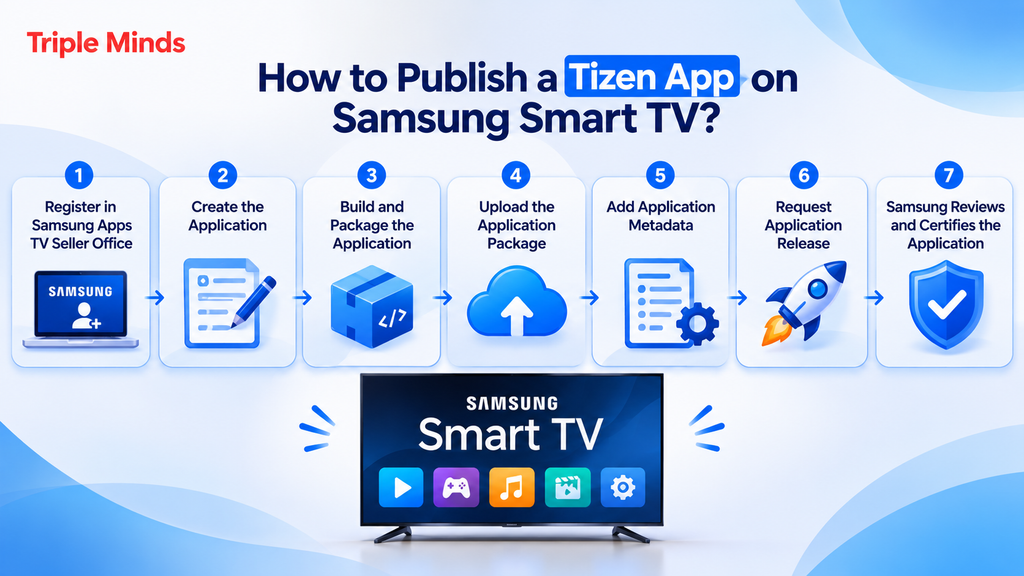
Step 1: Register in Samsung Apps TV Seller Office
Samsung Apps TV Seller Office manages the registration, certification, distribution, and lifecycle of TV applications.
You need the appropriate Samsung account and seller/partnership setup for your intended distribution markets.
Samsung notes that seller and partnership requirements can vary depending on distribution scope and country.
Step 2: Create the Application
In Seller Office, create a new application.
Samsung requires you to specify information such as:
- Application name
- Application type
- Default language
The application name and generated application ID are used for application management and cannot simply be changed later.
Plan your application identity carefully before registration.
Step 3: Build and Package the Application
- For Tizen Web applications, the package is generally a .wgt file.
- For Tizen .NET applications, the package is generally a .tpk.
Samsung also supports multi-architecture packages in the applicable workflow.
The package needs the required configuration, metadata, signatures, and application information.
Step 4: Upload the Application Package
Upload the packaged application through the Seller Office.
Samsung performs a pre-test during the upload process.
This automated check can identify issues before the application proceeds to formal certification.
This is valuable because it lets developers fix obvious issues before spending time in the full certification cycle.
Step 5: Add Application Metadata
Publishing is not only a technical exercise.
You also need to prepare the application’s store presence.
This can include:
- Application title
- Description
- Icons
- Screenshots
- Supported languages
- Service information
- Countries
- Billing information
- Feature information
- Test information
Samsung’s publication documentation specifies image and screenshot requirements and notes that localized application names and descriptions may be required when distributing in multiple countries.
Your store listing should therefore be treated as part of the product experience.
Step 6: Request Application Release
After your application information and package are ready, request the application release through Seller Office.
You select the applicable TV model group and service country.
Samsung then performs additional pre-tests and proceeds with review and verification.
Step 7: Samsung Reviews and Certifies the Application
Samsung reviews the application and performs verification testing.
An application can be rejected if it does not satisfy the applicable requirements or if defects are identified during verification.
If that happens, developers need to resolve the defects and resubmit the application.
This is why comprehensive pre-submission testing is so important.
Why Should Businesses Develop a Samsung Smart TV App?
As a founder or an entrepreneur, your first question should not be “Can we build a Tizen app?”
It should be:
“Does a Smart TV experience create additional value for our users and our business?”
For many digital products, the answer is yes. Want to know why? Let’s see
1. Reach Users on a Large Screen Platform
A Smart TV is not like a smartphone or laptop. It can run streaming platforms, fitness applications, games, other applications in a large-screen environment.
Instead of asking users to cast content from another device, a dedicated TV application can provide a direct experience.
2. Create a Better Experience for Video and Media
Samsung’s TV platform provides dedicated capabilities for media applications like Samsung’s AVPlay API that support audio and video playback. Such applications provide capabilities for use cases that go beyond basic HTML5 media playback and include adaptive streaming, additional subtitle formats, along with 4k UHD video. This makes Tizen apps particularly relevant for:
- OTT platforms
- Video streaming services
- Live streaming platforms
- Sports applications
- News applications
- Educational video platforms
- Fitness and wellness services
- Entertainment platforms
3. Extend an Existing Digital Product
Businesses do not necessarily need to build an entirely new product for Smart TV. They can even rely on an existing mobile or web application that can serve as the foundation for a TV-specific experience.
However, the TV interface should not simply reproduce the mobile UI. The content, navigation, authentication, media architecture, and backend services may be reusable, while the interaction model and presentation layer should be designed specifically for television.
4. Build Another Distribution Channel
A Smart TV application can become an additional product distribution channel.
For a business that already has a web, mobile, or OTT service, a Samsung TV application can help expand availability without forcing customers to rely on external streaming devices.
Can You Beta Test a Samsung Tizen App Before Publishing?
Yes. Samsung provides beta testing functionality before official publication.
A beta release can help identify usability problems and defects before a wider launch. Samsung also provides alpha testing capabilities for eligible partner sellers, allowing applications to be tested on specific TVs in real environments.
For a commercial application, beta testing is strongly recommended.
It allows you to validate the experience with actual users rather than relying entirely on internal testing.
Common Mistakes Most People Make in Samsung Smart TV App Development
Understanding what goes wrong can save considerable time.
Mistake 1: Treating a Mobile App as a TV App
A mobile UI scaled to 1920×1080 is still a mobile UI.
TV applications need different navigation, spacing, focus behavior, typography, and interaction patterns.
Mistake 2: Testing Only in a Browser
A web browser on a development computer is not equivalent to a Samsung TV environment.
Test on actual target hardware.
Mistake 3: Ignoring Remote Navigation
A beautiful UI becomes unusable if users cannot navigate it naturally with the remote.
Mistake 4: Using Unsupported APIs
Not every browser or web API behaves identically across Tizen versions.
Always verify API compatibility against your target platform.
Samsung provides dedicated API reference documentation for Tizen and Samsung Product APIs.
Mistake 5: Building Without Certification Requirements in Mind
An application can appear complete while still failing Samsung’s verification process.
Use Samsung’s development checklist during development, not after development.
Mistake 6: Losing Certificate Information
Certificate management is critical.
Keep the author certificate securely backed up because future versions of a published application need to maintain the appropriate signing identity.
Mistake 7: Overengineering the Application
TV applications benefit from simplicity.
If a feature does not improve the TV experience, it may not belong in the TV version.
How Much Does It Cost to Develop a Samsung Tizen App?
There is no single Samsung Tizen app development cost.
The budget depends on the product’s complexity and the number of platforms, APIs, integrations, and devices involved. Major cost factors include:
Application Complexity
A basic content browser is considerably simpler than a full OTT platform with subscriptions, profiles, DRM, recommendations, downloads, and analytics.
UI/UX Requirements
Custom TV interfaces, animations, complex navigation, and accessibility requirements can increase design and development effort.
Backend Integration
If your existing backend already supports the required APIs, development can be faster.
If new services, authentication systems, payment infrastructure, content management systems, or recommendation engines are required, the scope increases.
Media Functionality
Video applications often require additional work around:
- Streaming protocols
- DRM
- Subtitles
- Audio tracks
- Adaptive bitrate
- Playback recovery
- Analytics
Device Compatibility
Supporting more TV generations means more testing and potentially more compatibility work.
Maintenance
A TV application is not a one-time project.
As Samsung introduces newer Tizen versions and TV hardware, applications need ongoing compatibility testing and updates.
If you want a rough estimate, you can use app development cost calculator. It is a tool designed to help businesses design their budget for developing an app.
How Triple Minds Can Help Build Your Samsung Smart TV App?
Building a Tizen application successfully requires more than frontend coding.
It requires product thinking, TV-specific UX, platform knowledge, backend integration, testing, and deployment planning.
That is where an experienced development partner like Triple Minds can reduce risk.
Triple Minds operates across consultation, development, and marketing, with its development services spanning mobile applications, web development, product engineering, custom software, API integration, and software testing.
For a Smart TV product, that broader capability can be particularly useful when the TV application needs to connect with an existing ecosystem rather than operate as a standalone product.
A typical engagement can cover:
- Product and technical consultation
- Samsung Smart TV/Tizen application development
- TV-specific UI/UX
- Existing product adaptation
- API and backend integration
- OTT and streaming functionality
- Authentication and subscription integration
- Performance optimization
- Device compatibility testing
- QA and certification preparation
- Application packaging
- Samsung Seller Office submission support
- Post-launch maintenance
Planning a Samsung Smart TV application? Talk to Triple Minds about your product requirements, target devices, and development roadmap before you start building.
Samsung Tizen App Development: A Practical Roadmap
A streamlined development roadmap looks like this:
Phase 1: Product Discovery
Define:
- Target audience
- TV use cases
- Core features
- Revenue model
- Supported countries
- Target Samsung TV models
Phase 2: Technical Planning
Choose:
- Tizen Web or .NET
- Framework
- Backend architecture
- APIs
- Authentication model
- Media architecture
- Analytics
- Target Tizen versions
Phase 3: UX/UI Design
Design:
- Navigation
- Focus states
- Remote interactions
- Screen layouts
- Typography
- Playback controls
- Error states
- Loading states
Phase 4: Development
Implement:
- Core UI
- Business logic
- APIs
- Authentication
- Media
- Tizen/Samsung APIs
- Analytics
- Error handling
Phase 5: Testing
Test:
- Emulator
- Real TVs
- Multiple model groups
- Remote navigation
- Performance
- Memory
- Network conditions
- Media playback
- Application lifecycle
Phase 6: Certification Preparation
Run:
- Samsung development checklist
- Automated pre-tests
- Internal QA
- Beta testing where appropriate
- Package validation
Phase 7: Publishing
Complete:
- Seller Office registration
- Package upload
- Metadata
- Screenshots
- Localization
- Model group selection
- Release request
Phase 8: Post-Launch
Monitor:
- Application performance
- User feedback
- Crashes and defects
- Device compatibility
- Adoption
- New Tizen versions
- Feature requests
Ready to Launch Your OTT Platform?
Bring your OTT platform idea to life with Triple Minds. Get expert support for app development, streaming integration, and building a scalable digital product.
Contact Our App Development Team
Final Thoughts
Developing a Tizen application for Samsung Smart TV can open a valuable additional channel for digital products, especially for businesses working in streaming, entertainment, sports, education, fitness, e-commerce, and other large-screen use cases.
But success depends on more than getting an application to run on a television.
The application needs to feel native to the TV environment.
For businesses with an existing digital product, the opportunity is even broader. A Samsung Smart TV application can become an extension of an existing ecosystem, allowing users to access the same service through a purpose-built large-screen experience.
If you are considering launching a Samsung Smart TV application, the smartest first step is not necessarily writing the first line of code.
It is defining the product, target devices, technical architecture, and certification requirements first.
Frequently Asked Questions About Samsung Tizen App Development
Do I need Tizen Studio to build a Samsung TV app?
Tizen Studio is Samsung’s official development environment and provides the relevant IDE, SDK tools, emulator, and other development components. Samsung notes that applications can also be developed without relying on Tizen Studio as long as they comply with Tizen packaging requirements.
Does Samsung approve every application automatically?
No. Samsung reviews and verifies applications before official release. Applications can be rejected if they contain defects or do not satisfy applicable requirements.
How long does Samsung certification take?
There is no universal certification timeline. Samsung states that certification time can depend on tester availability and the number of certification rounds required to resolve defects. Thorough pre-submission testing can reduce avoidable delays.
Can an existing web or mobile application be converted into a Tizen TV app?
Potentially, yes—but it should usually be treated as an adaptation rather than a simple port. Backend services, APIs, authentication, content models, and some business logic may be reusable. The UI and interaction model should be redesigned around the TV environment.
Got a project in mind? Let’s build it together.
We work with founders and product teams across consulting, development, and growth marketing. Tell us what you’re building and we’ll show you how we’d ship it.