Cursor Vs GitHub Copilot Vs Claude Code: Which Is Best?
Cursor, GitHub Copilot, and Claude Code are among the most powerful AI coding tools available in 2026, but each serves a different purpose. This guide compares their features, strengths, limitations, pricing, and ideal use cases to help developers, startups, and engineering teams choose the right AI-powered development assistant.

In 2026, three tools are ruling the AI coding space. They are Cursor, GitHub Copilot, and Claude Code. These tools are getting used almost everywhere, whether you need to code regarding specific tasks or ship software.
Cursor turns your written instructions into code changes, refactors and even complete app features inside an IDE (Integrated Development Environment).
On the other hand, GitHub Copilot suggests code as you type and helps explain, debug and generate functions directly in your editor.
While Claude Code works like an autonomous coding agent that can read your project, run commands, fix bugs, and build features from the terminal.
They are all pretty good at what they do. But often businesses get confused when they are not able to understand which one they should choose according to their business needs and type?
In this blog, we will dive deep into what is the differences between each AI coding tool and which is best to have based on the needs of your startup or business.
Building a product and not sure which AI Coding tool is best for your business?
Triple Minds offers hands-on AI consulting and custom AI agent development to help teams move faster without the guesswork. Talk to our team and help figure out which AI coding works best for you.
What Are We Comparing?
Before the comparison, it is important to understand that each tool solves a different problem in coding. They have their own ways to work which differ from each other.
Cursor
It is a full AI-native code editor. It is built on top of VS code but rebuilt from scratch to put AI at the center of every action you take. You are not adding AI to your editor. The editor itself is the AI experience.
GitHub Copilot
GitHub Copilot is an AI powered coding assistant developed by GitHub and OpenAI. It acts as an “AI pair programmer” that integrates directly into your text editor, suggesting code completions, generating functions, explaining complex code and debugging in real time as you type.
Claude Code
It is an agentic coding assistant developed by Anthropic that lives directly inside your local terminal or IDE (Integrated Development Environment) instead of a web browser. It simply allows you to build, debug and refactor software using natural language by giving the AI direct access to read, create and modify files in your project directory.
Note: One is an editor. One is a plugin. One is an autonomous agent. That distinction matters more than any feature comparison.
Ready to Build Faster With AI-Assisted Development?
Modern development teams are increasingly combining AI coding tools, agent workflows, and human expertise to accelerate product delivery. Triple Minds helps startups and enterprises implement practical AI-driven development processes through specialized Vibe Coding services that speed up development without compromising quality.
Explore Our Vibe Coding Development Services
Cursor
Where Cursor Works the best?
Cursor is at its best when you are building something new, and you want the AI to co-build it with you in real time.
Its standout feature is called Composer. You describe a feature in plain English and Cursor builds it across multiple files at once. Also, if you need a login flow that involves your routes, controllers, database schema and frontend components, then you just describe it simply. After your command, Cursor writes all of it together by understanding how each piece connects rather than leaving you to stitch everything manually.
It also indexes your entire project, so it understands how your files relate to each other. When you give it a task, it reasons your actual code base not just the file on your screen.
Cursor also works well for:
1) Scaffolding new features from a plain-language description, saving the initial hours of setup.
2) Refactoring code with awareness of how a change in one place affects the rest of the project.
3) Asking architectural questions and getting answers that reference specific files.
4) Multi-line autocomplete that predicts entire logical blocks based on the pattern of what you are writing.
Where Cursor Lacks?
1) It handles new projects well but loses context in large, legacy codebases with hundreds of files and inconsistent patterns.
2) The learning curve is steep and many developers install it, feel overwhelmed and go back to their old setup without ever using it properly.
3) Its most powerful features run on premium AI models that consume plan credits fast, so heavy users on the Pro plan hit limits quickly.
4) Switching to Cursor means leaving your current editor behind entirely which is a bigger ask than it sounds for developers deep in JetBrains or Neovim.
Pricing
Individual plan: $20/month
Teams plan: $40/user/monthly
Choose Cursor If:
1) You are building a new product from scratch and want AI that co-builds it with you.
2) You are a solo developer or small team willing to fully commit to an AI first workflow.
3) You want AI across every layer of your editing experience not just a separate assistant.
4) You are comfortable investing time to learn the tool properly in exchange for a long-term productivity gain.
GitHub Copilot
Where GitHub Copilot Works Best?
Copilot was launched around 2021 and has gone through more real-world iteration than either of the other two tools. That history shows how reliably it performs across different environments.
Its inline autocomplete is the best of the three in pure accuracy and speed. For the kind of work that fills out a large portion of every developer’s day, writing boilerplate, implementing familiar patterns and converting logic between formats. Copilot saves real time without requiring any change to how you work.
Copilot also excels in team and enterprise environments because it has the most mature security controls, the most robust privacy settings for proprietary code and the deepest integration with GitHub’s existing ecosystem.
Copilot also works well for:
1) Accurate inline autocomplete across all major languages without any configuration.
2) Teams already on GitHub, VS Code or JetBrains who want AI capability with zero workflow disruption.
3) Enterprise environments with compliance requirements around data privacy and audit controls.
4) Developers who want AI that makes their current workflow faster rather than replacing it.
Where GitHub Copilot Lacks?
1) It accelerates what you are already doing but will not challenge a poor architectural decision or reason through a complex problem with you.
2) It tends to reason at the file level rather than the project level, so tasks involving multiple interconnected files often result in suggestions that are correct in isolation but break something elsewhere.
3) It does not do agentic work, every output requires a developer to review, accept and direct the next step manually.
4) Quality drops significantly in less common languages where suggestions become unreliable enough to be more of a distraction than a help.
Pricing
1) Team plan: $4 USD per user/month
2) Enterprise: Enterprise starting at $21 per user/month
Note: Copilot is the most predictability affordable of the three at team scale, costing less per month than most productivity tools that teams pay for without much thought.
Choose Copilot If:
1) Your team is already on GitHub and wants AI capability without changing tools or workflow.
2) You need enterprise-grade privacy controls and compliance features for proprietary code.
3) You want the most reliable and proven inline autocomplete available today.
4) Predictable, scalable pricing matters more than having the most experimental capabilities.
Claude Code
Where Claude Code Works the best?
Claude Code operates at a different level from the other two tools. It is an autonomous agent that takes a goal, reasons through it across your entire codebase and executes the solution with a level of independence that Cursor and Copilot do not offer.
You give it a task in your terminal and it reads the relevant files, maps out what needs to change and why, writes the change across every affected part of the codebase, runs the necessary commands, reads any errors that come back and iterates on its own until the task is resolved. It works through a complex engineering problem the same way a capable engineer would work through a ticket.
Because it runs in your terminal, it also has access to your file system, package manager, build tools and logs, letting it take broad environment-level actions that editor-based tools simply cannot.
Claude Code also works well for:
1) Debugging complex problems that span multiple files, services or layers of a stack.
2) Refactoring large sections of legacy code while understanding how every change affects the broader system.
3) Writing and fixing test suites including tests for parts of the codebase that were never tested before.
4) Getting oriented inside and unfamiliar codebase by having it map the architecture and explain where key logic lives.
5) Multi-step engineering work that would take a human developer several hours to work through it carefully.
Where Claude Code Lacks?
1) It lives entirely in the terminal with no syntax highlighting, no inline difference view and no GUI (Graphical User Interface) which feels unfamiliar and raw for developers used to visuals editor feedback.
2) It can make sweeping changes across many files at once and approving actions without carefully reviewing the plan first can leave you with a codebase that takes real time to untangle.
3) It is billed on API token consumption rather than a flat monthly fee, so a long agentic session on a large codebase can cost significantly more than expected if usage is not tracked.
4) It is best supported on MacOS, Linux and windows users need WSL to run it which adds friction that some teams find prohibitive.
Pricing
1) No flat monthly subscription for individual use.
2) Billed based on Anthropic API token consumption per session.
3) A simple task on Claude Sonnet costs very little while a long session on Claude Opus across a large codebase can cost meaningfully more.
4) Enterprise pricing is available directly through Anthropic for teams that need predictable billing and usage controls.
Setting usage Budgets and monitoring consumption from the first week is strongly recommended before it becomes a line item that surprises you.
Choose Claude Code If:
1) You are working on a large or legacy codebase where tasks routinely modify many files at once.
2) You want an AI that can own a task from start to finish rather than assist you through every step manually.
3) You are comfortable in the terminal and can build the review habits that make agentic AI safe on real codebases.
4) You are Tackling high value, high complexity problems where the hours saved justify the usage cost.
Read Also: Cursor vs Claude vs Bolt – AI Coding Tool Comparison for Production Code
How To Choose One?
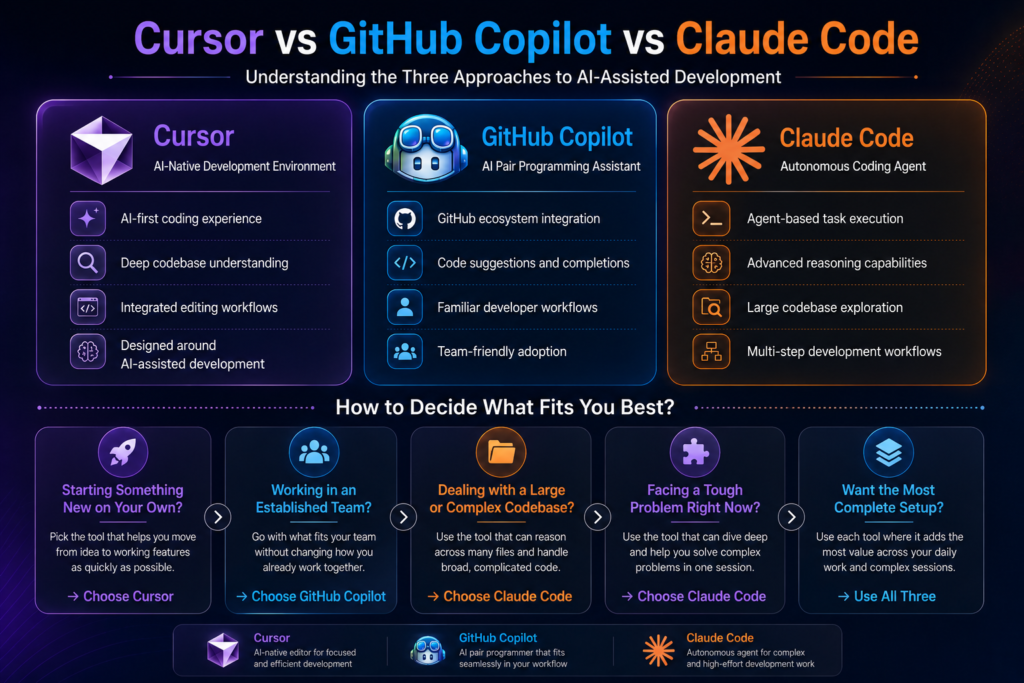
Here is a clear framework based on where you actually are right now:
1) Solo Developer Building Something New
Start with Cursor. The AI-native editor changes how fast you can go from idea to working feature and the gain on greenfield work is hard to match with any other tool.
2) Established Engineering Team:
Github Copilot is the path of least resistance. It requires nothing from your team in terms of workflow change, scales predictability in cost and delivers reliable daily value.
3) Large Or Complex Codebase
Claude Code is worth the terminal-based workflow. For tasks that require sustained reasoning across hundreds of files, it is the most capable tool available right now.
4) Specific hard Problem In Front Of You
Reach for Claude Code for that session even it is not your daily driver. It handles the kind of problem that would take a skilled developer most of the day to work through carefully.
5) Maximum Overall Setup:
Many senior developers run all three. Copilot for inline suggestions throughout the day, Cursor for building features across files, Claude Code for deep debugging or refactoring session.
Read Also: Best Uncensored LLMs For AI companion Apps in 2026
When Tools Are Not Enough?
Here is what all three tools share: they make a skilled developer faster, but none of them replace architectural thinking, strong product judgment or the experience to recognize when a codebase is quietly heading in the wrong direction.
A solo developer with three excellent AI tools is still one person with one perspective, and there is a ceiling on what one person can build well. That ceiling tends to appear at exactly the moment when momentum matters most.
Think about what actually goes into shipping something serious:
1) A senior AI engineer approaches a system design problem differently than a backend developer, and that difference prevents entire categories of technical debt.
2) A product strategist catches misalignments between what is being built and what users actually need, something no tool can flag because the tool has never spoken to your users.
3) A growth team ensures that what gets built actually reaches the people it is built for, because a product nobody finds is just an expensive side project.
AI tools speed up execution within the boundaries of what one person can see and decide. A team expands those boundaries entirely. If you are at the stage where the ceiling is starting to feel real, that is worth paying attention to.
Building With Claude AI?
From AI-powered assistants to intelligent business workflows, Claude AI can unlock powerful capabilities when implemented correctly. Triple Minds helps organizations integrate Claude AI into modern products and applications.
Learn More About Claude AI Integration Services
Conclusion
Cursor, Copilot and Claude each represent a genuinely different philosophy about AI-assisted development and all three are serious enough to deserve real consideration.
Copilot is the most reliable and universally applicable choice. Cursor gives the most immersive experience that changes how build rather than just making it slightly faster. Claude Code is the most powerful tool for complex autonomous work, behaving less like an assistant and more like a capable engineer you can hand over a hard problem to.
The right choice fits where you are right now. And the honest follow up is that if where you are is a point where you need to build something serious, at pace, with real quality, the tools alone might not help that much.
Quick Answers to Common Questions
Can I use Cursor and GitHub Copilot at the same time?
Yes, but they conflict on inline autocomplete since both tools compete to fill the same suggestions. Most developers who switch to Cursor disable Copilot’s autocomplete and rely on Cursor’s Tab feature instead, which tends to be stronger in that environment.
Is Claude Code safe to use with proprietary or confidential code?
Anthropic does not use API inputs to train its models by default. For sensitive codebases, review Anthropic’s current data usage policy and consider an enterprise agreement with formal contractual protections before running Claude Code on proprietary repositories at scale.
Does GitHub Copilot work equally well across all programming languages?
Copilot supports most major languages but quality varies significantly. It performs best in JavaScript, TypeScript, Python, and Go. In less common languages, suggestions become noticeably less accurate and can be more of a distraction than a help.
Is Claude Code available on Windows?
Claude Code works on Windows through WSL (Windows Subsystem for Linux) but is best supported on macOS and Linux, where setup is straightforward. The WSL requirement adds enough friction that some teams find it a practical barrier.
Which tool has the best free tier for someone just getting started?
GitHub Copilot’s free tier is the most generous starting point, offering 2,000 completions and 50 chat messages per month with no time limit. Cursor’s free tier works for light use but premium model requests run out faster than most active developers expect. Claude Code is technically free to start but it accumulates costs quickly even in moderate sessions.
Got a project in mind? Let’s build it together.
We work with founders and product teams across consulting, development, and growth marketing. Tell us what you’re building and we’ll show you how we’d ship it.