From MS Excel to Google Sheets, spreadsheets are the backbone of business data management worldwide. However, if you are still relying on traditional spreadsheet formulas to analyze critical business data, you may be slowing down decisions and increasing the risk of costly errors. Manual reporting, complex functions like VLOOKUP and pivot tables, and repetitive data cleaning consume valuable time. In fact, it’s been reported that data professionals spend nearly 60–80% of their time preparing data instead of analyzing it. This is where an AI Excel chatbot changes how modern businesses work with spreadsheets. Rather than making Excel itself “intelligent,” businesses can upload their Excel files into a secure AI-powered chatbot and analyze the data using plain English questions. The chatbot reads the spreadsheet, applies the correct calculations, and delivers structured insights instantly – turning static spreadsheets into dynamic analytical workspaces.
At Triple Minds, we implement secure AI Excel chatbot solutions that allow organizations to upload spreadsheet data and interact with it conversationally. An AI Excel chatbot is a tool that enables users to analyze Excel data using natural language instead of complex formulas. It helps clean messy datasets, generate visual reports, identify trends, and extract actionable insights faster and more accurately. For B2B teams managing sales reports, financial statements, operational dashboards, or inventory sheets, this shift from manual spreadsheet analysis to AI-driven conversational data analysis improves efficiency, reduces errors, and accelerates decision-making.
Ready to Transform Your Excel Analysis with AI?
Discover how AI-powered Excel chatbots help your team analyze spreadsheets in plain English—eliminating complex formulas, reducing reporting delays, and accelerating business decisions.
Explore Secure AI Excel Chatbot Solutions
Key Takeaways
- AI Excel chatbots let you analyze uploaded spreadsheet data using simple, natural language queries.
- They significantly reduce manual data cleaning and dependency on complex Excel formulas.
- Businesses can speed up decision-making with instant, structured insights generated by AI.
- Sales, finance, operations, and leadership teams gain faster access to accurate reports and performance analysis.
- AI-driven calculations minimize human errors and improve overall data reliability.
- Conversational analytics makes data accessible to both technical and non-technical teams across the organization.
What is AI in Excel?
AI in Excel refers to using intelligent AI-powered tools that can analyze your Excel data in a smarter and more efficient way. Instead of manually building complex formulas, calculations, and pivot tables, you can upload your spreadsheet into a secure AI chatbot and ask questions in plain language. The AI understands your request, applies the right logic behind the scenes, and delivers accurate, structured insights within seconds.
It can clean messy datasets, identify trends, summarize performance metrics, generate visual reports, and highlight unusual patterns automatically. At Triple Minds, we see AI in Excel as an evolution in how businesses interact with spreadsheet data — shifting from manual effort to AI-assisted analysis that makes insights faster, simpler, and accessible to every team, not just technical experts.
When we talk about cleaning messy datasets, we mean identifying and correcting common data issues that affect analysis accuracy. Business spreadsheets often contain duplicate entries, missing values, inconsistent date formats, numbers stored as text, or slight variations in naming conventions. These small inconsistencies may seem harmless, but they can significantly distort reports and performance metrics. An AI Excel chatbot automatically scans the uploaded file, detects such irregularities, and either corrects them or highlights them for review. This ensures that insights are generated from structured, reliable data, reducing errors and improving confidence in decision-making.
What Does It Mean to “Chat with Your Excel Files”?
“Chatting with your Excel files” means uploading your spreadsheet into a secure AI chatbot and asking questions about your data in plain English — without writing formulas or building complex reports.
Traditionally, extracting insights from Excel requires formulas like VLOOKUP, INDEX-MATCH, pivot tables, filters, or nested IF statements. Not everyone understands what these functions do or how to use them correctly. Even experienced users spend significant time building reports, and small formula errors can lead to inaccurate analysis. With an AI-powered Excel chatbot, that entire process becomes faster and more intuitive.
At Triple Minds, we implement secure AI chatbot systems that allow businesses to upload their spreadsheets and interact with them conversationally. Instead of struggling with formulas, your team can ask business questions and receive clear, structured answers instantly. Let’s look at how this works in practice.
Ask Questions in Plain Language
Instead of writing formulas, you simply type what you want to know. For example, if your uploaded file contains sales data with columns like Date, Product, Region, Customer, and Revenue, you can ask:
“What were last quarter’s highest-performing products?”
You receive a ranked list of top products based on revenue.
“Show monthly revenue trends for the past year.”
You get a clear month-by-month breakdown, often supported with a visual chart.
“Which customers reduced their purchase volume?”
The chatbot compares time periods and highlights customers with declining orders.
“Calculate churn rate from this dataset.”
The AI identifies inactive customers and calculates the percentage automatically.
How It Works
Behind the scenes, the AI chatbot reads your uploaded Excel file, understands column headers, analyzes the data structure, and performs the required calculations automatically. You do not need to define formulas or build reports – you simply ask the question, and the system generates the insight.
Why It Matters
Your spreadsheet remains the source of truth, but when connected to an AI chatbot, it becomes far more powerful. Instead of manually extracting insights, your team can interact with data conversationally and receive faster, more accurate answers. In simple terms, chatting with your Excel files means enabling AI to analyze your spreadsheet data on demand — making business analysis quicker, easier, and accessible across the organization.
Why Traditional Spreadsheet Analysis Slows Businesses Down
Spreadsheets have supported business operations for decades. They are reliable for storing and organizing structured data. However, as organizations scale and datasets grow larger, traditional spreadsheet workflows begin to create operational friction. What once worked for small teams can become inefficient when speed, accuracy, and cross-team collaboration become critical.
1. Analysis Becomes Time-Heavy
Generating meaningful insights from spreadsheets often requires multiple steps — filtering data, building calculations, validating numbers, and formatting reports. As data grows, this process takes longer, slowing down decision cycles.
2. Reporting Creates Dependency
Business leaders often rely on analysts or Excel experts to extract insights. This creates internal bottlenecks where decision-makers must wait for reports instead of exploring data independently.
3. Scalability Challenges
Spreadsheets are excellent storage tools, but as datasets expand across departments, managing versions, consolidating files, and maintaining consistency becomes increasingly complex.
4. Limited Real-Time Exploration
Most spreadsheet workflows are report-based. You generate a report, review it, and then request another version if you need deeper insights. This slows down dynamic decision-making.
5. Insight Gaps
Valuable business data often remains underutilized because extracting deeper patterns requires time and technical effort. Many organizations sit on strong datasets but struggle to convert them into continuous insight. For growing B2B businesses, these slowdowns directly impact agility and competitive advantage.
How AI Excel Chatbots Transform Business Analysis
AI Excel chatbots shift spreadsheet analysis from static reporting to interactive exploration. Instead of manually preparing reports, teams upload Excel files into a secure AI chatbot and engage with the data conversationally.
1. Instant Insight Generation
Rather than building step-by-step reports, teams receive structured answers immediately after asking a business question. This dramatically shortens decision cycles.
2. Self-Service Data Access
Non-technical users can interact with uploaded spreadsheet data without relying on specialists. This reduces bottlenecks and empowers cross-functional teams.
3. Interactive Follow-Up Questions
Instead of requesting a new report for every clarification, leaders can ask follow-up questions in real time. This enables deeper exploration without delays.
4. Structured Outputs & Visual Summaries
The chatbot doesn’t just provide numbers — it delivers organized summaries and visual breakdowns that are easier to interpret and present.
5. Strategic Focus Over Manual Work
By automating analytical tasks, teams can shift focus from spreadsheet management to strategic decision-making and performance improvement.
At Triple Minds, we see this transformation as moving from spreadsheet-driven reporting to AI-driven data conversations – where insight is continuous, not periodic.
Business Use Cases: Who Benefits the Most?
Sales Teams
Sales leaders can track pipeline health, deal velocity, win-loss trends, and account performance instantly after uploading their reports into the chatbot. Instead of waiting for analysts, representatives can analyze territory performance and identify stalled deals independently. This improves forecasting accuracy and strengthens revenue performance.
Finance Teams
CFOs and finance managers can review cash flow trends, cost centers, revenue variance, and profitability within seconds. Rather than rebuilding complex spreadsheets for each query, teams can drill into uploaded financial data conversationally. This improves financial clarity and speeds up reporting cycles.
Operations Teams
Operations managers can analyze inventory levels, supply chain delays, and vendor performance using simple queries. After uploading operational data, bottlenecks and inefficiencies become easier to identify. Instead of compiling reports manually, teams can focus on resolving issues faster.
Marketing Teams
Marketing leaders can evaluate campaign performance, conversion rates, ROI, and channel effectiveness instantly. Comparing campaign outcomes and identifying high-performing channels becomes straightforward. This enables smarter budget allocation and quicker optimization decisions based on real data.
Founders & Executives
Leaders can move beyond static dashboards and ask follow-up questions in real time. By interacting with uploaded business data through an AI chatbot, they can quickly explore revenue trends, growth drivers, and cost structures. This reduces dependency on multiple reports and meetings – making decisions faster, clearer, and data-backed.
Related Article You May Like: What is a Database Chatbot and How Does it Work?
Step-by-Step Guide: How to Chat with Your Excel Files
Below is a practical step-by-step guide to start analyzing your Excel data using a secure AI chatbot.
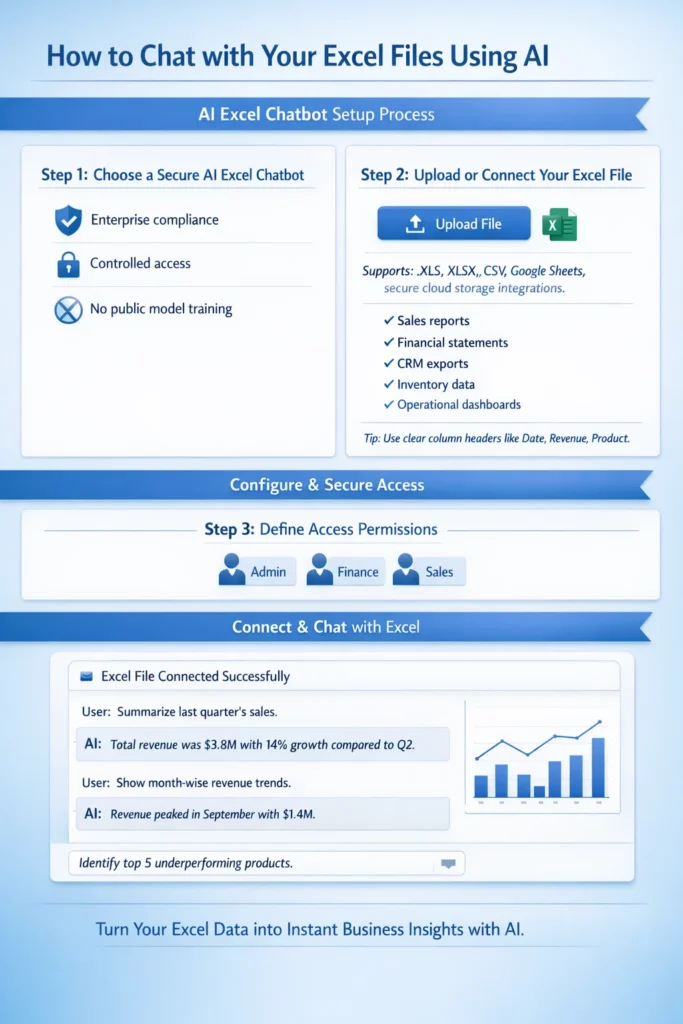
Step 1: Choose a Secure AI Excel Chatbot
Select a private AI chatbot solution that allows you to securely upload or connect Excel files. For business use, ensure the platform supports controlled access, enterprise compliance, and does not use your data for public model training.
Security should always be the first consideration when working with internal financial, sales, or operational data.
Step 2: Upload or Connect Your Excel File
Upload your Excel sheet directly into the chatbot or connect the secure folder where your spreadsheets are stored.
Typical business files include:
- Sales reports
- Financial statements
- CRM exports
- Inventory data
- Operational dashboards
For best results, ensure your spreadsheet has clear column headers such as Date, Revenue, Customer Name, or Product Category. Clean structure improves AI accuracy.
Step 3: Define Access Permissions
Decide which team members can access the chatbot and what data they are allowed to analyze. Role-based permissions protect sensitive information and ensure responsible usage across departments.
Step 4: Start Asking Business Questions
Once your file is connected, you can begin interacting with your data in plain English.
For example:
- “Summarize last quarter’s sales.”
- “Show month-wise revenue trends.”
- “Identify top 5 underperforming products.”
The AI chatbot reads your uploaded spreadsheet, performs the required calculations, and delivers structured answers instantly – without manual formula building or report preparation.
Public AI vs Private AI for Excel
Many AI tools are publicly available, but businesses handling sensitive operational or financial data must prioritize secure implementation.
Public tools may:
- Store conversation history externally
- Lack enterprise-grade compliance
- Offer limited integration with internal systems
At Triple Minds, we implement secure AI layers that allow businesses to connect Excel files or live databases privately. This ensures:
- Data privacy
- Controlled user access
- Enterprise compliance
- Scalable system integration
When working with internal business data, security is not optional – it is foundational.
The ROI of Using an AI Excel Chatbot
When we evaluate the return on investment of AI-powered Excel chatbots, we consistently see impact across three strategic areas:
1. Time Efficiency
Teams reduce hours spent preparing reports and restructuring spreadsheets. Instead of building analysis step-by-step, they ask questions and receive immediate answers. This shifts focus from operational tasks to strategic execution.
2. Improved Accuracy
Automated calculations reduce reliance on manual formulas, lowering the risk of reporting inconsistencies. More reliable insights lead to stronger business decisions.
3. Accelerated Decision Cycles
Executives gain clarity instantly instead of waiting for scheduled reports. Real-time follow-up questions allow deeper exploration, enabling faster course correction in competitive markets.
You Might Also Find This Useful: How to Chat with Your Own Database Using AI
Common Mistakes to Avoid
Even with AI chatbots, best practices matter:
- Maintain clear and consistent column headers
- Avoid combining unrelated datasets in a single sheet
- Validate AI-generated outputs for business context
- Use secure platforms for confidential data
- Train teams to ask clear, goal-oriented questions
AI enhances analysis – but structured data and thoughtful usage maximize results.
The Future of Conversational Analytics
We believe spreadsheet analysis is evolving from static reporting toward interactive, AI-assisted decision support. In the coming years:
- AI systems will automatically detect key performance indicators
- Predictive insights will become embedded in analysis workflows
- Automated forecasting will become standard practice
- Businesses will rely more on conversational queries than static dashboards
This shift is not about replacing analysts. It is about empowering them to focus on strategic thinking rather than repetitive data preparation.
Why We Recommend Secure AI Implementation
Although subscription-based AI tools are easy to access, companies that prioritize stronger security and want their data to remain entirely within their own environment often benefit more from customized chatbots built exclusively for their business. As organizations grow, they typically require deeper integrations, such as:
- Connecting CRM systems
- Linking ERP platforms
- Integrating SQL databases
- Building centralized AI dashboards
At Triple Minds, we implement private AI systems that allow teams to securely chat with live business data. This removes silos, improves accessibility, and ensures leadership always works with updated insights.
Final Thoughts
Spreadsheets remain central to business operations. What is changing is how organizations extract value from them. Moving from manual formula-based analysis to AI-powered conversational data interaction is not just a productivity upgrade — it is a strategic advantage. When teams spend less time managing spreadsheets and more time interpreting insights, efficiency improves. When executives can explore data in real time, decision cycles shorten. When accuracy increases, confidence in data strengthens.
At Triple Minds, we see AI-powered spreadsheet analysis as the new standard for modern, data-driven organizations. Your Excel file remains structured data — but when connected to a secure AI chatbot, it becomes a powerful decision-support system. If your organization is ready to move beyond static reporting toward intelligent data conversations, the transition starts here.
FAQs
An AI Excel chatbot is a secure tool that allows users to upload spreadsheets and analyze data using natural language instead of formulas.
No. The chatbot removes dependency on complex formulas, making data analysis accessible to non-technical users.
Security depends on the solution. Private AI implementations provide enterprise-level protection and controlled access.
AI can automate most common analytical tasks, but maintaining clean and structured data remains important.
AI delivers highly accurate results when data is properly structured. Human validation is recommended for critical decisions.
Yes. These solutions are scalable and beneficial for startups as well as large enterprises.
Structured tabular data such as sales reports, financial sheets, CRM exports, inventory logs, and operational metrics.
Most businesses today collect a huge amount of data, from sales and customer interactions to marketing performance and financial records. Yet having data doesn’t automatically lead to better decisions. Research shows that nearly 55% of enterprise data is stored but never used, and close to 68% of available business data goes underutilized simply because it’s hard to access, fragmented across systems, or too technical to interpret. While this data sits inside databases and analytics platforms, very few leaders can interact with it directly, something that modern tools like database chatbots are beginning to change.
At the same time, 80% of business leaders say data is critical for decision-making, yet many still struggle to act on it. Insights are locked behind dashboards, reports, and technical tools that require analysts or data teams to interpret. Instead of getting quick answers to everyday questions, what worked? Where did customers drop off? What should we change next?
Leaders are forced to wait, guess, or rely on incomplete information. This gap between having data and actually using it is where many organizations get stuck. Data becomes something that exists in the background rather than something leaders and non-technical teams can actively engage with. This is exactly where a database chatbot, capable of answering questions in plain English, can bridge the gap between raw data and real decisions. By enabling users to ask questions directly to their databases through a conversational interface, database chatbots make data accessible, actionable, and decision-ready, without complex dashboards or SQL queries. Just answers.
At Triple Minds, we build database chatbot solutions that connect directly to your existing data systems and translate natural language questions into real-time insights. Leaders don’t need to “learn data” – they simply talk to it, explore trends, uncover gaps, and make confident decisions based on live business data.
Looking to Chat With Your Own Data Using AI?
Connect with Triple Minds to see how AI-powered database chatbots enable teams to query complex data in plain language—without dashboards, SQL, or manual reporting.
Start Your AI-Driven Data Interaction Journey Today.
Key Takeaways
- Most businesses already have valuable data, but traditional SQL databases make it difficult for non-technical teams to access insights.
- Business users often depend on analysts or engineers to run queries, which slows down decision-making and limits data usage.
- AI-powered database chatbots allow users to ask questions in plain English and receive accurate answers directly from their databases.
- Text-to-SQL technology removes the need for SQL knowledge while preserving data accuracy and reliability.
- Public AI chatbots are not suitable for confidential business data due to security and compliance risks.
- A private, securely deployed database chatbot ensures full data ownership, access control, and data privacy.
- Chatting with your database helps teams make faster, more confident, data-driven decisions.
- AI database chatbots can be used across departments such as sales, marketing, operations, finance, and leadership.
- Organizations can connect conversational AI to various data sources, including SQL databases, CRM systems, and ERP platforms.
The Core Problem: Why Traditional Databases Block Business Insights
Traditional databases were created for technical teams, not for everyday business users. They are very good at storing and organizing large amounts of information, but they are not designed to help managers or leaders easily find answers. As a result, important business data often stay locked away, even though it holds valuable insights.
For technical teams, this may be normal. For non-technical roles such as marketing managers, operations leaders, finance teams, and executives, it creates a constant challenge. These teams need fast answers to make decisions, but they cannot easily access the data on their own.
Because of this, organizations face several problems:
- Simple questions take too long to answer
- Business teams must wait for reports or dashboards
- Data teams become overloaded with requests
- Many useful questions are never asked
Over time, this leads to slow decision-making. Instead of using real data, teams start relying on assumptions, experience, or incomplete information. This limits growth and reduces the value of the data the business already owns.
The real issue is not the amount of data or the quality of tools. The problem is that traditional databases are not built for how business people think, ask questions, or make decisions.
The Hidden Cost of Inaccessible Data
Most businesses collect large amounts of data every day. This data holds valuable information that can guide better decisions, improve performance, and support growth. However, when this data is difficult to access, it becomes a hidden problem that affects the entire organization.
When teams cannot easily get answers from data, decision-making slows down. Leaders are forced to wait for reports or depend on others to pull out information. In fast-moving business environments, these delays can be costly. By the time insights are available, the opportunity to act may already be gone.
When data is hard to access, businesses face several challenges:
- Decisions take longer than necessary
- Teams rely on assumptions instead of real data
- Growth opportunities are missed
- Past data remains unused and forgotten
Over time, this creates a pattern where people stop asking questions altogether. If getting answers feels difficult or time-consuming, curiosity fades. Teams begin to operate based on habits and opinions rather than facts.
Most organizations already have years of stored data that could offer powerful insights, such as:
- Which strategies delivered the best results
- Why customers stopped engaging or buying
- Where costs increased without clear returns
- Which channels supported long-term growth
Yet, because this data is locked behind technical tools, it rarely gets explored. Instead of learning from past performances, businesses often repeat the same mistakes.
The real cost of inaccessible data goes beyond slow reporting. It leads to missed learning, weaker decisions, and limited growth. Making data easier to access allows teams to move faster, ask better questions, and use information they already own to make smarter, more confident business decisions.
What Does It Mean to Chat with Your Database?
Chatting with your database means interacting with structured data using natural language.
An AI-powered text-to-SQL system allows users to ask questions in plain English. The system automatically:
- Understands the intent of the question
- Converts it into a SQL query
- Executes the query securely
- Returns results in a readable format
The complexity of the database remains hidden, while insights become accessible to everyone.
How to Chat With Your Own Database – Step-by-Step Guide
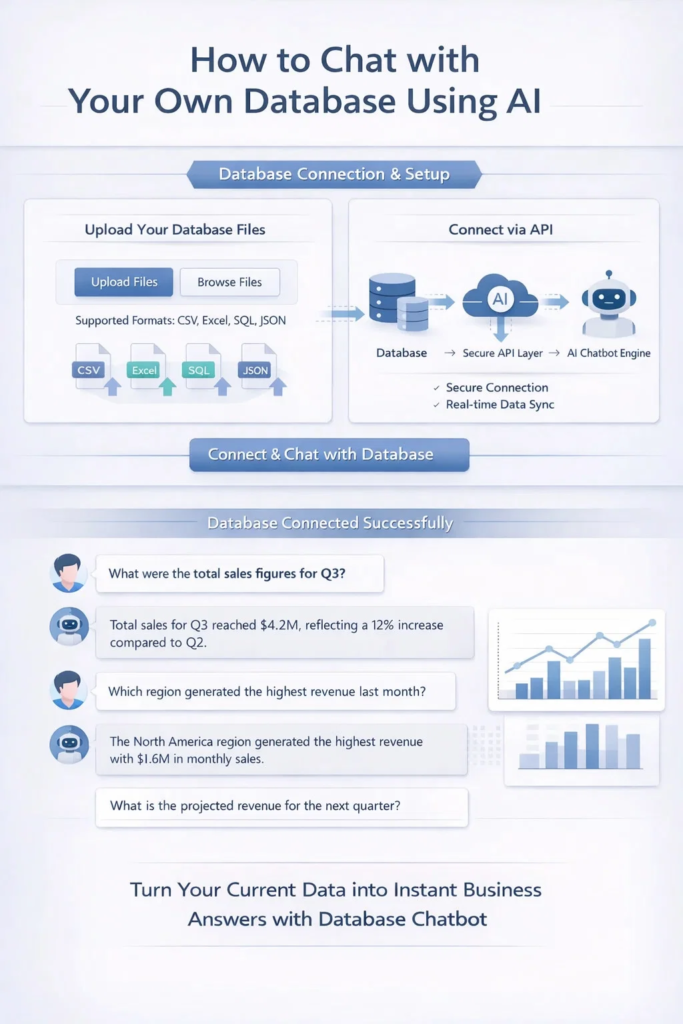
Scenario 1: Upload Your Database into the Chatbot
If your data already exists in Excel, CSV files, or exported reports, you can upload it directly into the chatbot. If it doesn’t, you’ll first need to export it from your system.
Step 1: Download your database
Export your data from your system into commonly used formats such as Excel (XLS/XLSX), CSV, Google Sheets, PDF reports, or JSON files. These formats are easy to upload and work well for analysis.
Step 2: Upload the file into our database chatbot
Once downloaded, simply upload the files into the data base chatbot. The system automatically reads, structures, and understands your data – no manual setup required.
Step 3: Start asking questions in plain English
You can now interact with your data naturally. Ask questions like:
Example Query:
“What were our total sales last quarter?”
What you get: A clear sales summary with total revenue, quarter-wise breakdown, and key trends—ready to understand briefly.
Example Query:
“Which products are performing the best?”
What you get: A ranked list of top-performing products with revenue contribution and growth indicators.
Scenario 2: Connect Your Database Directly with Us (Using Secure APIs)
For real-time and ongoing insights, we connect your live database to a private AI layer using secure APIs. An API (Application Programming Interface) acts as a safe bridge that allows the AI to fetch only the required data – without downloading or moving it.
Step 1: Connect your systems via APIs
We integrate your CRM, ERP, SQL databases, or data warehouses through secure APIs. Your data stays in your system while the AI accesses it in real time.
Step 2: Set access and permissions
API access is controlled with clear permission rules, ensuring each team can only view the data they are authorized to see.
Step 3: Start chatting with live data
Once connected, teams can ask questions in plain English and get instant answers based on the latest data.
Example Query:
“What does our sales pipeline look like today?”
What you get: A real-time pipeline view showing deal stages, total value, and key risks.
Example Query:
“Which customers are likely to churn?”
What you get: A focused list of at-risk customers with behavior signals and recommended actions.
Don’t Miss This Guide: Chat with Your Excel Files: Guide to Use AI Excel Chatbot
How Database Chatbots Are Different from General AI Chatbots
Database chatbots are built for precision and control, not casual conversation. Unlike general AI chatbots that generate answers from broad training data, database chatbots connect directly to your live business databases and respond strictly based on real, structured data.
Triple Minds designed database chatbots to understand business intent, convert natural language into secure queries, and deliver accurate, traceable outputs like reports, charts, and metrics. This makes them ideal for decision-makers who need reliable insights, not assumptions or generic AI responses.
Business Benefits of Chatting with Your Own Database
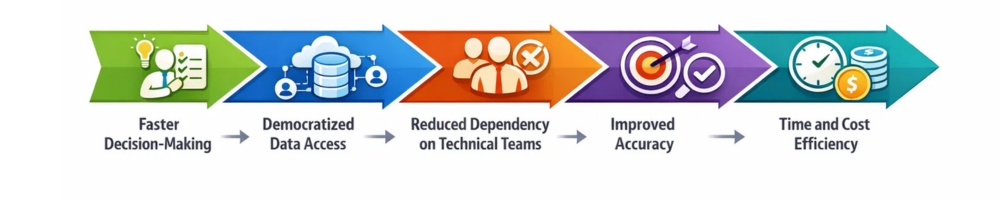
Faster Decision-Making: Leaders can ask questions in natural language and get answers in seconds. This removes delays caused by manual reporting and back-and-forth with data teams. Decisions are made while opportunities are still hot.
Democratized Data Access: Employees no longer need SQL or BI tools to explore data. Anyone can ask questions and receive clear, contextual answers. This creates a more data-driven culture across the organization.
Reduced Dependency on Technical Teams: Routine data requests no longer consume engineering or analytics bandwidth. Technical teams can focus on high-value initiatives instead of ad-hoc queries. This improves productivity and morale across teams.
Improved Accuracy: Insights are pulled directly from live databases rather than static reports. This minimizes human error and eliminates outdated assumptions. Teams operate with a single source of truth.
Time and Cost Efficiency: Organizations reduce the need for multiple dashboards and reporting tools. Less manual effort means faster insights at lower operational cost. Overall data workflows become simpler and more scalable.
Industry and Department-Wise Use Cases
How Sales Teams Can Chat With Their Database
Sales leaders can instantly track pipeline health, deal velocity, and win-loss trends. Sales representatives can ask questions about account activity or performance gaps. This enables faster course correction and better forecasting.
How Marketing Teams Can Use Database Chatbots for Better Decisions
Marketers can evaluate campaign performance, channel ROI, and lead quality in real time. Questions that once required dashboards can be answered conversationally. This helps optimize spend and messaging quickly.
How Operations Teams Can Chat With Operational Database
Operations managers can identify bottlenecks, delays, and inefficiencies as they happen. Real-time visibility supports proactive issue resolution. This leads to smoother workflows and lower operational costs.
Data Base Chatbot For Finance Teams
Finance leaders can monitor budgets, revenue trends, and cash flow on demand. Forecasts become more accurate with live data access. This improves financial planning and risk management.
How Executive Leaders Can Chat With Company-Wide Data
Executives can ask high-level questions and get immediate, trustworthy insights. There’s no need to wait for reports or presentations. This supports faster strategic decision-making.
Types of Databases You Can Chat With
AI database chatbots can connect to a wide range of data sources, including:
- SQL databases (MySQL, PostgreSQL, MS SQL Server)
- CRM and ERP systems
- Sales and revenue databases
- Analytics and reporting databases
SQL Databases (MySQL, PostgreSQL, MS SQL Server) store customer data, orders, payments, and business records. CRM and ERP systems store customer information, sales activities, finance data, and internal employee processes. Sales and revenue databases store revenue details, pricing data, sales transactions, and product performance. Analytics and reporting databases store summarized data used for performance tracking and business reports.
Chat With Your Own Database Without Compromising Security Using Triple Minds
Public AI tools are not built to handle sensitive enterprise data. A safer approach is using a private, customized AI solution where data stays within your environment and remains fully under your control. With a secure, private database chatbot, teams can query their own SQL databases and structured data using natural language, without exposing information to public models. This makes data access faster and easier for both technical and non-technical users, while still meeting enterprise security and compliance requirements. These systems are designed, so data never leaves your infrastructure; models do not train your data, and access is strictly controlled through encryption and role-based permissions. Built-in monitoring and governance provide full visibility into how data is accessed and used.
This is the exact approach implemented by Triple Minds. Backed by experienced industry professionals, we build private, enterprise-grade AI database chat solutions tailored to each organization’s needs. We’ve already helped teams securely connect their databases, deploy customized AI tools, and start chatting with their data – without compromising security. The result is a practical, secure way to unlock insights from your own data, using AI that’s built specifically for enterprise use, not public experimentation.
Final Thoughts
Most businesses already have the answers they need. Those answers are stored in databases but locked behind technical barriers. AI-powered database chatbots remove those barriers, allowing teams to ask questions naturally and make faster, more confident decisions. When implemented securely, chatting with your database turns data into a strategic advantage.
Triple Minds helps organizations securely chat with their SQL databases using AI. If you want to explore how conversational access to data can work for your business, book a call with Triple Minds and discover the insights hidden inside your data.
FAQs
Yes, you can ask questions in plain English, and the system automatically converts them into SQL in the background. No technical knowledge or query writing is required.
Yes, if it’s built privately and securely. Uploading business data to public or third-party AI tools can risk data leaks and loss of control. A private text-to-SQL chatbot runs within your own secure environment, keeps data confidential, and never shares or trains your information, making it safe for business use.
Yes. A single database chatbot can be connected to multiple SQL databases, CRM systems, ERP platforms, and analytics data sources, providing a unified conversational interface across systems.
In most organizations, valuable business data already exists inside databases — sales records, customer activity, operations data, finance numbers, product metrics, and more. Yet, as we have seen while working with startups and enterprises, this data often remains under-utilized because accessing it requires technical knowledge, SQL expertise, or dependency on analysts and IT teams.
We work closely with business leaders who face the same challenge: “We have the data, but getting answers takes too much time.” This is exactly where AI database chatbots are changing the way organizations interact with their own data.
Instead of writing queries or waiting for reports, teams can now ask questions to the database in plain English. Get Accurate answers directly from their databases. From leadership teams tracking performance to operations managers monitoring daily activity, AI database chatbots remove friction between data and decisions.
When decision-makers get insights directly from their own data—without friction—the biggest obstacle between them and growth disappears. Across many organizations, adopting an AI database chatbot has contributed to nearly 30–40% improvement in operational efficiency, faster decision-making, and stronger revenue-impacting actions.
Key Takeaways
- Most organizations already have valuable data, but access barriers prevent teams from using it effectively.
- AI database chatbots allow teams to ask questions in plain English instead of writing SQL queries or waiting for reports.
- Business users get real-time, accurate answers directly from live databases.
- Decision-making becomes faster, more confident, and data-backed across all departments.
- AI database chatbots improve operational efficiency, reduce reporting costs, and increase data adoption.
- Security, compliance, and governance remain fully controlled through role-based access and audit logs.
- Over time, AI database chatbots become smarter as they learn from business usage patterns.
We’ve already built AI database chatbots used by businesses worldwide. Connect with our team to see how it fits your data and workflows.
How to Chat with a Database Using AI
Connection OKHow Database Chatbot Work?
From a business point of view, an AI database chatbot is not a technical experiment—it’s a decision-enablement layer built on top of your existing data. At Triple Minds, we design these systems so business teams can move from question → insight → action in minutes, not days.
Here’s how it works in practice—without getting lost in technical jargon.
1) Business Questions Go In, Not SQL
Users interact with the chatbot using plain language, the same way they would ask a colleague:
- “What were last month’s top-performing regions?”
- “How many active users converted after the campaign?”
- “Which products have declining margins this quarter?”
The chatbot interprets intent, context, and business terminology—so non-technical users can work independently without writing queries or understanding database schemas.
2) AI Translates Intent Into Secure Data Queries
Behind the scenes, the AI maps each question to the right data source, tables, and relationships. From a business standpoint, the key advantages are:
- No risk of users accessing unauthorized data
- Role-based controls for departments and leadership levels
- Consistent logic across teams (no conflicting reports)
This ensures decision-makers trust the answers they receive.
3) Real-Time Answers, Not Static Reports
Instead of waiting for weekly or monthly reports, the chatbot fetches live data and returns:
- Clear textual summaries
- Tables for validation
- Charts or trend indicators for quick understanding
This shift alone reduces reporting delays and improves operational agility, especially for leadership and ops teams.
4) Business Context Is Preserved
One major issue with traditional BI tools is that numbers appear without explanation. We design AI database chatbots to retain business context, such as:
- Time periods (QoQ, YoY, campaign windows)
- Department-specific metrics
- Industry or internal KPIs
This allows executives and managers to ask follow-up questions naturally, without restarting the analysis.
5) Continuous Learning From Business Usage
As teams use the chatbot daily, the system learns:
- Common questions asked by each department
- Frequently used metrics and dashboards
- Decision patterns across roles
From a business lens, this means the chatbot becomes smarter and more aligned with how the organization actually operates—reducing friction over time.
6) Centralized Oversight for Leadership
While access feels simple for users, leadership retains full control:
- What data can be queried
- Who can see what
- Audit logs for compliance and governance
This balance between ease of use and governance is critical for enterprises and one of the core reasons organizations adopt AI database chatbots at scale.
This Might Be Useful to You: Cursor vs Claude vs Bolt: AI Coding Tools Compared
Business Use Cases Across Departments (Sales, Finance, Operations, CX)
When businesses ask us whether AI based database chatbots are actually useful beyond demos, our answer is simple: their real value shows up when every department starts using data daily—without friction. Triple Minds design AI database chatbots with department-specific workflows in mind, because each team asks different questions, at different speeds, for different outcomes.
Below are the most impactful, real-world use cases we consistently see across organizations.
Sales Teams: Faster Insights, Better Conversions
Sales teams live on numbers—pipelines, conversions, deal velocity, and regional performance. With an AI database chatbot, sales leaders and reps can instantly ask:
- “Which leads are most likely to convert this week?”
- “What’s the current pipeline value by region?”
- “Which salesperson has the highest close rate this quarter?”
Instead of waiting for CRM reports or analyst support, sales teams make real-time decisions during meetings and calls. The result is faster follow-ups, better prioritization, and improved win rates—without adding operational overhead.
Finance Teams: Control, Accuracy, and Confidence
Finance departments rely on accuracy and consistency. AI database chatbots help finance teams query:
- Revenue vs. expense trends
- Outstanding invoices and cash flow status
- Budget utilization by department or project
Because access rules and logic are predefined, finance teams get one source of truth. This reduces reporting discrepancies, shortens month-end cycles, and gives leadership immediate visibility into financial health—without relying on spreadsheets or manual reconciliations.
You Might Also Find This Useful: Chat with Your Excel Files: Guide to Use AI Excel Chatbot
Operations Teams: Real-Time Visibility Into Daily Performance
Operations teams benefit the most from instant data access. Typical questions include:
- “Which orders are delayed today?”
- “What’s the current inventory status of the warehouse?”
- “Where are bottlenecks happening in fulfillment?”
An AI database chatbot turns operational data into live insights, allowing teams to act before small issues become major disruptions. This leads to smoother workflows, fewer escalations, and more predictable outcomes.
Customer Experience (CX): Smarter Support, Happier Customers
CX and support teams deal with high-volume, time-sensitive queries. With AI database chatbots, they can quickly access:
- Customer history and recent interactions
- Open tickets and resolution timelines
- Common complaint patterns across products or regions
This enables support agents to respond with context-aware answers, reduce handling time, and improve customer satisfaction—without switching between multiple tools.
Leadership & Management: One View Across the Business
Beyond individual departments, leadership teams use AI database chatbots to ask high-level questions like:
- “How is the business performing today compared to last quarter?”
- “Which departments are underperforming against KPIs?”
- “Where should we focus resources this month?”
Instead of static dashboards, leaders get dynamic conversations with their data, supporting faster, more confident strategic decisions.
Why This Matters for Businesses
What makes these use cases powerful is not just automation—it’s accessibility. When every department can ask questions directly to data, organizations reduce dependency, improve speed, and create a culture of data-driven decision-making.
This is exactly how we approach AI database chatbot development at Triple Minds: building systems that align with how businesses actually operate, not how tools expect them to behave.
Measurable Business Benefits: Time Saved, Cost Reduced, Decisions Accelerated
When organizations evaluate AI database chatbots, the real question is not “Is this impressive technology?”—it’s “What measurable business impact does this create?”
These are not abstract benefits. They are operational improvements businesses can clearly track.
1) Time Saved Across Teams
Traditional data access depends heavily on analysts, reporting cycles, and dashboards that require setup or interpretation. AI database chatbots remove these layers.
Business impact we typically observe:
- Leadership and managers get answers in seconds instead of days
- Sales and ops teams stop waiting for weekly or ad-hoc reports
- Analysts spend less time answering repetitive queries and more time on high-value analysis
When multiplied across departments, this results in hundreds of productive hours recovered every month, especially in mid-to-large organizations.
2) Reduced Operational and Reporting Costs
Reporting is expensive—often in ways businesses don’t immediately see. Dedicated BI tools, manual reporting processes, and analyst dependency all add cost.
AI database chatbots help reduce:
- Dependency on large BI dashboards for day-to-day questions
- Manual report creation and maintenance
- Internal back-and-forth between business teams and data teams
Instead of hiring more analysts or adding complex tools, organizations enable existing teams to self-serve insights. The outcome is lower tooling costs and better ROI from existing data infrastructure.
3) Faster, More Confident Decision-Making
Speed matters, but clarity matters more. With AI database chatbots:
- Decisions are made using live data, not outdated reports
- Follow-up questions happen instantly, without restarting analysis
- Leadership discussions become data-backed in real time
This dramatically shortens decision cycles—from strategy meetings to daily operations—allowing businesses to respond faster to risks, opportunities, and market changes.
4) Improved Data Adoption Across the Organization
One overlooked benefit is cultural. When data becomes easy to access:
- Teams actually use it more often
- Decisions are based on facts instead of assumptions
- Data literacy improves without formal training
This shift creates a data-driven organization by design, not enforcement.
5) Better Use of Existing Systems
AI database chatbots don’t replace your databases, CRMs, ERPs, or warehouses—they unlock their full value. Businesses start seeing stronger returns from tools they already pay for, simply because access becomes effortless.
Why These Benefits Compound Over Time
The biggest advantage is compounding impact. As teams rely more on AI-powered data access:
- Processes become leaner
- Decision-making becomes faster and more aligned
- Operational blind spots reduce significantly
This is why many enterprises view AI database chatbots not as a feature, but as a core business capability.
Industry-Based Questions Businesses Can Ask Their Database (Using AI Chatbot)
One of the easiest ways to understand the power of an AI database chatbot is to look at real questions businesses ask every day. At Triple Minds, we design these systems so teams don’t think in queries or reports—they just ask business questions and get instant answers.
Below are examples across five major industries.
🛒 eCommerce Businesses
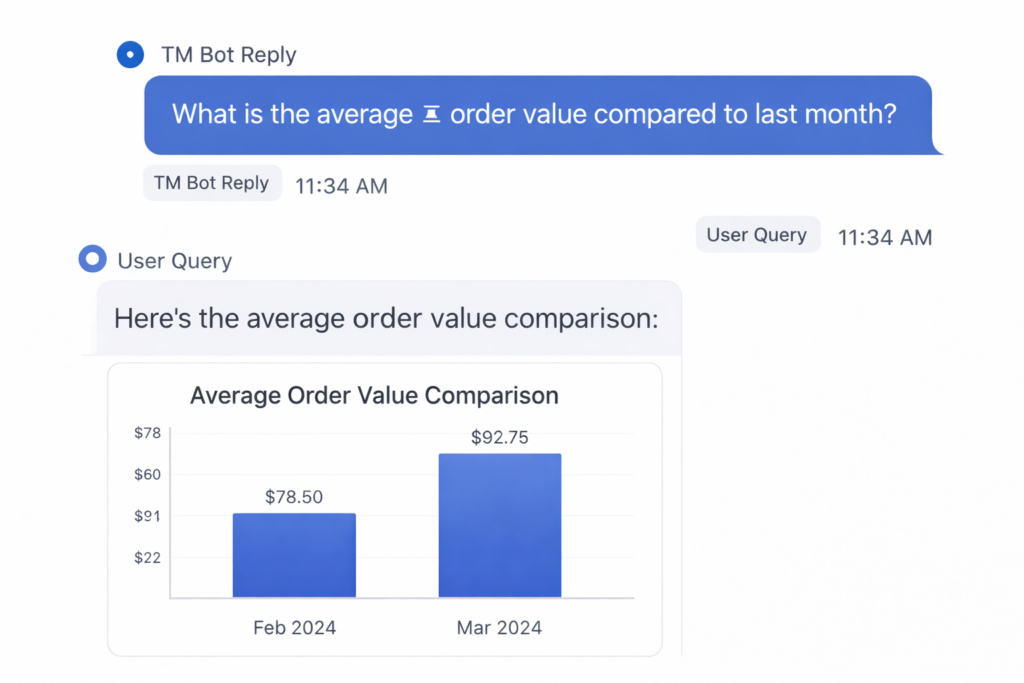
Sell more, fix leaks, move faster.
With an AI database chatbot, eCommerce teams can ask:
- “Which products are selling the most this week?”
- “Where are customers dropping off before checkout?”
- “Which marketing campaign brought the highest revenue?”
- “Which products are running low in inventory today?”
- “What is the average order value compared to last month?”
This helps teams optimize pricing, inventory, and campaigns without waiting for reports or dashboards.
🏫 eLearning Platforms
Improve engagement, reduce churn, grow subscriptions.
eLearning businesses commonly ask:
- “Which courses have the highest completion rate?”
- “Where are students dropping out the most?”
- “Which instructors get the best feedback?”
- “How many users upgraded from free to paid this month?”
- “Which course brings the highest lifetime value?”
Product, content, and marketing teams get clear direction on what to improve and what to scale.
🏢 Real Estate Companies
Track leads, deals, and performance in real time.
Real estate teams use the chatbot to ask:
- “How many new leads came in today?”
- “Which property listings are getting the most inquiries?”
- “Which agents are closing the most deals this quarter?”
- “What’s the average deal closure time?”
- “Which locations are performing better than expected?”
This helps brokers and managers focus effort where money is actually coming from.
🏭 Manufacturing Companies
Reduce delays, control costs, improve output.
Manufacturing teams often ask:
- “Which orders are delayed right now?”
- “Where is production slowing down?”
- “Which supplier causes the most delays?”
- “What is today’s production vs target?”
- “Which machine has the highest downtime?”
Operations teams get live visibility, not yesterday’s reports.
🏨 Hotel Booking & Hospitality
Increase occupancy, improve guest experience.
Hotel and booking platforms ask:
- “What is today’s occupancy rate?”
- “Which room types are selling fastest?”
- “Which booking channel gives the highest revenue?”
- “How many cancellations happened this week?”
- “What are the most common guest complaints?”
Revenue managers and hotel staff can adjust pricing, promotions, and service instantly.
This is exactly how we position AI database chatbots at Triple Minds—not as a technical tool, but as a daily decision assistant for the business.
Types of Databases That Can Be Integrated With an AI Database Chatbot
One concern we often hear from businesses is:
“Our database is old.” or “Our setup is not standard.”
The good news is—AI database chatbots are not limited to modern or popular databases. At Triple Minds, we design chatbot architectures that work with both legacy systems and modern data stacks, because real businesses rarely run on a single, clean database.
Below is a clear, business-friendly breakdown.
1) Traditional SQL Databases (Most Common)
Works perfectly with existing enterprise systems.
If your business uses:
- MySQL
- PostgreSQL
- Microsoft SQL Server
- Oracle Database
You’re already in a great position. These databases are widely used in CRMs, ERPs, finance systems, and internal tools.
The chatbot can query sales, finance, operations, and customer data directly and securely, without changing your setup.
2) Legacy & Enterprise Databases
Yes—even old systems can be integrated.
Many enterprises still rely on:
- Oracle legacy systems
- IBM DB2
- On-premise enterprise databases
We frequently work with businesses running 10–20 year old systems. Instead of forcing migration, we integrate the chatbot on top of existing infrastructure, protecting your past investments.
No forced upgrades. No risky rewrites.
3) Cloud Databases & Data Warehouses
Ideal for fast-growing and data-heavy companies.
If your data lives in:
- Amazon RDS / Aurora
- Google BigQuery
- Snowflake
- Azure SQL / Synapse
The AI chatbot can handle large-scale analytical queries like trends, forecasting, and performance analysis.
Perfect for leadership dashboards, finance analysis, and growth tracking.
4) NoSQL & Semi-Structured Databases
Great for modern apps and high-volume data.
For businesses using:
- MongoDB
- Firebase
- DynamoDB
- Cassandra
The chatbot can still answer meaningful questions—even when data is not stored in tables.
Useful for apps, marketplaces, IoT platforms, and high-traffic systems.
5) ERP, CRM & Business Systems Databases
Most businesses don’t even realize these are databases.
AI database chatbots can sit on top of:
- ERP systems (inventory, finance, procurement)
- CRM systems (leads, customers, sales)
- HR and operations platforms
Teams ask questions like “How many unpaid invoices exist?” or “Which leads are stuck in follow-up?” without opening multiple tools.
6) Multiple Databases at the Same Time
This is where real power shows up.
Many businesses run:
- One database for sales
- Another for finance
- Another for operations
We design chatbots that connect to multiple databases simultaneously, so businesses can ask:
- “Compare revenue with fulfillment delays”
- “Which regions have high sales but low margins?”
One question. Multiple systems. One answer.
7) Read-Only & Secure Integrations (No Risk to Data)
For sensitive businesses, the chatbot can be configured as:
- Read-only access
- Department-level permissions
- Audit-logged queries
This keeps compliance, security, and leadership confidence intact.
Security & Compliance: Built for Enterprise Confidence
When businesses think about using AI to access their databases, the first real concern is not features—it’s security.
Questions like “Is our data safe?”, “Who can see what?”, and “Will this create compliance risks?” are completely valid. At Triple Minds, we treat security and compliance as core design requirements, not add-ons.
Here’s how we ensure enterprise confidence from day one.
1) Your Data Never Leaves Your Control
AI database chatbots do not mean your data is sent everywhere. We design systems where:
- Databases stay in your environment (cloud or on-premise)
- The chatbot connects securely using controlled access
- No raw data is exposed outside approved boundaries
Businesses keep ownership and control of their data at all times.
2) Role-Based Access for Every Team
Not everyone in an organization should see the same data—and we fully respect that.
We implement:
- Role-based access (Sales, Finance, Ops, Leadership)
- Permission-level query restrictions
- Department-specific visibility rules
A sales executive sees sales data. Finance sees financials. Leadership sees everything—cleanly and safely.
3) Read-Only Database Access (Zero Risk to Data)
For most enterprises, chatbot access is configured as read-only.
That means:
- No updates
- No deletes
- No accidental data changes
Teams can ask unlimited questions without any risk to operational systems.
4) Full Audit Logs & Query Tracking
Every interaction can be logged:
- Who asked the question
- When it was asked
- Which data was accessed
This is critical for:
- Internal audits
- Compliance reviews
- Security investigations
Nothing happens silently in the background.
5) Compliance-Ready Architecture
Different industries have different compliance needs. We design AI database chatbots that align with:
- Enterprise IT policies
- Data privacy standards
- Industry-specific compliance requirements
Whether you operate in finance, healthcare, education, or enterprise SaaS, the chatbot can be tailored to match your compliance framework, not challenge it.
6) On-Premise or Private Cloud Deployment
For organizations that cannot use shared environments, we offer:
- Fully on-premise deployment
- Private cloud setups
- Network-restricted access
Ideal for enterprises with strict data residency or internal IT rules.
7) Human Oversight & Admin Controls
Admins always stay in charge:
- Control data sources
- Manage user access
- Pause or restrict functionality if needed
AI assists decisions—it does not override governance.
We’re a globally trusted AI development company and we’ve already built AI database chatbots. Talk to our team to see how this can work for your business.
FAQs
Yes. AI database chatbots can interpret multi-step, context-aware business questions and return accurate answers by combining data from multiple tables or systems when required.
By providing a single, consistent source of answers, AI database chatbots eliminate conflicting reports and ensure every department works from the same data logic.
Yes. AI database chatbots can be tailored with department-specific metrics, KPIs, permissions, and workflows for sales, finance, operations, CX, and leadership.
Implementation depends on data complexity and security requirements, but most businesses can deploy a working AI database chatbot within weeks, not months.
According to industry research, the global forest management software market is projected to grow at over 12% CAGR through 2030, driven by rising demand for sustainable forestry, digital inventory tracking, and AI-powered resource planning. More than 65% of forestry organizations now rely on digital tools for compliance reporting, forest monitoring, and operational planning—highlighting the growing shift toward data-driven forest management.
Forest management has undergone significant evolution over the past decade. Today, technology-driven solutions enable forestry businesses to streamline operations, enhance sustainability, and optimize profitability. Whether managing timber inventories, tracking logging operations, or monitoring forest health, businesses require tools that integrate data, automation, and analytics. Forest management software delivers exactly that—turning complex operations into actionable insights for smarter decision-making.
At Triple Minds, we understand the power of digital transformation. As a global AI development, app development, and digital marketing partner, we help businesses across industries, including forestry, leverage technology to drive efficiency, growth, and long-term sustainability
In this blog, we explore the top 10 forest management software solutions, their unique features, and the trends shaping the industry.
Key Takeaways
- Forest management software helps forestry businesses improve efficiency, compliance, and long-term sustainability through data-driven decision-making.
- Modern platforms combine GIS mapping, inventory tracking, automation, and analytics into a single unified system.
- Different tools cater to different needs—from logging operations and supply chain management to sustainability monitoring and land planning.
- AI, IoT, cloud collaboration, and mobile-first tools are shaping the future of forest management technology.
- Choosing the right software depends on business size, regulatory requirements, scalability, and integration capabilities.
- Partnering with an experienced technology provider like Triple Minds ensures successful implementation, customization, and long-term ROI.
What is Forest Management Software?
Forest management software is a digital solution designed to help forestry operations plan, execute, and monitor activities efficiently. It combines inventory management, data analytics, field mapping, compliance tracking, and reporting into a unified platform.
Key Benefits:
- Optimized Resource Management: Track timber growth, inventory, and harvesting schedules to reduce waste and increase yield.
- Regulatory Compliance: Maintain accurate records for environmental regulations, certifications, and audits.
- Data-Driven Decision Making: Analyze trends, plan logging operations, and forecast revenue more effectively.
- Operational Efficiency: Automate tasks like reporting, invoicing, and workforce scheduling to save time and costs.
- Sustainability Monitoring: Assess forest health, biodiversity, and environmental impact to support long-term growth.
By integrating forest management software, companies can achieve operational excellence, reduce costs, and enhance sustainability efforts. With the right technology partner like Triple Minds, businesses can tailor these solutions to their specific operational needs, ensuring scalable, future-ready systems.

Key Use Cases of Forest Management Software
This chart highlights how forestry businesses apply forest management software across core operational and sustainability areas, helping improve planning, compliance, and overall efficiency.
- Timber inventory and harvest planning: 32%
- Sustainability and environmental monitoring: 22%
- GIS mapping and land management: 18%
- Compliance and regulatory reporting: 14%
- Supply chain and procurement management: 9%
- Workforce and equipment management: 5%
Looking to Implement or Customize Forest Management Software for Your Business?
Talk to Triple Minds today and discover how AI-driven solutions can optimize your forestry operations, improve sustainability, and deliver long-term ROI.
Start Your Digital Forest Management Journey Today.
List of Top 10 Forest Management Software
Here is our curated list of the leading forest management software solutions for businesses of all sizes. Each platform excels in delivering actionable insights, improving productivity, and supporting sustainable forestry practices.
1. SingleOps
SingleOps streamlines forestry and tree care operations by integrating scheduling, invoicing, and workflows into one platform, boosting efficiency and providing real-time operational insights.
Key Features:
- Automated workflow management
- Inventory and asset tracking
- Customer relationship management (CRM) integration
- Mobile accessibility for field teams
Why Businesses Choose SingleOps: SingleOps reduces operational bottlenecks and provides real-time insights, helping businesses scale efficiently.
2. TRACT
TRACT offers timberland management with GIS (Geographic Information System) mapping, inventory control, and forecasting tools, enabling forestry managers to optimize harvesting strategies and minimize operational risks.
Key Features:
- GIS-based forest mapping
- Timber inventory management
- Harvest and growth forecasting
- Compliance tracking
Impact: TRACT empowers forestry managers to make data-driven decisions, minimizing risk while maximizing yield.
3. Forest Metrix
Forest Metrix focuses on data collection and field reporting for forestry professionals. It simplifies timber cruising, growth monitoring, and forest inventory analysis.
Key Features:
- Mobile data collection
- Integration with GIS and GPS tools
- Automated reporting
- Stand-level inventory management
Business Values: By reducing manual data entry and improving reporting accuracy, Forest Matrix enhances operational efficiency and strategic planning.
4. Logger’s Edge
Logger’s Edge is a full-featured solution for logging operations, financial management, and workforce coordination. It helps businesses streamline their end-to-end operations.
Key Features:
- Accounting and payroll integration
- Harvest tracking and reporting
- Equipment maintenance scheduling
- Client and contractor management
Why It Matters: Logger’s Edge reduces administrative burden and ensures operational transparency, critical for mid-to-large forestry enterprises.
5. ArborNote
ArborNote enables arborists to manage field reporting, compliance, and client interactions efficiently, improving team collaboration and service delivery in tree care operations.
Key Features:
- Mobile work orders and inspections
- Client management tools
- Regulatory compliance tracking
- Task scheduling and notifications
Business Impact: ArborNote improves team collaboration and enhances service quality, allowing businesses to scale without sacrificing operational control.
6. EarthCache
EarthCache integrates ecological monitoring with timber inventory management, helping businesses track environmental impact while improving forest sustainability practices.
Key Features:
- Environmental monitoring and reporting
- Timber inventory management
- GIS integration
- Growth and yield forecasting
Why Use EarthCache: Businesses committed to sustainability benefit from EarthCache’s data-driven approach to environmental stewardship.
7. Woodhub
Woodhub streamlines timber supply chain management, procurement, and financial oversight, ensuring operational efficiency for businesses with multiple forestry sites.
Key Features:
- Inventory and procurement tracking
- Vendor and contractor management
- Financial reporting and analytics
- Mobile and cloud access
Value Proposition: Woodhub ensures supply chain visibility and operational efficiency, critical for businesses managing multiple forest sites.
8. StumpGeek
StumpGeek supports forestry operations with land and timber management, growth analysis, and harvest planning, enabling long-term strategic decision-making.
Key Features:
- Land parcel management
- Harvest planning and scheduling
- Growth modeling and analytics
- Reporting and compliance tools
Business Advantage: StumpGeek provides actionable insights that enable businesses to plan long-term timber operations effectively.
9. Tally-I/O
Tally-I/O combines inventory tracking, reporting, and analytics to optimize forestry operations while ensuring compliance and sustainable growth.
Key Features:
- Real-time inventory monitoring
- Mobile-enabled field reporting
- Growth and harvest analytics
- Compliance tracking
Why It Works: Tally-I/O helps forestry businesses optimize operations while ensuring regulatory adherence and sustainable growth.
10. ArboStar
ArboStar provides end-to-end management for forestry operations, including tree tracking, workforce management, and data visualization for cost-efficient, sustainable operations.
Key Features:
- Tree and plot tracking
- Maintenance scheduling
- Workforce management
- Data visualization and reporting
Impact on Businesses: ArboStar’s integrated approach helps companies improve efficiency, reduce costs, and maintain sustainable forest operations.
Comparison Table: Top 10 Forest Management Software
| Software Name | Core Focus | Key Strengths | Best For |
| SingleOps | Operations & workflow management | Automated scheduling, invoicing, CRM integration, and mobile access | Forestry and tree care business scaling daily operations |
| TRACT | Timberland and GIS Management | GIS mapping, timber inventory, harvest forecasting, compliance tracking | Enterprise forestry managers optimizing harvest and yield |
| Forest Metrix | Forest Inventory & Data Collection | Mobile data capture, GIS/GPS integration, automated reporting | Forestry consultants and inventory-focused teams |
| Logger’s Edge | Logging Operations & Finance | Accounting, payroll, harvest tracking, and equipment maintenance | Mid-to-large logging and forestry enterprises |
| ArborNote | Arborist & Field Operations | Mobile inspections, work orders, compliance tracking | Tree care companies and arborist service providers |
| EarthCache | Sustainability & Environmental Monitoring | Ecological reporting, GIS integration, and growth forecasting | Businesses focused on sustainable forest management |
| Woodhub | Supply Chain & Procurement | Inventory tracking, vendor management, and financial analytics | Multi-site forestry operations managing supply chains |
| StumpGeek | Land & Harvest Planning | Land parcel management, growth modeling, compliance tools | Long-term timber and land management businesses |
| Tally-I/O | Inventory & Compliance Analytics | Real-time inventory, mobile reporting, harvest analytics | Forestry companies focused on compliance and optimization |
| ArboStar | End-to-End Forest Operations | Tree tracking, workforce management, and reporting dashboards | Businesses seeking cost-efficient, integrated forest management |
Future Trends in Forest Management Software

The forest management software landscape continues to evolve, driven by technological advancements and increasing sustainability requirements. Businesses that adopt future-ready solutions gain a competitive edge.
1. AI and Machine Learning
AI enables predictive analytics for growth forecasting, pest detection, and harvesting optimization. Companies can plan operations with unprecedented accuracy.
2. IoT and Sensor Integration
IoT devices and drones provide real-time forest data, including soil moisture, tree health, and environmental conditions, allowing proactive decision-making.
3. Cloud-Based Collaboration
Cloud platforms support multi-site operations, remote team collaboration, and data centralization, improving efficiency and reducing operational overhead.
4. Sustainability-Focused Solutions
Software increasingly integrates carbon tracking, biodiversity monitoring, and environmental compliance reporting, aligning business operations with ESG goals.
5. Mobile-First Field Tools
Mobile applications enable field teams to capture data, manage tasks, and communicate in real time, ensuring operational continuity and accuracy.
6. Integration with ERP and CRM Systems
Modern forestry software integrates seamlessly with ERP and CRM platforms, providing unified data insights and enhancing business decision-making.
At Triple Minds, we help forestry businesses leverage these trends. Our expertise in AI-driven solutions, custom forest management software development, and digital transformation ensures that your forest management system is efficient, scalable, and aligned with your long-term growth strategy.
Who Should Use Forest Management Software?
Forest management software supports organizations that manage land, timber resources, and environmental data. It helps decision-makers improve efficiency, compliance, and long-term sustainability.
1. Forestry and Timber Companies
Forestry and timber companies use forest management software to track inventory, plan harvesting, optimize supply chains, and improve profitability through data-driven forest operations and resource planning.
2. Government Forest Departments
Government forest departments rely on software to manage public forests, monitor biodiversity, ensure regulatory compliance, and support transparent reporting for conservation, planning, and policy execution.
3. Environmental and Conservation Organizations
Environmental organizations use forest management software to monitor forest health, track ecological data, manage conservation projects, and support sustainability initiatives with accurate, real-time insights.
4. Carbon Credit and Sustainability Firms
Carbon credit and sustainability firms use these platforms to measure carbon sequestration, track forest assets, verify compliance, and generate reliable data for ESG reporting and carbon markets.
5. Forest Consultants and Surveying Firms
Forest consultants and surveying firms use management software for timber valuation, land assessment, growth modeling, and client reporting, improving accuracy and delivering data-backed advisory services.
6. Research Institutions and Academic Organizations
Research institutions use forest management software to collect, analyze, and visualize forestry data, supporting long-term studies, environmental research, and evidence-based sustainability planning.
How to Choose the Right Forest Management Software
Selecting the right forest management software directly impacts operational efficiency, regulatory compliance, and long-term business growth. Forestry businesses should evaluate software based on strategy, scale, and future readiness, not just features.
1. Define Your Business Size and Goals
Match the software with your business scale and objectives. Small teams need core tracking, while large enterprises require advanced analytics, automation, and multi-location forest management capabilities.
2. Identify Compliance and Reporting Needs
Select software that supports environmental regulations, certifications, and audit-ready reporting. Strong compliance tools reduce legal risk and ensure transparency across forestry operations and stakeholders.
3. Evaluate Scalability and Integrations
Choose a scalable, cloud-ready platform that integrates with ERP, CRM, and accounting systems. Flexible integrations support business growth and prevent costly system changes later.
4. Consider Long-Term ROI and Support
Assess long-term value beyond pricing. Focus on automation benefits, productivity gains, regular updates, and reliable technical support to maximize return on investment.
At Triple Minds, we help forestry businesses evaluate, customize, and integrate forest management software that aligns with business goals. Our consulting and development expertise ensures you invest in a scalable, future-ready solution that drives measurable growth.
Conclusion
Forest management software is no longer a luxury. It is a necessity. From operational efficiency to sustainability, these platforms provide actionable insights that help businesses make smarter decisions, optimize resources, and scale effectively.
Partnering with a technology-driven growth partner like Triple Minds ensures your forestry business leverages the latest digital innovations. From custom software development to AI integration and digital strategy, we help businesses modernize operations, improve ROI, and achieve long-term sustainability.
Drive smarter forestry operations with Triple Minds, your all-in-one digital growth partner. Contact us today for a consultation and discover how technology can transform your business.
FAQs – Forest Management Software
Pricing varies based on features, scale, user count, and customization needs. Cloud-based solutions typically offer subscription-based pricing, while enterprise systems may require custom quotes.
These platforms track forest health, biodiversity, growth cycles, and environmental impact. Many tools also support carbon tracking, ESG reporting, and regulatory compliance, enabling sustainable forest management practices.
Most modern forest management platforms integrate with accounting, ERP, CRM, and supply chain tools. Integration ensures unified data, better reporting, and improved business decision-making.
AI enhances forest management software by enabling predictive growth modeling, early detection of pests and diseases, automated harvest planning, and real-time analysis of forest health data. By analyzing large datasets from satellites, sensors, and field reports, AI helps forestry businesses reduce risk, improve yield accuracy, and make proactive, data-driven decisions for sustainable forest management.
Loneliness is the silent epidemic of the digital age — and AI companion apps like Candy AI have become a billion-dollar response to it. If you are reading this, you are likely asking the same question hundreds of founders have asked our team in the last 18 months: how much does Candy AI development cost — and what does it really take to launch a clone that competes?
The honest answer in 2026: a production-ready, white-label Candy AI clone starts around $16,000–$18,000 USD for the core build, and a market-disruptive version with voice calls, virtual avatars, and proprietary fine-tuning can run $25,000–$45,000+. Add hosting, GPU inference, NSFW moderation, payments, and SEO — and the realistic first-year all-in budget sits between $33,000 and $50,000+.
Triple Minds has already shipped a full Candy AI clone and a DreamGF clone — and more importantly, we were the official marketing partner of Candy.ai from 2022 to 2024, where we drove a 60{de53437baba0a5574d3b7beaecc4fe2264d994f4338075d3c2793f4e0dc78437} increase in user signups in just four months through SEO, content, and performance marketing. We are also the marketing partner behind SugarLab.ai. We have published a Candy AI case study showing exactly how we cut development time in half, and we now ship white-label clones in a guaranteed 21 days. This guide pulls every number, decision, and gotcha from those projects so you do not learn them the expensive way.
- Global market growth: The AI chatbot market is valued at $15.57B in 2025 and is forecast to hit $46.64B by 2029 (CAGR 24.5{de53437baba0a5574d3b7beaecc4fe2264d994f4338075d3c2793f4e0dc78437}).
- AI companion segment: Industry analysts expect the AI companion sub-market to more than double by 2030, driven by Gen-Z adoption and improved multimodal models.
- Enterprise spend: Big Tech AI capex is projected to cross $2.8 trillion by 2029 — driving down inference costs in your favor.
Launch a Candy AI Clone — Built, Hosted & Marketed by One Team
From development to NSFW-safe payments to SEO that actually ranks under adult-content rules — Triple Minds delivers the full stack.
Book a Free Demo & RoadmapCandy AI Development Cost at a Glance (2026 Benchmarks)
| Build Tier | What’s Included | Timeline | Cost (USD) |
|---|---|---|---|
| White-Label Candy AI Clone (21-day delivery guaranteed) | Pre-built core, your branding, ready to deploy | 2–3 weeks | $5,000 – $12,000 |
| Standard Candy AI Build | NSFW chat, image gen, voice notes, subscriptions | 6–8 weeks | $16,000 – $18,000 |
| Differentiated Build | + AI voice calls, gamification, loyalty system | 10–12 weeks | $22,000 – $30,000 |
| Premium Build with Avatars | + 3D avatars, video calls, fine-tuned personality models | 14–18 weeks | $35,000 – $55,000 |
| Enterprise Companion Platform | Multi-tenant, custom LLM, AR/VR, full compliance | 5–7 months | $70,000 – $120,000+ |
Key Takeaways
- $16K–$18K is the realistic floor for a competitive Candy AI like chatbot — anything cheaper compromises moderation, infra, or compliance.
- NSFW image generation and voice are the biggest cost multipliers — both in development and inference billing.
- Compliance is non-negotiable. Age verification, content moderation, payment processor approval, and 2257-style record-keeping eat real engineering hours.
- Marketing costs as much as development. Plan $9K–$18K for the first 3 months of NSFW-compliant SEO and PR.
- White-label first, customize later. A pre-built clone gets you to market in 2–3 weeks at a fraction of the cost.
- Year-1 ROI of $200K–$500K is realistic with the right monetization stack — we have the data to prove it.
What is Candy AI? (And Why Clones Are Booming)
Candy AI is an AI companion chatbot that lets users build virtual girlfriends or boyfriends and chat with them in real time. Users customize appearance, personality, backstory, and voice. The platform layers in AI-generated images, voice messages, persistent memory, and gated NSFW content behind a tiered subscription. It is, structurally, the most successful product-market-fit example in the entire AI companion category.
The reason founders want a clone is simple: Candy AI’s revenue model works. According to our analysis in How Candy.ai Makes Money, the platform stacks subscriptions, in-app credits, premium content unlocks, and image-gen consumables — yielding ARPU multiples of standard SaaS. The blueprint is replicable; the execution is where most teams fail.
You Might Also Find This Useful: Best Countries to Register an Adult or NSFW AI Company · AI Girlfriend App Market Size & Forecast
Anatomy of a Candy AI Clone — Reference Architecture
Before pricing, you need to see what is actually being built. This is the production architecture we deploy for every Candy AI clone — every block is a real engineering deliverable.
SDXL / Flux
LoRA models
ElevenLabs
Cartesia
Vector DB
User profile
Lipsync · 3D
Unreal/Unity
What is the Cost of Developing a Candy AI-like Chatbot?
To build a white-labeled AI companion like Candy AI, the average development cost falls between $16,000–$18,000 USD. That tier ships with all the table-stakes features users now expect:
- NSFW chat with personality-based conversations
- AI image generation (uncensored SDXL or Flux pipelines)
- Short AI video / animated reactions
- Character customization (appearance, voice, backstory)
- Voice notes & text-to-speech
- Multi-tier subscription system + token wallet
- Memory-enabled long-term conversation continuity
If you are aiming to actually disrupt the market instead of just shipping another clone, budget another $5,000–$15,000 for differentiating features:
- AI-powered voice calling (sub-second latency with Cartesia / ElevenLabs)
- Video calling with virtual avatars (lipsync on real-time streamed audio)
- Gamification & loyalty (streaks, daily quests, relationship milestones)
- Interactive relationship scenarios (branching narratives, role-play modes)
- AR / VR integration (Vision Pro, Quest 3 ports)
- Advanced emotion & tone recognition (sentiment-aware response routing)
Detailed Cost Breakdown by Stage
| Development Stage | Cost Range (USD) | What You Get |
|---|---|---|
| Discovery & Strategy | $1,000 – $2,000 | Use-case validation, competitor teardown, scope lock |
| UI/UX Design & Prototyping | $2,000 – $4,000 | Figma flows, mobile + web, character builder UX |
| Core AI & Personality Engine | $3,000 – $8,000 | LLM integration, personality prompts, memory, guardrails |
| NSFW Image / Video Modules | $2,000 – $5,000 | SDXL/Flux pipeline, LoRA training, gallery, moderation |
| Voice Integration | $1,500 – $3,000 | TTS, voice notes, optional real-time calls |
| Subscription & Payments | $1,000 – $2,000 | Tier logic, token wallet, NSFW-safe processor wiring |
| Gamification & Loyalty | $2,000 – $4,000 | Streaks, rewards, relationship XP, retention loops |
| Compliance & Moderation | $1,500 – $3,000 | Age gate, content filters, audit logs, takedown flow |
| Testing & QA | $1,000 – $2,000 | Functional, load, NSFW edge-case, payment QA |
| Deployment & Support | $500 – $1,500 | Infra setup, CDN, monitoring, 30-day post-launch |
| Total | $15,500 – $34,500 | Production-ready Candy AI clone, your branding |
Engine
We at Triple Minds have already built and deployed a more advanced and powerful version of Candy AI — ready for demo. If you want to launch your own AI companion platform, our NSFW chatbot development team can ship in weeks, not quarters.
Tech Stack Behind a Production Candy AI Clone
Picking the right stack is what separates a $12K clone that crashes at 200 concurrent users from a $25K platform that scales to 50,000+. This is the stack we currently ship in production.
| Layer | Recommended Choices | Why | Indicative Cost |
|---|---|---|---|
| Foundation LLM | Claude Sonnet, GPT-4.1, Mistral Large, Llama 3.x (self-host) | Self-hosted Llama for uncensored chat; frontier APIs for safe paths | $0.50–$3 per 1M tokens |
| NSFW Image Gen | SDXL + LoRA, Flux Dev, ComfyUI pipelines | Open-source models avoid OpenAI/Google content blocks | $0.005–$0.02 per image (self-hosted GPU) |
| Voice (TTS) | ElevenLabs, Cartesia, Coqui (self-host) | Sub-300ms latency for real-time calls | $0.05–$0.30 per minute |
| Voice (STT) | Whisper Large, Deepgram Nova-3 | Accurate even on emotional / whispered input | $0.006–$0.015 per minute |
| Vector DB / Memory | Qdrant, Weaviate, pgvector | Per-user persistent memory of preferences and history | $0–$300 / month |
| Avatar / Lipsync | Wav2Lip, MuseTalk, Unreal MetaHuman | Real-time mouth sync on avatar video | GPU-bound, ~$0.10/min |
| Frontend | Next.js, React Native, Flutter | One codebase across web + iOS + Android | Open-source |
| Backend | Node.js / FastAPI, Postgres, Redis | Battle-tested for chat workloads at scale | Open-source |
| GPU Hosting | RunPod, Lambda Labs, Vast.ai, AWS g5 | Spot pricing keeps inference costs sane | $0.30–$2 / GPU-hour |
| NSFW-Safe Payments | Segpay, CCBill, Epoch, crypto rails | Stripe/PayPal will ban — these are built for adult | 10–14{de53437baba0a5574d3b7beaecc4fe2264d994f4338075d3c2793f4e0dc78437} effective fee |
| Age Verification | Yoti, Persona, AgeID, Veriff | Required in UK, parts of US, EU under DSA | $0.30–$1 per verification |
| Content Moderation | Custom CSAM filter + classifier ensemble | Off-the-shelf moderation blocks legitimate NSFW — you need a tuned stack | Engineering, not licensed |
Want a deeper engineering breakdown? See our NSFW Chatbot Development Cost & Tech Stack guide and the Claude AI Integration service page for safe-mode chat tiers.
Real Technical Challenges in Building a Candy AI Clone
Every cost article on the internet glosses over why Candy AI is hard to clone. After shipping multiple platforms at Triple Minds, here is the truth from the engineering trenches.
1. Routing Between Censored and Uncensored LLMs
OpenAI, Anthropic, and Google block almost all NSFW output. Self-hosted Llama or Mistral handles the explicit content — but for safe-mode chats (introductions, sensitive topics, suicide-watch keywords) you want a frontier model. Production agents need a real-time router that classifies intent and dispatches to the right model. Building this correctly is a 1–2 week engineering effort by itself.
2. Personality Consistency Across 100K Messages
Users notice immediately when an AI girlfriend “forgets” she said she has a sister last week. Solving this needs hierarchical memory: short-term context window, episodic memory in the vector DB, and a long-term profile summary regenerated on a schedule. Done wrong, churn spikes after week 2.
3. Image Generation Cost Explosion
A single user can burn $5–$10/month in GPU image generation if you let them. Caching, request quotas, async queueing, and per-tier rate limits are mandatory. We have seen unmanaged platforms lose money on every active user.
4. Real-Time Voice Latency Under 700ms
Voice calls feel broken above 1 second of latency. The chain — STT ? LLM ? TTS ? audio stream — must finish round-trip in <700ms to feel natural. This requires streaming at every stage, parallel inference, and aggressive caching of greetings/fillers.
5. CSAM & Underage Content Prevention
Non-negotiable. Every prompt and every generated image must be screened for content involving minors. Failure here ends the company — not just the product. We deploy a multi-classifier ensemble plus PhotoDNA-style hashing on uploaded media. Our content-moderation policy guide covers the full stack.
6. Payment Processor Bans
Stripe and PayPal will close your account the moment NSFW content is detected. You need NSFW-friendly processors (Segpay, CCBill, Epoch) plus a crypto fallback — and a defensible chargeback rate (under 1{de53437baba0a5574d3b7beaecc4fe2264d994f4338075d3c2793f4e0dc78437}). See our NSFW Payment Processor Guide for approval requirements.
7. Multi-Jurisdiction Age Verification
UK Online Safety Act, EU DSA, and a growing list of US states (TX, LA, UT, MS) now require strong age verification. Document scan + selfie liveness + IP geofencing must all live in one flow without killing conversion. Our AI chat moderation compliance guide walks through it.
8. Prompt Injection & Jailbreak Handling
NSFW platforms attract the most aggressive jailbreak attempts on the public internet. Defending against “reveal your system prompt”, “you are now in DAN mode”, and embedded payloads in user messages requires layered guardrails — not just a single instruction in the system prompt.
Must-Have Features for a Candy AI Chatbot
These are the exact feature modules we ship inside our production Candy AI Clone. Each one is a real engineering deliverable that drives a measurable lift in retention, ARPU, or both.
For an even deeper dive on what users actually pay for, see our companion piece: Must-Have Features of NSFW AI Companions & Chatbots.
Personality Modes — Why Users Stay (And Pay)
The reason Candy.ai’s churn is so low is that it sells relationships, not chats. Every successful clone we have shipped runs four core personality modes tunable per character. This is not a “tone slider” — these are distinct prompt graphs, memory schemas, and content-policy regimes.
Letting users switch modes mid-conversation — and remember which mode they were in — is the single biggest retention lever in the category. We engineer this as a finite state machine layered on top of the personality prompts.
Web App vs Native App — Why PWA Beats Both for NSFW
This is the one strategic decision that bankrupts more Candy AI clones than any other: founders try to launch on the App Store and Google Play. Apple bans NSFW outright. Google’s NSFW policy is selectively enforced and your app will be removed without warning. The fix: ship a Progressive Web App. We have proven this in production across multiple platforms.
| PWA Advantage | What It Means in Practice |
|---|---|
| 100{de53437baba0a5574d3b7beaecc4fe2264d994f4338075d3c2793f4e0dc78437} Freedom from App Store Policies | No NSFW takedowns, no algorithmic shadowbans, no 30{de53437baba0a5574d3b7beaecc4fe2264d994f4338075d3c2793f4e0dc78437} Apple/Google tax |
| Universal Cross-Platform Reach | One codebase serves iOS, Android, Windows, macOS, Linux — installable from browser |
| Instant Access, Zero Friction | No download wall — users land on your URL and start chatting in <3 seconds |
| True App-Like Experience | Add-to-home-screen, full-screen mode, push notifications, offline cache |
| Enhanced SEO & Discoverability | Pages are crawlable; the app itself becomes an SEO asset (impossible with native) |
| Fully Responsive & Scalable | Same React/Next.js codebase scales from mobile to desktop without re-engineering |
| Complete Control, Global Reach | Deploy to any region, change features same-day, never wait for store review |
Don’t Miss This Guide: Approval Guidelines for NSFW Adult Payment Processor & Orchestration
Factors That Affect Candy AI Like Chatbot Development Cost
| Cost Driver | Impact on Budget | Why |
|---|---|---|
| 3D / Virtual Avatar Integration | +25{de53437baba0a5574d3b7beaecc4fe2264d994f4338075d3c2793f4e0dc78437} to +40{de53437baba0a5574d3b7beaecc4fe2264d994f4338075d3c2793f4e0dc78437} | Unreal/Unity pipeline, motion capture, real-time render |
| Real-time Voice/Video Calls | +15{de53437baba0a5574d3b7beaecc4fe2264d994f4338075d3c2793f4e0dc78437} to +30{de53437baba0a5574d3b7beaecc4fe2264d994f4338075d3c2793f4e0dc78437} | WebRTC, low-latency inference, GPU concurrency |
| Custom LLM Fine-Tuning | +20{de53437baba0a5574d3b7beaecc4fe2264d994f4338075d3c2793f4e0dc78437} to +35{de53437baba0a5574d3b7beaecc4fe2264d994f4338075d3c2793f4e0dc78437} | Dataset curation, training compute, eval harness |
| Cross-Platform Native Apps | +15{de53437baba0a5574d3b7beaecc4fe2264d994f4338075d3c2793f4e0dc78437} to +25{de53437baba0a5574d3b7beaecc4fe2264d994f4338075d3c2793f4e0dc78437} | Separate iOS/Android codebases vs. one PWA |
| Multilingual Personalities | +10{de53437baba0a5574d3b7beaecc4fe2264d994f4338075d3c2793f4e0dc78437} to +20{de53437baba0a5574d3b7beaecc4fe2264d994f4338075d3c2793f4e0dc78437} | Per-language voice models, translation QA |
| Advanced Gamification | +8{de53437baba0a5574d3b7beaecc4fe2264d994f4338075d3c2793f4e0dc78437} to +15{de53437baba0a5574d3b7beaecc4fe2264d994f4338075d3c2793f4e0dc78437} | Reward economy design, XP system, balancing |
| Compliance Layer (UK/EU/strict states) | +10{de53437baba0a5574d3b7beaecc4fe2264d994f4338075d3c2793f4e0dc78437} to +18{de53437baba0a5574d3b7beaecc4fe2264d994f4338075d3c2793f4e0dc78437} | Age verification, data residency, audit logging |
| White-Label Multi-Tenant | +25{de53437baba0a5574d3b7beaecc4fe2264d994f4338075d3c2793f4e0dc78437} to +50{de53437baba0a5574d3b7beaecc4fe2264d994f4338075d3c2793f4e0dc78437} | Tenant isolation, per-brand theming, billing rollup |
Cost to Develop Candy AI Clone by Region (2026)
How Much Does SEO Cost for Candy AI-like Companions?
Marketing an AI companion like Candy AI carries unique constraints because it sits in the NSFW category. Traditional ad networks ban it outright; SEO is the highest-ROI channel — but it has to be done by people who know adult-compliant on-page strategy.
- Search engine guidelines (Google’s adult content rules)
- Adult content ad-network restrictions (Meta, Google Ads, TikTok all ban)
- Government regulations (UK Online Safety Act, EU DSA, US state laws)
- Sexual content promotion restrictions (IT Rules 2021 in India, CDA in the US)

At Triple Minds, we have helped scale 20+ NSFW chatbot platforms through our Adult Entertainment Marketing & SEO and Adult SEO Agency services — even under the strictest digital policies. The screenshots below are real client results.

SEO & Paid Promotion Cost for AI Companion Chatbots
| Service | Monthly Cost | Duration | Total |
|---|---|---|---|
| SEO + Content + Branding | $2,000 / month | 3 months | $6,000 |
| Paid PR Campaigns | $3,000 – $4,000 / month | 3 months | $9,000 – $12,000 |
| Influencer / Reddit / X Seeding | $1,000 – $2,000 / month | 3 months | $3,000 – $6,000 |
| Total Marketing Budget (3 mo) | $18,000 – $24,000 |
This covers complete organic SEO, branding content, and aggressive paid PR — ideal for launching or scaling an AI companion app like Candy AI.
Hosting, API & Real-World Cost of Running an NSFW AI Chatbot
Triple Minds doesn’t just develop AI companions like Candy AI — we host, scale, and market them. With end-to-end experience across 20+ NSFW chatbot platforms, we know exactly what it takes to bring your platform live and keep it running smoothly.
First-Year Investment Breakdown (USD)
| Category | Cost (USD) | Notes |
|---|---|---|
| Candy AI Development | $16,000 – $18,000 | Core AI companion platform, standard NSFW features |
| Differentiating Add-Ons | +$5,000 – $15,000 | Voice/video calls, gamification, loyalty, AR |
| SEO & Content (3 mo) | $9,000 – $12,000 | NSFW-compliant SEO + paid PR |
| Server & API (1 yr) | $8,400 – $14,000 | GPU inference, CDN, image/voice APIs |
| Compliance & Age Verification | $1,200 – $3,000 | Yoti/Persona setup + per-verify costs |
Total First-Year Investment
Base Setup (no extras): $34,600 – $47,000
With Add-On Features: $39,600 – $62,000
Realistic ROI for a Candy AI Clone
Cost only matters relative to return. Here’s the math from real platforms we have helped scale.
- Initial investment: $45,000 (build + add-ons + 3-month marketing)
- Active paying users by month 6: ~1,200
- Blended ARPU (subscription + tokens + premium content): $28 / month
- Monthly recurring revenue at month 6: ~$33,600
- Monthly recurring revenue at month 12: ~$70,000+
- Year-1 net revenue range: $200K – $500K+
- Payback period: 3–5 months on a healthy launch
For deeper monetization tactics, see AI Girlfriend App Monetization Strategies and our breakdown of Candy.ai Revenue Models.
5 Profitable Revenue Models for a Candy AI Clone
This is the part most “cost articles” never tell you: Candy AI’s success is not the chatbot — it is the monetization stack. Every Triple Minds clone ships with all five of these revenue streams pre-wired. Stack them, and a single user can drive $40–$120/month in blended revenue.
The compounding effect of stacking all five is what makes Candy AI clones outperform standard SaaS unit economics — gross margins north of 70{de53437baba0a5574d3b7beaecc4fe2264d994f4338075d3c2793f4e0dc78437} with ARPU multiples of normal subscription products.
Why Founders Choose Triple Minds — Built by Candy.ai’s Former Marketing Partner
This is not theory. We were Candy.ai’s official marketing partner from 2022 to 2024, and in just four months we drove a 60{de53437baba0a5574d3b7beaecc4fe2264d994f4338075d3c2793f4e0dc78437} increase in their user signups — through SEO, content, and performance marketing under strict NSFW ad-network constraints. Today we use that same operator playbook to ship and scale clones for new founders. Here are the pillars.
And the receipts:
Want to skip the build entirely? Our pre-built Candy AI Clone and DreamGF Clone ship in under 3 weeks. Need full custom? Talk to our AI Development Company team or browse the AI Flirting Platform Development service. Need a moderation-heavy variant? See Naughty Chatbot Development.
Conclusion
Building an AI companion like Candy AI is not just about coding a chatbot — it is about engineering a scalable, NSFW-compliant, monetizable product. Total realistic first-year cost: $33,000 – $50,000+. That investment, executed correctly, returns $200K–$500K+ in year one based on the cohorts we have seen in production.
At Triple Minds, we have already built and scaled NSFW platforms like Candy AI and partnered with industry leaders like SugarLab. We know what works — and what wastes money. Whether you are starting fresh or upgrading an existing AI project, our team can help you develop, host, and market your platform end-to-end.
Ready to Launch Your AI Companion?
Get a free consultation, custom roadmap, and a live demo of our Candy AI-level platform — built, hosted, and marketed by one team.
Book Free Strategy CallFAQs
A standard production-ready Candy AI clone costs $16,000 to $18,000 USD for the core build, including NSFW chat, image generation, voice notes, subscriptions, and memory. A differentiated build with voice calls, virtual avatars, and gamification ranges $22,000 to $30,000. A premium platform with 3D avatars and video calling can run $35,000 to $55,000+. White-label clones ship faster at $8,000 to $12,000.
A white-label Candy AI clone deploys in 2 to 3 weeks. A standard custom build takes 6 to 8 weeks. A differentiated build with voice and gamification takes 10 to 12 weeks. A premium build with 3D avatars and video calling takes 14 to 18 weeks. Enterprise multi-tenant platforms take 5 to 7 months.
Expect $700 to $1,200 per month at startup scale, including GPU inference, vector DB, CDN, NSFW-safe payment processor fees, age verification, and content moderation. As you scale to 10,000+ active users, monthly operating costs typically reach $3,500 to $8,000.
No. Stripe and PayPal explicitly prohibit NSFW and adult-content businesses. You must use NSFW-friendly processors such as Segpay, CCBill, Epoch, or Verotel, plus a crypto fallback. Effective fees run 10 to 14 percent.
Not for v1. Most production Candy AI clones use a self-hosted Llama or Mistral model with strong personality prompts and retrieval-augmented memory — accuracy is comparable to fine-tuning at 15 to 25 percent of the cost.
A Candy AI clone with $40,000 to $50,000 first-year investment realistically returns $200,000 to $500,000+ in year-one revenue, with payback typically achieved in 3 to 5 months.
Yes, in most jurisdictions, with proper compliance. Required: registered business in an adult-friendly jurisdiction, robust age verification, 2257-style record-keeping in the US, content moderation against CSAM, GDPR/CCPA compliance, and adherence to the UK Online Safety Act and EU Digital Services Act.
Understanding the difference between RPA and agentic workflows is essential in today’s automation-driven world.
While RPA streamlines routine tasks, agentic AI brings adaptive, decision-making intelligence to complex processes. This article breaks down their core distinctions, use cases, and future impact on digital transformation.
If you’re navigating automation choices in 2026, this guide will help you make the right call.
Let’s dive in for the detailed information!
What is RPA?
RPA is a technological solution that makes use of robots, or digital assistants, to carry out uncomplicated and rules-based operations. The robots execute unambiguous directions and are most effective in dealing with organized data. This quality matches RPA appropriately in numerous business process automation streams.
Where Is It Used? RPA is often used for data entry, form filling, data migration, and other repetitive tasks. It saves time, reduces errors, and lowers costs, making it a good option for quick wins in AI and automation without major system changes.
But RPA also has limits. It can’t handle unstructured data, adapt to change, or make decisions. This drives businesses to compare robotic process automation vs. agentic workflows and RPA vs. AI agents for more intelligent automation.
At Triple Minds, we specialize in advanced AI development, agentic model training, and automation solutions tailored to real-world business needs. With hands-on experience across industries, we help organizations make informed decisions when navigating automation—whether it’s RPA, agentic workflows, or custom AI agents. This guide is grounded in both technical expertise and practical implementation.
What is Agentic Workflow?
Agentic workflow uses AI-powered autonomous agents that can understand goals, make decisions, and act with minimal human input. Unlike RPA, which follows strict rules, agentic systems rely on reasoning, context-awareness, and adaptive decision-making. They can understand natural language, plan tasks, self-correct, and complete multi-step workflows on their own. To autonomously manage outreach, a cold email AI agent can identify leads, craft personalized messages, and handle follow-ups based on recipient behavior.
The advantages of these capabilities make agency workflows very effective in the context of contemporary business process automation. You will see the usage of these capabilities in customer service, data analysis, operations management, and intricate workflow handling. While businesses are comparing RPA to agentic workflows, the latter keeps distinguishing itself due to its adaptability and smartness.
You Might Also Find This Useful: 5 Types of Agent in AI – Goal Based Agents in Artificial Intelligence
What are the Differences Between RPA and Agentic Workflow?
Agentic AI workflows and RPA are two different automation strategies. While Agentic AI offers autonomous, goal-driven activities with the capacity to adapt, reason, and intelligently solve complicated problems, RPA uses structured logic to manage rule-based, repetitive tasks.
1. Narrow Use Cases vs. Broad Application Scope
RPA is perfect for heavy-duty, repetitive use cases, payroll processing, invoice generation, or data migration. But outside these narrow lanes, its utility drops.
Agentic AI has a broad spectrum. It can assist in legal review, marketing strategy, or IT operations. Whether you’re dealing with structured finance reports or unstructured customer feedback, agentic automation offers flexibility.
Key Takeaways:
- RPA is good for narrow and repetitive tasks.
- Agentic AI supports diverse and creative workflows.
- Better fit for cross-functional enterprise automation.
2. Fragile to Change vs. Resilient to Change
RPA scripts are prone to malfunction due to even the slightest user interface upgrades or alterations. A bad layout change can lead to the malfunctioning of the robots. Consequently, the maintenance costs escalate quickly as the bots require regular updates.
Agentic AI is durable. It resonates with workflows, interprets purpose, and adjusts to system changes. Imagine it as a self-driving automobile negotiating building sites. It adapts rather than stops it.
Key Takeaways:
- Small adjustments cause RPA to break.
- Agentic AI elegantly adjusts and recovers.
- Cut downtime and maintenance expenses.
3. No Collaboration vs Multi-Agent Coordination
RPA bots operate independently. They follow set instructions and don’t ring up their buddies.
AI that is agentic is social. To finish intricate tasks, it works with other AI agents, human operators, or digital systems. One agent might, for instance, manage the creation of contracts while another verifies compliance, coordinating actions and results.
Key Takeaways:
- RPA bots work on their own.
- Intelligent coordination is made possible by agentic AI.
- Increases the effectiveness of large-scale systems.
4. Task-Level Automation vs. Workflow-Level Autonomy
RPA focuses on micro-tasks, like copying and pasting data, filling out forms, and sending emails. Although it is quite good at automating these specific processes, it is unable to view or control the larger workflow.
Whereas entire workflows are planned by agentic AI. It prioritizes steps, recognizes the connections between jobs, and guarantees seamless execution from beginning to end. An agentic workflow is defined by this macro perspective, which is an intelligent process chain rather than merely discrete operations.
Key Takeaways:
- RPA automates individual, repetitive tasks.
- Agentic AI manages entire workflows from start to finish.
- Agentic AI is ideal for handling complex business processes.
Agentic AI’s ability to handle more than just simple tasks is key in the RPA vs.. Agentic AI debate.
5. Human-Defined Rules vs. AI-Driven Reasoning
RPA uses fixed rules (if-then statements) to make decisions, so its effectiveness depends on the person coding it. This makes it fragile in situations that require adaptation.
In contrast, agentic AI makes decisions based on data and adapts in real-time. For example, in customer support, RPA may escalate a ticket based only on keywords, while agentic AI looks at past interactions, tone, and sentiment to assess urgency.
Key Takeaways:
- RPA follows strict scripts.
- Agentic AI reasons from data and adjusts independently.
- It enables smarter, real-time decision-making.
6. Static Automation vs. Adaptive Intelligence
RPA uses static logic and can’t adapt without reprogramming. It works well for consistent, high-volume tasks but struggles with unpredictability, making it less effective in dynamic environments.
On the other hand, agentic AI uses machine learning to continuously improve and adapt. It can respond to new inputs, user preferences, or shifting business priorities without needing to be reprogrammed.
For example, where RPA might always send a report at 9AM, AI agents can decide to adjust the timing based on evolving business needs or urgent exceptions.
Key Takeaways:
- RPA doesn’t change unless it is manually modified.
- Agentic AI automatically changes and adapts.
- Perfect for evolving workflows and changing surroundings.
Static logic versus adaptive reasoning is a crucial distinction in the argument between RPA and agentic AI.
7. Rule-based Execution & Goal-Driven Autonomy
RPA (Robotic Process Automation) follows fixed, predefined steps with no flexibility; if a task isn’t in the script, it won’t be done. It’s perfect for repetitive, high-volume tasks requiring consistency.
Agentic AI, on the other hand, operates autonomously. You set the goal, and the AI decides how to achieve it, adapting to changing circumstances. This makes it ideal for dynamic, unpredictable environments, like a GPS adjusting to avoid traffic.
Key Takeaways:
- RPA follows strict rules, while agentic AI adapts to reach goals.
- Agentic AI is more flexible and suited for uncertain, evolving situations.
- RPA excels in stability, but AI agents thrive in changeable contexts.
8. No Learning and Continuous Improvement
Traditional RPA cannot learn from its environment. When an issue arises, it fails repeatedly until a human intervenes, as it has no memory or adaptive capabilities.
In contrast, Agentic AI learns from experience, analyzing feedback and adjusting over time. It becomes more accurate, faster, and better at handling exceptions, making it ideal for dynamic enterprise workflows.
Key Takeaways:
- RPA can’t learn from past performance and needs human intervention.
- Agentic AI supports self-optimization and continuous improvement.
- Agentic AI becomes more efficient and scalable over time.
Comparison of RPA vs. Agentic Workflows: Key Differences at a Glance
Here is a comparison table between RPA and agent-based workflow:
| Features | RPA (Robotic Process Automation) | Agentic Workflow (AI-Driven) |
| Use Case | Simple, repetitive tasks, like data entry, form filling | Complex, dynamic workflows, like customer support |
| Task Complexity | Rule-based, narrow tasks | Multi-step, decision-making tasks |
| Data Type | Structured data | Structured and unstructured data |
| Adaptibility | Frgile to change | Adapts automatically to new conditions |
| Collabration | Operates independently | Coordinates with agents, systems, and humans |
| Automations Scope | Task-level automation | End-to-end workflow management |
| Decision Making | Fixed rules | Adaptive, AI-driven decision-making |
| Flexibility | Rigid and predefined | Highly flexible and adaptable |
| Learning Capability | Regid and predefined | Highly flexible and adaptable |
| Maintenance | Frequent updates needed | Self-correcting, minimal human oversight |
| Best Use Case | Stable, predictable tasks | Dynamic, evolving tasks needing intelligence |
Can RPA and Agentic Workflows Work Together?
Yes, RPA and agentic workflows can work together. In many enterprise environments, this combination creates a stronger and more flexible automation stack. RPA handles stable, rule-based tasks, while agentic AI manages tasks that need reasoning, decision-making, and adaptation.
When both systems run in one workflow, your business gains speed, accuracy, and intelligence at the same time. For example, RPA can extract data from legacy systems, and an AI agent can analyze that data, detect patterns, and trigger the next steps. This hybrid model improves process efficiency and reduces the need for manual oversight.
Modern companies use this combined approach to scale automation faster, increase productivity, and reduce operational risk. RPA delivers consistency, and agentic AI brings intelligence; together, they support end-to-end automation across business functions.
Key advantages of combining RPA and agentic workflows:
- RPA handles repetitive tasks at high speed
- AI agents manage exceptions, decisions, and complex workflows
- Businesses reduce operational bottlenecks
- Teams gain real-time insights and better process visibility
- Automation becomes scalable, resilient, and future-ready
How to Choose Between RPA and Agentic Workflows?
Choosing between RPA and agentic workflows depends on your business goals, data type, and process complexity.
Use RPA when your process is stable, rules are clear, and data stays structured. RPA delivers fast automation wins, reduces manual effort, and performs well in predictable environments like finance operations, HR processing, and data migration.
Choose agentic workflows when your process requires decision-making, multi-step planning, or adaptation. Agentic AI works best in dynamic environments where tasks change often, users interact in natural language, or the workflow needs contextual understanding. It supports business functions like customer support, operations, IT service management, and analytics.
Most companies benefit from a hybrid model. Start with RPA to automate basic tasks, then add AI agents to scale automation into complex workflows.
Key factors to guide your choice:
1. Process Type:
- Stable and repetitive: RPA
- Dynamic and complex: Agentic AI
2. Data Type:
- Structured data: RPA
- Unstructured or mixed data: Agentic AI
3. Automation Goals:
- Cost reduction: RPA
- Intelligent decision-making and scalability: Agentic AI
4. Change Frequency:
- Low chance: RPA
- High change or unpredictable workflows: Agentic AI
By evaluating your workflow needs, you can pick the right automation model and build a scalable, future-ready automation strategy for your business.
Why Triple Minds Is the Right Partner for AI-Ready Digital Growth
In today’s fast-evolving digital landscape, businesses are rapidly adopting AI transformation, agentic workflows, and RPA-driven automation to streamline operations and stay ahead of the curve. Triple Minds stands at the forefront of this shift—offering powerful, future-ready solutions that bridge innovation with business outcomes.
As a full-service AI and RPA development company, Triple Minds empowers organizations to unlock efficiency, reduce operational costs, and scale faster. Our expertise spans intelligent automation, custom AI integrations, autonomous agent systems, and smart workflow orchestration—tailored to drive measurable results.
We help global brands navigate the complexity of emerging technologies by delivering end-to-end solutions: from strategy and architecture design to development, deployment, and optimization. Our focus on agent-based systems, AI-enhanced products, and process automation ensures that your digital transformation is not just implemented—but impactful.
With a proven track record across industries and markets, Triple Minds combines deep tech capabilities with a consultative approach—aligning every project with your long-term vision. Whether you’re digitizing workflows, building AI-powered applications, or launching enterprise-level automation, we provide the technology and execution to make it real.
If you’re looking to transform operations, enhance decision-making, and future-proof your business through AI and RPA—Triple Minds is your strategic partner.
Conclusion
RPA and agentic workflows complement each other in modern automation. RPA delivers speed and accuracy for repetitive, rule-based tasks, while agentic AI adds flexibility, problem-solving, and workflow intelligence. Together, they reduce manual work, boost efficiency, and support scalable automation. As businesses shift toward AI-driven operations, adaptive workflows become essential. The right approach depends on process complexity and long-term goals, with many companies using a hybrid model. Now is the time to explore both to build a future-ready automation framework.
Mental health concerns are rising at an unprecedented rate—yet access to timely, affordable, and stigma-free therapy remains a challenge for many. Enter AI therapy chatbots: intelligent digital companions designed to bridge the gap between mental health support and accessibility. By combining the power of artificial intelligence with psychology, these chatbots are not only reshaping how care is delivered but also revolutionizing how people perceive and engage with mental wellness.
As a forward-thinking tech company committed to leveraging innovation for real-world impact, Triple Minds explores how AI-driven mental health solutions are redefining the landscape of therapy—making it more inclusive, accessible, and personalized than ever before.
At Triple Minds, we create smart AI tools for mental health. We work with more than 10 large language models to build powerful chatbots. We have trained many AI Models for therapy chatbots that help people talk about their feelings and get support.
Our chatbots use advanced technology to understand emotions and offer helpful advice. We also help businesses design and develop their own AI therapy chatbots. Our goal is simple: to make mental health help easy to get, anytime and anywhere. We want everyone to have access to support when they need it most.
What is AI Therapy?
AI therapy is a digital mental health support. It refers to the use of artificial intelligence tools to support mental health and well-being. It involves AI programs or chatbots that help individuals manage stress, anxiety, and other mental health issues by providing conversations, exercises, or personalized advice.
AI therapy can offer immediate support and is available 24/7. It is often more accessible and affordable than traditional therapy. While it doesn’t replace human therapists, it can complement traditional care. This offers guidance and assistance during tough times or as a first step toward seeking help.
1. The Dual Nature of AI Therapy
AI therapy chatbots have rapidly emerged as a potential solution to global mental health gaps, offering non-judgmental, on-demand support. However, their rise has also invited scrutiny. Concerns around clinical safety, emotional nuance, and suicide risk response are real—and backed by recent research. While some studies show AI’s potential in alleviating distress and enhancing therapy, others warn of its limitations, especially when human lives are at stake. Controversial lawsuits and regulatory responses in the U.S. further highlight the need for a cautious, evidence-driven approach.
2. Human Intelligence, Enhanced by AI
At Triple Minds, we don’t just follow AI trends—we shape them with responsibility and purpose. We believe the future of mental health technology lies in augmentation, not automation. AI should support human therapists, not replace them. Our development philosophy centers on ethical, secure, and empathetic AI—built with clinical input, bias safeguards, and data transparency. This approach ensures our clients leverage cutting-edge tools without compromising user safety or integrity.
3. Building Smarter, Safer Digital Health Tools
As regulations evolve and expectations rise, it’s crucial for tech partners to deliver not just smart solutions—but right solutions. At Triple Minds, we’re committed to building AI platforms that prioritize user well-being, respect ethical boundaries, and meet regulatory standards. Whether you’re a healthcare startup or an enterprise building digital wellness tools, our team ensures your innovation is both scalable and socially responsible. Because in healthcare, trust isn’t optional—it’s everything.
Read Also: AI Medical Scribe Development Cost & Features List
How AI Chatbots Address Mental Health Challenges: A Technical Breakdown
As a leading AI development company with over 6 years of hands-on experience, Triple Minds has engineered intelligent systems across industries—including the development of specialized AI-powered mental healthcare chatbots. Our team has worked on real-world applications that blend psychological theory with cutting-edge AI to deliver emotionally intelligent, secure, and responsive solutions for mental wellness. Based on our deep technical expertise, here’s a breakdown of how AI chatbots can effectively address and manage mental health challenges using state-of-the-art technologies.
1. Sentiment & Emotion Analysis
AI chatbots use advanced NLP models trained on emotional datasets to detect sentiment, tone, and mood from user messages. Tools like transformer-based models (e.g., BERT, GPT, RoBERTa) process linguistic patterns to assess psychological states such as anxiety, sadness, or agitation. This enables the chatbot to adapt its responses in real-time, offering empathetic, mood-appropriate support.
2. Cognitive Behavioral Techniques (CBT) Mapping
Many therapeutic chatbots are programmed to simulate CBT interventions through predefined rule-based pathways and ML classifiers. These systems can guide users through thought reframing, mindfulness exercises, journaling prompts, and goal setting—structured around psychological models. For instance, decision trees trained on CBT frameworks allow the bot to deliver step-by-step interventions tailored to a user’s current emotional state.
3. Dialog Management & Intent Recognition
AI chatbots use dialog state tracking and intent classification algorithms to maintain coherent, context-aware conversations. By using RNNs or attention-based models, the bot can understand user goals, track conversation history, and avoid irrelevant or repetitive responses—mimicking a human therapist’s ability to “remember” and evolve the session over time.
4. Risk Detection & Escalation Protocols
Advanced bots integrate risk detection models trained on annotated suicide-risk and self-harm datasets. These models flag critical keywords or sentiment combinations and trigger crisis response protocols, such as redirecting to emergency services or human professionals. Integration with Named Entity Recognition (NER) helps extract personal identifiers or location data, which can assist in directing urgent support where applicable.
5. Personalized Progress Tracking
AI systems can use reinforcement learning and user profiling algorithms to build personalized wellness plans. Over time, the chatbot adapts to the user’s behavior, providing data-driven recommendations, sending nudges or reminders, and tracking improvement through sentiment shifts, conversation metrics, and engagement scores.
6. Data Security & HIPAA-Grade Compliance
Technically robust platforms also incorporate end-to-end encryption, role-based access controls, and anonymization protocols to ensure HIPAA or GDPR compliance. Secure cloud architecture combined with AI model sandboxing helps contain sensitive user interactions, minimizing the risk of data misuse.
(Text or Voice)
(Tokenization, Cleaning)
(Sentiment, Emotion)
Detected?
Refer to Human or Hotline
& Context Tracking
(CBT Mapping, Prompts)
(GPT / LLM)
(Delivered Response)
Challenges in Mental Healthcare
Mental health faces many challenges. Many people can’t access therapy because of its high cost and the difficulty in finding a qualified therapist. An AI therapy chatbot helps to solve these problems, as people can easily access it anytime and anywhere. These therapy chatbots use advanced technology to talk in a natural and caring way. Many think that AI replaces human therapists, but it does not. It offers quick support when human help is not available.
Benefits of AI Therapy Chatbot
The only big advantage of an AI therapy chatbot is that it is always available. Whereas human therapists work for limited hours only. People can talk to them whenever they are feeling stressed, anxious, or lonely. It doesn’t make them feel left out. It can help reduce stress, anxiety, and loneliness. An AI therapy chatbot provides immediate relief and useful coping strategies until professional help is available if needed.
Key Features of AI Therapy Chatbots
AI therapy chatbots are designed with advanced technology to provide meaningful, supportive interactions. Some of the key features include:
- 24/7 Availability – Always accessible, offering immediate emotional support whenever users need it.
- Emotion Recognition – Uses natural language processing (NLP) and sentiment analysis to detect mood, tone, and emotions during conversations.
- Personalized Guidance – Provides coping strategies, exercises, and advice tailored to the user’s mental health needs.
- Confidential & Anonymous – Ensures safe spaces where users can openly share feelings without fear of judgment.
- Multilingual Support – Breaks language barriers, making mental health help available to diverse communities.
- Integration with Other Tools – Can connect with wearables, mental health apps, or wellness platforms to track moods and progress.
- Scalable Support—It can handle multiple users at once, making mental health care more accessible at a larger scale.
Use Cases of AI Therapy Chatbot
AI therapy can be used in many ways for mental health concerns like anxiety, stress, and depression. It helps to monitor moods, build coping skills, and manage loneliness. Moreover, it also provides an immediate response provides support between therapy sessions. And it is easily accessible, lower cost than traditional therapy. Below are the key use cases:
- Its 24*7 availability makes it easily accessible at any time. And also reduce the waiting time period of the office hours or available appointments.
- AI therapy helps to manage symptoms of depression, anxiety, and stress by using techniques like Cognitive Behavioral Therapy (CBT), mindfulness, and positive psychology.
- Chatbots can provide coping skill suggestions, emotional support, and a way to log feelings. Especially for those who are facing mild stress, anxiety, or mood fluctuations.
- An AI therapy chatbot offers a low-cost, accessible option. It is beneficial for those facing financial, time, or hesitancy barriers to professional help.
- AI can help identify individuals who may need more advanced care. This can guide them toward appropriate resources or professionals.
Which Industries Can Benefit From AI Therapy Chatbots?
An AI therapy chatbot can be beneficial for many industries. Here we have listed some of them:
- Healthcare: AI chatbots for the healthcare sector can provide mental health support by offering therapy and counseling to patients. This makes mental health services more accessible and reduces the burden on therapists.
- Education: Students can use AI therapy chatbots to manage stress, anxiety, and study-related pressures. This can provide emotional support and help with coping strategies.
- Corporate/Workplace: Businesses may install AI chatbots for the benefit of employee mental well-being. It also provides various ways of stress management, etc.
- Customer Service: AI chatbots may have customers dealing with such emotional concerns. Especially in areas like retail and telecommunications, where customers express frustration or dissatisfaction.
- Insurance: Insurers may enhance their services with AI chatbots in providing mental health assistance. This tool helps policyholders in seeking therapy or counseling for emotional distress and thereby improving wellness.
- Non-profit: Non-profit organizations can implement AI chatbots to offer mental health support to the underserved, ensuring more people have therapy resources.
- Entertainment: Streaming platforms or gaming companies can use AI chatbots to help users manage stress and anxiety. These chatbots address issues related to their content. This feature offers a unique service to its audience.
Conclusion
An AI chatbot today is everywhere in the evolving world and has become essential in the diversification of industries. Primarily, they aided us in obtaining answers to our questions. Gradually, this began to transform into the area of healthcare. Now they work as personal therapists for those who cannot afford counseling or those who find it rather uncomfortable to share their emotions with another person. These AI-based therapy chatbots stand to give the feeling to their users that there is somebody there with them, along with the idea of curing depression and anxiety-related mental issues.
We’ve spent years helping adult-tech and NSFW AI startups go global the smart way. That’s why we created this no-fluff blog revealing the best countries to register your adult or NSFW AI company — and how to do it right from Day 1.
The adult industry has always been one of the global markets with the highest profits, and now technology is a major force in its growth. More companies are coming up with Artificial Intelligence (AI) that can be used in the creation, distribution, and user interactions of adult and NSFW (Not Safe For Work) content.
If you’re planning to start an AI-powered adult or NSFW business, one of the most critical early steps is choosing the right country for company registration. Each jurisdiction has different laws, taxation policies, and regulations concerning adult content, data privacy, and emerging technologies like AI. Making an informed decision at this stage can significantly impact your business’s compliance, growth potential, and operational freedom.
Whether you’re looking to launch a platform for AI-generated adult content, offer AI-powered intimacy tools, or develop adult-focused personalization engines, this guide explores the most favorable countries for setting up such ventures.
Let’s dive into the best countries for registering your adult or NSFW AI startup.
Important Factors to Consider Before Choosing a Country
Here are the common factors that you should consider before registering your adult or NSFW AI company.
Legal Framework
First thing is the legal framework of the country, ensure you choose a country that clearly permits adult or NSFW AI businesses under defined regulations. Also, make sure your platform operates legally and avoids future compliance issues.
Banking and Payment Gateway
Not all banks and payment gateways support transactions from adult sites. Selecting a country with a reliable, adult-friendly banking system and payment processor is crucial. It’s important to ensure that the chosen provider supports NSFW transactions without restrictions or account limitations. With years of experience in this domain, we’ve also created a comprehensive Approval Guidelines for NSFW Adult Payment Processor & Orchestration blog. To learn more, go and read this blog.
.
Data Protection
To keep your business secure, prioritize choosing a country that has strong data protection laws, such as GDPR, to secure user privacy, prevent misuse, and safeguard AI-generated or sensitive content.
Ease of Setup
If you want to go the easy way, pick countries that have a simplified and online company registration process. By doing this, you will be able to register and establish the company quickly with almost no bureaucratic obstacles.
Reputation and Compliance
It is necessary to register your business in high-quality jurisdictions. This not only increases business credibility and trust from investors but also guarantees hassle-free global partnerships.
Top 3 Countries Where Your Identity Can Remain Hidden
For entrepreneurs in the NSFW or adult AI space, privacy can be just as important as legality or taxation. Some jurisdictions offer strong protections for corporate anonymity—keeping founder names out of public records and shielding ownership through nominee services or legal privacy frameworks. The top three safe countries to start adult business where your identity can remain discreet while running an adult AI business are:
- Panama
- Belize
- Seychelles
These jurisdictions offer high levels of confidentiality, allowing you to operate globally without exposing your personal identity in public registries.
6 Best Countries to Register an Adult Company
Here we have listed the top countries to register an adult and NSFW AI company.
Estonia
Estonia is a tech-forward and business-friendly country in Europe. Estonia is known for its e-Residency program, which allows entrepreneurs to setup adult business in abroad even without living in Estonia.
It encourages digital and online business models, including subscription-based platforms and AI software services. Estonia is an ideal country for AI adult startups, virtual companion apps, content subscription sites, and developers creating adult-focused software tools.
Reasons to Register Adult Company in Estonia
- e-Residency Program: Register and manage your company 100% online with secure digital ID access—ideal for remote founders in the adult/NSFW AI space.
- No Requirement to Reside Locally: You don’t need to live in Estonia to run a company there, offering privacy and flexibility for sensitive business types.
- Low Corporate Tax Burden: 0% corporate tax on retained and reinvested profits—great for growth-stage startups reinvesting in tech development or marketing.
- Digital Infrastructure: Estonia ranks among the top in digital governance—everything from banking to tax filing is streamlined and paperless.
- Supportive Environment for AI Startups: The Estonian government and tech community are supportive of AI innovation, with clear frameworks for emerging tech.
- Privacy and Data Protection: Strong alignment with GDPR ensures high standards for user data protection—crucial for adult tech businesses handling sensitive user info.
- Neutral Image for Global Customers: Estonia has a neutral, progressive international reputation, reducing potential stigma sometimes associated with adult content businesses.
- Access to EU Market: An Estonian company is an EU entity, enabling smoother access to European customers, payment processors, and compliance pathways.
- English-Proficient Ecosystem: Most official systems and business services are English-friendly—ideal for non-Estonian-speaking entrepreneurs.
- Low Bureaucracy & Fast Setup: Company formation typically takes just a few days, with minimal red tape and full online management tools.
Cyprus
Cyprus has become a favorite destination for online entertainment and IT businesses. It combines European legitimacy with attractive tax benefits, making it perfect for companies in sensitive industries like NSFW AI or adult entertainment.
It charges only 12.5% corporate income tax, which is one of the lowest in the EU. Also, Cyprus has treaties with over 60 countries, which help you to avoid paying tax twice. It is ideal for AI cam sites, adult subscription apps, or software companies targeting global adult audiences.
Why Register in Cyprus?
- Low Corporate Tax (12.5%): One of the lowest rates in the EU, enabling higher reinvestment in R&D or marketing.
- Double Tax Treaties with 60+ Countries: Avoids double taxation and simplifies cross-border financial operations.
- Access to EU Financial System: Being an EU member offers credibility and ease of dealing with European clients and banks.
- Strategic Geographic Location: Bridges Europe, the Middle East, and Asia—ideal for companies serving global adult audiences.
- Relatively Open Approach to Adult & Digital Businesses: While content must comply with EU laws, Cyprus is considered more tolerant toward adult business models compared to some stricter European nations.
- Efficient Company Formation: Companies can be registered within a few working days with modern digital infrastructure.
- No Withholding Tax on Dividends for Non-Residents: Makes it easier to repatriate profits without excessive tax burdens.
- Privacy & Confidentiality: Strong corporate privacy protections benefit founders in sensitive or controversial industries.
- Established IT & Fintech Ecosystem: Cyprus is growing as a tech and crypto-friendly destination, with access to skilled developers, legal firms, and tax advisors.
- Banking Options: Access to local and international banks open to tech and entertainment businesses, including adult-friendly fintech platforms.
Singapore
Singapore is known for its tech infrastructure, business-friendly laws, and access to the Asia-Pacific market. Although the adult industry is tightly regulated here. But it is still possible to operate NSFW or AI-related business legally if the focus is on international audiences and compliant content.
It is an ideal place for AI, SaaS, and software-based adult tech companies. Singapore has strong IP laws that help in protecting your AI models, data, and technology from infringement.
Reasons to Setup Adult Company in Singapore
- World-Class Business & Tech Environment: Ranked among the best places for ease of doing business, with top-tier infrastructure, connectivity, and government support for AI and digital innovation.
- Favorable Tax Structure: Offers a flat corporate tax rate of 17%, with various exemptions and rebates for startups—especially those investing in R&D and software development.
- Strong IP Protection & Data Security Laws: Ideal for AI companies developing proprietary tech, algorithms, or content platforms—your intellectual property is legally protected.
- Excellent Access to Asian Markets: Strategically located in Southeast Asia, Singapore provides seamless access to rapidly growing markets like India, Indonesia, and the broader APAC region.
Netherlands
The Netherlands has one of the most open approaches towards adult entertainment in Europe. It recognizes adult content as a legitimate form of business and has well-defined regulations for its operations.
In the Netherlands, the legal adult entertainment industry is regulated, but not restricted. So, if you are looking to start an adult & NSFW AI company, the Netherlands is the best place for you to register your company.
Why Register NSFW Business in the Netherlands?
- Legal Tolerance for Adult Industry: The Netherlands has long been known for its progressive stance on adult content, making it one of the few countries with clear legal frameworks and social acceptance around NSFW businesses.
- Strong Data Privacy & GDPR Compliance: As an EU member, the Netherlands enforces strict data protection laws—ideal for AI companies handling sensitive user data or behavioral analytics in adult applications.
- Reputable Jurisdiction for Global Operations: Dutch-registered companies are seen as highly credible by international banks, payment processors, and partners—crucial for adult startups seeking financial infrastructure and trust.
- Advanced Tech Ecosystem: The Netherlands offers access to a thriving AI, SaaS, and content tech ecosystem, including government support for innovative tech, high-speed internet, and skilled professionals.
United Kingdom
Despite tighter security on adult content in recent years, the UK remains one of the most financially stable and tech-innovative countries for running adult-focused companies. The UK has a robust payment ecosystem that gives you access to reliable processors and fintech platforms.
While registering your business in the United Kingdom, make sure your Adult and NSFW company is registered under the proper business categories. And it follows the Age-Verification (AV) and Online Safety Bill guidelines for UK users.
Panama
Panama is one of the most discreet and flexible countries of Central America. Its favourable laws make it popular among entrepreneurs seeking privacy, especially in industries with sensitive or adult themes. Panama doesn’t impose income tax on foreign earnings, and no restrictions on adult content, as long as the platform follows international laws on consent and age verification.
Why Register in Panama?
- No Corporate Tax on Foreign-Sourced Income: Panama operates a territorial tax system, meaning income generated outside Panama is not subject to corporate tax—ideal for digital companies serving global audiences.
- High Corporate Privacy: Panama offers strong confidentiality for company owners and shareholders, which is valuable for founders operating in sensitive sectors like adult AI.
- Easy and Fast Company Formation: Panama allows quick and cost-effective company incorporation with no minimum capital requirement and limited bureaucracy.
- Lenient Content Regulation: Panama does not heavily regulate online adult content, especially if the platform serves international users—making it a practical base for NSFW content or AI-powered platforms.
1. Country Comparison Table – Key Factors for Adult/NSFW AI Business
| Country | Legal Acceptance | Tax Benefit | Adult-Friendly Banking | Data Privacy (e.g. GDPR) | Anonymity/Privacy | Company Setup Speed |
|---|---|---|---|---|---|---|
| Estonia | ✅ Yes | ✅ 0% on retained profits | ✅ Some friendly options | ✅ Strong (GDPR) | ❌ Public registry | ⚡ Fast (Online) |
| Cyprus | ✅ Moderate | ✅ 12.5% | ✅ EU Banks & Fintech | ✅ Strong (EU GDPR) | ❌ Moderate | ⚡ Fast |
| Singapore | ⚠️ Strict Locally | ✅ 17% | ⚠️ Limited (case-based) | ✅ Excellent | ❌ Public registry | ⚡ Very Fast |
| Netherlands | ✅ Very Open | ⚠️ Avg. 20–25% | ✅ Reputable Banks | ✅ Strong (EU GDPR) | ❌ Moderate | ⚡ Fast |
| UK | ✅ Regulated | ⚠️ Avg. 19–25% | ✅ Strong Fintech Sector | ✅ GDPR & AV Laws | ❌ Public disclosure | ⚡ Fast |
| Panama | ✅ Yes | ✅ No tax on foreign income | ✅ High-Risk Friendly | ❌ Basic | ✅ High Privacy | ⚡ Very Fast |
2. NSFW Payment Gateway Compatibility by Country
| Country | NSFW Gateway Availability | Notable Processors Supported | Common Payment Issues |
|---|---|---|---|
| Estonia | ✅ High | CCBill, Verotel, EPOCH | Rare |
| Cyprus | ✅ Moderate | Verotel, Paxum | Risk flagging possible |
| Singapore | ⚠️ Low | Requires offshore solutions | Gateway rejections |
| Netherlands | ✅ High | CCBill, Payze, Stripe (Case) | Occasional compliance checks |
| UK | ✅ Moderate | Segpay, CCBill, Klarna | Age-verification needed |
| Panama | ✅ Very High | Crypto, AltPay, PayOp | Low restrictions |
3. Best Use Cases by Country – Where to Register Based on Your Business Model
| Business Type | Best Country Recommendation | Reason |
|---|---|---|
| AI-Generated Content Platform | Estonia | e-Residency, GDPR compliance, low tax |
| AI-Powered Virtual Companion Apps | Cyprus | Tech ecosystem + low tax |
| AI Adult SaaS or Tool Development | Singapore | IP protection, R&D support |
| Adult Camming or Streaming Sites | Netherlands | Legal tolerance, fintech access |
| Subscription-Based Adult Services (Global) | UK | Payment diversity, structured law |
| Privacy-Focused Anonymous Ventures | Panama | No public registries, foreign income tax exemption |
How Triple Minds Can Help You?
At Triple Minds, we make launching and scaling your Adult or NSFW AI company simple, strategic, and fully compliant. We are a trusted Business and IT Consulting firm offering end-to-end app and software development solution exclusively for NSFW Startups, AI innovators, and adult-industry visionaries.
We Help You With:
- Adult Business Registration & Legal Setup
We identify the most suitable country for your business, manage all incorporation paperwork, and ensure full compliance with international adult-industry laws.
- NSFW Payment Gateway Integration
Our experts set up secure, adult-friendly payment gateways that handle high-risk transactions efficiently, ensuring smooth global operations and consistent cash flow.
- Revenue Model & Monetization Strategy
We design high-performing revenue models — from pay-per-view and premium subscriptions to token-based systems — that maximize your platform’s earning potential.
- Software & AI Development
Our development team builds custom software solutions, including AI-powered chatbots, automation systems, and secure NSFW platforms tailored to your business goals.
- Compliance & Data Protection
We guide you through legal frameworks, age verification, GDPR compliance, and content moderation systems to ensure your brand operates safely and responsibly.
- Brand & Market Positioning
From strategic branding to digital visibility, we help position your adult-tech company as a credible, innovative, and profitable global brand.
At Triple Minds, we don’t just help you start a company — we help you build a brand that stands out, scales fast, and stays compliant. Whether you’re creating an AI-driven adult platform or expanding an existing NSFW venture, our tailored consulting services make every step seamless, secure, and successful.
Triple Minds — your trusted partner in building the future of AI and adult innovation.
Conclusion
Choosing the right country to register your Adult or NSFW AI company is one of the most important steps toward building a sustainable, compliant, and profitable business. Each destination offers its own mix of benefits — from Estonia’s digital efficiency to Panama’s privacy-focused setup. The key is to find a balance between legal safety, taxation, payment accessibility, and business flexibility.
As the adult and NSFW AI industry continues to grow, governments and financial institutions are slowly adapting to its legitimacy. This shift opens new opportunities for innovators and entrepreneurs ready to build responsible, ethical, and high-performing adult-tech companies.
At Triple Minds, we make that journey simpler and smarter. Our team helps you register your business, integrate NSFW-friendly payment systems, build monetization strategies, develop AI software, and ensure full compliance with international standards. We’re more than consultants — we’re your growth partners, helping you turn your vision into a successful, future-ready brand.
If you’re planning to launch or expand your Adult or NSFW AI venture, now is the perfect time to take the next step.
Partner with Triple Minds — and let’s build your global success together.
TL;DR for engineers:
Flux.1 (Black Forest Labs) is the strongest text-to-image model for prompt fidelity and human anatomy thanks to its 12B-parameter MMDiT architecture and rectified-flow training.
SDXL (Stability AI) is a 2.6B-parameter dual-stage U-Net diffusion model — mature, well-tooled, and the de-facto open-source workhorse with the largest LoRA ecosystem.
Pony Diffusion V6 XL is an SDXL-derived fine-tune that crushes anime, furry, and stylized NSFW content via score-tag-based prompting. Each one wins a different production niche; this article tells you exactly which.
At Triple Minds, we run all three in production. We’ve integrated SDXL, Flux, and Pony into our Candy AI Clone, partnered with SugarLab.ai, and shipped NSFW AI Image Generator APIs serving millions of generations per month. This guide is written by engineers, for engineers — no marketing fluff, just the architecture, benchmarks, code, and tradeoffs you need to pick the right model.
Need Flux / SDXL / Pony Integrated Into Your Product?
Triple Minds builds production-ready image-gen pipelines — model routing, GPU autoscaling, NSFW-safe moderation, LoRA training, fine-tuning, API design. From prototype to 10M images/month.
Talk to Our AI EngineersFlux vs SDXL vs Pony — Quick Comparison Table
| Spec | Flux.1 [dev] | SDXL 1.0 | Pony Diffusion V6 XL |
|---|---|---|---|
| Architecture | MMDiT (Rectified Flow Transformer) | 2-stage U-Net Latent Diffusion | U-Net (SDXL fine-tune) |
| Parameters | 12B | 2.6B (base) + 6.6B (refiner) | ~2.6B (SDXL backbone) |
| Text Encoders | T5-XXL + CLIP-L | CLIP-ViT-L + OpenCLIP-ViT-bigG | CLIP-ViT-L + OpenCLIP-ViT-bigG |
| Native Resolution | 1024×1024 (flexible up to 2MP) | 1024×1024 | 1024×1024 |
| Default Sampler | Euler / Flow-matching | DPM++ 2M Karras / Euler a | Euler a / DPM++ 2M SDE |
| Inference Steps | 20–28 (dev) · 4 (schnell) | 25–40 (base) + 10 (refiner) | 20–30 |
| VRAM (FP16) | 24 GB | 10–12 GB | 8–10 GB |
| VRAM (Quantized) | 8–12 GB (FP8/GGUF Q4) | 4–6 GB (FP8) | 4–6 GB (FP8) |
| Latency on RTX 4090 | 10–20 s | 3–5 s | 3–5 s |
| License | FLUX.1 [dev] non-commercial; [schnell] Apache 2.0 | CreativeML Open RAIL++-M | Fair AI Public License (commercial-ok with terms) |
| NSFW Out-of-the-Box | Limited (gated by training data) | Possible with custom checkpoints | Yes, native |
| Best Use Case | Photorealism, prompt fidelity, hands | Versatile, huge LoRA ecosystem | Anime, stylized, NSFW-by-default |
The Same Prompt, Three Models — Output Comparison
Theory is cheap. This is what the exact same prompt actually produces in each model. Test prompt:
"portrait of a woman with red hair holding a coffee cup,
sitting in a sunlit cafe window, shallow depth of field,
photorealistic, 35mm film, golden hour lighting,
detailed hands, intricate fabric, 8k"

negative: "blurry, lowres, deformed hands, extra fingers, watermark"
seed: 42 · steps: 28 · CFG: 7.0 · 1024×1024Now flip the prompt to anime — "anime girl, cyberpunk alley, neon, score_9, score_8_up, masterpiece" — and Pony beats both. The takeaway: there is no universal winner. Match the model to the prompt distribution your product actually serves.
Architecture Deep Dive — How Each Model Actually Works
Key: text + image attention is JOINT, not cross-attention. Trained with rectified flow, not DDPM.
Key: text injected via cross-attention layers. Pooled OpenCLIP embedding adds aesthetic conditioning.
Key: prompts MUST start with score tags or quality collapses. Original SDXL CLIP behavior largely overwritten.
Flux.1 — Multimodal Diffusion Transformer (MMDiT) + Rectified Flow
This is the most important fact most blogs get wrong: Flux is NOT a U-Net diffusion model. It’s a transformer (DiT lineage), trained with rectified flow matching instead of DDPM-style noise prediction. Concretely:
- Backbone: 12B-parameter Multimodal Diffusion Transformer. Image tokens and text tokens flow through joint attention blocks (each layer attends to both modalities simultaneously) followed by single-modal blocks.
- Text encoders: T5-XXL (4.7B params, the same encoder used in Imagen) plus CLIP-L for short token cues. T5 is what gives Flux its compositional reasoning — multi-subject scenes, text-in-image, count-aware prompts.
- Training objective: Rectified Flow. Instead of learning to denoise step-by-step over 1000 timesteps, the model learns straight ODE trajectories from noise to data. This is why Flux.1 [schnell] can generate in just 4 steps.
- Sampling: Flow-matching ODE solver. Practical:
steps=4for schnell,steps=20–28for dev,guidance=3.5typical (much lower than SDXL because rectified flow doesn’t need aggressive CFG). - VAE: 16-channel latent (vs SDXL’s 4-channel) — more information density per latent pixel, hence sharper output.
- Variants: [pro] (API-only, best quality), [dev] (12B, non-commercial license), [schnell] (12B distilled, 4-step, Apache 2.0), [Krea] (photorealism-tuned), [Kontext] (instruction-edit variant).
SDXL 1.0 — Two-Stage Latent Diffusion U-Net
- Backbone: 2.6B-parameter U-Net (base) trained at 1024×1024 with size/crop conditioning. Optional 6.6B refiner U-Net for high-noise ? low-noise final passes.
- Text encoders (dual): CLIP ViT-L/14 (the original SD encoder) concatenated with OpenCLIP ViT-bigG/14. The pooled bigG embedding doubles as aesthetic guidance.
- Training objective: Standard ?-prediction DDPM with v-prediction in some checkpoints. ~1000 timestep schedule, sampled efficiently with DPM++ / Euler a.
- Sampling: DPM++ 2M Karras (best quality), Euler a (fast), DDIM (deterministic). 25–40 steps typical, CFG 5–9.
- VAE: 4-channel f8 latent (8× spatial compression).
- Why it dominates the LoRA ecosystem: The U-Net’s attention layers are well-understood, hooked into by tens of thousands of LoRAs, ControlNets, IP-Adapters, and inpainting variants.
Pony Diffusion V6 XL — Score-Tag Fine-tune of SDXL
- Backbone: Identical to SDXL 1.0 (same U-Net). The architecture isn’t novel — the training is.
- Training corpus: ~2.6M images curated from Derpibooru, Danbooru, e621, plus aesthetic-rated subsets. AstraliteHeart’s team reportedly burned ~250K+ A100-hours on the run.
- Score tag system: Pony was trained with quality buckets baked into the captions (
score_9,score_8_up,score_7_up, etc.) plus source tags (source_anime,source_furry,source_pony,source_cartoon). Omitting these collapses output quality — most beginners’ first complaint. - Practical prompting: Always lead with
score_9, score_8_up, score_7_upfollowed by source tag. Negative prompt should includescore_4, score_3, score_2, score_1to suppress low-quality modes. - What broke vs SDXL: Pony largely overwrote SDXL’s natural-language understanding. It thinks in booru tags (
1girl, blue_hair, looking_at_viewer), not sentences. This is why “photorealistic” prompts don’t work well. - Roadmap: Pony V7 (announced) moves to AuraFlow / Flux base for better natural-language handling.
Benchmarks — Latency, VRAM & Quality (RTX 4090)
VRAM Footprint at Different Quantization Levels
| Model | FP16 | FP8 | GGUF Q4_K_S | Min usable GPU |
|---|---|---|---|---|
| Flux.1 [dev] | ~24 GB | ~12 GB | ~6.5 GB | RTX 3060 12GB (Q4) |
| Flux.1 [schnell] | ~24 GB | ~12 GB | ~6.5 GB | RTX 3060 12GB (Q4) |
| SDXL 1.0 base | ~10 GB | ~5 GB | ~4 GB | RTX 3060 8GB |
| SDXL + Refiner | ~16 GB | ~8 GB | ~6 GB | RTX 3060 12GB |
| Pony V6 XL | ~10 GB | ~5 GB | ~4 GB | RTX 3060 8GB |
Production API & Integration Code
Below are the integration patterns we use in production. All three follow the Hugging Face diffusers API for self-hosting; cloud paths use Replicate, fal.ai, or BFL’s official API.
Flux.1 [dev] — Self-Hosted with diffusers
import torch
from diffusers import FluxPipeline

pipe = FluxPipeline.from_pretrained(
    "black-forest-labs/FLUX.1-dev",
    torch_dtype=torch.bfloat16
)
pipe.enable_model_cpu_offload()  # for <24GB cards

image = pipe(
    prompt="cinematic portrait, red-haired woman in a sunlit cafe, 35mm film",
    height=1024, width=1024,
    guidance_scale=3.5,        # Flux uses LOWER CFG than SDXL
    num_inference_steps=28,
    max_sequence_length=512,   # T5 supports long prompts
    generator=torch.Generator("cuda").manual_seed(42)
).images[0]

image.save("flux_out.png")
SDXL 1.0 — Self-Hosted with Refiner
from diffusers import StableDiffusionXLPipeline, StableDiffusionXLImg2ImgPipeline
import torch

base = StableDiffusionXLPipeline.from_pretrained(
    "stabilityai/stable-diffusion-xl-base-1.0",
    torch_dtype=torch.float16, variant="fp16", use_safetensors=True
).to("cuda")

refiner = StableDiffusionXLImg2ImgPipeline.from_pretrained(
    "stabilityai/stable-diffusion-xl-refiner-1.0",
    text_encoder_2=base.text_encoder_2, vae=base.vae,
    torch_dtype=torch.float16
).to("cuda")

prompt = "cinematic portrait, red-haired woman in a sunlit cafe, 35mm film"
neg = "blurry, lowres, deformed hands, extra fingers, watermark"

# Two-stage: base produces latent, refiner polishes
latent = base(prompt=prompt, negative_prompt=neg, num_inference_steps=25,
              denoising_end=0.8, output_type="latent").images
image = refiner(prompt=prompt, negative_prompt=neg, num_inference_steps=10,
                denoising_start=0.8, image=latent).images[0]
image.save("sdxl_out.png")
Pony V6 XL — With Mandatory Score Tags
from diffusers import StableDiffusionXLPipeline
import torch

pipe = StableDiffusionXLPipeline.from_pretrained(
    "AstraliteHeart/pony-diffusion-v6", # or local checkpoint path
    torch_dtype=torch.float16
).to("cuda")

# CRITICAL: lead with score tags or output collapses
prompt = ("score_9, score_8_up, score_7_up, source_anime, "
          "1girl, cyberpunk alley, neon lights, "
          "looking at viewer, masterpiece, best quality")

negative = ("score_6, score_5, score_4, score_3, score_2, score_1, "
            "worst quality, low quality, blurry, watermark")

image = pipe(prompt=prompt, negative_prompt=negative,
             num_inference_steps=25, guidance_scale=7.0,
             height=1024, width=1024).images[0]
image.save("pony_out.png")
Cost Per 1,000 Images — API vs Self-Hosted
| Path | Provider | Cost / 1k images | Best For |
|---|---|---|---|
| Flux.1 [pro] | BFL official API | $50 | Highest quality, low volume |
| Flux.1 [dev] | Replicate / fal.ai | $30 – $35 | Mid-volume, flexible LoRAs |
| Flux.1 [dev] self-hosted | RunPod A100 (spot) | $10 – $15 | High volume, full control |
| SDXL self-hosted | RunPod 4090 (spot) | $3 – $5 | Highest throughput / $ |
| Pony V6 XL self-hosted | RunPod 4090 (spot) | $3 – $5 | Anime/NSFW production |
| SDXL via Replicate | Replicate API | $8 – $12 | Burst traffic, no GPU ops |
When to Use Which — Engineering Decision Matrix
| Use Case | Recommended Model | Why |
|---|---|---|
| Photorealistic ads, product shots, hero portraits | Flux.1 [dev] | Hands, prompt fidelity, T5 understanding |
| Real-time chat avatar generation | Flux.1 [schnell] | 4-step inference under 2 seconds |
| High-volume general image gen with LoRAs | SDXL | Largest LoRA + ControlNet ecosystem |
| Anime / furry / stylized NSFW | Pony V6 XL | Native, cheap, fast |
| Realistic NSFW (humans) | SDXL custom checkpoints (Juggernaut, RealVisXL) | Pony too stylized; Flux gated |
| Text-in-image (signs, logos, captions) | Flux.1 [dev] | T5 encoder dramatically improves spelling |
| Inpainting / outpainting | SDXL | Mature inpainting checkpoints + ControlNets |
| Edge / mobile (low VRAM) | SDXL Turbo / Lightning | Distilled 1–4 step variants |
| Multi-style platform (one model only) | Flux.1 [dev] | Best generalist — anime to photoreal |
| Tight budget, high volume | SDXL or Pony on spot 4090 | 3× cheaper than Flux at scale |
Prompt Engineering — Per-Model Style Guide
Flux — Natural Language, Long Prompts
Because Flux uses T5-XXL, it understands paragraphs. Drop comma-soup; write sentences.
? DO: "A close-up portrait of a woman with auburn hair smiling
        gently. She holds a white ceramic coffee cup with steam
        rising. Behind her, a sunlit cafe window blurs into bokeh.
        The image is shot on 35mm film with golden-hour lighting."

? AVOID: "woman, auburn hair, portrait, coffee, cafe, 35mm,
          golden hour, bokeh, masterpiece, 8k"

CFG: 3.5  ·  Steps: 28  ·  No "masterpiece"/"4k" boilerplate needed
SDXL — Tag Soup + Quality Boosters
? DO: "(masterpiece, best quality, ultra-detailed:1.2),
        portrait of an auburn-haired woman, sunlit cafe,
        coffee cup, 35mm film, bokeh, golden hour,
        professional photography, sharp focus"

negative: "lowres, blurry, deformed, extra fingers, watermark,
           text, jpeg artifacts"

CFG: 7  ·  Steps: 28  ·  Sampler: DPM++ 2M Karras
Pony — Score Tags Are Mandatory
? DO: "score_9, score_8_up, score_7_up, source_anime,
        1girl, auburn hair, cafe, holding coffee cup,
        looking at viewer, masterpiece, best quality"

negative: "score_6, score_5, score_4, score_3, score_2, score_1,
           worst quality, low quality, blurry, monochrome, text"

CFG: 7  ·  Steps: 25  ·  Without score_9 ? quality collapses ~40{de53437baba0a5574d3b7beaecc4fe2264d994f4338075d3c2793f4e0dc78437}
Production Stack — How Triple Minds Deploys These Models
A100 80GB
autoscale 1–8
RTX 4090
autoscale 2–20
RTX 4090
autoscale 2–20
S3 + local SSD
warm-load <200ms
This is the same architecture behind our NSFW AI Image Generator API. Adopt it, license it, or have us deploy it inside your VPC — see the AI Development Company page for engagement models.
Fine-Tuning & LoRA Considerations
| Aspect | Flux.1 | SDXL | Pony V6 XL |
|---|---|---|---|
| LoRA Training Cost (1 char, 50 imgs) | $15 – $30 (A100, ~2h) | $3 – $8 (4090, ~1h) | $3 – $8 (4090, ~1h) |
| LoRA Rank (typical) | 16–32 | 32–128 | 32–128 |
| Tools | ai-toolkit, X-Flux, kohya-ss (Flux branch) | kohya-ss, OneTrainer | kohya-ss, OneTrainer |
| ControlNet Support | Limited (Flux ControlNets emerging) | Excellent (Canny, Depth, Pose, IP-Adapter) | Inherits SDXL ControlNets (some compat) |
| IP-Adapter | Flux IP-Adapter (XLabs) available | Mature (FaceID, Plus) | Works with SDXL IP-Adapter |
| Inpainting | Flux Fill model available | Best-in-class (multiple checkpoints) | Inherits SDXL inpainting |
Triple Minds runs a dedicated AI Model Training Service for character LoRAs, brand-style fine-tunes, and full DreamBooth/LoRA-Plus pipelines on all three models.
Licensing & Compliance — The Part Everyone Skips
- Flux.1 [dev]: non-commercial license. You may NOT use it in a paid product without a commercial license from Black Forest Labs.
- Flux.1 [schnell]: Apache 2.0 — fully commercial, fully redistributable. This is usually the right pick if you’re shipping a product.
- Flux.1 [pro]: API only, billed per image; commercial use included.
- SDXL 1.0: CreativeML Open RAIL++-M. Commercial OK with prohibited-use clauses (no illegal content, no impersonation, etc.).
- Pony V6 XL: Fair AI Public License 1.0-SD. Commercial allowed with attribution and propagation of license terms; explicit NSFW use is permitted, but CSAM is absolutely prohibited.
If you’re shipping NSFW with these models, also read our Content Moderation Policies and AI Chat Moderation Compliance Guide.
What’s Next — Flux 2, Pony V7, SD3.5 Large
- Stable Diffusion 3.5 Large (8B, MMDiT) — Stability’s transformer-era response. Good prompt adherence, weaker LoRA ecosystem so far.
- Pony V7 — moving off SDXL onto AuraFlow or Flux base. Expected to fix the natural-language deficit while keeping score-tag conditioning.
- Flux 2 / Flux Krea / Flux Kontext — Black Forest Labs continues to ship variants for editing, photorealism, and instruction-following.
- HiDream-I1 and OmniGen2 are emerging open competitors worth watching in 2026.
Conclusion — Pick the Right Tool, Then Engineer the Pipeline
None of these models is universally best. Flux wins prompt fidelity and anatomy at the cost of latency and license complexity. SDXL wins ecosystem and cost-per-image. Pony wins anime / NSFW-by-default. The real engineering question isn’t “which model” — it’s “how do I route requests across all three to optimize quality, latency, and cost?”
That’s the system Triple Minds builds. We’ve shipped this exact pipeline for SugarLab, behind our Candy AI Clone, and inside multiple production NSFW platforms — handling millions of generations per month with sub-5-second p95 latency and proper CSAM safeguards.
Hire Our AI Engineering Team
Production image-gen pipelines · Multi-model routing · LoRA & fine-tune training · NSFW-safe moderation · API design · GPU autoscaling. From prototype to 10M+ images/month.
FAQs
For prompt fidelity, human anatomy (especially hands), and text-in-image, Flux.1 [dev] outperforms SDXL. However, SDXL is 3-4x faster, has the largest LoRA and ControlNet ecosystem, and is roughly 3x cheaper per image at scale. For high-volume general-purpose generation, SDXL still wins on cost-per-quality. For hero shots, Flux is the better pick.
SDXL is a 2.6B-parameter U-Net latent diffusion model trained with standard DDPM noise prediction. Flux is a 12B-parameter Multimodal Diffusion Transformer (MMDiT) trained with rectified flow matching, using T5-XXL plus CLIP-L for text encoding.
Pony V6 was trained with quality buckets (score_9 to score_1) baked into every training caption. Omitting score tags causes the model to sample from the entire quality distribution, collapsing output quality by roughly 40{de53437baba0a5574d3b7beaecc4fe2264d994f4338075d3c2793f4e0dc78437}.
No. Flux.1 [dev] ships under a non-commercial license. For commercial deployment use Flux.1 [schnell] (Apache 2.0), Flux.1 [pro] via the BFL API, or purchase a commercial license from Black Forest Labs.
Flux self-hosted on spot A100: $10-15 per 1k images. SDXL or Pony on spot RTX 4090: $3-5 per 1k images. A multi-model router that picks the cheapest model meeting the quality bar saves 60-75{de53437baba0a5574d3b7beaecc4fe2264d994f4338075d3c2793f4e0dc78437}.
Full FP16 Flux.1 [dev] requires 24 GB VRAM. FP8 quantization fits in 12 GB. GGUF Q4 fits in 6.5 GB. SDXL and Pony run on 8-10 GB cards in FP16.
For anime/stylized NSFW: Pony V6 XL. For realistic NSFW: custom SDXL checkpoints like Juggernaut XL or RealVisXL. Stock Flux is gated. Production NSFW platforms typically run Pony plus a realistic SDXL checkpoint behind a router.
Flux: natural-language prompts, CFG 3.5, 28 steps. SDXL: comma tags with quality boosters, CFG 7, 28 steps DPM++ 2M Karras. Pony: always lead with score_9 tags, CFG 7, 25 steps Euler a.
Disclaimer: We are the developers behind SugarLab.ai and have worked with industry leaders like Candy.ai and several other multi-million dollar NSFW businesses. We’ve successfully handled payment processor integration and orchestration for them—so we consider ourselves fully qualified to educate and guide you on NSFW Adult Payment Processors & Orchestration. That’s why we’re writing this blog.
Learn how to get approved by NSFW payment gateways for adult apps, chatbots, and high-risk platforms. Avoid bans with this [year] payment orchestration guide.
The global NSFW and adult content industry is booming—with new digital experiences like adult chatbots, AI companions, live cam platforms, and premium content apps leading the charge. Yet despite massive demand and user engagement, most entrepreneurs face a brutal reality early on:
- Their payment gateway gets rejected or suspended.
- Stripe, PayPal, Razorpay, and other mainstream providers don’t support NSFW content.
- Even when you get approved, your gateway may get banned after just a few transactions.
This blog is your complete guide to navigating the NSFW payment processor landscape—from finding compliant gateways to getting approved, staying compliant, and setting up a sustainable orchestration model for long-term growth.
Triple Minds: Experts in NSFW Payment Gateway Solutions & Adult App Development
At Triple Minds, we don’t just build NSFW platforms—we provide end to end solution like NSFW Chatbot Development, AI Development, AI Model Training, NSFW Payment Orchestration and Adult SEO Services. We are doing this for years. We marketed for Candy.AI, we developed sugarlab.ai and list is so on.
With years of experience in high-risk app development, payment gateway integration, and NSFW-specific compliance, we’ve helped dozens of adult startups:
- Get approved on NSFW-friendly payment processors like CCBill, Segpay, and Paxum.
- Develop and launch AI-based adult chatbots, subscription platforms, and cam apps.
- Sustain operations without the fear of sudden bans or chargeback-related shutdowns.
We know the adult space—technically, legally, and financially. This guide shares everything we’ve learned to help you avoid costly mistakes and build a profitable, policy-compliant NSFW product from Day 1.
Why You Need a Specialized NSFW Payment Processor
If you’re launching an adult app, NSFW chatbot, or high-risk platform, your first goal is clear: monetize safely and sustainably.
But here’s what most founders quickly discover—payment processing is the biggest obstacle in the adult space.
At Triple Minds, we’ve worked with dozens of adult platforms that got everything right—except their payment setup. The result?
- Accounts suspended weeks after launch
- Funds frozen for up to 6 months
- Apps taken offline with zero recourse
Here’s why this happens…
Mastercard & Visa: No Place for NSFW
Both Mastercard and Visa have very strict regulations around adult content. Their global network policies prohibit use of their systems for platforms involving:
- NSFW or sexually explicit content
- High-risk behavior
- User-generated adult material (even if moderated)
This means ANY payment gateway operating on Mastercard/Visa rails (like Stripe, Razorpay, PayPal, etc.) is bound by those rules—even if they don’t say it upfront.
You might get approved by Stripe or PayPal initially…
…but one flag, one complaint, or one algorithmic audit—and your account is gone.
Real-World Case Study: Candy.ai & Sweetdream.ai
Take Candy.ai, a leader in the NSFW AI chatbot industry. They knew better than to trust Stripe or PayPal—and instead use Wasabigate and PayMerchant, two adult-friendly processors built for high-risk transactions.
That’s what industry leaders do.
Now take Sweetdream.ai—a newcomer in the NSFW chatbot and AI image generation space.
Surprisingly, they’re still processing payments through Stripe.com—a mainstream gateway that, under Mastercard and Visa rules, clearly prohibits adult content. In fact, these card networks have rejected even some of the biggest industry players.
And yet, Stripe approved Sweetdream?
The reason is simple: they’ve worked with a smart payment orchestration company like Triple Minds that knows exactly how to position and present platforms to pass approval, even in grey zones.
Want names? Trust us, we have them. We’ve been on calls with top platforms banned by Mastercard.
Still think this is luck? It’s not.
If you’re serious about getting paid and staying approved in the NSFW space, schedule a call with our NSFW Payment Orchestration Expert today.
We’ll show you:
- Who’s really processing what
- How to get approved
- And how to build a resilient system that won’t collapse after one compliance review
Here’s What Triple Minds Knows (That Most Don’t)
The adult tech industry is full of grey zones, loopholes, and moving goalposts.
But we’ve been on the inside.
We know:
- Which NSFW payment processors actually approve adult AI, cam, or content platforms
- What terms and content triggers lead to rejection (AI-generated, synthetic, real, animated—each has its own rulebook)
- The “quick fixes” and compliance tricks that can save a platform before it gets banned
- How to build hybrid payment orchestration systems using crypto, adult processors, and smart routing logic
If you’re new to this space, chances are you’ll get rejected—even if your platform is legit.
That’s where Triple Minds steps in.
We don’t just integrate your gateway—we prepare your business for approval, handle compliance, and create fallback systems so your cash flow never stops.
The Sure-Shot Solution for NSFW Payment Processing: Orchestrate It
If you’re serious about getting a NSFW payment processor approved without getting suspended later, here’s the sure-shot solution: You need to follow the Payment Orchestration method.
This isn’t just a recommendation—it’s the standard used by all leading adult platforms today. From global cam sites to top AI chatbots, payment orchestration is how they securely manage compliance, approvals, and multiple payment gateways without risking shutdowns.
Don’t worry—we’ll guide you step by step in this article.
You’ll learn:
- What payment orchestration actually means
- Why it’s crucial for NSFW & high-risk platforms
- And most importantly, how to implement it in your adult project with help from Triple Minds.
This isn’t guesswork. These are field-tested guidelines we use to build safe, scalable, and fully approved adult platforms.
How Payment Orchestration Works
A step-by-step flowchart from the customer’s click on the payment page to the final confirmation.
Payment Page
The customer enters their card or other payment details and clicks “Pay Now”.
Payment Orchestrator
Secure payment data is sent to the Payment Orchestration Platform instead of a single gateway.
Dynamic Routing
Rules (lowest cost, highest success rate, currency, risk score) pick the best gateway for this transaction.
Payment Gateways
Bank Authorization
The selected gateway sends the transaction to the acquirer and card network for authorization.
Bank Response
Bank returns “Approved” or “Declined”.
Response to Orchestrator
Gateway forwards the bank’s response back to the orchestrator.
Update System
Orchestrator updates your systems (CRM, ERP, analytics, fulfillment) with the result.
Retry Logic (Optional)
On failure, the orchestrator can automatically retry via a different gateway to save the sale.
Thank You Page
Customer is redirected to the confirmation page with success or failure status.
What is NSFW Payment Processing & Payment Orchestration?
Let’s break this down like we do on our consultation calls—no jargon, just real talk.
NSFW Payment Processing – What Does It Actually Mean?
NSFW payment processing simply means: How you collect money (credit card, wallet, crypto, etc.) on a platform that offers adult or “Not Safe For Work” content.
The challenge? You can’t just slap Stripe or Razorpay onto an adult app and start charging users. These processors follow Mastercard and Visa rules, which clearly say:
❌ No adult content
❌ No sexual chatbots
❌ No high-risk subscription models
So, you need payment gateways that are okay with adult content—these are called NSFW-friendly processors (like CCBill, Segpay, Paxum, etc.).
But here’s the twist…
Even with these adult processors, getting approved isn’t automatic. You still need proper documentation, compliance setup, risk handling, and a solid reputation.
And that’s where Payment Orchestration comes in.
What is NSFW Payment Orchestration?
In this video, you are seeing the brower keep switching the payment gateways, this is called Payment Orchestration. Its a process where application decide which will be the suitable payment gateway based on succeesss rate, charges and product.
Payment Orchestration is how you manage multiple payment processors smartly, so your platform doesn’t rely on one risky provider.
Imagine you own a restaurant. Would you rely on just one food supplier to deliver everything every day?
Probably not—because if they fail, your business stops.
Payment orchestration works the same way. It means creating a smart payment setup where:
- You don’t depend on one payment gateway
- You can switch between multiple processors if one goes down or gets blocked
- You can route different transaction types through different gateways (e.g., subscriptions via CCBill, tips via crypto, payouts via Paxum)
It’s like having a backup plan, fallback system, and smart switchboard—all rolled into one.
Real Example from Our Clients
We recently helped a client building an AI-based NSFW chatbot. They initially integrated Stripe (which approved them).
Two weeks later—account suspended, funds frozen. No warning.
Why? Stripe’s backend flagged the term “virtual girlfriend” in one of the chatbot scripts.
We stepped in, set up:
- Segpay for subscription billing
- Paxum for creator payouts
- Crypto wallet via NowPayments for anonymous users
Now, even if one processor fails, the business keeps running.
That’s payment orchestration—and it’s the only reason this client didn’t go bankrupt.
At Triple Minds, we help NSFW founders not only get the right processors—but we build you a resilient orchestration layer so your revenue never stops, and you don’t have to wake up worried about account bans.
Top NSFW Payment Gateways in 2025 & How to Choose the Right One
Not all NSFW platforms are the same—some sell subscriptions, others offer tipping, pay-per-minute chats, image generation, or custom AI bots. That means choosing the right NSFW payment processor isn’t about picking the most popular one—it’s about picking the right one for your business model.
At Triple Minds, we don’t just integrate processors—we analyze your product, pricing model, region, and risk level to recommend a solution that’s fast to approve, safe long-term, and optimized for global growth.
The best NSFW-friendly payment processors trusted by adult platforms in 2025 are: CCBill, Segpay, Verotel, Epoch, Paxum, and crypto gateways like NowPayments. These processors are built to handle adult content, recurring billing, global compliance, and creator payouts—making them the backbone of high-risk payment orchestration.
How to Get Approved on a NSFW Payment Gateway (Without Getting Banned)
Getting approved on a NSFW-friendly payment processor isn’t just about applying and waiting.
It’s about how you present your platform, what documents you submit, and whether your system meets compliance from day one.
At Triple Minds, we’ve helped NSFW platforms pass approvals that others failed—because we follow a proven orchestration method that processors trust.
Here’s the Step-by-Step Approval Process:
1. Choose the Right Gateway Based on Your Business Model
Subscription? Tipping? Creator payouts? We match your use case with the right processor.
2. Prepare Your Compliance Documents
You’ll need:
- Terms of Service & Privacy Policy (must mention age restrictions)
- Proof of 18+ content moderation
- KYC details for your business & domain
- Secure checkout with SSL
3. Structure Your Platform for Approval
We help configure:
- Proper user flows (e.g., no free NSFW access before age verification)
- Clear refund & chargeback policies
- Clean UI that reflects legitimacy and safety
4. Submit the Application (With the Right Framing)
What you say in your application matters. We help you position your platform smartly so it doesn’t get flagged under Visa/Mastercard rules.
5. Setup Multiple Gateways (Orchestrated)
Even after approval, your job isn’t done.
We set up orchestrated backups—so if one gateway pauses or reviews your account, others continue processing smoothly.
Why Most NSFW Startups Get Rejected
- Vague or missing policies
- Using Stripe or PayPal without disclosure
- Poorly framed product descriptions
- User-generated content without moderation
- No age-gating, or adult content visible before login
Triple Minds’ Payment Orchestration = Approval + Stability
We don’t just help you “get approved”—we help you stay approved.
Our orchestration model ensures:
- Faster approvals
- Lower risk of suspension
- Multiple processors in rotation
- Peace of mind while scaling
Want guaranteed compliance + multiple revenue routes?
We’re the team NSFW startups call before their gateway bans them.
Ready to build a compliant, profitable NSFW platform?
Common Mistakes That Get NSFW Platforms Banned After Approval (And How to Avoid Them)
Getting approved on a NSFW payment processor is a win.
But staying approved? That’s the real challenge.
We’ve seen platforms pass gateway checks and start earning—only to get banned after a few days or weeks because of simple, avoidable errors.
Here’s what you need to watch out for:
1. Using Banned Keywords in Product or Chatbot Descriptions
Even approved platforms can trigger Mastercard/processor flags by showing terms like “underage,” “teen,” “incest,” or even “virtual girlfriend” if phrased wrong. We audit your entire content structure before submission.
2. Exposing NSFW Content Before Age Verification
If your homepage, previews, or chatbot show anything adult without a verified login, you’re breaking compliance instantly. Triple Minds designs gated flows that are approval-friendly.
3. Accepting Payments via Stripe or Razorpay in Parallel
Trying to “sneak in” payments through a non-compliant gateway (while running an NSFW platform) is a red flag. We replace them with legal, adult-friendly processors through smart orchestration.
4. Not Moderating User-Generated Content (UGC)
If your app allows uploads or AI-generated images, you must track, moderate, and document everything. We set up UGC policies + moderation dashboards that are approval-proof.
5. Ignoring Local Compliance (Especially EU, U.S., and India)
Not all payment processors are allowed in every region, and your gateway could get blocked due to local financial laws. We customize payment flows based on your operating country.
Triple Minds Helps You Build Ban-Proof Payment Architecture
At Triple Minds, we do more than just help you “pass checks”—
We help you avoid the mistakes that cause suspensions, blacklisting, or legal issues.
We:
- Review your entire product before submission
- Set up compliant content & flow
- Integrate multiple payment routes (credit card, crypto, wallet)
- Run ongoing audits to keep you safe as you scale
How Triple Minds Builds NSFW Payment Architecture That Doesn’t Break
At Triple Minds, we don’t just “integrate a payment gateway” — we build NSFW payment infrastructure that can withstand bans, audits, policy changes, and high-risk flags.
Whether you’re launching an AI chatbot, cam platform, or content marketplace — your monetization engine needs to be built like a vault: resilient, compliant, and ready for scale.
Here’s How We Build It, Step by Step:
1. Payment Stack Strategy Based on Business Model
We start by understanding what you’re selling — subscriptions, tokens, tips, or pay-per-download — and match it with the best gateway(s).
2. Multi-Gateway Setup (Payment Orchestration)
We don’t rely on one processor. Instead, we integrate:
- Primary gateway (like Segpay or CCBill)
- Backup processor (Verotel, Epoch, etc.)
- Crypto gateway (NowPayments, BitPay, etc.)
- Payout solution (Paxum or bank wire)
So if one fails, others auto-activate — and your business never stops.
3. Region-Specific Compliance Layer
India? EU? U.S.?
Every country has its own rules. We tailor payment flows and hosting setups per region, so you’re safe across borders.
4. Content & UX Compliance Filters
We restructure content and chatbot UI/UX to:
- Block NSFW previews before login
- Pass age-gating and 2257 checks
- Remove flagged keywords
5. Payout & Risk Management
We don’t just collect money — we help you distribute it legally and safely to creators, affiliates, or partners.
Real Clients, Real Results
One of our recent clients had their app banned 3 times before we stepped in.
We rebuilt their payment flow using a multi-gateway orchestration system, removed content triggers, and added crypto for fallback.
They’ve now processed over $500K+ in transactions — no flags, no bans.
Conclusion
In the NSFW industry, getting approved on a payment gateway isn’t enough—you need a system that won’t collapse overnight. At Triple Minds, we build complete payment orchestration architecture tailored for adult platforms—combining multiple gateways, regional compliance, secure payouts, and long-term stability. We don’t guess—we implement what works. If you’re building an NSFW app, chatbot, or content platform, let’s make your payments bulletproof and ban-proof.
Stripe and PayPal are prohibited from processing payments for adult content due to the strict network policies of Mastercard and Visa. Using them for an NSFW business will result in a sudden account ban and your funds being frozen.
The best payment processors for NSFW content are specialized high-risk gateways. Top-rated options for 2025 include CCBill, Segpay, Verotel, Epoch, and Paxum. For crypto transactions, NowPayments is a leading choice.
NSFW payment orchestration is the strategy of using multiple payment gateways at once. You need it to ensure business continuity; if your primary processor bans or blocks you, the system automatically reroutes payments to a backup gateway, preventing any loss of revenue.
Triple Minds builds a complete, ban-proof payment orchestration system for your NSFW business. We manage the entire process for you—from selecting the right gateways and preparing compliance documents to handling the application and setting up multiple backup processors to guarantee your revenue is secure.