Online shopping means opening multiple tabs, comparing prices manually, reading reviews for hours, and finally clicking the “Buy Now” button yourself. Today, that experience is starting to change rapidly. Instead of people doing all the searching and decision-making, AI assistants are slowly becoming active participants in the buying journey. A shopper can now simply ask an AI tool to “find the best running shoes under $150 in blue color” or “reorder my monthly skincare products,” and the system can handle product discovery, comparisons, recommendations, and even checkout automatically.
This shift is giving rise to what many are calling agentic commerce, where AI agents do more than just assist shoppers. They actively make decisions, interact with ecommerce systems, and complete purchases on behalf of users with proper permissions. At the center of this transformation is the Agentic Commerce Protocol (ACP), a framework designed to help AI agents, ecommerce stores, payment systems, and product catalogs communicate with each other smoothly and securely.
For ecommerce brands, this is not just another technology trend. It represents a major change in how products may be discovered, evaluated, and purchased online in the coming years. As AI-driven shopping becomes more common, businesses may need to rethink how their ecommerce stores are structured, how product information is organized, and how their systems connect with AI-powered platforms.
At Triple Minds, we help businesses prepare for emerging AI-driven commerce trends through scalable AI solutions, ecommerce development, automation systems, and AI-ready digital experiences. In this blog, we’ll break down what OpenAI’s Agentic Commerce Protocol means, how AI-powered shopping works, and what ecommerce brands should do now to stay competitive in the future of autonomous commerce. Let’s first get to know what ACP really is.
What Is ACP (Agentic Commerce Protocol)?
Agentic Commerce Protocol (ACP) is a system designed to help AI agents interact with ecommerce stores and complete purchases on behalf of users. In simple terms, it creates a structured way for AI assistants, online stores, payment systems, and product databases to communicate with each other smoothly and securely.
ACP is a shared set of rules and instructions that helps AI agents and ecommerce stores talk to each other properly.
Without ACP:
- Every AI assistant would need a different custom integration for every online store.
With ACP:
- Everyone follows the same “shopping language,” so AI agents can buy from many stores automatically.
Unlike traditional ecommerce, where customers manually search for products, compare options, add items to carts, and complete checkout themselves, agentic commerce shifts much of that work to AI. Instead of clicking through multiple websites, a shopper can simply ask an AI assistant to find the best product based on their budget, preferences, or previous purchases. The AI then handles product discovery, comparisons, recommendations, and even checkout steps automatically.
The word “protocol” here does not simply mean a process or workflow. It refers to the rules, APIs, integrations, permissions, and communication systems that allow AI agents and ecommerce platforms to work together effectively. Without a proper protocol, AI systems would struggle to access accurate product information, verify inventory, process payments, or complete transactions securely.
This is why ecommerce businesses may need more AI-friendly product catalogs, structured product data, real-time inventory syncing, and seamless checkout systems in the future. As AI-powered shopping grows, brands that make their ecommerce infrastructure easier for AI systems to understand could gain a major advantage in product discovery and conversions.
Some early examples of agentic commerce can already be seen in AI shopping assistants, smart product reordering, conversational commerce, and AI-powered recommendation systems that help users discover and buy products with minimal manual effort.
Will Your Store Be Ready When AI Agents Become Buyers?
Customers are beginning to rely on AI assistants for product discovery, recommendations, and purchase decisions. Triple Minds helps ecommerce brands build intelligent shopping assistants, AI-powered customer experiences, and conversational commerce solutions that support the future of digital retail.
Explore Ecommerce Chatbot Development Services
How AI Shopping Agents Actually Buy Products
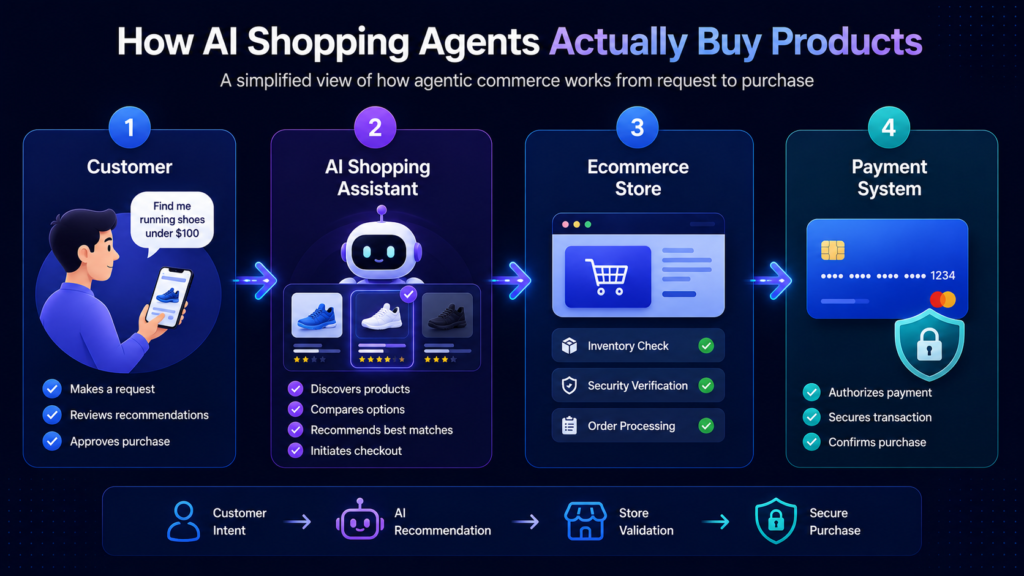
Agentic commerce works through a connected ecosystem where AI assistants, ecommerce stores, customers, and payment systems work together to complete purchases automatically. Instead of manually browsing websites and handling every step of checkout, users can rely on AI agents to manage much of the shopping journey for them. Here’s how the process typically works:
- Customer
The user simply asks an AI assistant to find or purchase a product. Based on the request, the AI recommends suitable options, and the customer approves the final purchase using a saved or new payment method.
- AI Shopping Assistant
The AI system handles product discovery, comparisons, recommendations, and checkout steps. Once the user confirms the order, the AI sends the purchase request directly to the ecommerce store.
- Ecommerce Store
The online business receives the order request, checks payment and security details, confirms inventory availability, and processes the order if everything is verified.
- Payment System
The payment provider securely manages the transaction using encrypted payment details and authorization systems to ensure safe and approved purchases.
Read Also: Major Differences Between RPA and Agentic Workflows?
What ACP Means for Ecommerce Brands
If AI shopping becomes mainstream, ecommerce businesses may need to rethink how their online stores are built and optimized. Instead of designing websites only for human visitors, brands may also need to make their stores easier for AI agents to understand, evaluate, and interact with.
In traditional ecommerce, customers manually search, compare, and purchase products themselves. But with agentic commerce, AI systems could increasingly influence which products shoppers discover and buy. This changes how ecommerce visibility works.
Here’s what that could mean for brands:
- AI-friendly stores may become essential
Ecommerce websites may need to be optimized not just for users, but also for AI systems that scan and evaluate products automatically.
- AI agents could influence buying decisions
Instead of customers browsing dozens of websites, AI assistants may shortlist and recommend products directly.
- Product discovery may shift beyond Google
AI-powered recommendations and conversational search could become a major source of ecommerce traffic and conversions.
- Poor product data may reduce visibility
Incomplete descriptions, outdated pricing, or messy catalogs could make it harder for AI systems to recommend products accurately.
- Real-time systems will matter more
APIs, live inventory updates, pricing synchronization, and seamless integrations may become critical for AI-driven shopping.
- Checkout experience could affect AI recommendations
Faster checkout flows, secure payments, and transparent return policies may improve trust and influence AI purchasing decisions.
- Brands may need to adapt early
Businesses that prepare for AI commerce sooner could gain stronger visibility and a competitive advantage as autonomous shopping grows.
“Okay, AI shopping is coming. What should we actually do about it?”
How Ecommerce Brands Can Prepare for ACP
As AI-powered shopping evolves, ecommerce brands may need to make their stores more structured, AI-readable, and easier to interact with programmatically. Preparing early can help businesses stay visible in future AI-driven commerce ecosystems.
Here are some practical ways brands can prepare for ACP:
- Improve product catalogs
Use clear product titles, descriptions, specifications, categories, and attributes so AI systems can understand products more accurately.
- Strengthen product metadata
Add detailed information such as dimensions, compatibility, pricing, materials, shipping details, and availability.
- Use structured data and schema markup
Structured product information helps AI systems interpret ecommerce pages more effectively.
- Optimize for conversational search
Product content should align with how people naturally ask questions in AI chat interfaces and voice assistants.
- Keep inventory and pricing updated
AI agents rely on real-time data, so outdated stock or pricing information may hurt visibility and trust.
- Simplify checkout systems
Faster and more secure checkout experiences can support smoother AI-assisted purchasing journeys.
- Build stronger trust signals
Positive reviews, transparent policies, reliable delivery, and strong brand authority may influence which products AI systems recommend most often.
Read Also: Shopify MCP Servers – Capabilities, Real Use Cases & Cost Breakdown
Challenges and Risks of Agentic Commerce
While agentic commerce creates exciting opportunities, it also introduces new challenges for ecommerce businesses, AI platforms, and shoppers. As AI systems become more involved in purchasing decisions, brands will need to balance automation with trust, accuracy, and security.
Here are some of the biggest risks businesses should be aware of:
- Privacy and user permissions
AI shopping assistants may require access to personal preferences, payment methods, purchase history, and browsing behavior. Businesses will need secure permission systems and transparent data practices to maintain customer trust.
- AI hallucinations or incorrect purchases
AI agents may occasionally misunderstand requests, recommend the wrong products, or provide inaccurate information. Poor recommendations or incorrect purchases could negatively impact customer experience and brand trust.
- Brand visibility challenges
In AI-driven shopping, users may no longer browse dozens of ecommerce websites manually. This means some brands could lose visibility if AI systems favor competitors with better product data, stronger reviews, or more AI-friendly infrastructure.
- Dependence on AI platforms
Ecommerce businesses may become increasingly dependent on AI ecosystems and platforms for product discovery and sales. Changes in AI algorithms or platform policies could directly affect visibility and conversions.
- Payment and security risks
Since AI systems may handle checkout and transactions, secure authentication, encrypted payment systems, fraud prevention, and permission controls will become even more important.
Read Also: How Much Does It Cost to Build an AI Agent?
Industries That May Benefit the Most
Some industries are naturally better suited for agentic commerce because they involve repeat purchases, standardized products, or frequent buying decisions that AI systems can automate easily.
Here are some sectors that may benefit the most from AI-driven commerce:
- Grocery and daily essentials
AI assistants could automatically reorder household products, groceries, or recurring essentials based on shopping habits and usage patterns.
- Electronics
AI systems may help users compare technical specifications, prices, reviews, and compatibility when purchasing gadgets or devices.
- Fashion basics and repeat purchases
Products like everyday clothing, shoes, skincare, or personal care items could become easier to reorder through AI shopping assistants.
- Subscription-based products
Agentic commerce could simplify recurring purchases for products such as supplements, pet food, software subscriptions, or monthly deliveries.
- B2B procurement
Businesses may use AI agents to automate repetitive purchasing tasks, vendor comparisons, inventory management, and bulk ordering processes.
Real-World Examples of Agentic Commerce Emerging Today
Agentic commerce is no longer just a future concept. Many AI-driven shopping experiences are already starting to appear across ecommerce platforms, apps, and digital assistants. While the technology is still evolving, these early use cases show how AI is gradually becoming more involved in online purchasing decisions.
Some real-world examples include:
- AI shopping assistants
AI tools can already help users discover products, compare options, answer product questions, and recommend purchases based on preferences and budgets.
- Smart reordering systems
Some ecommerce platforms and smart devices can automatically reorder frequently used products such as groceries, household items, or office supplies when stock runs low.
- Voice commerce ecosystems
Voice assistants are making it possible for users to search, reorder, and purchase products using simple voice commands instead of manual browsing.
- AI-powered ecommerce recommendations
Ecommerce stores increasingly use AI systems to personalize product suggestions, upsell relevant items, and improve product discovery.
- Chat-based shopping experiences
Conversational AI systems are enabling customers to shop directly through chat interfaces where they can ask questions, compare products, and complete purchases naturally.
What the Future of AI-Driven Ecommerce Could Look Like
As AI systems become more advanced, ecommerce may shift toward highly automated and autonomous shopping experiences. AI agents could move beyond assisting users and begin handling entire purchasing workflows with minimal human involvement.
Here’s what the future of agentic commerce could look like:
- AI agents negotiating deals
AI systems may compare sellers, negotiate discounts, find better shipping options, and secure the best value automatically for users.
- Autonomous subscriptions
AI assistants could manage recurring purchases automatically by tracking usage patterns, preferences, and delivery schedules without manual input.
- Personalized AI storefronts
Shopping experiences may become fully customized based on user behavior, purchase history, preferences, budgets, and lifestyle patterns.
- AI-to-AI commerce ecosystems
AI agents representing shoppers could directly communicate with ecommerce systems, supplier networks, and business AI tools to complete transactions automatically.
- Human-free purchasing for routine products
Everyday purchases like groceries, office supplies, household essentials, or subscriptions may eventually happen automatically without users manually browsing or checking out products themselves.
Exploring AI Commerce for Your Business?
Whether you’re evaluating AI shopping assistants, conversational commerce, MCP integrations, or broader AI adoption strategies, Triple Minds can help you identify practical opportunities and build a roadmap tailored to your business goals.
Talk to Our Team
Conclusion
Agentic commerce is reshaping how products are discovered and purchased online. As AI-driven shopping grows, ecommerce brands may need AI-friendly product data, APIs, and checkout systems to stay competitive. At Triple Minds, we help businesses prepare for the future of autonomous commerce with scalable AI and ecommerce solutions.
Quick Answers to Common Questions
Agentic Commerce Protocol (ACP) is a framework that helps AI agents interact with ecommerce stores, payment systems, and product catalogs to automate shopping experiences.
Traditional ecommerce depends on manual browsing and checkout, while agentic commerce allows AI systems to assist or automate product discovery, comparisons, and purchasing decisions.
Yes, AI agents can help users discover products, compare options, and complete purchases with user permissions and secure payment authorization systems.
ACP may influence how products are discovered and recommended in AI-driven shopping environments. Brands may need AI-friendly ecommerce systems to remain competitive.
Businesses can prepare by improving product data, using structured information, optimizing APIs, simplifying checkout systems, and building stronger trust signals.
Yes, AI-driven commerce may shift ecommerce SEO toward structured data, conversational search optimization, and AI-readable product information.
Almost every founder who reaches out to us at Triple Minds asks the same question first: how much does it cost to develop an AI agent for my business? It is a fair question, but the honest answer is — it depends on what you are actually trying to build.
AI agents are no longer experimental tools used only by tech companies. In 2026, they are becoming the operational backbone of modern businesses — handling customer conversations, qualifying leads, supporting internal teams, automating repetitive workflows, and even powering full digital products. According to Gartner, by 2028 roughly 33% of enterprise software will include agentic AI, up from less than 1% in 2024.
You will hear wildly different numbers in the market. Some vendors promise an AI agent for $1,000, while others quote $25,000, $50,000, or even $150,000+. Both can be technically correct. The difference comes down to scope, depth of integration, autonomy level, and whether the agent is meant for a marketing demo or for serious production traffic.
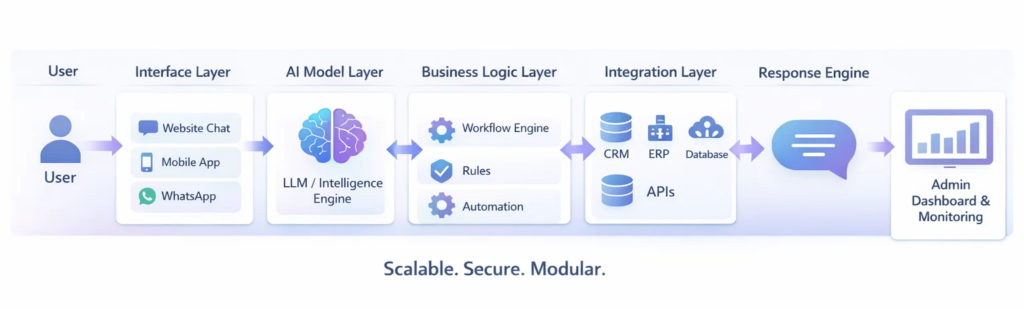
An AI agent is not just a chatbot. It is a complete software system made up of several layers working together:
- AI intelligence layer — the LLM, reasoning loop, and prompt orchestration
- Memory & knowledge layer — vector store, RAG, long-term memory
- Tool / action layer — function calling, APIs, browser, code execution
- Business logic layer — rules, guardrails, escalation policies
- Integration layer — CRM, ERP, databases, ticketing, messaging
- Interface layer — chat UI, dashboard, voice, mobile, admin console
Once you understand these layers, the AI agent development cost becomes much easier to reason about. As an AI development company, we have built everything from early-stage prototypes for YC-backed startups to enterprise automation systems handling millions of monthly conversations. After dozens of projects, one pattern is consistent.
The cost to develop an AI agent is mainly determined by three factors:
- How autonomous and complex the agent needs to be
- How many systems it must connect with — and the quality of those APIs
- What role it plays inside your business (assistant vs. operator vs. decision-maker)
In this guide, we break down the numbers in a practical, no-fluff way — covering agent types, the full development pipeline, technical challenges, hidden costs, region-by-region pricing, and a realistic ROI model. By the end you will have a defensible budget, not a guess.
Build AI Infrastructure That Scales With You
From MVP to enterprise automation, Triple Minds designs AI agents that are modular, secure, and built for real business impact.
Speak With Our AI Development TeamAI Agent Development Cost at a Glance (2026 Benchmarks)
Before we go deep, here is the short answer most founders are looking for. These ranges reflect production-grade builds delivered by mid-to-senior engineering teams in 2026.
| Build Tier | Typical Use Case | Timeline | Cost to Develop AI Agent |
|---|---|---|---|
| Basic AI Agent (MVP) | FAQ bot, lead capture, single-channel | 6–8 weeks | $12,000 – $18,000 |
| Investor-Ready Prototype | Demoable agent with 1–2 integrations | 8–10 weeks | $15,000 – $25,000 |
| Business AI Agent | CRM-connected, workflow automation | 10–14 weeks | $25,000 – $45,000 |
| Enterprise Support Agent | Multi-system, dashboards, security | ~4 months | $45,000 – $60,000 |
| Multi-Channel Enterprise System | Web + WhatsApp + voice + analytics | 4–6 months | $65,000 – $85,000 |
| Autonomous / Agentic Platform | Multi-agent, custom-trained, RAG at scale | 6–9 months | $90,000 – $150,000+ |
Key Takeaways
- The type of AI agent determines roughly 60% of the total cost.
- Integrations with legacy CRMs/ERPs are the #1 cause of budget overrun.
- LLM API spend is rarely the biggest line item — engineering effort is.
- Phased development reduces risk and protects ROI.
- Operating costs ($800–$5,000+/month) must be planned alongside development.
- Custom fine-tuning is rarely needed for v1 — RAG + good prompting handles most use cases.
Types of AI Agents (And Why Each One Costs Differently)
Before talking about timelines or pricing, the most important question is what kind of AI agent you actually need. This single decision determines most of the total investment. From an engineering standpoint, AI agents fall into six recognized classes — each with its own cost profile.
| Agent Type | How It Works | Real-World Example | Relative Build Cost |
|---|---|---|---|
| Simple Reflex Agent | If-this-then-that rules on current input | Auto-reply bot, FAQ widget | $ |
| Model-Based Reflex | Maintains internal state of the world | Order-status assistant | $$ |
| Goal-Based Agent | Plans steps toward a defined goal | AI scheduling assistant | $$$ |
| Utility-Based Agent | Optimizes across competing objectives | Pricing or routing optimizer | $$$$ |
| Learning Agent | Improves from feedback & data | Personalized recommender | $$$$ |
| Multi-Agent System | Multiple specialized agents collaborate | Autonomous research / ops platform | $$$$$ |
From a business perspective, those six classes collapse into three practical buckets. This is the framing we use when scoping projects at Triple Minds.
1. Basic AI Agent (Entry-Level Automation)
The starting point for most startups. A smart assistant that handles repetitive conversations and routine tasks but does not deeply interact with internal systems. Runs on existing models (GPT-4o-mini, Claude Haiku, Gemini Flash) and solves surface-level problems quickly.
- Answering frequently asked questions
- Capturing and qualifying leads
- Booking appointments or demos
- Providing basic product or service information
Cost to build an AI agent at this level: $12,000 – $25,000. Good fit if your goal is to launch fast, validate an idea, or take pressure off a small support team.
2. Business AI Agent (Operational Intelligence)
This is where AI starts delivering real business value. The agent connects with your CRM, database, or internal tools and acts more like a digital team member — performing actions, retrieving real data, and updating records.
- Checking order or delivery status
- Updating customer records in the CRM
- Assisting sales reps with lead insights and call summaries
- Pulling reports or business data on demand
- Creating and routing support tickets
Cost to develop AI agent at this level: $25,000 – $60,000. Most serious SaaS companies and scaling businesses start here because it directly impacts efficiency and customer experience.
3. Advanced Autonomous AI Agent (High-Complexity Systems)
The most powerful category. These agents handle multi-step tasks, run workflows automatically, use multiple tools, and operate with minimal human supervision. Often built as a network of specialized agents (planner, retriever, executor, verifier) coordinating through a shared memory.
- Multi-step reasoning and task execution
- Automatic workflow management across systems
- Long-term memory and learning from interactions
- Custom-trained or fine-tuned models for specific industries
- Self-correction loops and confidence-based escalation
Enterprise AI agent cost at this level: $85,000 – $150,000+. These systems require domain training, complex integrations, and rigorous evaluation infrastructure.
Don’t Miss This Guide: What is a Database Chatbot and How Does it Work?
The Anatomy of a Production AI Agent (Architecture Diagram)
To understand cost, you need to understand what is actually being built. Below is the reference architecture we deploy for most production-grade AI agents. Each block is a real engineering deliverable — and each one adds development hours.
Short-term ctx
Long-term store
Vector DB
Embeddings
Functions
APIs · Code
Rules · Auth
Escalation
Every layer above is a measurable line item in the budget. Skipping observability or evaluation infrastructure is the most common reason agents launch successfully and then quietly degrade in production.
AI Agent Development Cost — Breakdown by Component
Within a typical $50,000 enterprise build, here is roughly where the money goes. These percentages are drawn from our last 20 production projects.
| Component | % of Budget | What’s Included |
|---|---|---|
| Discovery & Architecture | 8–10% | Use-case validation, system design, data audit |
| LLM & Prompt Engineering | 10–15% | Model selection, prompt design, tool spec, guardrails |
| Backend & Integrations | 30–35% | API work, CRM/ERP connectors, auth, business logic |
| RAG & Knowledge Pipeline | 10–12% | Chunking, embeddings, vector DB, retrieval tuning |
| Frontend / Chat UI | 10–12% | Chat widget, admin dashboard, mobile responsiveness |
| QA & Evaluation | 8–10% | Test datasets, regression suite, red-teaming |
| DevOps & Deployment | 5–7% | CI/CD, infra-as-code, monitoring, secrets |
| Project Mgmt & Buffer | 5–8% | Coordination, scope changes, risk buffer |
Where the Budget Actually Goes (Enterprise Build)
Typical allocation across a $50K production AI agent project.
Integrations
Insight: integrations consume more budget than the AI itself. Plan for it early.
Typical Tech Stack (And What Each Costs)
| Layer | Common Choices | Indicative Cost / Month |
|---|---|---|
| Foundation Model | GPT-4.1, Claude Sonnet/Opus, Gemini 2.5, Llama 3.x (self-hosted) | $200 – $4,000 (usage-based) |
| Agent Framework | LangGraph, CrewAI, OpenAI Agents SDK, Claude Agent SDK | Open-source / included |
| Vector Database | Pinecone, Weaviate, Qdrant, pgvector | $0 – $500 |
| Orchestration | LangChain, Temporal, n8n, Zapier (light) | $0 – $300 |
| Observability | LangSmith, Langfuse, Helicone, Arize | $50 – $400 |
| Hosting | AWS, GCP, Azure, Vercel, Cloudflare Workers | $100 – $1,500 |
| Voice / Telephony | Twilio, Vapi, Retell, ElevenLabs | Usage-based |
How AI Agent Development Actually Works (6-Phase Pipeline)
An AI agent is not built in a single step. It is developed in structured phases to ensure clarity, performance, and long-term scalability.
1. Discovery & Use Case Validation
Every successful AI project starts by defining the exact problem. The focus is on identifying repetitive workflows, decision points, and system dependencies. The goal is to determine where automation creates measurable business impact and where human involvement is still necessary. Without this clarity, projects either over-expand or fail to deliver value.
2. Architecture Planning
Once the use case is validated, the technical foundation is designed: how the model connects to internal systems, how data flows, where state lives, how secrets are handled, and how security layers are enforced. A well-planned architecture lets the system scale without a rewrite later.
3. Model Selection & Intelligence Design
Not every AI agent requires custom training. In many cases, structured prompt engineering combined with well-organized RAG is enough. For more advanced systems this phase covers domain-specific fine-tuning, multi-step reasoning design, memory configuration, and confidence-based escalation logic. This step decides how intelligently the agent behaves in real-world scenarios.
4. Backend Development & Integrations
Where the AI moves from theory to operational capability. The system gets integrated with CRMs, databases, ticketing systems, internal APIs, and third-party tools. These integrations are what allow the agent to retrieve real data, update records, trigger workflows, and perform actions instead of simply generating text. This is what separates an AI agent from a basic chatbot.
5. Interface & Control Layer
An AI agent must be usable and manageable. This typically includes a website interface, application embed, and an internal dashboard for monitoring performance, reviewing conversations, managing prompts, and controlling permissions. Adoption depends on usability — not just intelligence.
6. Testing, Deployment & Continuous Monitoring
Before launch, the system is tested for response accuracy, workflow reliability, integration stability, and security compliance. After deployment, performance monitoring becomes essential. AI agents improve over time through structured analysis, evaluation harnesses, and prompt/data refinement. A properly built AI agent is not a one-time launch — it is an evolving operational system.
Here’s Something Similar: Major Differences Between RPA and Agentic Workflows
Real Technical Challenges That Drive Up AI Agent Development Cost
This is the section most pricing articles avoid — because it requires honesty. Below are the recurring technical problems that quietly inflate the cost to develop an AI agent. If a vendor’s quote does not address these, the number is incomplete.
1. Hallucination Control
LLMs confidently invent facts. In customer-facing systems this is a legal and reputational risk. Mitigation requires retrieval grounding, structured outputs, citation enforcement, and an evaluation harness that catches regressions when prompts or models change. Adds 8–12% to the budget.
Read Also: How to Fix Hallucinations in AI Agents?
2. Context Window & Memory Management
Long conversations and large knowledge bases blow past context limits. Engineering effort goes into smart chunking, summarization loops, hierarchical memory, and retrieval that returns the right 4 KB instead of every 4 KB. Done wrong, accuracy drops and token costs explode.
3. Tool-Use Reliability
Function calling looks simple in a demo. In production, the agent must handle malformed tool outputs, partial failures, retries with backoff, idempotency, and recovery from a half-completed action. This is plain backend engineering — and where most “demo to production” gaps live.
4. Latency vs. Cost vs. Quality Tradeoffs
A frontier model gives the best answers but is slow and expensive. A small model is fast and cheap but misses nuance. Production agents use a router — small model for easy turns, large model for hard ones — plus caching, streaming, and parallel tool calls. Building this correctly takes real effort.
5. Security & Prompt Injection
Any agent that reads untrusted content (emails, documents, web pages) is exposed to prompt injection. Defending against it means input sanitization, tool-call allowlists, capability scoping, audit logging, and red-team testing. Skipping this is not an option for enterprise deployments.
6. Evaluation & Regression Testing
Traditional unit tests don’t capture LLM behavior. Teams need golden-set evals, LLM-as-judge scoring, A/B harnesses, and automated regression detection so a prompt tweak does not silently break 5% of conversations. Without this, every release is a coin flip.
7. Data Privacy & Compliance
HIPAA, GDPR, SOC 2, and PCI introduce data-residency, retention, redaction, and audit obligations. PII redaction in logs, regional model deployment, BAAs, and consent flows are non-negotiable in regulated industries — and they materially add to engineering hours.
8. Legacy System Integration
Older CRMs and ERPs ship with weak APIs, rate limits, undocumented edge cases, and authentication quirks. Half of integration work is reverse-engineering and stabilizing these surfaces. This is the #1 source of timeline slippage in enterprise AI projects.
Enterprise AI Customer Support Agent Cost (Realistic 4-Month Build)
Let’s walk through a realistic scenario so you can clearly understand enterprise AI agent cost. Imagine a company wants a production-ready AI customer support agent that can actually handle real traffic — not just demo conversations. The agent must:
- Answer customer queries instantly with cited sources
- Check order or ticket details from internal systems in real time
- Create and update support cases automatically
- Escalate complex issues to human agents with full context
- Remember past conversations for continuity
- Provide an admin dashboard for monitoring, prompt edits, and analytics
- Meet enterprise-level security, SSO, and access requirements
At this level you are not building a chatbot — you are building core support infrastructure. A typical enterprise build takes around four months because multiple specialists are involved: AI engineers, backend engineers, frontend developers, UI/UX designers, QA, DevOps, and a project manager.
| Role | Allocation | Approx. Cost (4 months) |
|---|---|---|
| AI / LLM Engineer | Full-time | $15,000 – $20,000 |
| Backend Engineer | Full-time | $12,000 – $16,000 |
| Frontend Developer | Part-time | $6,000 – $9,000 |
| UI/UX Designer | Part-time | $3,000 – $5,000 |
| QA Engineer | Part-time | $4,000 – $6,000 |
| DevOps | Part-time | $3,000 – $5,000 |
| Project Manager | Part-time | $2,000 – $4,000 |
| Total Development | $45,000 – $65,000 |
Add multi-channel support (WhatsApp, email, voice), advanced analytics, or custom training and the cost rises to $85,000+. This is why AI development company pricing varies so much — two projects that sound similar can require very different engineering effort behind the scenes.
Cost to Develop an AI Agent by Region (2026)
Hourly rates vary dramatically. The same enterprise-grade build costs very different amounts depending on where the team is based.
| Region | Senior AI Engineer Rate | Same Enterprise Agent Build |
|---|---|---|
| United States / Canada | $150 – $250 / hr | $110,000 – $180,000 |
| Western Europe / UK | $110 – $180 / hr | $80,000 – $140,000 |
| Eastern Europe | $60 – $110 / hr | $50,000 – $90,000 |
| India / South Asia | $35 – $80 / hr | $30,000 – $65,000 |
| Latin America | $50 – $90 / hr | $40,000 – $75,000 |
Lower hourly rates are not automatically cheaper. Quality of architecture, evaluation discipline, and integration experience matter far more than headline rate — a poorly built $30,000 agent often costs $80,000 to fix.
This Might Be Useful to You: Average Cost to Build and Deploy Enterprise AI Agents For Small Business
Build vs. Buy vs. Hybrid — Which Is Right for You?
| Approach | Best For | Pros | Cons |
|---|---|---|---|
| Off-the-shelf SaaS (Intercom Fin, Zendesk AI, etc.) | Standard support, fast launch | No build cost, instant value | $0.50–$2 per resolution adds up; limited customization |
| No-code platforms (Voiceflow, Botpress, Relevance AI) | Marketing teams, simple flows | Cheap, fast iteration | Hits a ceiling on complex integrations |
| Custom build with frameworks | Differentiated product, deep workflows | Full control, owns the IP, fits your data model | Higher upfront cost, requires engineering team |
| Hybrid (custom on top of SaaS) | Most growing companies | Best of both worlds | Vendor lock-in risk, requires planning |
What Increases AI Agent Development Cost the Fastest
Many businesses begin with a simple requirement but expand scope during planning. Each new feature adds development time, testing effort, and integration work. The biggest cost drivers, ranked:
| Cost Driver | Typical Impact on Budget |
|---|---|
| Multi-channel support (web + WhatsApp + voice + app) | +20% to +30% |
| Custom model fine-tuning or domain training | +15% to +35% |
| Large knowledge base (10k+ documents) with high-accuracy RAG | +10% to +20% |
| Enterprise security, SSO, audit logging, compliance (SOC2/HIPAA) | +10% to +25% |
| Real-time analytics dashboard with drilldowns | +8% to +15% |
| Human-in-the-loop review & ticket escalation workflows | +5% to +12% |
| Voice (STT + TTS + telephony) capability | +15% to +25% |
| Multilingual support (5+ languages) | +8% to +15% |
From MS Excel to Google Sheets, spreadsheets are the backbone of business data management worldwide. However, if you are still relying on traditional spreadsheet formulas to analyze critical business data, you may be slowing down decisions and increasing the risk of costly errors. Manual reporting, complex functions like VLOOKUP and pivot tables, and repetitive data cleaning consume valuable time. In fact, it’s been reported that data professionals spend nearly 60–80% of their time preparing data instead of analyzing it. This is where an AI Excel chatbot changes how modern businesses work with spreadsheets. Rather than making Excel itself “intelligent,” businesses can upload their Excel files into a secure AI-powered chatbot and analyze the data using plain English questions. The chatbot reads the spreadsheet, applies the correct calculations, and delivers structured insights instantly – turning static spreadsheets into dynamic analytical workspaces.
At Triple Minds, we implement secure AI Excel chatbot solutions that allow organizations to upload spreadsheet data and interact with it conversationally. An AI Excel chatbot is a tool that enables users to analyze Excel data using natural language instead of complex formulas. It helps clean messy datasets, generate visual reports, identify trends, and extract actionable insights faster and more accurately. For B2B teams managing sales reports, financial statements, operational dashboards, or inventory sheets, this shift from manual spreadsheet analysis to AI-driven conversational data analysis improves efficiency, reduces errors, and accelerates decision-making.
Ready to Transform Your Excel Analysis with AI?
Discover how AI-powered Excel chatbots help your team analyze spreadsheets in plain English—eliminating complex formulas, reducing reporting delays, and accelerating business decisions.
Explore Secure AI Excel Chatbot Solutions
Key Takeaways
- AI Excel chatbots let you analyze uploaded spreadsheet data using simple, natural language queries.
- They significantly reduce manual data cleaning and dependency on complex Excel formulas.
- Businesses can speed up decision-making with instant, structured insights generated by AI.
- Sales, finance, operations, and leadership teams gain faster access to accurate reports and performance analysis.
- AI-driven calculations minimize human errors and improve overall data reliability.
- Conversational analytics makes data accessible to both technical and non-technical teams across the organization.
What is AI in Excel?
AI in Excel refers to using intelligent AI-powered tools that can analyze your Excel data in a smarter and more efficient way. Instead of manually building complex formulas, calculations, and pivot tables, you can upload your spreadsheet into a secure AI chatbot and ask questions in plain language. The AI understands your request, applies the right logic behind the scenes, and delivers accurate, structured insights within seconds.
It can clean messy datasets, identify trends, summarize performance metrics, generate visual reports, and highlight unusual patterns automatically. At Triple Minds, we see AI in Excel as an evolution in how businesses interact with spreadsheet data — shifting from manual effort to AI-assisted analysis that makes insights faster, simpler, and accessible to every team, not just technical experts.
When we talk about cleaning messy datasets, we mean identifying and correcting common data issues that affect analysis accuracy. Business spreadsheets often contain duplicate entries, missing values, inconsistent date formats, numbers stored as text, or slight variations in naming conventions. These small inconsistencies may seem harmless, but they can significantly distort reports and performance metrics. An AI Excel chatbot automatically scans the uploaded file, detects such irregularities, and either corrects them or highlights them for review. This ensures that insights are generated from structured, reliable data, reducing errors and improving confidence in decision-making.
What Does It Mean to “Chat with Your Excel Files”?
“Chatting with your Excel files” means uploading your spreadsheet into a secure AI chatbot and asking questions about your data in plain English — without writing formulas or building complex reports.
Traditionally, extracting insights from Excel requires formulas like VLOOKUP, INDEX-MATCH, pivot tables, filters, or nested IF statements. Not everyone understands what these functions do or how to use them correctly. Even experienced users spend significant time building reports, and small formula errors can lead to inaccurate analysis. With an AI-powered Excel chatbot, that entire process becomes faster and more intuitive.
At Triple Minds, we implement secure AI chatbot systems that allow businesses to upload their spreadsheets and interact with them conversationally. Instead of struggling with formulas, your team can ask business questions and receive clear, structured answers instantly. Let’s look at how this works in practice.
Ask Questions in Plain Language
Instead of writing formulas, you simply type what you want to know. For example, if your uploaded file contains sales data with columns like Date, Product, Region, Customer, and Revenue, you can ask:
“What were last quarter’s highest-performing products?”
You receive a ranked list of top products based on revenue.
“Show monthly revenue trends for the past year.”
You get a clear month-by-month breakdown, often supported with a visual chart.
“Which customers reduced their purchase volume?”
The chatbot compares time periods and highlights customers with declining orders.
“Calculate churn rate from this dataset.”
The AI identifies inactive customers and calculates the percentage automatically.
How It Works
Behind the scenes, the AI chatbot reads your uploaded Excel file, understands column headers, analyzes the data structure, and performs the required calculations automatically. You do not need to define formulas or build reports – you simply ask the question, and the system generates the insight.
Why It Matters
Your spreadsheet remains the source of truth, but when connected to an AI chatbot, it becomes far more powerful. Instead of manually extracting insights, your team can interact with data conversationally and receive faster, more accurate answers. In simple terms, chatting with your Excel files means enabling AI to analyze your spreadsheet data on demand — making business analysis quicker, easier, and accessible across the organization.
Why Traditional Spreadsheet Analysis Slows Businesses Down
Spreadsheets have supported business operations for decades. They are reliable for storing and organizing structured data. However, as organizations scale and datasets grow larger, traditional spreadsheet workflows begin to create operational friction. What once worked for small teams can become inefficient when speed, accuracy, and cross-team collaboration become critical.
1. Analysis Becomes Time-Heavy
Generating meaningful insights from spreadsheets often requires multiple steps — filtering data, building calculations, validating numbers, and formatting reports. As data grows, this process takes longer, slowing down decision cycles.
2. Reporting Creates Dependency
Business leaders often rely on analysts or Excel experts to extract insights. This creates internal bottlenecks where decision-makers must wait for reports instead of exploring data independently.
3. Scalability Challenges
Spreadsheets are excellent storage tools, but as datasets expand across departments, managing versions, consolidating files, and maintaining consistency becomes increasingly complex.
4. Limited Real-Time Exploration
Most spreadsheet workflows are report-based. You generate a report, review it, and then request another version if you need deeper insights. This slows down dynamic decision-making.
5. Insight Gaps
Valuable business data often remains underutilized because extracting deeper patterns requires time and technical effort. Many organizations sit on strong datasets but struggle to convert them into continuous insight. For growing B2B businesses, these slowdowns directly impact agility and competitive advantage.
How AI Excel Chatbots Transform Business Analysis
AI Excel chatbots shift spreadsheet analysis from static reporting to interactive exploration. Instead of manually preparing reports, teams upload Excel files into a secure AI chatbot and engage with the data conversationally.
1. Instant Insight Generation
Rather than building step-by-step reports, teams receive structured answers immediately after asking a business question. This dramatically shortens decision cycles.
2. Self-Service Data Access
Non-technical users can interact with uploaded spreadsheet data without relying on specialists. This reduces bottlenecks and empowers cross-functional teams.
3. Interactive Follow-Up Questions
Instead of requesting a new report for every clarification, leaders can ask follow-up questions in real time. This enables deeper exploration without delays.
4. Structured Outputs & Visual Summaries
The chatbot doesn’t just provide numbers — it delivers organized summaries and visual breakdowns that are easier to interpret and present.
5. Strategic Focus Over Manual Work
By automating analytical tasks, teams can shift focus from spreadsheet management to strategic decision-making and performance improvement.
At Triple Minds, we see this transformation as moving from spreadsheet-driven reporting to AI-driven data conversations – where insight is continuous, not periodic.
Business Use Cases: Who Benefits the Most?
Sales Teams
Sales leaders can track pipeline health, deal velocity, win-loss trends, and account performance instantly after uploading their reports into the chatbot. Instead of waiting for analysts, representatives can analyze territory performance and identify stalled deals independently. This improves forecasting accuracy and strengthens revenue performance.
Finance Teams
CFOs and finance managers can review cash flow trends, cost centers, revenue variance, and profitability within seconds. Rather than rebuilding complex spreadsheets for each query, teams can drill into uploaded financial data conversationally. This improves financial clarity and speeds up reporting cycles.
Operations Teams
Operations managers can analyze inventory levels, supply chain delays, and vendor performance using simple queries. After uploading operational data, bottlenecks and inefficiencies become easier to identify. Instead of compiling reports manually, teams can focus on resolving issues faster.
Marketing Teams
Marketing leaders can evaluate campaign performance, conversion rates, ROI, and channel effectiveness instantly. Comparing campaign outcomes and identifying high-performing channels becomes straightforward. This enables smarter budget allocation and quicker optimization decisions based on real data.
Founders & Executives
Leaders can move beyond static dashboards and ask follow-up questions in real time. By interacting with uploaded business data through an AI chatbot, they can quickly explore revenue trends, growth drivers, and cost structures. This reduces dependency on multiple reports and meetings – making decisions faster, clearer, and data-backed.
Related Article You May Like: What is a Database Chatbot and How Does it Work?
Step-by-Step Guide: How to Chat with Your Excel Files
Below is a practical step-by-step guide to start analyzing your Excel data using a secure AI chatbot.
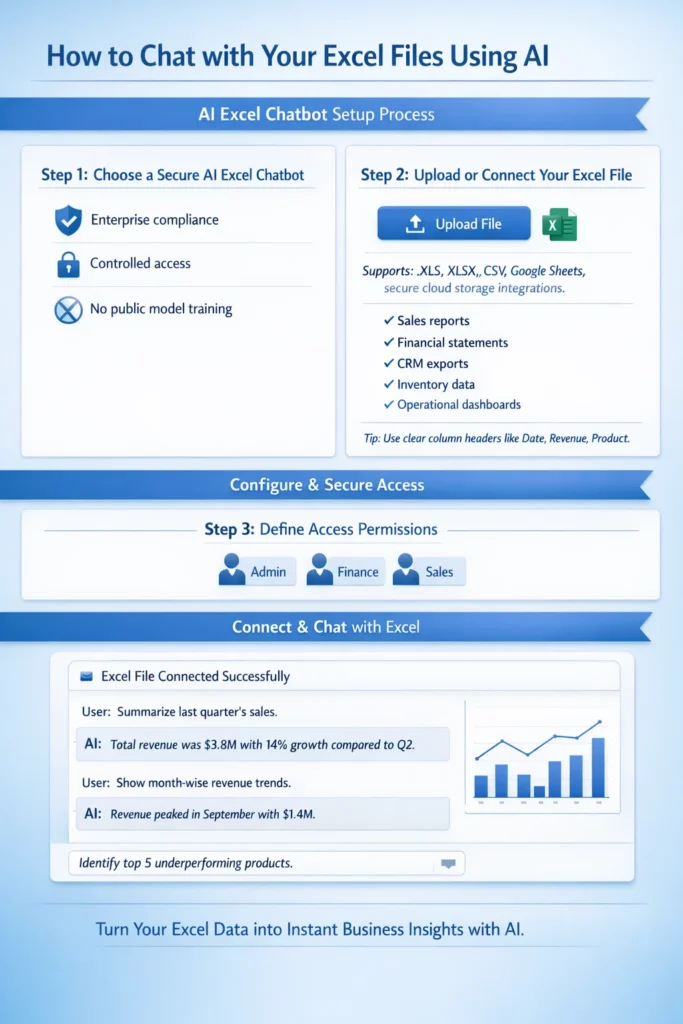
Step 1: Choose a Secure AI Excel Chatbot
Select a private AI chatbot solution that allows you to securely upload or connect Excel files. For business use, ensure the platform supports controlled access, enterprise compliance, and does not use your data for public model training.
Security should always be the first consideration when working with internal financial, sales, or operational data.
Step 2: Upload or Connect Your Excel File
Upload your Excel sheet directly into the chatbot or connect the secure folder where your spreadsheets are stored.
Typical business files include:
- Sales reports
- Financial statements
- CRM exports
- Inventory data
- Operational dashboards
For best results, ensure your spreadsheet has clear column headers such as Date, Revenue, Customer Name, or Product Category. Clean structure improves AI accuracy.
Step 3: Define Access Permissions
Decide which team members can access the chatbot and what data they are allowed to analyze. Role-based permissions protect sensitive information and ensure responsible usage across departments.
Step 4: Start Asking Business Questions
Once your file is connected, you can begin interacting with your data in plain English.
For example:
- “Summarize last quarter’s sales.”
- “Show month-wise revenue trends.”
- “Identify top 5 underperforming products.”
The AI chatbot reads your uploaded spreadsheet, performs the required calculations, and delivers structured answers instantly – without manual formula building or report preparation.
Public AI vs Private AI for Excel
Many AI tools are publicly available, but businesses handling sensitive operational or financial data must prioritize secure implementation.
Public tools may:
- Store conversation history externally
- Lack enterprise-grade compliance
- Offer limited integration with internal systems
At Triple Minds, we implement secure AI layers that allow businesses to connect Excel files or live databases privately. This ensures:
- Data privacy
- Controlled user access
- Enterprise compliance
- Scalable system integration
When working with internal business data, security is not optional – it is foundational.
The ROI of Using an AI Excel Chatbot
When we evaluate the return on investment of AI-powered Excel chatbots, we consistently see impact across three strategic areas:
1. Time Efficiency
Teams reduce hours spent preparing reports and restructuring spreadsheets. Instead of building analysis step-by-step, they ask questions and receive immediate answers. This shifts focus from operational tasks to strategic execution.
2. Improved Accuracy
Automated calculations reduce reliance on manual formulas, lowering the risk of reporting inconsistencies. More reliable insights lead to stronger business decisions.
3. Accelerated Decision Cycles
Executives gain clarity instantly instead of waiting for scheduled reports. Real-time follow-up questions allow deeper exploration, enabling faster course correction in competitive markets.
You Might Also Find This Useful: How to Chat with Your Own Database Using AI
Common Mistakes to Avoid
Even with AI chatbots, best practices matter:
- Maintain clear and consistent column headers
- Avoid combining unrelated datasets in a single sheet
- Validate AI-generated outputs for business context
- Use secure platforms for confidential data
- Train teams to ask clear, goal-oriented questions
AI enhances analysis – but structured data and thoughtful usage maximize results.
The Future of Conversational Analytics
We believe spreadsheet analysis is evolving from static reporting toward interactive, AI-assisted decision support. In the coming years:
- AI systems will automatically detect key performance indicators
- Predictive insights will become embedded in analysis workflows
- Automated forecasting will become standard practice
- Businesses will rely more on conversational queries than static dashboards
This shift is not about replacing analysts. It is about empowering them to focus on strategic thinking rather than repetitive data preparation.
Why We Recommend Secure AI Implementation
Although subscription-based AI tools are easy to access, companies that prioritize stronger security and want their data to remain entirely within their own environment often benefit more from customized chatbots built exclusively for their business. As organizations grow, they typically require deeper integrations, such as:
- Connecting CRM systems
- Linking ERP platforms
- Integrating SQL databases
- Building centralized AI dashboards
At Triple Minds, we implement private AI systems that allow teams to securely chat with live business data. This removes silos, improves accessibility, and ensures leadership always works with updated insights.
Final Thoughts
Spreadsheets remain central to business operations. What is changing is how organizations extract value from them. Moving from manual formula-based analysis to AI-powered conversational data interaction is not just a productivity upgrade — it is a strategic advantage. When teams spend less time managing spreadsheets and more time interpreting insights, efficiency improves. When executives can explore data in real time, decision cycles shorten. When accuracy increases, confidence in data strengthens.
At Triple Minds, we see AI-powered spreadsheet analysis as the new standard for modern, data-driven organizations. Your Excel file remains structured data — but when connected to a secure AI chatbot, it becomes a powerful decision-support system. If your organization is ready to move beyond static reporting toward intelligent data conversations, the transition starts here.
FAQs
An AI Excel chatbot is a secure tool that allows users to upload spreadsheets and analyze data using natural language instead of formulas.
No. The chatbot removes dependency on complex formulas, making data analysis accessible to non-technical users.
Security depends on the solution. Private AI implementations provide enterprise-level protection and controlled access.
AI can automate most common analytical tasks, but maintaining clean and structured data remains important.
AI delivers highly accurate results when data is properly structured. Human validation is recommended for critical decisions.
Yes. These solutions are scalable and beneficial for startups as well as large enterprises.
Structured tabular data such as sales reports, financial sheets, CRM exports, inventory logs, and operational metrics.
Artificial Intelligence (AI) is a hot topic everywhere. You’ve probably heard discussions about AI-generated blogs or AI-created images, but understanding how AI actually works is a different story. In simple terms, artificial intelligence refers to machines using technology to perform tasks similar to humans. AI operates by utilizing algorithms that analyze data, learn from patterns, and improve over time.
An AI agent is a program designed to perform tasks such as problem-solving and interacting with humans using AI-driven techniques. These agents collect information from their environment and use Natural Language Processing (NLP) and Machine Learning (ML) to analyze data. Over time, AI agents enhance their performance by learning from past mistakes.
There are 5 different types of AI agents, including:
- Simple Reflex Agents
- Model-Based Reflex Agents
- Goal-Based Agents
- Utility-Based Agents
- Learning Agents
| AI Agent Type | Decision-Making | Complexity | Learning Capability | Real-World Example |
|---|---|---|---|---|
| Simple Reflex Agent | Condition-action rule | Low | No | Thermostat |
| Model-Based Reflex Agent | Uses internal model | Medium | Limited | Autonomous vacuum cleaner |
| Goal-Based Agent | Evaluates actions to achieve goals | High | No | Self-driving car navigation |
| Utility-Based Agent | Chooses best outcome | Higher | No | Stock trading AI |
| Learning Agent | Improves through experience | Very High | Yes | ChatGPT, AlphaGo |
In this blog, we’ll dive deeper into AI agents and their types, with a focus on goal-based agents in artificial intelligence.
Don’t Miss This Guide: How Much Does It Cost to Build an AI Agent?
5 Types of AI Agents and Their Complexity Levels

Let’s Learn More About 5 Types of Agents in Artificial Intelligence
AI agents are software programs that use Artificial Intelligence (AI) to assist humans in performing daily tasks efficiently. These agents collect information from their surroundings and provide recommendations based on their analysis. AI agents utilize Natural Language Processing (NLP) to understand data better and improve their performance over time.
In our daily lives, we interact with various AI-powered tools such as Alexa, Siri, navigation apps, customer service chatbots, and smart home devices. These virtual assistants and intelligent systems help automate tasks, making life easier.
Read Also: How to Fix Hallucinations in AI Agents?
1. Simple Reflex Agents
Simple Reflex Agents are a type of AI agent that functions based on condition-action rules, meaning they follow predefined instructions to make decisions. These agents respond to the current state of their environment without storing past data. They perform well in structured, detectable tasks.
Real-World Applications of Simple Reflex Agents
Automated Doors
Automatic doors detect human motion and signal the control system to open. These doors also incorporate safety features to prevent accidental closures if someone is too close.
Vending Machines
Vending machines operate based on customer input. When a button is pressed, the AI agent processes the selection and dispenses the chosen product. The entire process relies on real-time inputs from users.
Thermostat Devices
Thermostats regulate room temperature by adjusting heating or cooling settings. If the temperature drops, the system increases the heat. If it rises, it activates cooling to maintain a comfortable environment.
Traffic Lights
Traffic lights use sensors, cameras, and radars to monitor vehicle movement, speed, and direction at intersections. AI-based traffic lights dynamically adjust signals to optimize traffic flow and reduce congestion.
2. Model-Based Reflex Agents
Model-Based Reflex Agents are a type of AI agent that utilize internal memory and historical data to make informed decisions. Unlike Simple Reflex Agents, these agents can handle partially observable environments, meaning they can process and respond to complex situations by storing and analyzing past experiences. Their ability to retain and use memory allows them to function effectively in dynamic and unpredictable environments.
Real-World Applications of Model-Based Reflex Agents
Autonomous Cars
Self-driving cars rely on multiple sensors, including cameras, LiDAR, radars, and ultrasonic sensors, to gather environmental data. AI agents use this data to create real-time maps for safe navigation, detecting road conditions, traffic flow, and obstacles to ensure smooth driving.
Robotic Vacuum Cleaners
Smart vacuum cleaners use AI-powered sensors to map the room’s layout and identify obstacles such as furniture, beds, and walls. They efficiently detect dirt, avoid hurdles, and adjust their navigation paths accordingly. These devices continuously update their mapping system to improve cleaning performance
3. Goal-Based Agents
Goal-Based Agents are AI agents designed to achieve specific objectives. Unlike Model-Based Reflex Agents, these agents plan their actions and make informed decisions by using an internal model of the environment. They analyze data, execute tasks efficiently, and continuously improve based on input. Compared to Simple Reflex Agents and Model-Based Reflex Agents, Goal-Based Agents exhibit a higher level of intelligence and adaptability.
Real-World Applications of Goal-Based Agents
Driverless Cars
Self-driving cars rely on AI agents to navigate roads, avoid traffic, and reach destinations safely. They use sensors such as cameras, LiDAR (Light Detection and Ranging), radars, ultrasonic sensors, and GPS. By utilizing Convolutional Neural Networks (CNNs), a deep learning algorithm, AI processes real-time data to handle tasks like braking, accelerating, and steering with precision.
Warehouse Robots
Warehouse robots lift, sort, and transport goods with high efficiency. They perform real-time data analysis, learn from past experiences, and use computer vision to identify and pick the correct products, enhancing warehouse operations.
Autonomous Delivery Drones
Autonomous drones use cameras and LiDAR sensors to navigate flight paths and detect obstacles. They leverage SLAM (Simultaneous Localization and Mapping) technology to create real-time maps while tracking their position, ensuring smooth and accurate deliveries.
Personal Assistants
Voice assistants like Siri, Alexa, and Google Assistant use AI to process human commands. They assist with setting reminders, making calls, answering questions, chatting, and providing personalized suggestions based on user behavior.
Gaming AI
AI agents enhance gaming experiences by acting as virtual opponents or guides. Chess AI, such as Stockfish and AlphaZero, analyzes game moves and suggests the best strategies to win. Many online multiplayer games also use AI to adjust difficulty levels and optimize player engagement.
Why Goal-Based AI Stands Out?
The biggest advantage of Goal-Based AI is its flexibility and adaptability based on inputs. Whether in autonomous vehicles, robots, assistants, drones, or gaming AI, these intelligent agents continue to evolve, making human tasks more efficient and seamless.
Read Also: Average Cost to Build and Deploy Enterprise AI Agents For Small Business
4. Utility-Based Agents
Utility-Based Agents are intelligent AI agents similar to Goal-Based Agents, but with a key difference—they prioritize efficiency while considering risks and preferences. These agents aim to maximize output while minimizing time, cost, and potential errors, making them highly effective for complex decision-making.
Real-World Applications of Utility-Based Agents
Google Maps
Google Maps assists with navigation by analyzing real-time traffic data and suggesting the fastest routes. It provides accurate estimates for travel time based on different modes of transportation, whether by car, bike, or on foot.
Stock Trading Bots
AI-powered stock trading bots analyze market trends, historical data, and live stock prices to recommend buying and selling strategies that maximize profits. These bots execute trades automatically based on risk assessment and market predictions.
Recommendation Systems
AI-driven recommendation engines suggest content based on user behavior and past interactions. Platforms like Netflix, Amazon Prime, ZEE5, and Hotstar analyze watch history to recommend movies and shows, providing a personalized experience for users.
You Might Also Find This Useful: Major Differences Between RPA and Agentic Workflows?
Flowchart of AI Agent Decision-Making
Here is a flowchart representing AI agent decision-making. It visually explains how different types of AI agents process information and make decisions.
Conclusion
AI agents are powerful software programs that help save human effort, time, and money. Different types of AI agents are designed for different tasks:
- Simple Reflex Agents and Model-Based Reflex Agents excel in detectable and immediate-response scenarios.
- Goal-Based Agents and Utility-Based Agents focus on achieving long-term objectives and ensuring optimal results while maintaining safety.
These AI agents are widely used in industries such as robotics, healthcare, finance, and entertainment. However, it is crucial to use AI responsibly and ethically to ensure fairness and security.
The 5 types of AI agents are Simple Reflex Agents, Model-Based Reflex Agents, Goal-Based Agents, Utility-Based Agents, and Learning Agents. Each type has different decision-making abilities.
A goal-based agent in AI selects actions based on achieving a specific objective. It evaluates multiple possibilities before making a decision, unlike reflex agents that respond immediately.
A self-driving car is an example of a goal-based agent in AI. It calculates the best route to reach a destination while avoiding traffic and obstacles, optimizing for safety and efficiency.
A goal-based agent considers future consequences and selects actions to achieve a goal, while a reflex agent reacts instantly to conditions without considering long-term outcomes.