Best Vibe Coding Tools For Non-Technical Founders
Choosing the right vibe coding tool can help non-technical founders turn ideas into working products faster than ever. This guide compares the best AI-powered coding tools, including Cursor, Claude Code, Bolt.new, Lovable, Replit Agent, and more, helping founders understand which platform fits their goals, budget, and technical experience. It also explains the strengths, limitations, pricing, and ideal use cases of each tool so founders can make informed development decisions with confidence.

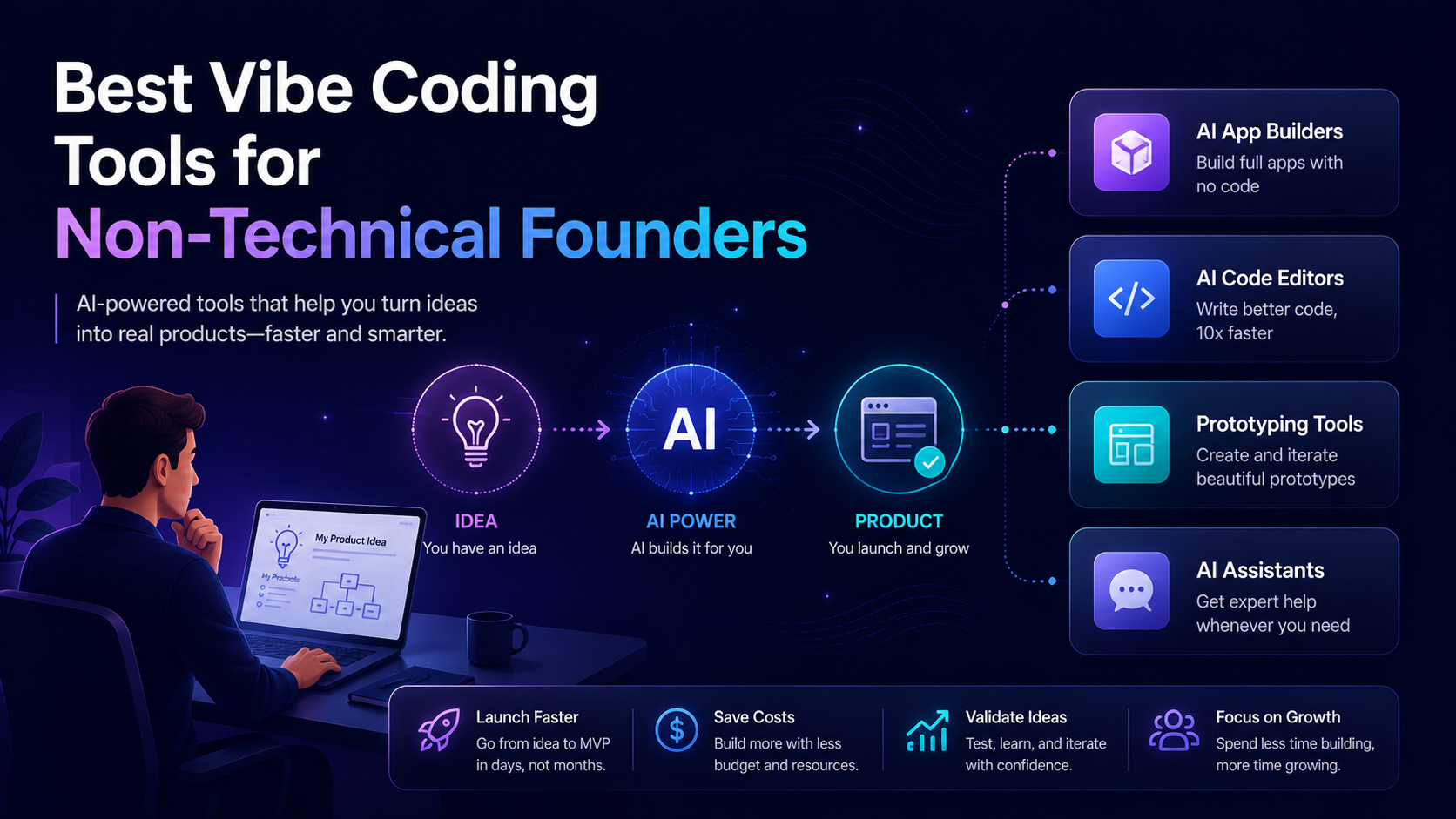
In 2026, a new way of building software called vibe coding has made it possible for non-technical founders to go from idea to live working product without spending months learning to code. You simply describe what you want, and the AI makes sure to deliver the result that you want to have.
This year many vibe coding tools like Cursor, Claude Code, GitHub, Copilot, and Bolt are becoming popular among non-technical founders. Non-technical founders are using these tools to build MVPs, prototypes, and even full products without traditional engineering teams, reducing development time and cost while speeding up validation and go-to-market.
At Triple Minds, we pair senior engineers with the best vibe coding tools on the market to help founders ship production ready MVPs in weeks, not months. Our cost to develop a vibe MVP starts at $3k and can vary based on the additional features. Want to know more? Book a consultation call with our subject matter experts today.
Key Takeaways
1) Vibe coding tools help non-technical founders turn ideas into working products quickly, with the best outcomes achieved when experienced engineers guide the process.
2) Lovable, Bolt, and v0 are the most beginner-friendly no-code AI development tools available in 2026.
3) Cursor and Claude Code offer the highest capability for development teams building more complex applications.
4) Most leading AI coding tools start at $10 to $25 per month, making professional-grade development accessible to startups at any stage.
5) The biggest risk is launching untested AI-generated code, which makes code review, testing, and engineering oversight essential.
Ready to Move Beyond Experimentation?
Vibe coding tools make it easier than ever to turn ideas into prototypes, but building scalable, production-ready software still requires the right development approach. Triple Minds helps startups and businesses transform AI-generated concepts into reliable products through structured Vibe Coding development services.
Explore Our Vibe Coding Development Services
What Is A Vibe Coding Tool?
Before we jump into vibe coding tools, let’s have a look at what vibe coding actually means:
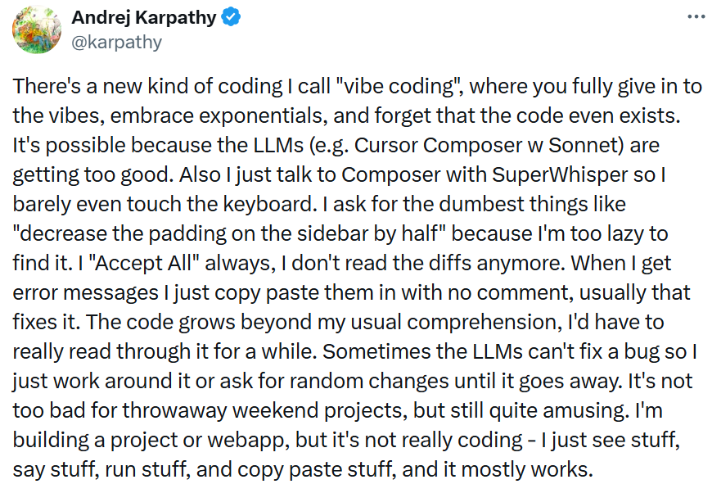
The term “vibe coding” was actually coined by Andrej Karpathy (Slovak-Canadian computer researcher). In his twitter / X post above, he explained really well what vibe coding means. In simple terms, vibe coding is a process of building software by simply describing what you want in simple and easy to understand language and letting AI build it for you.
A vibe coding tool is also the same, it is simply an AI powered software that helps you build real, working applications by understanding plain English instructions. Instead of writing code line by line, you describe what you need and the tool generates the code for you.
Read Also: Top 10 Vibe Coded Websites in 2026 – Real Builds, Real Timelines
Vibe Coding Tools Outlook
Not all vibe coding tools work in the same manner. Before picking one, it helps to understand that these tools fall into three broad categories. Each one serves a different stage, skill level and use case.
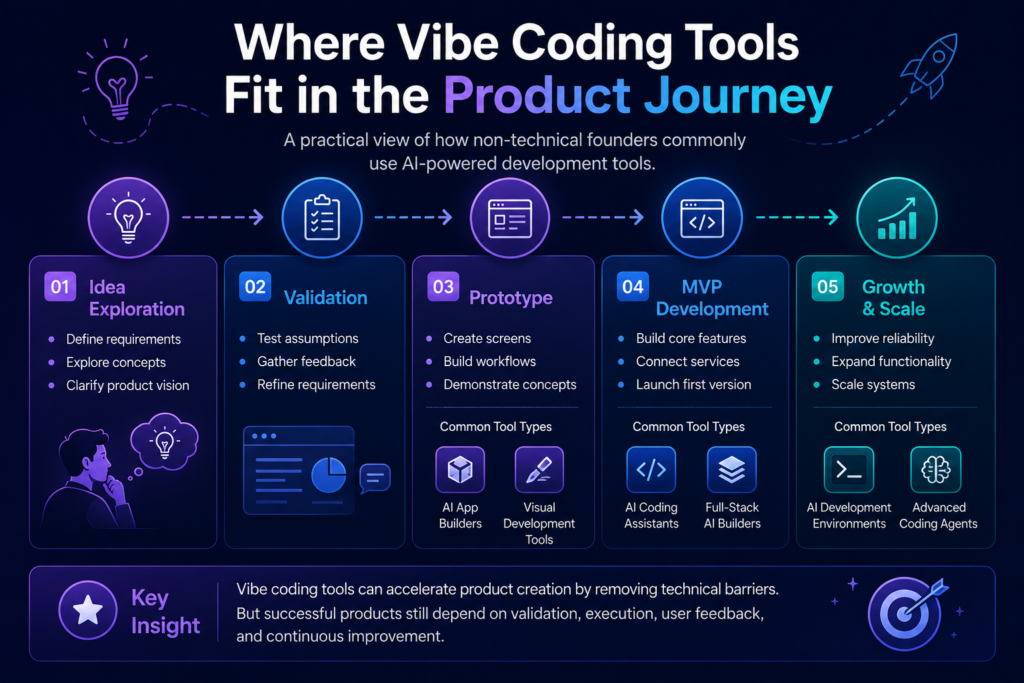
1) All in One App Builders
These are the platforms like Lovable, Bolt, and Base 44. You explain your app in plain English and they generate everything for you including the frontend, backend, database, and hosting. You do not write a single line of code. You do not set up any servers. You just describe what you want and the platform handles the rest. These are the most beginner-friendly options and the fastest way for a non-technical founder to go from idea to a live working product.
2) AI Powered Code Editors
These are tools like Cursor, Windsurf, GitHub, and Copilot. They sit inside a code editor and work alongside a developer, suggesting code, completing functions and helping write entire features faster. Think of them as a very smart co-pilot for someone who already knows how to fly the plane. If you have a developer on your team, these tools can double how fast they ship.
3) AI Coding Agents
These are tools like Claude Code, Replit Agent and Open AI Codex. Unlike editors that suggest code, these are AI systems that can plan, write and deploy code more autonomously. You give them a task and they figure out the steps, write the files, run commands and get things done with minimal hand-holding. They are the most powerful category but also the one benefits most from having a senior developer, engineer directing or leading the work.
Read Also: Agentic Engineering vs Vibe Coding – The 2026 Comparison Guide for Founders, CTOs and Builders
Best Vibe Coding Tools To Have In 2026
Let’s have a look at the best vibe coding tools which non-technical founders can use.
1) Cursor
Cursor is a code editor built on top of code that has an AI co-pilot baked directly into every part of the experience. It does not just suggest code, it writes entire features, explains errors in plain English and lets you chat with your codebase like it is a document.
Features
1) AI chat directly inside the editor that understands you full project.
2) Tab autocompletes that finish entire functions, not just single lines.
3) Composer mode where you describe a feature and it writes all the files needed.
4) Supports every major programming language and framework.
5) Works with your existing code, not just few projects.
Pros
1) The most powerful AI editor available right now.
2) Senior engineers love it because it speeds up their work without losing control.
3) Great for founders who have some technical help but want to move faster.
4) Context-aware, meaning it understands how different parts of your project connect.
Cons
1) Has a learning curve if you have never used a code editor before.
2) Works best when paired with a developer who can review what the AI generates.
3) Not a no-code tool, you still need some technical understanding to use it well.
Pricing
1) Free : Hobby plan with limited AI usage.
2) Pro : $20 per month
3) Business : $40 per user month
Best For
Founders with a developer on their team who wants maximum AI horsepower on complex, multi-file projects without leaving their code editor.
2) Claude Code
Claude Code is Anthropic’s official command-line AI coding tool that works directly inside your terminal. It understands your entire codebase, can write and edit files, run commands and fix bugs with full context of everything in your project.
Features
1) Reads your entire project folder and understands how everything connects.
2) Can write new files, edit existing ones and run terminal commands on your behalf.
3) Handles complex multi-file tasks like setting up auth, adding payment flows or building API endpoints.
4) Works with any stack, any language, any framework.
5) Deeply integrated with the Anthropic Claude model family.
Pros
1) One of the most capable AI coding tools available for complex, real-world projects.
2) Understands context across large codebases better than most competitors.
3) Trusted by senior engineers for production-level work.
4) Constantly improving with new model updates from Anthropic.
Cons
1) Requires comfort with a terminal and command-line interface.
2) Pricing is usage based not a flat subscription, so costs can vary.
3) Not beginner-friendly without some technical guidance alongside it.
Pricing
1) Pro plan is $17 /month billed annually.
2) Max plan starts from $100/month.
Best For
Founders working with a senior engineer or technical co-founder who wants maximum AI horsepower on complex projects.
This Might Be Useful to You: Cursor vs Claude vs Bolt – AI Coding Tool Comparison for Production Code
3) GitHub CoPilot
GitHub Copilot is one of the most widely used AI coding tools in the world. Built by GitHub and powered by OpenAI. It sits inside your code editor and suggests code as you type, like autocomplete but for entire functions and blocks of logic.
Features
1) Real time code suggestions as you type inside VS (visual studio) code, JetBrains and other editors.
2) Copilot chat lets you ask questions about code and get plain English explanations.
3) Copilot Workspace lets you describe a task and get a full plan with code changes.
4) Works across almost every programming language.
5) Integrates directly with GitHub repositories.
Pros
1) Widely supported and works inside the tools developers already use.
2) Great for speeding up repetitive coding tasks.
3) Copilot Chat makes it approachable even for non-technical users who want to understand what is being built.
4) Business plans include stronger privacy controls for teams.
Cons
1) Suggestion can sometimes be outdated or need review.
2) Less context developers to actually use it effectively.
Pricing
1) Pro at $10 USD for overall features of the plan including the features of the free plan.
2) Pro+ at $39 USD including pro plan’s features and more.
Best For
Founders with a developer on their team who is already using GitHub and wants AI assistance built into their existing workflow.
This Might Be Useful to You: Cursor Vs GitHub Copilot Vs Claude Code: Which Is Best?
v0 by Vercel
v0 is a generative UI tool by Vercel that turns plain text descriptions into real, working frontend components. You type what you want your interface to look like and v0 generates clean, copy paste ready React and Tailwind code instantly. For non-technical founders, this is one of the most accessible tools on this list.
Features
1) Generate full UI components from a simple text prompt.
2) Outputs clean React and Tailwind CSS code that developers can use directly.
3) Lets you iterate on designs by describing changes in plain English.
4) Built-in preview so you see the result before copying the code.
5) Integrates with Next.js and Vercel deployment in one click.
Pros
1) One of the most beginner-friendly tools on this list.
2) No coding knowledge needed to generate professional looking interfaces.
3) Great for showing investors or early customers what your product will look like.
4) Great for showing investors or early customers what your product will look like.
5) Produces code is clean and production ready.
Cons
1) Focused mainly on frontend UI, not full product logic or backend.
2) Free plans have limited generation credits.
3) Still needs a developer to wire the UI into a full working product.
Pricing
1) Free: Limited credits per month
2) Premium: $20 per month
Best For
Non-technical founders who want to prototype their product interface quickly or communicate design ideas to a developer without needing design tools.
5) Bolt.new
Bolt is a browser based full stack AI development tool that lets you build, run and deploy real web applications entirely in your browser. No installation, no setup, no terminal. You describe your app, Bolt builds it and you can share a live link within minutes.
Features
1) Full stack app generation directly in the browser.
2) Builds frontend, backend and database together in one go.
3) Supports popular frameworks including React, Next.js and Astro.
4) One-click deployment to a live URL.
5) Edit your project using plain English prompts after the initial build.
Pros
1) Zero setup required, works entirely in the browser.
2) One of the fastest ways to go from idea to live URL.
3) Great for non-technical founders who want to see something working immediately.
4) No need for any developer environment setup.
Cons
1) Apps generated by Bolt alone often need cleanup before they are production ready.
2) Complex logic, security and scalability need a developer’s review.
3) Free plan has limited usage.
Pricing
1) Free : Limited daily tokens
2) Pro : $20 per month
Best For :
Non- technical founders who want to see a working version of their idea live within hours especially for demos and early validation.
6) Lovable
Lovable is a full stack AI web app builder that goes from your idea to a deployed product. It is specifically designed for people who are not developers. You describe your app, Lovable builds it and you can keep refining it through conversation without touching a single line of code.
Features
1) Natural language app building with no coding required.
2) Connects to Supabase for real databases and user auth out of box.
3) Stripe integration available for adding payments.
4) GitHub sync so developers can take over and extend the project if needed.
5) Built in deployment with a shareable live link.
Pros
1) More complex features can require developer involvement.
2) Generated code quality varies and needs review before scaling.
3) Higher tier plans are needed for serious production use.
Pricing
1) Free: Limited Credits
2) Pro: $25 per month
3) Business: $50 per month
Best For
Non-technical founders building their first real web app who want the most complete no-code-to-product experience available.
7) Replit (with Replit Agent)
Replit is a browser based coding environment that has added a powerful AI agent capable of building entire apps from a single description. Replit agent plans your app, writes the code, sets up the database and deploys it, all inside your browser.
Features
1) Replit Agent builds apps from a plain English description end to end.
2) Browser based with no installation or setup needed.
3) Supports dozens of programming languages.
4) Built-in hosting and deployment included.
5) Real-time collaboration so multiple people can work on the project.
Pros
1) Very accessible for non-technical founders.
2) Handles the overall build and deployment pipeline automatically.
3) Good for learning because you can see the code being written in real time.
4) Collaboration features are useful for small teams.
Cons
1) Performance and reliability can vary on complex projects.
2) Generated code often needs cleanup for production use.
3) Not ideal for enterprise level or high traffic applications without significant hardening.
Pricing
1) Replit Core: $18 per month billed annually
2) Replit Pro: $90 per month
Best For
Non-technical founders who want a fully browser-based environment to build, test and deploy their app without installing anything locally.
8) Windsurf by Codeium
Windsurf is a newer AI code editor from Codeium that has quickly gained attention for its Cascade feature, which takes multi-step actions across your entire codebase. Think of it as Cursor’s strong competitor with a slightly lower price point.
Features
1) Cascade mode takes autonomous multi-step actions to complete complex tasks.
2) Understands your entire codebase and keeps context across long sessions.
3) Supports all major programming languages and frameworks.
4) Works inside VS Code and as a standalone editor.
5) AI-powered search and code explanation built in.
Pros
1) Cascade is one of the most autonomous AI coding experiences available.
2)More affordable than Cursor at the Pro level.
3) Great for developers who want the AI to handle longer, multi-file tasks.
4) Fast and responsive interface.
Cons
1) Still newer than Cursor and has a smaller community.
2) Best suited for use with a developer, not truly no-code.
3) Some complex tasks still need manual review and correction.
Pricing
1) Free: Available with limited AI credits
2) Pro: $15 per month
Best For
Founders with a technical team member who wants a powerful AI editor at a lower cost than Cursor.
9) Gemini Code Assist (by Google)
Gemini Code Assist is Google’s AI coding assistant, powered by the Gemini model family. It integrates into popular editors including VS Code and JetBrains and offers one of the most generous free tiers of any AI coding tool currently available.
Features
1) AI code completion and chat inside VS Code and JetBrains.
2) Supports a large context window, meaning it understands more of your project at once.
3) Integrated with Google Cloud services for easy deployment.
4) Code explanation and transformation tools built in.
5) Available for individual developers and enterprise teams.
Pros
1) One of the most generous free tiers among all AI coding tools.
2) Large context window makes it strong for bigger projects.
3) Deep integration with Google Cloud is useful if your stack is on GCP.
4) Backed by Google’s research and model improvements.
Cons
1) Works best within the Google ecosystem.
2) Less mature community and tooling compared to Cursor or Copilot.
3) Needs a developer to use effectively.
Pricing
1) Free: Very generous individual tier with high usage limits
2) Enterprise: Custom pricing through Google Cloud
Best For
Founders or developers already using Google Cloud who want a powerful AI coding assistant with a strong free tier.
10) ChatGPT (with Advanced Data Analysis and Coding)
ChatGPT by OpenAI is not a dedicated coding tool but it is one of the most useful for non-technical founders. With the Plus plan, you get access to code generation, debugging, explaining technical concepts, and even running code directly inside the chat through its code interpreter.
Features
1) Generate code in any language from plain English descriptions.
2) Code interpreter runs and tests Python code directly inside the chat.
3) Explains technical concepts, error messages and code in simple language.
4) Can review code your developer wrote and flag potential issues.
5) GPT-4o and newer models offer strong reasoning for complex logic tasks.
Pros
1) The most accessible AI tool for non-technical founders with no setup needed.
2) Great for understanding what your developer is building.
3) Useful for writing specs, user stories, and product requirements that developers can use.
4) Can prototype logic and small scripts quickly
Cons
1) Not an integrated development environment, so it cannot directly edit your project files.
2) Generated code needs to be copy-pasted and reviewed by a developer.
3) Not suitable as a standalone tool for building a full product.
Pricing
1) Free: GPT-4o with limited usage
2) Plus: $20 per month
3) Team: $30 per user per month
Best For
Non-technical founders who want to understand their product better, write clearer briefs, prototype ideas or have a plain-English conversation about what they want to build.
Read Also: Top 10 Vibe Coded Apps in 2026 – Real Builds, Real Timelines
Quick Comparison Table
| Tool | Best For | Free Plan | Starting Paid Price |
| Cursor | Engineers and technical co-founders | Yes (limited) | $20/mo |
| Claude Code | Senior engineers on complex projects | No | API usage |
| GitHub Copilot | Developer teams on GitHub | Yes (limited) | $10/mo |
| v0 by Vercel | UI prototyping and design handoff | Yes (limited) | $20/mo |
| Bolt.new | Fast idea to live URL | Yes (limited) | $20/mo |
| Lovable | Full app with no coding | Yes (limited) | $25/mo |
| Replit Agent | Browser-based full app builds | Yes (limited) | $18/mo |
| Windsurf | AI editor at lower cost | Yes (limited) | $15/mo |
| Gemini Code Assist | Google Cloud users | Yes (generous) | Custom |
| ChatGPT | Understanding and prototyping ideas | Yes (limited) | $20/mo |
How to Choose the Best Vibe Coding Tool?
With so many options it is easy to feel stuck before you even start. Here are the right questions to ask yourself before picking a tool.
Ask yourself these five questions first
1) Do I have any technical knowledge at all, or am I completely non-technical?
2) Do I have a developer or technical co-founder on my team?
3) Am I trying to validate an idea quickly or build something production-ready?
4) What is my monthly budget for tools?
5) Do I need a full app with a database and payments, or just a prototype interface?
Tips
1) If you are completely non-technical and building alone, start with Lovable or Bolt. Both are designed for people without coding backgrounds and can get you to a working product without writing a single line of code.
2) If you want to prototype your UI to show investors or customers, v0 by Vercel is your best starting point. It is fast, free to start, and the output looks professional.
3) If you have a developer on your team, give them Cursor or Windsurf. These tools multiply what a good developer can do in a day and keep the code quality high.
4) If budget is tight, GitHub Copilot at $10 a month or Gemini Code Assist with its free tier are strong starting points that do not compromise on quality.
5) If you are building something serious and scalable, do not rely on vibe coding tools alone. The tools are powerful but they do not replace architecture decisions, security reviews, and proper testing. That is exactly where Triple Minds comes in.
Read Also: Is Vibe-Coded Code Production-Ready?
Not Sure Which Vibe Coding Tool Is Right for Your Project?
Every product has different requirements, timelines, and technical challenges. Whether you’re evaluating AI-powered development tools, planning an MVP, or looking to accelerate software delivery, Triple Minds can help you choose the right path and execution strategy.
Talk to Our Team
Wrapping Up
Vibe coding tools have genuinely changed what is possible for non-technical founders in 2026. What used to require a six-figure budget and a six-month timeline can now be started in a browser with a free account and a good idea.
But there is one thing every founder learns eventually. The tools are fast. The engineering judgment still matters. A product built entirely on AI-generated code without review, testing, or proper architecture will crack the moment real users start using it.
The smartest founders use these tools to move fast and then bring in senior engineers to make sure what was built can actually scale. That is the exact model Triple Minds operates on. We combine the speed of the best vibe coding tools with senior engineering review on every single line that ships to production.
If you have an idea and want to know what it would actually cost to build it right then get your free vibe build plan from Triple Minds and a senior engineer will respond within 24 hours.
Quick Answers to Common Questions
Can a non-technical founder use vibe coding tools without any developer help?
Yes, tools like Lovable, Bolt and v0 are designed for non-technical users, but for anything production-ready you will eventually need a developer to review and harden the code.
Is vibe coding safe for building apps that handle real user data?
The tools themselves are safe to use, but the code they generate may have security gaps. Always have a developer audit the output before going live with real users.
What is the difference between a vibe coding tool and a no-code tool like Webflow?
No-code tools build within their own platform and limit what you can customize. Vibe coding tools generate actual code that you own completely and can extend in any direction.
Do I need to pay for multiple vibe coding tools at once?
Not necessarily. Most founders start with one tool like Lovable or Bolt and add more only when they bring a developer onto the team who needs tools like Cursor or Claude Code.
Will vibe coding tools replace developers in the future?
They will change the kind of work developers do, but senior engineering judgment around architecture, security and scalability is not something AI replaces today or in the near future.
Got a project in mind? Let’s build it together.
We work with founders and product teams across consulting, development, and growth marketing. Tell us what you’re building and we’ll show you how we’d ship it.