How to Launch a Pharmacy App with Great Security Features?
A pharmacy app can serve multiple purposes - it can manage medical history, medical prescriptions, patient profiles, and much more. Therefore, launching a pharmacy app with great security features is requires a structured approach.

A pharmacy app can serve multiple purposes – it can manage medical history, medical prescriptions, patient profiles, and much more. Therefore, launching a pharmacy app with great security features is requires a structured approach, and because the app is responsible for handling sensitive personal data and financial task, security in a pharmacy app becomes what oxygen is to humans.
So, what does it take to launch a secure and successful pharmacy app?
It starts with building security into the app from the very beginning. You need to identify the data your app will collect, understand the regulatory and compliance requirements, and many other factors that we will explain further in this blog.
One of the most important considerations is to choose the right app development company that has a good understanding of frameworks like OWASP and the Mobile Application Security Verification Standard (MASVS).
Planning to build a pharmacy app? This guide is exactly what you were looking for. By the end of this blog, you will learn what security features you will need to launch a pharmacy application. Let’s start
Essential Steps to Launch a Pharmacy App with Strong Security
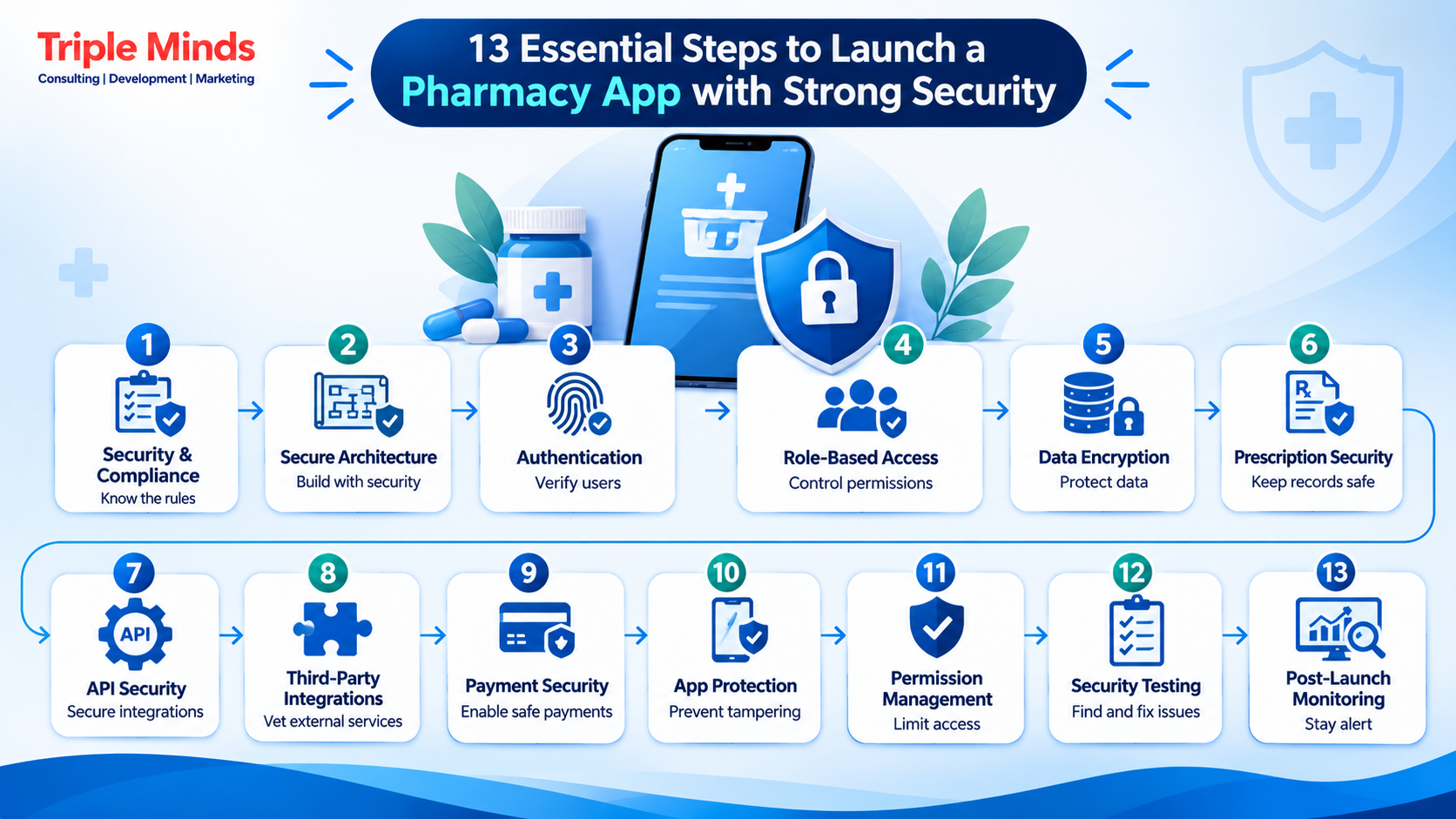
Step 1: Define the Security and Compliance Requirements
Before you begin developing a pharmacy app, it is important for you to know what your pharmacy app will collect, process, store, and share.
Start with a data inventory.
For example:
| Data Type | Example | Security Consideration |
| Personal information | Name, phone, email | Access control and encryption |
| Health-related information | Medication history | Strong access restrictions |
| Prescription data | Prescription images | Secure storage and transmission |
| Payment information | Transaction details | Secure payment integration |
| Authentication data | Passwords, tokens | Secure credential and token management |
| Delivery data | Address, location | Privacy and restricted access |
| Business data | Inventory, pricing | Role-based access |
Next, identify the markets in which you plan to operate.
Geographically, healthcare and pharmacy regulations vary. An app serving customers in one country may have different legal and compliance requirements from one operating across multiple countries.
For example, HHS provides specific resources for developers of mobile health applications to understand how privacy and security laws may apply depending on the app’s role and the organizations involved.
This is why a pharmacy app should begin with a security and compliance assessment. Being a reliable mobile app development company, when launching a pharmacy app, we document the following:
- What information the application collects.
- Why the information is collected.
- Where the information is stored.
- Who can access it.
- How it moves between systems.
- Which third-party services receive it.
- How long it is retained.
- How it is deleted.
- What happens if an account is compromised.
- What happens if a security incident occurs.
Step 2: Build the App With a Secure-by-Design Architecture
One of the biggest mistakes that businesses do is treating security as a last stage of app development. But in reality, you need to influence architecture from the beginning stage. A pharmacy app can typically be divided into several major components:
- Customer mobile application
- Pharmacist or pharmacy dashboard
- Admin panel
- Backend services
- Database
- Payment gateway
- Prescription processing system
- Inventory system
- Delivery/logistics integrations
- Notification services
- Analytics and monitoring systems
Each component of the application introduces potential security risks. For example, securing the mobile app does not automatically secure the backend. Similarly, securing the backend does not eliminate risks introduced by a third-party payment provider or analytics SDK.
Therefore, security should be evaluated across the entire ecosystem.
The OWASP MASVS specifically emphasizes that mobile apps should be considered as part of a broader ecosystem involving backend servers, APIs, third-party services, and other components.
Read More: How Much Does an AI Hospital Management System Development Cost
Step 3: Implement Strong Authentication
In an application, authentication is a feature that verifies the identity of the user or device. For applications like pharmacy management, such capabilities should be convenienet for everyday customers while providing protection to access. A secure authentication system may include:
- Strong password requirements
- One-time passwords where appropriate
- Multi-factor authentication
- Biometric authentication
- Secure session management
- Device recognition
- Login alerts
- Account recovery protection
- Brute-force protection
- Automatic session expiration
Although authentication is important, not every application needs the same level of authentication.
For example, browsing publicly available medicine information may require no authentication, while viewing prescription information or changing payment details should require stronger authorization.
Sensitive operations can also trigger the need for re-authentication.
OWASP recommends re-authentication for sensitive activities changing passwords or altering payment information and emphasizes authorization checks on backend functionality.
Step 4: Use Role-Based Access Control
A pharmacy application is not limited to a single user; it includes customers, pharmacists, staff, delivery personnel, admin, and support team. All these users need specialized and isolated access privileges. Role-Based Access Control can help you enforce boundaries like:
- Delivery executives need access to delivery information along with viewing customers’ prescription history.
- Customer support may need access to order information but not unrestricted access to sensitive healthcare information.
A good authorization model is the one that follows the principle of least privilege; that is- users and services should receive only the permissions they need to perform their tasks. As per the guidelines of OWASP, you should apply least privilege to both device permissions and backend services.
Note: Authorization must also happen on the server side. Never assume that hiding a button in the mobile application is sufficient protection. Attackers can potentially manipulate requests independently of the user interface.
Step 5: Encrypt Sensitive Data
Encryption should not be something static. It should be capable enough to protect sensitive information at both stages- when the data is moving and when it is stored.
Encryption in transit
When pharmacy apps communicate with the backend services, they should use secure transport protocols like TLS
This protects information while it travels between the user’s device and your infrastructure.
Encryption at rest
Sensitive information that is stored within databases, backups, etc. should be protected using appropriate strong encryption.
Where possible, if you have to store authentication tokens or other sensitive information locally, use platform secure storage methods.
OWASP recommends storing sensitive information in encrypted format both at rest and in transit. Using platform security features such as Secure Enclave (for supported Apple devices) and hardware-backed security (for supported Android devices).
Do NOT create your own encryption methods. Instead, use tried and tested cryptography technologies. Also ensure that the keys used for encryption are managed securely.
Step 6: Secure Prescription Uploads and Documents
Managing prescriptions is complex as well as important and therefore deserves special attention. Customers may upload prescription images, PDFs, doctor notes, medication instructions, and other healthcare documents. These files should not be treated like ordinary profile images. Security measures can include:
- Secure file upload endpoints
- File type validation
- File size restrictions
- Malware scanning
- Secure object storage
- Access-controlled URLs
- Encryption
- Short-lived download permissions
- Audit logging
- Controlled deletion policies
Therefore, your pharmacy app should also prevent users from accessing another customer’s uploaded documents by manipulating an identifier in a request.
Step 7: Protect APIs and Backend Services
API manages authentication, order management, prescription processing, inventory, payments, and customer data; that’s why API security becomes important.
The backend of your pharmacy app should implement strong authentication, authorization on every sensitive endpoint, input validation, rate limiting, request validation, secure error handling, token expiration, etc.
Note: Never place sensitive API keys or secrets directly inside a mobile application’s code. As mobile application binaries can potentially be inspected or reverse-engineered, you should never place sensitive API keys or secrets directly inside a mobile application’s code.
Step 8: Choose Third-Party Integrations Carefully
There are very few modern pharmacy apps that operate independently. You may integrate payment gateways, SMS providers, Email platforms, maps, delivery services, cloud storage, and analytics tools.
Every application integration adds another dependency. Therefore, before making the decision to integrate a third-party service, you need to evaluate the following-
- What data does it receive?
- Where is the data stored?
- How is it transmitted?
- What authentication mechanism does it use?
- Does it retain customer information?
- What happens if the service is compromised?
- What permissions does its SDK require?
- How quickly does the provider address vulnerabilities?
Step 9: Add Secure Payment Processing
One basic expectation that customers have from their pharmacy apps is convenient digital payments. That is why we say payment information should be handled carefully. Whenever possible, rather than building complete payment processing from the ground up, use reputable payment providers. The app should:
- Use secure payment APIs
- Avoid unnecessary storage of card information
- Protect payment-related tokens
- Require re-authentication for sensitive payment changes
- Validate transaction responses on the backend
- Monitor suspicious transactions
- Maintain appropriate transaction logs
All these factors make payment security as important as healthcare data. For example, you should not expose your prescription information in payment-related logs or notifications.
Step 10: Protect the App Against Reverse Engineering and Tampering
Mobile applications are installed on devices that you, as an owner or entrepreneur, can not control. This means attackers may attempt to:
- Reverse-engineer the application
- Modify application code
- Extract secrets
- Manipulate requests
- Hook application functions
- Run the app in compromised environments
- Repackage the application
To avoid these risk factors and protect your application, you can incorporate additional resilience mechanisms into your pharmacy app development process. These can include:
- Code obfuscation
- Application integrity checks
- Runtime tamper detection
- Root/jailbreak detection where appropriate
- Debugger detection
- Secure app signing
- Detection of suspicious environments
- Protection of sensitive application logic
Step 11: Minimize the Permissions Requested by the App
It is not necessary for your pharmacy app to need all the permissions available on your device. Ask only for the permissions that your app requires.
For example, if customers need to upload prescriptions using their camera, camera access may be necessary. If location is required to provide delivery services, location access may have a legitimate purpose.
When you set unnecessary permissions, it increases privacy and security risk. Your application user should understand the purpose behind a requested permission.
Step 12: Perform Security Testing Before Launch
A pharmacy app should not go directly from development to production.
Although development and production are major processes, overseeing security testing can cost you much more. Security testing should be integrated into the development lifecycle. A comprehensive testing process may include:
- Static Application Security Testing
- Dynamic Application Security Testing
- Mobile Application Testing
- API Security Testing
- Penetration Testing
- Dependency Scanning
- Configuration Reviews
Step 13: Monitor the App After Launch
Launching a pharmacy application does not mean that the security work is over. As the app evolve, new vulnerabilities and risks emerge, the reason being operating system updates, changes in third-party dependencies, API modifications, or customizations. Therefore, ongoing security monitoring should be an essential part of your post-launch strategy.
It is also important to test backups and maintain a disaster recovery plan so that your business can respond effectively if a security incident or system failure occurs. Your pharmacy app’s security strategy should follow the same approach—regularly identifying new risks, strengthening existing controls, and adapting security measures as your application, technology stack, and threat landscape change.
Read More: AI Medical Scribe Development Cost & Features List
A Practical Security Checklist for Launching a Pharmacy App
Before launching your pharmacy app, use the following checklist:
Architecture
- Conduct threat modeling.
- Map sensitive data flows.
- Separate customer, pharmacy, and administrative privileges.
- Apply least-privilege principles.
- Define secure API architecture.
Authentication
- Implement strong authentication.
- Consider MFA for high-risk accounts.
- Support secure session management.
- Protect account recovery.
- Implement login monitoring.
Data Protection
- Encrypt sensitive data in transit.
- Encrypt sensitive data at rest.
- Use secure device storage.
- Minimize stored data.
- Establish retention and deletion policies.
Prescription Security
- Validate uploaded files.
- Restrict prescription access.
- Secure document storage.
- Protect document URLs.
- Log sensitive access events.
APIs
- Secure every sensitive endpoint.
- Validate inputs.
- Implement authorization checks.
- Add rate limiting.
- Protect tokens and secrets.
Mobile Security
- Disable unnecessary debugging.
- Protect application integrity.
- Consider anti-tampering measures.
- Secure app signing.
- Review third-party libraries.
Testing
- Conduct code reviews.
- Perform vulnerability scanning.
- Test APIs.
- Perform mobile application security testing.
- Conduct penetration testing.
- Resolve critical vulnerabilities before release.
Post-Launch
- Monitor security events.
- Patch dependencies.
- Review access privileges.
- Conduct periodic security assessments.
- Maintain an incident response process.
Read More: How to Make Mental Health App Like Elomia Clone?
How Can Triple Minds Help You Build a Secure Pharmacy App?
Pharmacy app development is not only about creating a good looking mobile interface. It is a product that bring healthcare tasks, e-commerce functionality, secure payments, prescription management, APIs, user authentication, and pharmacy operations under single roof. That is why it is a matter of concern to choose the right development partner.
Whether you want a custom app development service or a white label solution, Triple Minds is the best mobile app development company that follows a structured approach aligned with your product lifecycle.
Rather than treating security as an isolated technical feature, the goal should be to incorporate security into the product’s architecture and development workflow. Depending on the pharmacy business model, We can plan developing an app with features like:
- Secure customer and pharmacy accounts
- Prescription management
- Role-based access control
- Secure APIs
- Payment integration
- Encrypted data handling
- Secure cloud infrastructure
- Third-party integrations
- Admin and pharmacy dashboards
- Audit trails
- Security testing
- Post-launch maintenance
If you are planning to develop a pharmacy app, we can help you translate your requirements into a practical product roadmap. To know more, you can talk to our expert and to get an estimated cost idea, you can use app cost calculator tool.
Launch Your Pharmacy App with Triple Minds
Build a secure, feature-rich pharmacy app with Triple Minds. From modern mobile app features to AI-powered capabilities, Triple Minds helps businesses create smarter pharmacy experiences with streamlined operations, improved user engagement, and scalable technology.
Explore Our Mobile App Solutions
Conclusion
For a pharmacy app, it is as important to earn customer trust as it is to deliver seamless solutions. Because your app will handle sensitive health data and payment information, security needs to be a part of your launch strategy. From choosing a secure architecture and implementing authentication to allowing role-based access to protect prescription data and testing third-party integrations, every stage of pharmacy app development plays a crucial role in influencing the safety and reliability of your pharmacy app.
If you’re planning to launch a pharmacy app, working with an experienced pharmacy app development company can help you bring these requirements together under one structured development process. Let’s discuss your app idea and start developing a product that people will love to operate.
Frequently Asked Questions About Pharmacy App
How does multi-factor authentication improve pharmacy app security?
Multi-factor authentication adds an extra layer of protection by requiring users to verify their identity through multiple methods, such as passwords, OTPs, or biometric authentication. This reduces the risk of unauthorized account access.
How can developers prevent cyberattacks on pharmacy apps?
Developers can prevent cyberattacks by implementing secure coding practices, conducting penetration testing, updating software dependencies, using firewalls, monitoring suspicious activities, and performing regular security assessments.
How can businesses maintain pharmacy app security after launch?
Businesses should regularly update the application, monitor security threats, conduct vulnerability assessments, maintain encrypted backups, review user access permissions, and establish an incident response plan to address potential security breaches.
How much does it cost to develop a pharmacy app?
The cost of developing a pharmacy app typically ranges from $15,000 to $80,000 or more, depending on app complexity, features, platform selection, UI/UX design, third-party integrations, and security requirements.
Got a project in mind? Let’s build it together.
We work with founders and product teams across consulting, development, and growth marketing. Tell us what you’re building and we’ll show you how we’d ship it.