How to Integrate AI into an Existing Business or Platform?
Learn how to integrate AI into your existing business platform without rebuilding your software from scratch. This guide covers a step-by-step AI integration process, technology stack audits, AI architecture selection, security, data readiness, deployment, and real-world business use cases. Discover how AI can automate workflows, improve productivity, and unlock new revenue opportunities.

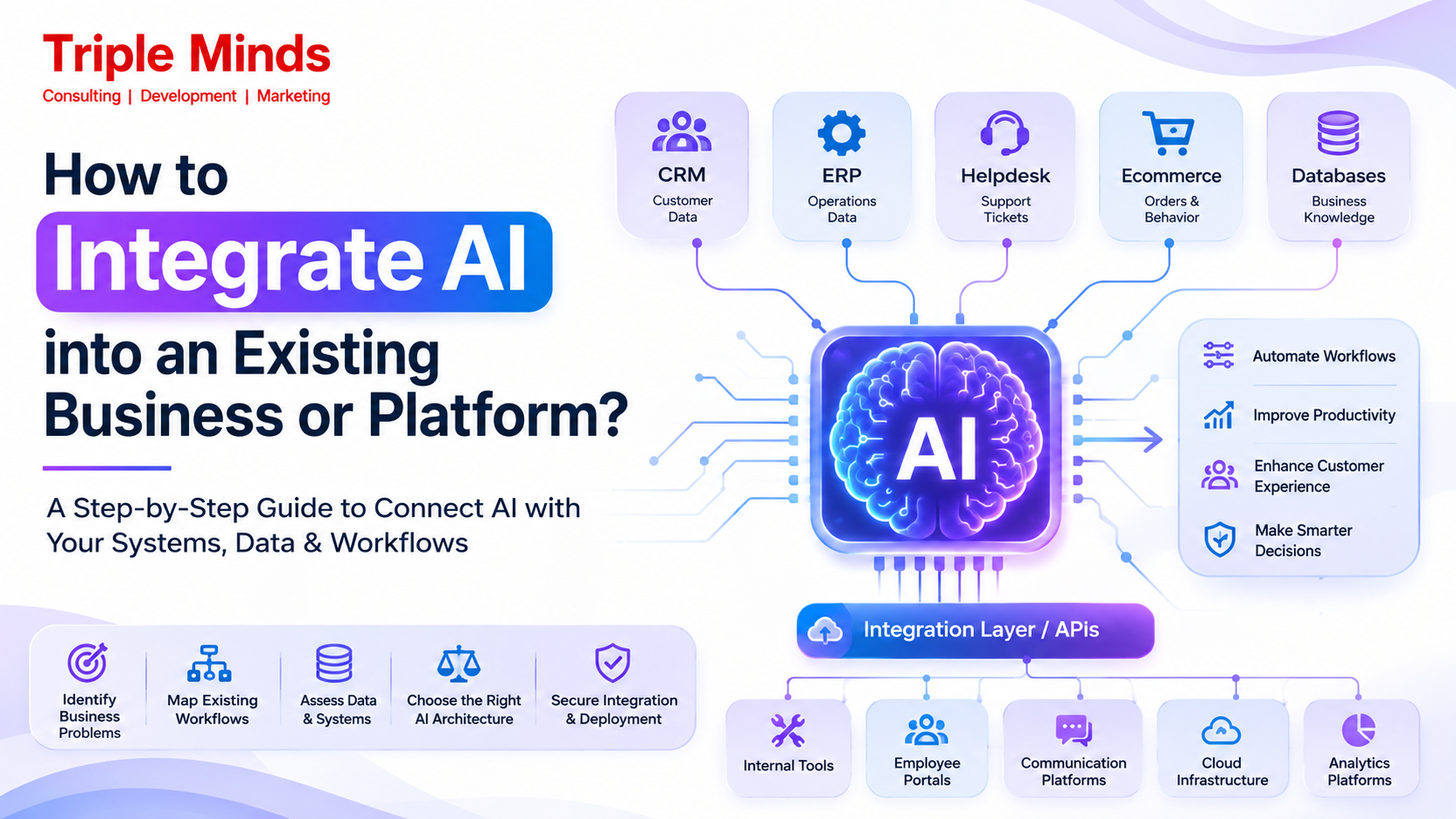
You can integrate AI into your existing business or platform by connecting AI models, AI agents, or machine learning systems, to your current software, data, APIs, and workflows. The process is complex, as it involves identifying high-value cases, website audits, and much more.
To ensure that AI is securely connected or integrating with your desired platform, you need expert assistance. That’s why Triple Minds exist. We develop AI systems that connect securely through APIs or integration layers.
Artificial intelligence is no longer something that businesses need to build from scratch. In many cases, the fastest way to adopt AI is to integrate it into the systems, applications, and workflows of your business.
- Your CRM already contains customer information.
- Your ERP already manages operational data.
- Your helpdesk already stores support tickets.
- Your ecommerce platform already tracks orders and customer behavior. Your internal databases already contain years of business knowledge.
Now, the opportunity- or, we can say, the challenge is to make these systems intelligent. AI has the ability to sit on top of your existing technology stack and help you streamline your business operations. These operations can help employees analyze information, automate repetitive workflows, respond to customers, and make recommendations, etc.
A successful AI integration is not just about connecting AI models to applications. Businesses need to consider data architecture, APIs, security, permissions, workflows, model selection, and much more. In this blog, we have gathered exclusive information about how to actually integrate AI into an existing business or platform.
Step-by-Step Guide to Integrate AI into an Existing Business Model
Instead of thinking of AI integration as an approach to simplify the development task, start considering it as a strategic step towards business transformation. To adopt AI, it is not necessary that you rebuild your existing business platform. Let’s see step-by-step how you can integrate AI into your business models.
Step 1: Identify the Business Problem
The very first step is to identify the problem that your business is facing. So, do not start by asking, “Where can we use AI?” Instead, ask, “What business problem are we trying to solve?”
Look for workflows involving:
- High volumes of repetitive tasks
- Manual data processing
- Large amounts of unstructured information
- Slow customer response times
- Complex information retrieval
- Repetitive decision-making
- High operational costs
- Employee productivity bottlenecks
- Large customer support volumes
- Difficult-to-scale processes
Step 2: Map the Existing Workflow
Before introducing AI, demonstrate how your business process is currently working. For example: Lead received → employee reviews lead → checks CRM → researches customer → assigns score → sends follow-up → updates CRM. Then identify where AI can participate.
- Read the incoming lead
- Retrieve customer information
- Analyze previous interactions
- Score the lead
- Generate a personalized response
- Update the CRM
- Notify the sales representative
Ready to Integrate AI into Your Business Platform?
Successfully integrating AI requires more than connecting an API. Triple Minds helps businesses identify high-impact AI use cases, design scalable AI architectures, integrate large language models, automate workflows, and deploy production-ready AI solutions that fit seamlessly into existing software and business processes.
Talk to Our AI Integration Experts
Step 3: Audit Your Existing Technology Stack
The next step is understanding what systems already exist. You evaluate your CRM, ERP, databases, data warehouses, APIs, SaaS applications, internal tools, Customer portals, Communication platforms, authentication systems, cloud infrastructure, and analytics platforms. The quality and accessibility of these systems will help you influence how easily AI can be integrated.
Step 4: Assess Data Readiness
AI is only as useful as the information it can reliably access. Evaluate whether your data is accurate, current, structured, accessible, secure, and consistent across systems. If you operate knowledge-based AI applications, you have to create a retrieval pipeline that connects AI to the trusted internal sources. For example, you can connect product manuals, policies, FAQs, and technical documentation to a RAG system so the AI can retrieve relevant information when needed.
Step 5: Select the Right AI Architecture
Every business has a unique architecture. Therefore, depending on the use cases, you may need generative AI, machine learning, predictive analytics, recommendation systems, computer vision, speech AI, RAG, AI agents, multi-agent systems, or traditional automation combined with AI. For example:
- A document-processing workflow may require OCR, an LLM, structured extraction, and validation.
- A customer support system may require conversational AI, RAG, CRM integration, and human escalation.
- An autonomous business workflow may require an AI agent capable of reasoning, tool use, API calls, memory, and multi-step execution.
At Triple Minds, we develop AI agents that can connect with your CRM ERPs. databases, APIs, and internal tools. This allows AI systems to operate within your existing business environment.
Step 6: Connect AI With Business Systems
Integrate AI model endpoints directly into existing staff interface tools such as custom Slack apps, internal CRM extensions, and ERP dashboards. To ensure that your data is transferred seamlessly between core databases and AI services, you can also build automated middleware systems. Design a Human-in-the-Loop (HITL) fallback process so low-confidence AI outputs are routed to staff for review. Common integration mechanisms include:
- REST APIs
- GraphQL APIs
- Webhooks
- Database connections
- Middleware
- Cloud services
- Workflow automation
- MCP-based integrations
- Custom integration layers
The integration should also define what the AI is allowed to read, modify, create, or delete. It follows a structured workflow: AI Agent → Authentication Layer → CRM API → Customer Data → AI Reasoning → CRM Update.
Step 7: Define AI Permissions and Guardrails
AI should not automatically have unrestricted access to business systems. You can implement Role-Based Access Control to restrict AI agents from accessing unauthorized company data. Enforce system prompts, input filters, and safety guardrails to mitigate hallucinations, data leakage, and prompt injection risks. For example:
- A customer support AI may be allowed to view customer information and create support tickets but not issue refunds above a specific threshold.
- A sales AI may update lead records but require human approval before changing commercial terms.
- An internal AI assistant may access company documents but only retrieve information the authenticated employee is authorized to see.
Step 8: Build a Prototype
Before implementing AI across the entire organization, consider developing a controlled proof of concept.
- Develop a lightweight Minimum Viable Product (MVP) using a single high-impact, low-complexity workflow.
- Test early iterations with a select group of internal power users to gather real-world usage data and edge-case behaviors.
- Measure early output accuracy against human benchmarks to establish baseline system reliability.
Step 9: Test AI Under Realistic Conditions
Testing AI systems is different from traditional software development because AI systems are probabilistic and can change based on data. Therefore, it requires measuring statistical accuracy and handling subtle behavioral shifts. Before integrating it into your business model, test for:
- Incorrect answers
- Prompt injection
- Unauthorized data access
- API failures
- Incorrect tool calls
- Unexpected inputs
- Poor retrieval
- Latency
- Model failures
- Integration failures
- Security vulnerabilities
Step 10: Deploy, Monitor, and Optimize
AI integration does not end at deployment. Production systems should be monitored continuously to ensure accuracy, latency, token usage, cost, task completion rate, escalation rate, user satisfaction, API failures, hallucination rate, automation rate, and business outcomes. Monitoring allows businesses to identify where the AI performs well and where it requires improvement.
Triple Minds follows a continuous monitoring and optimization approach for production AI systems, including performance evaluation, prompt optimization, model updates, and issue resolution.
Voice search is rapidly changing how customers discover products and services online. Learn how AI-powered voice search has evolved, the technologies driving its growth, and what businesses should do to stay ahead in our guide on Voice Search AI Integration Timeline.
How Can AI Integration Increase Your Business Revenue?
AI integration can improve your business revenue by 72%. It can help you generate more qualified leads, increase conversions, customer retention, average order value, reduce operational costs, and scale customer-facing operations without proportionally increasing headcount. These results are not captured by AI integrations; they are influenced when you connect AI to your systems. Here are the major ways AI integration can contribute to revenue growth.
- It prioritizes prospects based on their behavior and likelihood to convert.
- Increases lead-to-customer conversion rates by responding to prospects faster and providing more relevant interactions.
- Better personalization to increase engagement, conversions, cross-selling, and upselling opportunities.
- Increasing average order value that grows revenue without requiring a proportional increase in the number of customers.
- Acquire new customers and retain the old ones.
- Scale revenue without scaling operations
Where Can You Integrate AI in Your Business Infrastructure?
Operating a standalone chatbot is a good idea, but when it is connected to the systems that your business already uses, the results are commendable. You can integrate AI with your CRM, ERP, operations systems, customer support platforms, e-commerce platforms, marketing tools, internal applications, and data warehouses. This will help you automate workflows, analyze business data, and support decision-making.
CRM Platforms
Integrating AI with Salesforce, HubSpot, or Microsoft Dynamics can make customer and sales data actionable. AI can help you analyze customer profiles, previous interactions, sales activities, and pipeline data. In this way, your teams can prioritize opportunities and automate repetitive sales tasks. From lead qualification, customer segmentation, call summarization, and generating follow-ups to action recommendation and identifying high-intent leads, AI can help you with everything.
Example: An AI agent can analyze a newly generated lead, retrieve its previous interactions from the CRM, evaluate its likelihood of conversion, recommend the next action, and create a personalized follow-up for the sales representative.
ERP & Operations Systems
AI can be integrated with ERP and operational systems to improve processes involving inventory, procurement, finance, supply chains, production, and resource planning. Rather than just storing data, an AI-powered ERP model can demand forecasting, inventory optimization, procurement recommendations, supply-chain monitoring, production planning, and much more so that your team can respond quickly to potential issues.
Example: AI can identify which product may face a shortage and recommend when you need additional stock by analyzing historical sales, current inventory, supplier lead times, and seasonal demand.
Customer Support Systems
Connecting AI with customer support software allows businesses to automate repetitive interactions. It gives the support team access to the relevant customer and product information. AI can retrieve information from CRM records, order systems, knowledge bases, FAQs, and previous conversations.
Example: When a customer asks about an order, an AI agent can verify the customer’s identity, retrieve order information through an API, check the latest shipment status, provide an answer, and update the support ticket.
Ecommerce Platforms
AI integration can transform ecommerce platforms. It can help ecommerce platforms automate their operation while personalizing shopping experiences and scaling customer support. AI systems can help identify user behavior, conversational assistants, dynamic merchandising, upselling, cross-selling, and much more.
Example: A customer can tell an AI shopping assistant, “I need a lightweight laptop for video editing under $1,500.” The AI can understand the requirements, search the product catalog, compare specifications, check availability, and recommend suitable products.
Curious how AI agents can automate inventory management, order fulfillment, and backend ecommerce operations? Discover how MCP agents securely connect with business systems to streamline workflows and power the next generation of agentic commerce in our guide on How MCP Agents Automate Inventory & Fulfillment.
Marketing Platforms
AI can connect with marketing automation and analytics platforms to help businesses personalize their marketing campaigns. When you connect your marketing platform to an AI system, it provides useful insights, analytical details, lead nurturing, generation, and audience segmentation.
Example: AI can identify customers who have viewed a product multiple times but have not purchased it. After analysis, it will segment them based on behavior and trigger a personalized marketing workflow.
Internal Tools & Business Applications
Rather than forcing employees to switch to a separate AI tool, AI can embed directly into proprietary tools and internal applications. AI can help with the following:
- Internal knowledge assistants
- Intelligent document search
- Automated reporting
- Workflow recommendations
- Employee support
- Data analysis
- Meeting and document summarization
- Internal process automation
- Natural-language interfaces
Example: An employee could ask an internal AI assistant, “What is our process for approving enterprise software purchases?” The AI can retrieve the relevant company policy and provide the answer based on authorized internal documentation.
How Can Triple Minds Help Businesses with AI Integration?
Triple Minds provides the best enterprise AI development services that combine AI engineering, software architecture, business workflows, and system integration. For businesses with existing infrastructure, we can help with:
- AI Integration Consultancy
- Generative AI Integration
- AI Agent Integration
- AI Product Modernization
- AI Infrastructure & Monitoring
Transform Your Business Model With AI
Data is all about accurate insights. Organizations or businesses that smartly integrate AI by reviewing their current business models achieve better results and business profits. Over 90% of businesses are adopting artificial intelligence, and rather than asking whether they should integrate AI into their websites, people are asking how they should integrate AI.
Ready to identify where AI can create measurable value in your existing systems? Talk to Triple Minds about your AI integration requirements and build a practical roadmap for implementation.
Build AI Agents That Work with Your Existing Systems
Want your AI to do more than answer questions? Triple Minds develops intelligent AI agents that connect with your CRM, ERP, databases, APIs, internal tools, and business workflows—helping automate operations, improve decision-making, and deliver personalized experiences across your organization.
Explore Our AI Agent Development Services
Common Questions that People Ask about AI Integration
What’s the easiest way to add AI to business models?
The fastest way is to first analyze whether your existing platform actually needs AI features, and if yes, then what features it needs. You need to identify your business, its goals, and requirements. Custom API integrations are best reserved for unique workflows that off-the-shelf options can’t handle.
How long will it take to integrate an AI system into an existing application or platform?
It depends on the needs of your platform. Some business models take a few weeks, while others take months to scale rollouts across departments while maintaining regular operations.
Should I build an in-house AI team or partner with an integration partner?
Investing in or hiring an expert AI partner is a smart and less complex approach as compared to sourcing an in-house team. However, if you have a team with technical capabilities and the complexity of use cases, you can source an in-house AI team.
What is the cost of AI integration for small and mid-sized businesses?
AI integration cost for small and mid-sized businesses is different. The cost for small businesses can vary from $10,000 to $50,000 and more, whereas mid-sized businesses can cost higher than $50,000. Want to know how much we cost? Talk to our AI development consultants.
Got a project in mind? Let’s build it together.
We work with founders and product teams across consulting, development, and growth marketing. Tell us what you’re building and we’ll show you how we’d ship it.