Common Bugs in AI-generated Code (and How to Fix Them)
AI-generated code can accelerate software development, but it often introduces hidden bugs, security risks, and logic errors that affect production systems. This guide explores the most common issues found in AI-written code, explains why they occur, and shares practical techniques to review, test, and fix them before deployment.

AI coding tools are everywhere now. Developers use GitHub Copilot, ChatGPT and similar tools to write code faster than ever before. And honestly, for a lot of simple tasks, the output is impressive. But here is the problem that nobody talks about enough. AI generated code breaks in ways that are surprisingly hard to catch before it reaches production.
Every major AI coding tool ships with the same fine print: “AI may make mistakes. Double-check all generated code.” This guide is what double-checking actually means in practice — the common bugs in AI code, why AI coding mistakes slip through review, and how to fix AI-generated code before it costs you.
If your product relies on AI generated code and you have no expert layer of review between the output and deployment, then you are taking a bigger risk than you might think.
At Triple Minds, we help businesses build, integrate and govern AI systems correctly through our AI Development and Consulting services so that the code powering your product is actually reliable, secure and built to scale.
This blog breaks down the most common issues in AI-generated code and exactly what you need to do to fix them. In one line: the most common bugs in AI code are hallucinated APIs, security vulnerabilities, outdated dependencies, edge-case logic errors, missing error handling, context mismatches, and code that does not scale — and every one of them is catchable with the right review process.
Key Takeaways
1) AI tools generate code by pattern matching, not reasoning which means they confidently produce errors they cannot recognize.
2) Security vulnerabilities especially hardcoded credentials and SQL injection are among the most dangerous and common bugs in AI generated code.
3) Edge case handling and error handling are consistently weak in AI output and must be added or reviewed manually.
4) Always verify that the functions, libraries and APIs referenced in AI-generated code exist in the version you are using.
5) Treating AI-generated code with the same review rigor as any other code is not optional, it is the only reliable path to production ready quality.
Facing Problems with Messy AI-Generated Code?
AI-generated code can speed up development, but it often leaves behind inconsistent architecture, duplicate logic, and maintainability challenges. Triple Minds helps teams clean up AI-generated codebases, improve code quality, and prepare applications for long-term scalability.
Explore Vibe Coding Cleanup Services
Why AI Generated Code Has Bugs In The First Place?
Before getting into specific bugs, it helps to understand why they happen. AI coding tools work by predicting the most statistically likely next piece of code based on patterns in their training data. They are not reasoning about your product, your database structure or your business logic. They are pattern matching at a very sophisticated level.
This means AI-generated code:
1) Often handles the “happy path” perfectly but fails on edge cases.
2) Can produce output that looks correct but contains subtle logical errors.
3) May use outdated libraries or deprecated methods based on older training data.
4) Does not know the context of your broader codebase unless you explicitly provide it.
A Survey of Bugs in AI-Generated Code: What the Research Shows
These are not anecdotes. Academic and industry research on AI coding issues keeps finding the same pattern: the code compiles and reads well, but carries a meaningful rate of security and logic defects.
- NYU’s widely cited “Asleep at the Keyboard” study found that roughly 40% of 1,689 AI-assisted programs written in security-relevant scenarios contained exploitable vulnerabilities.
- A 2024 empirical survey of bugs in AI-generated code (Tambon et al., Bugs in Large Language Models Generated Code) catalogued 333 real bugs from three leading code models into ten recurring patterns — misinterpreted requirements, wrong input types, hallucinated objects — the same categories you will see below.
- GitClear’s analysis of hundreds of millions of changed lines shows code churn rising sharply in the AI era, with copy-pasted and quickly-reverted code growing — the statistical signature of bugs reaching production from AI generated code and being patched after the fact.
A Stanford experiment adds the uncomfortable twist: developers using an AI assistant wrote less secure code but believed they had written more secure code. Overconfidence is part of the bug.
With that foundation in place, here are the bugs that appear most often.
Read Also: Agentic Engineering vs Vibe Coding – The 2026 Comparison Guide for Founders, CTOs and Builders
The 7 Most Common Bugs in AI Code
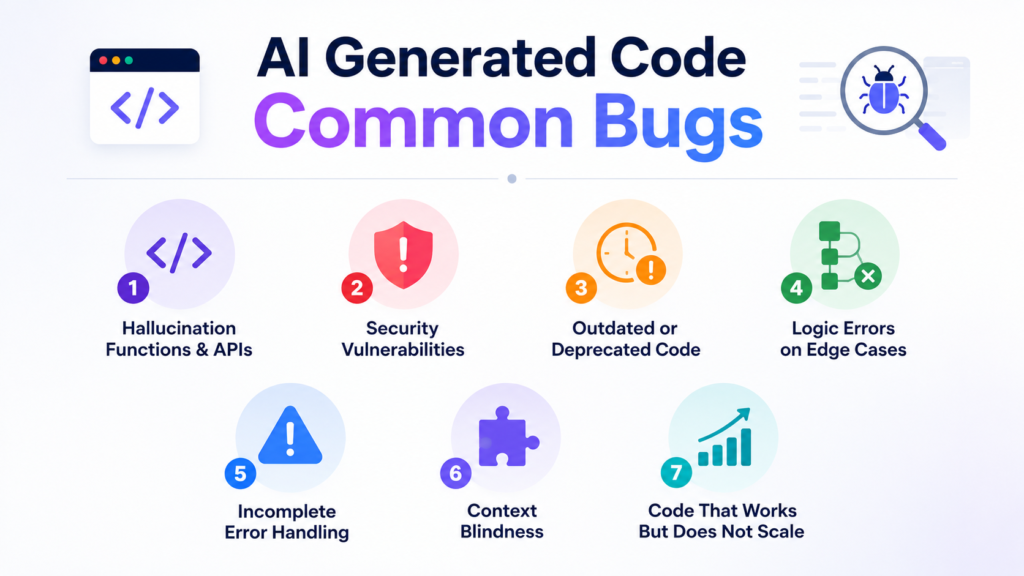
1) Hallucination Functions And APIs
This is one of the most disorienting bugs to run into. The AI writes code that calls a function or method that simply does not exist. The code looks completely legitimate, follows correct syntax and reads naturally. But when you run it , you get an immediate error because the library or method being referenced was either never real or has since been removed.
Why It Happens:
AI models sometimes confuse similar library names, combine features from different versions or generate plausible-sounding method names that were never part of any real API.
How To Fix It:
1) Always verify every imported library and method name against the official documentation.
2) Run a quick check on the version you are using versus what the AI likely trained on.
3) Use your IDE’s autocomplete and linting tools as a first pass to catch undefined references.
4) Treat any unfamiliar method name as “needs verification” before trusting it.
2) Security Vulnerabilities
This is where things get genuinely dangerous. AI-generated code regularly introduces security issues that could expose your application or your users data. The most common ones are:
1) Hardcoded credentials like API keys, passwords and tokens directly in the source code.
2) SQL injection vulnerabilities from building queries with string concatenation instead of parameterized statements.
3) Exposed sensitive data in logs or API responses.
4) Missing authentication checks on endpoints.
Why It happens:
AI models learn from code samples on the internet and a lot of internet code is written without security as a priority. The model replicates those patterns without understanding the risk.
How To Fix It:
1) Never deploy AI generated backend code without a security review.
2) Use static application security testing (SAST) tools like Semgrep or SonarQube to scan for common vulnerabilities.
3) Make it a rule that no credentials ever live in source code, no matter where the code came from.
4) Check every database query for parameterization especially anything accepting user input.
3) Outdated or Deprecated Code
AI models have a training cutoff date. That means the code they produce might be based on library versions, syntax patterns or APIs that have since been deprecated or completely replaced.
For example, you might get code using an old version of a framework where the method signature has changed or imports from a package that has been renamed or split into multiple packages.
Why It Happens:
The model genuinely does not know what changed after its training cutoff. It confidently produces what was once correct.
How To Fix It:
1) Always cross check the package versions being used against the current stable release.
2) Pay special attention to any deprecation warning when you run the code.
3) When prompting your AI tool, explicitly mention the version of the library or framework you are using.
4) Check the library’s changelog if you notice anything unusual in the generated code.
4) Logic Errors On Edge Cases
AI tools are excellent at generating code that works when everything goes as expected. They are much weaker when inputs fall outside the normal range, when a list is empty, when a value is null, or when the user does something unexpected.
These bugs are the hardest to catch because the code often runs without errors under normal conditions. They only surface when something unexpected happens which is exactly when you want your code to be most reliable.
Why It Happens
The training data for AI models is dominated by examples that show happy paths. Edge case handling is less consistently represented, so the model learns it less thoroughly.
How To Fix It:
1) Write unit tests that specifically target edge cases, empty inputs, null values and extreme values.
2) Review any conditional logic the AI writes and ask yourself what happens if the condition is never true or always true.
3) Test with data that is empty, zero, negative, very long or in an unexpected format.
4) Never assume AI-generated functions have been tested against anything other than the most basic inputs.
Read Also: Top 10 Vibe Coded Websites in 2026 – Real Builds, Real Timelines
5) Incomplete Error Handling
Look at AI generated code and you will often find functions that do not handle errors at all. No try/catch blocks. No null checks. No meaningful error messages. The code assumes everything will work perfectly.
In real applications, things go wrong. APIs time out. Databases return unexpected values. Files do not exist where expected. When there is no error handling, a single unexpected failure can bring down an entire process silently, or worse, crash into your application without any useful information about why.
How to fix it:
1) Add proper try/except blocks around any code that interacts with external systems.
2) Never let errors fail silently, always log the error in a meaningful way.
3) Validate function inputs before processing them.
4) When prompting AI tools, explicitly ask for error handling to be included in the output.
6) Context Blindness
AI coding tools only know what you show them. If you ask for a function without giving it the broader context of your application, then it will invent the surrounding structure. It might use variable names that conflict with yours, assume a data structure that is different from your actual schema or write a function that duplicates something you already have elsewhere in your codebase.
Why It Happens
The AI has no memory of previous conversations unless you provide them and it cannot see files it has not been shown. It builds what it sees, nothing more.
How To Fix It:
- Always include relevant context when prompting. Share the data structure, the function signature you need, the existing code it will interact with.
- Review AI -generated code for naming conflicts and structural assumptions before integrating it.
- If using a tool like GitHub Copilot, keep related files open in your editor so it has more context to work with.
- After generating code, walk through it manually to check whether its assumptions match your actual codebase.
7) Code That Works Once But Does Not Scale
AI-generated code often solves the immediate problem without considering what happens when the system grows. You might get a loop that runs fine on 10 records but times out on 10,000 or a database query that has no indexing considerations. It can also be a kind of approach that works perfectly as a prototype but creates performance bottlenecks in production.
Why It happens
AI tools optimize for readability and correctness on the example at hand. Performance at scale requires understanding the system’s growth trajectory which the AI does not have.
How To Fix It:
1) Review any loops, database queries and data transformation for efficiency.
2) Ask yourself what happens when the dataset is 100 times larger.
3) Use profiling tools to identify bottlenecks before they reach production.
4) When prompting, specify whether you need code optimized for performance, not just correctness.
Read Also: How to Find the Right AI Ethics Consultant for Your Digital Product
How Bugs Reach Production From AI-Generated Code
Knowing the bug types is half the story. The other half is understanding why these AI coding issues get past teams that would never let a junior developer merge the same mistakes:
- Volume outruns review. AI tools generate more code per day than most teams can review at their old level of rigor, so the review bar quietly drops.
- Plausible code lowers vigilance. AI output is clean, idiomatic and confident. Reviewers scrutinize messy code and wave through polished code — and AI coding mistakes are always polished.
- The tests share the blind spots. When the same model writes both the function and its unit tests, the tests validate the model’s assumptions instead of your requirements.
- Nobody owns it. Code no one wrote is code no one feels responsible for. Bugs reaching production from AI generated code are usually discovered by users, not authors.
How to Fix AI-Generated Code: A Pre-Merge Checklist
Before you drop AI-generated code into your codebase, run through these:
1) Does every imported function or method actually exist in the current version of the library?
2) Are there any hardcoded credentials, tokens or sensitive values?
3) Is every database query using parameterized inputs?
4) Does the code handle null values, empty inputs and unexpected data?
5) Is there a meaningful error handling around any operation that can fail?
6) Does the code fit your actual data structures and variable naming?
7) Have you tested it with edge case inputs, not just the expected ones?
Read Also: Best Vibe Coding Tools For Non-Technical Founders
Don’t Let Hidden Security Risks Reach Production
Applications handling customer data, financial information, or enterprise workloads need more than functional code—they need secure code. Triple Minds audits AI-generated code to uncover vulnerabilities, insecure dependencies, and authentication gaps before deployment.
Schedule a Vibe Code Security Audit
Can AI Fix Its Own Code Errors?
Partially — and it matters where you draw the line. Pasting an error message back into the tool works remarkably well for mechanical problems: syntax errors, missing imports, renamed methods, wrong API signatures. This loop — run, paste the error, regenerate — is what most developers mean when they search “AI fix code errors”, and for that class of problem it is genuinely fast.
Where the loop breaks down is everything this article is really about: logic errors on edge cases, security vulnerabilities, and architectural mismatches. The model cannot observe your runtime, your data or your intent — so it cannot tell the difference between code that runs and code that is right. Use AI to fix the mechanical errors, and keep human review (plus SAST scanning and edge-case tests) for the errors AI cannot see.
Conclusion
AI coding tools are genuinely useful. They can dramatically speed up development, help you explore approaches that you might not have considered, and reduce the time spent on boilerplate. But they are not substitutes for engineering judgement.
The bugs covered in this blog are not rare edge cases. They show up consistently in AI-generated code across languages, frameworks and uses cases. Knowing where to look is the first step toward using these tools responsibly.
If you are building a product powered by AI and want expert hands involved in how that code is written reviewed and deployed, Triple Minds offers full AI development and consulting services to help you ship with confidence. Talk to our team and get the right foundation from day one.
Quick Answers to Common Questions
Can AI-generated code be used in production without human review?
It is possible but not advisable. Even high-quality AI output should be reviewed by a developer before going to production, especially for security sensitive areas.
Which AI coding tools are least likely to produce buggy code?
No tool is bug free. GitHub Copilot, ChatGPT, Gemini and Claude all produce errors. The quality varies by task and how well you prompt, not just which tool you use.
Is AI-generated code a legal or intellectual property risk?
This is still an evolving area. Some AI generated code may be similar to existing open-source code in its training data. It is worth reviewing the policies of the tool you use and consult with a legal advisor for commercial products.
How do SAST tools help with AI-generated code specifically?
Static analysis tools scan code for known vulnerability patterns without running it. They can catch SQL injection risks, hardcoded secrets and insecure function usage automatically making them a strong first line of defense for AI output.
Should you tell your team when code was AI-generated?
Yes, transparency helps reviewers know where to apply extra scrutiny and builds good habits around AI assisted development across your engineering culture.
What are the most common bugs in AI code?
The most common bugs in AI code are hallucinated functions and APIs, security vulnerabilities such as hardcoded credentials and SQL injection, outdated or deprecated library usage, logic errors on edge cases, missing error handling, context mismatches with the surrounding codebase, and code that works in a demo but fails at scale.
How do bugs reach production from AI-generated code?
Bugs reach production from AI-generated code when generation speed outpaces review: polished-looking output lowers reviewer vigilance, tests written by the same model share its blind spots, and edge-case failures never appear in happy-path testing. Applying the same review rigor as human-written code, plus SAST scanning and edge-case tests, closes the gap.
Can AI fix its own code errors?
Partially. Feeding an error message back to the tool reliably fixes syntax errors, missing imports and wrong API signatures. It rarely fixes logic errors, security vulnerabilities or architectural problems, because the model cannot observe your runtime, data or intent. Use AI to fix mechanical code errors and human review for the rest.
Got a project in mind? Let’s build it together.
We work with founders and product teams across consulting, development, and growth marketing. Tell us what you’re building and we’ll show you how we’d ship it.