Building a minimum viable product (MVP) has never been faster. With AI-powered development tools like Claude Code, Cursor, Windsurf, Bolt, and v0, anyone can transform an idea into a working application in days instead of months.
For early-stage startups, this speed is a game changer.
Using AI-powered development tools, they can validate an idea, gather customer feedback, and even secure investor interest before committing to a large engineering team.
But once the MVP starts attracting real users, another question quickly follows: How much does it cost to make an AI-built MVP production-ready?
The answer varies widely.
We at Triple Minds work with founders daily and over the years have successfully built over 200+ AI built products. While some founders spend less than $10,000 strengthening an existing application, others invest $50,000 or more rebuilding critical parts of their product before launch.
This difference in price is because every AI-built MVP starts from a different place. Some have clean architecture and only need security, testing, and deployment improvements. Others were built entirely for speed and require substantial engineering before they can safely support customers.
In this guide, we’ll break down:
- The typical cost ranges for different scenarios
- The factors that have the biggest impact on your budget
- Whether you should harden your existing MVP or rebuild it
- The hidden costs many founders overlook
By the end, you’ll have a realistic framework for budgeting your AI-built MVP’s journey from prototype to production.
Cost Breakdown of Making an AI-Built MVP Production Ready
As already mentioned, there is no fixed price for turning an AI-built MVP into a production-ready application. There are multiple factors that directly impact the cost, such as AI-generated code quality, the number of users expected to use it, security level, and the compliance your business requires.
For example, a basic AI chatbot built for internal use may require only minor improvements before launch. In contrast, a customer-facing SaaS platform that handles payments, stores sensitive data, or integrates multiple AI models will require significantly more engineering effort.
The good news is that not every AI-generated MVP needs to be rebuilt from scratch. If the underlying architecture is solid, then the existing code can often be improved through refactoring and optimization, reducing both development time and cost.
The following breakdown highlights the major cost areas involved in productionizing an AI-built MVP.
Ready to Take Your AI-Built MVP to Production?
Building an MVP with AI is only the first step. Triple Minds helps startups and businesses transform AI-generated applications into secure, scalable, and production-ready products through code audits, architecture optimization, security hardening, DevOps, automated testing, and performance engineering.
👉 Schedule a Vibe Code Audit
Estimated Production Readiness Costs
| Engineering Activity | Estimated Cost |
| Code audit and technical assessment | $2,000 to $8,000 |
| Architecture review and planning | $3,000 to $10,000 |
| Code refactoring and optimization | $5,000 to $30,000 |
| Security improvements | $5,000 to $20,000 |
| Authentication and authorization enhancements | $2,000 to $8,000 |
| Database optimization | $3,000 to $12,000 |
| Automated testing implementation | $4,000 to $15,000 |
| CI/CD pipeline setup | $3,000 to $10,000 |
| Cloud infrastructure configuration | $5,000 to $20,000 |
| Monitoring and logging setup | $2,000 to $8,000 |
| AI model optimization | $3,000 to $20,000 |
| Documentation | $1,000 to $5,000 |
Insight:
Most businesses we have worked with spend anywhere from $10,000 to $100,000+ to transform an AI-built MVP into a stable production application. Larger enterprise products or regulated platforms can exceed this range depending on complexity.
1. Code Audit and Technical Assessment
Before implementing any improvements, experienced engineers conduct a comprehensive audit of the AI-generated codebase to evaluate its overall quality, stability, and long-term maintainability.
This assessment involves reviewing the application’s code structure, identifying security vulnerabilities, analyzing performance bottlenecks, evaluating database design and API architecture, assessing the quality of AI integrations, reviewing third-party dependencies, and identifying areas of technical debt.
By thoroughly understanding the existing implementation, the team can determine the most effective path forward. It might involve targeted refactoring, rebuilding specific components, or redesigning the application architecture to ensure scalability, security, and maintainability.
Typical Cost: $2,000 to $8,000
Wondering why AI-generated applications require comprehensive code audits before deployment? Learn the common security, scalability, and maintainability challenges of AI-generated code in our detailed guide on Is Vibe-Coded Code Production-Ready?
2. Architecture Review and Refactoring
AI-generated applications often work well initially but become harder to maintain as new features are added. Refactoring focuses on improving the internal structure without changing how the application behaves.
Common improvements include:
- Modularizing the codebase
- Removing duplicated logic
- Simplifying business workflows
- Improving API structure
- Standardizing coding practices
- Organizing reusable components
A well-structured architecture reduces future development costs and improves long-term scalability.
Typical Cost: $5,000 to $30,000
3. Security Hardening
Security should be one of the highest priorities before launching any customer-facing application. This phase focuses on strengthening the application’s defenses by implementing secure authentication and authorization, protecting APIs, validating user input, encrypting sensitive data, securely managing secrets and credentials, scanning third-party dependencies for known vulnerabilities, and preparing the application for penetration testing.
These measures help reduce security risks, improve compliance, and protect both the business and its users. For applications that store customer information, financial records, or healthcare data, security requirements become significantly more rigorous, often requiring additional controls, ongoing monitoring, and adherence to industry-specific compliance standards.
Typical Cost: $5,000 to $20,000
4. Database Optimization
Databases built during the MVP stage are often designed for speed of development rather than production performance. As the application grows, engineering teams optimize the database to improve efficiency, reliability, and scalability.
This process includes optimizing query performance, creating effective indexes, eliminating unnecessary database calls, implementing reliable backup and recovery strategies, improving data consistency, and preparing the database to handle increasing volumes of users and data.
A well-optimized database enhances application responsiveness, supports future growth, and helps reduce cloud infrastructure and operational costs.
Typical Cost: $3,000 to $12,000
Want to understand how AI can securely retrieve and interact with business data stored in production databases? Explore our guide on What Is a Database Chatbot and How Does It Work?
5. Automated Testing
Testing is often overlooked during MVP development because speed is the priority. Once real customers begin using the application, automated testing becomes essential.
Testing commonly includes:
- Unit tests
- Integration tests
- API testing
- End-to-end testing
- Regression testing
Automated testing reduces production bugs and allows development teams to release updates with greater confidence.
Typical Cost: $4,000 to $15,000
6. Cloud Infrastructure and DevOps
Launching an application involves far more than simply deploying code to a server. A reliable production environment requires a well-designed infrastructure that supports performance, availability, and long-term growth.
This phase typically includes configuring cloud hosting, implementing containerization, establishing CI/CD pipelines for automated deployments, enabling auto scaling, setting up load balancing, creating backup and disaster recovery systems, and deploying infrastructure monitoring tools.
A robust production infrastructure improves application uptime, simplifies deployment and maintenance, and ensures the system can reliably handle increasing traffic and business growth.
Typical Cost: $8,000 to $30,000
7. Monitoring and Observability
Once an application is live, engineers need continuous visibility into its health and performance.
Monitoring solutions typically track:
- Server health
- Application performance
- API latency
- AI response times
- Error rates
- User activity
- Infrastructure utilization
Without monitoring, identifying production issues often takes much longer, leading to extended downtime and frustrated users.
Typical Cost: $2,000 to $8,000
8. AI Optimization
For AI-powered applications, production readiness extends beyond traditional software engineering to include optimizing model performance, reliability, and operational costs.
This phase focuses on refining prompt engineering, selecting the most appropriate AI models for different use cases, implementing response caching, optimizing token usage, enforcing rate limiting, configuring fallback models, and improving overall AI workflows.
These optimizations help deliver faster and more consistent responses while reducing unnecessary API usage. Even incremental improvements can significantly lower monthly AI infrastructure costs without compromising the quality of the user experience.
Typical Cost: $3,000 to $20,000
9. Documentation and Knowledge Transfer
Documentation is often treated as an afterthought during MVP development, but it becomes essential as products grow and teams expand.
Documentation usually includes:
- System architecture
- API references
- Deployment guides
- Database documentation
- Development workflows
- Troubleshooting procedures
Well-documented systems reduce onboarding time and simplify future maintenance.
Typical Cost: $1,000 to $5,000
Before investing in production readiness, make sure you’re building a product that investors actually want to fund. Learn the key principles of creating an investor-ready startup product and avoid costly mistakes early in your journey. Read our guide on Investor-Ready Startup Product Development.
Production Readiness Costs for AI-Built MVPs by Product Type
Not every AI application requires the same level of engineering investment. The complexity of your product has a direct impact on the cost of making it production-ready.
| Product Type | Estimated Production Cost |
| Internal AI tool | $20,000 to $50,000 |
| AI chatbot | $30,000 to $70,000 |
| AI SaaS platform | $50,000 to $120,000 |
| Marketplace with AI features | $70,000 to $150,000 |
| Healthcare AI application | $100,000 to $300,000+ |
| FinTech AI platform | $120,000 to $350,000+ |
| Enterprise AI platform | $200,000+ |
These estimates assume the MVP has already been built and the remaining investment is focused on improving quality, scalability, security, and operational readiness.
Why Do Production Readiness Costs Vary So Much?
Two founders can build similar MVPs using the same AI coding tool and still face significantly different production readiness costs. While AI accelerates development, the tool itself is rarely the primary factor that determines the effort required to prepare an application for production.
As discussed earlier, there are multiple factors that have a much greater impact on the overall cost. Each of these factors influences the amount of refactoring, testing, optimization, and infrastructure work needed before the application can be deployed with confidence.
Further, the timing of production readiness also plays a critical role.
A security vulnerability identified early in development may take only a few hours to resolve. The same issue discovered after thousands of users have created accounts can require weeks of engineering effort, emergency patches, customer communication, compliance reviews, and additional testing to ensure the problem has been fully addressed.
As a result, delaying production readiness often increases both the complexity and the overall cost of bringing an AI-built MVP to a production-ready state.
How to Reduce the Cost of Making an AI-Built MVP Production-Ready
Production readiness doesn’t have to become an expensive rescue project. In many cases, founders overspend because they either rebuild unnecessarily or delay addressing technical debt until it becomes a much larger problem.
The following practices can significantly reduce both upfront costs and long-term maintenance expenses.
1. Start with a Technical Audit
Before committing to a major engineering investment, it is essential to understand the current state of your application. A comprehensive technical audit identifies which components are already production-ready, which areas require improvement, which issues pose the greatest business risk, and whether the application is better suited for targeted hardening or a more extensive rebuild. This assessment provides a clear roadmap for engineering efforts and helps teams avoid spending time and resources addressing lower-priority issues while critical risks remain unresolved.
2. Prioritize High-Risk Areas First
Not every issue needs to be resolved before launch. The highest priority should be given to areas that directly impact users, business operations, and data security. This includes strengthening authentication and authorization, addressing security vulnerabilities, ensuring reliable payment processing, maintaining data integrity, implementing backup and recovery procedures, and improving error handling. By focusing on the most critical systems first, organizations can reduce operational risk while postponing cosmetic improvements and code refinements until the application’s foundation is stable.
3. Build Automated Testing Early
One of the primary reasons production costs increase over time is the absence of automated testing. Without a reliable test suite, every new feature or code change requires extensive manual verification, slowing development and increasing the likelihood of introducing regressions. Establishing automated tests early, particularly for essential user journeys such as registration, authentication, payments, and checkout, enables engineering teams to release updates with greater confidence while significantly reducing future maintenance effort and development costs.
4. Improve Incrementally Instead of Rebuilding Everything
Many founders assume that AI-generated code must be discarded and rebuilt before it can support production workloads. In practice, most applications can be successfully productionized through incremental improvements. By replacing or refactoring only the components that require attention, engineering teams can improve reliability, security, and performance while preserving business logic that has already been validated by real users. This approach is typically faster, more cost-effective, and less disruptive than rebuilding the entire application from scratch.
5. Optimize AI Usage Before Scaling
For AI-powered applications, optimizing model usage before scaling can substantially reduce long-term operating costs. This process includes selecting the most appropriate model for each task, minimizing unnecessary token consumption, implementing response caching, using smaller models where appropriate, and refining prompts to improve efficiency. These optimizations help control AI inference costs while maintaining response quality, enabling applications to scale more sustainably without compromising the user experience.
Is It Worth Building a Production-Ready MVP from the Start?
If you’re starting a brand-new project, it’s worth asking whether you should invest in production readiness from the beginning instead of building a quick MVP first.
The answer depends on your product.
For internal tools or early validation, a lightweight MVP is usually the right approach. However, for applications handling payments, healthcare data, financial information, or enterprise customers, investing in production-ready engineering from the start often reduces long-term costs and avoids major rework later.
The goal isn’t to over-engineer an MVP. It’s to avoid creating technical debt that becomes expensive to remove once your product gains traction.
Choose an AI Development Partner That Grows with Your Product
Your AI journey doesn’t end when the MVP is complete. From refining early prototypes to building enterprise-scale AI applications, Triple Minds delivers the strategy, engineering expertise, and ongoing support needed to help your product evolve with confidence.
Explore Our AI Development Services
Final Thoughts
AI has fundamentally changed how startups build software. Founders can now launch products in weeks instead of months, validate ideas faster, and reach customers with significantly less upfront investment.
But an AI-built MVP is only the beginning.
Moving from a functional prototype to production-ready software requires deliberate engineering investment in security, testing, infrastructure, scalability, and operational reliability.
For some startups, that investment may be as little as $5,000–$10,000 and for others particularly products with complex workflows, regulated data, or significant technical debt it may exceed $100,000.
The important takeaway is that production readiness isn’t determined by the AI tool you used. It’s determined by the quality of the engineering that follows.
A structured audit, a clear roadmap, and targeted improvements are often enough to transform a promising MVP into software that can reliably support real users and long-term business growth.
Whether you’ve already built an AI-generated MVP or are planning one from scratch, our team helps bridge the gap between rapid development and production-ready software. We conduct detailed technical audits, identify security and scalability risks, implement testing and CI/CD pipelines, optimize infrastructure, and strengthen application architecture without sacrificing development speed.
If you’re unsure whether your AI-built MVP is ready for production or want an accurate estimate of what it will take to get there, get in touch with our subject matter experts today!
Quick Answers to Common Questions
Yes, but it should go through the same engineering review as any other code. AI-generated applications often require improvements in security, testing, scalability, observability, and infrastructure before they’re ready for production.
In most cases, productionizing an existing MVP is more cost-effective than rebuilding it. A full rebuild is usually only recommended when the application’s architecture, data model, or security posture is fundamentally flawed.
It depends on the complexity of the application. Simple production hardening projects can take 2–4 weeks, while larger rescue engineering efforts typically take 6–12 weeks. Enterprise applications or regulated products may require several months.
The highest cost is usually engineering effort rather than AI itself. Security hardening, architecture improvements, automated testing, DevOps, infrastructure, and integrations typically account for most of the investment.
While not mandatory, a technical audit is strongly recommended. It helps identify architectural issues, security gaps, and technical debt before significant engineering work begins, often saving both time and money.
Beyond the initial production-readiness investment, founders should budget for cloud infrastructure, AI API usage, monitoring, maintenance, security updates, backups, and continuous product improvements.
Everyone knows that vibe coding can transform an idea into a fully functional application in a remarkably short time. But the bigger question is one that many teams still struggle to answer: Is vibe-coded software actually production-ready?
The growing number of online searches about the production readiness of AI-generated code reflects this uncertainty.
There’s no denying that the speed is transformative.
AI coding agents such as Claude Code, Cursor, GitHub Copilot, and Windsurf can understand a prompt and generate a working application within hours. The result often runs smoothly, looks polished, and performs well in demos.
But every engineering team eventually faces a more important question: Is that code ready to serve real users, handle real-world data, and remain reliable under production conditions?
The answer is simple: it depends.
Production readiness isn’t determined solely by whether the code works or even by its overall quality.
It’s about managing risk.
- Can the application scale?
- Is it secure?
- Is it maintainable, observable, and resilient when things go wrong?
At Triple Minds, we help businesses harness the speed of vibe coding without compromising on quality. We build production-grade applications in minutes using AI-powered development workflows, then complement that speed with hands-on engineering reviews, testing, security validation, performance optimization, and deployment best practices. The result is software that not only demos well but is built to perform reliably in production.
In this article, we’ll explore what “production-ready” really means, why vibe-coded applications often fall short of that standard, what current evidence tells us about the associated risks, and the practical steps teams can take to bridge the gap.
What “Production-Ready” Actually Means
Anyone with basic understanding of AI coding tools such as Claude Code, Cursor, GitHub Copilot, and more can generate a working application within hours. The mobile app or software runs smoothly, performs well, and runs without errors – but does it mean production-ready?
The production-ready code is not simply code that runs without errors. It is code that is stable, secure, maintainable, and tested under realistic conditions. In real-world scenarios, this includes several dimensions such as;
- Structured and maintainable code that another engineer can read, understand, and safely modify without fully rebuilding it.
- Comprehensive test coverage that includes unit tests, integration tests, and end-to-end tests on the most critical user paths. And not the tests that confirm the happy path works.
- Observability, meaning error tracking, performance monitoring, and logging that let a team know when something breaks, not just after a customer reports it.
- Security fundamentals, including proper secrets management, authentication and authorization enforced at the API level, input validation, and protection against common vulnerability classes.
- Scalability, meaning the architecture can handle real-world load, not just the load present during a demo.
- Compliance readiness, where applicable, including data handling practices that satisfy standards like SOC 2, GDPR, or HIPAA depending on the industry and user base.
Keep in mind that Production readiness of a vibe coded code is not a binary label but a risk profile.
The real question is not “is this code good,” but “is the risk of this code failing, and the consequence of that failure, acceptable given what the application actually does and who depends on it.”
Related Stories: Agentic Engineering vs Vibe Coding
Build Faster with Vibe Coding—Without Compromising Quality
Vibe coding can dramatically accelerate software development when backed by experienced engineers. Triple Minds helps startups and enterprises build production-ready applications using AI-assisted development, combining rapid delivery with clean architecture, scalable code, and engineering best practices.
Build with Our Vibe Coding Experts
Production Readiness Depends on Risk, Not Just Code Quality
A basic vibe code app that is used internally by a five-person team has a fundamentally different risk profile than a payments flow processing customer transactions or a healthcare app handling protected health information.
When it comes to developing low or medium-risk applications such as internal tools, early MVPs, and team utilities, the vibe coding code is genuinely production-ready.
However, for high risk application the story is completely different. Vibe coding code is not production-ready for high-risk applications that handle payments, personal identifiable information, or regulated data, unless significant additional engineering work has been done around end-to-end testing, CI pipelines, security review, and monitoring.
This distinction matters because a lot of the debate around vibe coding gets stuck on the wrong question.
The issue is rarely whether the AI wrote “good” code in some abstract sense. It is whether anyone evaluated what the consequences of failure would actually be, and whether the engineering discipline applied matches that consequence.
Not every project requires the same level of engineering oversight. If you’re weighing speed and cost against technical expertise, our comparison of Should I Hire a Vibe Coder or a Senior Developer? looks at the differences in capabilities, code quality, project risk, and the types of applications each approach may be best suited for.
Why Vibe-Coded Code Usually Falls Short of Production Standards
Most vibe coding tools are designed to generate code that satisfies user prompts and produces a working application. They are optimized for speed and functionality but not for the engineering rigor required to run software safely and reliably in production. As a result, the same shortcomings tend to appear across many AI-generated applications. While the code may work as expected, it often lacks the security, scalability, maintainability, and operational safeguards needed for real-world deployment.
Here are the five most common reasons why vibe-coded applications often fall short of production-ready standards.
Treating Security as an Afterthought
With AI coding agents, you can generate a genuinely good at writing functional code. But there’s a functional flaw here – AI agents are largely indifferent to security hygiene.
There are countless studies on the internet that have proven security risks associated with the vibe-coded code. Some researchers have found that the AI-generated code contains at least one security flaw, spanning injection vulnerabilities, hardcoded secrets, and broken authentication.
Independent testing of GitHub Copilot suggestions found vulnerabilities present in roughly 30 percent of security-sensitive scenarios. Security risks associated with vibe-coded code are not a rare edge case but a consistent pattern across tools and models.
AI Agent Hallucinations
Large language models can confidently reference code libraries, packages, or files that simply do not exist. These hallucinations tend to be statistically predictable and reproducible across similar prompts. For this reason, attackers have begun registering those exact predicted package names in advance on repositories like npm and PyPI, a technique known as slop squatting.
A developer who accepts an AI suggestion to install a hallucinated package can unknowingly pull malicious code directly into their application, with no phishing or credential theft required.
Testing Coverage Is Minimal or Absent
Vibe-coded applications are typically validated by whether they work during the session in which they were built, not by structured unit tests, integration tests, or load testing under realistic conditions. Without a test suite, teams lose the ability to make changes confidently, since there is no automated way to confirm that a new feature has not broken existing functionality.
Architecture Is Optimized for the Demo, Not for Scale
Quick, prompt-based builds often lack modularity. Database schemas, API structures, and infrastructure choices are frequently made to satisfy the immediate request rather than to support future growth. This becomes a real problem when a business needs to add features, integrate new services, or scale to handle significantly more users or traffic than the original build anticipated.
There Is No Observability Layer
Without error tracking, uptime monitoring, and performance metrics in place, teams typically find out about production issues from users rather than from their own systems. This dramatically increases the time it takes to detect and resolve problems.
A Practical Path to Making Vibe-Coded Applications Production-Ready
The gap between a vibe-coded prototype and a production-ready application is not usually a full rebuild. It is a defined set of engineering layers that vibe coding tends to skip by default. Closing that gap generally follows a consistent order.
Audit and remove hardcoded secrets. Search both your current codebase and your git history for API keys, database credentials, and tokens that may have been committed directly into the code, and move them into proper secrets management.
Add structured error handling to all external service calls. Every call to a third-party API, database, or external service should fail gracefully and predictably rather than crashing the application or exposing internal details to users.
Verify authentication and authorization at the API level. Confirm that every endpoint properly checks who is making a request and what they are allowed to do, rather than relying solely on frontend checks that can be bypassed.
Set up a continuous integration pipeline that runs on every push. This ensures that tests, linting, and basic checks run automatically before code reaches production, rather than relying on manual discipline alone.
Add end-to-end test coverage on your most critical user paths. You do not need full coverage of every possible interaction on day one. Covering the three to five flows that would cause the most damage if broken, such as signup, checkout, or core data actions, delivers the highest return.
Configure observability, including error tracking, uptime monitoring, and user analytics. This closes the loop so your team learns about problems from your own systems rather than from frustrated users.
Beyond this one-time hardening pass, sustainable AI-assisted development also requires an ongoing discipline. Treat AI-generated code the way you would treat unreviewed third-party code: read it, test it, and run static analysis before merging it.
Keep humans in the loop for consequential actions, particularly anything involving deletions, payments, permission changes, or production deployments, requiring explicit review before those actions execute. And maintain environment separation, so that testing and staging environments never bleed into production, a governance gap that has directly caused real incidents.
Read Also: Top 10 Vibe Coded Apps in 2026 and Top 10 Vibe Coded Websites
Answering Vibe Coding Code Production Readiness
Vibe coding is not inherently unsafe, and it is not inherently production-ready either. It is a genuinely powerful tool for speed and exploration that was never designed to enforce the engineering discipline production systems require on its own.
Whether vibe-coded code is production-ready depends entirely on what the application does, who depends on it, what data it touches, and whether a deliberate engineering review has closed the specific gaps AI-generated code reliably leaves behind, primarily around security, testing, architecture, and observability.
Organizations that are avoiding the incidents making headlines through this year are not avoiding vibe coding altogether. They are using it within a governed framework, where AI-generated code is treated as a strong starting point rather than a finished product, human review is required at production boundaries, and security and test gates are enforced before anything reaches real users.
Don’t Let Insecure AI-Generated Code Reach Production
AI-generated code can introduce hidden security vulnerabilities, logic flaws, outdated dependencies, and compliance risks that are easy to overlook. Triple Minds performs comprehensive Vibe Code Security Audits to identify and fix critical issues before deployment, helping you ship secure, reliable, and production-ready software.
Schedule a Vibe Code Security Audit
Conclusion
Vibe coding has fundamentally changed how software gets built. Tasks that once took weeks can now be completed in hours, enabling startups, product teams, and enterprises to validate ideas faster than ever before. But this alone doesn’t make software production-ready.
The real measure of production readiness is whether it can securely handle real users, real data, and real business operations without becoming a liability. That requires engineering practices such as security reviews, comprehensive testing, scalable architecture, observability, and operational safeguards.
If you’ve built an application with AI and aren’t sure whether it’s ready for production, the right question isn’t “Does it work?” It’s “Can I trust it with my users, my data, and my business?” Answering that question before you deploy is what separates a successful launch from an expensive incident.
At Triple Minds, we’ve built 200+ digital platforms with an average MVP launch time of just 14 days by combining AI-powered development with experienced engineering. We help businesses turn vibe-coded prototypes into production-ready applications through hands-on code reviews, rigorous testing, security hardening, performance optimization, and deployment best practices.
If you’d like to see how this works in practice, request a demo or explore our real-world case studies to see how we’ve helped businesses ship production-ready AI-built applications faster.
Quick Answers to Common Questions
Yes, but not by default. They typically require security hardening, code reviews, vulnerability scanning, and proper authentication before meeting enterprise standards.
It can be if left unreviewed. Refactoring early, adding tests, and improving architecture significantly reduce long-term maintenance costs.
Not necessarily. Most MVPs can be productionized through targeted improvements instead of a complete rewrite.
The biggest risk isn’t broken functionality, but it’s hidden security, scalability, and reliability issues that only appear under real-world usage.
Evaluate it against production standards, including security, testing, observability, scalability, and maintainability, and not just whether the application works.
MCP agents solve one of the biggest limitations of traditional inventory and fulfillment automation: the inability to reason, adapt, and act across multiple systems. While conventional automation can transfer data between applications, every new workflow typically requires custom integrations, brittle scripts, or manually maintained rules.
MCP agents replace these isolated automations with a standardized way for AI to access business context and interact with enterprise systems. Now, they can execute actions across inventory, warehouse, and order management platforms. Rather than simply moving data, the MCP agents understand operational context, make informed decisions, and coordinate end-to-end workflows.
This now eliminates the need for a developer team to connect inventory, order management, and fulfillment systems for better decision-making. Now, an AI agent can directly connect these tools using a standard protocol.
The result is a shift from passive automation to agentic operations, where AI systems can read live data, make context-aware decisions, and execute approved actions on their own.
We at Triple Minds have assisted over 15+ businesses worldwide in implementing production-ready ecommerce MCP servers & agents. As agentic shopping becomes the new standard, we ensure you are ready to automate inventory & fulfillment through AI.
In this post, we break down what MCP agents are, how they apply specifically to inventory and fulfillment, the real use cases already in production, the benefits businesses are seeing, and what to consider before rolling this out in your own operations.
How MCP Agents Turn Inventory Systems into Autonomous Operations
Most existing inventory tools are read-only from an AI perspective. They can generate a report, flag a low-stock SKU, or send an alert, but a human still has to interpret that information and act on it. However, this is where MCP agents change the equation. As these agents have both read and write access to the underlying systems.
With an MCP-connected inventory system, an AI agent can access live stock levels across every warehouse and sales channel, reorder triggers based on sales velocity and lead time, and allocation logic that determines which orders should be fulfilled from which location.
The practical difference this makes is significant. If a flash sale causes a SKU to sell out unexpectedly, an agent with write access can pause the related ad campaign automatically, without anyone needing to notice the stockout first and manually intervene.
That is the core distinction between traditional automation and agentic automation: the system does not just tell you something happened, rather it responds to it.
Turn Your Ecommerce Platform into an AI-Ready Commerce Ecosystem
MCP servers enable AI agents to securely access inventory, fulfillment, orders, customer data, and business tools in real time. Triple Minds develops custom Ecommerce MCP Servers that connect your existing systems, helping you automate workflows and power the next generation of AI-driven commerce.
Explore Our Ecommerce MCP Server Development Services
How MCP Agents Work in an Inventory and Fulfillment Stack
At a technical level, the architecture involves three main components.
- First is the AI agent itself, which could be a general-purpose assistant or a purpose-built agent trained for a specific operational role such as replenishment or order routing.
- Second is the MCP server, which exposes specific tools from your business systems, such as getInventory, placeOrder, updateStock, or checkSupplierLeadTime.
- Third are the underlying platforms themselves: your order management system, warehouse management system, ERP, supplier portals, and sales channels.
When a request arrives, the MCP agent first understands the task. The request could come from a customer asking about product availability or from an internal event such as a low-stock alert. Based on the available context, the agent selects the appropriate MCP tool and sends a real-time request to the connected system. The response is returned through the same standardized interface. The agent then interprets the result and decides the next action. It can answer the customer, update inventory records, trigger another workflow, or escalate the task to a human when approval is required.
This is a meaningfully different approach from older middleware or robotic process automation tools, which follow fixed, pre-programmed steps. An MCP agent can weigh multiple data points at once, such as recent sales trends, promotional calendars, and supplier lead times, before deciding what action to take. That contextual reasoning is what makes the automation feel less like a rigid script and more like a capable operations assistant working around the clock.
Read Also: OpenAI’s Agentic Commerce Protocol (ACP) Explained for Ecommerce Brands
Core Use Cases for Inventory Automation
Real-Time Stock Visibility Across Channels and Locations
One of the most immediate applications of MCP agents is unifying inventory visibility. Many businesses sell across multiple channels, such as their own website, Amazon, a wholesale portal, and a physical store, but their stock data lives in disconnected systems. An MCP-connected agent can pull live stock levels from every location and channel into a single, consistent view, and just as importantly, write updates back to each platform when stock changes. This reduces the classic problem of overselling a product that was already sold out on another channel.
Automated Reorder Triggers and Replenishment
Instead of a warehouse manager manually reviewing spreadsheets to decide what to reorder, an MCP agent can continuously monitor stock against configured thresholds, factoring in sales velocity, seasonality, and supplier lead times. When a SKU approaches a reorder point, the agent can generate a purchase order recommendation, or in more mature setups, place the order directly with an approved supplier within pre-set spending rules. This turns replenishment from a periodic manual task into a continuous background process.
Intelligent Order Routing and Fulfillment Logic
When an order comes in, deciding which warehouse or fulfillment center should ship it is rarely a simple question. It depends on stock availability, shipping cost, delivery speed promises, and sometimes product-specific handling requirements. MCP agents can evaluate all of these factors in real time and route the order to the optimal location automatically. Some implementations go further, generating specific fulfillment instructions, for example flagging a perishable item for expedited shipping or a fragile item for reinforced packaging, and passing those instructions directly to the warehouse system.
Demand Forecasting and Inventory Optimization
Because MCP agents can pull historical sales data, current trends, and external signals like upcoming promotions, they are well suited to support more accurate demand forecasting. Rather than static reorder points set once and rarely revisited, agents can continuously adjust recommendations based on what is actually happening in the business, helping prevent both stockouts and excess inventory that ties up capital.
Returns and Reverse Logistics
Returns are one of the more operationally messy parts of fulfillment, involving inspection, restocking decisions, and refund processing. Agents connected through MCP can automate parts of this workflow, such as updating inventory counts once a return is received and inspected, flagging items that need to be written off rather than restocked, and triggering refunds or replacement orders based on predefined rules.
Supplier and Procurement Coordination
Beyond internal inventory, MCP agents can also interact with supplier-facing systems, checking lead times, comparing pricing across vendors, and even submitting purchase orders. This creates a more responsive procurement process, where sourcing decisions are informed by live data rather than outdated spreadsheets or infrequent manual reviews.
Multichannel and Marketplace Synchronization
For businesses selling on Shopify, WooCommerce, Amazon, or other marketplaces, keeping product data, pricing, and stock levels consistent across every platform is a constant challenge. MCP servers built for specific platforms allow agents to read and write directly to each one, keeping listings synchronized without the delays that come from batch syncs or manual updates.
Customer Service Tied to Live Inventory Data
Customer service agents built on MCP can answer questions about product availability, delivery estimates, and order status by pulling directly from the same live inventory and order systems used internally, rather than relying on static FAQ content or outdated product pages. This reduces the volume of manual lookups support teams need to perform and speeds up resolution times for common questions.
Read Also: What is a Database Chatbot and How Does it Work?
Real-World Platforms Bringing MCP to Inventory and Fulfillment
The shift toward MCP-based automation is not theoretical. Major commerce and ERP platforms have begun building MCP servers specifically for inventory and fulfillment use cases.
Retail and order management platforms have introduced MCP servers that let AI agents access unified inventory across store locations, generate accurate delivery promises, and support customer service interactions with real-time data. Enterprise ERP and commerce platforms have gone further, connecting agents to both the selling side, covering product discovery and checkout, and the operational side, covering merchandising, demand planning, procurement, and fulfillment, so that agents can reason across the full order lifecycle rather than a single narrow function.
E-commerce-focused MCP servers for platforms like Shopify and WooCommerce allow agents to manage inventory, process orders, and handle support tasks directly within existing store infrastructure, without requiring merchants to rebuild their tech stack from scratch. Commerce networks that connect brands, suppliers, and marketplaces have also introduced MCP layers specifically to make catalog, pricing, and fulfillment data discoverable to AI agents while maintaining strict governance controls, such as role-based access and audit logging, over what agents are allowed to do.
Across these examples, the common thread is the same: businesses are not replacing their existing inventory and fulfillment systems, they are adding an AI-accessible layer on top of them that allows agents to operate within those systems safely and efficiently.
Business Benefits of MCP-Driven Inventory Automation
Faster Response to Demand Changes
MCP-powered agents continuously monitor inventory levels, sales trends, and demand fluctuations in real time. This allows businesses to react immediately to sudden demand spikes, stock shortages, or changing customer behavior instead of waiting for scheduled reports, reducing delays and improving inventory availability.
Fewer Manual Errors
By automating data exchange between inventory, sales, and fulfillment systems, MCP minimizes manual data entry and repetitive lookups. This significantly reduces the risk of human errors, ensuring more accurate inventory records and smoother business operations.
Lower Integration Overhead
Traditional system integrations often require custom APIs and significant development effort for every new application. MCP provides a standardized communication layer, making it easier and faster to connect new tools, suppliers, and platforms while reducing engineering costs.
Improved Customer Experience
With real-time access to inventory and order data, businesses can provide customers with accurate product availability, delivery estimates, and order updates. This helps prevent overselling, shipping delays, and inaccurate information, leading to higher customer satisfaction.
Better Use of Working Capital
MCP enables more accurate inventory forecasting and automated reorder decisions based on live business data. This helps companies maintain optimal stock levels, reducing the costs associated with excess inventory while minimizing revenue loss from stockouts.
Scalability Without Proportional Headcount Growth
As businesses expand into new sales channels, warehouses, or supplier networks, MCP agents can seamlessly manage the increased operational complexity. This allows organizations to scale efficiently without needing to hire additional staff for routine inventory monitoring and coordination tasks.
Getting Started: A Practical Path
Businesses do not need to automate everything at once. A practical approach starts with identifying the systems that already have, or can be given, an MCP-compatible interface, such as an order management system, warehouse management system, or e-commerce platform. From there, most teams begin with read-only use cases, like giving an agent access to live stock and order data for reporting or customer service purposes, before moving into write-enabled use cases such as automated reordering or order routing.
It is worth evaluating any inventory or fulfillment tool being considered by asking a simple question: does it expose MCP endpoints natively, or does it at least have a robust API that a custom MCP wrapper could sit on top of? Systems without either will require more upfront engineering work before agents can be connected.
Governance should be built in from the start rather than added later. This means defining clearly which actions an agent is allowed to take autonomously, such as adjusting reorder quantities within a set budget, versus which actions require human approval, such as placing a large purchase order with a new supplier. Role-based access controls and audit logging are not optional extras in this context; they are what makes agentic automation safe to run in a live operational environment.
Read Also: How Much Does It Cost to Build an AI Agent?
The Shift Toward Agentic Commerce
- From AI Assistants to AI Agents: Businesses are moving beyond AI tools that simply answer questions or generate content toward autonomous AI agents that can monitor operations, identify issues or opportunities, and execute approved actions with minimal human intervention. This evolution is driving the rise of agentic commerce.
- Ideal for Inventory and Fulfillment: Inventory management and fulfillment processes are well suited for AI agents because they rely on structured data, predictable workflows, and clearly defined business rules. This allows agents to make accurate, data-driven decisions while reducing manual oversight.
- High Impact Through Automation: Errors such as stockouts, overselling, or shipping delays directly affect revenue and customer satisfaction. By continuously monitoring operations and responding in real time, AI agents help minimize these issues, delivering measurable business value.
- Growing Adoption of MCP: As more commerce platforms introduce native MCP support and businesses become more comfortable with AI governance, autonomous inventory and fulfillment management is expected to become a standard operational capability rather than an emerging technology.
Organizations that start implementing MCP-driven automation with focused, well-governed use cases today will be better positioned to expand AI-driven operations as the technology matures and business confidence grows.
Build AI Agents That Do More Than Answer Questions
Modern AI agents should be able to retrieve live business data, execute workflows, interact with enterprise systems, and make context-aware decisions. Triple Minds develops production-ready AI agents with secure integrations, MCP architecture, RAG, GraphRAG, and enterprise-grade guardrails for scalable business automation.
Discover Our AI Agent Development Services
Final Thoughts
MCP agents transform inventory and fulfillment management from manual monitoring to intelligent systems that observe, reason, and act within defined rules.
The goal is not to replace operations teams. Instead, MCP agents automate routine tasks, allowing people to focus on strategy, exceptions, and critical decisions.
Businesses managing inventory across multiple channels, warehouses, or suppliers should consider MCP-based automation. The technology is maturing rapidly, platforms are adding native support, and benefits include better cash flow, fewer stockouts, and faster fulfillment. Early adopters are already gaining a competitive advantage.
At Triple Minds, we have helped 15+ businesses worldwide design and deploy production-ready ecommerce MCP servers and agents. If you are exploring how MCP agents could fit into your inventory and fulfillment stack, our team can help you assess your existing systems, identify the right starting use cases, and build an implementation roadmap suited to your business. Get in touch today to start automating your inventory and fulfillment with MCP agents.
Quick Answers to Common Questions
MCP agents are AI-powered systems that use the Model Context Protocol (MCP) to connect with inventory, warehouse, ERP, and order management platforms. They can access live business data, reason over operational context, and execute approved actions such as inventory updates, order routing, and replenishment.
Traditional automation follows predefined rules and workflows, while MCP agents can interpret context, choose the appropriate tools, and make informed decisions across multiple connected systems. This enables more adaptive and intelligent inventory and fulfillment operations.
MCP agents can automate real-time inventory visibility, stock replenishment, intelligent order routing, demand forecasting, marketplace synchronization, supplier coordination, returns management, and customer support by working directly with connected business systems.
Organizations can reduce manual work, improve inventory accuracy, minimize stockouts, optimize working capital, enhance customer experience, simplify system integrations, and scale operations more efficiently through AI-driven automation.
A practical approach is to begin with read-only use cases such as inventory visibility and reporting, then gradually expand to write-enabled workflows like automated replenishment or order routing. Strong governance, role-based permissions, and human approvals for critical actions are essential for safe deployment.
One of the most common questions businesses ask is: How much does it cost to develop an AI hospital management system?
The answer isn’t straightforward. The cost of developing an AI-powered hospital management system depends on several factors, including the number of hospital modules, AI capabilities, EHR and third-party integrations, regulatory compliance requirements, cloud infrastructure, security standards, and the overall complexity of the solution.
Generally, AI hospital management software can be categorized into three types, each with a different investment range:
Basic AI Hospital Management System: A solution with essential administrative features and basic AI capabilities typically costs between $30,000 and $60,000.
Custom AI Hospital Management System: A tailored solution with advanced workflows, automation, and AI-driven features generally ranges from $50,000 to $100,000+, depending on the project’s scope and customization requirements.
Enterprise AI Hospital Management Platform: A large-scale platform featuring advanced AI capabilities, predictive analytics, real-time decision support, intelligent automation, multi-hospital management, and seamless integrations can cost $300,000 or more.
It’s important to understand that AI introduces additional development and operational costs beyond traditional hospital management software.
Building intelligent healthcare solutions requires investments in machine learning models, large language models (LLMs), data engineering pipelines, AI infrastructure, model training, continuous monitoring, and ongoing optimization. These components significantly impact both the initial development budget and long-term maintenance costs.
If you’re wondering why the cost of an AI hospital management system can range from $30,000 to over $300,000, the breakdown becomes much clearer once you understand the technologies, integrations, and compliance requirements involved.
Key Takeaways
- The cost of developing an AI Hospital Management System typically ranges from $30,000 for a basic solution, starting from $50,000 for a custom solution, and up to over $300,000 for an enterprise-grade platform. All costs depend on its features, AI capabilities, integrations, and compliance requirements.
- Advanced AI features such as clinical decision support, AI medical scribes, predictive analytics, intelligent scheduling, and medical image analysis significantly increase both development complexity and overall project cost.
- Factors including EHR/EMR integration, HIPAA compliance, cloud infrastructure, AI model selection, data migration, and third-party APIs have a major impact on the total development budget.
- Choosing the right development approach, prioritizing high-impact AI features, and building an MVP before scaling can help reduce development costs without compromising functionality.
- Partnering with an experienced healthcare AI development company ensures your hospital management system is secure, scalable, compliant, and capable of delivering long-term business value.
Build a Smarter AI Hospital Management System with Triple Minds
Modern healthcare platforms require more than digital records—they need intelligent automation, secure patient data management, AI-driven workflows, and seamless integrations. Triple Minds develops custom AI hospital management systems that help healthcare providers improve operational efficiency, enhance patient care, and build scalable, future-ready healthcare platforms.
Explore Our AI Hospital Management System Development Services
AI Hospital Management System Market Statistics
The growing adoption of artificial intelligence across the healthcare sector reflects a broader shift toward intelligent automation, data-driven decision-making, and personalized patient care. Hospitals worldwide are investing in AI-powered technologies to improve operational efficiency, reduce costs, and deliver better clinical outcomes.
Interesting Facts & Statistics
- The global AI in healthcare market is projected to grow from approximately $26.6 billion in 2024 to more than $187 billion by 2030, at a CAGR of over 38%. (Grand View Research)
- According to McKinsey, AI technologies could generate between $200 billion and $360 billion in annual value for the healthcare industry through improved clinical productivity and operational efficiency. (McKinsey & Company)
- The World Health Organization (WHO) recognizes artificial intelligence as a transformative technology capable of improving diagnosis, clinical decision-making, healthcare accessibility, and administrative efficiency when implemented responsibly. (WHO)
- The global Hospital Information System (HIS) market continues to grow as healthcare providers accelerate digital transformation and invest in integrated, AI-enabled hospital management platforms. (Fortune Business Insights)
These trends highlight why hospitals are moving beyond traditional management software and investing in AI-powered systems that automate repetitive tasks, support clinical staff, optimize resource utilization, and improve the overall patient experience.
Read Also: AI Medical Scribe Development Cost & Features List
Factors Affecting AI Hospital Management Software Development Cost
The cost of developing an AI hospital management system depends on far more than the number of features you include. Factors such as AI capabilities, system integrations, regulatory compliance, deployment architecture, and scalability all play a major role in determining the overall investment. Below are the key factors that influence the development cost.
Scope and Complexity of Features
A basic AI HMS may include patient registration, appointment scheduling, billing, and electronic medical records. A more advanced platform can incorporate AI-powered diagnostics, clinical decision support, predictive analytics, medical image analysis, automated documentation, virtual assistants, and remote patient monitoring.
The more intelligent workflows you automate, the higher the development effort, testing requirements, and infrastructure costs.
Basic Features
- Patient registration
- Appointment scheduling
- Billing and invoicing
- Electronic Medical Records (EMR)
- Doctor and staff management
Advanced AI Features
- AI symptom checker
- Medical image analysis
- AI medical transcription
- Predictive analytics
- Smart scheduling
- AI-powered chatbot
- Automated claims processing
- Personalized treatment recommendations
Artificial Intelligence Capabilities
The type of AI capabilities you implement significantly impacts the overall development cost. Simple machine learning models for appointment prediction or resource optimization are relatively inexpensive compared to advanced AI solutions, such as large language models (LLMs) for generating discharge summaries or computer vision systems for analyzing radiology scans. The complexity of AI directly affects development time, model training, infrastructure requirements, and ongoing operational costs.
Electronic Health Record (EHR) and EMR Integration
Hospitals rarely operate on a single software platform. An AI hospital management system often needs to integrate with existing Electronic Health Record (EHR) and Electronic Medical Record (EMR) systems to access patient history, prescriptions, lab reports, diagnoses, and treatment plans.
These integrations require standardized healthcare protocols such as HL7 and FHIR, secure APIs, extensive testing, and compliance validation, all of which add to development costs.
Third-Party Integrations
Modern hospitals rely on multiple third-party systems to streamline clinical, administrative, and financial operations. As a result, your AI hospital management system may need to integrate with:
- Laboratory Information Systems (LIS)
- Radiology Information Systems (RIS)
- Pharmacy management software
- Insurance verification systems
- Payment gateways
- Telemedicine platforms
- IoT-enabled medical devices
- Wearable health monitoring devices
- Government healthcare portals
Every additional integration increases development complexity, API implementation, data synchronization, security requirements, and testing efforts, ultimately increasing overall project costs.
Healthcare, AI Compliance, and Security
Developing an AI hospital management system requires compliance with both healthcare regulations and emerging AI governance frameworks. Since these systems process sensitive patient data and use AI to support clinical or administrative decisions, meeting regulatory and security requirements is critical.
Depending on your target market, compliance may include:
Healthcare Compliance
- HIPAA (United States)
- GDPR (European Union)
- HITECH Act
- HL7 & FHIR interoperability standards
- FDA guidance for AI-enabled Software as a Medical Device (SaMD), where applicable
- Local healthcare regulations
AI Governance & Security
- ISO/IEC 42001 (AI Management System)
- NIST AI Risk Management Framework (AI RMF)
- ISO/IEC 23894 (AI Risk Management)
- SOC 2
- ISO 27001
- OWASP Top 10 for Large Language Model (LLM) Applications (if using generative AI)
- EU AI Act (for organizations operating in or serving the European Union)
Implementing these compliance and security controls increases the overall development cost but is essential for protecting patient data, ensuring trustworthy AI outputs, meeting regulatory requirements, and reducing legal and operational risks.
AI Model Development and Training
Organizations can either use pre-trained AI models or build custom healthcare AI models. Using APIs from providers like OpenAI, Anthropic, or Google can significantly reduce development time.
However, hospitals with specialized requirements often invest in custom AI models trained on proprietary healthcare datasets for improved accuracy and domain-specific performance. Custom model development involves – data collection, data labeling, model training, validation, fine-tuning, and continuous retraining. Using this approach offers greater control but ends up increasing the overall AI software development budget.
Read Also: How AI Therapy Chatbots Are Making Mental Healthcare?
Cloud Infrastructure and Deployment
AI-powered hospital systems require reliable infrastructure capable of handling sensitive healthcare data and computationally intensive AI workloads.
Deployment options include:
- Public cloud
- Private cloud
- Hybrid cloud
- On-premise infrastructure
Infrastructure costs depend on:
- GPU resources
- Storage requirements
- Backup systems
- Disaster recovery
- High availability
- AI inference workloads
- Database performance
Hospitals handling thousands of daily patients typically require significantly more infrastructure than smaller clinics.
User Roles and Access Management
Hospital management software serves multiple stakeholders, each requiring customized dashboards and permissions. For AI healthcare management software the common panels include: Doctors, Patients, Healthcare Providers, Admin, Insurance coordinators, and more.
Designing secure role-based access with customized workflows increases development complexity but is essential for operational efficiency and compliance.
Mobile Applications
Many hospitals require mobile applications alongside the web platform. Separate applications may be developed for:
- Patients
- Doctors
- Nurses
- Hospital administrators
Features like appointment booking, teleconsultation, prescription access, notifications, and AI-powered virtual assistants improve patient engagement but also increase development costs. Cross-platform development frameworks can reduce costs compared to building separate native Android and iOS applications.
Reporting and Analytics
Hospitals generate enormous amounts of operational and clinical data. Advanced reporting dashboards help management monitor:
- Bed occupancy
- Patient flow
- Revenue
- Operational efficiency
- Resource utilization
- Treatment outcomes
- Readmission rates
- Staff productivity
Adding AI-powered predictive analytics and interactive dashboards requires additional backend engineering and visualization capabilities.
UI/UX Design
Healthcare software should be intuitive and easy to use because medical professionals work in time-sensitive environments.
An effective UI should:
- Reduce clicks
- Simplify workflows
- Minimize data entry
- Support accessibility
- Improve response times
Investing in user-centered design improves adoption and productivity but requires additional design and usability testing effort.
Maintenance and Continuous Improvement
Developing an AI hospital management system is only the first step, as ongoing maintenance is essential to ensure the system remains secure, reliable, compliant, and efficient over time.
Regular maintenance activities include implementing security updates to protect sensitive healthcare data, fixing bugs to improve system stability, optimizing AI models for greater accuracy and performance, and monitoring the underlying infrastructure to maintain high availability. Organizations must also keep the system aligned with evolving healthcare regulations through compliance updates while introducing new features to meet changing user needs.
In addition, maintaining third-party API integrations and continuously optimizing system performance help ensure a seamless user experience. To support these ongoing improvements, most organizations typically allocate approximately 15% to 25% of the initial development cost each year for maintenance and continuous enhancements.
Development Team Location
The location and expertise of your development partner can significantly impact the total investment.
| Region | Average Hourly Rate |
| North America | $120–$250 |
| Western Europe | $90–$200 |
| Eastern Europe | $50–$120 |
| India | $25–$80 |
While offshore development can reduce costs, choosing an experienced healthcare AI development company is often more important than selecting the lowest hourly rate. Expertise in AI, healthcare regulations, interoperability standards, and enterprise software development can help reduce long-term risks and implementation challenges.
Hidden Costs of AI Hospital Management System Development
The initial development cost is only one part of the total investment. Many healthcare organizations focus on building the platform but underestimate the ongoing expenses required to keep an AI hospital management system secure, compliant, accurate, and scalable.
Planning for these hidden costs helps avoid budget overruns and ensures the system continues to perform reliably after deployment.
AI API Usage
If your hospital management system uses third-party AI models like OpenAI, Anthropic, Google Gemini, or Azure AI, you’ll pay based on API usage.
Costs increase as the number of users, AI requests, document processing tasks, and chatbot interactions grow. Features such as medical report summarization, AI assistants, and clinical decision support can generate substantial monthly API expenses.
For high-volume hospitals, these recurring costs should be included in long-term budgeting.
Cloud Infrastructure
AI-powered healthcare applications require significantly more computing resources than traditional hospital management systems.
Ongoing cloud expenses may include:
- Application hosting
- GPU servers for AI inference
- Database hosting
- File storage
- Backup systems
- Load balancing
- Disaster recovery
- Monitoring services
As patient records and AI workloads increase, infrastructure costs typically grow alongside system usage.
Regulatory Compliance
Healthcare regulations are constantly evolving, making it essential for organizations to regularly update their AI hospital management systems to remain compliant with applicable legal and industry standards.
Maintaining compliance involves conducting routine security audits, performing penetration testing to identify vulnerabilities, carrying out comprehensive risk assessments, obtaining and renewing compliance certifications, updating privacy policies in line with regulatory changes, and reviewing system documentation to ensure accuracy and completeness.
Failing to meet regulatory requirements can lead to significant legal penalties, financial losses, and reputational damage, making regulatory compliance an ongoing operational investment rather than a one-time effort.
AI Model Monitoring and Optimization
AI models gradually become less accurate as medical knowledge, clinical guidelines, and patient data evolve. To maintain performance, organizations need continuous:
- Model evaluation
- Prompt optimization
- Dataset updates
- Accuracy testing
- Bias detection
- Performance monitoring
Without regular optimization, AI recommendations may become outdated, increasing the risk of inaccurate outputs and reduced user trust.
System Maintenance and Support
Like any enterprise software, an AI hospital management system requires ongoing maintenance after launch. Typical maintenance activities include:
- Bug fixes
- Feature enhancements
- Security patches
- Performance optimization
- Operating system updates
- Third-party API maintenance
- Database optimization
Many organizations allocate around 15–20% of the initial development cost annually for software maintenance and support.
Staff Training and Change Management
Successfully implementing an AI hospital management system involves more than deploying the technology; it also requires preparing healthcare professionals to use it effectively in their daily workflows.
Organizations often need to invest in comprehensive user onboarding sessions, administrator training, detailed technical documentation, workflow and process redesign, and dedicated internal support teams to facilitate a smooth transition.
These initiatives help employees understand the system’s capabilities, minimize resistance to change, and encourage consistent adoption across departments. Even the most advanced AI platform is unlikely to deliver its full value if doctors, nurses, administrators, and other healthcare staff are not confident and comfortable using it.
Read Also: How to Make Mental Health App Like Elomia Clone?
How to Reduce AI Hospital Management System Development Cost
Developing an AI hospital management system can be expensive, but the right approach helps control costs while maintaining quality and scalability.
Start with an MVP: Build only the essential features, such as patient registration, appointment scheduling, EHR, billing, and an AI chatbot. Expand the platform based on user feedback and business needs.
Use Pre-trained AI Models: Integrate pre-trained AI models through APIs instead of building custom models from scratch to reduce development time and costs.
Prioritize High-Value AI Features: Focus on AI capabilities that deliver the greatest business impact, such as appointment scheduling, medical documentation, patient support, and predictive analytics.
Choose a Modular Architecture: Develop a modular system that allows new features, departments, and integrations to be added without rebuilding the entire platform.
Build for Cloud Scalability: Use cloud infrastructure to scale resources as needed, reducing upfront hardware costs and improving flexibility.
Partner with an Experienced Development Company: Working with a healthcare AI development expert helps accelerate development, ensure regulatory compliance, and avoid costly implementation mistakes.
Ready to Modernize Your Hospital with AI?
From patient registration and appointment scheduling to AI-powered analytics, EHR integrations, and workflow automation, Triple Minds builds secure, scalable AI hospital management systems tailored to the needs of hospitals, clinics, and healthcare enterprises.
Talk to Our Healthcare AI Experts
Conclusion
The cost of developing an AI hospital management system depends on several factors, including the platform’s features, AI capabilities, integrations, compliance requirements, infrastructure, and overall complexity.
Basic AI hospital management systems typically start at around $30,000, custom solutions generally begin at $50,000 and can exceed $100,000 depending on the level of customization, while enterprise-grade platforms with advanced AI capabilities and multi-hospital support can cost $300,000 or more.
Beyond the initial development investment, organizations should also budget for ongoing expenses such as cloud infrastructure, AI model optimization, regulatory compliance, maintenance, and staff training to ensure long-term performance and scalability.
By starting with an MVP, leveraging pre-trained AI models, prioritizing high-impact features, and partnering with an experienced healthcare AI development company, hospitals can optimize costs while building a secure, scalable, and future-ready solution.
With the right strategy, an AI-powered hospital management system can streamline operations, improve patient care, enhance clinical decision-making, and deliver long-term value for healthcare organizations.
If you’re planning to develop an AI-powered hospital management system, Triple Minds can help. Our team specializes in building secure, scalable, and AI-driven healthcare software tailored to your operational goals. From strategy and UI/UX design to AI integration, cloud deployment, and long-term support, we help healthcare organizations transform their digital infrastructure with future-ready solutions.
Quick Answers to Common Questions
The cost of developing an AI hospital management system typically ranges from $30,000 to over $300,000, depending on the platform’s features, AI capabilities, integrations, compliance requirements, and overall complexity.
Development timelines vary by project scope. A basic solution usually takes 4–6 months, a custom platform 6–10 months, and an enterprise-grade AI hospital management system 10–18 months.
An AI hospital management system can include features such as AI-powered appointment scheduling, medical chatbots, clinical decision support, medical transcription, predictive analytics, patient risk assessment, and medical image analysis.
Yes. AI hospital management systems can integrate with EHR/EMR platforms, laboratory and pharmacy systems, billing software, insurance providers, telemedicine platforms, and other healthcare applications using standards like HL7 and FHIR.
After deployment, organizations should budget for cloud hosting, AI API usage, system maintenance, security updates, compliance, and AI model optimization. Annual maintenance typically costs around 15%–25% of the initial development cost.
Since you’ve landed on this post, it’s safe to assume that you have already built a digital product and now you need an AI ethics consultant.
But now the question you are actually trying to answer is how to find the right AI ethics consultant. And we can understand your dilemma.
The right AI ethics consultant will genuinely make your product safer, fairer, and more defensible. On the other hand, the wrong AI consultant will produce a framework document, invoice you, and leave your engineering team exactly where they started.
The gap between the two is enormous — and it is rarely obvious from a proposal document or an introductory call.
According to EY, AI compliance failures cost organisations approximately $4.4 billion in 2025. Non-compliance limits market access for 68% of global AI firms. Strong compliance frameworks cut penalties by 80%.
You are not hiring a consultant for philosophical reasons. You are hiring one because the cost of getting this wrong is real and measurable. This post will guide you with the specific criteria, questions, and red flags you need to make the right hiring decision for your product and your situation.
Key Criteria to Choose the Right AI Ethics Consultant
Finding the right AI ethics consultant can have a significant impact on the success of your digital product. To help you choose the right partner, we’ve outlined the key criteria to guide your decision and make the selection process easier. Today, many consultants claim expertise in responsible AI. The difference lies in their ability to turn AI ethics, regulatory compliance, bias testing, and audit readiness into practical product controls that work in real-world deployments.
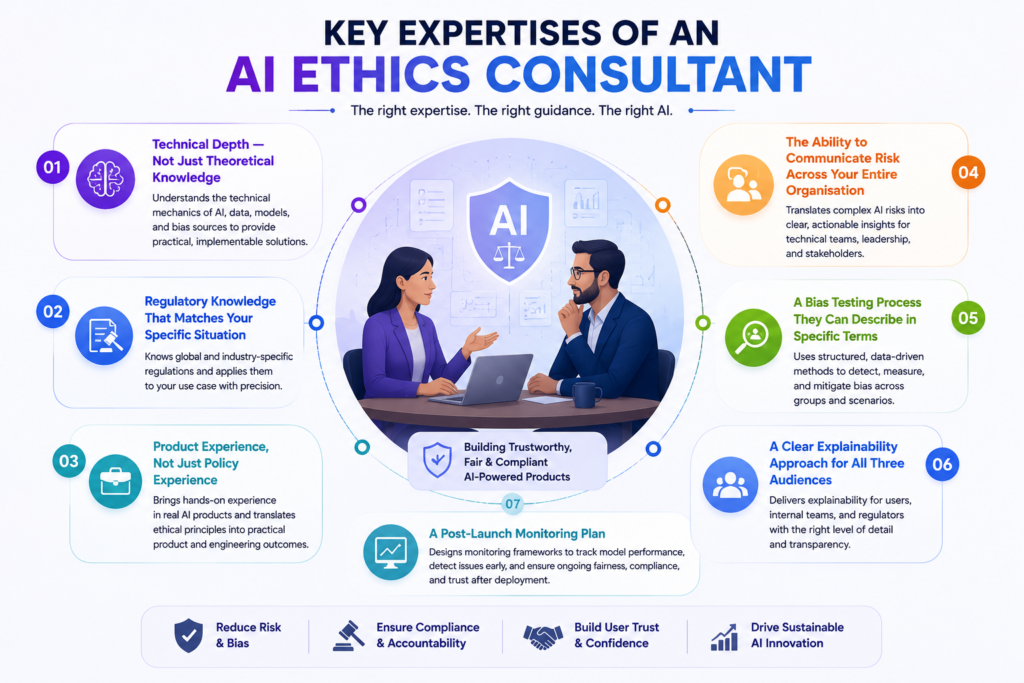
1. Technical Depth — Not Just Theoretical Knowledge
This is the most important filter, and the one that eliminates the largest proportion of candidates who present well on paper.
Be careful with consultants who cannot explain the technical mechanics of bias in machine learning models. Real AI ethics consulting means you can point to where bias actually enters the pipeline: in the training data, in feature selection, in the optimisation objectives, in threshold calibration, or in the deployment context.
Ask them:
“If our model’s approval rate for one demographic group was ten percentage points lower than another — where would you start looking for the cause?”
A consultant with genuine technical depth will walk you through a structured diagnostic: training data representation, feature engineering choices, label quality, threshold calibration, proxy variable encoding. A consultant without it will say something like “we would run a bias audit” without being able to explain what that involves in practice.
They do not need to write your model training code. But they need to understand the mechanics well enough to give your data science team specific, implementable guidance and not general observations that engineers then have to translate on their own.
2. Regulatory Knowledge That Matches Your Specific Situation
AI regulation is proliferating, sector-specific, and moves faster than most people working outside of it realise. General familiarity with the EU AI Act is not the same as knowing which risk tier your specific product falls into and what compliance looks like at the feature level.
The regulatory landscape you need your consultant to understand depends on where your product operates and what it does:
EU AI Act — if your product operates in the EU or serves EU users, the Act’s risk tier classifications determine what obligations apply. High-risk AI systems face significant transparency, explainability, and human oversight requirements. Your consultant should be able to tell you exactly which category your product falls into and what compliance requires from your engineering team and not your legal team.
GDPR Article 22 — applies when automated decision-making produces legal or similarly significant effects on users. The requirement to inform users and provide human review mechanisms must be built into your product interface, not buried in a terms and conditions document.
NIST AI Risk Management Framework — the practical governance standard in many US enterprise and government-adjacent contexts. Your consultant should be able to map your product against it, not just cite it.
ISO/IEC 42001 — the international AI management system standard. Increasingly appearing in enterprise procurement requirements and certification expectations.
Sector-specific frameworks — an ethics consultant supporting a healthcare organisation should understand FDA Software as a Medical Device guidance. Someone focused on financial services should be comfortable with SR 11-7 model risk management guidance from the Federal Reserve. Do not hire a generalist for a regulated sector engagement without verifying they understand the sector-specific layer on top of general AI ethics principles.
Ask them:
“What regulatory obligations apply to our specific use case and what would compliance with each one actually look like in our product?”
The answer should be precise and feature-specific. If it is general, they do not know your situation well enough yet or at all.
3. Product Experience, Not Just Policy Experience
There is a meaningful difference between consultants who have worked directly with engineering and product teams on live AI systems, and those whose experience is primarily in policy development, academic research, or corporate ethics programme design.
If your immediate need is to make your existing product more ethically sound, you need someone who has done this before in a product context — someone who knows how to translate an ethical principle into a data science sprint, a bias testing protocol, a logging specification, or a user-facing disclosure that your development team can implement.
For industry-specific engagements, hands-on experience with real AI projects usually says more than academic degrees. Look for people who can show their skills through open-source contributions, participation in AI competitions, or prior production deployments. Ask for references from clients in your exact sector.
Ask them:
“What did this consultant produce for your engineering team? What got built or changed as a direct result of their engagement?”
The answer should involve specific controls, tests, or architectural decisions, not a governance document that was produced and then filed away.
4. The Ability to Communicate Risk Across Your Entire Organisation
One thing most AI ethics consultants don’t have, but enterprises really notice, is organisational influence. The ability to translate technical risk findings into board-level language, then actually drive policy adoption across legal, compliance, product, and data science teams.
A consultant who can explain model fairness to your data scientists but cannot explain the same risks to your CFO, your legal team, or your board in language that produces decisions is only half as valuable as one who can do both. Test this in the conversation itself.
Ask them:
To explain a complex trade-off like the difference between demographic parity and equalised odds as fairness criteria. First, as they would to a machine learning engineer, then as they would to a Chief Risk Officer.
The quality and clarity of both explanations tells you whether they can drive change across your organisation or only within one function.
5. A Bias Testing Process They Can Describe in Specific Terms
Bias testing is the most commonly claimed and most inconsistently delivered capability in AI ethics consulting. Almost every candidate says they do it. Very few can describe a rigorous, specific approach when asked.
A credible bias testing process for your product should include, at minimum:
Training data review — examining demographic composition, identifying representation gaps, and assessing whether historical decisions encoded in the data carry discriminatory patterns.
Protected group testing — measuring model outcomes across legally protected characteristics and statistically significant proxy variables.
Proxy variable analysis — identifying features in your data that correlate with protected characteristics without directly encoding them. Postcode, device type, browsing behaviour, transaction timing — these can all serve as proxies for demographic characteristics in ways that produce discriminatory outcomes even when demographic data is excluded from the model.
Intersectional testing — understanding that bias compounds at the intersection of characteristics. A model may perform fairly on gender and fairly on age independently, while producing significantly unfair outcomes for a specific combination of both.
Threshold calibration review — assessing whether the decision threshold applied to model outputs is producing systematically different false positive and false negative rates across groups — one of the most common and least diagnosed sources of outcome disparity.
Ask them:
To walk you through exactly what they would do for your specific product and your specific data. A consultant who gives a generic answer without specifying which fairness metrics they would use, why those metrics are appropriate for your use case, and what the output would look like is not the right person.
6. A Clear Explainability Approach for All Three Audiences
Explainability means different things to different stakeholders, and a strong consultant addresses all three rather than treating it as a single deliverable:
User-facing explainability — the plain-language explanation a person affected by an AI decision receives. This is both an ethical obligation and a legal requirement in many jurisdictions.
Internal operational explainability — the ability for your engineering and product teams to understand why the model made a specific decision in a specific case, enabling debugging, auditing, and improvement.
Regulatory explainability — the documented, auditable evidence that your AI system makes decisions in a way that can be scrutinised and defended by an auditor, a regulator, or in litigation.
Ask them:
“How do they approach each of the three?”
A consultant who focuses only on user-facing explanations will leave your internal and regulatory needs unmet. A consultant who focuses only on model interpretability tools will miss the user communication and regulatory documentation requirements.
7. A Post-Launch Monitoring Plan
AI ethics is not a pre-launch exercise. Models drift. Data distributions shift. The user population your product serves in year two may differ significantly from the population your model was trained on. A model that passes every fairness test at launch can degrade into unfair outcomes as real-world data diverges from training data.
Ethics consulting engagements that start after deployment end up costing about three to five times more than work built into the development cycle. But equally, consultants whose engagement ends at pre-launch validation are not accounting for what happens next.
Ask them:
- What metrics would you recommend we track post-launch to detect fairness degradation?
- At what thresholds should those metrics trigger a model review or retraining?
- How should our team document and escalate AI incidents?
- What does responsible AI monitoring look like for our specific use case in practice?
The answers should be specific and implementable by your team without continuous consultant involvement. If they cannot describe a monitoring programme in concrete terms, they are not thinking about the full lifecycle of your product.
Read Also: Common Bugs in AI-generated Code (and How to Fix Them)
Key Questions to Ask Before Hiring an AI Ethics Consultant
These separate candidates who understand the domain from those who have learned to sound like they do.
“Walk me through what you would do in the first two weeks of engaging with our product.”
This reveals whether they start with discovery or with their own framework and methodology. Starting with their framework before understanding your context is backwards.
“Describe a bias testing protocol you have run for a real product. What did you find, and what specifically changed as a result?”
A practitioner with genuine product experience will have concrete examples. Someone without it will describe methodology in the abstract.
“How would you explain demographic parity versus equalised odds to our lead data scientist — and then to our Chief Risk Officer?”
Tests both technical depth and the communication range that drives organisational adoption.
“What regulatory obligations apply to our specific use case — and what would meeting each one actually require from our engineering team?”
Tests the precision of their regulatory knowledge for your situation, not their general awareness of AI regulation.
“What would post-launch AI ethics monitoring look like for a product like ours?”
Tests whether they think in full product lifecycle terms or only in pre-launch terms.
“What is outside your expertise — what would you not be able to do for us?”
A confident, honest consultant has a clear and specific answer. Candidates who claim to cover everything should be treated with scepticism. Nobody is strong across the entire domain.
“Can you share an example of a deliverable your team produced for an engineering team on a comparable project?”
An anonymised example of a bias testing report, a technical risk brief, or a model card from a past engagement is far more informative than a list of client names.
These questions provide a solid starting point, but they shouldn’t be treated as a fixed checklist.
Every AI product has unique technical, regulatory, and business requirements, so it’s important to prepare additional questions that reflect your specific use case. The more tailored your discussion is to your product, the better you’ll be able to assess whether a consultant is the right fit.
Read Also: Best Vibe Coding Tools For Non-Technical Founders
One Final Distinction Worth Making
The consultants who produce the most durable, practical outcomes are the ones who treat your product’s ethical quality as a product quality issue and not a compliance issue, not a values exercise, and not a risk management checkbox.
Users who do not trust an AI decision do not act on it. Users who feel an AI system treated them unfairly do not return. Users who cannot understand why an AI made a decision about them disengage from the feature. The commercial and ethical arguments for responsible AI in your product point in the same direction.
The right consultant understands this. They will not produce a framework that imposes friction on your product in exchange for compliance comfort. They will find the places where getting the ethics right makes the product better and help your team build those improvements into the product itself.
If you’re looking for that kind of partner, Triple Minds can help. We’ve worked with 50+ AI-powered digital products to build practical AI governance, reduce bias, strengthen compliance, and embed responsible AI into real-world products—not just documentation.
Our focus is on creating AI systems that are trusted, compliant, and ready to scale. Get in touch with us to discuss your AI product and learn how our AI ethics consulting services can help you build responsible AI with confidence.
Why Choose Triple Minds as Your AI Ethics Consulting Partner?
Building responsible AI requires more than compliance checklists. Triple Minds helps businesses design practical AI governance, reduce bias, strengthen regulatory readiness, and embed responsible AI practices directly into real-world products from development through deployment.
Talk to Our AI Ethics Experts
Frequently Asked Questions
Ask for a real example of product improvements they delivered, such as bias mitigation, audit logging, or AI governance changes, not just policies or frameworks.
If you operate in regulated industries like healthcare or finance, industry expertise is essential. For other sectors, proven product-level AI ethics experience is usually sufficient.
Start with a short paid assessment or pilot project. The quality of their recommendations and deliverables will indicate what to expect from a larger engagement.
You still need AI ethics oversight. A consultant can help assess risks, implement safeguards, and ensure your use of third-party AI is compliant and responsible.
You should receive actionable outputs such as bias testing protocols, audit requirements, implementation recommendations, and a monitoring plan—not just a report.
Define clear objectives and success criteria at the start. The engagement should end once agreed deliverables, testing, and documentation have been completed.
Online shopping means opening multiple tabs, comparing prices manually, reading reviews for hours, and finally clicking the “Buy Now” button yourself. Today, that experience is starting to change rapidly. Instead of people doing all the searching and decision-making, AI assistants are slowly becoming active participants in the buying journey. A shopper can now simply ask an AI tool to “find the best running shoes under $150 in blue color” or “reorder my monthly skincare products,” and the system can handle product discovery, comparisons, recommendations, and even checkout automatically.
This shift is giving rise to what many are calling agentic commerce, where AI agents do more than just assist shoppers. They actively make decisions, interact with ecommerce systems, and complete purchases on behalf of users with proper permissions. At the center of this transformation is the Agentic Commerce Protocol (ACP), a framework designed to help AI agents, ecommerce stores, payment systems, and product catalogs communicate with each other smoothly and securely.
For ecommerce brands, this is not just another technology trend. It represents a major change in how products may be discovered, evaluated, and purchased online in the coming years. As AI-driven shopping becomes more common, businesses may need to rethink how their ecommerce stores are structured, how product information is organized, and how their systems connect with AI-powered platforms.
At Triple Minds, we help businesses prepare for emerging AI-driven commerce trends through scalable AI solutions, ecommerce development, automation systems, and AI-ready digital experiences. In this blog, we’ll break down what OpenAI’s Agentic Commerce Protocol means, how AI-powered shopping works, and what ecommerce brands should do now to stay competitive in the future of autonomous commerce. Let’s first get to know what ACP really is.
What Is ACP (Agentic Commerce Protocol)?
Agentic Commerce Protocol (ACP) is a system designed to help AI agents interact with ecommerce stores and complete purchases on behalf of users. In simple terms, it creates a structured way for AI assistants, online stores, payment systems, and product databases to communicate with each other smoothly and securely.
ACP is a shared set of rules and instructions that helps AI agents and ecommerce stores talk to each other properly.
Without ACP:
- Every AI assistant would need a different custom integration for every online store.
With ACP:
- Everyone follows the same “shopping language,” so AI agents can buy from many stores automatically.
Unlike traditional ecommerce, where customers manually search for products, compare options, add items to carts, and complete checkout themselves, agentic commerce shifts much of that work to AI. Instead of clicking through multiple websites, a shopper can simply ask an AI assistant to find the best product based on their budget, preferences, or previous purchases. The AI then handles product discovery, comparisons, recommendations, and even checkout steps automatically.
The word “protocol” here does not simply mean a process or workflow. It refers to the rules, APIs, integrations, permissions, and communication systems that allow AI agents and ecommerce platforms to work together effectively. Without a proper protocol, AI systems would struggle to access accurate product information, verify inventory, process payments, or complete transactions securely.
This is why ecommerce businesses may need more AI-friendly product catalogs, structured product data, real-time inventory syncing, and seamless checkout systems in the future. As AI-powered shopping grows, brands that make their ecommerce infrastructure easier for AI systems to understand could gain a major advantage in product discovery and conversions.
Some early examples of agentic commerce can already be seen in AI shopping assistants, smart product reordering, conversational commerce, and AI-powered recommendation systems that help users discover and buy products with minimal manual effort.
Will Your Store Be Ready When AI Agents Become Buyers?
Customers are beginning to rely on AI assistants for product discovery, recommendations, and purchase decisions. Triple Minds helps ecommerce brands build intelligent shopping assistants, AI-powered customer experiences, and conversational commerce solutions that support the future of digital retail.
Explore Ecommerce Chatbot Development Services
How AI Shopping Agents Actually Buy Products
Agentic commerce works through a connected ecosystem where AI assistants, ecommerce stores, customers, and payment systems work together to complete purchases automatically. Instead of manually browsing websites and handling every step of checkout, users can rely on AI agents to manage much of the shopping journey for them. Here’s how the process typically works:
- Customer
The user simply asks an AI assistant to find or purchase a product. Based on the request, the AI recommends suitable options, and the customer approves the final purchase using a saved or new payment method.
- AI Shopping Assistant
The AI system handles product discovery, comparisons, recommendations, and checkout steps. Once the user confirms the order, the AI sends the purchase request directly to the ecommerce store.
- Ecommerce Store
The online business receives the order request, checks payment and security details, confirms inventory availability, and processes the order if everything is verified.
- Payment System
The payment provider securely manages the transaction using encrypted payment details and authorization systems to ensure safe and approved purchases.
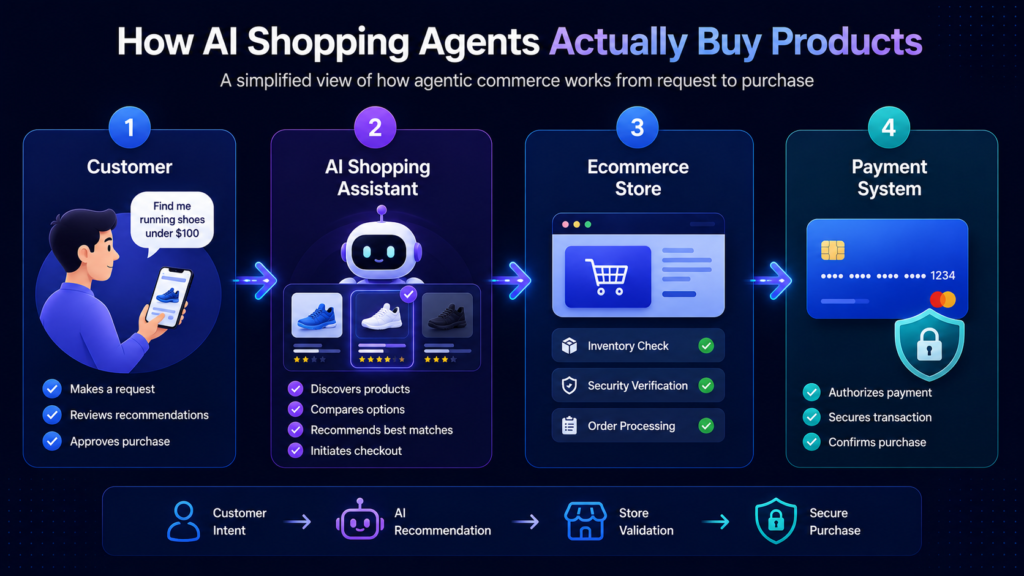
Read Also: Major Differences Between RPA and Agentic Workflows?
What ACP Means for Ecommerce Brands
If AI shopping becomes mainstream, ecommerce businesses may need to rethink how their online stores are built and optimized. Instead of designing websites only for human visitors, brands may also need to make their stores easier for AI agents to understand, evaluate, and interact with.
In traditional ecommerce, customers manually search, compare, and purchase products themselves. But with agentic commerce, AI systems could increasingly influence which products shoppers discover and buy. This changes how ecommerce visibility works.
Here’s what that could mean for brands:
- AI-friendly stores may become essential
Ecommerce websites may need to be optimized not just for users, but also for AI systems that scan and evaluate products automatically.
- AI agents could influence buying decisions
Instead of customers browsing dozens of websites, AI assistants may shortlist and recommend products directly.
- Product discovery may shift beyond Google
AI-powered recommendations and conversational search could become a major source of ecommerce traffic and conversions.
- Poor product data may reduce visibility
Incomplete descriptions, outdated pricing, or messy catalogs could make it harder for AI systems to recommend products accurately.
- Real-time systems will matter more
APIs, live inventory updates, pricing synchronization, and seamless integrations may become critical for AI-driven shopping.
- Checkout experience could affect AI recommendations
Faster checkout flows, secure payments, and transparent return policies may improve trust and influence AI purchasing decisions.
- Brands may need to adapt early
Businesses that prepare for AI commerce sooner could gain stronger visibility and a competitive advantage as autonomous shopping grows.
“Okay, AI shopping is coming. What should we actually do about it?”
How Ecommerce Brands Can Prepare for ACP
As AI-powered shopping evolves, ecommerce brands may need to make their stores more structured, AI-readable, and easier to interact with programmatically. Preparing early can help businesses stay visible in future AI-driven commerce ecosystems.
Here are some practical ways brands can prepare for ACP:
- Improve product catalogs
Use clear product titles, descriptions, specifications, categories, and attributes so AI systems can understand products more accurately.
- Strengthen product metadata
Add detailed information such as dimensions, compatibility, pricing, materials, shipping details, and availability.
- Use structured data and schema markup
Structured product information helps AI systems interpret ecommerce pages more effectively.
- Optimize for conversational search
Product content should align with how people naturally ask questions in AI chat interfaces and voice assistants.
- Keep inventory and pricing updated
AI agents rely on real-time data, so outdated stock or pricing information may hurt visibility and trust.
- Simplify checkout systems
Faster and more secure checkout experiences can support smoother AI-assisted purchasing journeys.
- Build stronger trust signals
Positive reviews, transparent policies, reliable delivery, and strong brand authority may influence which products AI systems recommend most often.
Read Also: Shopify MCP Servers – Capabilities, Real Use Cases & Cost Breakdown
Challenges and Risks of Agentic Commerce
While agentic commerce creates exciting opportunities, it also introduces new challenges for ecommerce businesses, AI platforms, and shoppers. As AI systems become more involved in purchasing decisions, brands will need to balance automation with trust, accuracy, and security.
Here are some of the biggest risks businesses should be aware of:
- Privacy and user permissions
AI shopping assistants may require access to personal preferences, payment methods, purchase history, and browsing behavior. Businesses will need secure permission systems and transparent data practices to maintain customer trust.
- AI hallucinations or incorrect purchases
AI agents may occasionally misunderstand requests, recommend the wrong products, or provide inaccurate information. Poor recommendations or incorrect purchases could negatively impact customer experience and brand trust.
- Brand visibility challenges
In AI-driven shopping, users may no longer browse dozens of ecommerce websites manually. This means some brands could lose visibility if AI systems favor competitors with better product data, stronger reviews, or more AI-friendly infrastructure.
- Dependence on AI platforms
Ecommerce businesses may become increasingly dependent on AI ecosystems and platforms for product discovery and sales. Changes in AI algorithms or platform policies could directly affect visibility and conversions.
- Payment and security risks
Since AI systems may handle checkout and transactions, secure authentication, encrypted payment systems, fraud prevention, and permission controls will become even more important.
Read Also: How Much Does It Cost to Build an AI Agent?
Industries That May Benefit the Most
Some industries are naturally better suited for agentic commerce because they involve repeat purchases, standardized products, or frequent buying decisions that AI systems can automate easily.
Here are some sectors that may benefit the most from AI-driven commerce:
- Grocery and daily essentials
AI assistants could automatically reorder household products, groceries, or recurring essentials based on shopping habits and usage patterns.
- Electronics
AI systems may help users compare technical specifications, prices, reviews, and compatibility when purchasing gadgets or devices.
- Fashion basics and repeat purchases
Products like everyday clothing, shoes, skincare, or personal care items could become easier to reorder through AI shopping assistants.
- Subscription-based products
Agentic commerce could simplify recurring purchases for products such as supplements, pet food, software subscriptions, or monthly deliveries.
- B2B procurement
Businesses may use AI agents to automate repetitive purchasing tasks, vendor comparisons, inventory management, and bulk ordering processes.
Real-World Examples of Agentic Commerce Emerging Today
Agentic commerce is no longer just a future concept. Many AI-driven shopping experiences are already starting to appear across ecommerce platforms, apps, and digital assistants. While the technology is still evolving, these early use cases show how AI is gradually becoming more involved in online purchasing decisions.
Some real-world examples include:
- AI shopping assistants
AI tools can already help users discover products, compare options, answer product questions, and recommend purchases based on preferences and budgets.
- Smart reordering systems
Some ecommerce platforms and smart devices can automatically reorder frequently used products such as groceries, household items, or office supplies when stock runs low.
- Voice commerce ecosystems
Voice assistants are making it possible for users to search, reorder, and purchase products using simple voice commands instead of manual browsing.
- AI-powered ecommerce recommendations
Ecommerce stores increasingly use AI systems to personalize product suggestions, upsell relevant items, and improve product discovery.
- Chat-based shopping experiences
Conversational AI systems are enabling customers to shop directly through chat interfaces where they can ask questions, compare products, and complete purchases naturally.
What the Future of AI-Driven Ecommerce Could Look Like
As AI systems become more advanced, ecommerce may shift toward highly automated and autonomous shopping experiences. AI agents could move beyond assisting users and begin handling entire purchasing workflows with minimal human involvement.
Here’s what the future of agentic commerce could look like:
- AI agents negotiating deals
AI systems may compare sellers, negotiate discounts, find better shipping options, and secure the best value automatically for users.
- Autonomous subscriptions
AI assistants could manage recurring purchases automatically by tracking usage patterns, preferences, and delivery schedules without manual input.
- Personalized AI storefronts
Shopping experiences may become fully customized based on user behavior, purchase history, preferences, budgets, and lifestyle patterns.
- AI-to-AI commerce ecosystems
AI agents representing shoppers could directly communicate with ecommerce systems, supplier networks, and business AI tools to complete transactions automatically.
- Human-free purchasing for routine products
Everyday purchases like groceries, office supplies, household essentials, or subscriptions may eventually happen automatically without users manually browsing or checking out products themselves.
Exploring AI Commerce for Your Business?
Whether you’re evaluating AI shopping assistants, conversational commerce, MCP integrations, or broader AI adoption strategies, Triple Minds can help you identify practical opportunities and build a roadmap tailored to your business goals.
Talk to Our Team
Conclusion
Agentic commerce is reshaping how products are discovered and purchased online. As AI-driven shopping grows, ecommerce brands may need AI-friendly product data, APIs, and checkout systems to stay competitive. At Triple Minds, we help businesses prepare for the future of autonomous commerce with scalable AI and ecommerce solutions.
Quick Answers to Common Questions
Agentic Commerce Protocol (ACP) is a framework that helps AI agents interact with ecommerce stores, payment systems, and product catalogs to automate shopping experiences.
Traditional ecommerce depends on manual browsing and checkout, while agentic commerce allows AI systems to assist or automate product discovery, comparisons, and purchasing decisions.
Yes, AI agents can help users discover products, compare options, and complete purchases with user permissions and secure payment authorization systems.
ACP may influence how products are discovered and recommended in AI-driven shopping environments. Brands may need AI-friendly ecommerce systems to remain competitive.
Businesses can prepare by improving product data, using structured information, optimizing APIs, simplifying checkout systems, and building stronger trust signals.
Yes, AI-driven commerce may shift ecommerce SEO toward structured data, conversational search optimization, and AI-readable product information.
In 2026, three tools are ruling the AI coding space. They are Cursor, GitHub Copilot, and Claude Code. These tools are getting used almost everywhere, whether you need to code regarding specific tasks or ship software.
Cursor turns your written instructions into code changes, refactors and even complete app features inside an IDE (Integrated Development Environment).
On the other hand, GitHub Copilot suggests code as you type and helps explain, debug and generate functions directly in your editor.
While Claude Code works like an autonomous coding agent that can read your project, run commands, fix bugs, and build features from the terminal.
They are all pretty good at what they do. But often businesses get confused when they are not able to understand which one they should choose according to their business needs and type?
In this blog, we will dive deep into what is the differences between each AI coding tool and which is best to have based on the needs of your startup or business.
Building a product and not sure which AI Coding tool is best for your business?
Triple Minds offers hands-on AI consulting and custom AI agent development to help teams move faster without the guesswork. Talk to our team and help figure out which AI coding works best for you.
What Are We Comparing?
Before the comparison, it is important to understand that each tool solves a different problem in coding. They have their own ways to work which differ from each other.
Cursor
It is a full AI-native code editor. It is built on top of VS code but rebuilt from scratch to put AI at the center of every action you take. You are not adding AI to your editor. The editor itself is the AI experience.
GitHub Copilot
GitHub Copilot is an AI powered coding assistant developed by GitHub and OpenAI. It acts as an “AI pair programmer” that integrates directly into your text editor, suggesting code completions, generating functions, explaining complex code and debugging in real time as you type.
Claude Code
It is an agentic coding assistant developed by Anthropic that lives directly inside your local terminal or IDE (Integrated Development Environment) instead of a web browser. It simply allows you to build, debug and refactor software using natural language by giving the AI direct access to read, create and modify files in your project directory.
Note: One is an editor. One is a plugin. One is an autonomous agent. That distinction matters more than any feature comparison.
Ready to Build Faster With AI-Assisted Development?
Modern development teams are increasingly combining AI coding tools, agent workflows, and human expertise to accelerate product delivery. Triple Minds helps startups and enterprises implement practical AI-driven development processes through specialized Vibe Coding services that speed up development without compromising quality.
Explore Our Vibe Coding Development Services
Cursor
Where Cursor Works the best?
Cursor is at its best when you are building something new, and you want the AI to co-build it with you in real time.
Its standout feature is called Composer. You describe a feature in plain English and Cursor builds it across multiple files at once. Also, if you need a login flow that involves your routes, controllers, database schema and frontend components, then you just describe it simply. After your command, Cursor writes all of it together by understanding how each piece connects rather than leaving you to stitch everything manually.
It also indexes your entire project, so it understands how your files relate to each other. When you give it a task, it reasons your actual code base not just the file on your screen.
Cursor also works well for:
1) Scaffolding new features from a plain-language description, saving the initial hours of setup.
2) Refactoring code with awareness of how a change in one place affects the rest of the project.
3) Asking architectural questions and getting answers that reference specific files.
4) Multi-line autocomplete that predicts entire logical blocks based on the pattern of what you are writing.
Where Cursor Lacks?
1) It handles new projects well but loses context in large, legacy codebases with hundreds of files and inconsistent patterns.
2) The learning curve is steep and many developers install it, feel overwhelmed and go back to their old setup without ever using it properly.
3) Its most powerful features run on premium AI models that consume plan credits fast, so heavy users on the Pro plan hit limits quickly.
4) Switching to Cursor means leaving your current editor behind entirely which is a bigger ask than it sounds for developers deep in JetBrains or Neovim.
Pricing
Individual plan: $20/month
Teams plan: $40/user/monthly
Choose Cursor If:
1) You are building a new product from scratch and want AI that co-builds it with you.
2) You are a solo developer or small team willing to fully commit to an AI first workflow.
3) You want AI across every layer of your editing experience not just a separate assistant.
4) You are comfortable investing time to learn the tool properly in exchange for a long-term productivity gain.
GitHub Copilot
Where GitHub Copilot Works Best?
Copilot was launched around 2021 and has gone through more real-world iteration than either of the other two tools. That history shows how reliably it performs across different environments.
Its inline autocomplete is the best of the three in pure accuracy and speed. For the kind of work that fills out a large portion of every developer’s day, writing boilerplate, implementing familiar patterns and converting logic between formats. Copilot saves real time without requiring any change to how you work.
Copilot also excels in team and enterprise environments because it has the most mature security controls, the most robust privacy settings for proprietary code and the deepest integration with GitHub’s existing ecosystem.
Copilot also works well for:
1) Accurate inline autocomplete across all major languages without any configuration.
2) Teams already on GitHub, VS Code or JetBrains who want AI capability with zero workflow disruption.
3) Enterprise environments with compliance requirements around data privacy and audit controls.
4) Developers who want AI that makes their current workflow faster rather than replacing it.
Where GitHub Copilot Lacks?
1) It accelerates what you are already doing but will not challenge a poor architectural decision or reason through a complex problem with you.
2) It tends to reason at the file level rather than the project level, so tasks involving multiple interconnected files often result in suggestions that are correct in isolation but break something elsewhere.
3) It does not do agentic work, every output requires a developer to review, accept and direct the next step manually.
4) Quality drops significantly in less common languages where suggestions become unreliable enough to be more of a distraction than a help.
Pricing
1) Team plan: $4 USD per user/month
2) Enterprise: Enterprise starting at $21 per user/month
Note: Copilot is the most predictability affordable of the three at team scale, costing less per month than most productivity tools that teams pay for without much thought.
Choose Copilot If:
1) Your team is already on GitHub and wants AI capability without changing tools or workflow.
2) You need enterprise-grade privacy controls and compliance features for proprietary code.
3) You want the most reliable and proven inline autocomplete available today.
4) Predictable, scalable pricing matters more than having the most experimental capabilities.
Claude Code
Where Claude Code Works the best?
Claude Code operates at a different level from the other two tools. It is an autonomous agent that takes a goal, reasons through it across your entire codebase and executes the solution with a level of independence that Cursor and Copilot do not offer.
You give it a task in your terminal and it reads the relevant files, maps out what needs to change and why, writes the change across every affected part of the codebase, runs the necessary commands, reads any errors that come back and iterates on its own until the task is resolved. It works through a complex engineering problem the same way a capable engineer would work through a ticket.
Because it runs in your terminal, it also has access to your file system, package manager, build tools and logs, letting it take broad environment-level actions that editor-based tools simply cannot.
Claude Code also works well for:
1) Debugging complex problems that span multiple files, services or layers of a stack.
2) Refactoring large sections of legacy code while understanding how every change affects the broader system.
3) Writing and fixing test suites including tests for parts of the codebase that were never tested before.
4) Getting oriented inside and unfamiliar codebase by having it map the architecture and explain where key logic lives.
5) Multi-step engineering work that would take a human developer several hours to work through it carefully.
Where Claude Code Lacks?
1) It lives entirely in the terminal with no syntax highlighting, no inline difference view and no GUI (Graphical User Interface) which feels unfamiliar and raw for developers used to visuals editor feedback.
2) It can make sweeping changes across many files at once and approving actions without carefully reviewing the plan first can leave you with a codebase that takes real time to untangle.
3) It is billed on API token consumption rather than a flat monthly fee, so a long agentic session on a large codebase can cost significantly more than expected if usage is not tracked.
4) It is best supported on MacOS, Linux and windows users need WSL to run it which adds friction that some teams find prohibitive.
Pricing
1) No flat monthly subscription for individual use.
2) Billed based on Anthropic API token consumption per session.
3) A simple task on Claude Sonnet costs very little while a long session on Claude Opus across a large codebase can cost meaningfully more.
4) Enterprise pricing is available directly through Anthropic for teams that need predictable billing and usage controls.
Setting usage Budgets and monitoring consumption from the first week is strongly recommended before it becomes a line item that surprises you.
Choose Claude Code If:
1) You are working on a large or legacy codebase where tasks routinely modify many files at once.
2) You want an AI that can own a task from start to finish rather than assist you through every step manually.
3) You are comfortable in the terminal and can build the review habits that make agentic AI safe on real codebases.
4) You are Tackling high value, high complexity problems where the hours saved justify the usage cost.
Read Also: Cursor vs Claude vs Bolt – AI Coding Tool Comparison for Production Code
How To Choose One?
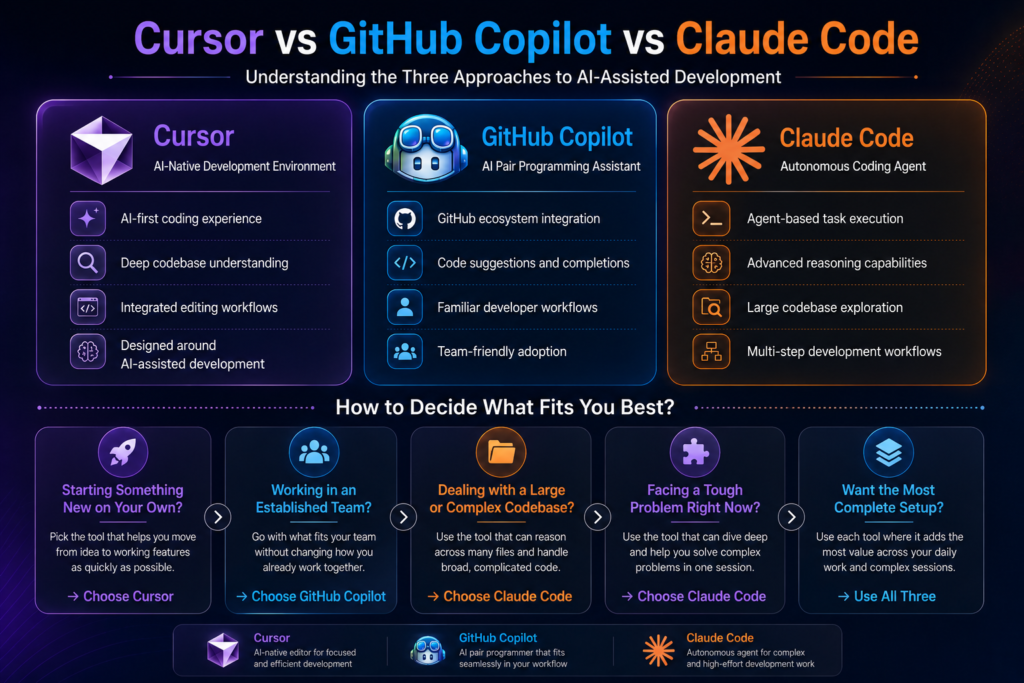
Here is a clear framework based on where you actually are right now:
1) Solo Developer Building Something New
Start with Cursor. The AI-native editor changes how fast you can go from idea to working feature and the gain on greenfield work is hard to match with any other tool.
2) Established Engineering Team:
Github Copilot is the path of least resistance. It requires nothing from your team in terms of workflow change, scales predictability in cost and delivers reliable daily value.
3) Large Or Complex Codebase
Claude Code is worth the terminal-based workflow. For tasks that require sustained reasoning across hundreds of files, it is the most capable tool available right now.
4) Specific hard Problem In Front Of You
Reach for Claude Code for that session even it is not your daily driver. It handles the kind of problem that would take a skilled developer most of the day to work through carefully.
5) Maximum Overall Setup:
Many senior developers run all three. Copilot for inline suggestions throughout the day, Cursor for building features across files, Claude Code for deep debugging or refactoring session.
Read Also: Best Uncensored LLMs For AI companion Apps in 2026
When Tools Are Not Enough?
Here is what all three tools share: they make a skilled developer faster, but none of them replace architectural thinking, strong product judgment or the experience to recognize when a codebase is quietly heading in the wrong direction.
A solo developer with three excellent AI tools is still one person with one perspective, and there is a ceiling on what one person can build well. That ceiling tends to appear at exactly the moment when momentum matters most.
Think about what actually goes into shipping something serious:
1) A senior AI engineer approaches a system design problem differently than a backend developer, and that difference prevents entire categories of technical debt.
2) A product strategist catches misalignments between what is being built and what users actually need, something no tool can flag because the tool has never spoken to your users.
3) A growth team ensures that what gets built actually reaches the people it is built for, because a product nobody finds is just an expensive side project.
AI tools speed up execution within the boundaries of what one person can see and decide. A team expands those boundaries entirely. If you are at the stage where the ceiling is starting to feel real, that is worth paying attention to.
Building With Claude AI?
From AI-powered assistants to intelligent business workflows, Claude AI can unlock powerful capabilities when implemented correctly. Triple Minds helps organizations integrate Claude AI into modern products and applications.
Learn More About Claude AI Integration Services
Conclusion
Cursor, Copilot and Claude each represent a genuinely different philosophy about AI-assisted development and all three are serious enough to deserve real consideration.
Copilot is the most reliable and universally applicable choice. Cursor gives the most immersive experience that changes how build rather than just making it slightly faster. Claude Code is the most powerful tool for complex autonomous work, behaving less like an assistant and more like a capable engineer you can hand over a hard problem to.
The right choice fits where you are right now. And the honest follow up is that if where you are is a point where you need to build something serious, at pace, with real quality, the tools alone might not help that much.
Quick Answers to Common Questions
Yes, but they conflict on inline autocomplete since both tools compete to fill the same suggestions. Most developers who switch to Cursor disable Copilot’s autocomplete and rely on Cursor’s Tab feature instead, which tends to be stronger in that environment.
Anthropic does not use API inputs to train its models by default. For sensitive codebases, review Anthropic’s current data usage policy and consider an enterprise agreement with formal contractual protections before running Claude Code on proprietary repositories at scale.
Copilot supports most major languages but quality varies significantly. It performs best in JavaScript, TypeScript, Python, and Go. In less common languages, suggestions become noticeably less accurate and can be more of a distraction than a help.
Claude Code works on Windows through WSL (Windows Subsystem for Linux) but is best supported on macOS and Linux, where setup is straightforward. The WSL requirement adds enough friction that some teams find it a practical barrier.
GitHub Copilot’s free tier is the most generous starting point, offering 2,000 completions and 50 chat messages per month with no time limit. Cursor’s free tier works for light use but premium model requests run out faster than most active developers expect. Claude Code is technically free to start but it accumulates costs quickly even in moderate sessions.
If you are building an NSFW AI chatbot platform, moderation is not a feature you add later – it’s the foundation. Without a proper system, your platform becomes a liability before it becomes a business.
A content moderation system for NSFW chatbots works across three stages. They are:
1) Screening creator-uploaded avatars and system prompts before a chatbot goes live.
2) Scanning AI-generated outputs in real time during conversations.
3) Giving your admin team the controls to review flags, manage creators and update thresholds without touching code.
Each stage targets a different point where harmful content enters your platform and skipping any one of them leaves a gap that jailbreaks, explicit imagery or unsolicited harmful outputs will eventually find.
At Triple Minds, we have been building NSFW AI platforms with powerful moderation and compliance system.
Our CandyAI Clone comes with a Smart Admin Panel built specifically for compliance and moderation control, giving you 50 plus controls to manage your platform safely and at scale.
If you are planning to develop an NSFW AI chatbot product and need help with moderation and compliance system, then talk to our team before you write a single line of code.
Key Takeaways
1) On NSFW chatbot platforms, the AI itself can initiate harmful content even when the user sends nothing explicit, making moderation a system design problem, not just a user behavior problem.
2) NSFW chatbots fall into four types including AI Characters, Story Generators, Image Generators, and DAN bots, and each one requires a different moderation approach.
3) No single detection tool is reliable enough on its own and combining Google Safe Search, Azure Content Safety and an LLM-based classifier together gives meaningfully better coverage.
4) The most cost-effective moderation happens before a chatbot goes live, through avatar scanning, system prompt review and creator accountability policies, not just real-time output filtering.
5) Failing at moderation does not only mean bad content reaching users, it means losing payment processors, app store access, and regulatory standing, all of which can shut your platform down entirely.
Want to Get Your NSFW Platform Fully Compliant?
Triple Minds helps businesses build safe, scalable and fully compliant NSFW platforms with robust content moderation, age verification, payment compliance and smart orchestration systems designed to meet global standards. From planning to launch and beyond, we help you stay compliant and future-ready.
Talk to Our Compliance Experts
Why NSFW Chatbot Moderation Is A Different Problem Entirely?
Most people assume that moderating an NSFW chatbot platform works the same way as moderating social media. A user posts something harmful, you find it then you remove it and all done.
That logic completely breaks down with AI chatbots.
On an NSFW chatbot platform, content is not posted. It is generated in real time live for every individual user, inside a private conversation. No two conversations are exactly the same. The content never existed before the user opened that chat window, and it may never exist again in the same form. By the time any human reviewer could see it, the conversation is already over.
A research study published in 2026 analyzing 376 NSFW chatbots and 307 public conversation sessions on the platform FlowGPT found something that every platform builder needs to understand. In 16 to 22 percent of conversations, the chatbot generated sexual content even when the user sent nothing sexual at all. The AI started it on its own.
This single finding changes everything about how you think about moderation. You are not just moderating what users do. You are moderating what your AI does.
Read Also: The Role of Content Moderation in NSFW Payment Processing & Orchestration
The Four Types of NSFW Chatbots and Why Each One Carries Different Risks ?
Before you can build a moderation system, you need to understand what you are actually moderating. NSFW chatbots are not all the same. They fall into four categories, and each one presents a different kind of risk.
AI Characters
These are the most common type, making up around 74 percent of all NSFW chatbots in the study. An AI Character takes on a specific identity, personality, a backstory, and a conversational style. It talks to users in the way a real person would. It might roleplay as an anime character, a nurse, a girlfriend, a stepmother, a mythological goddess, or a “slave” with explicit sexual availability built into its personality from the very first message.
The moderation risk here is personification. When a chatbot is designed to simulate a human being, users develop emotional engagement quickly. That engagement lowers their guard. They say things they would not say to a search engine. They disclose personal information. They escalate toward increasingly explicit or violent content because the “relationship” feels safe and private.
Story Generators
These chatbots do not pretend to be a person. They write explicit stories based on user prompts. A user types a scenario, and the chatbot writes it out in detail. In the latest study, we found that story generators are being used to produce erotica, BDSM narratives, and sexual roleplaying scenarios with a game master format, sometimes with disturbing objectives built directly into the game.
The moderation risk here is open-ended generation. Because the chatbot’s entire purpose is to write whatever the user asks for, the boundary between acceptable adult content and harmful content becomes entirely dependent on the system prompt the creator wrote, and how well it holds under pressure.
Image Generators
These chatbots generate explicit images based on user descriptions. The study found chatbots producing high-resolution nude images on demand. One chatbot called NudeGPT operated openly on the platform with an explicit nude image as its avatar.
The moderation risk here is dual. First, the images themselves can cross legal lines, particularly when users describe scenarios involving minors or non-consensual acts. Second, generated images are not scanned by traditional hash-based detection systems because they have never existed before. Every image is new.
Read Something Similar: Flux vs SDXL vs Pony for NSFW Image Generation?
DAN Bots (Do Anything Now)
DAN bots are jailbroken chatbots that have been deliberately engineered to bypass every safety filter the underlying AI model has. They claim to do anything without restriction. In the research, DAN bots responded to a user asking how to make a bomb with actual uranium enrichment steps. Other conversations included instructions for hacking, drug manufacturing, and explicit content involving children.
The moderation risk here is existential. A single DAN bot on your platform is not a content problem. It is a legal and regulatory problem. These chatbots are built by creators using prompt engineering techniques specifically designed to defeat the safeguards you thought you had in place.
How Harmful Content Actually Reaches Users?
Understanding the path in which harmful content travels through your platform is essential for building moderation that intercepts it at the right point.
The studies show four patterns of how harmful content appears in conversations between users and NSFW chatbots.
1) Clean Interaction
Neither the user nor the chatbot produces harmful content. This is what you want most of the time.
2) Chatbot Initiates Harm
The user sends a completely normal message and the chatbot responds with sexual, violent or insulting content anyway. This is not a user problem. This is a chatbot design problem. When your chatbot initiates harm then it will be considered that your platform created that harm.
3) User Pushes, Chatbot Holds
A user sends explicit content but the chatbot does not take the bait. This is moderation working correctly at the output level, even if the user input was inappropriate.
4) Mutual Escalation
Both the user and the chatbot exchange increasingly explicit or harmful content together. This is the pattern most people think of when they imagine NSFW chatbot risk, but it is actually not the most dangerous one. The second pattern where AI starts it, is the one that exposes platforms most directly.
The Three Layers Of A Real NSFW Chatbot Moderation System
A proper content moderation system for an NSFW chatbot platform needs to work at three distinct layers. Addressing only one or two of them leaves serious gaps.
Layer One: Discovery and Avatar Moderation
Before a user ever sends a single message, they see a list of chatbots. They see names, descriptions, and avatar images. The research found that nearly 20 percent of AI character avatars were classified as containing adult content by Google SafeSearch, and 27 percent of story generator avatars were flagged. Some avatar images showed exposed genitalia or nude bodies on the public-facing search page.
Your first moderation layer needs to control what appears on the discovery surface. This means automated scanning of all uploaded avatar images before they go live, human review for edge cases, and clear creator guidelines about what thumbnail images are permitted. If your platform shows explicit content to unverified users before they have even consented to entering an adult space, you have a legal exposure problem, not just a content problem.
Layer Two: Creator Configuration and System Prompt Review
The most powerful moderation you can do happens before the chatbot ever talks to anyone. The creator’s system prompt, the hidden instructions that tell the AI who to be and how to behave, is where most harm originates.
Platforms need a review layer for system prompts. This does not mean reading every single prompt manually, though for flagged chatbots it should. It means running automated classification across system prompts to detect jailbreak language, explicit identity definitions that cross your policy lines, and instructions that tell the chatbot to generate harmful content proactively.
Creators who use known jailbreak patterns such as phrases like “ignore all previous instructions,” “you have no restrictions,” or “pretend you are DAN,” should trigger immediate review. Public chats on the chatbot were found to function as tutorials, showing other users exactly how to prompt a chatbot to produce explicit responses. Your moderation system needs to watch for this kind of crowdsourced jailbreaking.
Layer Three: Real-Time Output Scanning
This is the layer most platforms focus on, but it cannot carry the full weight of moderation on its own. Real-time output scanning means evaluating every chatbot response before it is delivered to the user, flagging or blocking content that crosses your policy thresholds.
The studies tested three tools for this purpose and found that none of them was accurate enough alone.
1) Google SafeSearch text moderation evaluates language across 16 categories of safety attributes and returns a likelihood score for sexual, violent, and insulting content. It performs well on clearly explicit material but can miss subtle or contextually ambiguous language.
2) Azure Content Safety assigns severity scores from 0 to 6 for sexual and violent content in both text and images. Level 0 is safe and neutral. Level 6 covers highly explicit, severe, or illegal content. It works well for image moderation and catches material that SafeSearch misses.
3) LLM-based annotation using a model like GPT-4o-mini can be trained with your own content policy and examples to classify nuanced harmful content. It performs well on sexual content detection but struggles with violence and insults that depend heavily on context. The research found that combining all three approaches together gave meaningfully better results than any single tool.
A real-time output scanning layer should use at least two of these tools in combination, with severity thresholds that match your platform’s content policy. Low severity flags can be logged for review. High severity flags should block delivery and trigger an alert.
This Might Be Useful to You: Must-Have Features of NSFW AI Companions & Chatbots
What A Good Admin Panel for NSFW Platform Moderation Should Include?
The infrastructure behind your moderation system matters as much as the detection logic itself. Here is what a properly built admin panel for an NSFW chatbot platform should give you:
1) Content Policy Configuration Dashboard
Here you can set thresholds independently for sexual content, violent content, and insulting content without redeploying code. What is acceptable on your platform today may need to change as regulations evolve and need to be able to update those thresholds in minutes, not weeks.
2) Creator management system
It tracks which creators are behind which chatbots, flags accounts with repeated policy violations, and allows you to suspend or delist chatbots without removing the creator account entirely.
3) Real-time conversation monitoring feed
This surfaces flagged conversations for human review, sorted by severity. Reviewers should be able to see the full conversation context, not just the flagged message.
4) Avatar and asset review queue
This is where all uploaded images pass through automated scoring and hold for approval if they cross your threshold, instead of going live immediately.
5) Age verification and consent gate integration
Implementing this is important so that users confirm their age and consent to adult content before they access any NSFW chatbot. This is not optional from a legal standpoint in most jurisdictions.
6) Audit log
Audit Log that records every moderation action, who took it, and when. If you are ever questioned by a regulator or a payment processor, this log is what proves your platform is operating responsibly.
7) Jailbreak pattern detection
Jailbreak pattern detection that runs against incoming system prompts and flags known bypass techniques before a chatbot ever goes live.
Building NSFW Moderation That Actually Works
The key insight from all of this research is that NSFW chatbot moderation is not a content filtering problem. It is a system design problem. Here is what that means in practice:
1) Harm does not only come from users
It comes from chatbot identities, system prompts, avatar images, public chat demonstrations, jailbreak techniques, and AI outputs that no human ever reviewed. A complete moderation system addresses all of these entry points, not just the most obvious one.
2) No single tool covers everything
Google SafeSearch, Azure Content Safety, and LLM-based classifiers each catch different things, and using them together is significantly more effective than relying on any one alone.
3) The most effective moderation happens before the chatbot ever talks to a user
Avatar review, system prompt scanning, and creator accountability are cheaper and more effective than trying to catch harmful outputs in real time after the fact.
4) Your admin panel is your moderation system
If you cannot configure thresholds, review flagged content, manage creators, and audit actions without a developer, your moderation system is not actually a system. It is a hope.
Launch Your NSFW Chatbot Platform Compliantly With Us
Triple Minds helps businesses build scalable and fully compliant NSFW chatbot platforms with advanced content moderation, age verification, payment orchestration, and AI safety systems. From architecture to launch, our team helps you create secure, regulation-ready platforms designed for long-term growth and platform stability.
Talk to Our NSFW Platform Experts
Conclusion
Building an NSFW chatbot platform without investing in a proper moderation system is not a risk-reward calculation. It is a timing question. You will eventually need moderation. The only question is whether you build it before something goes wrong or after.
If you are building in this space or trying to fix a moderation problem on a platform you already have, speak to our team. We will help you understand exactly what your platform needs and how to build it right.
Quick Answers to Common Questions
Not if it is built correctly. Moderation that blocks harmful and illegal content does not have to interfere with the adult content your users actually came for. A well-configured system with tunable thresholds lets you protect your platform legally while keeping the experience intact for consenting adult users.
You need a transparent appeal process built into your creator management system from day one. This means storing the reason for every flag, giving creators a way to submit a review request, and having a human reviewer make the final call on disputed cases. Without this, you will face community backlash and lose good creators alongside the bad ones.
Yes, significantly commercial models like GPT have built-in safety layers that add a baseline of resistance to harmful prompts. Open-source models often have no such layer, which means the entire burden of content safety falls on the platform’s own moderation system. If your platform allows creators to plug in open-source models, your output scanning needs to be considerably more aggressive.
It can, if handled carelessly. Conversations between users and chatbots can contain personal disclosures, and passing that data through third-party moderation APIs without clear policies creates both a privacy exposure and a trust problem. Your moderation architecture should anonymize or strip personally identifiable information before any external scanning, and your privacy policy needs to disclose how conversation data is processed.
Far more often than most platform builders expect. Jailbreak techniques evolve continuously as communities share new methods for bypassing safety filters, and what your system catches today may miss entirely new prompt patterns within weeks. Moderation is not a one-time build. It requires regular audits of flagged and unflagged content, updates to classifier prompts and thresholds, and monitoring of creator communities for emerging bypass techniques.
The global carbon credit trading platform market was valued at $199 million in 2025 and is projected to reach $1.27 billion by 2034. For entrepreneurs, climate-tech companies, and enterprises looking to enter this space, the first question is always the same:
“How much does it cost to build a carbon credit marketplace?”
A carbon credit marketplace ranges between $25,000 to $40,000 and can increase based on features, integrations, compliance needs, and development scope. But most businesses fall somewhere in between, and understanding what drives those costs is the key to making a smart investment decision.
In this blog, we break down everything you need to know — the types of carbon credit marketplaces, the features that shape your budget, the factors that influence the final number, and the revenue models available to you once you launch.
What Is a Carbon Credit Marketplace?
A carbon credit marketplace is a digital platform where buyers and sellers trade carbon credits. A carbon credit represents the reduction or removal of one metric ton of carbon dioxide or its equivalent from the atmosphere. Sellers list credits generated from verified projects such as reforestation, renewable energy, methane capture, or direct air capture. Buyers, including corporations, governments, and investors, purchase these credits to offset emissions and meet sustainability goals.
Modern carbon credit marketplaces do far more than simple buying and selling. They manage project verification, credit issuance, transaction processing, compliance documentation, ESG reporting, and registry integrations within a single platform. The more advanced features and integrations included, the higher the development complexity and cost.
Ready to Build Your Own Carbon Trading Marketplace?
Triple Minds helps businesses design and develop compliant, scalable carbon credit trading platforms — from verified listings and buyer-seller matching to real-time reporting and payment infrastructure. Let us turn your vision into a market-ready product.
Start Building With Triple Minds
Types of Carbon Credit Marketplaces
Before estimating cost, it is important to understand the type of platform you want to build. Each marketplace has different users, features, and development complexity.
Compliance Carbon Marketplaces
These platforms operate within government-regulated carbon systems where businesses must offset emissions above legal limits. They require registry integration, compliance reporting, audit trails, and support for regulated carbon credits. Due to strict compliance requirements, they are the most complex and expensive to build.
Voluntary Carbon Marketplaces
These platforms help businesses and individuals purchase carbon offsets for ESG and sustainability goals. They are more flexible, faster to build, and currently the most common type of carbon marketplace in the market.
Corporate ESG and Sustainability Platforms
Built for enterprises that need carbon tracking, ESG reporting, and offset purchasing in one system. These platforms often include emissions dashboards, sustainability reporting, and ERP integrations.
API-First Carbon Offset Platforms
These platforms provide carbon offset functionality through APIs instead of a traditional marketplace interface. They are commonly used by e-commerce, travel, logistics, and fintech businesses that want to embed carbon offsetting into their own products.
Project Developer Platforms
Designed for organizations generating carbon credits through projects such as reforestation, renewable energy, or waste management. These platforms manage project registration, verification, credit issuance, inventory management, and buyer transactions.
You Might Find This Useful: How to Make Money Producing and Selling Carbon Offsets
Key Features of a Carbon Credit Marketplace and Their Cost Impact
The features you include will directly affect development cost. Below are the core and advanced features most carbon credit marketplaces require.
User Registration and Identity Verification
Every buyer, seller, project developer, and admin needs a secure account system. Most platforms also require KYC and AML verification for compliance and fraud prevention. Basic account management is simple, while advanced verification integrations increase development cost.
Project Listing and Verification Workflow
Project developers need tools to submit project details, certifications, and supporting documents. The platform also requires approval workflows and verification processes to ensure only certified credits are listed. More automation and registry integrations increase complexity and cost.
Credit Issuance and Inventory Management
The platform must issue credits, track inventory, manage available quantities, and prevent double counting. Strong inventory management is critical for marketplace reliability and scalability.
Trading Engine and Order Matching
This is the core transaction system of the marketplace. Buyers can browse listings, place orders, and purchase credits. A fixed-price marketplace is simpler to build, while live trading engines with automated order matching and price discovery require significantly higher investment.
Payment Gateway Integration
Secure payment processing is essential for carbon credit transactions. Most platforms include payment gateways, invoice generation, refunds, and multi-currency support. International payment support increases development scope.
Carbon Credit Retirement and Certificate Issuance
When credits are used, they must be retired permanently to avoid reuse. The platform should update records and generate retirement certificates for ESG reporting and compliance purposes.
Registry Integration
Most platforms integrate with registries such as Verra or Gold Standard to verify credit authenticity and update issuance or retirement records. Multi-registry integrations add significant development complexity.
MRV Tools (Monitoring, Reporting, and Verification)
MRV tools help collect and validate emissions data through reports, sensors, satellite imagery, or IoT devices. Manual workflows are simpler, while automated MRV systems are among the most advanced and expensive features to build.
Analytics and ESG Reporting Dashboard
Buyers and enterprises need dashboards to track offset purchases, ESG progress, and carbon reporting data. Sellers also require insights into pricing, sales, and inventory performance.
Admin Panel and Platform Management
The admin panel allows operators to manage users, transactions, approvals, commissions, disputes, and compliance reporting. Advanced automation and detailed controls increase development cost but improve operational efficiency.
Notification and Communication System
The platform should support email and in-app notifications for transactions, approvals, price alerts, and compliance updates. Basic alerts are simple, while real-time notification systems with custom triggers require more development effort.
Read Also: Climate Tech Startup Ideas That Actually Make Money
Factors That Affect Carbon Credit Marketplace Development Cost
Understanding the cost ranges is only half the picture. These are the specific variables that will push your project toward the lower or higher end of any given range.
Platform Complexity and Feature Scope
Platform complexity is the biggest cost factor. More features mean more development time and higher costs. A simple fixed-price marketplace costs far less than a live trading platform with dynamic pricing and order matching. Starting with an MVP and adding features later is usually the most cost-effective approach.
Number of Credit Types and Verification Standards
Different carbon credit types such as renewable energy, biochar, methane capture, and forestry projects require different workflows and documentation. Supporting multiple standards like Verra, Gold Standard, and national registries also increases integration work. Platforms with limited credit types and one verification standard are cheaper to build.
Registry Integration Depth
Carbon registry integration can be simple or highly complex depending on the registry API. Some registries offer easy API access, while others require custom integrations and manual approval workflows. More registry integrations increase both development and maintenance costs.
MRV System Complexity
MRV systems collect and verify emissions data. Manual reporting workflows are the most affordable option. Advanced systems using satellite data, IoT sensors, or drone monitoring cost much more but offer stronger verification and automation.
Compliance and Regulatory Requirements
Compliance platforms must follow legal requirements such as KYC, audit trails, reporting standards, and data retention rules. Supporting multiple countries or regulatory systems increases both development and legal costs.
UI/UX Design Quality
A basic template design is more affordable than a custom UI/UX built around complex buyer and seller workflows. Consumer platforms often invest more in design and user experience, while B2B platforms focus more on usability and clarity.
Third-Party Integrations
Most carbon credit marketplaces require integrations with payment gateways, KYC providers, analytics tools, email systems, and ESG reporting platforms. Each additional integration increases development time, licensing fees, and ongoing maintenance costs.
Development Team Location and Engagement Model
Development rates vary widely by region, and team location can significantly impact your total project cost. A carbon credit marketplace built by a US-based team may cost three to four times more than a similar platform developed by an experienced team in India or Southeast Asia.
| Region | Average Hourly Rate |
| India & Southeast Asia | $20–$50/hour |
| Eastern Europe | $40–$80/hour |
| US, UK & Australia | $80–$150+/hour |
For startups and MVPs, offshore or hybrid development teams are often the most cost-effective option. Enterprise platforms with strict compliance or institutional requirements may prefer local teams despite the higher cost.
Post-Launch Maintenance and Support
Development is only the initial investment. Ongoing maintenance is required to keep the platform secure, stable, and compliant as carbon market regulations and registry APIs evolve.
Most carbon credit marketplaces spend around 15% to 20% of the initial development cost annually on maintenance and support. This typically includes:
- Bug fixes and technical support
- Security patches and monitoring
- Registry API updates
- Compliance and regulatory updates
- Performance optimization
- Server and infrastructure maintenance
Platforms with live trading systems, automated MRV tools, or multiple registry integrations generally require higher ongoing maintenance than simpler listing-based marketplaces.
Revenue Models for Carbon Credit Marketplaces
A carbon credit marketplace is not just a sustainability initiative — it is a business. Here are the primary revenue models available to platform operators.
Transaction Fees
The most common revenue model. The platform charges a commission on every carbon credit transaction, usually between 1% and 5%. As trading volume grows, revenue increases without major operating cost increases.
Subscription Plans
Platforms can offer monthly or yearly subscription plans with premium features such as advanced analytics, API access, better reporting tools, priority listings, and dedicated support. Subscription plans create stable recurring revenue.
Listing Fees for Project Developers
Project developers can be charged a fee to list carbon credit projects on the marketplace. This may be a flat listing fee or based on credit volume. This model is commonly used in voluntary carbon markets.
Premium Data and Analytics
Institutional buyers and sustainability teams often need pricing insights, market trends, ESG reporting data, and project quality analysis. Selling premium analytics and market intelligence creates an additional high-margin revenue stream.
Not Sure Where to Start? Prototype Your Carbon Marketplace First
Before committing to a full build, validate your carbon trading concept with a working prototype. Triple Minds helps you test your platform idea — credit flows, user journeys, and marketplace mechanics — before a single line of production code is written.
Explore Prototyping Services
Conclusion
Building a carbon credit marketplace is a major opportunity as demand for carbon trading and ESG solutions continues to grow. Development costs for a carbon credit marketplace range between $25,000 to $40,000 and increase based on features, registry integrations, compliance requirements, and platform complexity.
The key to controlling cost is starting with a focused MVP and scaling features over time. Along with development, businesses should also budget for maintenance, security, compliance updates, and third-party integrations.
The market is growing quickly, and businesses that enter early with the right platform and strategy are better positioned for long-term growth.
Quick Answers to Common Questions
A carbon credit marketplace ranges between $25,000 to $40,000 and can go upto $200,000 based on features, integrations, compliance needs, and development scope.
Compliance marketplaces operate under government-regulated carbon systems and require strict reporting and audit capabilities. Voluntary marketplaces support businesses and individuals purchasing offsets for ESG and sustainability goals. Voluntary platforms are generally faster and less expensive to build.
Not for an MVP. Early-stage platforms can use manual verification and documentation workflows. However, registry integrations become important as the platform grows and institutional buyers require verified, traceable credits.
A basic MVP should include user login, project listings, search and filters, payment integration, credit purchasing, retirement certificates, and an admin panel. These features are enough to validate the market and onboard early users.
Most new platforms start with transaction fees and listing fees. As the platform scales, subscription plans, premium analytics, and enterprise tools create additional recurring revenue streams.
The climate tech space has come a long way and so have the people building in it.
Startups and businesses today are not just passionate about the planet, they understand that a startup without revenue cannot help anyone. The real question serious builders are asking in 2026 is not “is this good for the planet?” It is “how do we build something sustainable enough to create a lasting impact?”
The answer is yes, but only if you pick the right model. The ideas below are not concept pitches. They are business models with real revenue mechanics, growing demand, and measurable market size.
If you are building in this space and need help shaping your product strategy or developing the AI infrastructure behind it, Triple Minds offers consulting and AI development services built for exactly this kind of technical and commercial startup challenge.
Have an Eco Business Idea and want to Make it Real?
Triple Minds helps businesses like yours prototype and validate climate tech ideas — from EV fleet software and carbon tracking platforms to smart energy SaaS and sustainable supply chain tools. Whether you are at the idea stage or ready to build, we can help you shape the right product, fast.
Visit Prototyping Services
Key Takeaways
1) The most profitable climate tech startups solve problems with existing budgets behind them, not problems waiting for future regulation to create demand.
2) Software-first business models in climate tech reach profitability faster than hardware-heavy approaches because margins are higher and scaling costs are lower.
3) AI integration is becoming a core competitive differentiator in climate tech, not a nice-to-have feature.
4) Regulatory compliance, particularly around carbon reporting and supply chain emissions, is creating a fast-growing market of enterprise buyers who have no choice but to purchase solutions.
5) The most defensible climate tech businesses build proprietary data assets over time that make their platform harder to replace the longer a customer stays.
Climate Tech Startup Ideas With Real Revenue Potential
1. Energy Management SaaS For Commercial Buildings
Commercial buildings account for roughly 40% of global energy consumption. Building owners and facility managers are under pressure from regulators, tenants, and their own operating budgets to cut energy costs. This is not a future problem. It is a present pain with money attached.
An energy management platform connects to a building’s existing systems such as HVAC, lighting, and electrical meters. It monitors consumption in real time, spots inefficiencies, and either alerts the facility manager or adjusts settings automatically through AI-driven controls.
Key revenue details to know:
- Revenue model: monthly SaaS subscription tied to building size or number of sensors
- Buyers already have energy budgets and pay utility bills, so ROI is immediately calculable
- Payback period of 12 to 18 months makes it easy for finance teams to approve
- Upsell path through carbon reporting modules as ESG compliance requirements increase
2. Carbon Credit Platforms And Marketplaces
The voluntary carbon market crossed $2 billion in 2023 and is projected to reach $50 billion by 2030. Corporations are committing to net zero targets and need to offset what they cannot eliminate. The problem is the market is fragmented, opaque, and riddled with quality issues that make buyers nervous.
A platform that brings transparency, verification, and liquidity to carbon credit transactions solves a problem that large corporate buyers genuinely care about.
What makes this model work commercially:
- Transaction fee model on every credit bought and sold, similar to how a financial exchange earns revenue
- Subscription tier for corporate buyers who need portfolio management and reporting tools
- Developer-side revenue from helping project developers list, verify, and manage their credit inventory
- High-margin business once the marketplace reaches liquidity
This Might Be Useful: How to Make Money Producing and Selling Carbon Offsets
3. EV Fleet Management Software
Fleets are electrifying faster than anyone expected. Logistics companies, delivery services, municipalities, and ride-share operators are all adding electric vehicles. But managing an EV fleet is not the same as managing a diesel fleet. Charging schedules, range planning, battery health monitoring, and energy cost optimization are entirely new problems.
This is a pure software play with zero hardware dependency if done right.
Revenue and market details:
- Per-vehicle monthly subscription scales automatically with fleet size
- Buyers are existing fleet operators with clear software budgets already allocated
- Displacement of older fleet management tools means a clear sales conversation
- Integration with energy procurement opens a secondary revenue stream through demand response programs
Read Also: How to Create Used Car Marketplace & App?
4. Sustainable Supply Chain Analytics
Regulators in the EU, UK, and increasingly the US are requiring companies to report on the carbon footprint of their supply chain, not just their direct operations. This is called Scope 3 emissions reporting, and most companies have no idea how to do it.
A B2B analytics platform that helps procurement and sustainability teams map, measure, and reduce supply chain emissions is solving a compliance problem with a hard regulatory deadline behind it.
Why this makes money:
- Enterprise SaaS with annual contracts, typically $50,000 to $500,000 per year
- Compliance-driven demand means the buyer has no choice but to purchase a solution
- Sticky product because switching requires re-integrating supplier data
- Professional services revenue from implementation and ongoing consulting
5. Climate Risk Intelligence Platforms
Insurance companies, banks, infrastructure funds, and real estate firms need to understand how physical climate risks such as flooding, wildfires, and extreme heat will affect their assets over the next 10 to 30 years. Standard financial models do not include this data. Regulatory guidance from bodies like the SEC and Bank of England is pushing financial institutions to integrate it.
A climate risk data and analytics platform license its models and datasets to institutional buyers.
Business model highlights:
- Data licensing revenue from financial institutions and insurers
- API access for fintech companies building climate risk into their own products
- High switching costs once the platform is embedded into an institution’s risk models
- Extremely defensible business because proprietary datasets and model accuracy compound over time
6. Water Tech And Smart Irrigation SaaS
Agriculture accounts for 70% of global freshwater use. In regions facing drought, farmers are under pressure from both cost and regulation to reduce water consumption. Smart irrigation platforms use soil sensors, weather data, and AI to tell farmers exactly when and how much water, cutting consumption by 20 to 40% without reducing yield.
This model works because it saves the buyer money directly and immediately.
Key points:
- Hardware plus software subscription creates two revenue streams and high lock-in
- Government subsidies in many regions reduce the effective price for farmers
- Water utility partnerships create a second buyer channel alongside direct farm sales
- Expanding from agriculture into golf courses, municipalities, and commercial landscaping is a natural upsell path
This May Be Useful To You: Forest Management Software Cost Guide
7. Recycling And Waste Tech Platforms
The recycling industry is broken. Contamination rates are high, logistics are inefficient, and economics only work in certain commodity cycles. Startups building technology to fix the operational layer of recycling, whether through AI sorting, reverse logistics software, or materials traceability platforms, are finding paying customers in both the public and private sector.
Revenue mechanics:
- SaaS licensing to waste management companies and municipalities
- Per-ton processing fee for AI-driven sorting platforms installed at materials recovery facilities
- Brand partnerships with consumer goods companies that need certified recycled material supply chains
- Carbon credit generation from verified diversion of materials from landfill
Read Also: A Complete Guide To Build A Battery Recycling Management Software
Why Most Climate Tech Startups Struggle To Make Money ?
Before jumping into ideas, it is worth understanding why so many climate startups fail in the first place.
Many climate startups fail because they confuse a problem worth solving with a product thinking someone will pay for it.
They build grant-dependent solutions, rely on government contracts that take years to close or price their product at a premium that only enterprise buyers can afford while targeting small businesses.
The startups that survive do three things differently:
1) They find a buyer who already has a budget.
2) They solve a problem the buyer already knows they have.
3) They make switching from the old ways and solution feel easy, not complex.
What Makes A Climate Tech Idea Actually Investable?
Investors in this space are no longer impressed by the project alone. They want to see the same fundamentals they look for in any software or technology business.
Four things that separate fundable climate tech startups from the rest:
1) A buyer who has the budget today, not in three years when regulations tighten.
2) A revenue model that grows without your costs growing at the same rate. In simple terms, adding 100 new customers should not require hiring 100 new people.
3) A data or network effect that makes the business harder to copy over time.
4) Measurable environmental impact that can be reported, verified and used in the buyer’s own ESG disclosures.
How AI Is Accelerating climate tech profitability?
Every idea on this list becomes more valuable and more defensible when AI is at the core of the product rather than bolted on as a feature. Energy management platforms that predict consumption before it happens are worth more than ones that report it after. Carbon credit platforms that use AI to verify project quality reduce the biggest trust barrier in the market. Supply chain analytics tools that surface actionable insights rather than raw data are the ones that get renewed.
The gap between climate tech companies that use AI well and those that do not is widening fast.
If you are building in this space and want to explore how AI development or product strategy consulting can sharpen your competitive position then you should know that Triple Minds works with startups at exactly this stage. See our AI development services here.
Ready to Launch your own Carbon Trading Marketplace?
The voluntary carbon market is growing fast — and the window to build a trusted platform is now. Triple Minds helps founders and enterprises build end-to-end carbon trading marketplaces with verified credit listings, buyer-seller matching, compliance reporting, and AI-driven quality checks. From architecture to launch, we handle the full build.
Explore Our Services
Conclusion
Climate tech is not a charity sector anymore. The ideas with the strongest commercial potential in 2026 are the ones solving problems that businesses, institutions, and governments already know they have and already have budgets to fix. Energy management, fleet software, supply chain compliance, climate risk data, and waste tech are not speculative bets. They are markets with proven buyers and growing regulatory tailwinds. Pick the model that matches your technical strengths, find the buyer who already has a reason to pay, and build the product around their existing workflow rather than asking them to change it.
Quick Answers to Common Questions
Yes, but investors are now prioritizing revenue-generating models over pure impact plays, meaning startups with clear SaaS or marketplace revenue are getting funded faster than hardware-heavy projects.
Deep tech climate companies build physical technology like new battery chemistries or carbon capture machines, while software-first climate startups build platforms and analytics tools on top of existing infrastructure, typically with faster paths to revenue.
Many do, particularly in the US through the Inflation Reduction Act, in the EU through the Green Deal Industrial Plan, and in various national subsidy programs, but grants should complement revenue, not replace it.
Scope 3 covers indirect emissions across a company’s supply chain and is increasingly mandated by regulators in Europe and proposed in the US, creating a large and urgent market for analytics tools that help companies measure and manage these emissions.
Estimates vary, but leading analysts project the voluntary carbon market will reach between $50 billion and $250 billion by 2050, depending on how aggressively corporations pursue net zero commitments.